



Most manufacturers still rely on trade shows and cold calls to fill their sales pipeline. Meanwhile, their buyers are already 60% through the purchasing process before they ever pick up…
Table of Contents
Every website needs forms. But using the wrong type costs you conversions and frustrates visitors.
The contact form vs lead generation form debate confuses many business owners. Both collect information. Both live on websites. The similarities end there.
Contact forms handle customer service. Lead generation forms build sales pipelines. Choosing incorrectly means support requests clog your CRM or qualified prospects disappear into generic email inboxes.
This guide breaks down the differences between these two web forms, when to use each type, and how to optimize forms for maximum results.
You will learn which form fits your goals and how to implement it correctly.
What is a Contact Form
A contact form is a website element that lets visitors send messages directly to a business. It handles customer service inquiries, general questions, and support requests without any sales qualification purpose.
Think of it as your digital front desk. Someone has a question, they fill out the form, you get an email.
The visitor controls the conversation. They write what they want, you respond. No tricks, no qualifying questions, no marketing automation running in the background.
Most businesses place these on their contact us page where visitors expect to find them. Simple, direct, functional.
Primary Function of a Contact Form
Customer service sits at the center of every contact form. Visitors use it to ask questions, report problems, or request information they could not find elsewhere.
Support teams receive these submissions and route them to the right department. No lead scoring involved. No sales pipeline integration required.
The goal is communication, not conversion.
Standard Fields in a Contact Form
Most contact forms include these core fields:
- Name
- Email address
- Subject line
- Message box
- Phone number (optional)
That message box matters most. It gives visitors space to explain their situation in their own words.
Some businesses add dropdown menus for department selection. This helps route inquiries faster but adds friction.
Keep fields minimal. Every extra field reduces completion rates.
Where Contact Forms Appear on Websites
The contact us page templates you choose determine visibility. Most businesses bury contact forms on dedicated pages, which forces visitors to hunt for them.
Better placement options include:
- Footer sections (visible on every page)
- About pages
- Help and support sections
- Service pages where questions arise naturally
Visitors abandon websites within 15 to 50 seconds if they cannot find what they need. Make your form easy to locate.
What is a Lead Generation Form
A lead generation form captures prospect information in exchange for something valuable. It feeds data into your sales pipeline and qualifies potential customers before your team ever speaks with them.
The transaction is clear. Visitors give you their contact details. You give them an ebook, demo, free trial, or consultation.
Unlike contact forms, these are built for conversion. Every field serves a qualification purpose. Every submission becomes a potential sale.
Lead generation forms power marketing campaigns, fuel sales teams, and drive revenue growth.
Primary Function of a Lead Generation Form
Prospect capture and qualification define these forms. They collect specific data points that help sales teams prioritize follow-ups.
Marketing automation platforms like HubSpot, Salesforce, and Marketo receive these submissions instantly. Lead scoring begins immediately.
The goal is pipeline building, not just communication.
Standard Fields in a Lead Generation Form
Form fields for capturing high-quality leads typically include:
- Name
- Email address
- Company name
- Job title
- Phone number
- Industry or company size
- Budget range
- Qualifying questions
Each field serves a purpose. Job title indicates decision-making authority. Company size signals deal potential. Budget range prevents wasted sales calls.
Balance matters here. Too many fields kill conversions. Too few leave sales teams blind.
Where Lead Generation Forms Appear on Websites
Landing page forms convert best when placed above the fold. Visitors see the value proposition and the form simultaneously.
Common placement locations:
- Dedicated landing pages
- Popup forms and exit intent popups
- Gated content pages
- Demo request sections
- Pricing pages
- Webinar registration forms
Timing matters as much as placement. Show forms when buying intent peaks, not when visitors first arrive.
How Contact Forms and Lead Generation Forms Differ

The distinction between these types of forms comes down to purpose. One serves customers. One creates customers.
Understanding these differences prevents costly mistakes. Using the wrong form type frustrates users and wastes opportunities.
Purpose and Goal
Contact forms solve problems. Lead generation forms create opportunities.
A visitor with a billing question needs customer service, not a sales pitch. A visitor downloading your industry report wants value, not a support ticket. Service versus sales. Reactive versus proactive. Problem-solving versus pipeline building.
Match the form to the intent or lose the conversion.
Data Collection Approach
Contact forms use open-ended fields. The message box lets visitors explain situations in their own words.
Lead generation forms use structured questions. Dropdown menus, radio buttons, and conditional logic guide visitors through qualification sequences. Open text works for support. Structured data works for sales.
Response Expectations
Research from Business Dasher shows 46% of customers expect contact form responses within 4 hours. HubSpot data reveals 67% of consumers expect resolution within 3 hours.
The gap between expectation and reality is massive. Industry average response time sits at 12 hours and 10 minutes, according to data from Toister Solutions. You’re losing customers before you even respond.
Lead forms operate differently. The priority is capturing interest before it fades. Sales teams can take 24 to 48 hours to follow up on qualified leads. Support teams cannot.
Research from Chili Piper shows companies responding within 5 minutes are 100x more likely to connect with leads compared to those waiting longer. Speed matters, but the timeline differs.
Set your response SLAs based on form type:
- Contact forms: under 4 hours
- Hot leads: under 5 minutes
- Qualified prospects: within 24 hours
Follow-up Processes
Contact form submissions route to help desks. Tools like Zendesk, Freshdesk, and Intercom create support tickets automatically.
Lead form submissions flow into CRM systems. Salesforce, Pipedrive, and HubSpot trigger automated nurturing sequences.
Data from DemandSage shows businesses using CRM software experience a 300% increase in conversion rates. CRM.org research reveals 94% of businesses report a surge in sales productivity after adopting CRM platforms. The backend determines the experience.
Support teams handle contact forms. Sales teams handle lead forms.
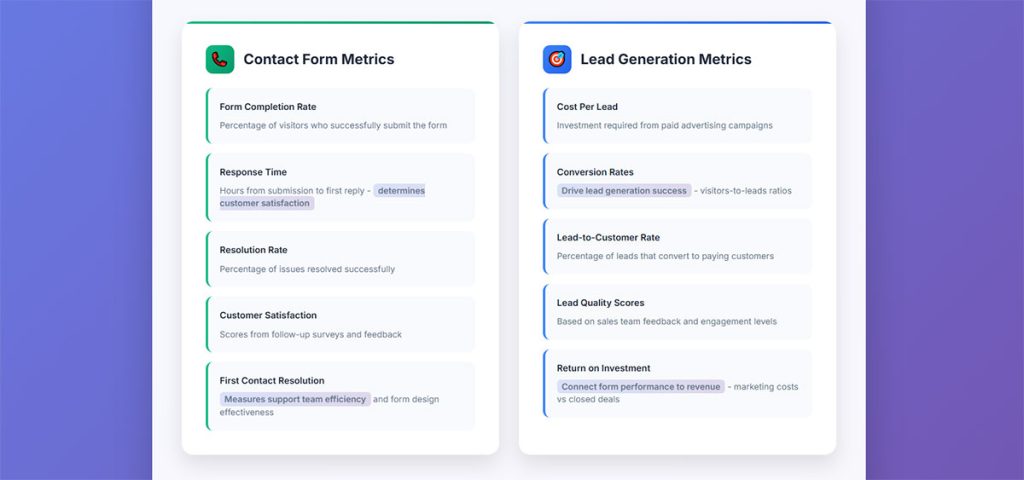
Track these metrics weekly:
- Average response time by form type
- Form abandonment rate (industry average is 81% according to Formisimo)
- Conversion rate from form submission to qualified lead
- Support ticket resolution time versus customer satisfaction scores
Configure conditional logic in lead forms to qualify prospects automatically. Enable automation for instant email confirmations on both form types. A/B test form fields to reduce abandonment. Route each form type to the right team with the right tools.
Form Design Differences

Form design impacts completion rates dramatically. What works for contact forms often fails for lead generation forms.
Form UX design principles apply differently to each type.
Field Count and Complexity
Contact forms can be longer. Users have specific problems to solve and will complete more fields to get help.
Lead generation forms need careful balance. Research from HubSpot shows forms with 3 fields achieve conversion rates above 25%, while 4-field forms see rates drop by nearly half.
The sweet spot sits between 3 to 5 fields for most lead forms. Formstack data reveals lead gen forms average 11 fields with a 17% conversion rate, but contact forms with only 4 fields see just 1% conversion.
Start with the minimum. Add fields only when qualification requires them.
Layout and User Experience
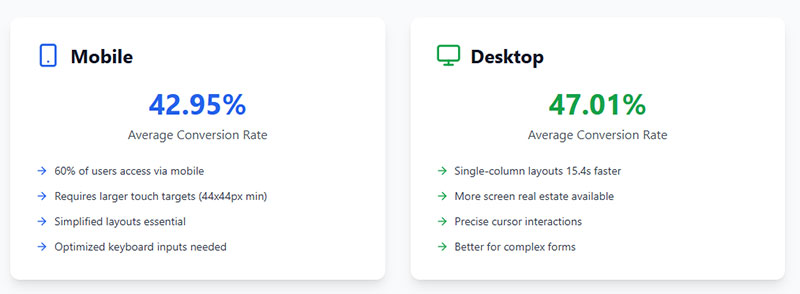
Single-column layouts complete 15.4 seconds faster than multi-column designs, according to research from CXL.
Mobile devices generate 62.54% of global website traffic as of Q4 2024 per Statista data. Your mobile forms must work perfectly on small screens.
Desktop still converts better though. Zuko Analytics reports desktop conversion rates at 47.01% versus 42.95% on mobile.
Progressive disclosure helps complex forms. Show fields only when previous answers require them. Guide users through one decision at a time instead of overwhelming them with everything upfront.
Button Text and Calls to Action
Generic “Submit” buttons cause 3% more abandonment than action-oriented alternatives, according to research from The Manifest.
Lead form options that work:
- Get Started
- Download Now
- Request Demo
- Claim Your Free Trial
Contact form options that work:
- Send Message
- Get Help
- Contact Us
Wordstream research shows the best performing buttons include action words like “get”, “reserve”, and “try” rather than generic submit language.
Match button text to visitor expectations.
Validation and Error Handling
Inline form validation reduces errors by 22% and speeds completion by 42%, according to data from CXL.
Contact forms can accept incomplete information if intent is clear. Lead generation forms need stricter validation for data quality.
Show form error messages next to problem fields, not at the top. Baymard Institute research found 31% of sites still lack inline validation entirely.
Real-time feedback prevents frustration. Set up validation to trigger after users leave a field, not during typing. Test with real users to identify friction points and adjust timing.
When to Use a Contact Form
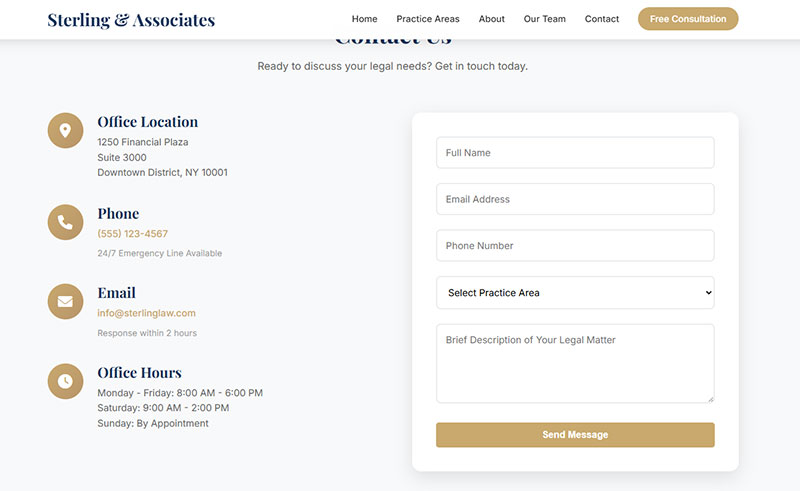
Contact forms belong wherever customers need help. Not every visitor wants to buy something. Some just have questions.
Customer Support Scenarios
General inquiries, technical support requests, feedback forms, partnership questions, media requests.
Billing disputes need contact forms. Product complaints need contact forms. Collaboration proposals need contact forms.
Sales forms would frustrate these visitors.
Awareness Stage Interactions
First-time visitors rarely convert immediately. They browse, compare, evaluate.
A simple website form lets them ask questions without commitment. No pressure, no qualification hoops.
Build trust first. Capture leads later.
When to Use a Lead Generation Form
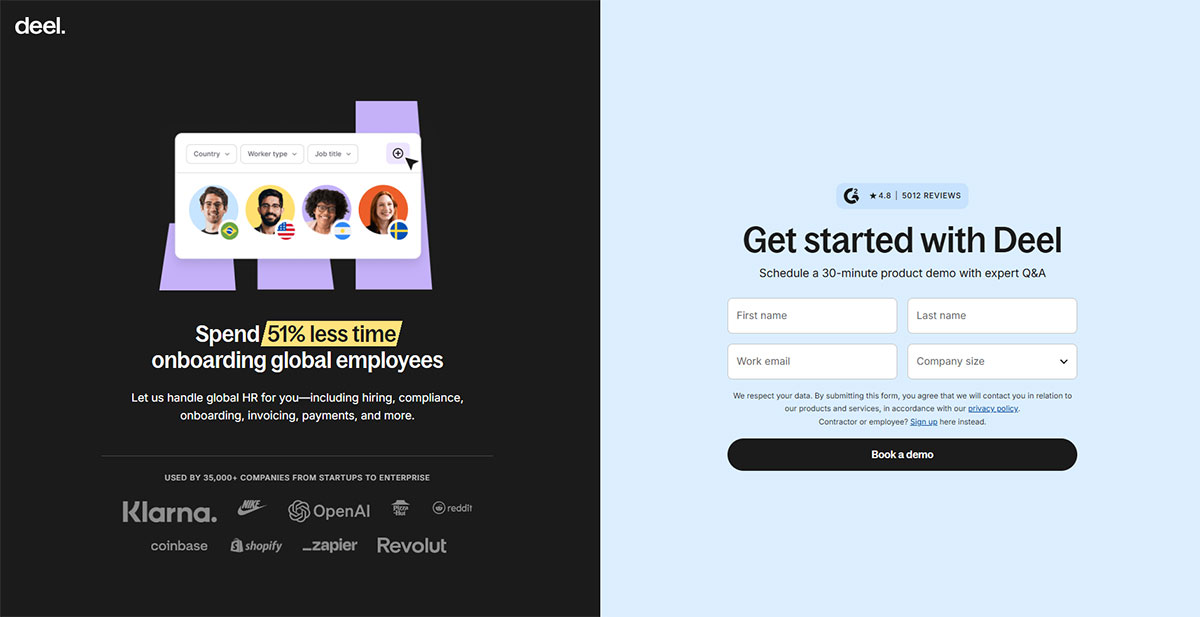
Lead forms shine when buying intent exists. Someone wants your ebook, demo, or free trial. They expect to exchange information for value.
Marketing Campaign Scenarios
Research from Force24 shows top B2B organizations achieve conversion rates of 10 to 15% on gated content offers. High-value gated content pulls in around 11% of visitors on average according to data from Amra and Elma, compared with just 2% for generic landing pages.
Lead capture scenarios that justify qualification forms:
- Gated content downloads (ebooks, research reports, guides)
- Registration forms for webinars
- Free trial signups
- Demo requests
- Quote requests
- Subscription forms for premium newsletters
WPForms data shows 84% of marketers use form submissions to generate leads. The tactic works when value exchange is clear.
Netline platform data tracking 6.2 million content downloads shows gated content consumption increased 14% from 2022 to 2023 and 77% since 2019. Ebooks represent 39.5% of all demand, with registrations increasing 34.5%.
Consideration and Decision Stage Interactions
Visitors comparing solutions want specifics. Pricing, features, implementation timelines.
Demo request forms work here. Consultation booking forms work here. Quote request forms work here.
Match form complexity to buyer intent. High intent justifies more fields. Ruler Analytics data shows the average conversion rate across industries sits at 2.9%, with professional services reaching 9.3%.
Track your landing page conversion rate against benchmarks. Unbounce analysis of 41,000 landing pages shows the median conversion rate across all industries reached 6.6% as of Q4 2024. Aim for 3% or higher, though top performers hit 10% or above.
Speed matters at this stage. Companies responding to leads within 5 minutes see conversion rates 9 times higher according to Growth List research.
Common Form Elements Comparison
Both form types share foundational elements but implement them differently.
| Element | Contact Form | Lead Generation Form |
|---|---|---|
| Required fields | Name, email, message | Name, email, company, qualifying data |
| Optional fields | Phone, department | Job title, budget, timeline |
| Conditional logic | Rarely used | Frequently used |
| Mobile optimization | Standard | Critical |
| Spam protection | CAPTCHA, honeypots | CAPTCHA, honeypots, validation |
Conditional Logic Impact
Conditional logic in forms personalizes lead generation experiences by showing different fields based on previous answers.
WPForms research shows conditional logic helped IT consulting firm Huna increase form submissions by 30%. Reducing form fields from 11 to 4 can boost conversions by up to 160% according to data from Amra and Elma.
Multi-step forms convert 14% better than single-step forms. Only 40% of marketers use them, but HubSpot data shows their conversion rate is 86% higher. Progressive profiling collects information over time instead of overwhelming users upfront.
GDPR Compliance Requirements
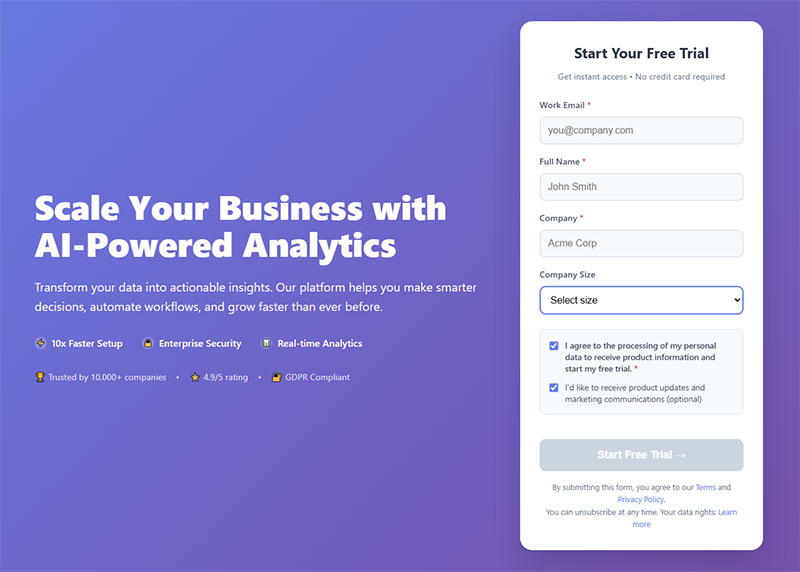
GDPR compliant forms require consent checkboxes and privacy policy links for both form types.
Over €2 billion in GDPR fines were issued in 2023 per Compleye research. DMA data shows 62% of UK consumers feel more comfortable sharing data with organizations because of GDPR protections.
IAB Europe’s TCF Compliance Report found the most frequent failures:
- Not clearly informing users how to withdraw consent (50% failure rate)
- Making withdrawal harder than giving consent (42% failure rate)
- Users unable to easily resurface consent options (42% failure rate)
Forms.app research reveals only 50% of organizations have reviewed their consent methods, leaving them at compliance risk.
Consent must be freely given, specific, informed, and unambiguous according to GDPR Article 7. Make it as easy to withdraw consent as to give it.
Form Security Basics
Form security protects submitted data through SSL certificates, encrypted storage, and access controls. These apply to both contact and lead forms.
Set up proper consent mechanisms with clear privacy policy links. Test your consent interface with real users. Include withdrawal options that match the ease of opt-in.
Integration and Automation Differences
The software stack determines what happens after submission. Different purposes require different tools.
Contact Form Integrations
Help desk software receives contact form submissions. Zendesk, Freshdesk, Intercom create tickets automatically.
Email routing sends inquiries to appropriate departments. Marketing questions go to marketing. Technical issues go to support.
WordPress contact form plugins connect with most help desk platforms natively. Zapier bridges gaps where native integrations fail.
Lead Generation Form Integrations
CRM systems like Salesforce, HubSpot, and Pipedrive receive lead data instantly.
Email Vendor Selection research shows 55% of companies cite integration with existing CRM software as the most important feature when choosing marketing automation tools. EmailMonday data reveals businesses using marketing automation to nurture prospects experience a 451% increase in qualified leads.
WordPress lead generation plugins feed prospects into nurturing sequences:
- ActiveCampaign
- Marketo
- ConvertKit
- GetResponse
Marketing platform Mautic found its SMB users see 3X more leads generated from CRM integration. HubSpot data shows 61% of sales leaders automated their CRM in 2023.
Lead scoring assigns values based on form responses. Sales teams prioritize high-scoring leads.
Research shows 42% of sales teams automate meeting scheduling through CRM, while others automate content distribution (40%), quote generation (36%), and meeting follow-ups (34%).
Connect forms to your CRM immediately after setup. Enable automated nurturing for lead forms. Set up automated ticket creation for contact forms. Test integrations weekly to catch failures.
Conversion Optimization for Each Form Type
Increasing form conversions requires different tactics for each form type.
Contact Form Optimization
Visibility matters most. Forms buried on dedicated pages get ignored.
Place contact options on high-traffic pages. Add them to footers, sidebars, and service pages.
Response time promises build confidence. “We respond within 4 hours” reduces abandonment. Research shows 67% of site visitors abandon forms forever if they encounter complications, while only 20% follow up with the company.
Trust signals help. Security badges, privacy statements, and company contact information reassure visitors. Data from The Manifest shows 29% of users abandon forms due to security concerns.
Improving form abandonment rates starts with removing unnecessary fields. The average form abandonment rate sits at 68% according to WPForms research.
FormStory data reveals the average abandonment time is just 1 minute and 43 seconds. You have less than two minutes to capture attention before users leave.
Lead Generation Form Optimization
Value proposition clarity drives completions. Visitors must understand what they receive before sharing data.
Lead magnets justify the exchange:
- Ebooks
- Templates
- Exclusive content
- Free trials
Multi-step forms outperform single long forms for complex qualification. Break 10 fields into three steps.
HubSpot research shows multi-step forms convert 86% higher than single-step forms. Only 40% of marketers use them despite the performance advantage.
A/B testing reveals what works. Test headlines, field counts, button text, and form placement. Marketers who run A/B tests on forms report conversion rates 10% higher on average according to HubSpot data.
Progressive profiling collects data across multiple interactions. Ask for email first, company details later.
Form submission confirmation messages set expectations for next steps. Tell visitors when and how you will follow up.
Place forms above the fold. Nielsen Norman Group research shows content above the fold captures 57% of viewing time. Test your confirmation messages. Make response time promises specific and realistic.
Choosing the Right Form for Your Goals
The decision comes down to intent. What does the visitor want? What do you want?
Choose contact forms when:
- Visitors have support questions
- No clear value exchange exists
- Building trust matters more than capturing data
- Customer service is the primary goal
Choose lead generation forms when:
- Marketing campaigns drive traffic
- Clear value exchange exists (content, demo, trial)
- Sales qualification is needed
- Pipeline building is the priority
Some pages need both. Product pages might include a demo request form and a question form side by side.
Lead generation strategies depend on understanding this distinction. Wrong form type, wrong results.
Research from Ruler Analytics shows the average form conversion rate across industries sits at 1.7%. Professional services reach 2.5% while real estate drops to 0.6%. Form type directly impacts these numbers.
Using website forms for lead generation works only when visitor intent aligns with form purpose.
WPForms data reveals 81% of people have abandoned at least one form after starting it. Mismatched form types contribute to this abandonment.
Test both form types on the same page. Measure completions, response quality, and downstream conversions. Track which form generates more qualified opportunities versus support tickets.
Data reveals which form type serves each page best. Run tests for at least two weeks to gather meaningful data. Monitor conversion rates by traffic source to understand visitor intent patterns.
FAQ on Contact Form vs Lead Generation Form
What is the main difference between a contact form and a lead generation form?
Contact forms handle customer service inquiries and general questions. Lead generation forms capture prospect data for sales pipelines. One serves existing customers. The other creates new customers through qualification and marketing automation.
Can I use a contact form for lead generation?
Yes, but results suffer. Contact forms lack qualification fields and CRM integration. You capture names and messages without company size, budget, or job title. Sales teams receive unqualified leads they cannot prioritize effectively.
How many fields should a lead generation form have?
Three to five fields work best for most campaigns. Each additional field reduces conversions by approximately 4%. Balance data needs against completion rates. Start minimal, add fields only when qualification requires them.
Where should I place lead generation forms on my website?
Above the fold on landing pages converts best. Also effective on pricing pages, demo request sections, and as exit-intent forms. Show forms when buying intent peaks, not during initial browsing.
Do contact forms need CRM integration?
Not typically. Contact forms route better to help desk software like Zendesk or Freshdesk. These tools create support tickets and track response times. CRM integration adds unnecessary complexity for customer service workflows.
What makes a good lead magnet for lead generation forms?
Ebooks, templates, exclusive research, free trials, and demo access perform well. The lead magnet must deliver clear value that justifies sharing contact information. Match the offer to your audience’s specific pain points.
Should I use multi-step forms or single-step forms?
Multi-step forms or single-step forms depends on field count. Single-step works for under five fields. Multi-step increases completions when you need more qualification data by reducing perceived complexity.
How fast should I respond to contact form submissions?
46% of customers expect responses within 4 hours. Same-day response is minimum standard. Faster responses correlate with higher customer satisfaction scores and better retention rates across all industries.
What tools integrate with lead generation forms?
HubSpot, Salesforce, Pipedrive, ActiveCampaign, Marketo, and Mailchimp connect with most WordPress forms. Zapier bridges gaps between platforms. Choose tools that match your existing marketing automation stack.
Can one form serve both purposes?
Poorly. Hybrid forms confuse visitors and dilute data quality. Better approach: use separate forms for separate purposes. Place them strategically based on page intent and visitor journey stage.
Conclusion
The contact form vs lead generation form distinction determines how effectively you capture and serve website visitors. Choosing correctly impacts conversion rates, customer satisfaction, and sales pipeline quality.
Contact forms belong on support pages and service sections. Lead generation forms belong on landing pages and gated content offers.
Match form type to visitor intent. Use help desk integrations for customer inquiries. Connect CRM platforms like HubSpot or Salesforce for prospect data.
Test placement, field count, and button text. Track completion rates and downstream conversions with Google Analytics.
The right form in the right place turns visitors into customers or satisfied support cases. Wrong form, wrong results.
Start with your goals. Build forms that serve them.