




Most WordPress attacks don’t start at the login page. They start at a form, because a form is the one part of a site built to accept whatever a stranger…
Table of contents
Most GDPR compliant form advice jumps straight to the checkbox, like ticking one box solves the whole problem. It doesn’t. A form that actually meets the regulation gets the lawful basis right, designs consent properly, minimises what it asks for, supports the rights people have over their own data, and keeps whatever gets submitted secure once it lands in your database.
Location decides who this applies to, not company size or where a business happens to be registered. If the person filling out your form is sitting in the EU or UK when they hit submit, GDPR governs what happens to their data next, even if your company has never had so much as a mailing address there.
Most sites still get this wrong, by a wide margin. Researchers who scanned the UK’s top 10,000 websites found only 11.8 percent of consent interfaces met even minimal GDPR compliance standards, largely because there was no real way to say no (Nouwens et al., CHI 2020).
What Is a GDPR Compliant Form?
Plenty of businesses treat a checkbox at the bottom of a form as the whole job. It isn’t. What actually separates a compliant form from one that just looks compliant is where the legal groundwork sits, baked into the fields themselves, the consent wording, and how the data gets handled after submission, not stapled on once the database is already full of entries.
Most of this starts with the ordinary contact and signup forms already sitting on a site’s pages. A broader look at what WordPress forms actually are covers how they collect data in the first place, if you want the basics first.
A tickbox on its own doesn’t get you there. Forms fail for reasons that have nothing to do with whether a checkbox exists at all, like:
- A single tickbox that bundles marketing consent with acceptance of the terms of service
- A privacy policy link buried in the footer with no reference on the form itself
- A field asking for a date of birth or job title that has nothing to do with the form’s stated purpose
Enforcement decisions keep circling back to the same handful of causes, whether that’s the wrong lawful basis, sloppy consent design, fields nobody needed in the first place, ignored subject rights, or storage that wasn’t locked down properly.
Worth separating out here: a cookie consent banner isn’t the same mechanism. That one’s governed by the ePrivacy Directive and deals with tracking technology, not the fields sitting on a submission form.
Which Lawful Basis Applies to Your Form?
Newsletter signups and checkout forms don’t run on the same legal basis, and mixing the two up is one of the more common mistakes site owners make once they start thinking about this seriously. The lawful basis depends entirely on what the data will actually be used for, not on the form itself.
Article 6 of GDPR lays out six possible lawful bases in total, though in practice, nearly every form ends up leaning on one of three: consent, contract, or legitimate interest.
| Form type | Likely lawful basis | Why |
|---|---|---|
| Newsletter signup | Consent | Marketing communication needs an opt-in |
| Checkout form | Contract | Data is needed to fulfil the purchase |
| Job application form | Contract or legitimate interest | Processing precedes a potential employment contract |
| Feedback or survey form | Legitimate interest | Improving a service does not usually need consent |
It’s worth mapping different form types out individually rather than guessing. A wider look at the different types of forms a site typically runs makes it easier to assign the right basis to each one instead of defaulting to consent everywhere, which is the lazy option and usually the wrong one.
Special category data, meaning health, religion, sexual orientation, trade union membership, or biometric data, needs a separate and stricter basis under Article 9. Explicit consent is usually the only workable route for this category, and it has to be requested on its own, never folded into a general terms checkbox.
Get this wrong and the penalty isn’t small. Choosing the wrong basis for consent or data subject rights processing falls into the top GDPR fine tier, up to 20 million euros or 4 percent of global annual turnover, whichever is higher (Article 83(5) GDPR).
Consent Versus Legitimate Interest
With consent, the person stays in control the entire time, including the ability to pull it back later, and it applies whenever the processing isn’t strictly necessary to deliver what they actually asked for. Legitimate interest works the other way around. It lets a business go ahead without asking permission first, but only when the processing is proportionate and wouldn’t come as a surprise to the person on the other end of it.
Orange Romania found out what happens when that balance gets ignored. The telecom had been relying on pre-ticked boxes buried in signed contracts to justify copying customers’ identity documents. Romania’s supervisory authority fined the company for it in 2018, and the CJEU later reviewed the case and confirmed the consent standard had failed completely.
How Should Consent Checkboxes Be Designed?
See the Pen
GDPR-Compliant Contact Form by Bogdan Sandu (@bogdansandu)
on CodePen.
Pre-ticked by default is the single most common mistake here, and it’s also the first thing regulators flag. A checkbox that actually holds up needs to start empty, cover exactly one specific purpose, and only change state because the visitor clicked it themselves, not because someone did it for them in advance.
Anything less falls short of the freely given, specific, informed consent standard set out in Article 4(11) and Article 7 of the GDPR.
A few design points matter more than the rest:
- Checkbox starts unticked, never pre-selected
- Marketing consent sits separate from terms of service acceptance
- Wording states the specific purpose, not a vague reference to “communications”
- A way to withdraw consent is available at any later point, not just buried in an email footer
- The submission itself is logged as a consent record, timestamped and tied to the exact wording shown
Real, working GDPR consent form examples are worth studying directly. The wording and layout differences between a compliant checkbox and a non-compliant one are often subtler than you’d expect.
A few common checkbox patterns come with their own trade-offs. A single opt-in checkbox is the quickest for whoever’s filling out the form, though it comes with a catch: there’s no proof the email address is real, or that the person entering it actually owns it.
Double opt-in fixes that by adding a confirmation email before the subscription goes live. It costs one extra click, but it filters out typos and bots along the way.
Then there’s the granular toggle list, which separates marketing consent from data-sharing consent line by line. It satisfies the granularity requirement GDPR asks for, though the form ends up visibly longer because of it.
The Court of Justice of the European Union settled the pre-ticked question directly in its 2019 Planet49 ruling, confirming a pre-checked box can never count as consent, only one the visitor ticks themselves. The EDPB’s Guidelines 05/2020 push that logic further, beyond just cookies: pre-ticked boxes, silence, and scrolling through a page are all ruled out as valid indications of choice.
France’s CNIL fined Accor 600,000 euros in 2022 for a related mistake, a pre-checked newsletter consent box that automatically enrolled customers in marketing emails, with no effective way to object.
Where Should the Privacy Notice Appear on the Form?
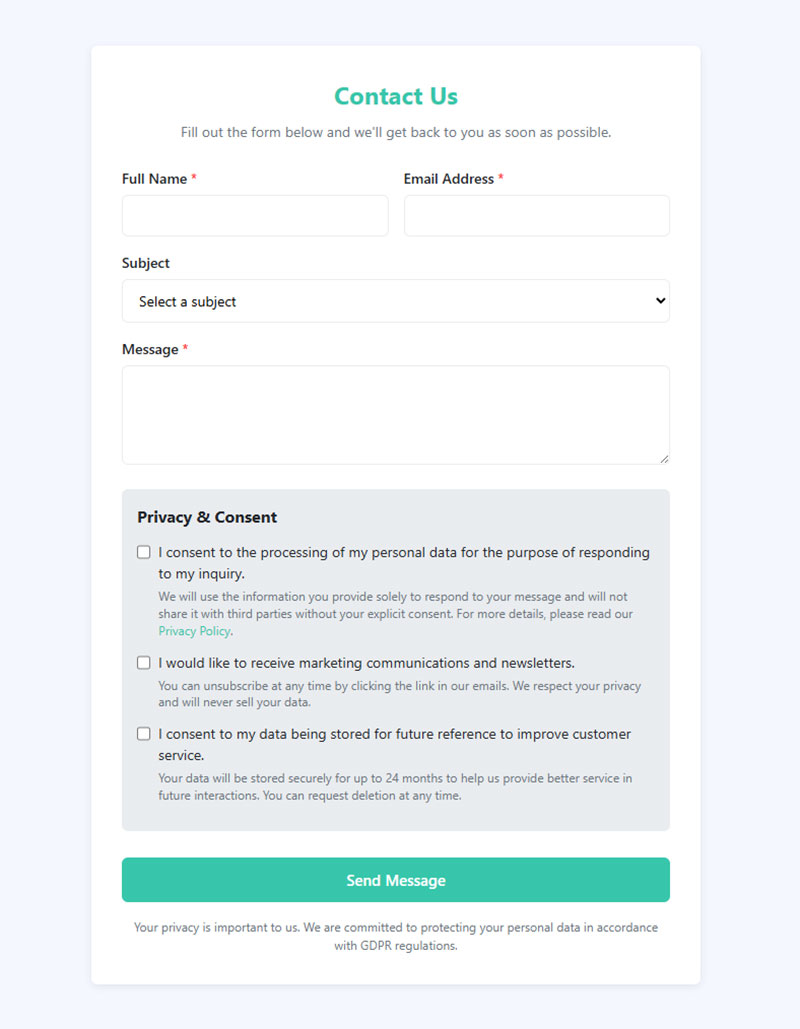
Right on the form is the only place a privacy notice actually does its job, either as a couple of lines above the submit button or as a link sitting next to the consent checkbox itself. Burying it in a footer three clicks away doesn’t meet the transparency standard in Article 13 of the GDPR.
A layered notice pairs well with a just-in-time one. The layered version gives a one or two line summary with a link through to the full policy, while the just-in-time version drops a short explanation right next to a specific sensitive field, something like a date of birth or a health question.
A compliant notice states who the data controller is, why the data is being collected, how long it’ll be kept, and what rights the person has. Skip any one of those four and the notice is incomplete, even with a link to the full privacy policy sitting elsewhere on the page.
Purpose limitation runs through this section and the last one too. The notice has to name the same purpose that determined the lawful basis, not a broader or vaguer one dressed up to sound more useful.
How Many Fields Should a Compliant Form Collect?
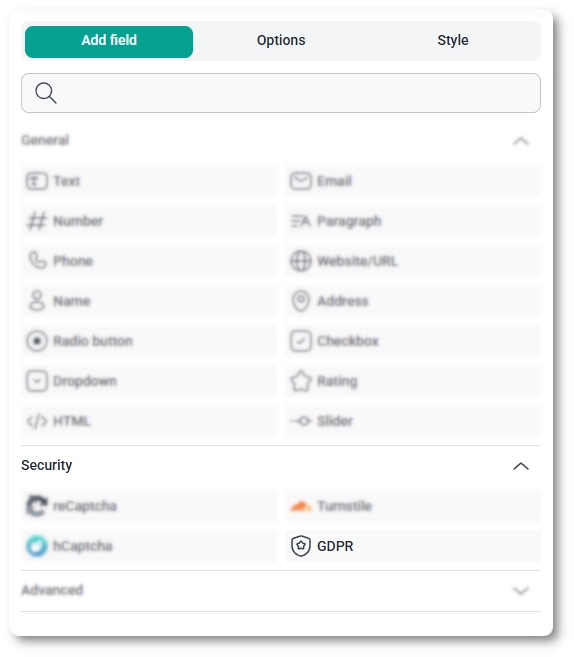
There’s no fixed number here. What matters is whether every field on the page ties back to a specific, stated purpose, nothing added because it might come in handy someday. That’s the data minimisation principle in Article 5(1)(c) of the GDPR, and it applies before a single byte reaches storage.
Name and email on a contact form, that’s minimised correctly. Add a phone number, a job title, and company size on top of that, though, and you’re now holding data with no immediate use for it, which is exactly the kind of gap an audit picks up on fast.
Running a quick check on the field list catches most of this early. Match every field to a specific, named purpose. Mark anything genuinely optional as optional instead of quietly forcing it. Push the nice-to-have stuff to a later stage of the relationship rather than cramming it into the first form someone sees.
A full breakdown of form fields and how each one should be labelled and validated is useful groundwork before applying that test.
Progressive profiling, meaning collecting extra detail gradually across several later interactions instead of one long form, is the practical fix when a business genuinely needs more information over time.
What Data Subject Rights Must the Form Support?
Once someone submits your form, they gain a set of rights over what happens to that data next, and a form owner has to be ready to support each one: access, rectification, erasure, restriction, and objection. Portability applies too, but only when the processing runs on consent or contract as its basis.
Access means the person can ask what you’re holding on them and get a copy of it. Rectification means fixing incorrect entries when someone flags them. Erasure kicks in once whatever the data was collected for no longer applies. Objection is the strict one, marketing processing has to stop the moment someone objects, no questions asked.
Every request carries the same clock under Article 12(3) of the GDPR. One calendar month is the standard response window, counted from the day the request lands. Businesses can get up to two further months on top of that, but only for requests that are genuinely complex or high in volume.
Access and erasure requests are consistently the two most-complained-about categories at Europe’s data protection authorities, which is a big part of why the EDPB picked the right to erasure as the focus of its EU-wide coordinated enforcement action across national regulators in 2025.
Erasure requests are the ones most likely to arrive through a form’s own contact channel, since that’s often the easiest way for someone to find a business at all.
Handling an Erasure Request Submitted Through the Form
- Confirm the identity of the requester before acting on anything
- Locate every record tied to that person, including backups and any connected marketing tool
- Check whether a legal obligation requires keeping some of the data anyway, such as tax records
- Delete what remains and confirm the deletion back to the requester in writing
- Log the request and the action taken as part of the audit trail
Skipping step three is a common mistake.
Erasure isn’t absolute, either. Certain legal retention duties, tax recordkeeping being the obvious one, can override it for a defined period.
How Should Form Data Be Stored, Transferred and Retained?
None of this works in isolation. Weak storage quietly undermines whatever you got right earlier about lawful basis and consent, so the data needs to be encrypted, handled only by processors under a signed agreement, and deleted once its retention period runs out.
Storage and Transfer Safeguards
A few baseline safeguards apply to any form handling personal data:
- TLS encryption in transit, so submissions aren’t readable if intercepted
- Encryption at rest for the database or spreadsheet storing responses
- A signed Data Processing Agreement with every data processor that touches the data, required under Article 28
Reviewing WordPress form security settings directly is a reasonable starting point, since plugin misconfiguration is a common source of exposed submissions.
Transfers outside the EU need an extra safeguard on top of encryption, usually Standard Contractual Clauses.
The Court of Justice of the European Union invalidated the EU-US Privacy Shield in its Schrems II ruling on 16 July 2020, leaving Standard Contractual Clauses as the main legal route for transfers to US-based tools.
Meta kept relying on Standard Contractual Clauses to transfer EU user data to the US in the years after that ruling, and plenty of businesses using US-hosted form or email tools followed the same pattern. Regulators, for their part, have kept questioning whether SCCs alone actually provide enough protection for transfers at that scale.
A processor holding ISO 27001 certification (the international standard for information security management) is a reasonable baseline to look for when picking a form tool or hosting provider.
Setting a Retention Period
GDPR doesn’t hand out a fixed number of days or months for retention. Article 5(1)(e) instead requires deletion once the original purpose is fulfilled, whatever that period turns out to be for the specific form in question.
For contact form enquiries, delete or archive once the enquiry’s resolved. Newsletter signups can stay on file for as long as the subscription’s active, then get deleted promptly after someone unsubscribes. Job applications get a defined window after the role closes, and then they’re gone too.
Writing the retention period into the privacy notice itself closes the loop between what a form promises and what it actually does with the data afterward.
What Extra Steps Protect Children’s Data on Forms?
Age matters more here than almost anywhere else in this list. Any form that might be filled out by someone under 16 needs an age check before it collects a single piece of personal data.
Under Article 8 of the GDPR, the default digital consent age is 16, though individual EU member states can lower that threshold to as young as 13.
A few safeguards worth adding on top of the basics:
- An age gate that asks for a birth date before the rest of the form loads
- A parental consent trigger that pauses the form and requests a parent’s email once a below-threshold age is entered
- No fields that support targeted advertising to a child, such as detailed interest or lifestyle questions
Ireland’s Data Protection Commission fined TikTok 345 million euros in 2023 after an investigation found that child accounts (ages 13-17) defaulted to public visibility, and that the platform’s registration process didn’t adequately verify age, leaving the door open for under-13 users to access the platform in the first place.
Age verification doesn’t replace the consent design covered earlier. It sits in front of it, deciding whose consent the form actually needs before a single checkbox gets ticked.
Which Form Tool Fits GDPR Compliance?
The right tool depends on whether a business needs EU-only hosting or just a working consent field. A handful of widely used form builders cover most of what a compliance-focused site actually needs, and each one starts from a different place.
| Tool | Native consent field | Hosting | DPA |
|---|---|---|---|
| IvyForms | Yes, native GDPR field with a checkbox and description | Same as your WordPress host, entries save directly into native WP database tables | Not applicable, no data leaves your server |
| WPForms | Yes, GDPR Agreement field, never pre-checked | Same as your WordPress host | Not applicable, no data leaves your server |
| Gravity Forms | Yes, native Consent field | Same as your WordPress host | Depends on your own host |
| HubSpot | Yes, legal basis property plus consent fields | EU hosting on EU accounts | Included |
| Typeform | Manual, added as a question | AWS, US by default (EU data hosting is available on higher-tier plans) | Included, via SCCs |
| Google Forms | Manual, added as a question | EU data region available on qualifying Google Workspace Business, Enterprise, or Education plans | Via Google’s DPA addendum |
WordPress-native options put the compliance work in the site owner’s hands rather than the vendor’s, since entries typically stay on the site’s own server instead of somewhere else entirely. IvyForms fits that same pattern. It doesn’t route submissions through a third-party cloud layer, so there’s no external processor to add to a data map in the first place.
A closer look at WordPress contact form plugins is worth doing before picking one, since GDPR features are only part of what actually separates them.
WPForms versus Gravity Forms comes up constantly once GDPR is the deciding factor. Both ship a native consent field, but they differ everywhere else, from pricing to the add-on ecosystem. A direct WPForms vs Gravity Forms comparison covers those differences in more depth than a compliance checklist alone can.
IvyForms is worth putting next to both of those, honestly, since it’s newer and the GDPR field was only added in a recent update, but the underlying approach (keep data on the same server as the rest of the site) is the same one WPForms and Gravity Forms rely on.
Typeform and Google Forms both work fine on their own terms, but neither stores data on EU-only servers by default, so the international transfer safeguard covered earlier applies to both of them too. Ivy sidesteps that particular question entirely. If there’s no international transfer because nothing leaves the host, there’s less paperwork to justify.
How Do You Build a GDPR Compliant Form Step by Step?
Building the form correctly the first time takes less work than retrofitting compliance onto a live one later. There’s a build order worth following that avoids most of the rework:
- Define the purpose of the form and settle on a lawful basis before adding a single field
- Add only the fields tied to that purpose, marking anything extra as optional
- Build the consent checkbox unticked, with wording specific to that one purpose
- Add a privacy notice summary above the submit button, linked to the full policy
- Connect the form to encrypted storage and a processor covered by a Data Processing Agreement
- Add spam protection such as reCAPTCHA, and disclose in the notice that it sends data outside the EU
- Set a retention rule and a process for handling access or erasure requests
- Test a real submission and confirm the consent record logs correctly
Most of this can be done inside a page builder or a dedicated forms plugin. Site owners avoiding third-party plugins entirely can still follow the same order. A look at building forms in WordPress without plugins covers the coding side of steps one through four.
Step six is the one most sites skip entirely. A walkthrough on adding reCAPTCHA to a WordPress contact form covers the setup along with the specific disclosure wording it needs.
Skipping step eight is the most common failure of the bunch, though. A form can look completely compliant on the front end and still fail if the consent record never actually saves to the database.
When Does GDPR Not Apply to a Form?
GDPR isn’t universal. It steps back for purely personal use, for data that’s been fully anonymised, and for processing that never leaves a single household.
Where the regulation genuinely doesn’t apply:
- A form built by an individual for a purely personal or household activity, under Article 2(2)(c), such as a private hobby mailing list with no commercial purpose
- Data that has been fully anonymised, so no person can be re-identified from it, per Recital 26 of the GDPR
- Aggregate-only fields that never collect an identifier, such as a form that only asks for a postal code range for statistics
A contract-based form sits in a different category. GDPR still applies to it in full, but the consent-specific rules from earlier don’t.
A checkout form doesn’t need an unticked consent checkbox for the order itself, since Article 6(1)(b) already supplies the lawful basis once the purchase is placed. The same checkout form still needs a separate, genuinely optional checkbox for anything beyond the sale, like adding the buyer to a marketing list.
What Happens When a Form Is Not GDPR Compliant?
A non-compliant form exposes a business to fines, but the fine is rarely the first consequence. A supervisory authority typically opens with a reprimand or a compliance order before any financial penalty lands, giving the business a fixed window, often around three months, to fix the problem.
The numbers behind current enforcement are worth sitting with for a second. Cumulative GDPR fines issued across Europe since May 2018 have reached 7.1 billion euros, as of January 2026 (DLA Piper GDPR Fines and Data Breach Survey). Of that, 1.2 billion euros came from 2025 alone, broadly matching the year before it (DLA Piper, 2026). And one single case, the 30.5 million euro fine issued to Clearview AI in 2024 for building an illegal facial recognition database without a valid legal basis, shows how far individual penalties can go (Dutch Data Protection Authority).
Enforcement has moved past a short list of headline cases against large platforms. Smaller businesses face the same rules, just at a scale matched to their own turnover, and a form is one of the most common places an investigation actually starts, since it’s where the data enters the business in the first place.
A data subject complaint about a single form, not a large-scale audit, is the most common trigger for a supervisory authority to open a file at all.
FAQ on How To Create GDPR Compliant Forms
What Is the Difference Between a GDPR Compliant Form and a Form With Just a Consent Checkbox?
A checkbox alone only covers consent design, one piece of a bigger puzzle. A GDPR compliant form also needs the right lawful basis, a minimised field list, a visible privacy notice, and support for data subject rights and secure storage on top of that. Get one of those pieces right and skip the rest, and the form still isn’t compliant overall.
What Counts as Personal Data Collected Through a Form?
Names, email addresses, IP addresses, and free-text comments all count as personal data under Article 4(1) of the GDPR, since each one can be tied to an identifiable person. Special category data, like health details, needs its own separate lawful basis under Article 9.
How Do You Keep an Audit Trail of Consent?
Log the exact wording shown, a timestamp, and the checkbox state for every submission. Store that alongside the consent record itself rather than in a separate system that can fall out of sync. Keep it for as long as the underlying data stays on file.
Should You Use Consent or Legitimate Interest for a Marketing Form?
Consent is the safer, more practical standard for marketing forms in almost every case. Legitimate interest rarely survives a balancing test for direct marketing outside an existing customer relationship. Pair the checkbox with a clear unsubscribe link in every follow-up message, which satisfies GDPR and ePrivacy rules at the same time.
Is Double Opt-In Required by GDPR?
No single line in the GDPR mandates double opt-in. The regulation only requires proof of a clear affirmative act, nothing more specific than that. Double opt-in still happens to be one of the strongest ways to document that proof, which is why plenty of email marketing platforms offer it as a built-in option even without a legal requirement to use it.
What Common Mistakes Make a Form Non-Compliant?
Using one checkbox for marketing and analytics consent together is the most frequent error by a wide margin. Others include skipping the transfer disclosure for tools like payment processors, never setting a retention period at all, and forgetting to actually test that the consent record saves on submission.
Where Does How to Create GDPR Compliant Forms Break Down After Launch?
A GDPR compliant form breaks down after launch, not during the build, when nobody schedules a review of the consent wording, the field list, or the retention period against how the business is actually using the data six months down the line.
A periodic review catches this before a regulator does. Check consent wording against the current processing purpose. Check the retention period against how long data actually sits in storage. And check any newly added fields against the original minimisation decision, since those tend to creep in quietly.
The 11.8 percent minimal compliance figure across studied consent interfaces and the 7.1 billion euros in cumulative fines point to the same underlying gap. Enforcement has caught up to a form layer that most sites configured once, years ago, and never touched again.
Once the consent and storage layer holds, form accessibility best practices covers the next compliance gap most sites leave open.