



The best AI plugins for WordPress connect a site’s dashboard, page builder, or database to a machine learning model, turning a plugin that follows fixed rules into one that writes,…
Table of contents
Picking the wrong WordPress form builder plugin costs you time twice: once when you set it up, and again when you migrate away from it. The WPForms vs Gravity Forms decision trips up a lot of site owners because both plugins look similar on the surface.
They’re not. WPForms is built for speed and simplicity. Gravity Forms is built for power users and developers who need deep customization.
This comparison breaks down pricing, ease of use, form fields, payment features, spam protection, conditional logic, developer tools, and real performance differences so you can pick the right WordPress form plugin for your actual situation.
What Are WPForms and Gravity Forms?
Both WPForms and Gravity Forms are premium WordPress form builder plugins. They let you create different types of forms without writing code, from basic contact pages to complex payment workflows.
That said, they target very different users.
WPForms is built by Awesome Motive, the same team behind WPBeginner and OptinMonster. It currently has over 6 million active installations on WordPress.org, making it the most popular form plugin on the platform, according to BuiltWith.
Gravity Forms is developed by Rocketgenius and has been around since 2009. It was one of the first premium-only form plugins for WordPress, and it became the go-to choice for agencies and developers who needed advanced functionality early on.
Here’s the quick breakdown:
| Detail | WPForms | Gravity Forms |
|---|---|---|
| Developer | Awesome Motive (Jared Atchison, Syed Balkhi) | Rocketgenius (Carl Hancock) |
| Free version | Yes (WPForms Lite) | No |
| Active installs | 6M+ | Not publicly listed |
| Primary audience | Beginners, small businesses | Developers, agencies |
| Template count | 2,000+ | 16 |
WPForms Lite gives you a functional free starting point. You can build unlimited web forms, add Stripe payments (with a 3% fee), and access basic spam protection without paying anything.
Gravity Forms has no free tier. You pay from day one, which makes the decision feel heavier for someone just testing the waters.
WordPress itself powers roughly 43% of all websites on the internet, according to W3Techs. With that kind of scale, form plugins are among the most installed plugin categories in the entire ecosystem. Choosing the right one matters because migration between form builders is messy (there’s no one-click switch between these two).
Pricing and License Structure Compared
This is usually the first question. How much does each plugin cost, and what do you actually get?
WPForms Pricing Tiers
Basic: $49.50/year for 1 site. Includes conditional logic, multi-page forms, file uploads, and spam protection. Stripe payments work here too, but with an added 3% transaction fee.
Plus: $99.50/year for 3 sites. Adds email marketing integrations like Mailchimp, AWeber, and some automation tools. Still has the 3% Stripe fee.
Pro: $199.50/year for 5 sites. Removes the 3% transaction fee, adds PayPal and Authorize.net, and unlocks conversational forms, surveys, form landing pages, and form abandonment tracking.
Elite: $299.50/year for unlimited sites. Includes Salesforce integration, webhooks, and everything else.
All of these are introductory prices. Renewals jump to the full rate.
Gravity Forms Pricing Tiers
Basic: $59/year for 1 site. Core form features plus basic add-ons (Mailchimp, HubSpot).
Pro: $159/year for 3 sites. Adds Stripe, PayPal, Square, Zapier, and CRM integrations.
Elite: $259/year for unlimited sites. Includes surveys, quizzes, user registration, webhooks, and priority support.
Here’s where it gets tricky. Gravity Forms locks payment processing behind the Pro tier ($159/year). WPForms Lite offers basic Stripe integration for free, though with a 3% fee on top of regular Stripe fees. If all you need is a simple payment form for a single site, WPForms costs you nothing upfront, just that transaction cut.
| Feature Need | WPForms Cost | Gravity Forms Cost |
|---|---|---|
| Basic contact form | Free (Lite) | $59/year |
| Payment processing | Free (Lite/Basic/Plus with 3% fee) or $199.50/year | $159/year |
| Unlimited sites | $299.50/year | $259/year |
| Surveys and polls | $199.50/year | $259/year |
Gravity Forms also offers a Nonprofit License at $129/year with all Elite features. That is a solid deal if your organization qualifies.
Both plugins include a 30-day money-back guarantee (Gravity Forms) and a 14-day refund window (WPForms), so there’s some safety net either way.
For agencies managing multiple client sites, Gravity Forms Elite at $259/year for unlimited sites is actually cheaper than WPForms Elite at $299.50/year. That price gap adds up over time.
Form Builder Interface and Ease of Use
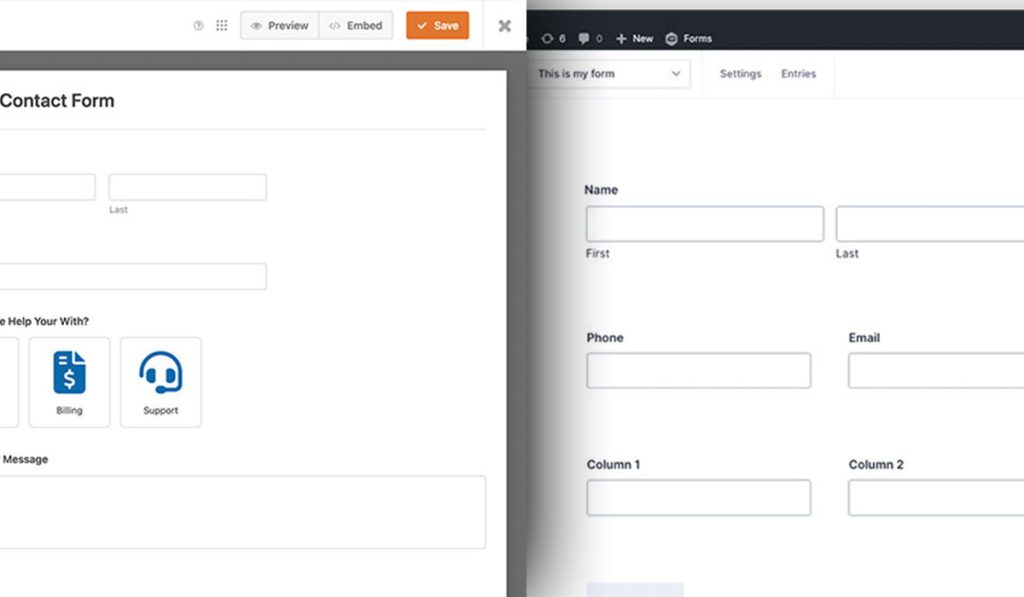
The drag-and-drop builder is where you’ll spend most of your time. And these two plugins take very different approaches to the building experience.
WPForms opens in a full-screen, distraction-free editor. The WordPress admin menu disappears entirely. You drag fields from a left panel into a live preview on the right. It feels like using a modern SaaS app rather than a WordPress plugin.
Gravity Forms works inside the standard WordPress admin dashboard. Fields sit on the right, the form preview sits on the left. It’s functional, but it doesn’t feel as polished. Some users on Capterra have specifically mentioned the interface feeling dated compared to newer builders.
Took me a few minutes to build a working contact form in WPForms. Gravity Forms took roughly the same amount of time, but the configuration felt like it had more steps to click through.
Zuko Analytics data shows that 55% of people who start filling out a form abandon it. The form builder you pick directly affects how well you can optimize forms for completion, because both plugins handle form design and layout differently.
Template Libraries
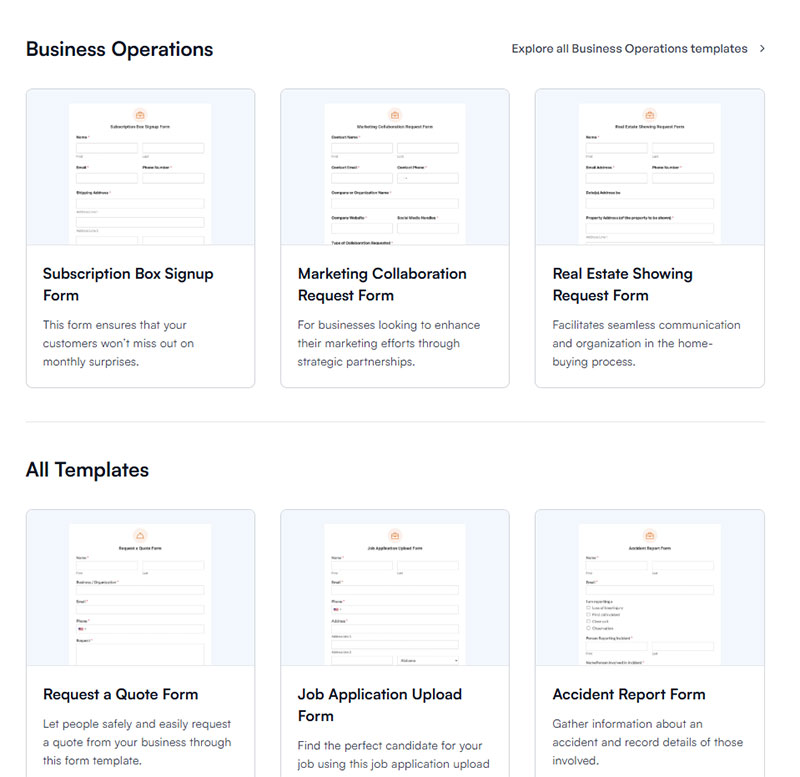
This is not even close. WPForms ships with over 2,000 pre-built templates. You get templates for contact forms, registration forms, survey form templates, donation pages, job applications, and dozens of other use cases.
Gravity Forms offers about 16 templates. And they’re not even built into the dashboard. You download them as JSON files from the Gravity Forms website and import them manually.
If you like starting with a template and tweaking it, WPForms saves you a lot of time. If you prefer building from a blank canvas anyway (a lot of developers do), the template gap matters less.
Try a cheaper & more innovative alternative to WPForms & Gravity Forms
WPForms is built for simplicity and Gravity Forms for power users — but both ask you to pay every year, and Gravity has no free tier at all. IvyForms delivers the advanced pieces most teams actually use — conditional logic, multi-page and conversational forms, payments, a REST API and webhooks — with a real free tier and a one-time lifetime option that ends the renewal treadmill.
IvyForms
WPForms
Gravity Forms
Starting paid price
€29/year (1 site)
~$49.50/year (Basic)
$59/year (Basic, 1 site)
Unlimited / agency
€99/year (unlimited)
~$299.50/year (Elite)
~$259/year (Elite)
Free version
Yes — feature-rich Lite
Yes — limited Lite
No free version
Lifetime license
€399 one-time
No
No
Developer tools
REST API + webhooks (Pro)
Add-ons / webhooks on higher tiers
Extensive hooks, filters, add-ons
Stands out for
Price, data ownership, wpDataTables/Amelia, MCP for AI Agents
Easiest onboarding, 2,000+ templates
Deepest add-on ecosystem for developers
Honest trade-off
Newer plugin with a smaller template library and community than the incumbents; Zapier, Slack and multiple payment gateways are on the near-term roadmap (unlocked when you buy now).
Key features behind paid tiers
No free tier; add-ons cost extra; heavier setup
Gravity Forms is still the developer’s workhorse and WPForms is the friendliest on-ramp. But for the majority of sites that want modern features, entry ownership and predictable cost — including a true lifetime licence — IvyForms is the better value without giving up the essentials.
Ready to switch? Get IvyForms Pro from €29/year — or €399 once for lifetime access to every current and future feature.
▶ See plans & pricing or download IvyForms free (no credit card).
Form Fields and Input Types
Both plugins cover the basics: text, email, dropdowns, checkboxes, radio buttons, paragraph fields, number fields, and date pickers. You won’t feel limited with either one for standard website forms.
The differences show up in the specialized fields.
Where WPForms Stands Out
Repeater field: Lets users add duplicate field groups dynamically. Perfect for group registrations or listing multiple items.
Net Promoter Score (NPS): Built-in NPS field for customer satisfaction surveys. Gravity Forms doesn’t have this natively.
Likert scale: Available in the Pro tier for detailed feedback survey questions and research forms.
Content field: Add instructional text, images, or videos between form fields without code.
Where Gravity Forms Stands Out
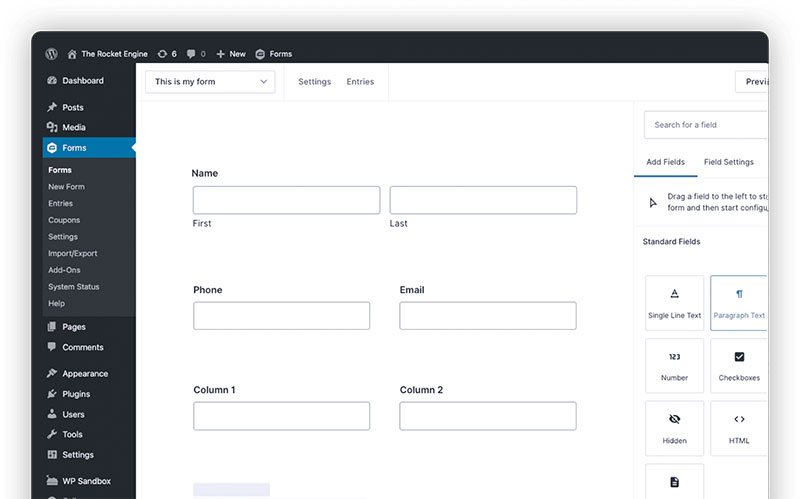
Pricing fields: Product, option, quantity, shipping, and total fields that work together as a mini order system. You can build order forms with calculated totals directly inside the form builder.
List field: Creates spreadsheet-style data entry with multiple columns. Useful for inventory lists or itemized entries.
Post fields: Let users submit WordPress posts directly through a form, complete with categories, tags, and featured images.
Chained selects: Dropdown fields where options change based on previous selections. Think country, state, city cascading menus.
Gravity Forms’ pricing fields are honestly hard to replicate. If you’re building order forms with product options, quantity selectors, and shipping calculations, Gravity Forms handles this natively while WPForms requires workarounds or third-party solutions.
For collecting good form fields, both plugins let you mark fields as required, add custom validation rules, and configure placeholder text. The field editing experience is smoother in WPForms, but Gravity Forms gives you more granular options per field.
Payment and E-Commerce Features
Baymard Institute research shows the average cart abandonment rate sits at 70.2%. Forms play a direct role in that number, especially when you’re processing payments through a WordPress form instead of a full e-commerce platform like WooCommerce.
Both WPForms and Gravity Forms integrate with Stripe, PayPal, and Square. But how they handle payments, and at which price tier, is where things split.
WPForms Payment Setup
The free Lite version supports Stripe with a 3% transaction fee. That’s a real advantage if you’re just getting started with a WordPress payment form and don’t want to pay for a premium license yet.
The Pro plan ($199.50/year) removes the 3% fee and adds PayPal Commerce and Square. You can create one-time payment forms, donation forms, and basic product order forms.
Recurring payments through Stripe are supported. You can set up subscription forms with monthly or annual billing cycles.
Gravity Forms Payment Setup
No free payment option. You need at least the Pro license ($159/year) to access Stripe, PayPal, and Square add-ons.
But here’s where Gravity Forms pulls ahead: native pricing fields. Product fields, option fields, quantity fields, shipping calculations, and total fields all work together as a built-in order system.
You can build a product configurator that dynamically calculates totals based on user selections, all without any extra plugin.
Gravity Forms also supports Mollie as a payment gateway (on the Pro tier), which matters if you serve European customers.
Coupon support: Gravity Forms includes a coupon add-on on the Elite tier. WPForms added coupon functionality to the Pro tier. Both let you create percentage or flat-rate discounts applied at checkout.
For simple payment collection (donations, single product, service fees), WPForms is cheaper and faster to set up. For anything resembling a product catalog with calculated pricing, Gravity Forms gives you tools that WPForms just doesn’t match.
Third-Party Integrations and Add-Ons
A form plugin is only as useful as what it connects to. Both WPForms and Gravity Forms offer extensive integration ecosystems, but they structure access differently.
Email Marketing Integrations

WPForms connects to Mailchimp, Constant Contact, AWeber, ActiveCampaign, Drip, Campaign Monitor, Brevo, GetResponse, MailerLite, and ConvertKit. Most of these start at the Plus tier ($99.50/year).
Gravity Forms integrates with Mailchimp, HubSpot, and Constant Contact on the Basic tier. ActiveCampaign, AWeber, and others come with higher plans.
If you’re building lead capture forms that feed into email campaigns, both plugins handle the job. WPForms has a slight edge in the number of native email marketing connectors available.
CRM and Automation Integrations
WPForms: HubSpot, Salesforce (Elite only), and Zapier (Pro). Also includes native Slack integration on the Plus plan.
Gravity Forms: HubSpot, Agile CRM, Zoho CRM, Capsule CRM (Pro tier), plus Zapier, Slack, Trello, Help Scout, and Dropbox on Pro.
Gravity Forms has more CRM options built in. WPForms leans on Zapier for anything beyond HubSpot and Salesforce.
The Zapier Factor
Both plugins integrate with Zapier, which connects to 4,000+ apps. But Gravity Forms includes Zapier on the Pro tier ($159/year), while WPForms requires the Pro plan ($199.50/year).
If Zapier is central to your workflow, Gravity Forms gets you there for $40 less per year.
Gravity Forms also offers webhooks on the Elite plan, letting developers send form data to any external API without a middleman. WPForms has a similar webhook feature on its Elite tier too.
One thing I’ve noticed: Gravity Forms has a larger ecosystem of third-party developers building unofficial add-ons. GravityView, GravityPDF, GravityKit, and dozens of others extend Gravity Forms in ways that WPForms’ ecosystem hasn’t matched yet. That matters if you’re a developer using website forms for lead generation or building complex client solutions.
Conditional Logic and Advanced Form Behavior
Both WPForms and Gravity Forms support conditional logic. The difference is how deep each plugin lets you go.
WPForms calls it “Smart Logic.” You set rules to show or hide fields based on user input. The setup is visual and works fine for most scenarios, like displaying a text field when someone selects “Other” from a dropdown.
Gravity Forms treats conditional logic as a core feature that touches almost everything. It applies not just to fields, but also to form pages, email notifications, confirmations, and third-party feed processing.
Multi-Step Form Creation
Both plugins let you break long forms into multi-step forms with page breaks and progress indicators.
Zuko Analytics data shows the average form completion rate is about 51.7%, with desktop outperforming mobile by roughly 8 to 9 percentage points. Breaking forms into steps can help close that gap.
WPForms includes a progress bar for multi-step layouts. Gravity Forms adds conditional page logic on top, letting you skip entire pages based on earlier responses.
Calculations and Dynamic Fields
Gravity Forms wins here. It supports calculated fields natively, meaning you can build quote generators, cost estimators, and dynamic pricing forms without a third-party add-on.
WPForms added calculation forms more recently. The feature works, but Gravity Forms has had years to mature this functionality and handles more complex formulas.
Save and Continue
Feathery research shows the average form abandonment time is 1 minute and 43 seconds. That’s not a lot of time, especially for longer forms.
- Gravity Forms: Save and Continue is a built-in feature on all plans, generating a unique link so users can return later
- WPForms: Offers both a Form Abandonment add-on (captures partial entries) and a Save and Resume add-on (Pro tier and above)
WPForms’ approach actually covers two problems. Form Abandonment captures data even when users don’t click save, which is useful for improving form abandonment rates.
Spam Prevention and Security

OOPSpam’s 2024 report found that 69% of all CMS-targeted spam hit WordPress sites. Sign-up forms were the most spammed category at 45%, followed by contact forms at 35%.
If your forms aren’t protected, you’ll find out fast.
Built-In Anti-Spam Features
| Feature | WPForms | Gravity Forms |
|---|---|---|
| Honeypot | Built-in, enabled by default | Built-in |
| Anti-spam token | Yes (unique to WPForms) | No |
| Google reCAPTCHA | v2 and v3 | v2 and v3 (via add-on) |
| hCaptcha | Yes | No native support |
| Cloudflare Turnstile | Yes | Yes |
| Akismet | Yes | Yes (via add-on) |
WPForms has a slight edge on spam tools out of the box. Its anti-spam token runs behind the scenes without any user-facing CAPTCHA, which is good for form UX design because it doesn’t add friction.
IvyForms offers an alternative worth considering for WordPress sites — built-in spam protection with reCAPTCHA, hCaptcha, and Cloudflare Turnstile included at no additional cost.
Gravity Forms released a Moderation Add-On that uses AI to detect toxic or profane content, which is a different angle on spam protection.
GDPR and Data Compliance
Both plugins include tools for building GDPR compliant forms. You can add consent checkboxes, disable user tracking cookies, and customize data retention settings.
Gravity Forms lets you configure data retention per form. WPForms handles it at a broader plugin level. Both get the job done, though Gravity Forms offers more granular control for sites handling sensitive data.
For form security beyond spam, both plugins support SSL encryption, form validation, and secure file upload handling. WPForms also lets you sanitize user input to prevent injection attacks.
Entry Management and Reporting
What happens after someone submits a form matters just as much as the form itself. Both plugins store entries in your WordPress database, but the management experience is different.
Viewing and Filtering Entries
WPForms presents entries in a clean list view with filtering, search, and star/unread markers. You can click into any entry and see submission details alongside a sidebar with metadata.
Gravity Forms displays entries in a more data-dense table. The column selection is more flexible (you choose which fields show up as columns), but the interface feels busier.
Key difference: WPForms supports XLSX exports in addition to CSV. Gravity Forms only exports CSV, though you can filter by date range and specific fields before exporting.
Notifications and Confirmations
Both plugins let you set up multiple email notifications per form. This is where conditional logic again gives Gravity Forms an advantage.
You can route notifications to different departments based on what the user selected. Someone picks “Billing” from a dropdown, and the billing team gets the email. Someone picks “Support,” and it goes to the support inbox.
WPForms does this too (conditional notification routing on Pro and above), but Gravity Forms makes the configuration feel more natural for complex routing scenarios.
For confirmation messages after submission, both plugins offer three options: a custom message, a redirect to another page, or showing the entry details. If you need help with form submission confirmation messages, WPForms includes more pre-built templates to start from.
GravityView and Front-End Display

Gravity Forms has a major ecosystem advantage here. GravityView (a third-party plugin by GravityKit) lets you display form entry data on the front end of your WordPress site as searchable directories, tables, maps, or listings.
Think member directories, job boards, real estate listings, or event calendars powered entirely by form submissions. WPForms doesn’t have an equivalent.
Developer Extensibility and Custom Code
Gravity Forms was built for developers. That’s not marketing copy. The documentation backs it up.
API and Hook Library
Gravity Forms provides a full REST API (v1 and v2) available on all license tiers. It exposes hundreds of PHP action hooks, filter hooks, and JavaScript hooks for modifying nearly every aspect of form behavior.
The Gravity Forms developer documentation covers a dedicated Add-On Framework, a Field Framework for custom field types, and comprehensive GFAPI functions for programmatically creating forms, reading entries, and sending notifications.
WPForms offers action and filter hooks too, plus its own developer documentation. But the hook library is smaller, and the REST API access is less prominent in the product.
For developers building client projects where forms need to integrate tightly with custom themes, plugins, or external services, Gravity Forms is the standard choice. The ecosystem of third-party extensions (GravityView, GravityPDF, GravityKit, Gravity Wiz) exists specifically because the developer API makes it possible.
Custom Field Creation
Gravity Forms: The Field Framework lets you create entirely new field types with custom markup, validation, and save behavior. This is documented and supported.
WPForms: Custom fields are possible through hooks, but the process is less documented and requires more trial and error. Most users rely on the built-in field types.
Performance and Site Speed Impact
A Portent study found that sites loading in 1 second convert at 3x the rate of sites loading in 5 seconds. Every plugin you add to WordPress contributes to page weight, and form builders are no exception.
Frontend Asset Loading
WPForms is lighter on the front end. A simple contact form adds a small amount of CSS and JavaScript to the page. In testing, the performance impact is minimal, even on mobile networks.
Gravity Forms loads more assets by default, including scripts for conditional logic, calculations, and field types even if the specific form on that page doesn’t use them. That’s extra weight on pages where you only need a basic form.
SpeedCurve’s 2025 Page Bloat Report found the median web page grew 8% in a single year. With page bloat already increasing, the lighter your form plugin, the better.
Database and Long-Term Footprint
Both plugins store entries in your WordPress database. Over months or years, thousands of entries can increase database size and slow down queries.
- WPForms stores entries in custom database tables, keeping them separate from the main WordPress tables
- Gravity Forms also uses custom tables (introduced in version 2.3), which improved query performance over its older serialized data approach
Neither plugin is a performance disaster. But if your site runs a lot of high-traffic forms, periodic database cleanup becomes part of the maintenance routine for both.
Which Plugin Fits Which Use Case
There’s no single “best” WordPress form builder. The right pick depends entirely on what you’re building and who’s building it.
Best for Simple Contact and Lead Generation Forms
WPForms. The free Lite version handles basic contact page setups without spending a dollar. Over 2,000 templates mean you can launch a lead generation form in minutes.
For small businesses focused on increasing form conversions, the beginner-friendly builder and built-in spam protection make WPForms the faster path to results.
Best for Complex or Calculation-Heavy Forms
Gravity Forms. If you need pricing fields, dynamic calculations, chained select dropdowns, or forms that double as mini applications, Gravity Forms handles complexity that WPForms can’t easily replicate.
Industries like real estate, insurance, and financial services often use Gravity Forms for intake forms that calculate quotes based on user input.
Best for Non-Technical Site Owners
WPForms, clearly. The full-screen drag-and-drop builder, massive template library, and straightforward settings panels mean you don’t need to understand WordPress internals to build functional forms.
The free version also lets you test the plugin without committing any budget.
Best for Developers Building Client Sites
Gravity Forms Elite ($259/year for unlimited sites) is the standard for agencies. The REST API, hundreds of developer hooks, the Add-On Framework, and a deep third-party ecosystem give developers the control they need.
WPForms Elite works too ($299.50/year for unlimited sites), but the developer tooling is thinner. Most agencies I’ve seen default to Gravity Forms for client work.
Best for E-Commerce and Payment Collection
Depends on what kind of payments you’re collecting.
- Simple donations or single products: WPForms Lite with free Stripe (3% fee) gets you started at zero cost
- Product catalogs with calculated totals: Gravity Forms’ native pricing fields and order system are built for this
For landing page forms that collect payments alongside lead data, both plugins integrate with Stripe, PayPal, and Square. The deciding factor is whether you need calculated pricing (Gravity Forms) or just a flat payment amount (either plugin works).
FAQ on WPForms vs Gravity Forms
Does WPForms have a free version?
Yes. WPForms Lite is free and available on WordPress.org. It includes basic fields, Stripe payments (with a 3% fee), spam protection, and over 20 templates. Gravity Forms has no free version at all.
Which plugin is easier to use?
WPForms is more beginner-friendly. Its full-screen drag-and-drop builder feels cleaner than Gravity Forms’ admin-embedded editor. Non-technical users consistently find WPForms faster to learn.
Which one is better for developers?
Gravity Forms. It offers a full REST API, hundreds of action and filter hooks, a dedicated Add-On Framework, and a Field Framework for creating custom field types. The developer ecosystem is deeper.
Can both plugins handle payment forms?
Yes. Both integrate with Stripe, PayPal, and Square. WPForms offers free Stripe on its Lite plan. Gravity Forms locks payment add-ons behind the Pro tier ($159/year) but includes native pricing and order fields.
Which plugin has better conditional logic?
Gravity Forms applies conditional logic to fields, pages, notifications, confirmations, and feeds. WPForms handles field-level conditional logic well but doesn’t go as deep across multi-page or notification routing scenarios.
How do their pricing plans compare?
WPForms starts at $49.50/year (1 site). Gravity Forms starts at $59/year (1 site). For unlimited sites, Gravity Forms Elite costs $259/year while WPForms Elite runs $299.50/year.
Can I migrate from one plugin to the other?
There is no one-click migration tool between WPForms and Gravity Forms. You would need to rebuild your forms manually and re-collect entries. Pick based on long-term needs, not short-term convenience.
Which plugin is better for spam protection?
WPForms includes more anti-spam tools out of the box: honeypot, anti-spam token, reCAPTCHA, hCaptcha, Cloudflare Turnstile, and Akismet. Gravity Forms covers reCAPTCHA, Turnstile, Akismet, and a newer AI-based Moderation Add-On.
Do both plugins support multi-step forms?
Yes. Both let you split long forms into multiple pages with progress bars. Gravity Forms adds conditional page logic, letting you skip entire pages based on user responses. WPForms keeps it simpler.
Which plugin performs better on page speed?
WPForms is lighter on the front end. It loads fewer CSS and JavaScript assets per page. Gravity Forms loads more scripts by default, which can add weight on pages that only use simple forms.
Conclusion
The WPForms vs Gravity Forms choice comes down to who’s using the plugin and what they need it to do. Neither plugin is objectively better. They solve different problems for different people.
WPForms is the right call for small business owners, bloggers, and marketers who want a drag-and-drop form builder that works in minutes. The free Lite version, 2,000+ templates, and clean interface make it hard to beat for straightforward contact us pages and sign up forms.
Gravity Forms earns its place on agency and developer projects. The REST API, calculated fields, advanced entry management, and deep third-party ecosystem (GravityView, GravityPDF) give it a level of extensibility that WPForms hasn’t matched.
Pick based on where your site is headed. Switching later is painful.