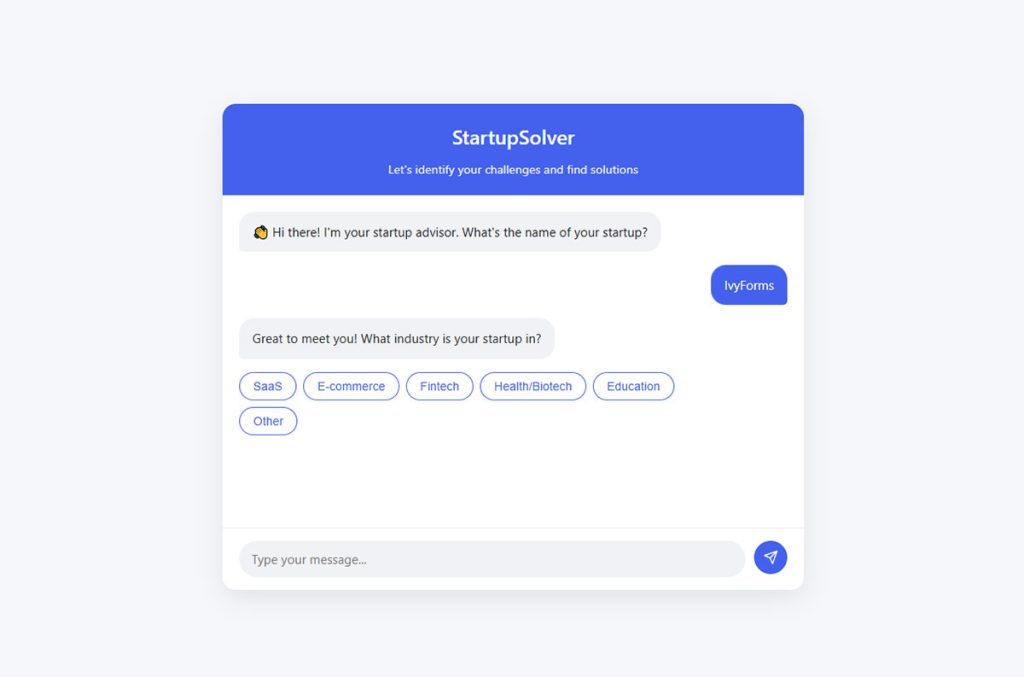





Most WordPress attacks don’t start at the login page. They start at a form, because a form is the one part of a site built to accept whatever a stranger…
Table of contents
More than half the people who see your form never submit it.
That single number explains why so many teams are rethinking the old wall-of-fields layout. If you’ve ever wondered what conversational forms are and why builders like Typeform keep winning on completion, this is where the shift starts.
A conversational form asks one question at a time, like a chat. No intimidating grid of empty boxes, just a single prompt that moves at the user’s pace.
The difference shows up in the numbers. Typeform’s one-question format averaged a 47.3% completion rate across 2.6 million forms, more than double the 21.5% industry benchmark.
This guide breaks down how the format works, where it fits, and where it doesn’t:
- The main types and how they handle branching
- Benefits, drawbacks, and the honest tradeoffs
- Tools, build steps, and what drives conversion
What Is a Conversational Form
A conversational form is an input method that asks one question at a time, mimicking a chat exchange instead of showing every field at once.
The reader answers a single prompt, and that answer triggers the next one. This is a UX pattern, not a specific product.
You’ve met them already. The Typeform quiz that asked your name before anything else. The lead-gen widget on a SaaS homepage that felt like texting a friend.
Where they show up most:
- Chatbots and lead-gen widgets
- Onboarding flows inside apps
- Typeform-style survey builders
- Product recommendation quizzes
The whole thing rides on one idea: focus. A static form dumps ten fields on your screen. A conversational form hands you one, waits, then moves on.
Typeform’s own data backs this up. In 2023, Typeform users published more than 2.6 million forms and generated over 568 million submissions, and the one-question-at-a-time format averaged a 47.3% completion rate, against an industry average of 21.5% (Typeform, The Data on Data Report, January 2024).
Worth noting: that’s vendor-published data comparing its own customers to a general benchmark, not a controlled test. Treat it as directional rather than definitive.
How Does a Conversational Form Work
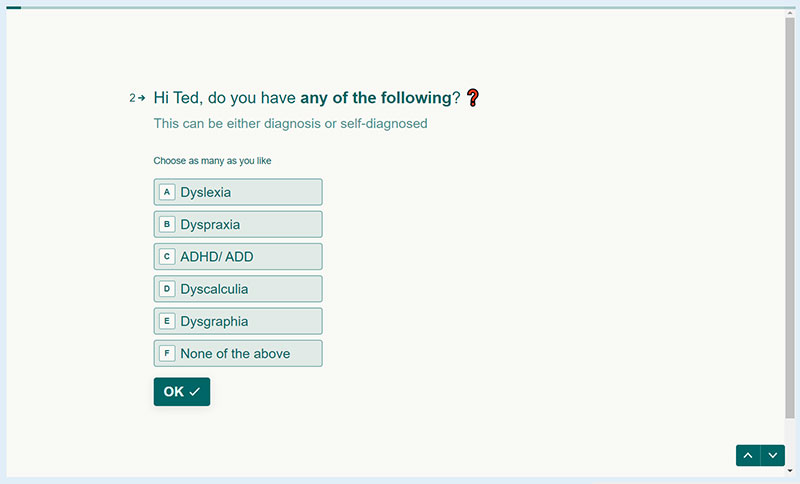
A conversational form works by revealing one field, capturing the answer, then loading the next question based on what the user just said. Data saves in the background per response, and branching logic decides which prompt comes next.
The mechanics break down into a few moving parts.
Step reveal: one question appears, gets answered, then the next slides in.
Conditional logic: answers reroute the path (pick “enterprise” and you skip the questions meant for solo users).
Input types: text, multiple choice, buttons, sliders, date pickers.
Background capture: each response writes to your data store the moment it’s submitted, not at the end.
That last point matters more than people realize. Partial data still lands. Someone bails halfway, and you keep what they already gave you.
Branching is the engine here. If you’re new to how answers reshape the flow, the concept of rules that show or hide fields based on prior input is worth understanding before you build one.
Progress cues sit on top of all this. A thin bar or a “3 of 6” counter keeps people oriented without crowding the screen.
What Makes It Different From a Chatbot
Conversational forms follow a fixed question path. Chatbots parse free-form intent and decide what to do next.
| Trait | Conversational Form | Chatbot |
|---|---|---|
| Question Flow | Fixed, predefined sequence of questions | Dynamic, intent-driven conversation |
| Natural Language Processing (NLP) | Rarely used; follows predefined logic | Commonly used to understand and respond to natural language |
| Data Output | Structured and predictable responses | Open-ended responses that may require additional processing |
The line blurs with AI-native builders, but the core split holds. Forms collect clean, predictable data. If you’re weighing which fits your use case, the tradeoffs between bot-driven interfaces and structured form flows come down to whether you need free conversation or reliable fields.
What Are the Main Types of Conversational Forms
There are 5 main types of conversational forms: linear, branching, AI-assisted, voice-based, and hybrid chat-widget forms. Each handles the question flow differently, from a fixed sequence to loose natural-language replies.
Not every type suits every job. A linear form is fine for a short survey. A branching one earns its keep on complex lead qualification.
| Type | How It Flows | Best For |
|---|---|---|
| Linear | Follows a fixed sequence of questions with no branching | Short surveys, registrations, quick intake forms |
| Branching | Routes users to different questions based on previous answers | Lead qualification, product recommendations, quizzes |
| AI-Assisted | Uses a large language model (LLM) to interpret free-text responses and guide the conversation | Customer feedback, research, open-ended data collection |
| Voice-Based | Accepts spoken responses and provides voice prompts | Accessibility, hands-free interactions, mobile experiences |
| Hybrid Widget | Combines conversational forms with messaging or chat interfaces | Customer support, lead capture, seamless handoff to live agents |
AI-assisted forms are the fastest-growing slice. A study by OpenResearch (1,918 respondents) found that among participants who opted into an AI chatbot survey module, 88% completed it, with most non-completions caused by technical failures rather than people quitting. Participants spent a median of 16 minutes in conversation across roughly 24 back-and-forth turns, and 77% agreed the format gave researchers a better understanding of their stress and wellbeing.
Read that 88% carefully, though. It measures completion among people who already agreed to chat, so it isn’t directly comparable to a form’s view-to-completion rate. The same study found about half of all individual answers were still minimal or superficial.
The interactive quiz variant deserves its own mention. These engagement-driven formats that respond to user choices overlap heavily with branching conversational forms.
Voice-based sits at the edge. Still niche for web, but growing as conversational AI matures. The global conversational AI market was estimated at $11.58 billion in 2024, reached an estimated $14.29 billion in 2025, and is projected to hit $41.39 billion by 2030 at a 23.7% CAGR (Grand View Research).
Where Are Conversational Forms Used
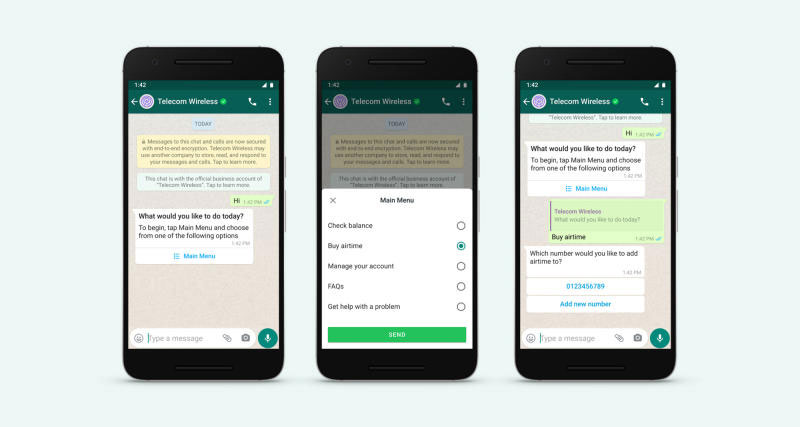
Conversational forms show up wherever a business needs answers without scaring people off. Lead generation, onboarding, support intake, surveys, and booking flows all lean on the format.
Lead generation is the big one. Landing pages use conversational forms to qualify prospects mid-flow, asking budget and role before ever requesting an email.
SaaS onboarding runs on them too. New users set up accounts one decision at a time instead of facing a wall of settings.
Other common homes:
- Support intake and ticket routing
- Surveys, quizzes, and recommendation flows
- Booking, application, and checkout sequences
The support angle connects to a broader shift. Gartner has predicted that chatbots will become the primary customer service channel for roughly a quarter of organizations by 2027, and conversational intake forms are the front door to that system.
More recently, a Gartner survey of 265 customer service leaders (April–May 2025) found that self-service portals, live chat, and knowledge management are set to overtake phone and email as the most valuable service technologies by 2027. Notably, the same survey placed autonomous AI agents outside the top 10, with leaders citing “agent-washing” concerns. The direction is digital-first, but it is less AI-driven than the hype suggests.
Retail leans in hard. Product recommendation quizzes (answer 5 questions, get your match) are conversational forms wearing a marketing hat.
What Are the Benefits of Conversational Forms
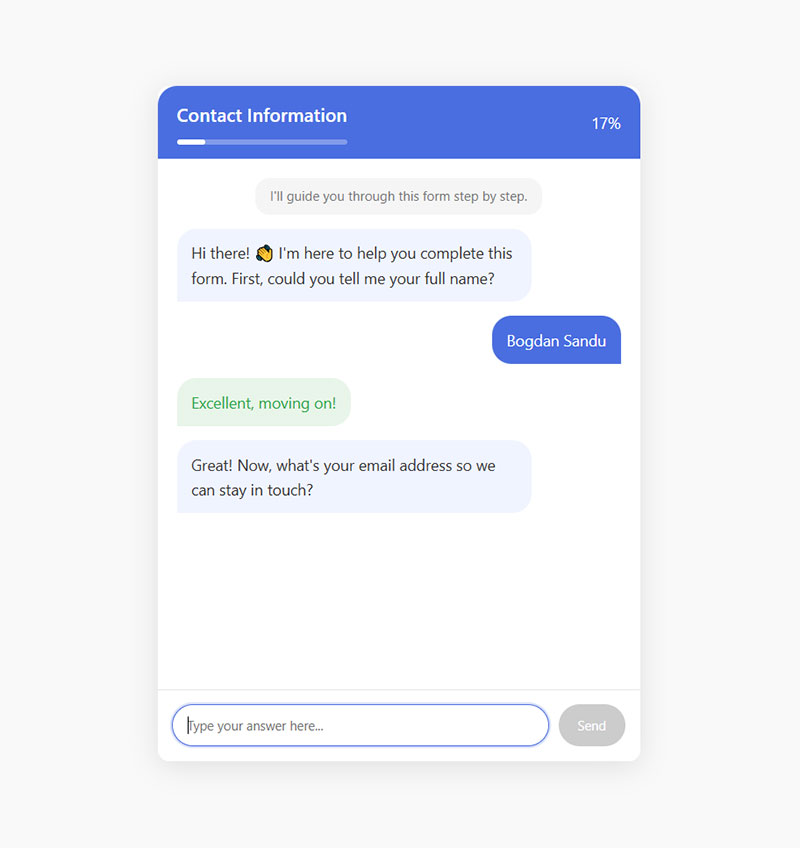
Conversational forms lift completion rates, cut cognitive load, and produce cleaner data than static forms. The one-question focus keeps people moving, and conditional logic strips out irrelevant fields before anyone sees them.
The headline benefit is completion.
Lower cognitive load: one question on screen means no “this will take forever” panic.
Better mobile experience: the format is mobile-first by design. Traditional forms lose roughly 8 percentage points of completion on mobile versus desktop, and up to 15 points on complex onboarding forms.
Cleaner data: branching logic means you never collect answers that don’t apply.
Mid-flow personalization: the form adapts as it learns, feeling less like paperwork.
Response quality climbs too, not just quantity. A 2025 study by Rival Technologies (2,006 participants) found conversational formats pulled roughly 2.5x longer open-ended answers, rising to about 5x when AI follow-up probing was added. Separately, OpenResearch rated 65% of conversational responses as top quality against 13% in traditional formats.
If your current forms leak visitors, the practical fixes for turning more form views into completed submissions often start with switching to this one-at-a-time approach.
What Are the Drawbacks of Conversational Forms
Conversational forms slow down power users, make earlier answers hard to review, and add build complexity. For bulk data entry (tax forms, long applications), the one-at-a-time flow becomes a chore.
Speed is the honest tradeoff. Someone who wants to fill everything at once and hit submit will find the drip-feed annoying.
Editing friction: going back to fix answer #2 while you’re on #7 is clunky in most builders.
Accessibility gaps: a poorly built conversational form can break screen readers and keyboard navigation.
Tooling overhead: more setup than dropping a plain HTML form on a page.
Wrong fit for density: financial comparison forms require an average of 36 inputs, and government forms average 71 (Zuko Analytics). Nobody wants those revealed one screen at a time.
The format also can’t fix a bad ask. In a survey of 502 US consumers by The Manifest, security concerns were the top reason people abandoned forms at 29%, with form length second at 27%. That study dates to 2018, so treat the exact percentages as a rough guide rather than a current benchmark. The underlying point holds: a conversational wrapper on a bloated, invasive form still loses people.
Context decides. Perfect for a 6-question lead quiz. Rough for a 40-field government application.
Conversational Forms vs Traditional Forms
Conversational forms win on completion and mobile experience. Traditional forms win on speed for short tasks, bulk data entry, and letting users see everything before they commit.
The core difference is layout. One field at a time versus all fields visible.
| Factor | Conversational Form | Traditional Form |
|---|---|---|
| Fields Displayed | One question shown at a time | All fields displayed on a single page or section |
| Completion Rate | Typically 15–40% higher, depending on context | Baseline completion rate |
| Mobile Experience | Optimized for mobile with a step-by-step flow | More prone to abandonment on smaller screens |
| Bulk Data Entry | Slower for large amounts of information | Faster when entering many fields at once |
The completion gap is real but the size of it varies. Across Typeform’s platform data, SurveySparrow’s mobile study, and the Rival Technologies research, conversational formats outperform traditional ones by roughly 15 to 40%, with the biggest gains on mobile and on longer data-collection tasks.
When traditional still wins: short forms under 5 fields, checkout where users want to see total cost, and any power-user task where seeing the whole form saves time.
When conversational wins: lead qualification, surveys, mobile-heavy traffic, anything where perceived effort kills your numbers.
The abandonment math explains the stakes. Zuko Analytics’ aggregated benchmarking shows only about 45% of people who view a form go on to complete it, and across 93 million tracked sessions the starter-to-completion rate averages roughly 52%. Desktop view-to-completion sits at 47% against 42% on mobile. Cutting those losses is exactly where the tactics for keeping users from quitting mid-form pay off.
Mobile matters more every year, since phones now account for roughly 62 to 64% of global web traffic.
One more wrinkle. The choice isn’t always conversational versus static. It’s often breaking a form into steps versus keeping it on one page, and conversational is really the step approach taken to its limit.
Test both against your own traffic. Benchmarks point a direction. Your audience gives the answer.
Which Tools Build Conversational Forms
The main tools for building conversational forms are Typeform, Tally, Landbot, and IvyForms, plus chat-widget platforms like Intercom and Drift.
No-code builders cover most needs, while developer libraries handle custom flows.
Pick based on budget, design needs, where your data lives, and how deep your branching goes.
| Tool | Key Strength | Best For |
|---|---|---|
| Typeform | Polished one-question conversational experience with strong branding options | Lead generation, customer surveys, interactive forms |
| Tally | Free plan with unlimited forms and responses | Startups, freelancers, indie makers, simple data collection |
| IvyForms | Conversational forms built and hosted inside WordPress, entries stored in your own database | WordPress sites, agencies, self-hosted data |
| Landbot | No-code conversational workflows across multiple messaging channels | Lead qualification, WhatsApp, Messenger, website chat |
| Intercom | Customer support automation with AI-powered assistance (Fin AI) | SaaS customer support, onboarding, support intake |
No-Code Builders
Typeform: built its whole brand on the one-question-at-a-time format. Typeform says it serves over 150,000 businesses. In terms of installed base, 6sense tracks it at roughly 9% of the survey-tool category, third behind Google Forms (around 47%) and JotForm (around 18%). It ranks far higher in the narrower market-research segment, at about 32%.
Tally: the value play. Unlimited forms and responses on a free tier that’s actually usable, not a demo.
Landbot and Formless: visual flow builders for chatbot-style forms that replace static HTML on landing pages.
Pricing is where Typeform loses budget-conscious teams. Its free plan was cut to 10 responses per month in February 2026, down from 100. Paid plans start at roughly $25 to $29 per month on annual billing (around $39 billed monthly) for 100 responses, and removing Typeform branding requires the Plus tier. Check Typeform’s pricing page before you commit, since these tiers change often.
The WordPress-Native Option
IvyForms takes a different route. Instead of hosting your form on someone else’s domain and embedding an iframe, the whole thing runs as a plugin on your own site.
Submissions land in your WordPress database. No monthly response cap, because there’s no vendor metering them.
Conversational mode is a toggle rather than a separate product. Build a normal form, flip Enable Conversational Form in settings, and every field turns into its own step. Or start a new one from the Conversational Form option and skip the conversion. IvyForms also pairs its WordPress-native forms with an AI form builder, so you can spin up or edit a form by asking an assistant instead of configuring every field by hand.
It’s a Pro feature, available from the Essentials plan up. There’s a free Lite version, though conversational flows aren’t part of it.
You also get a custom permalink, so the form opens at its own URL like a hosted Typeform would, and a checkbox to strip the “Made with IvyForms” link off the bottom.
Worth knowing who’s behind it: the Melograno team, the same people who make Amelia, Trafft, and wpDataTables.
The tradeoff is obvious. You’re managing hosting, updates, and performance yourself. If you already run WordPress, that’s nothing new. If you don’t, a hosted tool is less hassle.
If you’re comparing options before committing, a roundup of other builders that match or beat Typeform’s conversational feel is worth a look.
Chat-Widget and AI-Native Platforms
Intercom, Drift, and ManyChat embed conversational forms inside live messaging.
These lean toward support and sales handoff rather than pure data collection.
AI-native builders use GPT-style models to read loose replies instead of forcing rigid choices. The conversational AI market they ride on was worth $11.58 billion in 2024 (Grand View Research).
Selection comes down to a few things: branching depth, integrations, pricing model, and whether you need real AI or just a friendly flow.
Developer Libraries
Teams that want full control skip the SaaS tools entirely.
React-based conversational form libraries let developers build custom flows with their own styling and data handling.
Botpress is a common pick for teams wanting to self-host, choose their own LLM, and own their code.
The tradeoff is obvious. More engineering time, zero vendor lock-in. For teams needing deep logic, a builder that supports branching rules out of the box saves weeks of custom work.
How Do You Build a Conversational Form
You build a conversational form in 5 steps: map the question sequence, write plain prompts, choose input types, set branching logic, then connect your data destination and test on mobile.
Start with the flow, not the fields. Sketch the path before you touch a builder.
- Map the sequence: list every question and where each answer branches.
- Write conversational prompts: “What’s your budget?” beats “Budget Range (required).”
- Pick input types: buttons and dropdowns over free text wherever possible.
- Set logic and validation: route answers and catch errors before submission.
- Connect and test: wire data to your CRM, sheet, or webhook, then test on a real phone.
Input type choice moves the needle more than people expect.
Radio buttons are completed an average of 2.5 seconds faster than dropdown selects (CXL), and Zuko’s field-level data shows the password field carries the highest mean abandonment rate at 10.5%, ahead of email (6.4%) and phone number (6.3%).
Validation deserves care, not an afterthought. Getting error handling and field checks right is what separates a form that feels smooth from one that frustrates. Inline validation alone cuts form errors by around 22% (CXL).
Test on mobile for real. Not responsive preview.
An actual phone, because mobile drives most web traffic now and that’s where clumsy builds fall apart.
Building One in IvyForms
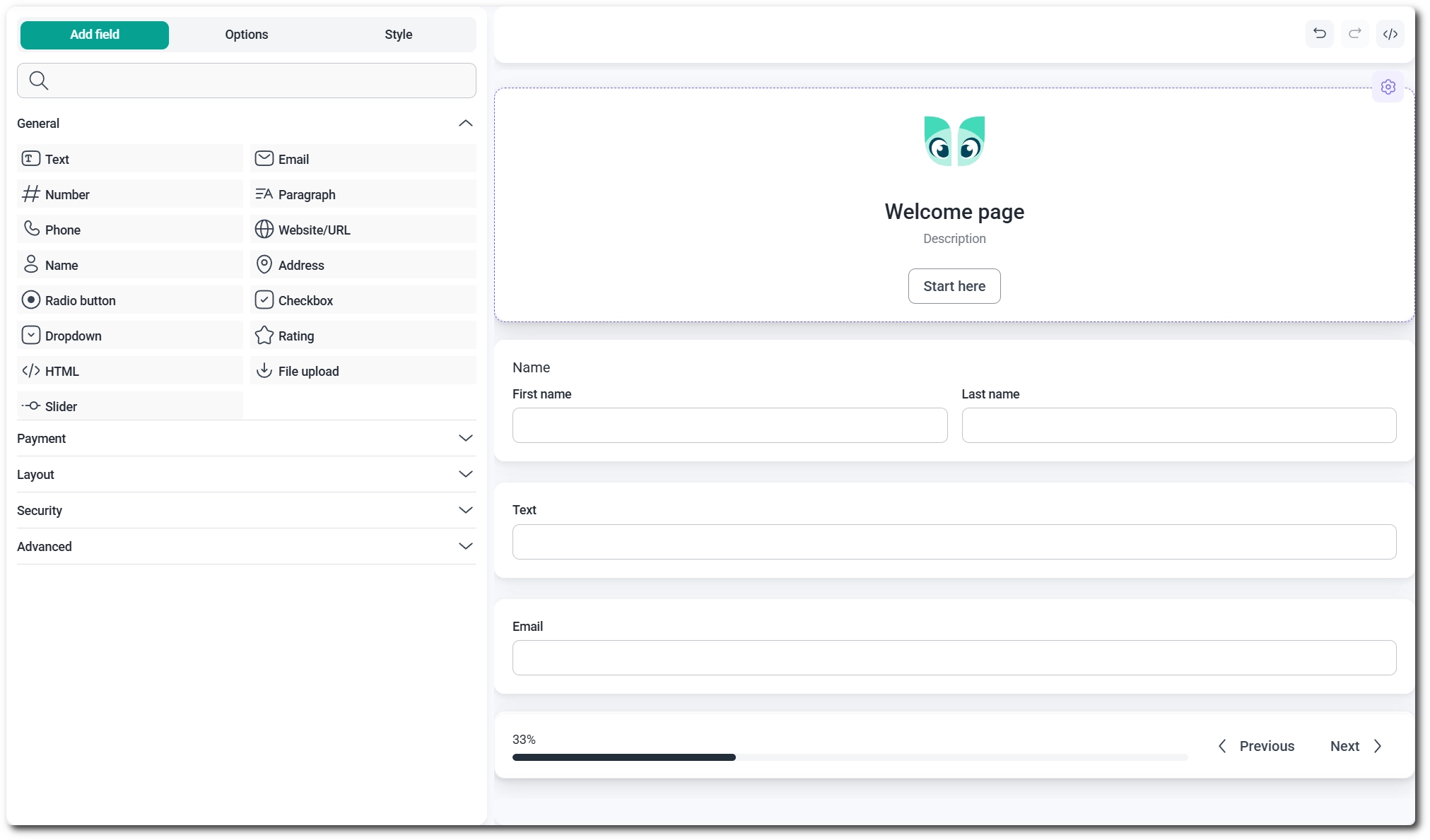
The plan above is builder-agnostic. Here’s what it looks like inside an actual tool.
IvyForms is a WordPress plugin, and conversational forms sit in the Pro tier from Essentials up.
Go to IvyForms > New form and pick Conversational Form. It sits next to Start from scratch and Import.
You land in the Build step right away, with a welcome page already switched on above your fields.
One thing that confuses people the first time: the back-end canvas shows everything stacked vertically with gaps between fields.
That’s not a bug. The builder can’t preview a step-by-step flow, so it lays it flat. On the front end, each field becomes its own screen.
The Welcome Step
Click the welcome page on the canvas and its settings open on the left.
You get a Title, a Header logo through the Media Library, a Description message, and the label on the Start button.
Don’t want it? Toggle Enable Welcome Page off and respondents drop straight into question one.
I usually keep it for anything longer than four questions, kill it for short lead captures. A welcome screen on a two-field form is just an extra tap.
Adding and Styling Fields
Fields work exactly like any other form. Click one in the Add field panel, it lands on the canvas below the welcome step.
Field settings behave identically to a classic form, so nothing new to learn there.
Styling lives in the Style tab, sitting beside Add field and Options. Background image, colors, the usual look-and-feel controls.
Full details in the Style tab docs.
Entries go where you’d expect. Same table, same format as any other form. No separate view to hunt for.
Converting a Form You Already Have
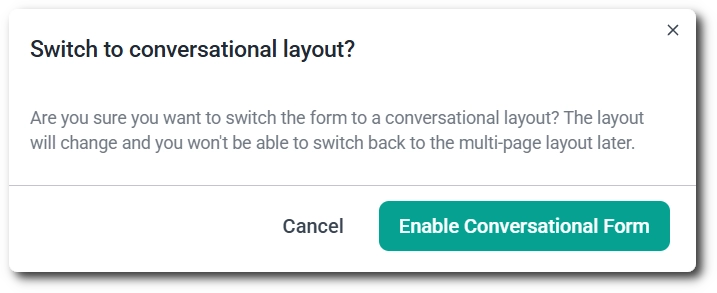
Already built something classic or multi-page? Open the form’s Settings tab at the top of the builder and flip Enable Conversational Form on.
Read this bit carefully.
Converting a multi-page form merges every field onto a single page, and you cannot go back to the multi-page layout afterward.
A confirmation popup gives you one chance to cancel. Take it if you’re unsure.
Turning the toggle back off doesn’t restore pages either. You get a standard classic form with everything on one page.
Once a form is conversational, two extra settings show up.
Permalink lets you set a custom slug so the form opens at its own dedicated URL, something like https://ivyforms.com/conv-form/.
Handy when you’re sending the form out as a standalone link instead of embedding it.
Below that, Disable branding removes the “Made with IvyForms” link from the bottom of the form.
Set those two, publish, and respondents move through one field at a time.
What Makes a Conversational Form Convert Well
Conversational forms convert well when they ask easy questions first, keep the count tight, use buttons over typing, and show clear progress. Order and length drive completion more than visual polish.
Field count is the biggest controllable lever. HubSpot’s testing found that cutting a form from four fields to three lifted conversions by around 50%.
The drop-off is steep and measured. NP Digital’s analysis of 404 landing pages (December 2024) found one-field forms convert at 18.2%, sliding to 13.0% at two fields, 11.5% at three, 9.9% at four, 8.1% at five, 7.6% at seven, 5.8% at eight, and 4.2% once you pass nine (Neil Patel).
One caveat worth holding onto: Zuko’s own benchmarking across industries found the correlation between raw field count and conversion is weaker than most marketers assume, because form type and context matter more than length alone. Government forms average 71 inputs and still complete at high rates, because there’s no alternative. Field count is a strong lever, not an iron law.
Question Order and Count
Easy first, sensitive later: ask the phone number last, not first. Including a phone number field can cut conversions by up to 5%, and switching it from mandatory to optional has been shown to lift capture rates substantially (Zuko Analytics).
Keep it tight: for lead capture, 3 to 5 fields is the widely used target, and HubSpot’s landing-page analysis found forms with three fields converted best.
Match count to intent: a webinar signup can ask more because motivation is higher.
Speed of judgment matters. Zuko’s data puts average form abandonment time at well under two minutes, so the opening screens carry most of the weight.
Input Design and Progress Cues
Buttons beat text boxes. Every tap you save is friction removed.
Progress bars keep people oriented without showing the full length upfront, which is exactly why the one-at-a-time format works. The mechanism has a name: the endowed progress effect, demonstrated by Nunes and Dreze in 2006, where a loyalty card pre-stamped with two of ten slots nearly doubled completion against an eight-slot card requiring identical effort.
Strong closing action matters too. The final screen should tell people what happens next, not just say “thanks.”
Solid choices around layout, spacing, and interaction turn a functional form into one that people actually finish.
Micro-Copy and Tone
Human phrasing carries the whole illusion. A conversational form that sounds robotic defeats its own purpose.
Write like you’d talk. “Nice to meet you” over “Data received.”
And since removing a single field can move conversions by double digits, every question needs to earn its place.
For teams focused on capturing prospects, the tactics behind building forms that turn visitors into leads lean heavily on this tone-and-brevity combo.
How Do Conversational Forms Handle Data and Privacy
Conversational forms capture responses in real time, sync them to a CRM or database, and require consent capture for compliance. Sensitive fields need encryption, and integrations must be secured against leaks.
Data privacy isn’t optional here. Security concerns are consistently cited as a leading reason people abandon forms, so how you handle data affects both trust and completion.
Where responses live: most builders store data on their servers and sync via webhook or native integration.
Consent inside the flow: a checkbox or explicit question captures GDPR and CCPA consent mid-conversation.
Sensitive fields: encrypt anything covering health, finance, or personal identifiers.
The stakes are real. Cumulative GDPR fines since May 2018 now exceed 7.1 billion euros across more than 2,800 enforcement decisions, with roughly 1.2 billion euros issued in 2025 alone (DLA Piper GDPR Fines and Data Breach Survey, January 2026). More than 60% of that total has landed since January 2023.
Consent and legal basis are the main drivers. In 2025, violations tied to an insufficient legal basis for processing accounted for about 90% of total fine value, roughly 1.03 billion euros, which makes a clean consent step non-negotiable.
Building the consent flow correctly from the start beats retrofitting it. A guide to forms that meet data-protection rules covers the checkbox wording, storage, and retention pieces most teams miss.
Retention and deletion close the loop. Set how long you keep responses and give users a way to request removal. European regulators logged an average of 443 personal data breach notifications per day in 2025, up 22% year over year, so the enforcement environment is tightening rather than easing.
Uber learned the transfer rules the hard way. The Dutch DPA fined the company 290 million euros in a decision dated 22 July 2024 and announced that August, for transferring European driver data to the US without proper safeguards (Autoriteit Persoonsgegevens). Uber has indicated it intends to contest the fine.
FAQ on Conversational Forms
What is a conversational form in simple terms?
A conversational form asks one question at a time, like a chat exchange. Instead of showing every field at once, it reveals the next prompt only after you answer the current one.
How is a conversational form different from a chatbot?
A conversational form follows a fixed question path and produces structured data. A chatbot parses free-form intent and often uses natural language processing to decide its next reply, giving open-ended output instead.
Do conversational forms actually improve completion rates?
The evidence points that way. Typeform’s data across 2.6 million forms shows a 47.3% completion rate against a 21.5% industry average. Across several independent studies, conversational formats beat traditional ones by roughly 15 to 40%, with the largest gains on mobile and longer surveys.
What are the main types of conversational forms?
There are 5 main types: linear (fixed sequence), branching (answers reroute the path), AI-assisted (an LLM reads loose replies), voice-based, and hybrid chat-widget forms embedded inside messaging interfaces.
Which tools build conversational forms?
Popular builders include Typeform, Tally, and Landbot. Chat-widget platforms like Intercom and Drift add live messaging, while React-based libraries and Botpress suit developers who want full control.
Are conversational forms good for mobile?
Very. The one-field-per-screen layout is mobile-first by design. Traditional forms lose around 8 percentage points of completion on mobile versus desktop, and up to 15 points on complex onboarding forms. That matters because mobile now accounts for roughly 62 to 64% of global web traffic.
When should I avoid using a conversational form?
Skip it for bulk data entry, checkout where users want total cost visible, and long applications. Financial comparison forms average 36 inputs and government forms average 71, and revealing those one at a time feels painful.
Do conversational forms use conditional logic?
Yes. Branching logic decides which question comes next based on prior answers. Pick “enterprise” and the form skips prompts meant for solo users, keeping the flow relevant and short.
How many questions should a conversational form have?
Keep it tight. For lead capture, 3 to 5 fields is the usual target. NP Digital’s analysis of 404 landing pages found conversion falls from 18.2% at one field to 8.1% at five and 4.2% past nine, so every question must earn its spot.
Are conversational forms GDPR compliant?
Only if you build them right. You need consent capture inside the flow, encryption for sensitive fields, and clear retention rules. Cumulative GDPR fines passed 7.1 billion euros by January 2026, so compliance isn’t optional.
Conclusion
Knowing what conversational forms are is only half the job. The real win comes from matching the format to the task instead of chasing a trend.
Ask questions one at a time, and you cut cognitive load. Add branching logic, and you collect cleaner data without padding the flow with irrelevant fields.
The format isn’t a cure-all. For a 40-field application or a fast checkout, a traditional form still wins.
But for lead generation, onboarding, and surveys, the completion gains are hard to argue with.
Start small. Rebuild one high-traffic form in Typeform, Tally, or Landbot, then measure the drop-off against your old version.
Test it against real traffic. Benchmarks point the way, but your conversion rate gives the final answer.