








Most WordPress attacks don’t start at the login page. They start at a form, because a form is the one part of a site built to accept whatever a stranger…

Form Fields Explained: Every Type and When to Use Them
Every input box on a page is doing one job: catching a single piece of data before it moves anywhere else. A name, a date, an email address. Type it,…

Form Accessibility Best Practices for Inclusive Design
A screen reader user tabs into a checkout form and one of the fields just announces “edit text.” No name, no hint about what it wants, nothing. That’s the actual…

Best Practices for Creating Feedback Forms
Short forms outperform long ones, and timing matters just as much as length. Send a form too late and people forget what happened. Send one that drags on and they…

What Are WordPress Forms And Why They Are Important
A WordPress form works through a plugin, not a theme setting. There’s no form builder baked into core, so anyone who wants a contact box, a survey, or a checkout…
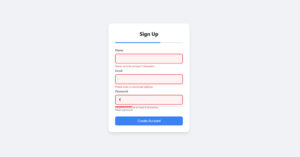
Form Validation Best Practices for Error Messages That Work
Browser validation and server validation aren’t doing the same job, even though setting both up feels like double work. One catches typos while someone’s still filling out the form. The…

What are Conversational Forms? A Simple Overview
More than half the people who see your form never submit it. That single number explains why so many teams are rethinking the old wall-of-fields layout. If you’ve ever wondered…

How to Create GDPR Compliant Forms
Most GDPR compliant form advice jumps straight to the checkbox, like ticking one box solves the whole problem. It doesn’t. A form that actually meets the regulation gets the lawful…