






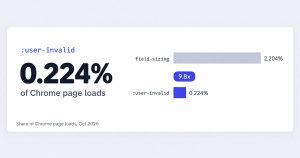

Of the native CSS form features now shipping, field-sizing (the property that sizes a textarea to its content) appears on about 2.204% of Chrome page loads. :user-invalid, the selector that…

How Did You Hear About Us? – 9 Templates & Options
Google Analytics files plenty of visits under direct that were never direct. In a 2023 experiment by SparkToro and Really Good Data, covering 1,113 test visits across 11 networks, 100%…

WordPress Form Security: How to Protect Your Forms
Most WordPress attacks don’t start at the login page. They start at a form, because a form is the one part of a site built to accept whatever a stranger…

Lead Generation for Accountants: The 5 Minute Response Rule
A new client doesn’t sign with an accounting firm because a landing page convinced them. They sign because someone they trust vouched for the firm, or because the firm showed…

Form Fields Explained: Every Type and When to Use Them
Every input box on a page is doing one job: catching a single piece of data before it moves anywhere else. A name, a date, an email address. Type it,…

Form Optimization Tips: How Many Fields Is Too Many
A form is usually the last thing standing between a visitor and whatever you actually want them to do: buy something, sign up, ask a question. Optimizing that form means…

HTML Checkbox: Syntax, Styling and 12 Working Examples
An HTML checkbox is a form input element that lets a user select any number of independent options from a group at the same time, with each box holding its…

The Best AI Plugins for WordPress (2026)
The best AI plugins for WordPress connect a site’s dashboard, page builder, or database to a machine learning model, turning a plugin that follows fixed rules into one that writes,…