





Most WordPress attacks don’t start at the login page. They start at a form, because a form is the one part of a site built to accept whatever a stranger…
Table of contents
Exit-intent forms are pop-up capture fields that trigger the instant a visitor’s cursor signals they’re about to leave, rather than firing on a timer or a scroll position.
Ecommerce stores run them on product and cart pages. Publishers stick them into long-form articles. SaaS sites use them too, usually judging results against whatever the page converts at with no overlay running at all.
Personalization changes the outcome sharply.
A message that references a visitor’s exact cart contents converts at 7.4%, more than three times the 2.1% rate of a generic exit message, according to Barilliance’s 2025 data.
What Is an Exit-Intent Form?

Picture a cursor jumping toward the browser’s tab bar right before someone bails on a page. That flick of motion is the trigger. An exit-intent form watches for it and throws up an overlay in the half-second before the tab closes.
It doesn’t fire on a timer. It doesn’t fire once someone scrolls 60% down the page. It waits for one specific movement and reacts only once that happens.
That’s what separates it from a regular popup form, which can be set to trigger on almost anything a site owner wants.
People use it for a few different jobs. Most often it’s grabbing an email address before a visitor disappears for good, or throwing a last-second nudge at someone who’s got items sitting in a cart. Some sites use it to catch a one-line reason for leaving through a short survey instead.
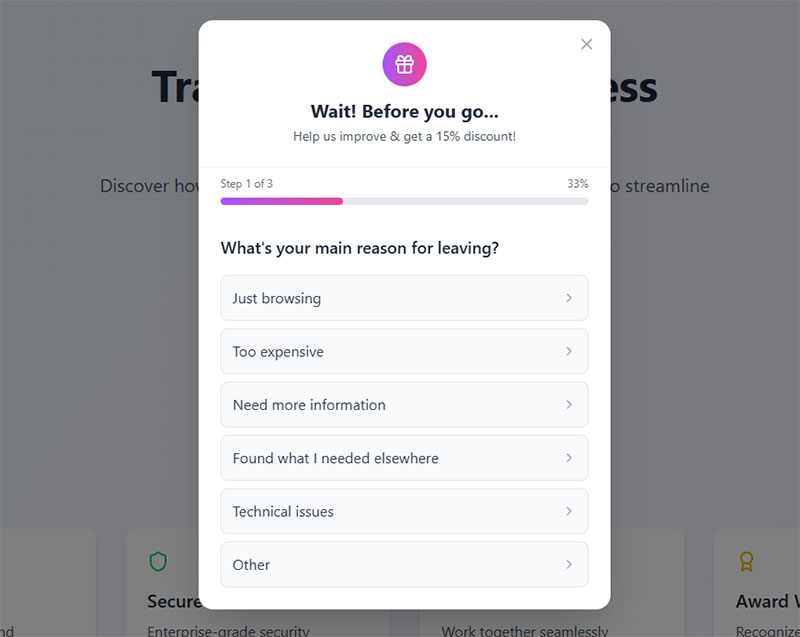
Most marketers still call it an exit-intent popup. Both names describe the same mechanism, just from different angles: one names the trigger, the other names the container.
How Does Exit-Intent Detection Work?
Under the hood, it’s watching how a cursor moves in the final moments before it reaches the edge of the viewport. Speed matters, since it reads how fast the pointer is heading toward the top of the screen. Direction matters too. And there’s a plain browser event called mouseleave that fires the instant the pointer actually crosses the boundary.
OptinMonster trademarked its own version as Exit-Intent® Technology, which is one reason its detection algorithms get named specifically instead of described as a generic industry technique.
Accuracy isn’t identical everywhere. Safari and Firefox report pointer coordinates slightly differently than Chrome does, so a script tuned only on one browser tends to misfire on the others.
Trigger Timing Conditions
Detection on its own would fire on every distracted mouse movement near the top of the screen, so tools layer timing rules on top of it.
| Condition | What it controls |
|---|---|
| Session duration | Minimum time on page before the trigger can fire |
| Scroll percentage | Minimum scroll depth reached before eligibility |
| Page load delay | A short window after load where exit signals are ignored |
Stacking two or three of these cuts down on forms firing for visitors who bounce out of pure impatience rather than genuine disinterest.
How Do Exit-Intent Forms Work on Mobile Devices?
There’s no cursor on a phone, so there’s no exit angle and no mouseleave event to read.
Vendors fake it with a few workarounds. A fast scroll upward gets read as someone heading back toward the address bar. Some tools try intercepting the back button, though that behaves inconsistently between Android and iOS and honestly isn’t all that reliable. Others just wait: if there’s no touch input for a while, the silence itself becomes the trigger.
None of it matches the precision of desktop detection. A scroll-up gesture can just as easily mean the visitor is re-reading a paragraph as it can mean they’re leaving.
That’s part of why mobile-specific form design matters even more here.
Smaller fields help. So do bigger tap targets. A simpler layout doesn’t hurt either, though none of it fully makes up for what the trigger itself is missing.
What Types of Exit-Intent Forms Are There?
Overlay formats aren’t interchangeable. A full-screen takeover interrupts a reader very differently than a slide-in tucked into the corner of the screen, and the table below breaks down the shapes worth knowing.
| Form type | Trigger style | Best use case | Build complexity |
|---|---|---|---|
| Lightbox | Full-screen dim with centered field | Single-field email capture | Low |
| Welcome mat | Full takeover of the viewport | High-value offers, content sites | Medium |
| Slide-in | Enters from a screen edge | Secondary, lower-friction offers | Low |
| Two-step opt-in | Button first, field revealed after click | Reducing perceived commitment | Medium |
The different popup formats available generally map onto these same four shapes. Exit-intent forms just add a timing layer on top.
Rich Page, a small SaaS site, split-tested a lightbox exit-intent form built from a template and saw conversions climb 225% once the headline and call-to-action were rewritten.
Welcome mats tend to convert harder because they command the full screen, but they also feel heavier. Publishers with a strong content-first reputation often avoid them for that reason.
Slide-ins skip the interruption entirely and work well as a softer follow-up to a lightbox that already got dismissed.
Two-step opt-ins lean on a small psychological quirk: a visitor who has already clicked a button is more likely to finish a form than one shown the field cold.
Scanning real exit-intent popup examples makes the difference between these formats obvious in a way a description alone doesn’t.
Which Offer Should You Show in an Exit-Intent Form?

The offer decides whether the form earns the interruption or just annoys someone who was already leaving.
Baymard Institute’s running average across 50 studies puts online cart abandonment at 70.22%, which is exactly why a cart-reminder offer exists as its own category (Baymard, 2025).
| Offer type | Works well when | Main downside |
|---|---|---|
| Discount code | Ecommerce, price-sensitive traffic | Erodes margin if overused |
| Content upgrade | Blogs, informational pages | Weaker intent signal than a purchase |
| Cart reminder | Visitors who added items but stalled | Needs live cart data to work |
| Exit survey | Gathering qualitative drop-off reasons | Low completion, no immediate revenue |
A content upgrade, like a checklist or template tied to the exact article being read, tends to outperform a generic newsletter signup because the value exchange is obvious in context.
Marketing112, a Hungarian marketing firm, promoted a free course through a popup offer and lifted its subscription rate by 62% without changing anything else about the page.
Exit surveys rarely convert in the traditional sense. The qualitative feedback they collect, specific complaints, pricing objections, confusing navigation, often points at a bigger fix elsewhere on the site.
Discount codes convert fast but train repeat visitors to wait for a popup before buying, which is worth weighing against the short-term lift.
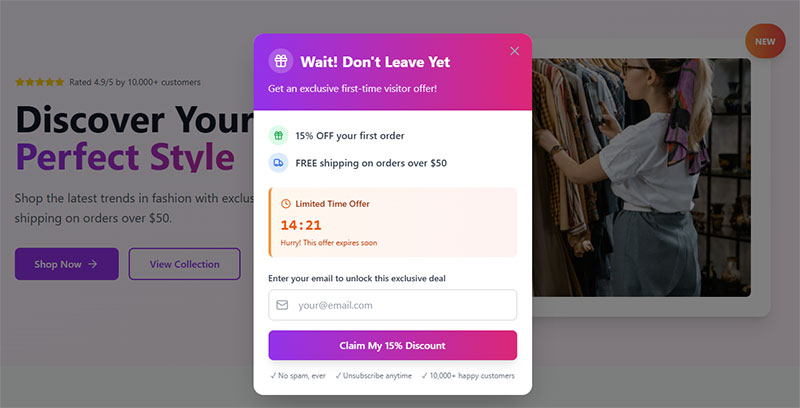
For sites building out a formal offer library, browsing lead generation form examples is a fast way to see which layout matches a discount or content-upgrade offer.
The same applies to survey-style exits: a set of real feedback form examples shows how short an exit survey can stay and still collect something useful.
Are Exit-Intent Forms Effective?
Effectiveness depends heavily on what is being measured and against what baseline, but the direction of the data is consistent: exit-intent beats doing nothing.
The average exit-intent campaign converts at 3.94%, but the top 10% pull off a 19.20% rate (Wisepops, 2025). Cart-abandonment popups specifically do better than that overall average, converting at 17.12% (OptiMonk, 2025). Mobile clicks through at a 10% rate compared to 7.09% on desktop, roughly a 41% gap (Getsitecontrol). Shockbyte, a game server provider, attributed 52% of its sales to exit-intent campaigns after adopting OptinMonster.
The gap between the average and the top 10% is the real story here. Targeting precision, offer relevance, and design quality separate a form that barely registers from one that carries a fifth of a site’s conversions.
A form that shows the wrong offer to the wrong segment sits near that 3.94% floor no matter how well the trigger itself is tuned.
Reading through practical guidance on increasing form conversions covers most of the copy and field-count levers in one place.
Pairing that with tactics for reducing form abandonment rounds out the picture for anyone chasing a higher completion rate, not just a higher trigger rate.
Do Exit-Intent Forms Comply with GDPR and Privacy Law?
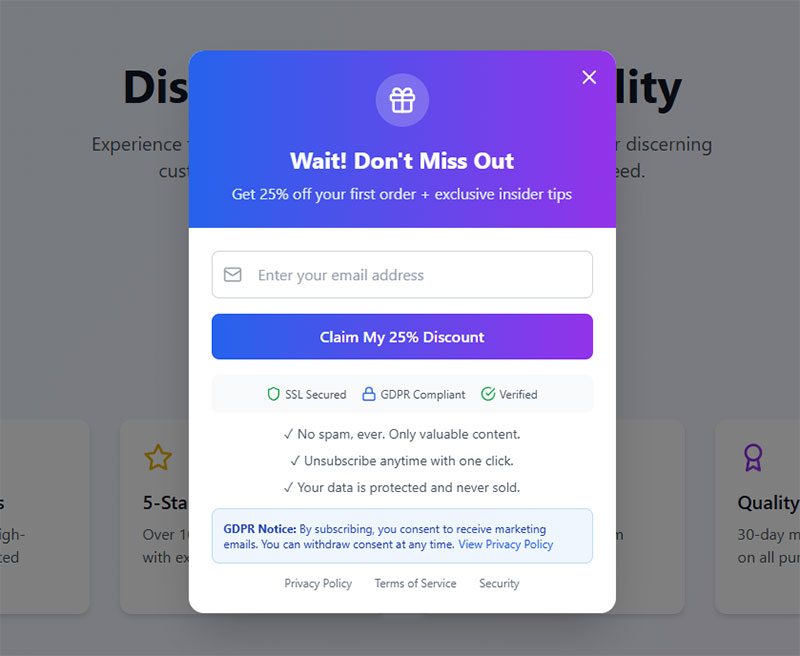
An exit-intent form is legal to run everywhere, but the tracking script behind it and the data the field collects both sit inside real consent law.
| Requirement | What it covers |
|---|---|
| Consent basis | Data entered into the form needs a lawful basis before it’s stored |
| Cookie disclosure | A detection cookie or fingerprint used to avoid re-showing a visitor falls under the ePrivacy Directive |
| Accessible dismissal | The close control must work by keyboard and screen reader, not mouse alone, under WCAG |
Enforcement is not theoretical. CNIL, France’s data protection authority, fined Google €150 million in 2022 specifically over dark-pattern cookie banners.
Under GDPR Article 83, penalties for non-compliant consent mechanisms reach up to €20 million or 4% of a company’s global annual turnover, whichever figure is higher.
CCPA runs a lighter regime in California, built mostly around disclosure and an opt-out right rather than prior consent.
Getting the mechanics right from the first draft is cheaper than retrofitting a form that already shipped. Building GDPR-compliant forms from day one avoids most of this.
The dismissal requirement gets overlooked constantly. A close button that only responds to a mouse click fails accessible form design standards even if the rest of the form is compliant.
How Do Exit-Intent Forms Compare to Other Lead Capture Methods?
Exit-intent forms trade reach for relevance. A form that’s always on the page catches everyone, but only at the moment it happens to be visible.
| Method | Main strength | Main weakness |
|---|---|---|
| Exit-intent form | Targets visitors already about to leave | Only reaches desktop cursor movement reliably |
| Embedded (inline) form | Always visible, no interruption | Easy to scroll past unnoticed |
| Timed or scroll popup | Reaches engaged readers mid-session | Can interrupt someone still reading |
Exit-intent is rarer in practice than the marketing around it suggests.
Popupsmart’s review of 500 live popup campaigns found that only 2.0% used an exit-intent trigger, while 95.4% fired immediately on page load (Popupsmart, 2026).
Most sites default to the simpler option rather than the more targeted one.
Bibado, a baby-products brand, uses exit-intent popups with cart-value thresholds, showing shoppers how close they are to unlocking a better discount if they add more items, and increased its average order value by 17% as a result.
That kind of lift sits well above what a static, always-visible signup form typically pulls from the same traffic, since a static form never gets the benefit of catching someone at their most decisive moment.
Click-triggered popups, where the visitor opts in by clicking something first, convert far higher still: 54.42% in one Wisepops dataset (Wisepops, 2025).
That gap exists because a click-triggered popup only shows to someone who already asked for it. Exit-intent shows to someone who was trying to avoid the page entirely, a much colder audience by definition.
A side-by-side look at inline forms versus popup forms covers the placement half of this decision in more depth.
Which Tool Can Build an Exit-Intent Form?
The right tool depends more on the platform underneath the site than on any single feature checklist.
| Tool | Platform focus | Notable trait |
|---|---|---|
| OptinMonster | Platform-agnostic | Trademarked Exit-Intent® detection |
| Sleeknote | Platform-agnostic | Behavioral targeting rules |
| Poptin | Platform-agnostic | No-code visual builder |
| OptiMonk | Ecommerce-leaning | Segment-based offer personalization |
| Icegram | WordPress | Native plugin, no external script tag |
| Privy | Shopify | Live cart-data triggers |
| Justuno | Shopify | Ecommerce event targeting |
OptinMonster states that more than 1 million websites run its lead-generation software (OptinMonster).
Scale like that isn’t proof of quality on its own, but it does mean the detection script has been battle-tested across a wide range of browsers and traffic patterns.
Integration depth matters as much as the trigger itself.
A tool that syncs cleanly into an existing email platform or CRM saves a rebuild later. One that only exports a CSV creates manual work every single week.
Platform-Specific Options
Match the tool to the stack, not the other way around.
- WordPress sites can just run a dedicated plugin. No external script needed, so page weight stays down.
- Shopify stores do better with tools built around live cart data, since the offer can point at what’s actually sitting in the cart.
- Running a custom stack, or juggling more than one platform? A script-based, platform-agnostic tool is usually the easier route.
Anyone comparing plugin options directly should look at WordPress exit-intent popup plugins before picking one, since build quality varies more between plugins than the marketing pages suggest.
How Do You Set Up an Exit-Intent Form?
Setup follows the same order regardless of which tool ends up running it.
- Step 1: Pick the trigger condition and timing rules, session duration, scroll percentage, or a combination of both
- Step 2: Choose the form type (lightbox, welcome mat, slide-in, two-step opt-in) and the offer behind it
- Step 3: Connect the form to an email platform or CRM so submissions land somewhere usable
- Step 4: Publish, then confirm the exit signal actually fires across the browsers real visitors use
Kiss My Keto used OptiMonk’s exit-intent auto-redeem discount, which applies the code automatically at checkout, and cut cart abandonment by 20%, according to OptiMonk’s published case data.
That auto-redeem detail matters at step two: an offer that still requires copying and pasting a code loses some of the visitors it just recovered.
Testing and Iterating After Launch
Publishing the form doesn’t mean the work’s done.
Start with the copy. Test the headline and the call-to-action before touching anything visual, since wording usually swings conversion more than color choices ever do. Once that settles, try the offer itself, running the same layout against two different incentives to see which one people actually respond to.
Tracking comes last, but don’t skip it: a form can look like it’s working while submissions quietly fail to reach the destination platform.
Setting up form submission tracking in Google Analytics alongside the tool’s own dashboard gives a second, independent read on what’s converting.
Beyond that first testing pass, a broader set of form optimization tactics covers field count, layout, and copy adjustments worth running through over time.
When Do Exit-Intent Forms Fail or Not Apply?
Exit-intent forms don’t work everywhere, and forcing one onto the wrong site wastes development time without moving any number that matters.
A handful of situations make this pointless. Low-traffic sites, say a few hundred visitors a month, never rack up enough exits to get a statistically meaningful read on any offer. Long B2B sales cycles are another problem: a discount popup doesn’t mean much to someone still routing a proposal through procurement and legal.
Then there’s popup fatigue, since a visitor who already closed one overlay on the site probably isn’t going to welcome a second. And on mobile, a scroll-up trigger that fires during ordinary re-reading can actually increase bounce instead of reducing it.
Sentiment toward popups is genuinely split. In a 2026 OptiMonk survey of marketers, store owners, and everyday users, 23.5% called popups annoying but effective, and a further 22.3% said they dislike them outright (OptiMonk, 2026).
That’s close to half of respondents holding some negative view, which is the real cost side of the conversion numbers covered earlier in this piece.
Common Setup Mistakes That Cause Failure
| Mistake | What fixes it |
|---|---|
| Trigger fires too early in the session | Add a minimum session duration or scroll depth before eligibility |
| Offer doesn’t match the page context | Match the offer to what the visitor was actually looking at |
| No mobile fallback configured | Add a scroll-up or inactivity trigger instead of leaving mobile untargeted |
Most failures trace back to one of these three rows, not to the exit-intent mechanism itself being broken.
FAQ on Exit-Intent Forms
What Is Another Name for an Exit-Intent Form?
Most people call it an exit-intent popup or exit popup, since form and popup describe the same overlay from different angles.
OptinMonster markets its own version as Exit-Intent® Technology, a trademarked term for one specific detection method rather than the category itself.
What Code or Technology Powers Exit-Intent Detection?
A short JavaScript snippet listens for the native mouseleave event and calculates cursor speed and direction in real time.
Vendor tools like OptinMonster, Sleeknote, and Poptin wrap that same logic inside a hosted SDK, so sites rarely write the detection script themselves.
Do Exit-Intent Forms Hurt SEO or Core Web Vitals Scores?
Google has penalized intrusive mobile interstitials shown immediately on entry since 2017, not ones triggered later by behavior, so a well-timed exit form usually avoids that penalty.
A well-built script also loads asynchronously, keeping its effect on Largest Contentful Paint minimal.
What Should You Fix First in Exit-Intent Forms?
The first fix in an exit-intent form is trigger accuracy: a script that misreads ordinary mouse movement as an exit signal burns impressions on visitors who were never actually leaving, and every later improvement inherits that error.
Get the trigger right first. Offer relevance comes second, matched to whatever page the visitor was actually on. Consent and accessibility get checked last, before scaling up traffic.
Fixing offer relevance before trigger accuracy wastes effort, since even a well-matched discount still fires on visitors who were only skimming rather than leaving.
That order comes with a trade-off. Narrowing the trigger shrinks the audience reached, but the signal you’re optimizing against gets cleaner.
Below roughly 1,000 visitors per variant, most testing platforms cannot confirm whether a trigger or offer change actually moved the number (Spotler, 2026).
That same sequence, trigger before offer before compliance, applies once designing lead capture forms beyond a single overlay.