




A new client doesn’t sign with an accounting firm because a landing page convinced them. They sign because someone they trust vouched for the firm, or because the firm showed…
Table of contents
Somebody fills out a form on your site. Maybe they want to know when you’re open, maybe they’re already comparing your pricing against two competitors down the street. You often can’t tell the difference from the submission itself, mostly because the form never asked.
That gap sits right in the middle of contact forms vs lead generation forms.
Nearly 50% of marketers say web forms are their single highest-converting lead generation tool (VWO, 2026). Most business sites still run one generic form to catch everything anyway: a support question, a demo request, a job title field nobody actually wanted. Get it wrong and a support message gets treated like a sales lead, or a real buyer ends up stuck filling out fields meant for somebody who just wanted a quick callback.
Which form sits where changes who reads the message first, and how fast anything real actually gets picked up.
What Is a Contact Form
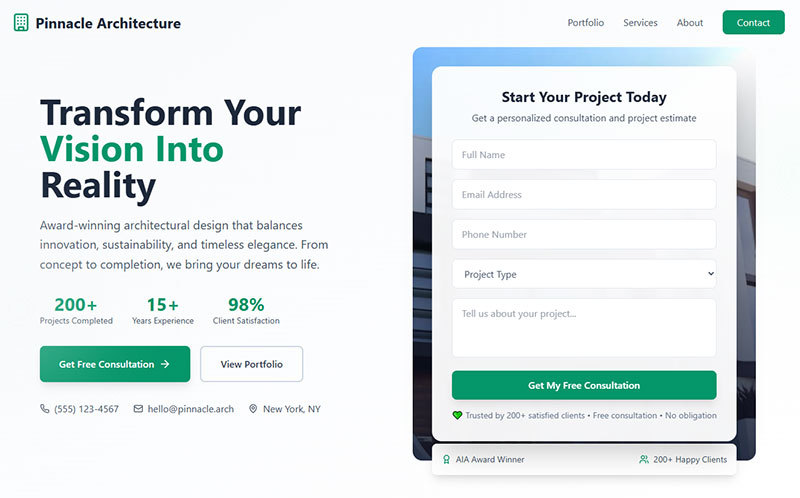
Somebody types a two-line message into a box on your Contact page, hits send, and expects a reply from an actual person within a day. That’s really the whole job of a contact form, passing a message along without making anyone open their email client.
Support questions, “do you ship to Canada,” a broken link report, the kind of one-off stuff that doesn’t need a sales process wrapped around it. Four fields usually cover it: name, email, subject, message. Nothing more.
KoMarketing found 44% of website visitors will leave a site entirely if they can’t find contact information, which is probably part of why the field count stays so low. Ask for too much and you start losing the exact people who just wanted a fast answer.
Where the form sits on the page matters almost as much as what’s in it. A dedicated Contact Us page, the footer, sometimes a help center tab. Ivy Forms has a rundown of the different types of forms a site typically needs, and out of that whole list, a contact form is usually the simplest thing to build.
Most businesses don’t hand-code these. WPForms, Gravity Forms, and Formspree handle the WordPress side, and Squarespace and Wix both ship their own form builders. If the site already runs on WordPress, and there’s a decent chance it does since W3Techs (2026) puts WordPress at 41.2% of all websites globally, a quick look at what WordPress forms actually are is worth the five minutes.
Spam shows up the moment the form goes live. WPForms (2026) reports the average WordPress contact form collects 15 to 20 spam submissions a day without any filtering, and that number climbs past 200 once a site gets real traffic.
Pull up contact form examples across a few different industries and the pattern gets obvious fast. Name, email, message. Maybe a phone number. Almost nobody adds more than that. Which is also why comparing WordPress contact form plugins before committing to one is worth doing early. Migrating form submissions between plugins later is never as clean as it sounds.
What Is a Lead Generation Form

Nobody fills out a lead generation form just to be nice. They’re trading contact details for something, a demo, a discount code, a downloadable report, and the form only works if that trade feels worth it.
The goal here isn’t a reply back. It’s a name, a work email, and enough surrounding context, job title, company size, sometimes a rough budget, to tell a sales rep whether this person is worth a phone call.
Forrester Research (2024) puts the optimal field count for B2B lead generation at 3 to 5 fields. Plenty of qualification forms on landing pages blow way past that, usually because someone in sales insisted on one more field.
These forms live wherever intent already runs high: landing pages, gated PDFs, pop-ups, pricing pages. HubSpot Forms, Typeform, Unbounce, and Leadpages are the tools most teams reach for.
HubSpot alone now runs lead capture for close to 300,000 companies (299,458 paying customers as of Q1 2026, according to the company’s own reporting). On the WordPress side, the strongest WordPress lead generation plugins push submissions straight into a CRM, so nothing sits in someone’s inbox waiting to get copied over by hand.
Scroll through actual lead generation form examples and the pattern repeats everywhere. Short forms near the top of the funnel, longer qualification forms further down once someone’s already shown real interest. None of this needs custom development either. A guide on how to create lead capture forms walks through the field logic and plugin setup most teams end up using anyway.
Gated Content Forms vs Direct Signup Forms
Gated content sits behind these forms literally, an ebook, a report, a template you can’t download until you submit. The visitor already knows what they’re getting before they type anything, which buys the form a little room. One or two extra fields won’t tank completion the way they would elsewhere, since the value’s already sitting right there in front of them.
Newsletter signups and free trial buttons work completely differently. There’s no resource being traded, so there’s no room. Try slipping a job title field onto a newsletter opt-in and watch completion drop, because nobody can point to what they’re getting in return for that extra ten seconds of typing.
What Is the Core Difference Between a Contact Form and a Lead Generation Form

A contact form invites a conversation, nothing more complicated than that. A lead generation form is doing something else entirely. It’s the first step in a pipeline, whether the visitor realizes it or not.
Field count, placement, who follows up, which system the data lands in, all of that traces back to this one split. And the split really comes down to intent. Somebody filling out a contact form has a question. Somebody filling out a lead generation form is, at minimum, curious about spending money.
| Dimension | Contact Form | Lead Generation Form |
|---|---|---|
| Primary intent | Support or general inquiry | Sales or marketing qualification |
| Typical field count | 3 to 4 fields | 5 to 9 fields |
| Funnel stage | Any stage, often post-purchase | Top to mid funnel |
| Data destination | Helpdesk or shared inbox | CRM or marketing automation |
Follow-up looks different too. A contact form submission gets a reply from an actual person. A lead generation form submission usually hits a scored, automated sequence long before anyone sees it.
You can see that gap show up as real friction on sales teams. 67% of B2B sales teams say they often lack the information needed for effective lead qualification (HubSpot, 2024), and more often than not that traces straight back to a contact form quietly doing a lead generation form’s job.
It’s the single most common mistake on small business sites: one generic form trying to handle both a support ticket and a sales pipeline at the same time.
How Contact Form Fields Differ From Lead Generation Form Fields

Field count isn’t decoration. It’s the single biggest lever on whether anyone actually finishes the form. A 2025 Formstack study of 1,500 B2B decision makers found abandonment jumps to 67.8% once a form asks for more than 7 fields.
Contact forms almost never cross that line on their own. Lead generation forms cross it constantly, usually the moment someone in sales asks for “just one more field.”
| Attribute | Contact Form | Lead Generation Form |
|---|---|---|
| Required fields | Name, email, message | Name, work email, company |
| Optional fields | Phone, subject line | Job title, budget, timeline |
| Qualifying fields | Rarely used | Budget range, company size |
Progressive profiling helps here. Ask for less the first time someone shows up, then request more once they’re back and there’s already some trust built.
Phone number fields do more damage than any other single field on the form. Zuko Analytics found phone number is among the highest-abandoned inputs out there, beaten only by a mandatory password prompt. Make it optional and completion nearly doubles in most tests, mostly because a required phone number reads like an invitation for a cold call, and nobody wants that.
Getting the fields right from the start beats trimming them later. A closer look at the best form fields for capturing high-quality leads breaks down which qualifying questions actually predict a closed deal, and which ones are just friction dressed up as due diligence.
Multi-Step Lead Forms vs Single-Step Contact Forms
Contact forms stay single-step almost every time. One page, four fields, submit, done.
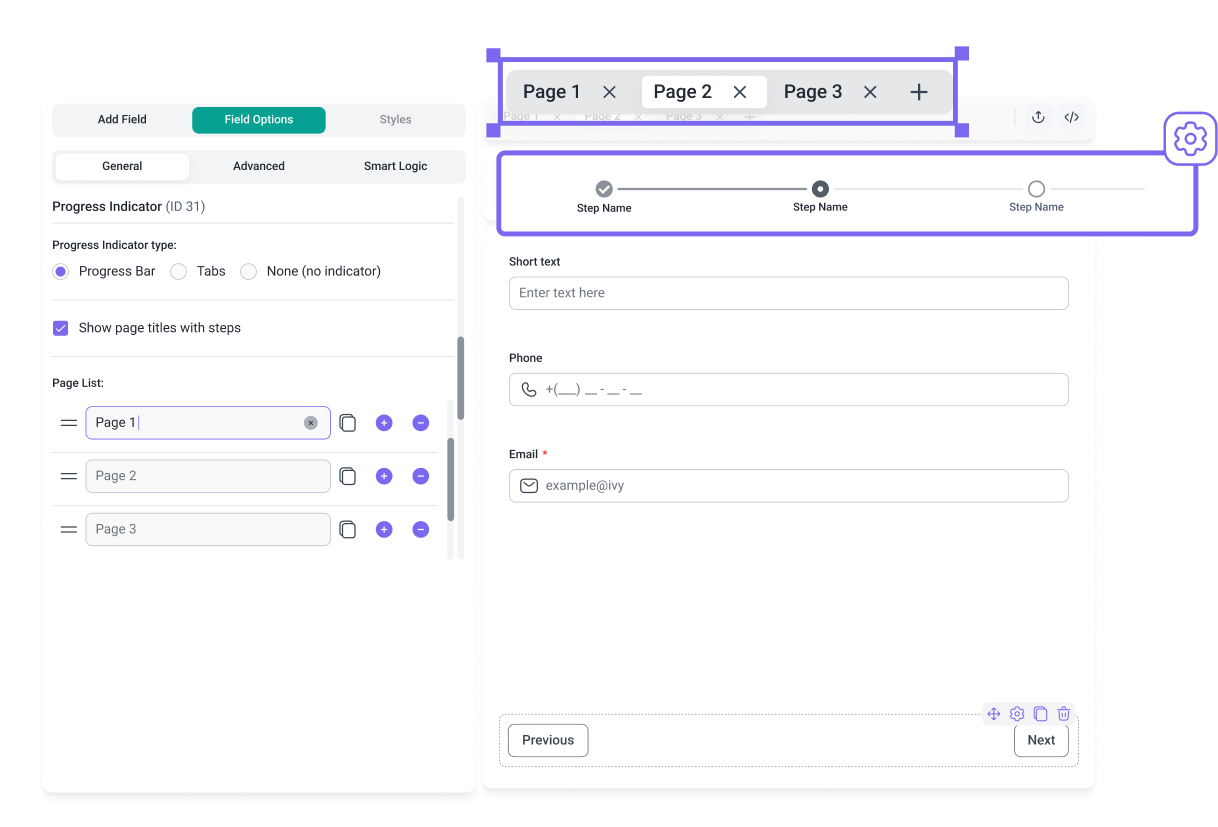
Lead generation forms are splitting across steps more and more: name and email up front, the qualifying stuff on a second screen. It actually works. Spreading the same field count across 2 to 3 steps lifts completion by 14% on average, and 21% specifically on lead generation forms (Digital Applied, 2026).
A look at multi-step forms versus single-step forms gets into exactly when that extra build effort is worth it, and when it’s just adding complexity for no real gain.
Where Contact Forms and Lead Generation Forms Are Typically Placed on a Website
Placement says almost as much about intent as field count does. A form stuck in the footer is basically saying “reach out if you ever need to.” A form sitting on a landing page is saying something much more direct: here’s the offer, take it now.
| Location | Common Form Type | Why |
|---|---|---|
| Contact Us page | Contact form | Expected default for inquiries |
| Site footer | Contact form | Always accessible, low commitment |
| Landing page | Lead generation form | Single offer focus, high intent |
| Exit-intent pop-up | Lead generation form | Last chance before visitor leaves |
Contact forms don’t stray far from convention. Good contact us page templates tend to follow the same basic shape everywhere: a short form, a map or address, business hours listed somewhere nearby.
Lead generation forms take more design risk, mostly because the page around them only has one job to do. A dedicated landing page strips out navigation and any competing links, and landing page form best practices usually push you to cut anything that isn’t the form itself or the offer.
There’s also a difference between forms that sit inside the page and forms that interrupt it. Embedded forms are part of the scroll. Pop-ups stop you mid-scroll whether you like it or not. The choice between inline forms and popup forms comes down to how much attention the offer actually deserves against how much friction a visitor will put up with before bouncing.
Exit-intent is really the only pop-up pattern most sites can justify keeping around. The right WordPress exit intent popup plugins only fire when someone’s actually about to leave, so the interruption doesn’t feel constant.
Sticky bars and slide-ins tend to lean lead capture. Static, embedded forms lean contact. Mixing the two rarely does either one any favors.
How Contact Forms and Lead Generation Forms Affect Conversion Rates
This is where the field-count decision actually gets tested against real numbers. Digital Applied’s 2026 benchmark analysis puts the cross-industry median form completion rate at 17.3% for forms shown to a qualified visitor, and that number moves a lot depending on how many fields sit between someone and submit.
Conversion runs 23.1% at 3 fields. Drops to 17.0% at 5. Collapses to 11.4% at 7, then 6.9% once you hit 10 or more (Digital Applied, 2026). Contact forms sit on the high end of that curve by default, just by staying short. Lead generation forms often land on the low end, because qualification fields push the count right past where conversion still holds up.
Device changes things too. Lead generation forms convert roughly 32% below desktop on mobile, 8.7% versus 12.8% on a normalized five-field B2B form (Digital Applied, 2026). Contact forms barely feel that gap. Four fields on a phone screen still moves fast. Nine does not.
If you’re trying to increase form conversions, cutting fields almost always beats fiddling with design, copy, or button color first. It’s also worth pulling up conversion rate benchmarks by industry before assuming a form is underperforming. A 6% conversion rate on a 10-field demo request form isn’t broken. That’s just what a 10-field form does.
When drop-off keeps climbing anyway, the fix is rarely a redesign. Tips for improving form abandonment rate gets into autofill, inline validation, and field order, three things that tend to move the needle more than a fresh coat of visual polish ever does.
Mobile form best practices deserve their own separate pass no matter which form type you’re running. They cover the input sizing and keyboard-type issues that desktop testing just never catches.
How Contact Forms and Lead Generation Forms Integrate With CRM and Support Tools
Where a submission lands after somebody hits send matters almost as much as what’s on the form. Contact form submissions usually end up in a helpdesk or shared inbox, Zendesk, Help Scout, Freshdesk, that kind of thing, built for replying to one person at a time.
Lead generation forms feed somewhere completely different. HubSpot, Salesforce, Marketo, ActiveCampaign, platforms built to score and nurture a lot of people at once rather than answer any one of them individually. That routing difference isn’t cosmetic, either. Teams using a CRM like HubSpot are 128% more likely to rate their marketing strategy as effective compared to teams without one (HubSpot).
Lead scoring only runs on whatever the form actually captured. A job title field feeds seniority scoring. A budget field feeds deal-size estimates. Skip the field and you lose the signal, permanently, there’s no getting it back after the fact.
78% of sales leaders say their CRM improves alignment between sales and marketing teams (HubSpot Research, 2023). Most of that alignment traces back to clean form data flowing in automatically rather than someone re-typing it from an email.
Zapier and native webhooks handle the connection whenever the form tool and the CRM aren’t built by the same company. Set it up once and every submission moves on its own, no spreadsheet required.
None of this holds up if the data going in is garbage. Imperva’s 2025 Bad Bot Report found bad bots now make up 37% of all internet traffic, and form submission bots specifically have climbed sharply year over year. Spam entries reach a CRM just as easily as real leads do when there’s no filter catching them first.
Stopping that has to happen before the CRM, not after. A guide to stopping spam from WordPress contact forms covers the filtering layer most teams skip right up until their pipeline is already full of junk. Honeypot fields quietly catch a big share of that traffic on their own, since bots fill in a field real visitors never even see.
Tracking which forms actually feed the pipeline closes the loop. Setting up form submission tracking in Google Analytics shows which page, which form, and which field count actually produced a lead worth keeping, instead of just guessing.
What Mistakes Reduce the Effectiveness of Contact Forms and Lead Generation Forms
Most underperforming forms fail for a small handful of reasons, and neither form type is immune to any of them.
| Mistake | Shows Up On | Fix |
|---|---|---|
| Asking for budget or company size too early | Contact forms | Move qualifying fields to lead generation forms only |
| No spam filtering at all | Both | Add a honeypot field or server-side filtering |
| Overly aggressive CAPTCHA | Both | Use a low-friction option like reCAPTCHA v3 |
| Competing calls to action | Lead generation forms | Repeat one CTA, never introduce a second |
| No follow-up trigger | Lead generation forms | Automate the first touch within minutes |
Asking a support inquiry to declare a budget range is probably the single most common overreach out there. It turns a two-minute task into something people abandon halfway through, because why would someone reporting a broken link need to state their budget.
Spam protection breaks in both directions. Skip it entirely and the inbox floods. Overcorrect and you start losing real visitors too. Baymard Institute’s CAPTCHA research found people fail to correctly type a text CAPTCHA nearly 30% of the time (29.45% when it’s case-sensitive), and some portion of users just abandon the form rather than attempt the CAPTCHA at all, a cost most sites never bother measuring. A guide to how to add reCAPTCHA to a WordPress contact form covers the version built to balance protection against that exact friction.
One repeated call to action beats several competing ones every time. Unbounce benchmark data shows landing pages with a single CTA convert at 13.5%, against 10.5% for pages running five or more competing links or CTAs. Nolah Mattress proved a smaller version of the same idea. Just swapping its contact form button text from “Submit” to “Send Message” lifted submissions by roughly 20% (MarketingSherpa). Reviewing call to action examples makes the gap between a clear ask and a vague one pretty obvious once you start looking.
Mobile fields get ignored more than anything else in the build. A field sized right for a mouse cursor isn’t sized right for a thumb, and the drop-off shows up in analytics long before anyone thinks to check the CSS.
The last mistake on this list costs the most, by far. Contacting a lead within 5 minutes makes qualification 21 times more likely than waiting even 30 minutes, according to the InsideSales.com and MIT Lead Response Management Study. A lead generation form with no automated trigger sitting behind it is really just a contact form wearing a longer set of fields.
A lot of this traces back to skipping the same handful of foundational web form best practices that would’ve caught these issues before launch.
When a Contact Form Is Not Enough for Lead Generation
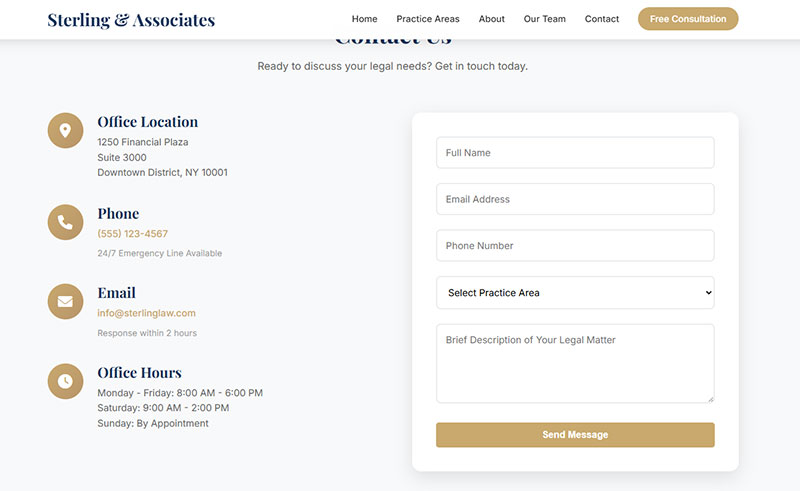
A contact form stops being enough the moment somebody in the business needs to know more about a visitor than just “they had a question.”
You’ll start noticing it in a few ways. Every submission reads like a support ticket even when the person filling it out was clearly ready to buy something. Sales can’t tell a browsing student apart from a funded buyer just from what’s on the form. And the same three questions keep getting asked over email after literally every submission, because the form never asked them up front.
Gleanster Research puts a number on that first problem. Only 25% of marketing leads are sales-ready the moment they’re generated, which means most of what lands in an inbox still needs qualifying before anyone should be spending real time on it.
Volume makes the second problem worse. Sales reps waste up to 50% of their time on unqualified prospects (Forrester, 2023), and a short contact form does nothing to save any of that time.
A defined sales funnel changes the math completely. Once a business starts tracking visitors through actual stages, awareness, evaluation, decision, a contact form just can’t capture where any given person sits in that journey. Understanding what a lead generation funnel actually tracks makes it pretty clear why that stage-specific data has to come from the form itself, not some follow-up email three days later.
Cargill ran into this exact wall at enterprise scale. Its lead qualification forms now run on conditional logic that reads the inquiry type and routes each submission straight to the right business development rep inside Salesforce, a level of structure no single contact form could ever support on its own.
Fixing it rarely means ripping out the contact form. It usually just means adding a second one built specifically to qualify, and letting each form stick to the one job it’s actually good at. A closer look at how to use website forms for lead generation covers that transition in more detail, from the first field all the way to the first automated response.
How to Choose Between a Contact Form and a Lead Generation Form for a Website
It really comes down to one question. Does anybody on the team need to know something about this visitor before the first real conversation happens? If not, a contact form covers it. No need to overbuild it.
| Business Type | Typical Need | Why |
|---|---|---|
| Local service, retail | Contact form | Short decision, one point of contact |
| SaaS, software | Lead generation form | Multi-stage evaluation, several stakeholders |
| Agencies, consultancies | Lead generation form | Scope and budget vary by client |
| High-ticket local trades | Both, run separately | Support questions and quote requests differ |
Service businesses and local businesses almost never need more than a contact form. A plumber or a hair salon has one real decision maker and one short conversation ahead of them, so there’s not much to qualify.
High-ticket local work is the exception. Roofing, remodeling, that kind of trade, often adds a short qualifying form because the quote genuinely depends on project scope, and lead generation for local businesses in that category works pretty differently than it does for a standard local storefront.
SaaS companies and agencies rarely get away with a contact form alone, because a sales cycle involving multiple stakeholders needs qualification data before the first call ever gets booked. Optifai’s benchmark of 939 B2B companies puts the median SaaS sales cycle at 84 days, with SMB deals closing in 14 to 30 days and enterprise deals stretching past 90. That spread is really the deciding factor here. A short, single-decision-maker sale rarely justifies a qualification form, and a long, multi-stakeholder one rarely survives without one.
The specifics shift by category too. Lead generation for SaaS leans on trial signups and demo requests, while lead generation for agencies tends to run through scoped consultation forms instead.
Most established businesses end up running both. A contact form stays put in the footer and on support pages for existing customers, while a separate lead generation form runs on the pages actually built to sell. Neither one replaces the other. They’re just answering different questions, for different visitors, at different points on the same site.
FAQ on Contact Forms Vs Lead Generation Forms
Can a Contact Form Be Used for Lead Generation
Technically, yes, but it performs poorly. A contact form is missing the qualifying fields, lead scoring, and CRM routing a real lead generation form needs, so most businesses end up manually sorting inquiries instead of automating any of it.
Is a Contact Us Page the Same as a Contact Form
No. A Contact Us page is the whole page, address, map, hours, while the contact form is just the input fields sitting on it. Good contact us page examples usually pair a short form with trust signals like a phone number or a photo.
How Many Fields Should a Lead Generation Form Have
Most benchmarks put the sweet spot at 3 to 5 fields for cold traffic. Looking at actual form fields used on high-converting pages, name and email cover most top-of-funnel forms, with company and role only added once intent is already confirmed.
Do Lead Generation Forms Need a GDPR Consent Checkbox
Yes, for any visitor in the EU or UK. A consent checkbox confirming how the data will be used has to appear before submission. Guidance on how to create GDPR compliant forms covers the exact wording and opt-in logic regulators expect to see.
Can a Chatbot Replace a Contact Form
Not fully. A chatbot handles quick, scripted questions fine but struggles once an inquiry needs documentation or an attachment. Comparing chatbots vs forms shows most sites end up running both, chat for instant answers, a form for anything that needs a written record.
Should a Lead Generation Form Always Sit on Its Own Landing Page
Not always, though it helps. A dedicated landing page form removes competing navigation and tends to lift conversion. Embedding the same form mid-page on a busy site still works, just at a lower rate.
Is an Opt-In Form the Same as a Lead Generation Form
They overlap, but they’re not identical. Every opt-in form counts as a lead generation form, but not every lead generation form is a simple opt-in. Opt-in form examples usually show just a single email field, skipping the deeper qualifying questions entirely.
Do Contact Forms Need to Be Accessible
Yes, and in a lot of regions it’s a legal requirement, not just a nice-to-have. Proper label association, keyboard navigation, and clear error announcements matter most. Following form accessibility best practices also tends to improve completion rates for every visitor, not just the ones who need it.
What Is Conditional Logic in a Lead Generation Form
It’s a rule set that shows or hides fields depending on a previous answer. Understanding conditional logic lets a form skip irrelevant questions entirely, so a solo founder never has to fill in a field meant for someone running a 500-person company.
What Happens After Someone Submits a Lead Generation Form
The data routes to a CRM, a confirmation message shows up, and an automated sequence usually kicks off within minutes. A clear form submission confirmation message reassures the visitor while everything in the background handles scoring and routing.
Conclusion
Pick whichever page on your site generates the most inquiries and go check which form actually sits on it. That single check usually reveals the real problem behind contact forms vs lead generation forms: most businesses are running one generic form trying to do two jobs that don’t actually fit together.
Start with the destination, not the fields. Figure out where a submission actually needs to land, a CRM record or a support ticket, before adding a single qualifying question to anything.
A short contact form everywhere beats one bloated form anywhere. Add sales-stage fields only on the pages built to sell, never on the page that just answers a question.
And expect a small conversion dip the first week after splitting the two apart. That dip is the qualification doing its job, not the form failing.