




The best AI plugins for WordPress connect a site’s dashboard, page builder, or database to a machine learning model, turning a plugin that follows fixed rules into one that writes,…
Table of contents
Picking the wrong WordPress form plugin costs you time, money, and a painful migration later. The Gravity Forms vs Formidable Forms decision trips up a lot of people because both plugins look similar on the surface.
They both use drag-and-drop builders. They both handle conditional logic, file uploads, and payment processing. But they solve different problems once you get past the basics.
This comparison breaks down pricing, form builder usability, field types, integrations, data management, performance, and real use cases. By the end, you will know exactly which plugin fits your project and budget.
What Are Gravity Forms and Formidable Forms
Gravity Forms and Formidable Forms are both premium WordPress form builder plugins. They do a lot of the same things, but they solve different problems.
Both use drag-and-drop interfaces. Both handle conditional logic, file uploads, and payment processing. And both target users who need more than a basic contact form.
That is where the similarities start to thin out.
Gravity Forms at a Glance
Built by Rocketgenius, Gravity Forms has been around since 2009. It is a premium-only plugin with no free version on WordPress.org.
The plugin focuses on form data collection with deep third-party integrations. Payment gateways like Stripe, PayPal, and Square connect through official add-ons. CRM tools like Salesforce, HubSpot, and Zoho CRM plug in at higher license tiers.
WPForms reports that over 60,000 free plugins exist in the WordPress directory, but Gravity Forms isn’t one of them. You pay from day one.
Formidable Forms at a Glance
Formidable Forms takes a different approach. It offers a free Lite version on WordPress.org alongside four paid tiers. Strategy11 built it as a form builder that doubles as an application builder.
The standout feature is Formidable Views. This lets you take submitted data and display it on the front end of your site as directories, event calendars, real estate listings, or searchable databases. Gravity Forms doesn’t have a native equivalent (you need the third-party GravityView plugin for that).
Both plugins rank among the top choices for building various types of forms on WordPress, from lead generation forms to payment pages and user registration systems.
Quick Feature Overview
| Feature | Gravity Forms | Formidable Forms |
|---|---|---|
| Free version available | No | Yes (Lite) |
| Drag-and-drop builder | Yes | Yes |
| Front-end data display | Via GravityView (3rd party) | Built-in Views |
| Payment gateways | 6 options | 3 options |
| Official add-ons | 32+ | Varies by tier |
| Developer API | Open, well-documented | REST API (premium) |
WordPress powers 43.4% of all websites globally, according to W3Techs. With that kind of install base, the choice of form plugin matters. Both Gravity Forms and Formidable Forms serve a huge chunk of that market, but for different reasons.
Pricing and License Structure
Pricing is the first filter most people apply. And honestly, the numbers alone don’t tell the full story here.
Gravity Forms Pricing Tiers
Basic: $59/year for 1 site. Includes all core form features plus email marketing integrations (Mailchimp, ActiveCampaign, HubSpot) and spam protection add-ons.
Pro: $159/year for up to 3 sites. Adds payment gateways (Stripe, PayPal, Square), Zapier, Slack, and Trello integrations.
Elite: $259/year for unlimited sites. Everything in Pro plus User Registration, Surveys, Quizzes, Webhooks, and Signature fields.
No free tier. No free trial. There is a 7-day demo environment, but that is it. Renewal pricing stays the same year over year.
Formidable Forms Pricing Tiers
Formidable runs four tiers, and the first-year pricing is discounted. This is something a lot of people miss until renewal time.
- Basic: $39.50/year (renews at $79). Conditional logic and multi-page forms included
- Plus: $99.50/year (renews at $199). Adds Formidable Views for front-end data display
- Business: $199.50/year (renews at $399). Unlocks payments, quizzes, calculators, PDF generation
- Elite: $299.50/year (renews at $599). Every add-on, including WooCommerce integration and AI form generation
That renewal jump is significant. Formidable’s Elite renews at $599/year compared to Gravity Forms Elite at $259/year. For agencies managing multiple sites, this difference adds up fast.
Price Comparison at Each Level
| Tier | Gravity Forms | Formidable Forms (Year 1) | Formidable Forms (Renewal) |
|---|---|---|---|
| Entry-level | $59 | $39.50 | $79 |
| Mid-tier | $159 | $99.50 | $199 |
| Top tier | $259 | $299.50 | $599 |
Formidable offers a free Lite version, which is a real advantage if you need basic WordPress forms and want to test the interface before spending anything. Gravity Forms requires you to commit financially before you can install it on your site.
Both plugins also offer a nonprofit discount. Gravity Forms has a $129/year nonprofit license with all Elite features. Formidable’s nonprofit pricing varies by application.
A lighter, cheaper alternative to Gravity Forms & Formidable Forms
This is a fight between two heavyweight, developer-first plugins — and for most websites, that’s the whole problem. If you’re building a mortgage calculator or a front-end property directory, pick one of them. If you just need genuinely good forms with conditional logic, payments and clean reporting, both are more plugin (and more money) than the job calls for. That’s the gap IvyForms fills: modern and capable, priced for real-world forms rather than enterprise applications.
What you’d pay per year
| Sites you run | Gravity Forms | Formidable Forms | IvyForms | Your saving with IvyForms |
|---|---|---|---|---|
| 1 site | $59/yr | ~$39.50/yr | €29/yr | ~50% vs Gravity · ~25% vs Formidable |
| 3 sites | ~$159/yr | ~$99.50/yr | €59/yr | ~63% vs Gravity · ~40% vs Formidable |
| Unlimited / agency | ~$259/yr | ~$399.50/yr | €99/yr | ~62% vs Gravity · ~75% vs Formidable |
The part that compounds — unlimited-site cost over time
Both rivals bill you every year. IvyForms Elite is one payment, forever.
| Unlimited sites | Year 1 | After 3 years | After 5 years |
|---|---|---|---|
| Gravity Forms (Elite) | ~$259 | ~$777 | ~$1,295 |
| Formidable Forms (Elite) | ~$399.50 | ~$1,198.50 | ~$1,997.50 |
| IvyForms (Elite Lifetime) | €399 once | €399 | €399 |
At €399, the lifetime licence pays for itself in about a year against Formidable’s unlimited tier and roughly 18 months against Gravity’s — and every renewal after that is money saved.
Formidable is the right call when the form is only half the project — calculations, views, applications. Gravity earns its keep when you live in add-ons and hooks. For the far more common case — capable forms, a sensible price, and data you own — IvyForms is the one that won’t have you paying for power you’ll never switch on.
Right-size your form stack: Compare IvyForms plans → (from €29/yr, or €399 once), or start free and only upgrade if you hit a wall.
Form Builder Interface and Ease of Use
The builder is where you spend most of your time. If it frustrates you, nothing else really matters.
Building Forms in Gravity Forms
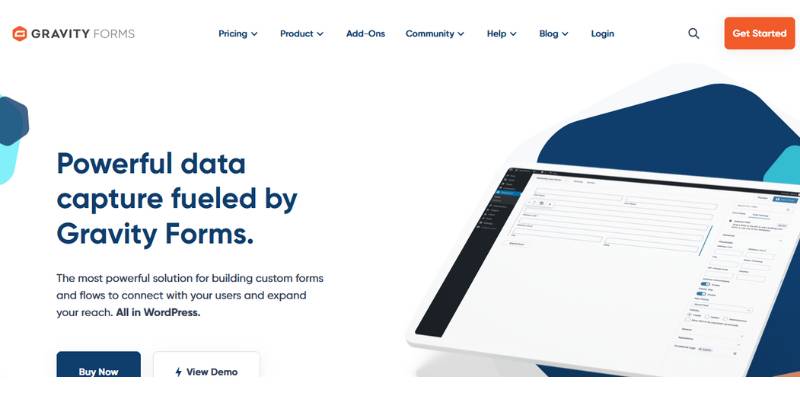
Gravity Forms opens inside the WordPress dashboard. No separate window, no full-screen mode. You add fields from the right panel, drag them into position, and configure each field’s settings on the right side.
Took me a while to appreciate the condensed view option. When your form gets past 15 fields, collapsing everything into a compact list saves a lot of scrolling. It is genuinely useful for longer multi-step forms and survey setups.
One downside people bring up a lot: no live preview. You edit, save, then check the front end. It is a slower workflow compared to what some other plugins offer.
Building Forms in Formidable Forms

Formidable uses a full-screen, distraction-free editor. Fields sit on the left, the form canvas in the center, and field settings open in a right panel when you click any element.
The interface feels modern. More polished than Gravity Forms, if we are being direct about it. But it can also feel dense. There are more options visible at once, which is great for experienced users and occasionally overwhelming for beginners.
Formidable ships with 320+ form templates at the Elite tier. Gravity Forms offers around 15 pre-built templates. If you like starting from a template and tweaking from there, Formidable has a clear edge.
According to Feathery, roughly 34% of people who start a form fail to finish it. So the builder you use to create that form? It affects conversion directly. Bad form design choices made during the building process show up as abandoned submissions later.
Which Builder Feels Faster
For a quick contact us page, both work fine. You can have a working form in under five minutes with either plugin.
For complex forms with lots of conditional branching, Formidable’s visual approach probably saves time. For developers who want to get in and out without a lot of UI chrome, Gravity Forms keeps it lean.
Your mileage may vary. I have seen people swear by both.
Field Types and Form Features
Fields are the building blocks. What you can drop into a form determines what that form can actually do.
Standard Fields Comparison
Both Gravity Forms and Formidable Forms cover the basics you would expect from a premium WordPress form plugin. Text inputs, email fields, dropdowns, checkboxes, radio buttons, paragraph text, number fields, and date pickers all come standard.
Gravity Forms includes 30+ field types out of the box. Formidable matches most of those and adds a few unique ones like star ratings, toggle switches, and scale fields.
Neither plugin will leave you short on standard form fields. The real differences show up in advanced territory.
Advanced Fields and Calculations
Formidable has stronger native calculation support. You can build pricing calculators, quote generators, and dynamic totals directly inside the form builder. This is a big deal for anyone building estimate tools, order forms, or financial calculators without writing code.
Gravity Forms supports product fields, quantity selectors, and basic pricing math. But if you need something more complex (like a mortgage calculator), you will likely need a third-party add-on like Gravity Perks.
WPForms data shows that quiz-like forms can triple conversion rates compared to static forms. Both plugins support quiz creation, but Gravity Forms locks the Quiz add-on behind the Elite tier ($259/year), while Formidable includes it in the Business tier ($199.50 first year).
Repeater and Lookup Fields
Formidable Forms natively supports repeater fields. Users can add multiple rows of data (like listing work history on a job application or adding multiple guests to a WordPress event registration form).
Lookup fields are another Formidable-native feature. These pull data from previously submitted entries or WordPress posts, creating dynamic dropdowns that update automatically.
Gravity Forms can replicate repeater functionality through the List field and third-party add-ons. It works, but it requires more setup. Lookup fields need custom development or a plugin like Gravity Perks.
File Uploads and Signatures
Both handle WordPress forms with file uploads well. You can restrict file types, set maximum sizes, and allow multiple uploads per field.
Signature capture exists in both plugins at higher tiers. Gravity Forms includes it in Elite. Formidable includes it in the Business plan.
Conditional Logic and Advanced Workflows
Conditional logic is what separates a basic form from a smart one. Both Gravity Forms and Formidable Forms handle it well, but there are differences worth knowing.
How Each Plugin Handles Conditional Logic
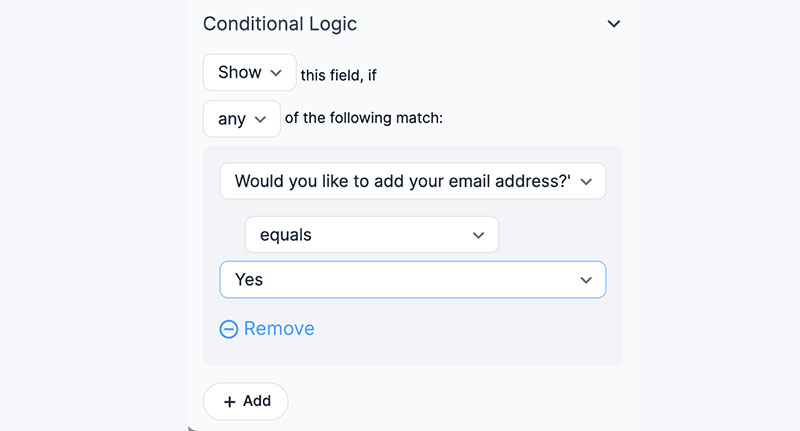
In Gravity Forms, you configure conditional rules per field. Click a field, open its settings, and toggle conditional logic on or off. You set conditions like “show this field if Field X equals Value Y.” The same logic applies to form pages, notifications, and confirmations.
Formidable Forms uses a similar per-field approach but extends it further. Conditional rules apply to fields, form actions, Views, email notifications, and even redirect URLs after submission. The scope is wider out of the box.
The Manifest reports that 81% of people have abandoned a form after starting to fill it out. Smart conditional logic reduces visible fields and keeps forms relevant, which directly helps with completion rates. Both plugins give you the tools, but Formidable’s wider application of logic gives it an edge for complex scenarios.
Multi-Step Form Logic
Both support conditional page breaks. You can skip entire sections based on earlier answers.
Gravity Forms shows a progress bar with customizable step labels. It supports AJAX page transitions (no full page reload), and the Save & Continue feature lets users leave and return later.
Formidable offers a rootline progress indicator with the choice between percentage-complete or step-number display. Both validate the current page before letting users move forward.
When building optimized forms that push through multiple pages, either plugin handles the workflow reliably. Gravity’s Save & Continue is a nice touch for long intake forms or application forms where users might need to gather information before finishing.
Notification and Confirmation Logic
Gravity Forms conditional notifications: send different emails to different people based on form answers. A support form could route billing questions to finance and technical issues to the dev team.
Formidable conditional notifications: same capability, but also extends to form actions beyond email. You can conditionally create WordPress posts, trigger API calls via Webhooks, or redirect users to different thank-you pages.
For straightforward notification routing, they are equally capable. For workflows that need to branch into multiple actions, Formidable gives you more room without extra plugins.
Integrations and Add-Ons
A form plugin only matters as much as what it connects to. Both Gravity Forms and Formidable Forms integrate with major third-party services, but the ecosystem around each plugin looks different.
Payment Gateway Support
Gravity Forms connects to six payment processors: Stripe, PayPal Standard, PayPal Checkout, Square, Authorize.Net, and 2Checkout. All of these are official first-party add-ons maintained by the Gravity Forms team.
Formidable Forms supports Stripe and PayPal, with options for ACH, Cash App, Affirm, and Klarna through Stripe’s expanded payment methods. Fewer dedicated gateways, but Stripe covers a lot of ground on its own.
If you need to create a WordPress payment form, Gravity Forms offers more processor options. But for most use cases, Stripe alone handles the majority of transactions.
Email Marketing and CRM Integrations

| Service | Gravity Forms | Formidable Forms |
|---|---|---|
| Mailchimp | Basic tier | Plus tier |
| ActiveCampaign | Basic tier | Plus tier |
| HubSpot | Basic tier | Plus tier |
| Salesforce | Basic tier | Elite tier |
| ConvertKit | Basic tier | Plus tier |
| Constant Contact | Basic tier | Plus tier |
A clear win for Gravity Forms here. Most email marketing integrations land in the $59 Basic plan. Formidable locks these behind the Plus tier ($99.50 first year). For anyone building subscription forms or email capture workflows on a budget, Gravity Forms gives you more at the entry level.
Zapier, Webhooks, and Automation
Both plugins connect to Zapier, which opens up thousands of indirect integrations with tools like Google Sheets, Slack, Trello, Asana, and just about anything else with an API.
Gravity Forms includes Zapier in the Pro tier ($159/year). Formidable includes it in the Plus tier ($99.50 first year, renews at $199).
Webhook support exists in both. Gravity Forms locks it in the Elite tier. Formidable includes it in Business.
The WordPress plugin market hit $2,380 million in 2025 with an 8.4% projected CAGR through 2033, according to Data Insights Market. That growing ecosystem means more integration options for both plugins each year.
Developer-Focused Integrations
Gravity Forms has an open, well-documented REST API available across all license tiers. Developers can read entries, create submissions, and interact with form data programmatically. The GF API and extensive hook system make it a preferred choice for custom WordPress development.
Formidable Forms offers REST API access in premium plans. It also supports custom actions, filters, and shortcodes. Both are developer-friendly, but Gravity Forms’ third-party add-on ecosystem is significantly larger. You will find over 15 third-party extensions for Gravity Forms compared to a smaller pool for Formidable.
For agencies doing custom work with WordPress contact form plugins, the size of the developer community around a plugin matters. Gravity Forms has the bigger ecosystem. Formidable has stronger built-in tools that reduce the need for third-party code in the first place.
Data Management and Front-End Display
This is the single biggest difference between the two plugins. Gravity Forms collects data. Formidable Forms collects data and displays it on your site.
Entry Management in the WordPress Admin
Gravity Forms stores every submission as an entry in the WordPress dashboard. You can search, filter, sort, and export entries to CSV. Bulk actions let you mark entries as read, star them, or delete in batches.
The admin-side entry view is clean and straightforward. Each entry shows all submitted field data plus metadata (submission date, IP address, user agent, payment status if applicable).
Formidable’s back-end entry management works similarly. You get search, filter, and export. Nothing game-changing on either side when it comes to managing entries from the WordPress admin. The difference is what happens next.
Formidable Views for Front-End Data Display
Formidable Views turns submitted data into front-end content. No custom code needed.
- Table Views: display entries in a sortable, searchable table
- Grid Views: card-based layouts for directories and listings
- Calendar Views: date-based entries rendered on an interactive calendar
- Classic Views: fully custom layouts with HTML and shortcodes
A real estate agency can collect property listings via a form and display them on the front end as a searchable directory. A nonprofit can accept event submissions and auto-populate an event calendar. These are not theoretical examples. People actually build this stuff with Formidable every day.
Views require the Plus plan or higher ($99.50 first year).
GravityView as the Gravity Forms Alternative
Gravity Forms has no built-in equivalent to Views. If you want to display submitted entries on your site’s front end, you need GravityView, a third-party plugin developed by a separate company.
GravityView starts at $99/year for a single site and goes up to $399/year for unlimited sites. That cost stacks on top of your Gravity Forms license.
It works well (I have used it on a few projects), but it is an extra purchase, an extra plugin to maintain, and an extra support channel if something breaks. Formidable bakes this in natively.
| Capability | Gravity Forms | Formidable Forms |
|---|---|---|
| Back-end entries | Built-in | Built-in |
| Front-end display | GravityView ($99+/yr extra) | Views (Plus plan+) |
| Front-end editing | GravityView addon | Built-in with Views |
| CSV/Excel export | All tiers | All tiers |
For anyone building data-driven applications on WordPress (directories, job boards, member profiles), Formidable’s native Views feature is a clear advantage. If you just need to collect and export data, both plugins handle that equally well.
Performance and Site Speed Impact
A form plugin that slows your site down is working against you. Google research shows that bounce rates jump 32% when page load time increases from 1 to 3 seconds. Both Gravity Forms and Formidable Forms are generally well-coded, but they handle assets differently.
Script and Stylesheet Loading
Gravity Forms conditionally loads its CSS and JavaScript only on pages where a form is present. This is the right approach, and it has been this way for years. Pages without forms stay unaffected.
Formidable Forms also conditionally loads assets, but its broader feature set (Views, calculations, front-end editing) means more scripts may load on pages that use those features. A page displaying a View with search, filtering, and inline editing will carry more overhead than a simple form page.
Bit Form’s comparison testing measured Formidable’s front-end footprint at roughly 46.99 KB for basic usage. Gravity Forms lands in a similar range for standard form pages. Neither is heavy by modern standards.
Database Overhead at Scale
High-volume submissions can bloat your database.
Both plugins store entries in custom database tables, not in the wp_posts table. That is good. But if you are collecting thousands of entries per month (common for high-traffic landing page forms), regular cleanup matters.
Gravity Forms allows you to trash and permanently delete entries. Formidable includes an entry expiration feature that auto-deletes old submissions after a set period. That automation saves time if you are dealing with temporary data like event RSVPs or time-limited surveys.
Caching Compatibility
Both work with major caching plugins (WP Rocket, W3 Total Cache, LiteSpeed Cache). The main thing to watch for: if your caching plugin serves a static version of a page, AJAX-dependent form features (like conditional field visibility or real-time calculations) might not load correctly until the page is excluded from cache.
Deloitte and Google collaborative research found that even a 0.1-second improvement in load time can increase ecommerce conversions by 8.4%. So the caching setup around your form plugin actually matters for revenue.
Rakuten 24 saw a 53% increase in revenue per visitor after optimizing their Core Web Vitals, according to Web.dev case studies. Forms are one piece of the performance puzzle, but they contribute to the overall score your site receives.
Support, Documentation, and Community
Something will eventually go wrong. A form breaks after a WordPress update, a payment integration stops working, or conditional logic behaves oddly on mobile. When that happens, the support and documentation around your plugin becomes the thing that saves (or costs) you hours.
Official Documentation Quality
Gravity Forms documentation is thorough. The knowledge base covers installation, every field type, every add-on, developer hooks, and REST API usage. Code examples are included for most developer-facing features.
Formidable’s documentation is equally deep, with the added benefit of covering Views (which adds a whole layer of use cases). Both maintain developer-oriented docs with PHP hooks, filters, and shortcode references.
If you are used to building with free WordPress form plugins and their often thin documentation, either of these premium plugins will feel like a significant step up.
Support Channels and Response Times
Gravity Forms: ticket-based support for all license holders. Elite users get priority routing. No phone support, no live chat. Response times typically fall within 24 hours on business days.
Formidable Forms: ticket-based support with prioritized response for higher-tier plans. Free Lite users can post in the WordPress.org support forums. Paid users get dedicated ticket support.
One note on Gravity Forms: because its third-party add-on ecosystem is so large, the official support team will not troubleshoot issues caused by plugins they did not build. If GravityView or Gravity Perks causes a conflict, you need to contact those developers separately.
Community and Third-Party Resources
| Resource | Gravity Forms | Formidable Forms |
|---|---|---|
| WordPress.org forum | No (premium only) | Yes (Lite version) |
| Third-party tutorials | Extensive | Moderate |
| Developer add-ons | 15+ third-party | Fewer third-party |
| Stack Overflow presence | Strong | Growing |
Gravity Forms has been around longer and has a bigger developer community. You are more likely to find answers on Stack Overflow, in WordPress forums, or through blog tutorials for Gravity Forms than for Formidable. That matters when you hit a weird edge case at 11 PM and support is closed.
WPForms data shows that 92% of WordPress vulnerabilities stem from outdated plugins. Both Gravity Forms and Formidable push regular updates. Keeping either plugin current is not optional if you care about form security.
Which Plugin Fits Which Use Case
There is no universal winner here. The right choice depends on what you are actually building. Took me a few projects to figure this out, but once you map the plugin to the project type, the decision gets simple.
Best for Simple Contact and Lead Capture Forms
Gravity Forms Basic ($59/year).
If you need a reliable contact us page, email capture, or basic lead capture forms, Gravity Forms at the entry tier gives you more integrations for less money. Mailchimp, HubSpot, ActiveCampaign, and ConvertKit all come included at $59.
Formidable’s Basic tier ($39.50 first year, $79 renewal) includes conditional logic but locks most email integrations behind the Plus tier. For straightforward lead generation, Gravity Forms is the better value.
Best for Data-Driven Applications
Formidable Forms, no contest.
If your project involves displaying submitted data on the front end (directories, listings, calendars, searchable databases), Formidable’s Views feature handles this natively. Building a job board? A member directory? A classified ads section? Formidable was designed for exactly this.
Gravity Forms can get there with GravityView, but that adds cost and complexity. Formidable keeps it all under one roof.
Best for Developers Building Custom Solutions
Both are strong, but for different reasons.
- Gravity Forms has an open REST API, extensive hooks and filters, and the largest third-party add-on ecosystem. If your workflow relies on custom integrations and PHP-level control, Gravity’s developer community gives you more resources to pull from
- Formidable Forms reduces the need for custom code in the first place. Repeater fields, lookup fields, calculated fields, and Views are built in, so developers spend less time writing code for features that other plugins require add-ons to achieve
Your call depends on whether you prefer a plugin with deep extensibility (Gravity) or one with more built-in power (Formidable).
Best for Non-Technical Users
Formidable’s free Lite version gives beginners a risk-free starting point. The full-screen editor is more visual, and 320+ templates at the Elite level mean less building from scratch.
Gravity Forms requires a purchase before you can even install it. The builder is functional but less visually polished. If you are not comfortable with WordPress admin panels, Formidable’s onboarding feels smoother.
That said, form UX design is just as much about what you build as the tool you use. Either plugin gives you the pieces. But Formidable holds your hand a bit more.
When Neither Plugin Is the Right Tool
Sometimes the answer is not Gravity Forms or Formidable Forms.
If you need a standalone SaaS form builder that works across platforms (not just WordPress), tools like Jotform or Typeform are better fits. Neither Gravity nor Formidable works outside of WordPress.
If budget is tight and you just want a basic contact form, WPForms Lite or Contact Form 7 handle the job for free. Paying $59+ per year for a simple contact form might not make sense.
If you need conversational forms with a chat-like interface, neither plugin specializes in that. Dedicated tools do it better.
Zuko Analytics data shows that only 45% of people who view a form go on to complete it. Regardless of which plugin you choose, focus on increasing form conversions through better field selection, smarter logic, and cleaner design. The plugin matters, but what you do with it matters more.
FAQ on Gravity Forms Vs Formidable Forms
Is Gravity Forms or Formidable Forms better for beginners?
Formidable Forms is easier to start with. It has a free Lite version, a full-screen visual editor, and 320+ templates. Gravity Forms requires a paid license before you can install it, which raises the barrier for newcomers.
Does Formidable Forms have a free version?
Yes. Formidable Lite is available on WordPress.org for free. It covers basic form creation with a drag-and-drop builder. Advanced features like Views, payment integrations, and calculated fields require a paid plan.
Which plugin has better payment integration?
Gravity Forms connects to six payment gateways including Stripe, PayPal, Square, and Authorize.Net. Formidable supports Stripe and PayPal. If you need multiple processor options, Gravity Forms has the edge.
Can I display form submissions on the front end of my site?
Formidable Forms handles this natively through its Views feature. You can build directories, calendars, and searchable listings. Gravity Forms requires a third-party plugin called GravityView, which costs extra.
Which plugin is better for developers?
Both are developer-friendly. Gravity Forms offers an open REST API and a larger third-party add-on ecosystem. Formidable reduces the need for custom code by including repeater fields, lookup fields, and interactive forms natively.
How do the pricing structures compare?
Gravity Forms runs $59 to $259 per year with consistent renewal rates. Formidable starts lower ($39.50) but renewals jump significantly. Formidable’s Elite plan renews at $599/year compared to Gravity’s $259.
Which plugin is faster for site performance?
Both conditionally load scripts only on pages with forms. For simple forms, performance is comparable. Formidable’s advanced features like Views and front-end editing load additional assets on pages that use them.
Can I migrate from Gravity Forms to Formidable Forms?
Yes. Formidable includes a built-in Gravity Forms importer that transfers forms and entry data. The migration process takes a few clicks. Moving the other direction requires manual recreation or third-party tools.
Which plugin handles conditional logic better?
Both handle form builder with conditional logic well for showing and hiding fields. Formidable extends logic to Views, form actions, and redirect URLs. Gravity Forms applies it to fields, pages, and notifications.
Do either of these plugins work outside WordPress?
No. Both are WordPress-only plugins. If you need a form builder that works across platforms, standalone SaaS tools like Jotform or Typeform are better options. Neither Gravity Forms nor Formidable Forms operates independently of WordPress.
Conclusion
The Gravity Forms vs Formidable Forms decision comes down to what you need after the form gets submitted. If your workflow stops at data collection, email notifications, and CRM syncing, Gravity Forms delivers that with a larger integration library and lower long-term renewal costs.
If you need to turn submissions into front-end applications like directories, event calendars, or searchable databases, Formidable Forms handles that without extra plugins.
Both are solid WordPress form builders with drag-and-drop interfaces, spam protection, and multi-page form support. Neither is a bad choice.
Match the plugin to your project scope. A simple website form has different requirements than a full data-driven application. Start there, and the right answer becomes obvious.