





Black Friday 2026 is on Friday, November 27, with Cyber Monday following on November 30. For WordPress site owners it’s the one week a year when the plugins and services…
Table of contents
A contact form template gives you the fields and the layout. It doesn’t give you the checks behind them. Fields built with type=email have validated their format across browsers since July 2015, per MDN Web Docs, and MDN is just as direct that this does not replace validation on the server.
Online stores use these templates, and so do agencies, software teams, and pretty much anyone who would rather not design a form from scratch. Each one sends a submission through a fixed set of fields to the team that can answer it. Most requests fall into general inquiries, support requests, quote requests, feedback, and complaints or returns.
The only test that counts is whether the message arrives, gets past the spam filter and earns a reply.
Which customer contact form templates fit which type of inquiry?
General inquiries, support requests, quote requests, feedback, and complaints or returns account for most of what lands in a contact inbox.
They all start from the same name, email and message. What separates them is the extra fields, which let each team answer without a follow-up email.
| Template type | Purpose | Extra fields | Best for |
|---|---|---|---|
| General inquiry | Open questions from visitors | Topic dropdown | Small sites with one shared inbox |
| Support request | Problems with a product or order | Order number, issue category | Online stores, software support |
| Quote request | Price questions for a job | Project type, budget range, deadline | Agencies, contractors, consultants |
| Feedback | Opinions after a purchase or visit | Rating, topic | Stores, service teams |
| Complaint or return | Refunds, replacements, escalations | Order number, desired resolution | Ecommerce, hospitality |
Mailpro’s template guide starts its quote request from a standard contact template, then adds project type, budget range, deadline and notes.
Live brand sites split the same way. Popupsmart reviewed 15 of them, checking 14 on their live pages in October 2026 and using a November 2024 capture for NYX. K18 runs an order support inquiry form. NYX Cosmetics goes with a customer care form that lists its hours of operation, and Davines keeps a separate one for partnership inquiries.
Browse these real-world contact form examples for more layouts to compare.
Choosing by team workflow
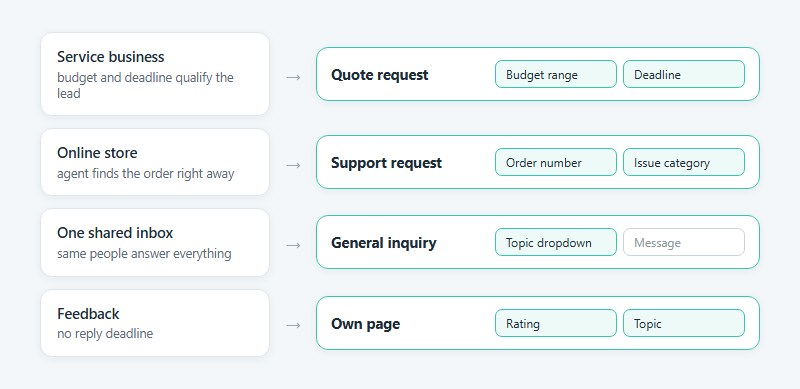
A service business should start with the quote request, since budget and deadline qualify each lead before anyone replies. An online store is better off with a support request that carries an order number, so the agent finds the order without a second email.
If everything goes to one shared inbox, a general inquiry form with a topic dropdown does the job. Split into separate templates only when different people answer them.
Feedback is the exception. It has no reply deadline, so it fits on its own page, and templates built for collecting feedback keep it out of the support queue.
Examples of Customer Contact Form Templates
Different business needs call for different types of forms. Here are the most common variations.
General Inquiry Contact Form
See the Pen
Modern Contact Form by Bogdan Sandu (@bogdansandu)
on CodePen.
Technical Support Request Form
See the Pen
Modern Technical Support Request Form by Bogdan Sandu (@bogdansandu)
on CodePen.
Sales Inquiry Form
See the Pen
Sales Inquiry Form – Modern B2B Lead Generation by Bogdan Sandu (@bogdansandu)
on CodePen.
Feedback and Suggestion Form
See the Pen
Modern Feedback & Suggestion Form by Bogdan Sandu (@bogdansandu)
on CodePen.
Callback Request Form
See the Pen
Modern Callback Request Form – Business Lead Generation by Bogdan Sandu (@bogdansandu)
on CodePen.
Appointment Booking Contact Form
See the Pen
Modern Hair Salon Appointment Booking Form by Bogdan Sandu (@bogdansandu)
on CodePen.
Quote Request Form
See the Pen
Modern Quote Request Form | Dark Theme with Glassmorphism by Bogdan Sandu (@bogdansandu)
on CodePen.
E-commerce Store Contact Form
See the Pen
Premium E-Commerce Contact Form by Bogdan Sandu (@bogdansandu)
on CodePen.
SaaS Company Support Form
See the Pen
Premium SaaS Contact Page by Bogdan Sandu (@bogdansandu)
on CodePen.
Healthcare Provider Inquiry Form
See the Pen
Premium Healthcare Provider Inquiry Form by Bogdan Sandu (@bogdansandu)
on CodePen.
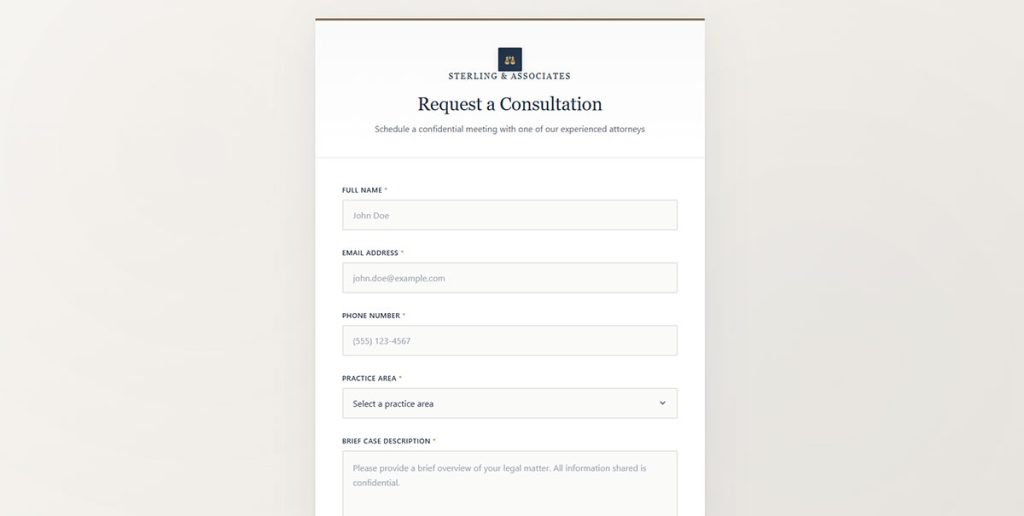
Law Firm Consultation Request Form
See the Pen
Law Firm Consultation Request Form by Bogdan Sandu (@bogdansandu)
on CodePen.
Restaurant Reservation Contact Form
See the Pen
Modern Table Reservation Form by Bogdan Sandu (@bogdansandu)
on CodePen.
Required and optional fields in a customer contact form template
Every template needs name, email and message. Anything else is either optional or tied to one template type.
Fields every template shares
One full-name field is enough. The email gets validated for format, and the message goes in a multi-line text area. A simple contact form template starts with about this set, plus a subject line.
Anything beyond these needs an owner, meaning someone on the team who reads that field and acts on it.
The full range of form field types is worth skimming before adding anything to this base.
Fields that belong to one template type
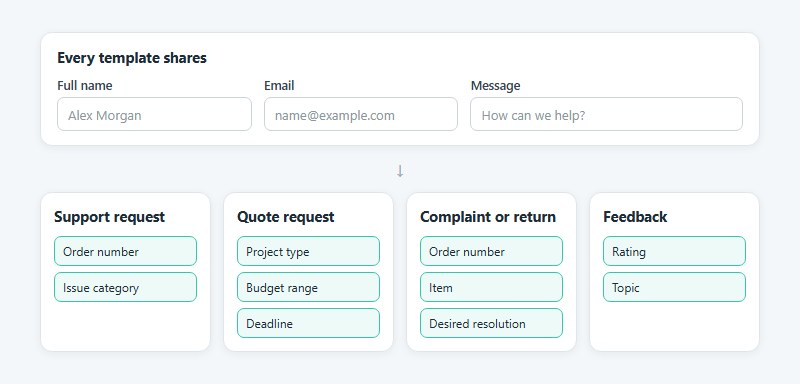
Support requests usually want an order number and an issue category dropdown. Quote requests ask for project type, budget range and deadline. Complaints and returns need the order number again, plus the item and what the customer wants out of it (refund, replacement, call back). Feedback only needs a rating and a topic.
Phone number and other fields to leave out
Phone is the field most teams add by habit, and I’d leave it off by default. Ask for it only when someone will actually call, and mark it optional.
Zoho’s 2026 guide to contact form best practices says to skip birth dates, home addresses and ID numbers unless the request needs them.
Not every field costs the same in completions. HubSpot’s field-type analysis, covered next, shows why.
How many fields should a customer contact form template have?
Three to five fields is the working range for a contact form. Past that, each extra field needs a reader on the team who acts on it.
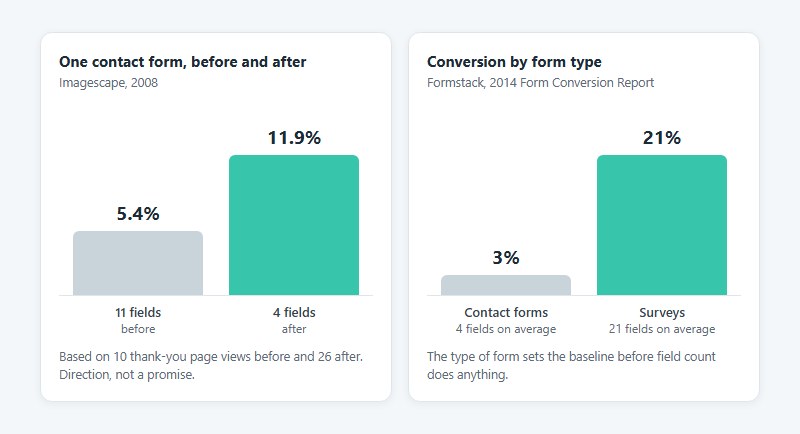
The usual evidence for trimming fields is one old case study. Imagescape cut a contact form from 11 fields to 4, and conversion rose from 5.4% to 11.9% (Imagescape, 2008).
Formstack’s numbers look different. Contact forms averaged 4 fields and converted at 3%, while surveys averaged 21 fields and converted at 21% (Formstack, 2014 Form Conversion Report). And across more than 40,000 landing pages, HubSpot’s Dan Zarrella found conversion fell only slightly as fields were added.
These don’t actually conflict. Imagescape is one contact form that improved after losing fields. Formstack is saying something else, that the type of form sets the baseline before field count does anything.
Formstack’s figures date from 2014, so read them as direction, not as a current benchmark.
HubSpot’s data points at field type, not count. Zarrella found conversion barely moved as single-line text fields were added, while multiple drop-downs tied to lower conversion.
So a topic dropdown earns its place only when it routes the message. A second one rarely does.
One caveat on that Imagescape number. The jump rests on 10 thank-you page views before the change and 26 after, so treat the 120% as direction, not a promise.
Dividing thank-you page views by form page views gives a rate for any form, or a form conversion rate calculator does the division.
Single-page or multi-step?
Multi-step helps long forms. It does little for a four-field contact form.
Formstack’s 2015 report put multi-page forms at roughly 14% conversion against 5% for single-page forms, across all the form types it tracked.
A contact form with 4 fields has nothing to split. The trade-offs between multi-step and single-step forms start to matter once a quote request grows toward 8 fields or more.
How to stop contact form spam without losing real messages
Start with a honeypot field and server-side validation. Add a CAPTCHA service only when spam still reaches the inbox, because every challenge adds the same friction an extra field does.
| Method | Visitor friction | Cost | Known limit |
|---|---|---|---|
| Honeypot field | None | Free | Misses bots that render the page and spam typed by people |
| Cloudflare Turnstile | Checkbox only when Managed mode flags risk | Free | Token needs a server-side check |
| Google reCAPTCHA | None in invisible score mode | Free to 10,000 assessments a month | Quota error after that without billing |
| hCaptcha | Challenge for most visitors on free accounts | Free Publisher tier | Passive modes need Pro or Enterprise |
Honeypot and server-side checks
Hide an extra field with CSS and real visitors never see it. Simple bots fill every input anyway, and the form rejects any submission where the hidden field has a value.
The trap costs nothing and adds no friction. Pair it with a time-to-submit check and per-IP rate limits, and see this explainer on how a honeypot field works for setup details.
Turnstile and hCaptcha
Cloudflare’s documentation lists three Turnstile widget modes (Managed, Non-Interactive and Invisible) and recommends Managed, which shows a checkbox only when a visitor looks risky. On WordPress, a Turnstile field adds it to the form like any other input.
hCaptcha works differently on free accounts. Publisher accounts get the classic CAPTCHA experience, where most visitors see a challenge, and the passive modes sit on the Pro and Enterprise plans, per hCaptcha’s documentation.
hCaptcha also states that the site operator decides whether its accessibility options are enough. The form owner still answers for visitors who cannot solve a challenge.
If neither fits, compare the wider set of CAPTCHA alternatives.
When reCAPTCHA stops being free
Google Cloud’s documentation gives the free Essentials tier 10,000 assessments per month, counted per organization across all sites (as of November 2026).
Go past that without billing and requests return a quota error. A form that reads the error as a failed check turns real visitors away.
Premium adds a flat $8 for 10,001 to 100,000 assessments, then $1 per 1,000 above that. A team running several sites under one organization shares a single pool.
Consent, privacy policy and data retention under GDPR
A contact form needs a privacy policy link and a stated purpose. A consent checkbox is required only when consent is the lawful basis, and then the box starts unticked.
Checkbox or legitimate interest?
Answering a message the visitor sent is usually handled under legitimate interest (GDPR Article 6(1)(f)), not consent.
The Education Endowment Foundation’s privacy notice for enquiries works this way. It relies on Article 6(1)(f) and says it collects only what it needs to answer the enquiry.
Consent becomes the basis when the form does more than answer, such as adding the sender to a newsletter list. Recital 32 of the GDPR states that “Silence, pre-ticked boxes or inactivity should not therefore constitute consent,” and the ICO’s consent guidance says the same about pre-ticked boxes.
Keep marketing consent separate. That means one unticked box with its own line, such as “Send me the monthly newsletter,” never bundled into the message itself.
For wording to compare against, see these GDPR consent form examples.
Privacy policy link and the line under the form
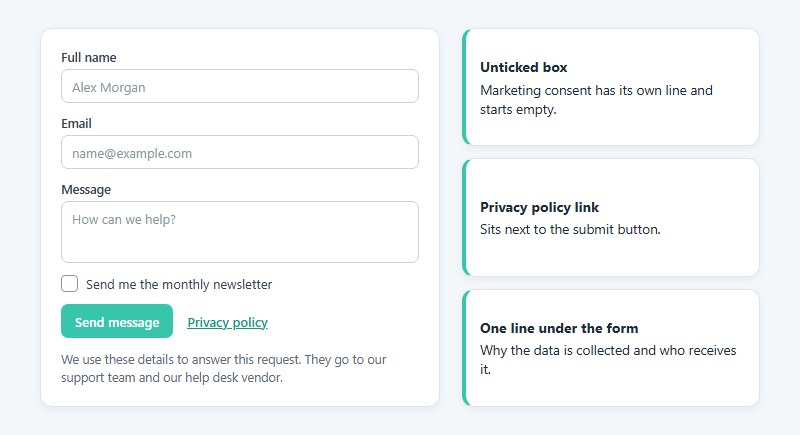
Put a privacy policy link next to the submit button. Under the form, add one sentence saying why the data is collected (to answer this request) and who receives it, such as the support team or the help desk vendor.
Data retention
The GDPR sets no fixed retention period. Article 5(1)(e) requires keeping personal data no longer than the purpose needs, so the form owner picks a period and records the reason.
Article 5(1)(c) limits collection to what is necessary, which ties retention back to field count. A phone number nobody calls is data without a purpose.
For the wider setup, see this guide on how to create GDPR compliant forms.
Third-party scripts and sensitive messages
A CAPTCHA script is a third party touching visitor data. hCaptcha’s FAQ describes itself as a processor for the sites that use it, so the site’s own privacy policy governs that data.
The message box is a second exposure, because visitors type health details into it unprompted. Special category data needs an Article 9 condition on top of the Article 6 basis.
Auto-reply, notification and help desk routing
Every submission needs to confirm to the visitor that it arrived and notify the team. It also has to land as a record where one person owns the reply.
Thank-you message or thank-you page?
A thank-you page gives analytics a URL to count. An inline message needs an event instead. The form’s confirmation settings decide which one the visitor gets.
Google’s enhanced measurement fires form_submit when a visitor submits the form, not when the server accepts it, per Google Analytics Help.
Wording matters more than placement, and this piece on the form submission confirmation message is a good place to start.
What the auto-reply says
Slow replies are common. In SuperOffice’s 2018 benchmark, 62% of 1,000 companies never answered a two-question test email, and the rest averaged 12 hours and 10 minutes.
An auto-reply cannot fix a slow team, but it tells the visitor the message arrived and when to expect an answer. Promise a window the team already beats.
It should repeat the subject or order number the visitor sent and give a reply window in hours or business days. One link to a help article for urgent cases is enough. On WordPress, this is usually a notification addressed to the form’s email field.
Notification email and reply-to address
The notification is where submissions go missing. WordPress sends mail through PHP’s mail function by default, and WPForms says on its own template page that wp_mail is often unreliable and that hosts can block outgoing mail, so it recommends SMTP.
Google’s sender guidelines add a second constraint: every sender to personal Gmail accounts must authenticate with SPF or DKIM. A notification that claims to come from the visitor’s address fails that check, so send it from a domain mailbox and put the visitor in the reply-to field.
Help Scout’s guidance for third-party forms lands in the same place. Replies go back to the customer, not to a generic contact@ address.
More on the sending side is in this guide to WordPress email settings.
Where the submission lands
- Every Zendesk Support plan includes a ticket form, and on plans that allow several, a category dropdown can open a different form for each request type
- Freshdesk’s help widget embeds a contact form that creates a ticket, and Formspree documents a connection that adds one ticket per submission
- Help Scout turns each Beacon contact form submission into a conversation in the connected inbox
- HubSpot Forms logs each submission in the contact database
Zapier fills the gaps for builders without a native connector. Its templates create a HubSpot contact from each new form submission, for example.
Accessibility requirements under WCAG 2.2
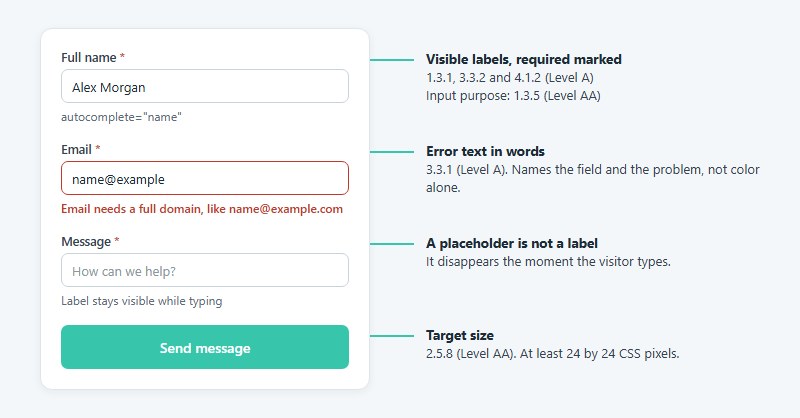
WCAG 2.2 reaches contact forms through labels, error text, input purpose, target size, redundant entry and CAPTCHA alternatives. Those decide whether the form works with a keyboard, a screen reader and a thumb.
WebAIM’s 2026 Million report found missing form input labels on 51% of home pages, the third most common failure it detected.
- Labels fall under 1.3.1, 3.3.2 and 4.1.2 (Level A). Every input needs a visible label tied to the field in code, and required fields get marked.
- Error text (3.3.1, Level A) has to name the field and describe the problem in words, not color alone.
- Autocomplete values on name and email let browsers fill them in, which is input purpose (1.3.5, Level AA).
- Target size (2.5.8, Level AA) means buttons and checkboxes measure at least 24 by 24 CSS pixels, or sit far enough apart.
- Redundant entry (3.3.7, Level A) rules out asking for the same detail twice in one process, which matters for multi-step quote forms.
- A CAPTCHA (1.1.1, Level A) needs a text description of its purpose plus an alternative form.
WCAG 2.2 added target size and redundant entry in October 2023, so templates built before then often miss both.
A placeholder is not a label. It disappears the moment the visitor types, which leaves nothing to check the entry against.
The full checklist sits in this guide to form accessibility best practices.
Error text gets its own pass. Each message names the field and the fix, and these form error message examples show the phrasing.
CAPTCHAs under WCAG 2.2
W3C’s guidance for 1.1.1 says every type of CAPTCHA is unsolvable for people with certain disabilities. The minimum is a text description of its purpose plus an alternative form, and W3C also suggests a human contact route that bypasses it.
Some checklists cite 3.3.8 Accessible Authentication for contact form CAPTCHAs. That criterion covers authentication such as logging in, so 1.1.1 is the one that applies here.
Which builder or platform has the right templates?
Pick by where the site runs and where submissions must land. Contact Form 7, WPForms or IvyForms fit WordPress, Netlify Forms or Formspree fit a static site, HubSpot Forms makes sense when the CRM is the destination, and Jotform covers a hosted template library.
| Option | Best for | Templates and cost | Known limit |
|---|---|---|---|
| Contact Form 7 | WordPress sites that want a free plugin | Free, one default form | No built-in conditional logic |
| WPForms | WordPress sites that want ready templates | 2,100+ templates, free Lite version | Lite stores no entries |
| IvyForms | WordPress sites that want templates and entry storage in a free plugin | 100+ templates, free Lite version, paid annual or lifetime plans | Conditional logic and multi-step forms need Pro |
| Jotform | Hosted forms embedded anywhere | Free Starter plan | Jotform branding on free forms |
| Netlify Forms or Formspree | Static sites with no backend | Formspree HTML templates, capped free tiers | Netlify reads forms at deploy time |
| HubSpot Forms | Teams where the CRM is the destination | Free builder, pre-built templates | Submissions live inside HubSpot |
WordPress: Contact Form 7 or WPForms
Contact Form 7’s documentation says it recommends Cloudflare Turnstile unless there is a reason to use reCAPTCHA, and its FAQ lists Akismet for filtering. On this platform the spam layers are a settings page, not a project.
WPForms Lite emails every entry and stores none, while any paid WPForms version stores entries in the WordPress database, per WPForms’ own documentation. A lost notification therefore means a lost entry, and Lite allows only one notification per form, according to the plugin’s support team on WordPress.org.
WordPress: IvyForms
IvyForms Lite saves every submission as an entry in the WordPress dashboard, where you can view, filter and export it. That alone separates it from WPForms Lite. Spam protection (reCAPTCHA, hCaptcha and Turnstile) and email notifications are also in the free plan.
The template library has more than 100 forms across order, feedback, consent, waiver, event registration, booking, registration and request categories. Some are free and others need a paid plan, and each template page says which. Contact forms are the thin spot, with just one template.
Conditional logic, multi-step forms, and Stripe and PayPal payments sit in Pro, which runs as an add-on on top of Lite. Paid plans are annual (1, 3 or unlimited domains) or a one-time lifetime option. It is WordPress only, and the plugin is young (1,000+ active installs on WordPress.org), so the add-on ecosystem is smaller than WPForms.
A wider comparison of WordPress contact form plugins covers the alternatives to both.
Static sites and hosted builders
Netlify Forms filters every submission through Akismet, and the netlify-honeypot attribute switches on a honeypot field, per Netlify’s documentation. The catch is that Netlify finds forms by parsing the built HTML at deploy time, so JavaScript-rendered forms need a static skeleton file.
On Jotform, the free Starter plan allows 5 active forms and 100 submissions a month across all of them, as of November 2026, according to Jotform support.
Google Forms works fine for internal requests, but a file upload question requires responders to sign in to a Google Account, per Google Docs Editors Help. Public forms with uploads fit better among the Google Forms alternatives.
For a five-field contact form on WordPress, Contact Form 7 or a free WPForms install is enough. A paid builder adds features this form never uses.
How to set up and test a customer contact form template
Most of the failures get caught at the test step, so don’t skip it.
If you’re starting without an existing form, a contact form generator can help you create the basic HTML structure before configuring how submissions are handled. Start with name, email and message fields, then add only the inputs your team actually needs. Once the form is generated, connect it to a working endpoint and test validation, spam protection and email delivery before publishing it.
- Choose the template type by who answers it, and clone it instead of editing the original.
- Delete every field nobody reads.
- Add the privacy policy link, plus a consent checkbox only where consent is the basis.
- Switch on the honeypot field, and add a CAPTCHA only if spam still gets through.
- Set the notification, the auto-reply and the help desk or CRM destination.
- Submit a test from a phone and again by keyboard alone, with one deliberate error.
- Turn on submission tracking, and compare the first week of counts with the inbox.
Write the test message as a full sentence from a real address. Netlify’s guidance warns that lazy test data such as [email protected] looks like spam to the filter.
What breaks most often
- Mail sent through the default PHP function lands in spam or never arrives, so send a test from the SMTP plugin and then a real submission
- Netlify’s knowledge base says a missing legitimate submission is usually Akismet, so check the Spam list first
- Measure School’s test showed GA4’s automatic form_submit firing more than once for a single submission, so confirm in DebugView
- Tab sometimes skips the consent checkbox or the CAPTCHA widget
This walkthrough on how to track form submissions in Google Analytics covers the measurement side.
For the phone check, follow these mobile form best practices.
When a contact form template is the wrong tool
Templates stop working once a request is urgent or the data is regulated. Custom logic and heavy volume push the same way.
Urgent requests
Contact forms suit non-urgent scenarios, according to the City of Winnipeg’s design system.
Typeform’s template page notes that many companies pair a contact form for general inquiries with live chat for immediate help. This comparison of chatbots vs forms sets the two side by side.
Regulated health data
HHS says a software vendor becomes a business associate when it needs access to protected health information, and the covered entity must sign a business associate agreement before granting it.
Builders add their own wrinkle. Jotform lists HIPAA compliance as available only on its Gold and Enterprise plans, not on Starter, Bronze or Silver.
For a clinic, a plain template is the wrong starting point.
Custom logic and payments
Contact Form 7 has no built-in conditional logic, and Formspree’s own contact form guide says custom coding is the better route for advanced functionality.
Payment is the clearest case. Take it through a dedicated WordPress payment form, never through the message box.
High volume
- Zendesk’s Help Center says a ticket form adds structure that a plain email address lacks
- Freshdesk’s help widget can hide the contact form until a visitor marks a solution article as not helpful
At that point the form is the last step of a support flow, not the first.
Customer Contact Form Templates FAQ
Can a contact form template accept file uploads?
Yes, on builders that support it, though the limits differ. Help Scout’s Beacon form allows up to 3 files per message at 10 MB each, and Jotform’s free Starter plan caps upload space at 100 MB in total.
Where should the contact form sit on the website?
On a dedicated contact page linked from the header and the footer.
A widget gives visitors a second way in from any page. Freshdesk’s help widget, for example, embeds a contact form across a whole site.
Is there a free HTML contact form template?
Yes. Formspree’s library offers free HTML contact form templates, and WPForms Lite includes a free Simple Contact Form template.
Plain HTML only draws the form. It needs a form endpoint, such as Netlify Forms or Formspree, to receive the submissions. A free contact form generator writes the HTML and lets you enter that endpoint address.
Should the customer get a copy of their message?
In most cases, yes. Quote the message in the confirmation email so the visitor keeps a record of what they sent.
Skip the copy on forms that collect sensitive details, since the message then sits in an inbox you do not control.
What options belong in a subject dropdown?
Whatever matches how the team routes work, such as order status, billing, technical issue, returns and general question. Each option needs an owner.
End the list with Other, so nobody abandons the form because nothing fits.
When a Live Contact Form Template Needs Changes
A live template is doing its job when each submission produces a notification, a reply and a record. It needs changes when real messages go missing or the spam folder fills.
Change one layer at a time. Fix delivery first so every submission reaches an inbox, then spam filtering so no real message sits in the spam list, and only after that the fields.
Field edits shift submission counts, which makes a delivery fault look like a conversion problem.
The auto-reply carries a limit. Bots that type other people’s addresses turn it into mail to strangers, and as of November 2026 Google tells senders to keep reported spam below 0.1% and never reach 0.3%.
Tighter spam filtering lowers junk and raises the chance of dropping a real message, so review the spam list weekly.
Validation rules come next, and form validation best practices explain how to set them.