


A form is usually the last thing standing between a visitor and whatever you actually want them to do: buy something, sign up, ask a question. Optimizing that form means…
Table of contents
Every missed booking is money left on the table.
Manual scheduling through emails and phone calls wastes hours each week and leads to double-bookings, no-shows, and frustrated customers.
Booking form templates solve this by automating the entire reservation process. Customers pick available time slots, enter their details, and receive instant confirmations.
Tools like Calendly, Acuity Scheduling, and JotForm make setup simple, even without technical skills.
This guide covers everything you need to build effective appointment booking forms: the right fields to include, calendar integration setup, payment processing options, and mistakes that kill conversion rates.
You will also find recommendations for the best booking form builders across different industries and budgets.
What is a Booking Form Template
A booking form template is a pre-designed digital document that collects reservation details from users for services, appointments, or events.
It includes input fields for dates, times, contact information, and service preferences to streamline scheduling processes.
Businesses use these templates to automate customer booking without back-and-forth emails or phone calls.
Tools like Calendly, Acuity Scheduling, and JotForm offer ready-made templates you can customize in minutes.
Booking Form Templates
Modern Hotel Room Booking Form
See the Pen
Modern Hotel Room Booking Form by Bogdan Sandu (@bogdansandu)
on CodePen.
A sleek, contemporary hotel booking interface with thoughtful UX and premium visual design. Features a warm terracotta and beige color palette that breaks away from typical tech aesthetics.
Modern Car Rental Booking Form
See the Pen
Modern Car Rental Booking Form by Bogdan Sandu (@bogdansandu)
on CodePen.
A sleek, interactive car rental booking form with premium UI/UX design. Features a fresh emerald green color scheme, smooth animations, and thoughtful micro-interactions.
Modern Table Reservation Form
See the Pen
Modern Table Reservation Form by Bogdan Sandu (@bogdansandu)
on CodePen.
A sophisticated restaurant reservation form featuring an elegant design with warm terracotta accents and refined interactions.
Modern Hair Salon Appointment Booking Form
See the Pen
Modern Hair Salon Appointment Booking Form by Bogdan Sandu (@bogdansandu)
on CodePen.
A beautifully crafted appointment booking form with a sophisticated design system that breaks away from typical form aesthetics.
Modern Dentist Booking Form
See the Pen
Modern Dentist Booking Form by Bogdan Sandu (@bogdansandu)
on CodePen.
A beautifully designed appointment booking form with a sophisticated, contemporary aesthetic. Built with pure HTML, CSS, and vanilla JavaScript.
Personal Trainer Booking Form
See the Pen
Personal Trainer Booking Form by Bogdan Sandu (@bogdansandu)
on CodePen.
A sleek, modern booking form for personal training sessions featuring a warm coral/orange color palette and smooth animations.
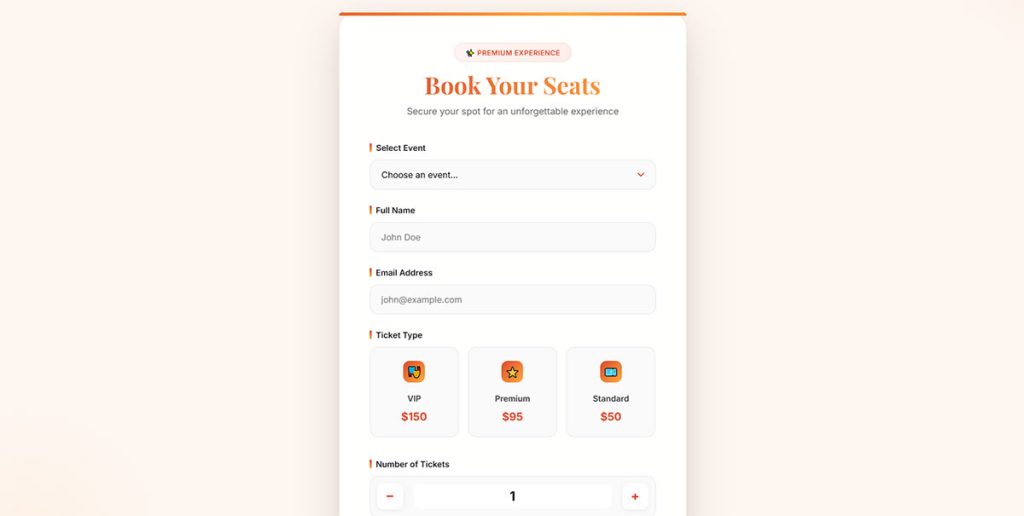
Modern Concert & Theater Ticket Booking Form
See the Pen
Modern Concert & Theater Ticket Booking Form by Bogdan Sandu (@bogdansandu)
on CodePen.
A sleek, conversion-optimized ticket booking experience featuring a warm coral-to-gold color palette and sophisticated micro-interactions.
Modern Course Enrollment Form
See the Pen
Modern Course Enrollment Form by Bogdan Sandu (@bogdansandu)
on CodePen.
A beautifully designed online course enrollment form with a sophisticated, startup-inspired aesthetic. Features a warm coral/red color palette on a soft peachy background – intentionally avoiding the typical blue/purple gradients.
Premium Service Booking Form
See the Pen
Premium Service Booking Form by Bogdan Sandu (@bogdansandu)
on CodePen.
A beautifully designed, modern booking form for plumber/electrician services with sophisticated visual design and smooth animations.
Modern Guided Tour Booking Form
See the Pen
Modern Guided Tour Booking Form by Bogdan Sandu (@bogdansandu)
on CodePen.
A sleek, thoughtfully designed booking form for guided tours with a fresh teal/emerald color palette. Features smooth animations, real-time progress tracking, and polished UX details.
House Viewing Appointment Form
See the Pen
House Viewing Appointment Form by Bogdan Sandu (@bogdansandu)
on CodePen.
A modern, visually engaging appointment booking form designed for real estate platforms. Features a warm terracotta color palette, smooth animations, and thoughtful UX patterns.
Wedding Photographer Booking Form
See the Pen
Wedding Photographer Booking Form by Bogdan Sandu (@bogdansandu)
on CodePen.
A modern, elegant booking form designed for wedding photographers with a sophisticated aesthetic that breaks away from typical wedding clichés. Features a warm champagne gold color palette, premium glassmorphism effects, and thoughtful micro-interactions.
What Does a Booking Form Template Include
Every booking form template contains specific form fields that capture reservation data; the exact fields depend on your industry and service type.
Core components include date pickers, time slot selection, contact details, and service selection dropdowns.
Standard Form Fields
- Name and email address
- Phone number
- Date and time selection
- Service or appointment type
- Special requests or notes field
Advanced Features
- Calendar integration with Google Calendar or Microsoft Outlook
- Payment processing via Stripe or PayPal
- Automated confirmations and reminders
- Custom branding options
What Are the Types of Booking Form Templates
Different industries require different types of forms for their scheduling needs.
The template you choose should match your specific business model and customer expectations.
Appointment Booking Forms
Used by consultants, therapists, and professional service providers.
These forms connect directly with scheduling software to show real-time availability.
Event Reservation Forms
Perfect for workshops, seminars, and group activities; check out event registration form templates for specific examples.
They handle multiple attendees, ticket types, and capacity limits.
Hotel and Accommodation Forms
Collect check-in dates, room preferences, guest count, and special accommodation requests.
Wix Bookings and Squarespace Scheduling both offer hospitality-specific templates.
Service Scheduling Forms
Built for salons, spas, repair services, and home maintenance businesses.
Include service duration, staff member selection, and location options.
Class and Course Registration
Handle recurring sessions, skill levels, and prerequisite requirements; similar to standard registration forms but with scheduling logic.
Restaurant Reservation Forms
Capture party size, dining preferences, and special occasions.
Integration with table management systems is common.
How Does a Booking Form Template Work
The workflow is straightforward: customer fills out the form, system checks availability, booking gets confirmed.
Behind the scenes, your online reservation system handles validation, calendar sync, and notifications automatically.
What Information Do Booking Forms Collect
The data collected depends on your service complexity and what you need to prepare for each appointment.
Contact Details
- Full name
- Email address for confirmations
- Phone number for reminders
- Company name (for B2B services)
Scheduling Information
- Preferred date from availability calendar
- Time slot selection
- Duration or service length
- Timezone (for virtual appointments)
Service Specifications
- Type of service or appointment
- Staff member preference
- Location selection
- Add-on services
Payment and Billing
Some forms collect payment upfront through integrated processors; learn how to create a WordPress payment form if you need this functionality.
What Happens After a User Submits a Booking Form
The system triggers several automated actions the moment someone clicks submit.
Immediate Actions
- Availability check against your calendar
- Booking slot reservation
- Form submission confirmation message display
- Data storage in your client management system
Automated Communications
Email confirmations go out to both you and the customer; configure your WordPress email settings properly to avoid delivery issues.
SMS reminders can be set up through Twilio integration.
Calendar Synchronization
The booking appears in your Google Calendar or Microsoft Outlook automatically.
iCalendar format ensures compatibility across different platforms.
Follow-up Sequences
Reminder emails 24-48 hours before the appointment reduce no-shows significantly.
Post-appointment follow-ups can request reviews or suggest rebooking.
Who Uses Booking Form Templates
Any business that schedules appointments, sessions, or reservations benefits from a structured online booking form.
The template approach saves hours compared to building forms from scratch.
What Industries Use Booking Form Templates
Service-based industries rely heavily on appointment scheduling templates; product-based businesses use them less frequently but still find value for consultations and demos.
Healthcare
Clinics, dentists, therapists, and chiropractors use HIPAA-compliant booking forms.
Patient intake forms often connect directly to these scheduling systems.
Hospitality
Hotels, vacation rentals, and tour operators need date-range selection and guest capacity fields.
SimplyBook.me and Booksy dominate this space.
Professional Services
Consultants, lawyers, accountants, and coaches book discovery calls and client sessions; check out lead generation for coaches for related strategies.
Personal Care
Salons, spas, and barbershops need staff scheduling and service duration tracking.
Square Appointments handles both booking and payment processing.
Education and Training
Tutors, music teachers, and corporate trainers schedule recurring sessions.
Class booking templates handle group sizes and skill level requirements.
Fitness
Gyms, personal trainers, and yoga studios book classes and one-on-one sessions; explore lead generation for gyms to connect booking with marketing.
What Businesses Benefit Most from Booking Form Templates
High-volume appointment businesses see the biggest ROI; solo practitioners benefit from automation but have simpler needs.
Multi-location businesses and franchises need centralized scheduling with location-specific availability.
How to Create a Booking Form Template
Start with a form builder that includes calendar integration and customize from there.
Most WordPress forms can be converted into booking forms with the right plugins.
What Fields Should a Booking Form Template Have
Include only fields you actually need; every extra field reduces completion rates.
Follow best practices for form fields to balance data collection with user experience.
Required Fields
- Full name
- Email address
- Date selection
- Time slot
- Service type
Optional Fields
- Phone number
- Company name
- How did you hear about us
- Special requests
Conditional Fields
Use conditional logic to show relevant fields based on service selection.
A form builder with conditional logic keeps forms short while collecting detailed information.
How to Add Calendar Integration to a Booking Form
Connect your form to Google Calendar or Microsoft Outlook through native integrations or Zapier; this prevents double-bookings and shows real-time availability.
Integration Options
- Direct API integration (Calendly, Acuity Scheduling)
- Zapier connections for custom setups
- Webhook triggers for advanced workflows
- iCalendar sync for universal compatibility
How to Set Up Confirmation Emails for Booking Forms
Automated confirmations reduce no-shows and build trust; include booking details, cancellation policy, and calendar file attachment.
Set up reminder sequences at 48 hours, 24 hours, and 1 hour before the appointment.
How to Accept Payments Through a Booking Form
Stripe and PayPal integrations handle deposits, full payments, and recurring billing.
Review checkout optimization tips to reduce payment abandonment.
Payment Options
- Full payment at booking
- Deposit with balance due later
- Pay at appointment
- Package or subscription billing
What Are the Best Booking Form Template Builders
The right booking form builder depends on your technical skills, budget, and integration needs.
Some tools specialize in scheduling while others are general form builders with booking capabilities.
What Features Should a Booking Form Builder Have
Calendar sync, payment processing, automated reminders, and mobile responsiveness are non-negotiable; custom branding and API access matter for growing businesses.
Dedicated Scheduling Tools
- Trafft – clean interface, easy setup, limited customization
- Acuity Scheduling – powerful features, Squarespace owned
- Setmore – free tier available, good for small teams
- Zoho Bookings – integrates with Zoho CRM suite
General Form Builders with Booking Features
- JotForm – drag-and-drop builder, hundreds of templates
- Typeform – conversational forms approach, engaging UX
- Google Forms – free, basic functionality
Platform-Specific Solutions
- Wix Bookings – built into Wix websites
- Squarespace Scheduling – native Squarespace integration
- WordPress plugins – various options through free WordPress form plugins
How to Choose a Booking Form Template Builder
Match the tool to your existing tech stack; switching later means migrating data and retraining staff.
Compare conversion rate benchmarks across platforms if possible.
Selection Criteria
- Integration with your website platform
- Calendar sync capabilities
- Payment processor compatibility
- Pricing at your expected volume
- Customer support quality
What Are Common Booking Form Template Mistakes
Most mistakes come from asking too much or providing too little feedback.
Poor form design kills conversion rates faster than anything else.
How to Reduce Booking Form Abandonment
Review tips for improving form abandonment rate and apply them specifically to your booking flow.
Common Problems
- Too many required fields
- No progress indicator on multi-step forms
- Unclear form error messages
- Slow loading calendar widgets
- No mobile optimization
Quick Fixes
- Remove optional fields entirely
- Show available times immediately
- Add trust signals near payment fields
- Enable guest checkout without account creation
What Makes a Booking Form Template Effective
Speed and clarity determine success; users should complete booking in under 60 seconds.
Study form design examples from high-converting businesses in your industry.
How to Design a Mobile-Friendly Booking Form Template
Over 60% of bookings happen on phones; follow mobile form best practices from the start.
Mobile Requirements
- Large tap targets (minimum 44px)
- Single-column layout
- Native date pickers on mobile
- Minimal scrolling
What Accessibility Features Should a Booking Form Have
Follow form accessibility best practices to serve all users and meet legal requirements.
Accessibility Checklist
- Proper label associations
- Keyboard navigation support
- Screen reader compatibility
- Sufficient color contrast
- Clear focus indicators
Test with actual assistive technology, not just automated checkers.
GDPR compliance matters too; review GDPR compliant forms requirements if you serve European customers.
Protect customer data with proper form security measures including SSL encryption and secure data storage.
FAQ on Booking Form Templates
What is a booking form template?
A booking form template is a pre-built digital form that collects reservation details from customers. It includes fields for dates, times, contact information, and service selection. Businesses customize these templates to match their scheduling needs.
Are booking form templates free?
Many platforms offer free booking form templates. Google Forms, Calendly’s basic plan, and Setmore provide no-cost options. Premium features like payment processing, custom branding, and advanced calendar integration typically require paid plans starting around $10-15 monthly.
How do I add a booking form to my website?
Most booking form builders provide embed codes or booking widgets. Copy the HTML snippet and paste it into your website. Platforms like Wix Bookings and Squarespace Scheduling offer native integration without any coding required.
Can booking forms accept payments?
Yes. Most appointment scheduling tools integrate with Stripe and PayPal for payment processing. You can collect deposits, full payments, or let customers pay at the appointment. Configure payment settings within your form builder’s dashboard.
Do booking forms sync with Google Calendar?
Virtually all booking form builders support Google Calendar and Microsoft Outlook integration. When customers book, appointments appear automatically in your calendar. Real-time sync prevents double-bookings and shows accurate availability to users.
What fields should a booking form include?
Essential fields include name, email, date selection, time slot, and service type. Phone number and special requests are optional. Keep forms short. Every additional field reduces completion rates by approximately 4-5%.
How do I reduce booking form abandonment?
Minimize required fields, show available times immediately, and optimize for mobile devices. Add progress indicators on multi-step forms. Display clear error messages when validation fails. Remove account creation requirements for guest bookings.
Which booking form builder is best for small businesses?
Calendly and Acuity Scheduling work well for most small businesses. JotForm and Typeform offer more customization. Square Appointments suits service businesses needing combined booking and point-of-sale functionality. Compare features against your specific requirements.
Are booking forms GDPR compliant?
Compliance depends on your configuration. Add consent checkboxes for data collection and marketing. Include links to your privacy policy. Store customer data securely with SSL encryption. Most reputable form builders like Zoho Bookings provide GDPR-ready features.
Can I send automated confirmation emails from booking forms?
Yes. All major booking platforms send automated confirmations after submission. Customize email content with booking details, cancellation policies, and calendar attachments. Set up reminder sequences at 24-48 hours before appointments to reduce no-shows.
Conclusion
Booking form templates transform how businesses handle reservations and appointments.
The right template reduces administrative work, eliminates scheduling conflicts, and creates a smoother experience for customers.
Pick a form builder that matches your tech stack. Platforms like Square Appointments, Zoho Bookings, and Typeform each serve different needs and budgets.
Focus on mobile optimization and keep your form fields minimal. Connect your booking widget to Google Calendar through Zapier or native integrations for real-time availability sync.
Add Stripe for payment processing if you need deposits or upfront payments.
Start with a simple online booking form and refine based on customer feedback. Test different layouts, field arrangements, and confirmation messages.
Your scheduling automation should save time, not create more work.