


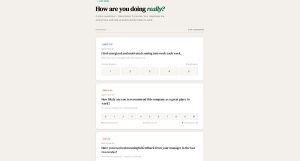
Gallup’s 2024 data shows only 31% of U.S. employees feel engaged at work. Annual surveys can’t catch that kind of decline fast enough. Pulse surveys can. These short, frequent questionnaires…
Table of Contents
Most webinar registration forms lose signups before the page even finishes loading. Too many fields, clunky design, zero mobile optimization.
The right webinar registration form template fixes that. It collects attendee data, syncs with your CRM and email marketing platform, and sends confirmation emails and calendar invites automatically.
This guide breaks down the types of webinar registration form templates, the fields that actually matter for lead capture, and how platforms like Zoom Webinars, GoToWebinar, Demio, and Livestorm handle registration differently.
You will also find a ranked comparison of the best templates by conversion features, integration depth, and customization options, plus step-by-step setup for tracking registration form performance in Google Analytics 4.
What Is a Webinar Registration Form Template
A webinar registration form template is a pre-built form layout used to collect attendee information before an online event, including fields for name, email address, company, and job title.
These templates connect directly to webinar platforms like Zoom Webinars, GoToWebinar, Demio, and Livestorm. They handle the data collection side of webinar promotion so that organizers spend less time building forms from scratch and more time preparing content.
Most templates sit on a dedicated registration landing page or get embedded into an existing site. The form captures attendee data, triggers a confirmation email, sends a calendar invite (.ics file), and syncs information with a CRM like Salesforce or HubSpot CRM.
A webinar registration form template is not the same as a generic contact form. Contact forms collect general inquiries. Registration forms collect session-specific data tied to a particular date, time, speaker, and webinar topic.
Webinar registration form templates also differ from standard registration forms used for accounts or memberships. The key difference is that webinar forms include event-specific fields: session selection for multi-session events, time zone preference, and sometimes pre-webinar survey questions about attendee experience level.
For WordPress sites, these templates are typically built through WordPress forms using plugins like IvyForms, Gravity Forms, or through standalone form builders like Typeform and Jotform.
Webinar Registration Form Templates
Minimalist Registration Form
See the Pen
Premium Webinar Registration Form by Bogdan Sandu (@bogdansandu)
on CodePen.
A stunning, minimalist registration form featuring cutting-edge web design trends and premium aesthetics. Perfect for webinars, events, or any high-conversion landing page.
Detailed Registration Form
See the Pen
Detailed Webinar Registration Form by Bogdan Sandu (@bogdansandu)
on CodePen.
A stunning, fully responsive webinar registration form featuring cutting-edge web design principles and smooth animations. Built with vanilla HTML, CSS, and JavaScript.
Multi-Step Registration Form
See the Pen
Glassmorphism Multi-Step Webinar Registration Form by Bogdan Sandu (@bogdansandu)
on CodePen.
A stunning, modern registration form featuring glassmorphism design and smooth animations. Built with pure HTML, CSS, and vanilla JavaScript.
Social Login / One-Click Registration
See the Pen
Premium Social Login – Webinar Registration Interface by Bogdan Sandu (@bogdansandu)
on CodePen.
Embedded Form in a Landing Page
See the Pen
Webinar Landing Page with Glassmorphism Registration Form by Bogdan Sandu (@bogdansandu)
on CodePen.
A sophisticated, conversion-optimized landing page featuring a premium glassmorphism registration form. Built with modern web design principles and smooth micro-interactions.
Popup / Modal Registration Form
See the Pen
Webinar Registration Modal by Bogdan Sandu (@bogdansandu)
on CodePen.
A sophisticated, premium registration modal designed with modern web standards and award-winning UX principles. Features a refined color palette, glassmorphism effects, and fluid animations that create an engaging yet professional user experience.
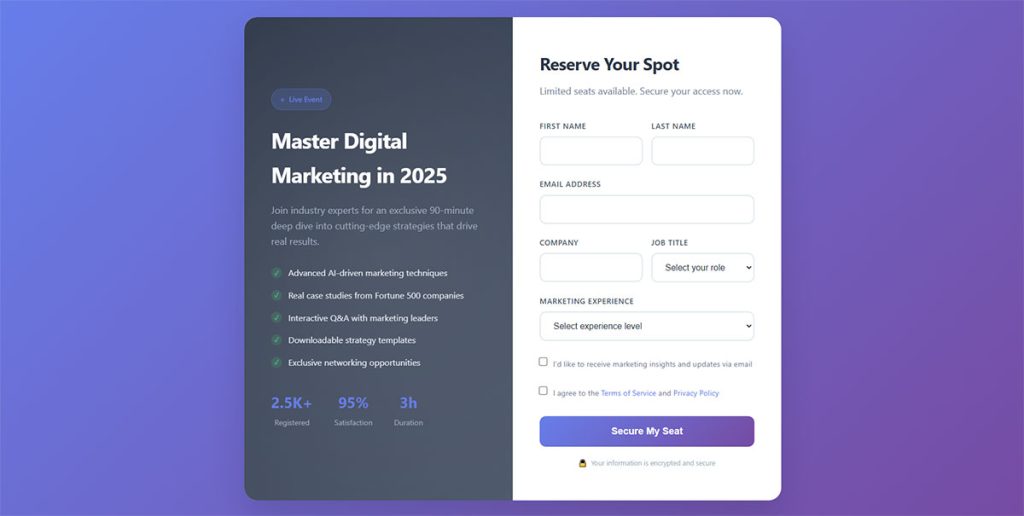
Two-Column Design Form
See the Pen
Premium Webinar Registration Form – Two Column Design by Bogdan Sandu (@bogdansandu)
on CodePen.
A sophisticated, award-winning style webinar registration form featuring a modern two-column layout. Built with pure HTML, CSS, and JavaScript – no frameworks required.
Eventbrite-Style Form
See the Pen
Premium Webinar Registration Form – Eventbrite Style by Bogdan Sandu (@bogdansandu)
on CodePen.
A sophisticated, award-winning webinar registration form inspired by Eventbrite’s design philosophy. Features a refined color palette of slate blues and emerald accents with premium typography and subtle micro-interactions.
Survey-Style Form
See the Pen
Modern Survey-Style Webinar Form with Stunning UX by Bogdan Sandu (@bogdansandu)
on CodePen.
Confirmation-Based Form (Double Opt-In)
See the Pen
Webinar Registration Form With Double Opt-In Flow by Bogdan Sandu (@bogdansandu)
on CodePen.
A sophisticated, award-winning style registration form implementing a complete double opt-in flow for webinar signups. Features a clean, professional design with subtle animations and premium user experience.
What Are the Types of Webinar Registration Form Templates
Webinar registration form templates fall into five main categories, each built for a different placement and conversion context.
The right type depends on your webinar platform, traffic source, and whether the audience is cold or warm.
What Is a Single-Field Registration Form Template
A single-field registration form captures only an email address. Conversion rates sit higher because friction is almost zero, which makes this format common for free webinars targeting large audiences.
Platforms like Demio and BigMarker support single-field templates natively. The tradeoff: less attendee data for segmentation, weaker lead qualification for B2B webinars where job title and company name matter for sales follow-up.
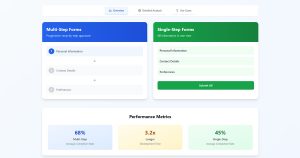
What Is a Multi-Step Registration Form Template
A multi-step form splits the registration into two or more screens. Screen one collects email. Screen two asks for company, role, and session preference.
This structure reduces perceived form length. According to conversion rate data, multi-step forms or single-step forms perform differently depending on the number of total fields, and multi-step consistently wins when a form exceeds four fields.
What Is an Embedded Webinar Registration Form Template
Embedded form templates sit directly inside a blog post, homepage, or sidebar using an iframe or JavaScript snippet. They keep visitors on the page instead of redirecting to an external registration landing page.
This type works well when comparing inline forms or popup forms for webinar sign-ups on content-heavy pages. Embedded forms reduce bounce rate because visitors never leave the content they came for.
What Is a Pop-Up Webinar Registration Form Template
A popup form for webinar registration appears based on triggers: scroll depth, time on page, or exit intent.
Exit intent popups are especially effective for webinar promotion. A visitor about to leave the page sees the registration form at the exact moment they would otherwise bounce. Timing matters here. Triggering too early kills trust. Triggering on exit gives one last chance at conversion.
WordPress sites can set this up with WordPress exit intent popup plugins that connect to most webinar platforms through Zapier.
What Is a Landing Page Registration Form Template
A landing page registration form template is a full standalone page built around one goal: getting the visitor to register.
The page includes the form alongside supporting elements like speaker bios, webinar agenda, countdown timer, social proof (attendee count or testimonials), and a clear CTA button. Tools like Unbounce, Leadpages, and Elementor offer pre-built landing page form templates designed for webinar conversion.
This type pairs well with paid ad traffic from Google Ads, LinkedIn Ads, or Facebook Ads. Paid traffic performs best when it lands on a focused page with zero navigation distractions. That is the reason most landing page forms strip away site headers, footers, and sidebars entirely.
What Fields Does a Webinar Registration Form Template Include
The form fields in a webinar registration template depend on the webinar type, audience, and what the organizer plans to do with the data after the event.
Here are the standard fields used across most webinar registration form templates:
- First name and last name — used for personalized confirmation emails and reminder sequences
- Email address — the single most critical field; required for calendar invites, reminders, and replay access
- Company name — common in B2B webinars; helps sales teams qualify leads after the event
- Job title — used for audience segmentation and identifying decision-makers
- Phone number — optional; typically included for high-ticket B2B webinars where sales follow-up happens by phone
- Industry or department — helps tailor post-webinar content and follow-up sequences
- Webinar session selection — required for recurring or multi-session webinar events hosted on platforms like HeySummit or BigMarker
- Time zone — relevant for global audiences attending live webinars across multiple time zones
Every additional field increases form abandonment. Research from HubSpot shows that reducing form fields from four to three increases completion rates by nearly 50%.
Use only the fields you will actually act on. If no one on the team reviews the “industry” field data, remove it. The best approach to choosing form fields for capturing high-quality leads is matching each field to a specific follow-up action in your CRM or email marketing tool.
For B2C webinars and free educational events, first name plus email address is usually enough. For B2B webinars tied to a sales pipeline in Salesforce or Pipedrive, adding company name and job title is standard because those fields drive lead scoring.
Including a GDPR consent checkbox is required for webinars targeting EU audiences. Organizers building GDPR compliant forms add an explicit opt-in checkbox with a link to their privacy policy, separate from the registration submit button.
How to Choose the Right Webinar Registration Form Template
Picking a webinar registration form template comes down to five factors: webinar format, audience type, platform compatibility, integration requirements, and compliance.
Webinar Format
Live webinars need time zone fields and session selectors. On-demand webinars skip scheduling fields entirely and focus on instant replay access. Recurring webinars on platforms like Livestorm or Demio require date-picker fields or dropdown menus for session selection.
Audience Type
B2B audiences expect professional-looking forms with company and role fields. B2C audiences convert better on shorter forms with just name and email. Cold traffic from paid ads responds to single-field or two-field templates. Warm traffic from email lists tolerates longer forms because trust already exists.
Platform Compatibility
GoToWebinar, Zoom Webinars, and Webex Events each have native registration forms with limited customization. Third-party form builders like Typeform, Jotform, or HubSpot Forms offer more form design control but require manual integration through Zapier or webhook connections.
WordPress sites using Gravity Forms or WordPress contact form plugins can build custom registration forms and connect them to any webinar platform through API or Zapier automations.
CRM and Email Integration
The registration form template must sync with your existing tools. Salesforce, HubSpot CRM, Zoho CRM, and Pipedrive all handle webinar registrant data differently. Choose a template that maps form fields directly to CRM contact properties without manual data entry.
Email marketing platforms like Mailchimp, ActiveCampaign, and HubSpot handle post-registration automation: confirmation emails, reminder sequences, and replay delivery. The form template needs native or Zapier-based connections to your email tool.
Compliance Requirements
Webinars targeting EU residents require GDPR consent fields. California audiences fall under CCPA rules. The form template needs to support GDPR consent form fields, separate opt-in checkboxes, and links to privacy policy and terms of service pages.
Form security also matters. SSL encryption on the registration page protects attendee data in transit. Honeypot fields and reCAPTCHA block spam registrations that inflate attendee counts with fake data.
What Are the Best Webinar Registration Form Templates
The best webinar registration form templates come from dedicated webinar platforms and standalone form builders. Each option trades off between customization, integration depth, and ease of setup.
Here are the top templates ranked by flexibility, platform integration, and conversion-focused features.
Demio Registration Form Template
Demio offers built-in registration pages with customizable fields, brand colors, and speaker bios. Native integrations with HubSpot, ActiveCampaign, Mailchimp, Drip, and Zapier. The template includes automated reminder emails, calendar invites, and replay page generation without third-party tools.
Best for: marketers who want a complete webinar registration and hosting solution in one platform.
Livestorm Registration Form Template
Livestorm provides customizable event registration form templates with conditional logic for field display. It supports custom domains, UTM parameter tracking for Google Analytics 4, and CRM sync with Salesforce and HubSpot CRM. Embedded registration widgets drop into any webpage via JavaScript snippet.
Best for: teams that need detailed attendee analytics and multi-event management from one dashboard.
GoToWebinar Registration Form Template
GoToWebinar’s native registration form includes standard fields plus custom questions. Integration with Salesforce, HubSpot, and Marketo works out of the box. The template auto-generates unique join links per registrant and handles multi-session series registration. Customization is limited compared to standalone form builders.
Best for: enterprise teams already using the GoTo product suite with large attendee volumes.
HubSpot Forms for Webinar Registration
HubSpot Forms connect directly to HubSpot CRM without any third-party integration. Progressive profiling shows different fields to returning visitors. The form supports form validation, smart fields, and automated email workflows triggered by form submission.
Best for: businesses already running their marketing and sales pipeline in HubSpot.
Typeform Webinar Registration Template
Typeform’s conversational forms present one question at a time, creating a form UX design that feels like a conversation instead of a traditional form. Integration with Zoom Webinars, GoToWebinar, and Calendly through Zapier. Built-in logic jumps show different fields based on previous answers.
Best for: brands that prioritize attendee experience and want a registration process that feels different from standard form pages.
Jotform Webinar Registration Template
Jotform offers hundreds of pre-built registration form templates including webinar-specific layouts. It supports payment collection through Stripe and PayPal for paid webinars, WordPress form with file upload capability, and conditional logic. Embeds into WordPress, Squarespace, and Wix with a single line of code.
Best for: organizers who need a free or low-cost form builder with broad integration support and fast setup.
WordPress Registration Form (Custom-Built)
Building a WordPress registration form gives full control over field structure, design, and data handling. Gravity Forms, WPForms, and Formidable Forms all support form builders with conditional logic, payment fields for paid webinars, and CRM integrations through add-ons or Zapier.
This route takes more setup time. But it means the registration form matches the site design exactly, loads faster than third-party embeds, and keeps all data inside the WordPress database or connected CRM.
Best for: WordPress site owners who want full customization and already use free WordPress form plugins or premium form builder plugins.
FAQ on Webinar Registration Form Templates
What is a webinar registration form template?
A webinar registration form template is a pre-built form layout that collects attendee information (name, email, company) before an online event. It connects to webinar platforms like Zoom Webinars or Demio and triggers confirmation emails and calendar invites automatically.
How many fields should a webinar registration form have?
Three to five fields perform best for most webinar types. First name, email address, and company name cover B2B lead capture. Every field added beyond five drops the registration conversion rate significantly, especially on mobile devices.
Which webinar platforms have built-in registration form templates?
GoToWebinar, Demio, Livestorm, BigMarker, Webex Events, and Zoom Webinars all include native registration forms. Customization varies by platform. Livestorm and Demio offer the most flexible branding and field options without third-party form builders like Typeform or Jotform.
Can I embed a webinar registration form on my WordPress site?
Yes. Most webinar platforms provide an iframe or JavaScript embed code. WordPress users can also build custom forms with Gravity Forms or WPForms and connect them to webinar platforms through Zapier or direct API integration for full design control.
What is the difference between a pop-up and embedded registration form?
Embedded forms sit directly inside a page and are always visible. Pop-up registration forms appear based on triggers like scroll depth or exit intent. Pop-ups work better for cold traffic. Embedded forms suit blog posts and content pages where visitors are already engaged.
How do I connect a webinar registration form to my CRM?
Native integrations exist between platforms like Livestorm and Salesforce, or Demio and HubSpot CRM. For other combinations, Zapier maps form fields to CRM contact properties. Direct API connections offer more reliable syncing for high-volume webinar registrations.
Do webinar registration forms need GDPR consent fields?
Yes, for webinars targeting EU audiences. GDPR requires an explicit opt-in checkbox separate from the submit button, plus a visible link to the privacy policy. California audiences fall under CCPA with similar disclosure requirements for attendee data collection.
What makes a webinar registration form high-converting?
Fewer form fields, a clear CTA button, speaker bios, a countdown timer, and social proof like attendee count. Mobile optimization and fast page load speed on the registration landing page also directly affect completion rates across all traffic sources.
Can I use a multi-step form for webinar registration?
Multi-step registration forms split fields across two or more screens, reducing perceived length. Screen one captures email. Screen two collects company and job title. This format consistently outperforms single-step forms when the total field count exceeds four.
How do I track webinar registration form performance?
Set up event tracking in Google Analytics 4 for form submissions. Monitor registration conversion rate, form abandonment rate, and source attribution through UTM parameters. Heatmap tools like Hotjar and Microsoft Clarity show exactly where visitors drop off inside the form.
Conclusion
Picking the right webinar registration form template is not a design decision. It is a conversion decision that affects every step of your webinar marketing funnel, from initial sign-up to post-webinar follow-up.
Match the template to your webinar format, audience segmentation, and CRM data sync requirements. A B2B webinar on Livestorm with Salesforce integration needs a different form structure than a free educational session promoted through Mailchimp to a B2C email list.
Test your form on mobile. Cut fields that no one acts on. Track form abandonment rate in Hotjar or Microsoft Clarity and A/B test CTA button text and placement.
The best-performing registration pages combine a focused sign-up form with speaker bios, social proof, and a countdown timer. Strip away everything else.
Start with one of the templates covered above, connect it to your webinar platform and email marketing automation, and optimize your form based on actual registrant data instead of guesswork.