



Gallup’s 2024 data shows only 31% of U.S. employees feel engaged at work. Annual surveys can’t catch that kind of decline fast enough. Pulse surveys can. These short, frequent questionnaires…
Table of Contents
Your email list grows or dies based on one thing: your signup form.
The right subscription form template converts casual visitors into engaged subscribers. The wrong one gets ignored, closed, or worse, annoys people into leaving your site entirely.
This guide covers everything you need to build high-converting email capture forms. You’ll learn about popup and inline formats, design specifications, platform integrations with tools like Mailchimp and ConvertKit, and templates for specific industries.
Whether you’re building your first newsletter signup or looking to optimize forms that aren’t performing, you’ll find actionable strategies to grow your mailing list faster.
What is a Subscription Form Template
A subscription form template is a pre-built form layout designed to collect email addresses from website visitors.
These templates include input fields, submit buttons, and styling that you can customize for your brand.
Email marketing platforms like Mailchimp, ConvertKit, and ActiveCampaign offer built-in templates. Third-party tools like OptinMonster and Privy provide more advanced options.
How Does a Subscription Form Template Work
The template connects to your email service provider through an API integration or embed code.
When someone enters their email and clicks submit, the data syncs directly to your mailing list.
Why Use a Subscription Form Template Instead of Building from Scratch
Templates save hours of design and development time. They come with tested layouts that already follow best practices for sign up forms.
Building custom HTML and CSS from zero requires coding knowledge. Templates let you launch in minutes.
Subscription Form Templates
Modern Subscription Form Widget
See the Pen
Modern Subscription Form Widget by Bogdan Sandu (@bogdansandu)
on CodePen.
A sleek, conversion-focused email subscription form with contemporary design patterns and smooth micro-interactions.
Modern Header Subscription Bar
See the Pen
Modern Header Subscription Bar by Bogdan Sandu (@bogdansandu)
on CodePen.
A sleek, animated header bar perfect for announcements and email collection. Features a warm orange/cream color palette, smooth animations, and thoughtful UX patterns.
Modern Inline Newsletter Form
See the Pen
Modern Inline Newsletter Form by Bogdan Sandu (@bogdansandu)
on CodePen.
A sophisticated, conversion-optimized newsletter signup form designed for embedding in blog posts, landing pages, and product pages. Features a premium aesthetic that avoids typical startup clichés while maximizing user engagement.
Modern Footer Subscription Form with Social Proof
See the Pen
Modern Footer Subscription Form with Social Proof by Bogdan Sandu (@bogdansandu)
on CodePen.
A premium, startup-style newsletter signup form designed to maximize conversions through thoughtful UX and social proof elements. Features a sophisticated coral and teal color palette, custom typography, and micro-interactions that feel polished and trustworthy.
Modern Subscription Popup with Advanced Micro-Interactions
See the Pen
Modern Subscription Popup with Advanced Micro-Interactions by Bogdan Sandu (@bogdansandu)
on CodePen.
A premium, startup-style subscription modal featuring sophisticated micro-interactions and delightful user feedback. Built with vanilla HTML, CSS, and JavaScript – no frameworks required.
Modern Slide-In Subscription Form
See the Pen
Modern Slide-In Subscription Form by Bogdan Sandu (@bogdansandu)
on CodePen.
A sleek, non-intrusive subscription form that slides in elegantly from the right after 30% page scroll. Built with modern web standards and startup-friendly design principles.
Premium Lead Magnet Subscription Form
See the Pen
Premium Lead Magnet Subscription Form by Bogdan Sandu (@bogdansandu)
on CodePen.
A modern, conversion-optimized lead magnet form designed with startup aesthetics in mind. Features a sophisticated coral-to-orange gradient hero section paired with sage green accents, avoiding typical blue/purple clichés.
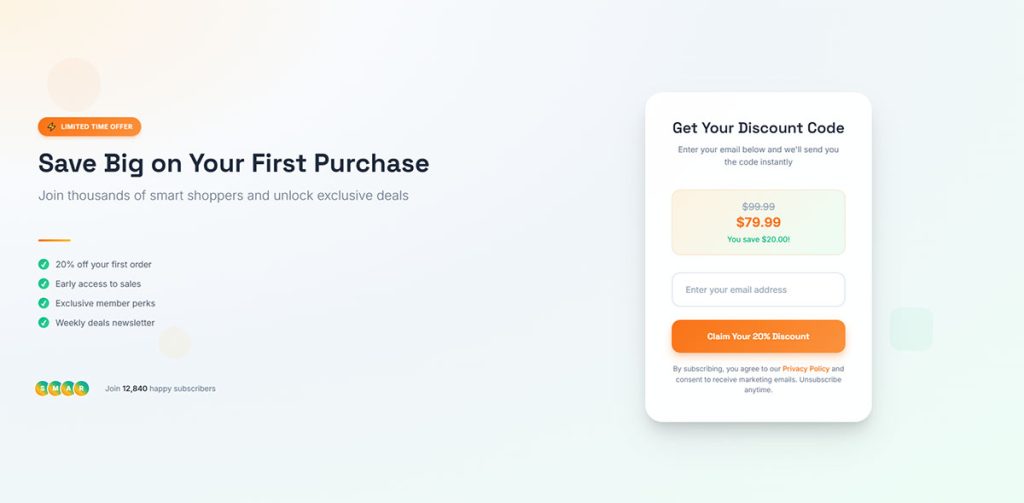
Modern Discount Subscription Form
See the Pen
Modern Discount Subscription Form by Bogdan Sandu (@bogdansandu)
on CodePen.
A visually stunning, conversion-optimized email capture form featuring:
- Asymmetrical split-screen layout with gradient mesh backgrounds
- Warm color palette (orange/amber/emerald) avoiding cliché blue/purple
- Custom fonts (Inter + Space Grotesk) with strategic typography hierarchy
- Glassmorphism effects with multi-layered shadows
Premium Content Upgrade Form
See the Pen
Premium Content Upgrade Form by Bogdan Sandu (@bogdansandu)
on CodePen.
A visually stunning, conversion-optimized subscription form designed with startup-level aesthetics. Perfect for lead magnets, PDF downloads, and email list building.
Types of Subscription Form Templates
Different types of forms serve different purposes on your website.
The format you choose affects conversion rates, user experience, and how visitors perceive your brand.
What are Pop-up Subscription Form Templates
Popup forms appear as overlay windows that demand attention. They typically convert between 3-9% of visitors.
Use time-delayed triggers or scroll-based activation to reduce bounce rates.
What are Inline Subscription Form Templates
Inline forms sit directly within your page content. They feel less intrusive than popups.
When deciding between inline forms or popup forms, consider your audience’s tolerance for interruptions.
What are Slide-in Subscription Form Templates
Slide-in forms animate from the corner of the screen, usually bottom-right. Less aggressive than full popups but still attention-grabbing.
What are Full-screen Subscription Form Templates
These welcome mats cover the entire viewport. High-impact, high-risk. They either convert well or annoy visitors immediately.
What are Floating Bar Subscription Form Templates
A thin horizontal bar fixed to the top or bottom of the screen. Persistent visibility without blocking content.
Hello Bar popularized this format. Conversion rates hover around 1-2%, but the non-intrusive nature keeps bounce rates low.
What are Exit-intent Subscription Form Templates
Exit-intent forms trigger when mouse movement suggests a visitor is leaving. Last chance to capture an email before they go.
Check out these exit intent popup examples for inspiration on timing and messaging.
Components of a Subscription Form Template
Every effective email signup form contains specific elements that work together to capture subscriber information.
What Fields Should a Subscription Form Template Include
Fewer form fields mean higher completion rates. Only ask for what you actually need.
Email Address Field
The only required field. Use field validation to catch typos before submission.
Name Fields
First name enables personalization in email campaigns. Last name is rarely necessary for newsletters.
Submit Button
Action-oriented text outperforms generic labels. “Get Free Updates” beats “Submit” every time.
Privacy Policy Checkbox
Required for GDPR compliant forms in the EU. Link to your privacy policy directly from the checkbox label.
What is the Headline in a Subscription Form Template
The headline communicates your value proposition in under 10 words. It answers: why should someone give you their email?
What is a Call to Action in Subscription Forms
Your CTA button text drives clicks. Specific beats vague. “Send Me the Guide” converts better than “Subscribe.”
What are Incentive Offers in Subscription Form Templates
A lead magnet gives visitors a reason to subscribe. Common incentives include:
- Discount codes (10-20% off first order)
- Free ebooks or guides
- Exclusive content access
- Early product announcements
- Free shipping offers
Design Specifications for Subscription Form Templates
Good form design balances visual appeal with conversion optimization.
What Size Should a Subscription Form Template Be
Popup forms work best at 400-600px wide on desktop. Mobile forms should span 90-95% of screen width with touch-friendly tap targets of at least 44×44 pixels.
What Colors Work Best for Subscription Form Templates
High contrast between background and text improves readability. CTA buttons should pop against the form background.
Brand colors build recognition, but test button colors. Sometimes off-brand colors convert better.
What Fonts are Used in Subscription Form Templates
Sans-serif fonts like Inter, Open Sans, and Roboto dominate modern form design. Keep body text at 16px minimum for accessibility.
Where Should You Place a Subscription Form on a Website
Placement impacts visibility and conversion rates. Test multiple locations to find what works for your audience.
Header Placement
Maximum visibility but limited space. Works for simple email-only forms with strong CTAs.
Footer Placement
Catches engaged readers who scroll through entire pages. Lower conversion but higher intent subscribers.
Sidebar Placement
Traditional blog position. Stays visible as readers scroll through content.
Content Area Placement
Mid-article forms interrupt reading at strategic points. Effective in long-form content when the form relates to the topic.
Subscription Form Templates by Industry
Different industries require different approaches to email list building.
What Subscription Form Templates Work for E-commerce Websites
Lead generation for ecommerce focuses on discount-driven incentives.
Effective elements include:
- First-purchase discount codes
- Free shipping thresholds
- Early access to sales
- Back-in-stock notifications
Platforms like Klaviyo and Privy integrate directly with Shopify and other ecommerce systems.
What Subscription Form Templates Work for Blog Websites
Content upgrades specific to each post convert better than generic newsletter signups.
WordPress sites can use plugins to display different opt-in offers based on post category or topic.
What Subscription Form Templates Work for SaaS Companies
Lead generation for SaaS emphasizes educational content over discounts.
Effective lead magnets: product demos, free trials, industry reports, webinar registrations, and ROI calculators.
What Subscription Form Templates Work for News Websites
Frequency options let readers choose daily, weekly, or breaking news alerts. Segment by topic interest for better engagement.
Metered paywalls often use subscription forms to capture emails before requiring payment.
What Subscription Form Templates Work for Non-profit Organizations
Mission-driven messaging replaces promotional language. Focus on impact stories and community updates.
Combine newsletter signups with donation form options when appropriate. Many supporters prefer ongoing engagement before giving money.
Technical Specifications of Subscription Form Templates
Understanding the technical side helps you troubleshoot issues and customize templates beyond basic settings.
What HTML Structure Do Subscription Form Templates Use
Most templates use a standard form element with input fields, labels, and a submit button. Following HTML form best practices improves both accessibility and deliverability.
What CSS Styles Apply to Subscription Form Templates
CSS3 controls colors, fonts, spacing, borders, and responsive behavior. Most builders let you customize styles without touching code.
How Do Subscription Form Templates Connect to Email Marketing Platforms
Integration happens through embed codes, JavaScript snippets, or direct API connections.
Mailchimp Integration
Embed forms directly or use the API for custom implementations. Supports double opt-in by default.
ConvertKit Integration
Form builder included in all plans. Tags subscribers automatically based on which form they used.
ActiveCampaign Integration
Advanced automation triggers when forms submit. Supports conditional logic in form displays.
HubSpot Integration
Forms feed directly into CRM records. Free tier includes basic form functionality.
What Validation Methods Do Subscription Form Templates Use
Proper form validation catches errors before submission, reducing failed signups and improving data quality.
Understanding client-side vs server-side form input validation helps you implement the right checks.
What is Double Opt-in in Subscription Forms
Subscribers confirm their email by clicking a link in a confirmation message. Required in some countries, recommended everywhere for list quality.
What is Single Opt-in in Subscription Forms
Immediate list addition without email confirmation. Higher signup rates but more fake emails and spam complaints.
Conversion Metrics for Subscription Form Templates
Tracking the right numbers tells you if your forms actually work.
What Conversion Rate Should a Subscription Form Template Achieve
Check conversion rate benchmarks for your industry. Popup forms average 3-9%; inline forms typically hit 1-3%.
How Do You Measure Subscription Form Performance
Track impressions, submissions, and confirmation completions. Calculate conversion rate as submissions divided by impressions.
Most email platforms include basic analytics. Google Analytics event tracking provides deeper insights.
What is Form Abandonment Rate
The percentage of visitors who start but don’t finish your form. High abandonment signals friction in your signup process.
Tips for improving form abandonment rate include reducing fields and adding progress indicators.
Mobile Subscription Form Templates
Over 60% of web traffic comes from mobile devices. Your forms must work flawlessly on small screens.
What Makes a Subscription Form Template Mobile-friendly
Responsive design adapts layout to screen size. Touch-friendly buttons with adequate spacing prevent mis-taps.
What Screen Sizes Should Subscription Form Templates Support
Test at 320px (small phones), 375px (iPhone), 414px (larger phones), and 768px (tablets). Use CSS media queries to adjust layouts.
What Touch Target Sizes Work for Mobile Subscription Forms
Minimum 44×44 pixels for buttons and input fields. Apple and Google both recommend this size for comfortable tapping.
GDPR and Subscription Form Templates
Privacy regulations affect how you collect and store subscriber data.
What Compliance Requirements Apply to Subscription Form Templates
GDPR applies to EU residents. CAN-SPAM covers US subscribers. CASL governs Canadian email marketing.
Review GDPR consent form examples to see proper implementation.
What Consent Language Should a Subscription Form Include
Clear explanation of what subscribers receive and how often. Link to privacy policy. Unchecked consent checkbox for GDPR.
How Do You Store Subscriber Data from Form Templates
Email platforms handle storage and compliance. Ensure your provider offers data export and deletion capabilities for GDPR requests.
Accessibility in Subscription Form Templates
Accessible forms work for everyone, including users with disabilities.
What Accessibility Standards Apply to Subscription Form Templates
WCAG 2.1 guidelines define accessibility requirements. Following form accessibility best practices expands your potential audience.
How Do Screen Readers Interact with Subscription Form Templates
Proper label elements connect text to input fields. ARIA attributes provide additional context for complex form elements.
What Keyboard Navigation Features Should Subscription Forms Have
Tab order follows logical sequence. Focus states clearly visible. Enter key submits the form.
Common Subscription Form Template Platforms
Dozens of tools offer form templates. Your choice depends on existing tech stack and budget.
What are the Best Subscription Form Builders
Selection criteria: ease of use, template variety, integration options, pricing, and analytics depth.
Email-first platforms:
- Mailchimp – Free tier, good for beginners
- ConvertKit – Creator-focused, tag-based organization
- ActiveCampaign – Advanced automation
- AWeber – Reliable, long-standing provider
- GetResponse – Includes landing page builder
- MailerLite – Budget-friendly with solid features
Popup and lead capture specialists:
- OptinMonster – Extensive targeting options
- Sumo – Free tier available
- Privy – E-commerce focused
- Hello Bar – Simple floating bars
Form builders with subscription features:
- Typeform – Conversational format
- JotForm – Extensive template library
- Wufoo – Straightforward interface
- Google Forms – Free but limited styling
For WordPress sites, explore free WordPress form plugins or WordPress lead generation plugins for more options.
If you need exit popups specifically, check out WordPress exit intent popup plugins.
How to Customize a Subscription Form Template
Templates provide the starting point. Customization makes them yours.
What Elements Can You Change in a Subscription Form Template
Colors, fonts, field labels, button text, images, and layout. Most builders offer visual editors; some allow custom CSS.
How Do You Add Custom Fields to a Subscription Form Template
Choose the form fields for capturing high-quality leads based on your segmentation needs.
Common additions: phone number, company name, job title, industry, or interest categories.
How Do You Match a Subscription Form Template to Your Brand
Use brand colors for backgrounds and buttons. Upload your logo. Match typography to your website fonts.
Review form design examples for inspiration on branded implementations.
Good form UX design keeps visual customization from hurting usability.
FAQ on Subscription Form Templates
What is the best subscription form template for beginners?
Start with a simple inline or popup template from your email platform. Mailchimp, MailerLite, and ConvertKit offer drag-and-drop builders that require zero coding. Focus on one email field and a clear call to action button.
How many fields should a subscription form have?
One to three fields maximum. Email-only forms convert highest. Adding a first name field enables personalization but reduces signups by 10-25%. Every additional field drops conversion rates further.
Are popup subscription forms annoying to visitors?
Poorly timed popups annoy visitors. Well-designed ones convert. Use time delays of 30-60 seconds, scroll triggers at 50%, or exit-intent activation. Avoid showing popups immediately on page load.
What conversion rate should I expect from subscription forms?
Popup forms average 3-9% conversion. Inline forms hit 1-3%. Floating bars reach 1-2%. Your results depend on traffic quality, offer strength, and landing page forms placement.
Do I need double opt-in for my subscription form?
GDPR requires verifiable consent for EU subscribers, making double opt-in safer legally. Single opt-in grows lists faster but attracts more fake emails. Double opt-in produces higher quality, more engaged subscribers.
How do I connect a subscription form to Mailchimp?
Mailchimp provides embed codes for any website. Copy the HTML from your signup form settings and paste it into your site. WordPress users can install Mailchimp’s plugin for easier integration.
Can I use subscription form templates on WordPress?
Yes. WordPress forms work through plugins or embedded code from email providers. WordPress contact form plugins like WPForms and Gravity Forms include subscription form functionality with email platform integrations.
What makes a subscription form mobile-friendly?
Responsive design that adapts to screen size. Touch targets of 44×44 pixels minimum. Single-column layouts. Large, readable text at 16px or higher. Forms should load fast and work without horizontal scrolling.
How do I increase my subscription form conversion rate?
Strategies for increasing form conversions include offering valuable lead magnets, reducing form fields, writing specific CTA button text, and A/B testing headlines. Test one element at a time to identify what works.
Are subscription form templates GDPR compliant?
Templates provide structure, not compliance. You must add proper consent language, privacy policy links, and unchecked opt-in checkboxes. Ensure your email platform stores consent records and supports data deletion requests.
Conclusion
The right subscription form templates turn passive visitors into active subscribers. Your choice of format, fields, and placement directly impacts list growth.
Start simple. One email field, one compelling headline, one clear submit button.
Test different approaches. A/B test your CTAs, experiment with timing triggers, and track your form analytics to see what resonates with your audience.
Platforms like AWeber, GetResponse, and Klaviyo make implementation straightforward. Pick one that integrates with your existing tech stack.
Remember that compliance matters. Double opt-in protects your sender reputation and keeps you on the right side of privacy regulations.
Build your lead capture forms with intention, measure results consistently, and refine based on real subscriber behavior.