


A new client doesn’t sign with an accounting firm because a landing page convinced them. They sign because someone they trust vouched for the firm, or because the firm showed…
Table of contents
A shopper hands over an email address before they ever hand over a credit card. That’s the whole mechanic behind lead generation for ecommerce: onsite forms, popups, quizzes, and paid campaigns built to catch contact details before checkout instead of after.
Store owners run it through email service providers, onsite popup tools, and paid social platforms. The scorecard looks different than in B2B too, weighed against cart abandonment rates and cost per lead rather than a quarter-long sales cycle with a rep following up.
Klaviyo’s 2026 benchmark report, drawn from over 183,000 ecommerce brands, puts email’s average contribution at 27% of total store revenue, ranging from 12% to 70% depending on how mature the program is.
What Is Lead Generation for Ecommerce?
There’s no sales rep chasing the contact for weeks after the form gets filled out. That’s the first thing that separates this from lead gen elsewhere: the consideration window is short, sometimes measured in hours rather than months.
Contact gets captured through onsite forms, popups, and quizzes rather than a sales development rep working a phone list, and once that address is on file, success gets measured by capture rate and revenue per subscriber instead of the size of a single deal.
Store owners often blur one line here. The gap between a standard contact form and a form designed for lead generation comes down to intent, not design.
One resolves a support question. The other starts a relationship the store plans to monetize later, usually through email or SMS.
A qualified lead in this context isn’t just an email address sitting in a spreadsheet. It’s a contact tied to a signal, a completed quiz, a cart addition, a specific product page visit, that suggests they’re closer to buying than a random newsletter subscriber.
Lead generation also gets confused with demand generation, and the two aim at different stages of awareness. Capture happens after someone already knows what a store sells and needs a reason to convert now, while the split between lead generation and demand generation matters more for brands still building that initial awareness through content or influencer work.
How Does the Ecommerce Lead Generation Funnel Work?
A visitor becomes a contact. With any luck, that contact turns into an engaged subscriber, and eventually a paying customer. Most people label those moves capture, nurture, and convert, and each produces something different: a contact record out of the first, an engagement score out of the second, a transaction out of the third.
For a fuller breakdown of what a lead generation funnel actually tracks at each stage, the mechanics stay consistent across industries. Ecommerce just compresses the timeline into days instead of months.
Average onsite popup conversion sits at 4.65%, up from 4.01% the year before, and the top-performing campaigns convert well above 19% (Wisepops, 2025). Automated nurture flows generate up to 30x more revenue per recipient than one-off campaigns (Klaviyo, 2024), which is a big reason the middle of the funnel gets so much attention. Before purchase, though, the average cart abandonment rate runs 70.19% across 49 studies (Baymard Institute, 2024), so a lot still leaks out right at the end.
Top of Funnel: Capture
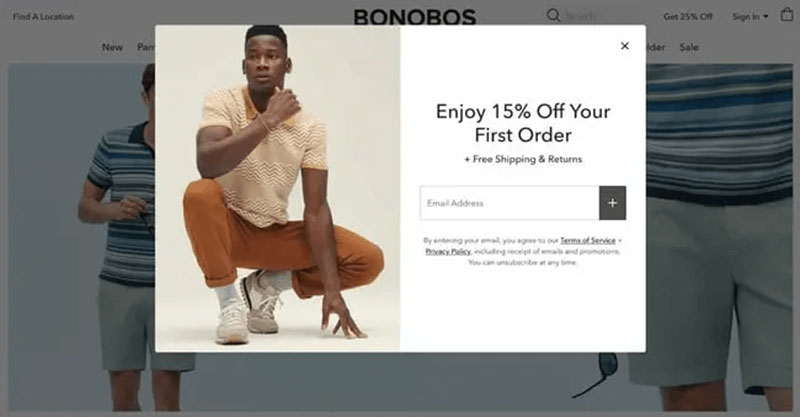
Capture is where a visitor becomes a contact, usually through an email field, a phone number field, or both.
Most stores lean on a mix of mechanisms instead of betting on one tactic: onsite popups and embedded forms, quiz funnels that trade a personalized result for an email address, checkout fields that grab a contact even when the sale doesn’t close. The quality of this stage depends on how website forms get used for lead generation in the first place, since a poorly placed form can suppress the exact traffic it’s meant to convert.
Middle of Funnel: Nurture
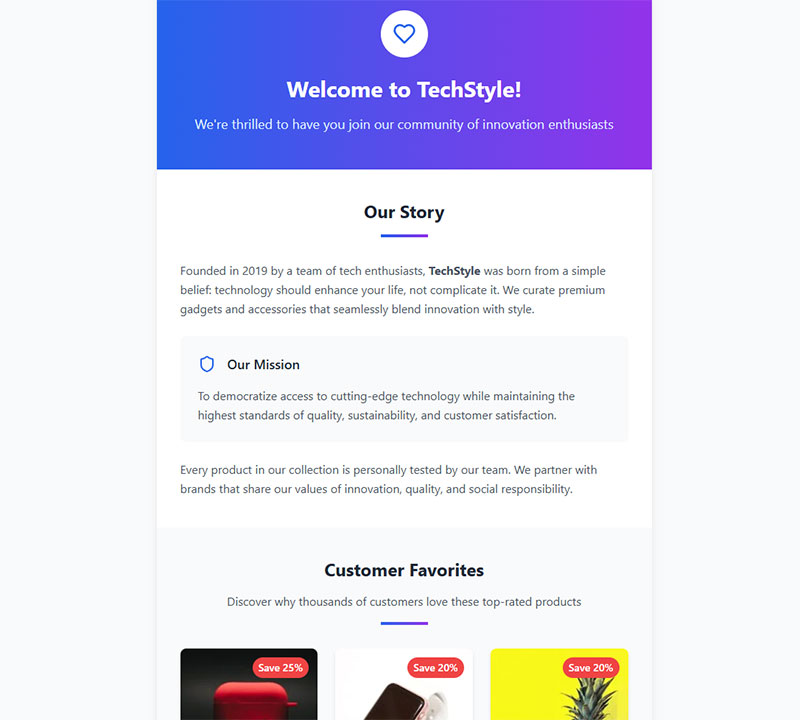
Nurture is the stretch between getting an email address and getting a first order. Welcome sequences introduce the brand, usually with a discount code attached, and behavioral triggers respond to browsing or cart activity while segmentation keeps new subscribers separate from lapsed customers so the messaging doesn’t blur together.
This is the stage where a generic newsletter subscription list turns into a segmented, revenue-producing asset, assuming the flows are actually built out and not left on autopilot.
Bottom of Funnel: Convert
Convert is blunt. Either the lead becomes a paying customer or they don’t.
Cart abandonment is the biggest leak at this stage, and it’s not a small one. Most stores lose seven out of ten carts before checkout completes, which is exactly why abandoned cart recovery sequences carry so much weight in ecommerce lead generation specifically.
Checkout friction, unexpected shipping costs, and forced account creation are the usual suspects behind that drop-off, more so than a weak offer earlier in the funnel.
What Lead Magnets Convert Best for Ecommerce Stores?
A lead magnet is the specific incentive offered in exchange for contact details, and the format matters more than most stores assume.
Lead magnets built for ecommerce behave differently than the whitepapers and webinars common in B2B, mostly because the buyer is closer to a purchase decision already.
Discount and Shipping Offers
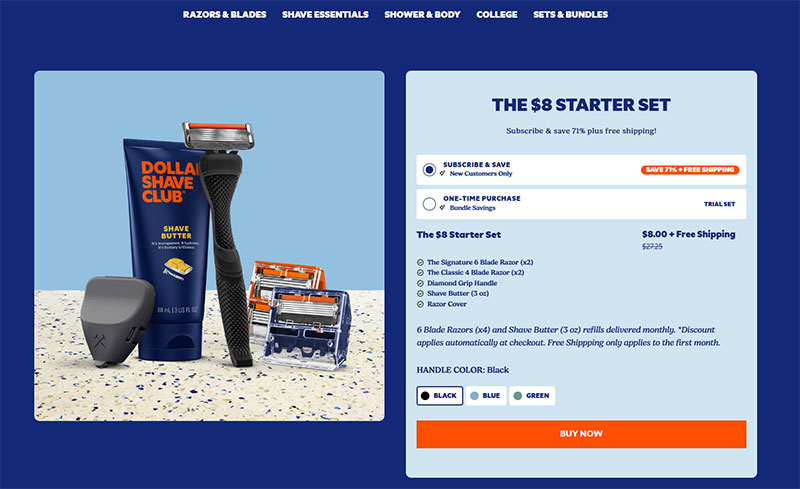
These are the default choice for a reason. They’re easy to build and they speak directly to price-sensitive shoppers. Almost any form builder can put one together quickly, the incentive ties straight to a purchase, and it works across nearly every product category.
The downside shows up slower. Margin erodes fast when discounts get stacked too aggressively, and some of the people captured this way are hunting for the cheapest price, not a brand relationship. They may never buy again once the code runs out.
Interactive and Quiz-Based Magnets
Quizzes trade a few minutes of the shopper’s attention for a personalized product recommendation, and they tend to pull in higher-intent contacts than a plain popup.
Function of Beauty leads its site with a hair quiz rather than a standard product catalog, collecting hair type, styling habits, and fragrance preference before revealing a custom formula and capturing the email address needed to view results.
The approach works because using quizzes and interactive forms for lead generation gives the store first-party data on customer preferences, not just a name and an inbox. It takes longer to build than a basic popup, though, and needs real logic behind the questions or the personalization feels fake.
Gated Content Offers
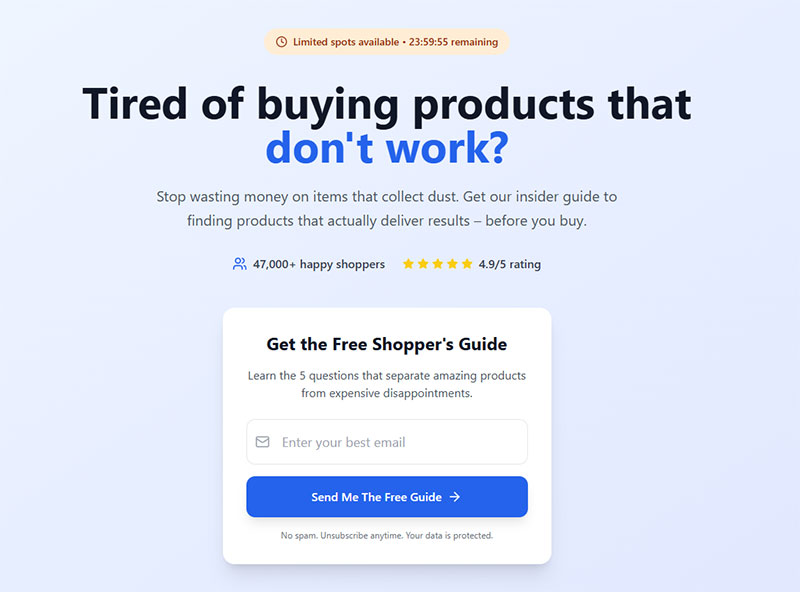
Gated content works better for education-heavy categories than for impulse purchases.
| Works well when | Underperforms when |
|---|---|
| The product needs explanation (skincare routines, supplements, tech gear) | The product is a simple, low-consideration purchase |
| The brand has genuine expertise to share (buying guides, sizing charts) | The content is a thin repackage of information already on the product page |
| The audience is still researching, not ready to buy today | The shopper already has strong purchase intent and just wants to check out |
Which Lead Capture Channels Work Best for Ecommerce?
Channel choice depends on where the shopper is in their visit, not on which tool has the flashiest features.
| Channel | Typical Cost | Typical Conversion | Best Fit |
|---|---|---|---|
| Onsite popup or form | Low, mostly the tool subscription | 2.8% to 4.8% average, lower on exit-intent, higher on click-triggered | Most stores, any traffic source |
| Email and SMS opt-in | Low, built into ESP cost | Varies by placement and field count | Stores with repeat-purchase products |
| Paid social lead ads | Highest, pay per click or impression | Depends on audience targeting | Stores scaling beyond organic traffic |
Onsite Capture
Onsite capture covers popups, embedded forms, and slide-ins, and it’s still the cheapest lever most stores have.
Field count matters more than design polish. Popups with one to three fields convert at roughly 2.1% to 2.2%, while adding a fourth field drops that rate to about 1.5%, and five or more fields to roughly 1.4% (Omnisend, 2026).
Most stores reach for OptinMonster or Privy for popup and slide-in capture, Justuno when they want to run onsite conversion tests, or Shopify Forms for the native, no-cost option built into the platform. There’s real variety in the types of popups available, and matching the trigger (exit-intent, scroll depth, time delay) to the page matters as much as the offer itself.
Email and SMS Capture
Email carries almost no legal friction and works for nearly any store. SMS converts faster, but it comes with stricter written-consent requirements, and both usually get collected in the same form anyway, staged as two fields rather than one.
Getting the opt-in itself right is half the battle. Sign-up form best practices cover the field order, the disclosure language, and the confirmation step that keeps a list compliant from day one.
Klaviyo, Mailchimp, and Omnisend all handle this dual capture natively, which is why most ecommerce stacks lean on one of the three rather than stitching together separate tools.
Paid Social Capture
Paid social skips the organic traffic requirement entirely. It buys leads directly through Meta Ads, Google Ads, or TikTok Ads lead forms.
Retargeting ads and lookalike audiences extend this further, putting the offer in front of people who resemble existing customers rather than cold traffic. Meta’s lead ads handle in-platform form completion well, TikTok leans toward younger, video-first audiences, and Google Ads tends to catch people already comparing products with real intent to buy.
How Do You Score and Qualify Ecommerce Leads?
Lead scoring assigns a value to a contact based on behavior and, to a lesser extent, demographics.
The behavioral side carries more weight in ecommerce than the demographic side, mostly because purchase intent shows up in actions long before it shows up in a job title or income bracket.
Every meaningful action along the way counts as one of the micro conversions that feed a scoring model, and tracking these small steps is what separates a real qualification system from a gut-feel guess.
Behavioral Scoring Criteria
A handful of actions tend to raise a lead’s score: repeat visits to the same product page in a short window, adding an item to cart without finishing checkout, opening multiple emails or clicking through to the site, finishing a quiz or product finder.
A contact who abandons a cart twice in one week is a stronger lead than one who opened a single newsletter, and most scoring models weight the two very differently.
Demographic Scoring Criteria
Demographic data plays a smaller, supporting role here.
Location can inform shipping-cost messaging. Device type can flag whether a contact needs a mobile-optimized checkout nudge. Neither one predicts purchase intent nearly as well as behavior does.
Tracking the right numbers matters more than tracking every number. Lead generation KPIs worth tracking usually center on capture rate, cost per lead, and time-to-first-purchase rather than raw list size.
What Nurture Sequences Turn Ecommerce Leads Into Customers?
A nurture sequence is the automated messaging that runs between capture and first purchase, and it’s where most of the actual revenue gets made.
Email marketing still delivers strong returns for this work, averaging $36 to $42 back for every $1 spent (Litmus, 2025).
Welcome and Onboarding Flows
A typical structure sends three emails on a loose schedule: one immediately, introducing the brand and delivering the discount code promised at signup; a second two or three days later, covering product education or bestsellers; a third five to seven days out, reminding the shopper the discount is about to expire.
Building this out properly beats copying a generic template. Starting from existing lead nurturing templates and adjusting timing to match average order value tends to outperform a one-size-fits-all cadence.
Abandonment and Win-Back Flows
These flows target contacts who showed intent and then went quiet.
| Flow | Trigger | Typical Timing |
|---|---|---|
| Cart abandonment | Item added, checkout not completed | 1 hour, 24 hours, 72 hours |
| Browse abandonment | Product viewed, no cart activity | Same day, next day |
| Win-back | No purchase in 60 to 90 days | Single email or short 2-email burst |
Win-back flows tend to have the lowest engagement of the three, simply because the audience has already disengaged once.
What Compliance Rules Govern Ecommerce Lead Capture?
Compliance isn’t optional overhead here. It determines whether a captured contact can legally be marketed to at all.
GDPR Requirements
GDPR applies to any store collecting contact details from EU residents, regardless of where the store itself is based.
Consent has to be affirmative, specific, and separate from other terms and conditions. A pre-checked box doesn’t count.
Building this correctly from the start saves a rebuild later. Creating GDPR compliant forms means the consent checkbox, the privacy link, and the data-use disclosure all live on the same form as the capture field itself: an explicit, unticked opt-in box, a clear statement of how the data gets used, and an accessible way to withdraw consent later.
CAN-SPAM Act Requirements
The core obligations are simple enough: accurate sender information in every marketing email, a working unsubscribe link honored within 10 business days, and no misleading subject lines.
CAN-SPAM is less strict than GDPR on the consent side, since it allows opt-out rather than requiring opt-in upfront, but the unsubscribe and disclosure requirements are non-negotiable.
CCPA Requirements
CCPA gives California residents the right to know what data a store holds on them and the right to request its deletion.
This matters for any ecommerce brand selling nationally, since geographic filtering rarely catches every California-based subscriber cleanly.
SMS capture carries its own layer on top of all this. The TCPA requires prior express written consent before sending marketing texts, and violations carry statutory damages of $500 to $1,500 per message, with no cap on total exposure across a campaign.
| Regulation | Scope | Core Requirement | Penalty Range |
|---|---|---|---|
| GDPR | EU residents | Affirmative opt-in consent | Up to 4% of global revenue |
| CAN-SPAM | US email marketing | Working unsubscribe, accurate sender info | Per-email FTC penalties |
| CCPA | California residents | Right to know and delete data | Statutory and enforcement fines |
| TCPA | US SMS and calls | Prior express written consent | $500 to $1,500 per message |
How Much Does Ecommerce Lead Generation Cost?
Cost per lead varies more by channel than by store size.
Ecommerce sits on the cheap end of the spectrum compared to most other industries, mostly because average order values are lower and inbound traffic volume is higher.
Average cost per lead for ecommerce runs $83 through organic channels and $98 through paid channels (FirstPageSage data via HubSpot Research, 2025). Across all industries on Google Ads, the blended average cost per lead was $66.69 in the most recent report, down from $70.11 the year before, the first year-over-year decline in five years (WordStream/LocaliQ, 2026).
Financial services and legal run considerably higher than either figure, by comparison, since those industries chase far fewer, far higher-value contacts.
A raw dollar figure means little on its own. Conversion rate benchmarks by industry matter just as much, since a cheap lead that rarely converts can cost more per sale than an expensive one that converts reliably.
Cost per lead and customer acquisition cost measure two different things, and mixing them up leads to bad budget decisions. Cost per lead is total spend divided by contacts captured, whether or not they buy. Customer acquisition cost is total spend divided by customers who actually complete a purchase, which is a very different denominator.
A store paying $2 per lead through a popup but converting only 1% of those leads ends up with a higher customer acquisition cost than a store paying $15 per lead at a 10% conversion rate.
Cost also moves with industry competitiveness, seasonality, and how tightly the offer matches the traffic source it’s shown to.
The number that actually matters for profitability is cost per lead measured against average order value, not against a generic industry benchmark.
How Do You Attribute Ecommerce Leads to Revenue?
Attribution assigns credit for a sale to the marketing touchpoints that led up to it.
The model chosen changes which channels look profitable and which look wasteful, sometimes dramatically.
| Model | Data Requirement | Bias | Best Fit |
|---|---|---|---|
| First-click | Minimal | Overstates top-of-funnel channels | Brand awareness campaigns |
| Last-click | Minimal | Overstates checkout-stage channels | Short consideration window stores |
| Multi-touch / data-driven | High conversion volume needed | More balanced across the journey | Longer, multi-session buying paths |
First-Click and Last-Click Models
First-click gives full credit to whatever touchpoint introduced the shopper to the brand, whether that was an ad, a social post, or an organic search result.
Last-click works the other way around. It credits the final touchpoint before purchase in full, usually an email link or a retargeting ad, and ignores everything that came before it.
Both get something wrong. First-click ignores the nurture work that actually closed the sale, and neither model accounts for anything that happened in between the first touch and the last.
Stores with a short path from discovery to purchase get away with last-click longer than stores selling considered purchases like furniture or electronics.
Multi-Touch Models
Multi-touch spreads credit across every touchpoint in the path, weighted by contribution rather than position.
Google Ads runs its own version of this, called data-driven attribution, and Google made it the default for every new conversion action, removing the old minimum-volume requirement that used to gate access to the model.
Google still recommends around 200 to 300 conversions and 2,000 to 3,000 ad interactions within 30 days for the model to produce its most reliable weighting, but falling short of that no longer disqualifies an account from data-driven attribution or forces a fallback to last-click (Google Ads Help documentation, 2026).
Smaller ecommerce stores that still default to last-click are usually doing so by choice or oversight rather than because they’re locked out of the more balanced model, though accounts with thinner conversion data will see less precise credit-weighting either way.
How Do You Set Up an Ecommerce Lead Generation Campaign?
Order matters here more than most stores expect. Building the nurture flow before deciding on the lead magnet wastes work the moment the magnet changes.
- Pick the lead magnet. Decide the exact incentive, discount, quiz, or free shipping, before touching any form builder.
- Choose the capture channel. Match the channel to where the visitor already is: onsite for browsing traffic, paid social for cold traffic.
- Build the capture form. Starting from lead capture form templates goes faster than a blank canvas, and keeps the field count sane by default.
- Connect the nurture sequence. Route new contacts into a welcome flow the same day the form goes live, not weeks later.
- Set the scoring rule. Define what behavior moves a contact from cold to sales-ready before the first campaign send.
- Verify compliance. Confirm the consent language, unsubscribe link, and data-use disclosure match the regulations covered earlier.
- Test before full launch. Send the flow to an internal list first and check every link, coupon code, and mobile rendering.
Typeform or a native quiz builder usually handles the magnet, OptinMonster or Shopify Forms cover the capture form, and Klaviyo, Omnisend, or Mailchimp run the nurture sequence. Zapier bridges the form data to a CRM when the store doesn’t have a native integration for that already.
Measuring whether any of it worked starts with tracking form submissions in Google Analytics, tied back to the specific campaign that drove each one.
The most common configuration error isn’t technical. It’s launching the popup before the welcome flow is built, which means the first batch of captured leads gets no follow-up at all.
When Does Ecommerce Lead Generation Fail?
Lead generation doesn’t help every store equally, and pretending otherwise wastes budget.
Store Types Where It Underperforms
It works poorly for single-purchase, high-ticket categories where a repeat email relationship adds little, mattresses and major appliances being the obvious examples. Extremely low average order value stores run into the opposite problem, where nurturing a lead can cost more than the margin on the eventual sale. Very low traffic stores usually can’t grow a list fast enough to justify building out segmentation and scoring in the first place either.
A store selling a single $15 product with thin margins gains little from a multi-email sequence built for a $150 average order value brand.
Paid retargeting often outperforms lead capture directly in these cases, since there’s no real benefit to owning the contact long-term.
Channel and Compliance Failure Points
Failure here tends to be self-inflicted rather than a mismatch of category.
SMS capture aimed at an audience that skews older or desktop-first tends to run low consent rates and high opt-outs. Popup fatigue from stacking multiple offers on the same session suppresses conversion across all of them, not just the second popup, and long capture forms push visitors to quit mid-fill rather than submit. List hygiene neglected for too long eventually tanks deliverability altogether.
Gmail requires bulk senders to keep spam complaint rates under 0.3%, and crossing that line triggers filtering and rejections rather than just a milder deliverability penalty (Google, 2024).
A store that never prunes unengaged subscribers eventually pushes its whole sending domain past that threshold, which stops nurture emails from reaching anyone, not just the disengaged segment.
Some of this is fixable with better form design. Tips for improving form abandonment rate apply just as much to a lead capture form as to a checkout flow.
Unprotected forms also pull in bot-submitted junk that skews scoring models, which is why a honeypot field or similar spam trap earns its place even on a simple email capture form.
FAQ on Lead Generation For Ecommerce
What Is the Difference Between Lead Generation and Demand Generation in Ecommerce?
Lead generation captures contact details from shoppers who already know the brand and are close to buying. Demand generation builds awareness earlier, through content, influencer partnerships, or paid reach, before any capture form appears. One converts intent, the other creates it.
Is Popup-Based Lead Capture Worth It Compared to Email or SMS Capture?
Popups win on speed since they need no existing list and start capturing the moment a store launches. Email and SMS opt-ins take longer to pay off but carry more long-term value once a list exists, which is why most stores run popups to feed email and SMS rather than replace them.
How Do You Recover Abandoned Cart Leads Specifically?
Recovery works best as a sequence, not a single email. Start with a reminder within an hour, add an incentive at 24 hours, and layer in SMS or retargeting ads by 72 hours if the cart is still unclaimed.
How Long Does It Take to See Results From Ecommerce Lead Generation?
Onsite capture shows results within days, since popups start converting traffic immediately. Nurture sequences need two to four weeks to reveal real conversion patterns, and full list maturity, where segmentation and lead scoring actually pay off, usually takes two to three months of consistent volume.
Do Ecommerce Lead Generation Tactics Differ by Platform (Shopify vs BigCommerce vs Magento)?
The tactics stay about the same across platforms. It’s mostly the tooling that changes: Shopify leans on native apps like Shopify Forms and deep Klaviyo integration, while BigCommerce and Magento more often route capture through third-party form builders and separate email service provider connections.
What Should You Fix First in Lead Generation For Ecommerce?
Lead generation for ecommerce breaks down fastest at the nurture stage, so fixing the welcome flow and cart abandonment sequence before adding acquisition spend gives the highest return for the least rebuild effort.
Start with the nurture sequence, since a broken welcome flow wastes every lead already captured. Then look at the capture form itself, since field count and placement decide how many leads even enter that sequence. Paid acquisition comes last, because new spend only compounds a leak that’s still unfixed underneath it.
This order carries a trade-off. Budget stays frozen on the capture side longer than most teams expect, slowing list growth for two to three weeks while the rebuild settles.
Once that foundation holds, refining the form fields themselves becomes the next lever worth pulling. A closer look at how to design lead capture forms covers field order, validation, and layout choices this guide only touched on briefly.