



A new client doesn’t sign with an accounting firm because a landing page convinced them. They sign because someone they trust vouched for the firm, or because the firm showed…
Table of contents
Ask a visitor for an email before they’ve gotten anything back, and most of them leave. Ask five quick questions first, hand them a personalized answer, and a lot more of them stick around long enough to hand over contact details on their own. That’s the entire logic behind a lead generation quiz: an interactive sequence of questions that qualifies and sorts a visitor before it ever asks for an email or phone number.
Marketers run these ahead of a landing page form now, using branching logic to send each visitor toward a personalized result page, then into a matching follow-up sequence in the CRM.
Outgrow’s 2025 Interactive Content Benchmark Report, built from more than 50,000 forms across 1,200 companies, found interactive formats converting at 47.3% against 2.8% for static forms. That’s a 16.9 times gap between the two, and it’s the number that gets quoted every time someone tries to justify building a quiz instead of a plain form.
What Is a Lead Generation Quiz
Start with what a static form can’t do: earn interest before asking for anything. A quiz opens with something the visitor actually wants, an answer, a recommendation, a score, and only asks for an email once it’s ready to hand that over. That’s the whole differentiator between this format and a regular contact form.
Lead generation, broadly, is the process of turning an anonymous visitor into a named, contactable prospect. For the fuller picture of what lead generation actually covers, the mechanics haven’t changed much even as the channels have.
A quiz sits inside a bigger category, the broader group of interactive forms, alongside calculators, assessments, and product finders.
A working quiz needs a few pieces regardless of platform: a set of questions (five to eight is typical), a branching path that reacts to earlier answers, a result screen showing a score or recommendation or personality type, and an opt-in field placed somewhere along that path.
Warby Parker runs a style quiz that walks shoppers through a handful of preference questions before recommending specific glasses. The quiz functions as the product finder and the lead capture mechanism at the same time.
Interact’s own platform data, drawn from over a billion quiz views, puts the average quiz conversion rate at 40.1% from start to opt-in (Interact, 2026). Standard web forms rarely clear single digits, so the gap isn’t subtle.
Lead Generation Quiz vs Standard Lead Form
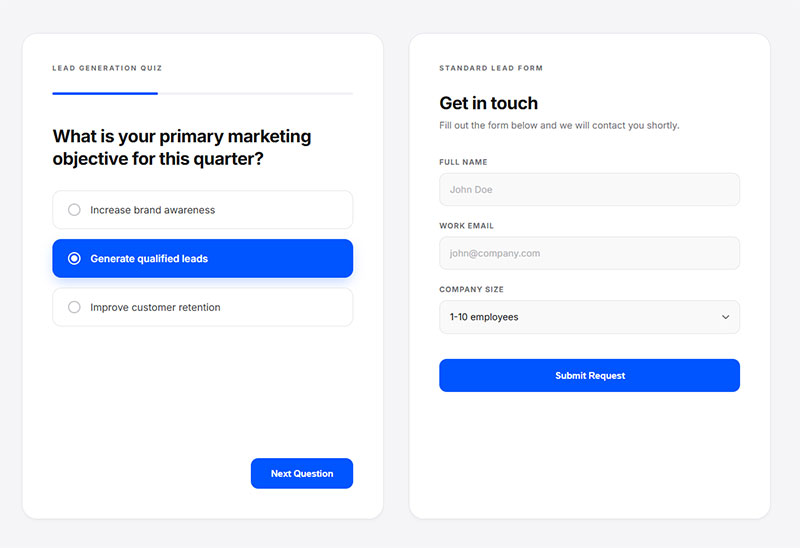
A quiz and a standard lead form are aiming at the same outcome, but they get there through opposite mechanisms. A quiz earns the click by being curious first. A form just asks, upfront, and leans on the offer to make that feel fair.
The structural gap matters more than it looks on paper. Revealing one question at a time behaves nothing like dumping every field onto a single screen, and the split between single-step and multi-step form design is really what drives the conversion difference here.
Typeform’s own 2023 data, covering more than 2.6 million published forms, showed an average completion rate of 47.3%, more than 25 points above the platform-wide industry average of 21.5% (Typeform, 2024). Quizzes, which lean heavily on that one-question-at-a-time format, tend to sit at the high end of that range.
Bumpin Blends, a smoothie subscription brand, built its funnel around a flavor-matching quiz. New customers take it to get personalized smoothie recommendations before choosing a subscription. That’s not a lab benchmark. It’s a live product-fit quiz doing double duty as a lead and customer-acquisition tool.
A quiz tends to win when traffic is cold: completion and opt-in rates run higher, the questions themselves pull in richer zero-party data than a form ever could, and the branching sets up segmentation for whatever follow-up comes next. It also just feels less like an interrogation and more like a conversation, which matters more than a lot of marketers give it credit for.
It loses just as often, though. Building one takes longer than three fields and a submit button. It’s the wrong fit for fast, transactional intent (nobody requesting a demo wants to answer eight questions first), and it needs a genuinely useful result at the end or completion rates fall apart fast.
The line between the two formats isn’t always clean, either. Plenty of teams get confused about what actually separates a contact form from a true lead generation form, and a quiz forces that distinction whether you plan for it or not.
What Quiz Formats and Question Types Convert Best
Question format is not a cosmetic choice. It changes completion rate, the kind of data you collect, and how the branching logic downstream can behave.
Outgrow’s own analytics documentation puts a good completion rate at 70% to 80% for quizzes and calculators (Outgrow, 2025). Formats that add friction, long open text fields especially, tend to pull a quiz below that range.
Multiple Choice Questions
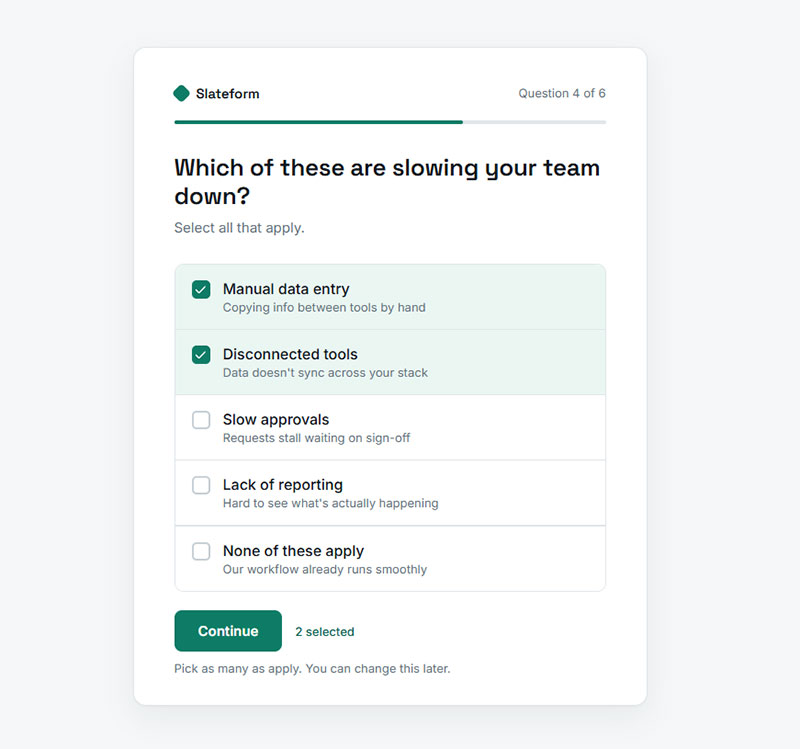
Multiple choice is the default for a reason. It’s fast to answer and just as fast to branch on.
- Works for both single-select and multi-select variants
- Cleanest data structure for CRM field mapping later
- The choice between a radio button and a checkbox here isn’t cosmetic, it decides whether the answer maps to one segment or several
Most qualifying questions (“what’s your budget range,” “how many employees”) belong here. Beardbrand’s homepage quiz, “What Type of Beardsman Are You?”, is a good example: a short set of multiple-choice personality questions routes each shopper to one of several beardsman types and a matching set of grooming products.
Image-Based Questions
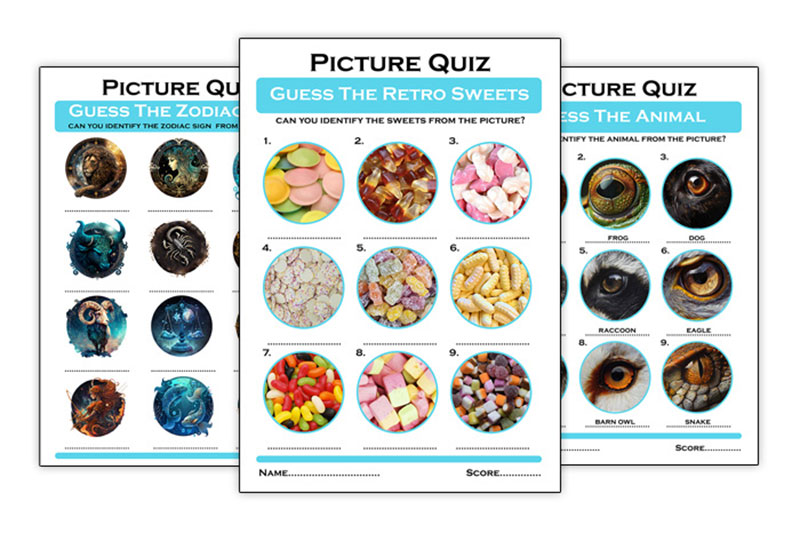
Image-based selection swaps text options for pictures, and it shows up constantly in style and product-fit quizzes.
For aesthetic or lifestyle products, it converts well, since a picture communicates faster than a label ever could. B2B software is a different story. The qualifying data there is usually numeric or categorical, and a photo doesn’t help anyone sort a lead by budget or team size.
Slider and Scored Questions
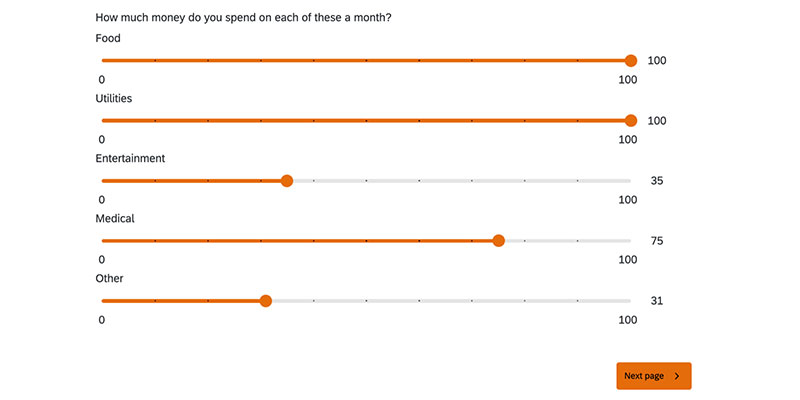
Image source: qualtrics.com
Sliders make sense in assessment and audit-style quizzes (“rate your current process from 1 to 10”) and in calculators where the slider value feeds straight into the result. Health, fitness, and readiness quizzes use them too, mostly to produce a numeric score at the end.
These questions produce a single result, a score, and that score is what gives the results screen its payoff. Strip out the scoring mechanism and a slider is just a fancier multiple choice.
Open Text Questions
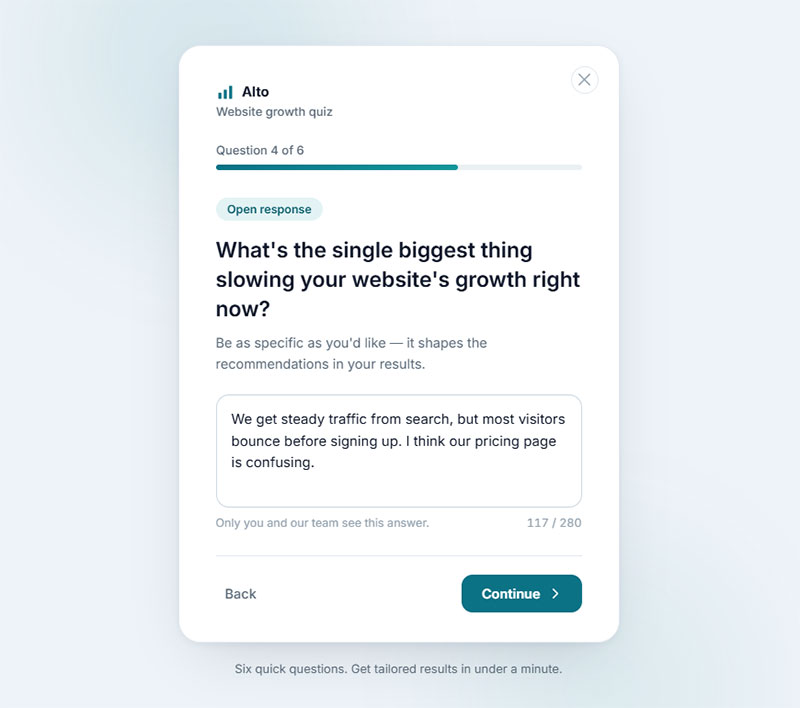
Use these sparingly. Every open text field is a small tax on completion rate, since it asks the visitor to think and type instead of tap.
One, maybe two open fields per quiz is a reasonable ceiling. Push past that and drop-off climbs fast, particularly on mobile where typing is slower.
For a wider view of what’s available beyond these four, the full range of survey question types covers formats like ranking and matrix questions that occasionally fit a quiz too.
How Branching Logic Qualifies and Segments Leads
Each answer inside a quiz changes what the visitor sees next, and that changing path is exactly what makes a quiz behave differently from a static form. The path itself becomes qualifying data, without anyone filling out an extra field for it.
What conditional logic actually does behind the scenes is simple: it checks a prior answer against a rule, then shows or skips a question based on the result.
A linear quiz shows every visitor the exact same questions in the exact same order, no matter what they clicked two steps back. Branching breaks that. The path itself adjusts per visitor, so someone who picks “enterprise” ends up staring at a completely different set of qualifying questions than the person who picked “solo founder.”
Krista Neher of Boot Camp Digital built a “digital IQ” quiz that branches respondents into tailored training offers based on their measured knowledge level. The branching itself does the segmentation work a sales rep would otherwise have to do on a discovery call.
The output of that branching isn’t just a smoother experience. It’s a label.
- Segment tags applied automatically based on the path taken
- Lead scoring values assigned per branch, not per quiz
- Follow-up sequences that differ by segment instead of one generic drip campaign for everyone
Most dedicated quiz builders support visual branching, dragging a line from an answer to the next question, rather than writing conditional statements by hand.
Where to Place the Opt-In Field for Maximum Conversions
Placement decides the trade-off between lead volume and lead quality. There isn’t a universally correct answer, only a correct answer for whatever the goal actually is.
Outgrow’s analytics documentation splits it cleanly: gated results with a skip option convert leads at 25% to 30%, while a fully ungated results-page form, offered only after the visitor sees their outcome, converts at 10% to 12% (Outgrow, 2025).
Gating the field before results gets the highest volume, but it’s also the least patient with a weak offer, and it only holds up when the result on the other side is genuinely worth the trade. Putting the form after results instead pulls in fewer leads, though the ones who do sign up trust the brand more, and a completed quiz still counts as a win even from the people who skip the form entirely, which works fine for a pure brand awareness play. Some teams split the difference and break the field request across steps instead of dumping it in one block. That softens the moment without really hiding it.
Whatever placement you pick, the field choice itself still needs work. Not every field pulls its weight, and the fields that actually predict a high-quality lead are usually fewer than marketers assume.
The mechanics of the field itself matter too. Anyone building a dedicated lead capture form for the first time tends to over-ask, which is exactly what a quiz’s earlier questions are supposed to prevent.
How Quiz and Form Data Connects to Your CRM and Email Platform
A quiz that doesn’t sync anywhere is just an expensive engagement toy. The value shows up downstream, in the CRM record and whatever email sequence fires next.
Some platforms connect natively, meaning there’s a direct link to the CRM or email tool and fields map over automatically. When that native connector doesn’t exist, teams usually route submissions through Zapier or a similar automation layer before anything lands in the CRM.
Nick Persico, who leads sales and marketing at Close.com, has described the effect plainly: with a tool like ConvertFlow, a new lead can see a different next step based on the answers they gave in a quiz, synced straight to their CRM profile.
What typically maps from a quiz answer to a CRM property:
- Selected segment or persona, mapped to a custom field
- Numeric score, mapped to a lead-scoring field
- Branch path taken, mapped to a tag used for list segmentation
Without a direct connector, teams often lean on general-purpose plugins to bridge the gap. If you’re on WordPress, plugins built specifically for lead generation usually include the CRM and email hooks that a bare form builder leaves out.
When the connection breaks, quiz leads sit in the platform’s own dashboard instead of the CRM, and the sales team never sees them. That failure mode is more common than it should be, and it’s almost always a mapping error rather than a platform limitation.
Best Quiz and Interactive Form Builders Compared
No single builder wins every use case. The right one depends on how deep the branching needs to go, what CRM you’re already locked into, and honestly, how much you’re willing to pay just to remove the platform’s own branding.
| Builder | Branching Logic | Native CRM Integrations | Best Use Case |
|---|---|---|---|
| Typeform | Logic jump, visual | Limited native, relies on Zapier | Conversational, design-heavy quizzes |
| Outgrow | Advanced, calculator-style | HubSpot, Mailchimp, others | Scored assessments and calculators |
| Interact | Visual branching, dedicated | ActiveCampaign, Mailchimp, Klaviyo | Dedicated quiz funnels, ecommerce |
| Jotform | Conditional logic builder | Salesforce, HubSpot, Zapier | General lead forms plus light quizzes |
| Gravity Forms | Add-on based conditional logic | Via add-ons and Zapier | WordPress-native, developer-controlled |
Interact’s customer Direct Energy built a “Quiz Hub” that went on to win a Content Marketing Institute award for content strategy, which says something about how far a well-run quiz funnel can travel past pure lead capture.
A dedicated builder pays off once you need deep branching, native CRM sync, and result personalization running at scale. A simpler tool is plenty for a short internal survey or a one-off assessment with no real segmentation need, and for that lighter case, the wider field of Google Forms alternatives is worth a look before committing to a paid quiz platform.
If Typeform’s per-response pricing starts to sting at volume, a scan of Typeform alternatives is a reasonable next step before assuming a rebuild is necessary.
Where to Publish and Distribute a Lead Generation Quiz
A quiz only generates leads if people actually reach it. Where you place it changes both the volume of traffic and the intent of the person taking it.
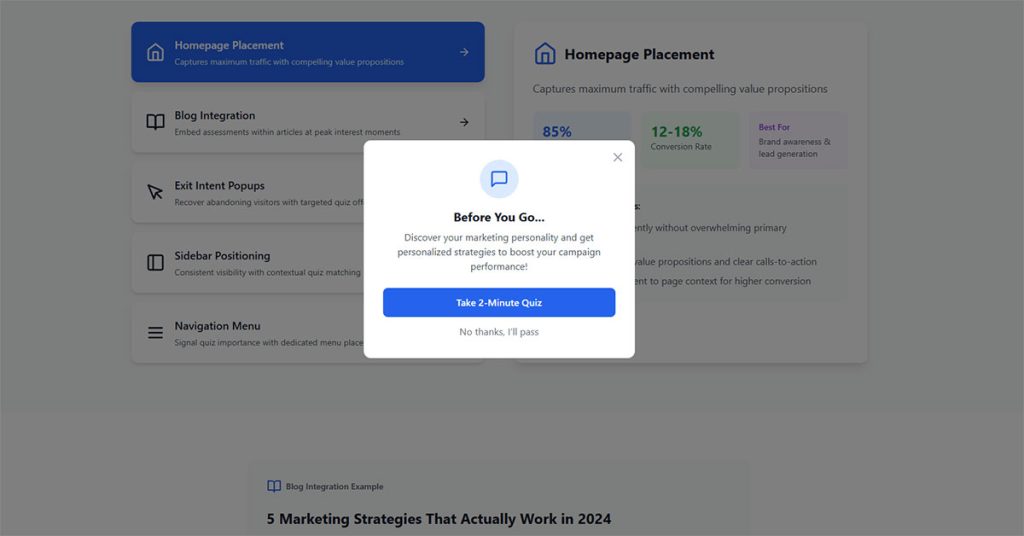
Embedding it on an existing page is the lowest-friction option. It shows up mid-content or right on the homepage and works well against warm site traffic. A standalone landing page strips away everything else on the screen so paid traffic has nothing to look at but the quiz. Some teams skip the landing page entirely and send ad traffic straight to the quiz itself, making it the click-through destination for a Facebook or Instagram campaign instead of a product page. Then there’s the popup or exit-intent trigger, which catches someone right as they’re about to leave, though it runs into the same fatigue that hurts regular popups.
ConvertFlow’s own case data shows the meal-delivery brand Ready, Set, Food! runs its recommendation quiz directly embedded on-site rather than as a separate landing page, feeding results straight into product suggestions.
The embed-versus-popup decision isn’t unique to quizzes. It’s the same tradeoff covered in the comparison between inline and popup form placement, and the same logic mostly transfers.
For the paid traffic case specifically, a dedicated page still needs the fundamentals right. Landing page form best practices apply just as much to a quiz’s entry screen as to a plain lead form.
Compliance Requirements for Quiz-Based Lead Capture
A quiz still collects personal data, so it’s bound by the same consent rules as any other form. Curiosity doesn’t exempt anyone from data protection law.
The consent checkbox itself needs to stay unticked by default, sit near the opt-in field, and never get bundled into the “see my results” button as some kind of implied yes. Marketing email, SMS, and third-party sharing need separate consent lines too, since GDPR treats these as distinct purposes rather than one blanket agreement. And whatever opt-in flow you build, unsubscribing has to be roughly as easy as opting in was.
On the email side, the FTC’s CAN-SPAM Rule sets hard numbers. An unsubscribe link must stay valid for at least 30 days, and the opt-out request itself has to be honored within 10 business days (FTC).
Retention matters too. Quiz answers tied to an identified lead should follow the same retention window as any other CRM record, not sit indefinitely in the quiz platform’s own dashboard just because it happens to be a separate tool.
Getting the mechanics right from the start saves a rebuild later. Building GDPR compliant forms covers the checkbox and disclosure requirements in more depth than a quiz-specific guide usually does.
Seeing the wording in practice helps too. A look at real GDPR consent form examples shows how brands phrase the granular opt-in without turning the quiz results screen into a legal document.
How to Build a Lead Generation Quiz Step by Step

Building the quiz is the easy part. Sequencing the decisions in the right order is what keeps teams from rebuilding it twice.
- Define the qualifying question set before touching any software. Know what you need to learn about a lead before you know which tool will ask it.
- Map the branching logic on paper. A whiteboard sketch of “if they answer X, show Y” catches dead ends a builder’s interface won’t warn you about.
- Pick the opt-in placement decided earlier (before results, after, or progressive) and build the field list around it.
- Connect the result screen to a CRM tag or segment, so the quiz outcome actually does something once it’s captured.
- Publish to a test group and walk every branch yourself before sending traffic to it.
Basic field hygiene still applies at build time. Form validation best practices catch a mistyped email before it ever reaches the CRM, quiz or not.
Spam doesn’t skip quizzes just because they’re more engaging. Adding reCAPTCHA to a WordPress contact form is worth doing on the opt-in step of a quiz too, particularly one running on paid traffic.
Skip step five and you’ll find out about a broken branch from a confused lead, not from your own testing. That’s the expensive way to find it.
How to Follow Up With Leads After a Quiz
Harvard Business Review’s analysis of 1.25 million sales leads found that contacting a prospect within an hour made a company nearly seven times more likely to qualify that lead than waiting even one hour longer, and more than sixty times more likely than waiting a full day (Oldroyd, McElheran and Elkington, HBR).
A completed quiz is not the finish line. It’s the point where the actual sales or nurture motion starts.
The follow-up email needs to be triggered by the specific quiz result, not some generic “thanks for taking our quiz” note, and it should land within minutes of completion while the result is still fresh in the person’s head. For high-intent segments, dropping a calendar link right into the results screen skips a whole email cycle.
Ready, Set, Food! routes its quiz answers into personalized product recommendations that follow up automatically based on the infant’s age and allergy risk profile the parent selected.
The confirmation moment matters more than most teams give it credit for. A well-written form submission confirmation message sets the tone for whatever email arrives next.
Beyond the first email, the sequence needs actual structure instead of a single blast. Working from existing lead nurturing templates is faster than writing a segment-specific drip campaign from a blank page.
How to Measure and Improve Quiz Conversion Rates
A few numbers are worth tracking here. Quizzes and surveys with more than six questions see completion drop below 50% (Typeform). Adding a number to the welcome screen copy lifts completion by roughly 7% (Typeform/PRNewswire, 2024). And a reasonable time-on-quiz target sits around 1.5 minutes per session (Outgrow documentation).
Completion rate and opt-in rate are two different numbers, and mixing them up hides where the real problem actually sits. A low completion rate usually just means the quiz runs too long or gets boring partway through. A low opt-in rate, on the other hand, means people finished the thing and still decided the offer at the end wasn’t worth an email address.
Most quizzes lose people at question three or four, right after the novelty wears off. An open text field placed mid-quiz instead of at the very end is another common drop-off point. And plenty of quizzes lose respondents right at the opt-in screen, if the promised result feels underwhelming once they actually get there.
A/B testing one variable at a time (headline, question count, field placement) isolates which change actually moved the number, instead of guessing after a redesign changed five things at once.
Knowing where visitors actually give up requires watching the funnel, not just the final tally. Tracking form submissions in Google Analytics makes that funnel visible step by step.
Once the drop-off point is clear, the fix is usually structural rather than cosmetic. General tips for improving form abandonment rate apply directly to the question where a quiz loses the most people.
When Quizzes Fail to Generate Leads
A quiz is not a universal upgrade over a form. It fails under specific, predictable conditions.
Low-traffic pages don’t have the volume to justify the extra build time a quiz demands: friction added without enough visitors to ever reach a meaningful sample size. Transactional, low-consideration intent is another mismatch, since someone requesting a demo or a quote wants a fast form, not eight questions standing between them and the ask. Sending a long, detailed quiz at cold ad traffic tends to backfire too, most of those visitors abandon before question three. And a completed quiz with no segment-based email sequence behind it is just a wasted lead, no matter how good the completion rate looked on paper.
Multi-step formats carry a real cost when they’re applied to the wrong use case, not just an upside. The argument that multi-step forms can actively kill conversions applies just as much to a quiz stretched past what the offer justifies.
Length is the most common failure point, and it’s avoidable. Watching for how to avoid survey fatigue matters just as much for a quiz as it does for a standard survey, since the underlying cause, too many questions and too little payoff, is identical.
None of this means quizzes underperform forms in general. It means the format has to match the traffic, the intent, and the offer, or the completion rate becomes a vanity number nobody acts on.
FAQ on How To Use Quizzes + Interactive Forms For Lead Generation
What types of interactive forms exist beyond quizzes?
Interactive forms extend past quizzes into calculators, polls, assessments, and surveys. A calculator returns a numeric result, like cost or savings, instead of a personality type. Polls capture one opinion with no branching. Assessments resemble quizzes but skip the personalized result screen.
What is progressive profiling in a lead form?
Progressive profiling swaps previously answered fields for new questions each time a known lead returns to a form. Instead of ten fields on one visit, the form asks two or three per session. It deepens the lead record without raising abandonment.
Is a quiz worth the added cost for a small business?
A small business rarely needs a full quiz platform subscription to start. Free tiers on tools like Interact or Outgrow cover a single quiz with basic branching logic. The cost becomes worth it once traffic volume justifies custom CRM integration and multiple quizzes.
Do quizzes work for B2B lead generation?
B2B buyers respond well to assessment-style quizzes that reveal budget, team size, or current tooling before a sales call. The format works best as a qualifying step ahead of a demo request, not as a replacement for the sales conversation itself.
What common mistakes break a quiz funnel?
The most common mistake is a broken branching path nobody tested end to end. Others include placing the opt-in before any value has been delivered, skipping mobile testing, and mapping quiz answers to the wrong CRM field entirely.
Can quiz questions be A/B tested?
Quiz questions can be tested like any other form element, one variable at a time. Headline wording, question order, and image-based versus text-based options all move completion rate. Testing needs enough traffic to reach statistical significance before a result decides anything.
What Should You Fix First When a Lead Generation Quiz Isn’t Converting?
The first fix for a lead generation quiz that isn’t converting is the branching logic, since a broken or overly generic path produces a result nobody finds relevant enough to trade an email address for.
A short list resolves most underperformance, tackled roughly in this order:
- Branching logic and result relevance
- Opt-in field placement against the offer’s actual value
- CRM field mapping for every quiz answer
Any test run on these fixes needs volume behind it. AB Tasty’s testing guidance sets a working floor of 10,000 visitors and 300 conversions per variation before a result can be trusted.
Below that threshold, a shorter quiz with less segmentation converts more reliably than a deeply branched version still gathering data. Once the fix list clears, the next constraint is usually generic to every form on the site, addressed directly in how to increase form conversions.