




The best AI plugins for WordPress connect a site’s dashboard, page builder, or database to a machine learning model, turning a plugin that follows fixed rules into one that writes,…
Table of contents
Picking the wrong WordPress form plugin costs you time twice: once when you set it up, and again when you rip it out. The Gravity Forms vs Ninja Forms debate keeps coming up because both plugins solve the same problem, but they do it with completely different pricing models, builder interfaces, and developer tools.
One is premium-only. The other has a free core with paid add-ons. Both handle conditional logic, payment integrations, and spam filtering, just packaged differently.
This comparison breaks down pricing, form builder usability, field types, third-party integrations, performance, spam protection, entry management, developer extensibility, and support quality. By the end, you will know which plugin fits your specific WordPress setup.
What Are Gravity Forms and Ninja Forms?
Both Gravity Forms and Ninja Forms are WordPress form plugins built specifically for creating WordPress forms. They handle everything from basic contact pages to complex multi-page applications with payment processing.
But they come from different philosophies.
Gravity Forms is a premium-only plugin built by Rocketgenius. It launched in 2009 and has no free version. You pay before you build. The plugin targets developers, agencies, and businesses that need deep customization and a large library of hooks and filters.
Ninja Forms is a freemium plugin from Saturday Drive. The free core is available on WordPress.org with over 800,000 active installations, according to WPForms’ comparison data. Paid add-ons and membership tiers unlock advanced features.
WordPress powers roughly 43% of all websites globally (W3Techs, 2025), and the plugin ecosystem behind it was valued at $2.38 billion in 2025 (Data Insights Market). Form builders sit at the center of that ecosystem because nearly every site needs some way to collect data from visitors.
| Feature | Gravity Forms | Ninja Forms |
|---|---|---|
| Pricing model | Premium only (annual license) | Freemium (free core + paid add-ons) |
| Developer | Rocketgenius | Saturday Drive |
| Free version on WordPress.org | No | Yes |
| Target audience | Developers, agencies | Beginners, small businesses |
| Latest major release | Gravity Forms 2.9 (Nov 2024) | Ongoing incremental updates |
The core difference? Gravity Forms gives you everything in a bundle tied to your license tier. Ninja Forms lets you pick individual add-ons or buy a membership plan.
For a single contact form, Ninja Forms’ free version works fine. For complex workflows with payment processing, user registration, or CRM syncing, both plugins can handle it, just with different pricing logic.

Pricing and Licensing Compared
This is where most people get tripped up. The sticker price looks simple enough, but the real cost depends on what you actually need.
Gravity Forms License Tiers
Gravity Forms uses a tiered annual subscription. All tiers share the same drag-and-drop form builder and core features (conditional logic, file uploads, AJAX submissions, spam filtering). What changes is site limits and add-on access.
- Basic ($59/year): 1 site, email marketing add-ons (Mailchimp, HubSpot, ActiveCampaign, and more)
- Pro ($159/year): 3 sites, payment gateway add-ons (Stripe, PayPal, Square), plus Zapier and webhooks
- Elite ($259/year): Unlimited sites, all add-ons including User Registration, Surveys, Quizzes, and priority support
There is also a Nonprofit license at $129/year that includes all Elite features.
No free trial exists, but Gravity Forms offers a demo environment and a 30-day refund policy.
Ninja Forms Pricing Structure
Ninja Forms does things differently. The free core plugin on WordPress.org gives you a functional drag-and-drop builder with unlimited forms and submissions. No form count limits, no submission caps.
Paid options come in two flavors:
Membership plans:
- Plus ($99/year): 3 sites, basic add-ons like Layout & Styles, Multi-Step Forms, PayPal, and email marketing integrations, plus 20% off additional add-ons
- Pro ($199/year): 20 sites, CRM and payment add-ons (Stripe, HubSpot, Salesforce, Zapier), 40% off additional add-ons
- Elite ($499/year): Unlimited sites, all current and future add-ons, early access to new releases
Individual add-ons: You can skip the membership entirely and buy specific add-ons a la carte. Prices range from $29 to $129 per add-on per year.
Which Plugin Costs Less for a Single Site?
For a basic contact us page on one WordPress site, Ninja Forms wins. The free version handles it.
If you need Stripe payments on a single site, Gravity Forms Pro at $159/year covers that. With Ninja Forms, you would need at least the Pro plan ($199) since Stripe is not included in the Plus plan, which gets close to the same cost anyway.
| Scenario | Gravity Forms | Ninja Forms |
|---|---|---|
| Simple contact form (1 site) | $59/year (Basic) | Free |
| Payment form + Stripe (1 site) | $159/year (Pro) | ~$128–$199/year |
| Agency with 10+ sites, all features | $259/year (Elite) | $499/year (Elite) |
| Nonprofit with full features | $129/year | No nonprofit discount |
Gravity Forms gets cheaper at scale. If you manage multiple client sites, the Elite license at $259/year with unlimited installations is hard to beat. Ninja Forms’ unlimited tier runs almost double that at $499/year.
The Add-On Pricing Trap
Both plugins can get expensive fast once you start stacking features.
With Gravity Forms, the add-on access is bundled. You either have access to the add-on through your tier or you don’t. No nickel-and-diming per feature.
Ninja Forms’ a la carte model sounds flexible, but buying three or four individual add-ons can quickly exceed the cost of a membership plan. Always do the math before purchasing individually.
Renewal pricing is another thing to watch. Gravity Forms keeps renewal rates the same. Ninja Forms has been known to offer introductory discounts that increase at renewal.
The cheaper, add-on-free alternative to Gravity Forms & Ninja Forms
Here’s the catch this faceoff tends to skip: Gravity Forms has no free tier at all, and Ninja Forms hands you a cheap core and then sells the useful parts one add-on at a time. IvyForms bundles those “extras” — multi-page forms, payments, file uploads, conditional logic, Google Sheets — into flat plans, so the price on the page is the price you actually pay.
Instead of a spec sheet, here’s what it costs to get real work done with each:
Ivyforms for NinjaForms & Gravity
| To do this… | IvyForms | Gravity Forms | Ninja Forms |
| Start without paying | Free Lite plan | No free version | Free core |
| Add conditional logic | Included in Pro | Included | Paid add-on |
| Build a multi-page form | Included in Pro | Included | Paid add-on |
| Let people upload files | Included in Pro | Included | Paid add-on |
| Accept payments | Included in Pro | Add-on (higher tiers) | Paid add-on |
| Push entries to Google Sheets | Built-in integration (Pro) | Third-party add-on | Zapier / add-on |
| Turn entries into sortable tables | Native wpDataTables | Add-on | Add-on |
| Run it on 3 sites | €59/yr (Growth) | Higher tier ($99/yr) | Varies by plan |
| Pay once, keep it forever | €399 lifetime | Not offered | Not offered |
Starting price: IvyForms €29/yr · Gravity Forms $59/yr · Ninja Forms ~$99.50/yr.
None of this makes Gravity or Ninja bad tools. Gravity still has the deepest add-on library in WordPress, and Ninja’s modular model is genuinely handy if you only ever need one extra feature. But if you’re tired of adding up add-ons just to reach a total, IvyForms gives you the whole toolkit up front — and the option to stop renewing altogether.
Price it out yourself: See IvyForms plans → (from €29/yr, or €399 once). Want to kick the tyres first? Grab the free version →
Form Builder Interface and Ease of Use
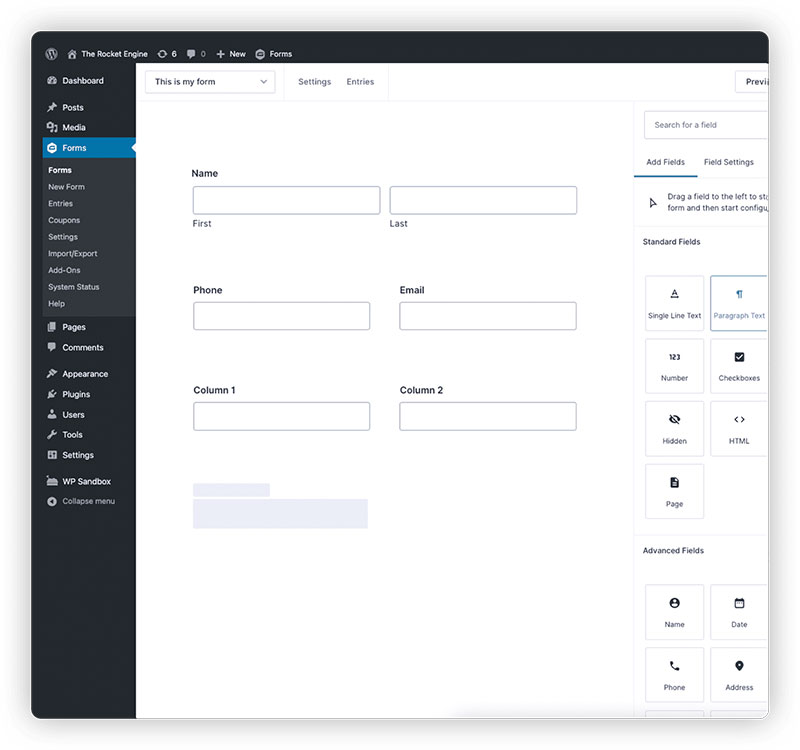
The builder is where you spend most of your time with either plugin. Both use drag-and-drop, but they feel very different in practice.
Zuko Analytics data shows that 55% of people abandon forms before completing them. A clunky builder leads to clunky forms, which directly impacts whether visitors finish filling them out.
Gravity Forms Builder
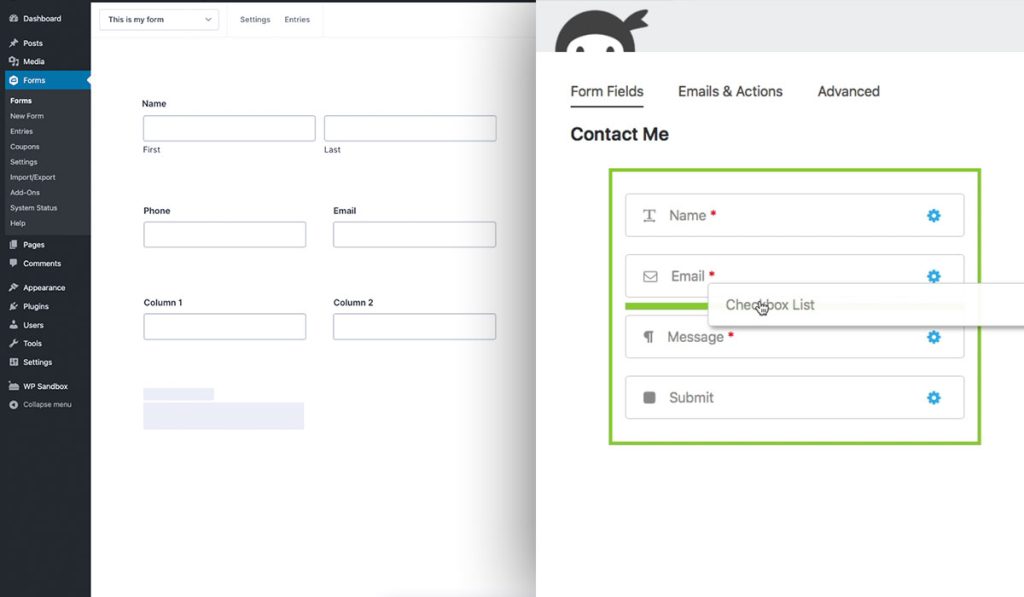
Gravity Forms loads its builder inside the WordPress admin panel. You drag fields from a sidebar into the form canvas. There is no live front-end preview by default, so you build in the admin and then preview on the front end separately.
The interface is clean but not flashy. Field settings open in a flyout panel. You can configure conditional logic per field, per section, and per page break.
With version 2.9 (released November 2024), Gravity Forms introduced new Multiple Choice and Image Choice fields, plus an updated Orbital theme system for consistent styling across forms.
Took me a while to get used to the lack of real-time preview. But once you get the rhythm of build-then-preview, it moves fast.
Ninja Forms Builder
Ninja Forms uses a drawer-style builder that opens in a modal overlay. Fields sit in a left panel, and you drag them into the form area. The builder gives you a closer approximation of how the form will look on the front end, though it is still not a true WYSIWYG editor.
One thing that catches new users off guard: the “Publish” button inside the builder does not actually embed the form on your site. It saves the form. You then need to grab a shortcode or use the Ninja Forms Gutenberg block to place it on a page.
For beginners, Ninja Forms has a lower barrier to entry. The free version gets you building immediately, and the interface is less dense than Gravity Forms.
How Each Builder Handles Conditional Logic
Both plugins support form builders with conditional logic that can show, hide, or change fields based on user input. This is where the power users spend their time.
Gravity Forms: Conditional rules live inside each field’s settings. You can apply logic to individual fields, entire sections, page breaks, submit buttons, and email notifications. The logic supports AND/OR conditions and nested rules.
Ninja Forms: Conditional logic is available through the Conditional Logic add-on (free with paid plans). It works at the field level and supports show/hide actions, changing field values, and triggering specific email actions.
Gravity Forms has the edge here because conditional logic is built into the core plugin at no extra cost. With Ninja Forms, the free version has basic conditional logic, but advanced rules require the paid add-on.
Multi-Step Form Creation in Both Plugins
Splitting long forms into multi-step forms can improve completion rates. FormStory data shows multi-step layouts often convert better than single-page forms, though poorly designed ones can hurt (checkout abandonment still hovers around 70% according to Baymard Institute’s 2025 data).
Gravity Forms: Add a “Page” field between sections. That is it. The form automatically splits into steps with navigation buttons. You can apply conditional logic to entire pages.
Ninja Forms: Multi-Part Forms is a paid add-on. Once installed, you get a similar page-break system with a progress bar and breadcrumb navigation.
Both get the job done. Gravity Forms includes it by default, Ninja Forms charges extra.
Available Form Fields and Field Types
The number of form fields a plugin offers determines what kinds of forms you can actually build without custom code.
Shared Standard Fields
Both plugins cover the basics that you would expect from any WordPress form builder:
- Text, paragraph text, email, number
- Dropdown, checkbox, radio buttons
- Name, address, phone
- Date picker, time
- Hidden fields
- HTML blocks
Neither plugin skimps on the fundamentals. You can build a solid lead generation form or intake form with either one right out of the box.
Fields Where Gravity Forms Pulls Ahead
List field: A repeatable row-based field where users can add multiple entries. Think line items on an order form.
Post fields: Title, body, category, tags, custom fields, and featured image. These let users create WordPress posts directly through a form submission.
Pricing fields: Product, option, quantity, total, and shipping fields are built into the core plugin. Combined with a payment add-on, you have a lightweight storefront without WooCommerce.
Image Choice field (new in 2.9): Lets users pick from visual options instead of plain text radio buttons.
Fields Where Ninja Forms Pulls Ahead
Star rating: Available in the free version. Useful for feedback forms and quick surveys.
Save Progress: Lets users save partially completed forms and return later. Available as a paid add-on. Gravity Forms offers a similar Partial Entries feature, but only on the Elite plan.
User Management: Front-end login, registration, and profile editing through forms. This is a paid add-on, but it is well-integrated into the Ninja Forms ecosystem.
File Upload Handling
Both plugins support WordPress forms with file upload capabilities.
Gravity Forms stores uploaded files on your server by default. You can set file size limits, restrict file types, and enable multi-file uploads. The Dropbox add-on (Pro tier) lets you route files to cloud storage.
Ninja Forms handles file uploads through its File Uploads add-on (paid). It supports similar restrictions on file type and size, plus integration with cloud storage services.
For sites that collect a lot of documents, like event registration forms or application forms, Gravity Forms includes file uploads in every license tier. Ninja Forms requires the paid add-on.
Third-Party Integrations and Add-Ons
A form builder is only as useful as the tools it connects to. Both Gravity Forms and Ninja Forms integrate with payment gateways, email marketing platforms, CRMs, and automation tools.
The difference is how those integrations are packaged.
Payment and E-Commerce Integration Differences
If you need to create a WordPress payment form, both plugins connect to the major gateways. But the gateway access depends on your license tier.
Gravity Forms (Pro tier and above):
- Stripe, PayPal Standard, PayPal Checkout, Square, Authorize.Net, Mollie
- Built-in pricing fields for products, subscriptions, and one-time payments
Ninja Forms:
- Stripe, PayPal Express, Authorize.net, Elavon
- Payment add-ons available individually or through Pro/Elite memberships
Gravity Forms has a slight edge in gateway variety. The native pricing fields also make it easier to build order forms without needing WooCommerce.
CRM and Email Marketing Connections
Both plugins connect to the tools that WordPress lead generation plugins typically need.
| Integration Type | Gravity Forms | Ninja Forms |
|---|---|---|
| Mailchimp | Basic tier | Plus tier (or individual add-on) |
| HubSpot | Basic tier | Pro tier |
| ActiveCampaign | Basic tier | Plus tier |
| Salesforce | Elite tier | Pro tier |
| Zapier | Pro tier | Pro tier |
| ConvertKit | Basic tier | Individual add-on |
Gravity Forms bundles more email marketing integrations at its lowest tier. If you just need to connect forms to Mailchimp or ActiveCampaign, the $59/year Basic license covers it.
Ninja Forms has more CRM integrations at the Pro level, including Salesforce, HubSpot, and Zoho CRM. But getting all of them requires a higher-tier plan or stacking individual add-on purchases.
Both plugins support Zapier as a catch-all for connecting to thousands of other apps. If a native integration does not exist, Zapier or webhooks usually fill the gap.
Performance, Speed, and Page Load Impact
This is the section most comparison articles skip. But it matters. A form plugin that loads heavy scripts on every page of your site will drag down Core Web Vitals scores, and Google has confirmed that page experience is a ranking signal.
How Each Plugin Loads Assets
Gravity Forms conditionally loads its CSS and JavaScript. If a page does not contain a Gravity Form, the plugin should not load its scripts on that page. This keeps unnecessary HTTP requests off blog posts, archive pages, and anywhere else you are not using a form.
Gravity Forms also creates its own custom database tables to store entries. This is generally faster for querying large volumes of submissions compared to stuffing everything into the wpposts and wppostmeta tables.
Ninja Forms also aims to load assets only where forms are present. However, some users have reported that certain Ninja Forms scripts load globally, depending on configuration and active add-ons. Your mileage may vary based on how many add-ons you have running.
Ninja Forms stores submission data differently from Gravity Forms and relies more on WordPress core tables.
AJAX Submissions and Perceived Speed
Both plugins support AJAX form submissions, meaning the page does not reload when a user hits submit. This makes a noticeable difference in perceived speed, especially on mobile forms where full page reloads feel sluggish.
Gravity Forms enables AJAX per form through a simple checkbox in the form settings. Ninja Forms uses AJAX by default for all submissions.
Real-World Performance Considerations
Neither plugin will tank your site speed on its own, assuming your hosting is decent. The bigger risks come from stacking multiple add-ons, using unoptimized themes, or running form plugins alongside heavy page builders like Elementor.
Zuko Analytics data shows desktop users complete forms at a 47% rate compared to 42% on mobile. Slow-loading forms on mobile widen that gap. If your form plugin adds 200-300KB of scripts to every page, mobile users feel it first.
A few practical tips to keep either plugin running lean:
- Use a caching plugin (WP Rocket, LiteSpeed Cache) and exclude form pages from full-page caching
- Disable scripts on pages that do not use forms (Perfmatters or Asset CleanUp can help)
- Avoid loading multiple form plugins simultaneously
If performance is your top concern and you want to optimize forms for speed, Gravity Forms’ conditional asset loading and custom database tables give it a small structural advantage. But both plugins perform well when configured properly.
Spam Prevention and Security Features
Spam is a real problem for any web form. According to Imperva’s Bad Bot Report, bots account for 37% of all internet traffic, and form submission bots have increased 87% year-over-year.
A 2025 Clearout analysis found that 61% of all form spam activity happened on WordPress sites. Sign-up forms get hit hardest (45%), followed by contact forms (35%).
Both Gravity Forms and Ninja Forms include built-in spam filtering, but they approach it differently.
Built-In Anti-Spam Tools
| Feature | Gravity Forms | Ninja Forms |
|---|---|---|
| Honeypot field | Built-in, configurable | Built-in (free core) |
| Google reCAPTCHA v2 | Built-in | Built-in (free core) |
| Google reCAPTCHA v3 | Via reCAPTCHA add-on | Built-in (free core) |
| hCaptcha | Via third-party | Built-in (free core) |
| Cloudflare Turnstile | Via reCAPTCHA add-on | Built-in (free core) |
| Akismet | Dedicated add-on | Via Akismet plugin |
Ninja Forms has an edge in the free tier here. The free core includes reCAPTCHA, hCaptcha, Cloudflare Turnstile, and a honeypot. You get layered form security without spending anything.
Gravity Forms added a Submission Speed Check feature in 2025 that blocks submissions completed too fast to be human. That is a smart addition, since most bots fill forms in under a second.
GDPR and Data Privacy Controls
Pew Research Center found that 73% of Americans feel they have little or no control over how their data is used online. Both plugins address data privacy, but completeness varies.
Gravity Forms: Supports consent fields, personal data export, and personal data erasure through WordPress core tools. Entries can be configured to auto-delete after a set period. No separate GDPR add-on needed.
Ninja Forms: Offers consent checkboxes and integrates with WordPress core data export/erasure. The plugin also works with third-party GDPR plugins like Complianz.
If you collect data from EU visitors and need to build GDPR compliant forms, both plugins cover the basics. Gravity Forms handles it natively. Ninja Forms works but may need a companion GDPR plugin for full compliance.
Custom Validation for Developers
Beyond automated spam filtering, both plugins let developers write custom form validation rules.
Gravity Forms exposes the gformvalidation filter, which lets you hook into the submission process and reject entries based on any PHP logic you want. Ninja Forms uses an action/trigger architecture that achieves the same result through its developer API.
For form spam prevention at scale, the combination of honeypot fields, reCAPTCHA v3, and custom validation hooks gives you the strongest protection in either plugin.
Entry Management and Data Handling
Collecting form submissions is only half the job. What you do with the data after it comes in matters just as much.
Viewing and Managing Submissions
Gravity Forms stores all entries in custom database tables. The Entries dashboard inside WordPress admin gives you a filterable, searchable list of every submission. You can click into any entry to see full details, edit field values inline, add notes, and change entry status.
The star and read/unread system helps teams triage incoming submissions without leaving WordPress.
Ninja Forms stores submissions and displays them in a Submissions dashboard. The interface is clean but more limited. Inline editing is not available in the free version, and the overall entry detail view is less granular than what Gravity Forms offers.
Exporting and Reporting Submission Data
Zuko Analytics data shows form completion rates average around 51.7% across industries. That means roughly half your visitors bounce before submitting. When they do submit, you need clean export tools to get that data where it needs to go.
Gravity Forms export options:
- CSV export with date range and field selection filters
- Conditional export (only entries matching specific criteria)
- PDF generation through third-party add-ons like GravityView
Ninja Forms export options:
- CSV export of submissions
- Excel export via paid add-on
- Google Sheets integration via Zapier or direct add-on
Gravity Forms gives you more control over what gets exported without needing extra plugins. Ninja Forms covers the basics but leans on add-ons for anything beyond simple CSV downloads.
Partial Entry Saving
Long forms lose people. Baymard Institute’s 2025 data shows checkout abandonment averages 70.2%, and complex application forms are not far behind. Partial entry saving lets you capture data from users who start but do not finish.
Gravity Forms: The Partial Entries add-on (Elite tier) automatically saves incomplete submissions. You can see which fields were filled before the user left. Great for improving form abandonment rate.
Ninja Forms: The Save Progress add-on (paid) lets users manually save their progress and return later via a unique link. This is a different approach. Instead of passive capture, it requires user action.
Developer Friendliness and Extensibility
If you write PHP for a living (or at least part of one), the developer experience matters more than the drag-and-drop builder.
Gravity Forms Developer Ecosystem
Gravity Forms has hundreds of action and filter hooks, all prefixed with gform. The documentation is thorough and well-organized.
Key developer features:
- REST API v2 built into core since version 2.4, supporting CRUD operations on forms and entries
- Add-On Framework that lets you build custom add-ons with settings pages, feed conditions, and script enqueuing in minimal code
- Field Framework for creating custom field types
- GFAPI class and helper functions for server-side data manipulation
Gravity Flow 3.0 (released late 2025) expanded the REST API further with workflow-specific endpoints, targeting agencies and enterprise teams.
Ninja Forms Developer Ecosystem
Ninja Forms uses a Merge Tag system and an action/trigger architecture that is different from Gravity Forms but still capable.
Merge Tags: Dynamic placeholders that pull field values into notifications, confirmations, and third-party connections. Flexible, but the documentation is thinner than Gravity Forms’.
Developer Mode: Ninja Forms includes a developer mode that exposes additional settings and debugging tools. Useful when building custom integrations.
The plugin also supports custom field creation and has hooks for modifying form behavior, though the hook library is smaller than Gravity Forms’ collection.
REST API and External Integrations
| Capability | Gravity Forms | Ninja Forms |
|---|---|---|
| REST API | v2 in core, full CRUD | Limited, add-on dependent |
| Webhook support | Pro tier (Webhooks add-on) | Via Zapier or custom code |
| WP-CLI support | Yes | Limited |
| Hook library size | Hundreds of documented hooks | Smaller, growing |
For developers building complex, multi-site workflows or connecting forms to external APIs, Gravity Forms has a clear advantage. The REST API alone makes it possible to manage forms and entries from any external application, which is something agencies rely on regularly.
Support, Documentation, and Community
At some point, something will break. Or you will want to do something tricky with conditional logic and need a hand. That is when support quality actually matters.
Gravity Forms Support Resources
Ticket-based support is available to all license holders. Elite users get priority support with faster response times. The documentation library at docs.gravityforms.com is one of the most comprehensive in the WordPress plugin space, covering everything from basic setup to advanced developer hooks.
Gravity Forms ran monthly webinars throughout 2025 covering topics like spam protection, payment integration with Square, and workflow automation with Gravity Flow.
The third-party ecosystem is large. You will find extensive tutorials on YouTube, dedicated courses on Gravity Learn (their academy platform), and active community discussions on WordPress forums.
Ninja Forms Support Resources
Support for free and paid users: Ninja Forms offers ticket-based support to both free and paid customers, though paid users get priority with response times under 8 hours.
This is a genuine differentiator. Most competing plugins (including Gravity Forms and Formidable Forms) restrict direct support to paid licenses only.
Documentation is available through their knowledge base and blog. YouTube tutorials exist but are less abundant than Gravity Forms’. The community is smaller but active.
Community and Third-Party Ecosystem

Gravity Forms benefits from a massive third-party add-on market. GravityView, Gravity Perks, and Gravity Flow are just the biggest names. Developers have built an entire ecosystem around the plugin.
Ninja Forms has a smaller third-party ecosystem. Most extensions come directly from Saturday Drive rather than independent developers. This means fewer options but tighter quality control from the core team.
For teams that rely on community-contributed code snippets, Stack Overflow threads, and tutorial content, Gravity Forms has a deeper pool to draw from.
Which Plugin Fits Which Use Case?
The “it depends” answer is lazy. Here is who should pick what, based on specific scenarios.
Gravity Forms or Ninja Forms for WooCommerce Stores?
Gravity Forms wins here. The native pricing fields (product, option, quantity, total) let you build lightweight order forms without WooCommerce, or alongside it. The Stripe and PayPal integrations are bundled at the Pro tier.
Ninja Forms can handle payments too, but you will need separate add-ons for each gateway. If you already run WooCommerce and just need a simple subscription form or website form for custom orders, either plugin works.
Gravity Forms or Ninja Forms for Membership Sites?
Both plugins support WordPress registration forms that create user accounts on submission.
Gravity Forms: The User Registration add-on (Elite tier) maps form fields directly to WordPress user profiles. It supports BuddyPress and handles role assignment.
Ninja Forms: The User Management add-on (paid) handles front-end registration, login, and profile updates. It is well-built but requires the Pro or Elite membership.
If you need registration forms with custom fields mapped to user profiles, Gravity Forms has a slight edge because the User Registration add-on integrates more tightly with WordPress core user management.
Freelancers Managing Multiple Client Sites
Gravity Forms Elite at $259/year with unlimited site installations. End of discussion for most freelancers and agencies. You install it on every client site and manage everything under one license.
Ninja Forms Elite at $499/year gets you the same unlimited coverage but costs nearly double.
Small Business Owner Building One Contact Form
Ninja Forms free version. Period.
You get a drag-and-drop builder, unlimited submissions, honeypot spam protection, reCAPTCHA, and AJAX submissions. For a basic contact form, there is no reason to pay.
If you later need sign up forms or payment processing, you can add those features a la carte without committing to a full membership.
When Neither Plugin Is the Right Answer
If you need a fully free plugin with more built-in features than Ninja Forms’ free tier, look at WPForms Lite (6+ million active installations) or Contact Form 7.
If you are building forms outside WordPress entirely (Shopify, Squarespace, or a custom stack), neither Gravity Forms nor Ninja Forms will work. Both are WordPress-only plugins. Check Ninja Forms alternatives like Typeform, Jotform, or Tally for platform-agnostic form builders.
And if your primary goal is using website forms for lead generation at scale with built-in A/B testing and analytics, a dedicated lead capture form tool might serve you better than a general-purpose WordPress form builder.
FAQ on Gravity Forms Vs Ninja Forms
Does Ninja Forms have a free version?
Yes. Ninja Forms offers a free core plugin on WordPress.org with unlimited forms and submissions. It includes a drag-and-drop builder, honeypot spam protection, reCAPTCHA, and AJAX submissions. Paid add-ons and membership plans unlock advanced features like payment processing and CRM integrations.
Does Gravity Forms have a free version?
No. Gravity Forms is a premium-only WordPress form plugin. Pricing starts at $59/year for a single site Basic license. There is no free tier, but Gravity Forms offers a demo environment and a 30-day money-back guarantee for new purchases.
Which plugin is better for beginners?
Ninja Forms has a lower learning curve. The free version gets you building immediately, and the interface is less dense. Gravity Forms is more powerful but assumes some familiarity with WordPress admin panels and form configuration.
Which plugin is cheaper for agencies managing multiple sites?
Gravity Forms Elite at $259/year covers unlimited sites. Ninja Forms Elite costs $499/year for the same unlimited coverage. For agencies and freelancers managing many client sites, Gravity Forms offers better value at scale.
Can both plugins accept payments through Stripe?
Yes. Both integrate with Stripe. Gravity Forms includes Stripe access at the Pro tier ($159/year). Ninja Forms offers Stripe through a paid add-on or the Pro/Elite membership plans. Both also support PayPal and other payment gateways.
Which plugin has better spam protection?
Ninja Forms includes more anti-spam tools in its free version, including reCAPTCHA, hCaptcha, Cloudflare Turnstile, and a honeypot field. Gravity Forms has strong built-in spam filtering plus a Submission Speed Check feature, but some tools require add-ons.
Do both plugins support conditional logic?
Yes. Gravity Forms includes conditional logic in every license tier at no extra cost. Ninja Forms offers basic conditional logic in the free version, but advanced conditional rules require a paid add-on for full functionality.
Which plugin is better for developers?
Gravity Forms. It has hundreds of documented PHP hooks, a REST API v2 built into core, an add-on framework, and a field framework. Ninja Forms has developer tools too, but the hook library and API are smaller.
Can I use either plugin for user registration forms?
Both support WordPress user registration through paid add-ons. Gravity Forms uses the User Registration add-on (Elite tier). Ninja Forms uses the User Management add-on. Both map form fields to WordPress user profiles on submission.
Which plugin performs better in terms of page load speed?
Both conditionally load assets, meaning scripts only appear on pages with forms. Gravity Forms uses custom database tables for entry storage, which can be slightly faster at scale. Neither plugin will noticeably slow a well-hosted WordPress site.
Conclusion
The Gravity Forms vs Ninja Forms choice comes down to what you need right now and where your site is headed. Neither plugin is universally better. They serve different budgets, skill levels, and project scopes.
Gravity Forms is the stronger pick for agencies, developers building custom workflows, and anyone who needs payment fields, a REST API, or unlimited site installations at a reasonable annual cost.
Ninja Forms makes more sense for small business owners, solo site operators, and anyone who wants a functional WordPress form builder without paying upfront. The free core handles basic data collection well.
Test both against your actual requirements. Check which free WordPress form plugins cover your needs before committing to a paid license. The best form plugin is the one that fits your workflow without forcing workarounds.