




A blank quiz builder staring back at you is where most people quit. The questions feel off, the scoring logic gets confusing, and the whole thing takes three times longer…
Table of Contents
Building a questionnaire from scratch takes hours. Finding the right survey form templates takes minutes.
Whether you need customer feedback forms, employee satisfaction surveys, or market research questionnaires, templates give you a tested structure that actually gets responses.
The problem? Most templates are generic. They miss critical question types, lack proper skip logic, and ignore mobile optimization.
This guide covers everything you need to choose and customize the right template. You will learn the core components of effective surveys, compare tools like Google Forms, SurveyMonkey, and Typeform, and see real examples you can use immediately.
Stop guessing. Start collecting data that matters.
What is a Survey Form Template
A survey form template is a pre-designed questionnaire structure that collects data from respondents through standardized questions, response options, and formatting.
These templates include fields for multiple choice questions, rating scales, open-ended questions, and demographic sections.
Researchers, HR teams, and businesses customize them for specific data gathering goals.
The difference between building from scratch and using a template? Hours of work. Sometimes days.
Most online forms follow predictable patterns. Customer feedback collection needs rating scales. Employee satisfaction surveys need anonymity options. Event evaluation forms need quick completion times.
Templates handle the structural thinking so you can focus on asking the right questions.
They also standardize your questionnaire design across teams. When everyone uses the same base structure, your survey results become easier to compare over time.
Examples Of Survey Form Templates
Customer Feedback Survey Template
See the Pen
Modern Customer Feedback Survey by Bogdan Sandu (@bogdansandu)
on CodePen.
Employee Survey Template
See the Pen
Modern Employee Feedback Survey by Bogdan Sandu (@bogdansandu)
on CodePen.
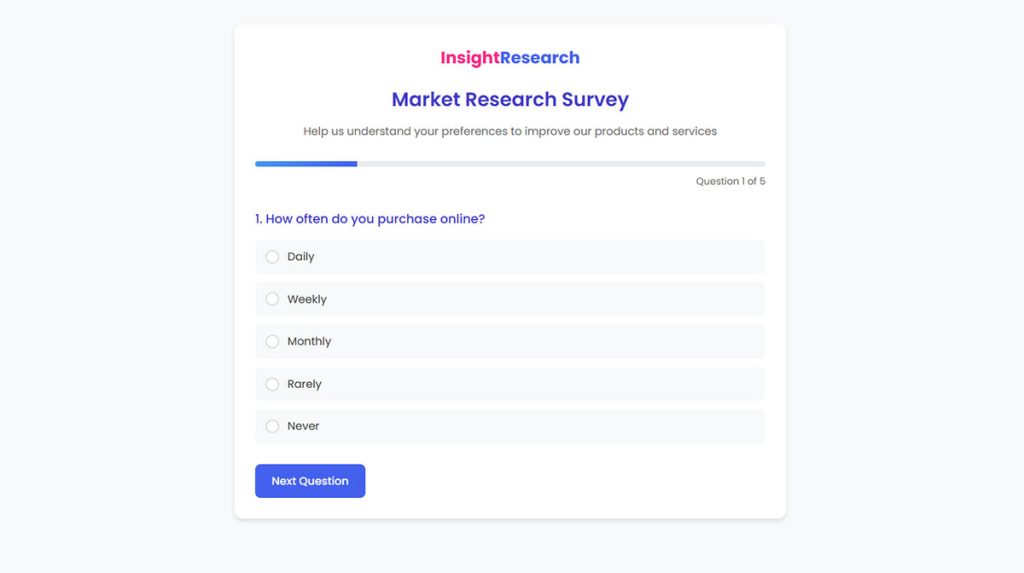
Market Research Survey Template
See the Pen
Market Research Survey by Bogdan Sandu (@bogdansandu)
on CodePen.
Academic & Educational Survey Template
See the Pen
Academic & Educational Survey by Bogdan Sandu (@bogdansandu)
on CodePen.
Event Feedback Survey Template
See the Pen
Modern Event Feedback Survey with Pastel Theme by Bogdan Sandu (@bogdansandu)
on CodePen.
Patient Satisfaction Survey Template
See the Pen
Modern Patient Satisfaction Survey by Bogdan Sandu (@bogdansandu)
on CodePen.
Usability Feedback Survey Template
See the Pen
Usability Feedback Survey by Bogdan Sandu (@bogdansandu)
on CodePen.
What Are the Types of Survey Form Templates
Different data collection goals require different template structures. Here are the main types of forms you will encounter.
Customer Satisfaction Survey Templates
These measure how customers feel about your product, service, or support interactions. They typically include CSAT scores, open text fields for comments, and Likert scale questions ranging from “Very Dissatisfied” to “Very Satisfied.”
Most templates run 5-10 questions. Any longer and completion rates drop.
Employee Feedback Survey Templates
HR teams use these for engagement surveys, pulse surveys, and exit interview forms. Anonymous responses matter here since employees won’t share honest opinions if they fear identification.
Good templates include sections for management feedback, workplace culture, and professional development. You can explore specific employee satisfaction survey questions to build more targeted questionnaires.
Market Research Survey Templates
Brand awareness surveys, competitor analysis questionnaires, and product concept testing all fall here. These templates tend to be longer because researchers need comprehensive data.
Question branching keeps them manageable. Respondents only see questions relevant to their previous answers.
Event Feedback Survey Templates
Sent immediately after conferences, webinars, or training sessions. Timing matters since response rates plummet after 24 hours.
Templates focus on logistics (venue, timing, registration process) and content quality (speaker ratings, session relevance). Check out post event survey questions for specific question ideas.
Product Feedback Survey Templates
These capture user opinions on features, usability, and improvements. SaaS companies run them constantly.
The best templates combine quantitative ratings with open-ended questions. Numbers show trends. Comments explain why.
Net Promoter Score Survey Templates
NPS surveys ask one core question: “How likely are you to recommend us?” Responses range from 0-10.
Promoters score 9-10. Detractors score 0-6. Your NPS equals the percentage of promoters minus detractors. Simple math, powerful metric.
Fred Reichheld developed this methodology, and it became the standard for measuring customer loyalty. Learn more about crafting effective NPS survey questions.
What Are the Components of a Survey Form Template
Every template shares common structural elements. Understanding these helps you customize effectively.
Question Types in Survey Templates
Your types of survey questions determine what data you collect and how easily you can analyze it.
Multiple Choice Fields
Single-select or multi-select options. Fast for respondents, easy to analyze. Best for categorical data.
Likert Scale Ratings
Named after psychologist Rensis Likert. Usually 5 or 7 points ranging from strong disagreement to strong agreement. Standard for measuring attitudes.
Open-Ended Text Boxes
Capture qualitative feedback. Harder to analyze at scale but reveal insights numbers miss.
Matrix and Grid Questions
Multiple items rated on the same scale in a table format. Efficient for comparing related topics.
Ranking Questions
Respondents order items by preference. Useful for prioritization research.
Response Collection Fields
Beyond questions, templates need form fields for metadata. Email addresses for follow-up. Timestamps for response tracking. Device info for technical analysis.
Some templates include progress bars. These improve completion rates by showing respondents how much remains.
Conditional Logic Elements
Smart templates use conditional logic to personalize the respondent experience. Skip patterns hide irrelevant questions. Question branching creates custom paths based on previous answers.
Example: If someone rates satisfaction below 3, show a follow-up asking what went wrong. If they rate 5, skip to the next section.
Branding and Design Sections
Professional templates include spaces for logos, custom colors, and branded headers. Consistent form design builds trust.
Some platforms offer white-label options that remove all builder branding.
How Do You Create a Survey Form Template
Building an effective template requires more than dragging and dropping fields. Here is the process that works.
How Do You Define Survey Objectives
Start with one question: what decision will this data inform?
Vague objectives create bloated surveys. “Understanding customer sentiment” leads to 50 questions. “Identifying top 3 support pain points” leads to 10 focused ones.
Write your objective before opening any form builder.
How Do You Select Question Types
Match question format to data needs. Quantitative goals need scales and multiple choice. Qualitative exploration needs open text.
Mix both, but lean toward closed questions. They are faster to complete and easier to analyze.
For deeper guidance on crafting questions that get responses, review feedback survey questions examples.
How Do You Structure Question Order
Easy questions first. Sensitive questions (income, age, complaints) later when respondents are committed.
Group related topics together. Random jumps between subjects confuse people and hurt data quality.
Put demographic survey questions at the end. They feel intrusive upfront but acceptable after someone has invested time.
How Do You Add Skip Logic and Branching
Map your survey flow before building. Draw the paths on paper or use flowchart software.
Identify branching points where responses determine next steps. Program these rules in your form builder with conditional logic capabilities.
Test every path. Broken logic frustrates respondents and corrupts data.
How Do You Test a Survey Template
Never launch without testing. Complete the survey yourself on desktop and mobile.
Send to 3-5 colleagues for feedback. Time how long completion takes. Ask what confused them.
Check that all conditional logic works correctly. Preview your survey results to confirm data captures properly.
Which Survey Form Template Tools Are Available
Dozens of platforms offer survey capabilities. These are the major players worth considering.
Google Forms Survey Templates
Google Forms is free and integrates with Google Sheets for automatic data analysis. The template gallery covers basics like customer feedback forms and event evaluation forms.
Limitations: basic design options, limited question branching, no payment collection. Good for internal surveys and simple data gathering.
Typeform Survey Templates
Typeform pioneered conversational forms that show one question at a time. Higher completion rates than traditional formats.
Beautiful default designs. Strong conditional logic. Pricing starts free but useful features require paid plans.
SurveyMonkey Templates
SurveyMonkey dominates the market for a reason. Hundreds of pre-built templates created with research methodology experts.
Advanced features include A/B testing, sentiment analysis, and benchmarking against industry data. Enterprise pricing for full capabilities.
Microsoft Forms Templates
Included with Microsoft 365 subscriptions. Tight integration with Excel, Teams, and SharePoint.
Best for organizations already in the Microsoft ecosystem. Template library is smaller but covers employee feedback surveys and customer satisfaction surveys.
JotForm Survey Templates
JotForm offers 10,000+ templates across every category. Drag-and-drop builder with strong form accessibility features.
Free tier is generous. Paid plans add HIPAA compliance, larger submission limits, and advanced reporting. Check out JotForm alternatives if you need different features.
For WordPress sites specifically, dedicated WordPress survey plugins often provide better integration than standalone platforms.
FAQ on Survey Form Templates
What is a survey form template?
A survey form template is a pre-built questionnaire structure with placeholder questions, response options, and formatting. Templates include multiple choice fields, rating scales, and open-ended text boxes. You customize them for specific data collection goals instead of building from scratch.
How many questions should a survey template have?
Most effective surveys contain 5-15 questions. Shorter surveys get higher completion rates. Longer questionnaires work for engaged audiences like employees or paid research participants. Consider avoiding survey fatigue by cutting unnecessary questions.
What is the best free survey form builder?
Google Forms offers the best free option with unlimited surveys and responses. SurveyMonkey and Typeform have free tiers with limited features. For WordPress sites, several free WordPress form plugins handle basic survey needs.
How do I improve survey response rates?
Keep surveys short. Use clear, simple language. Send at optimal times (Tuesday-Thursday mornings). Offer incentives when appropriate. Mobile optimization matters since over 50% of responses come from phones. Follow mobile forms best practices.
What question types work best in surveys?
Multiple choice questions provide easy analysis. Likert scales measure attitudes consistently. Open-ended questions capture detailed feedback but take longer to analyze. Mix question types based on your research objectives. Rating scales work well for satisfaction measurement.
Can I create anonymous survey forms?
Yes. Most platforms including SurveyMonkey, Google Forms, and Typeform support anonymous responses. Disable email collection and IP tracking. Anonymous surveys get more honest answers, especially for sensitive topics like employee feedback or customer complaints.
How do I analyze survey form responses?
Export data to spreadsheet software for quantitative analysis. Use built-in platform reports for quick insights. Cross-tabulate responses to find patterns. Code open-ended answers into themes. Learn proper techniques for analyzing survey data before launching.
Are survey templates GDPR compliant?
Templates themselves are neutral. Compliance depends on how you collect and store data. Add consent checkboxes, privacy policy links, and data retention disclosures. European respondents require explicit opt-in. Create GDPR compliant forms to avoid legal issues.
What is the difference between a survey and a feedback form?
Surveys collect structured data from multiple respondents for analysis. Feedback forms gather individual opinions or complaints, often unstructured. Surveys use standardized questions. Feedback forms are more open-ended and conversational.
How do I embed a survey form on my website?
Most platforms provide embed codes or iframe options. Copy the code into your page HTML or use a widget block. Some WordPress forms integrate directly through plugins. Test the embedded form on mobile before publishing.
Conclusion
The right survey form templates turn data collection from a guessing game into a repeatable system.
You now understand the core components: question types, response fields, branching logic, and branding elements. You know the differences between platforms like Qualtrics, Microsoft Forms, and JotForm.
Start with your objective. Pick a template that matches your data needs. Customize the questionnaire design for your audience.
Test on mobile. Keep it short. Watch your completion rates.
Whether you are measuring NPS scores, running pulse surveys, or collecting post-purchase feedback, templates handle the structural work. Focus on best practices for creating feedback forms and you will see better response rates immediately.
Your respondents’ time matters. Respect it with well-designed forms.