


Google Analytics files plenty of visits under direct that were never direct. In a 2023 experiment by SparkToro and Really Good Data, covering 1,113 test visits across 11 networks, 100%…
Table of contents
Most training teams collect smile sheets and then report the average. The trouble is what that average tells you. Reaction ratings correlate with learning at only r = 0.09 across two meta-analyses covering more than 150 studies (Alliger and colleagues, 1997; Sitzmann and colleagues, 2008).
So a high score confirms people liked the course. It says very little about whether the skill made it onto the job.
What you can prove depends on which question you ask and when you ask it. Every item sits at one Kirkpatrick level and in one timing wave, and that pairing sets the limit on what the answers can show.
What do training survey questions measure at each Kirkpatrick level?
A general employee survey asks how people feel about work. Training survey questions ask whether one specific program changed what people know and do. L&D teams send them to learners and managers at set points around a program, and the answers map to reaction, learning, behavior and business results.
Donald Kirkpatrick introduced the four levels in 1959, and each question type in this article maps to one of them.
| Level | Question it answers | Best format | Sample item |
|---|---|---|---|
| 1. Reaction | Was it relevant and usable? | Rating scale plus one open-ended item | How relevant was this session to your current role? |
| 2. Learning | Did knowledge, skill or confidence increase? | Paired before and after ratings, scenario items | Rate your skill with the task before and after the course. |
| 3. Behavior | Are people applying it on the job? | Frequency scale, manager observation | How often did you use the new process in the past 30 days? |
| 4. Results | Did a business metric move? | Operational data | Compare error rate or ticket volume before and after. |
| 5. ROI (Phillips) | Did benefits exceed costs? | Cost records plus isolation methods | Net benefits divided by program costs. |
Levels 4 and 5 rarely come from survey items. They come from operational data and cost records, which is why most survey work sits at levels 1 to 3.
ASTD’s 2009 Value of Evaluation study (run with i4cp) found that only 36% of organizations using level 1 rated it high or very high in value. For level 3 and for level 4, the figure was 75% each.
ATD’s 2016 Evaluating Learning report put usage at 83% for level 1, 54% for level 3, 38% for level 4 and 16% for level 5.
Read together, the two studies point the same way. The level organizations measure most is the one they value least. The samples differ, so treat the comparison as directional.
Jim and Wendy Kirkpatrick introduced the New World Kirkpatrick Model in their 2016 book. It keeps the four levels and adds two planning tools. Required drivers are the reinforcement, accountability and support systems that move learning into on-the-job behavior. Leading indicators are short-term measures that show whether critical behaviors are heading toward the level 4 result.
Kirkpatrick Partners advises running the levels in reverse. Pick the leading indicators first, then write survey items that test whether they move.
Two other methods stretch the four levels in different directions. Jack Phillips added level 5 in 1983 (ROI Institute), plus a step that isolates the program’s effects from other influences. ROI equals net program benefits divided by program costs, times 100 (Training Industry).
The Brinkerhoff Success Case Method works differently. A short survey finds the best and worst cases, then interviews document why each worked or failed (Brinkerhoff, 2003). It explains outliers but doesn’t rate a program overall, so run it beside a four-level plan.
Isolation is where ROI work stalls. Difficulty isolating a program’s influence on results was the top barrier in the same ATD report, cited by 41% of respondents.
When to send each training survey
Send the pre-training survey hours to days before the session, the end-of-session survey within 24 hours, and behavior follow-ups at 30, 60 or 90 days. Each wave answers a different level, so skipping one leaves a gap in the evidence.
- Before the session, collect baseline skill ratings and goals. Early enough to adjust content, late enough that answers still reflect current need.
- During a multi-day program, two or three items on pacing and clarity let the trainer change course while the cohort is still in the room.
- Right after, ask for reaction and self-rated learning.
- At 30 to 90 days, ask about on-the-job application. Send it to learners and to their managers.
The US Centers for Disease Control and Prevention (CDC) recommends a pretest before the training and a posttest after it, then a comparison of the two. Its training guidance calls delayed follow-up evaluation the best way to assess learning transfer.
The CDC leaves the follow-up date open. It depends on the topic, the program’s resources and how soon learners can apply the skill at work.
My own rule is to tie the follow-up to first real use, not to the calendar.
A call-handling script gets used on day one, so check at 30 days. An annual compliance procedure may not come up for months, and a 30-day survey on it measures nothing.
Word the pre and post items identically. Otherwise the comparison measures the wording, not the learning.
When both waves run through a form plugin, build the same grid in each form and turn on stored values, so the numbers behind the labels match from wave to wave. The Likert field and the Rating field both have a Show values option for this.
Level 4 needs no survey of its own. Pull it from operational systems after the behavior waves close.
What to ask before training starts
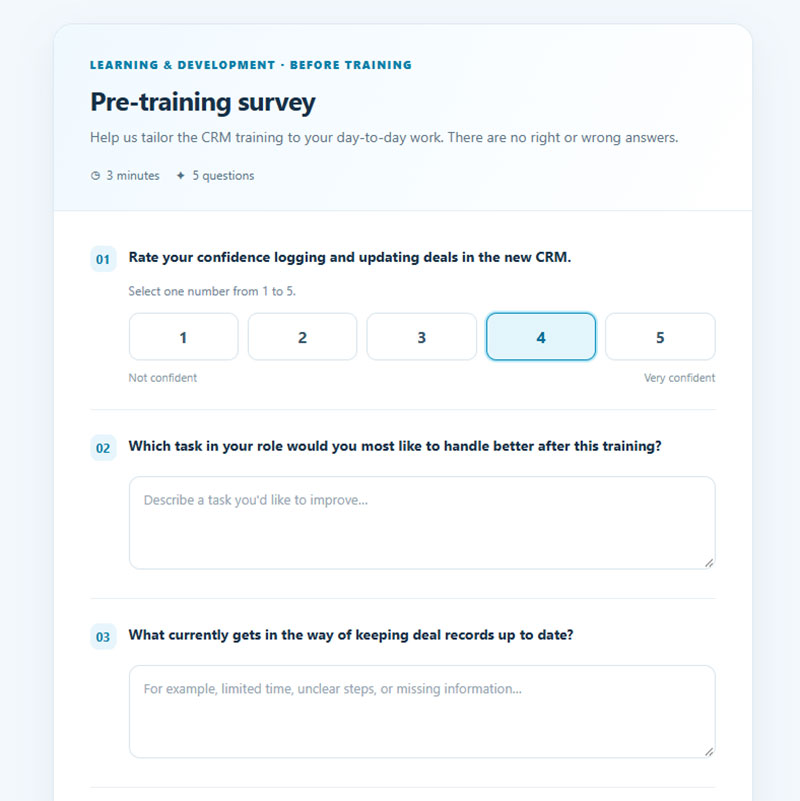
Keep the pre-training survey tight. It should cover current skill on each learning objective, the task the learner wants to improve, what blocks use of the skill today, how often the task comes up, and the preferred format.
- Rate your confidence logging and updating deals in the new CRM, from 1 (not confident) to 5 (very confident). Repeat for each learning objective.
- Which task in your role would you most like to handle better after this training?
- What currently gets in the way of keeping deal records up to date?
- How often do you update deal records in a typical week?
- Which format works best for you: live in person, live online or self-paced?
The first item is the baseline. Repeat it word for word after the course and the difference is your level 2 gain.
Items two and three double as a training needs assessment. They show the gap between what the role requires and what people can do now, plus the workplace obstacles no course can fix.
Those obstacles come back at the 30-day follow-up, so record them now.
Self-rated confidence is a perception, not a test. When the skill carries risk (safety, compliance), add one scenario question to get a factual baseline.
Cut anything you won’t compare later. It’s easier to avoid survey fatigue before day one than to repair it halfway through a program.
Skip role, tenure and team if the HR system already holds them. Skip every satisfaction question too, since nobody has been trained yet.
What to ask right after training ends
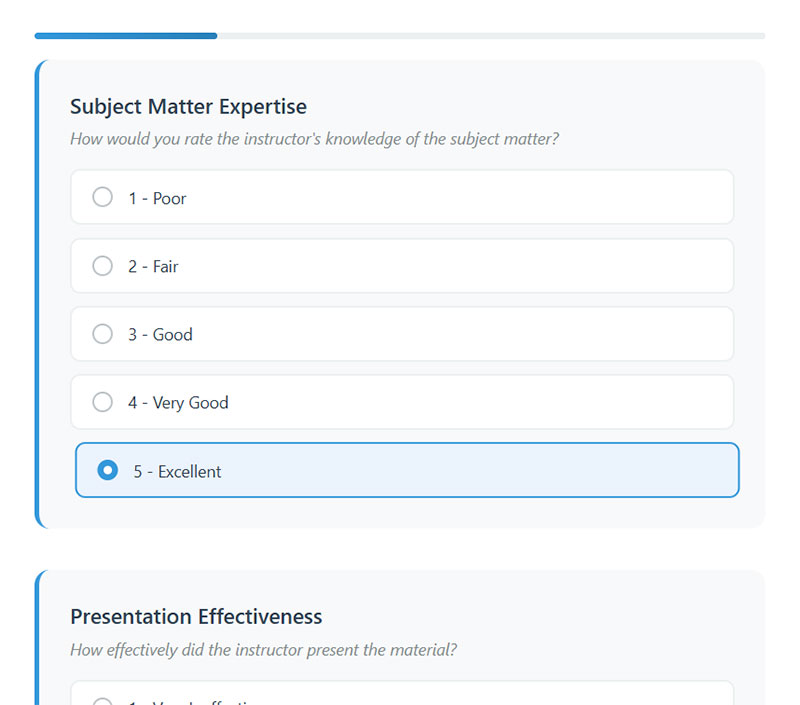
Content relevance, the instructor, delivery and materials, and a learning check all belong in this wave. Pick a few items from each topic and pair every rating with one open-ended question. This wave covers level 1 and gives a first read on level 2.
Ready-made starting points exist for most of these topics. The training feedback form templates cover course content, trainer, online delivery and employee training, and each one is editable.
Content and relevance questions
Ask about relevance before enjoyment. Mind Tools, summarizing the New World model with Kirkpatrick Partners’ permission, notes its emphasis on making training relevant to a learner’s everyday job.
- How relevant was this training to your current role?
- Which example was closest to a situation you face at work?
- What content could be cut without losing anything you need?
- Rate how well the session met each stated learning objective.
The course content feedback form template evaluates course structure, content relevance and learning outcomes.
Instructor questions
Ask what the instructor did, not whether people liked them.
A weak item reads “The instructor was engaging.” A better one reads “The instructor gave me time to practice and answered my questions in a way I could use.”
The weak version collects a personality vote. The better one tells the trainer what to repeat.
The trainer feedback form template collects focused feedback on trainer knowledge, communication and teaching, which makes a useful base to reword.
Delivery, materials and environment questions
Pacing gets a simple three-way answer: too fast, about right or too slow. For materials, ask which handout or job aid the learner will use again.
In-person sessions need questions about the room, the equipment and whether the schedule fit. Virtual sessions need audio and video quality, how easy the platform was, and whether chat and breakout time gave enough interaction.
Don’t skip the technical items for virtual programs. A bad connection shows up as a bad course in the open-text answers.
The online training feedback form template measures user experience, platform usability and materials, and the training event feedback form covers training-focused or educational events.
The form itself matters too, and these feedback form best practices cover the layout basics.
Learning check questions
Self-rating is a start. A scenario question is better evidence.
The CDC’s recommended post-course items ask learners to rate their knowledge of the topic before the course and now after it. The agency says to pair them with objective measures of knowledge and recall.
Write the objective items at the same depth as the learning objective. Bloom’s revised taxonomy (Anderson and Krathwohl, 2001) runs from remember to create, and the verb in each objective tells you which level to test.
For a remember objective, ask learners to list the three steps of the refund process. For an apply objective, give a scenario instead: A customer disputes a charge from last month. Which step do you take first?
If the objective says apply, a recall question tests the wrong thing. The New World model also adds confidence and commitment as level 2 items, so one rating on each is worth including.
For scenario items, a Radio button field works well, with the correct option stored as a value. The employee training feedback form template focuses on training effectiveness and skill development and can supply the self-rated items.
How do you measure on-the-job application 30, 60 and 90 days later?
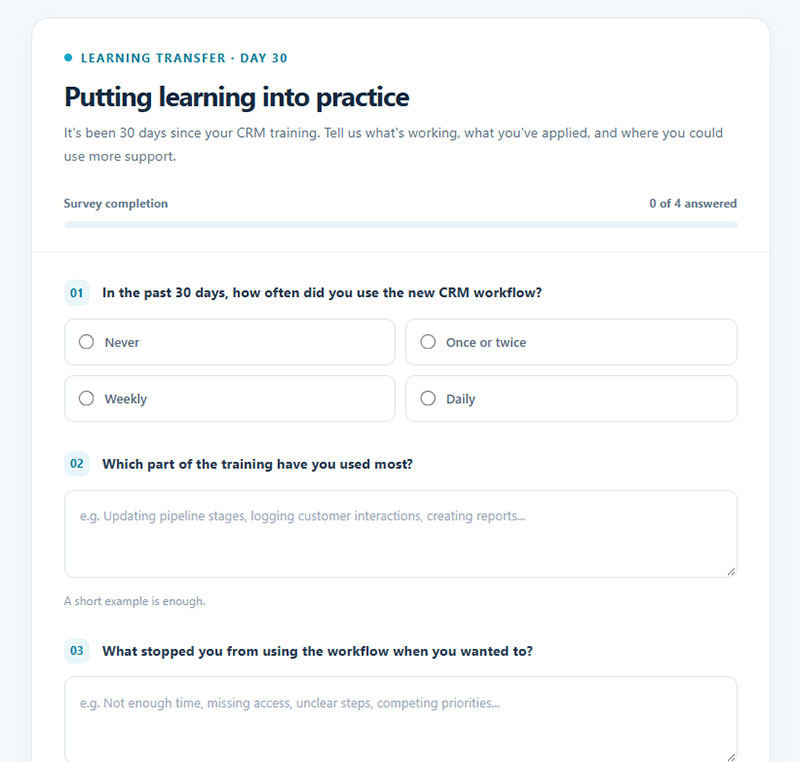
Ask learners which skills they used, how often and what got in the way, then ask their managers to confirm the same behaviors. Send the first check at 30 days and a second at 60 or 90 days. Level 4 numbers come from operational data, not survey items.
Learner follow-up questions
Keep the 30-day check to a handful of items. A short pulse survey is enough, with depth added at 60 or 90 days.
- In the past 30 days, how often did you use the new CRM workflow? (never, once or twice, weekly, daily)
- Which part of the training have you used most?
- What stopped you from using the workflow when you wanted to?
- How much has your manager supported you in using it?
The last two items measure the work environment, not the course. Holton, Bates and Ruona built the Learning Transfer System Inventory (2000) from responses by 1,616 training participants, and factor analysis produced 16 transfer system constructs, including supervisor support and opportunity to use.
This split prevents a wrong call. Holton’s evaluation model shows that a program can raise learning scores and still fail to change behavior because the transfer climate is poor.
Read with the four levels alone, that result says rebuild the course. The course was not the problem.
Manager and trainer questions
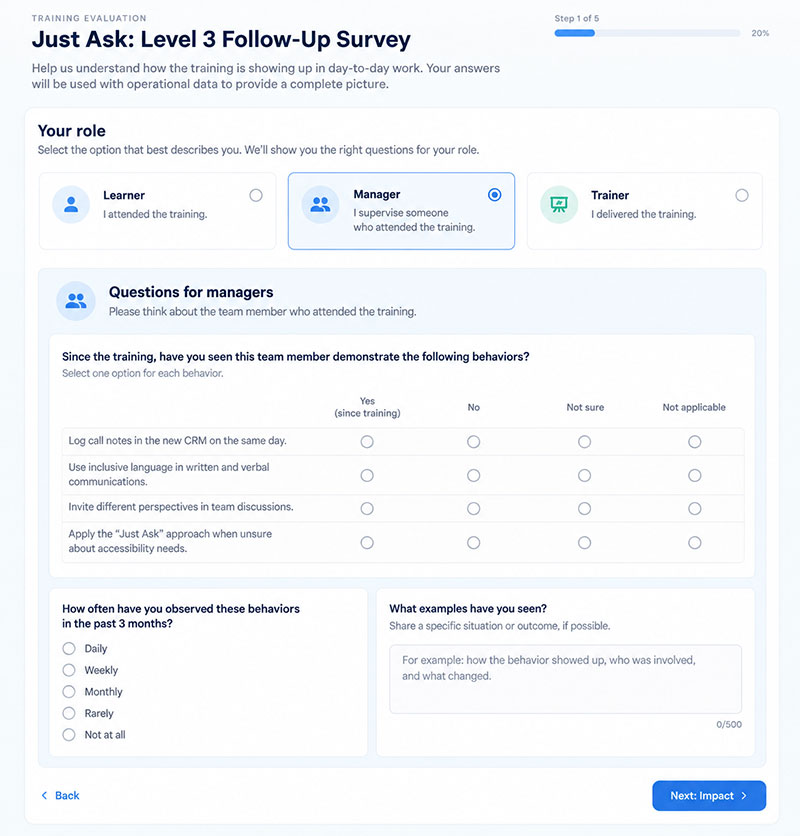
For managers, name the behavior in the question. “Have you seen this team member log call notes in the new CRM on the same day since the training?” gets a usable answer. “Has the training helped?” does not.
Trainers can answer a different question. Ask what the cohort could and could not do by the end, and which conditions (time, equipment, prior knowledge) limited the session. That explains a weak level 3 result before anyone blames the learners.
When one form serves both learners and managers, conditional logic can reveal the manager items only after the respondent picks the manager role, so each group sees only its own questions.
York Region ran a level 3 evaluation of its “Just Ask” inclusivity training in 2008. It waited six months, surveyed every participant and their direct supervisors, and received about 40% of the responses, according to its presentation to the Accessibility Advisory Committee.
That is the response risk of a late, single-wave follow-up. Plan reminders, and ask managers to nudge their teams.
Kirkpatrick Partners disputes the one-survey approach. In one of its Quick Tips, the most popular reader answer for evaluating level 3 was a survey of participants and supervisors 90 days out, yet the firm argued the right answer was none of the options.
Its position is that level 3 work starts before the program, when stakeholders define the critical behaviors, and continues through monitoring and leading indicators. A single 90-day survey is a snapshot, not a monitoring plan.
Use the survey to ask people. Use operational data to check what they said.
Why high satisfaction scores do not prove the training worked
Satisfaction and learning are different outcomes. Two meta-analyses covering more than 150 studies found a correlation of r = 0.09 between traditional smile sheet ratings and learning results, according to Will Thalheimer in TD Magazine.
Statisticians treat correlations below 0.30 as weak, so 0.09 is close to no relationship at all.
Reactions aren’t worthless. Sitzmann and colleagues (Journal of Applied Psychology, 2008) found that reactions mainly reflect course characteristics such as instructional style, and that they predict gains in motivation and self-efficacy.
That makes them a design signal, not a skill measure.
Reaction questions tend to fail in a few predictable ways.
- Turning agreement answers into numbers and reporting a mean hides the spread of answers (Thalheimer, TD Magazine).
- Nobody decided in advance what counts as an acceptable answer, so every result reads as good news.
- Likert-like agreement scales give fuzzy data, which is why Thalheimer recommends concrete answer choices.
- The same-day rating never gets repeated on the job.
A typical item reads “Overall, how would you rate this course? (1 to 5)”. A performance-focused version asks “How able are you to put what you learned into practice on the job?” and offers these answers:
- I am not yet able to do this on the job
- I understand it but need more practice
- I can do it with help
- I can do it on my own at an acceptable standard
- I can do it fully and could coach others
The question follows Thalheimer’s “how able are you” wording. The answer choices here are adapted, so agree your own acceptable standard with stakeholders before launch.
Thalheimer notes the same ability question works on a delayed survey, which makes it useful again at 30 or 90 days. A result like “most learners can do it with help” tells a trainer what to fix. “4.1 out of 5” does not.
In a form builder, a Radio button field holds these five answers, and a stored value from 1 to 5 on each option makes the share per answer easy to count at every wave.
Plain satisfaction questions still earn their place for logistics (room, audio, schedule), pacing and facilitator behavior. They diagnose the experience. They do not certify learning.
Treat a high score as the absence of a complaint, not proof of success.
Which question type fits which goal?
Use rating or concrete-choice items for pre and post comparisons, open-ended items for what to change, multiple choice for barriers, NPS only as a closing item, and yes/no for facts. The table shows the trade-offs.
| Type | Best use | Main weakness | Training example |
|---|---|---|---|
| Likert or rating scale | Pre and post comparison on the same item | Averages hide the spread | I can update deals in the new CRM without help. |
| Open-ended | What to change and why | Slow to code | What part of the session should change? |
| Multiple choice | Ability levels, barriers, formats | Options must be written and agreed in advance | Which of these stopped you using the workflow? |
| NPS (0 to 10) | One summary item at the end | One number, no diagnosis | How likely are you to recommend this training to a colleague? |
| Yes/no | Facts and checklists | No nuance for judgments | Did you receive the pre-work before the session? |
Likert scale and rating questions
Five or seven points is the research answer. Krosnick and Tahk’s 2008 meta-analysis pooled 706 reliability tests from 30 studies and found five- or seven-point scales most reliable, with a midpoint on bipolar scales raising reliability further.
For unipolar items (how relevant, how often, how useful), five points from not at all to extremely works. Bipolar items (agree or disagree, too fast or too slow) get seven points with a true neutral middle. SurveyMonkey’s guidance on numbering rating scales draws the same split.
The sources don’t fully agree. Some studies favor seven points for finer discrimination, while a 2023 study in Survey Research Methods found five-point scales more robust to scale direction effects (whether labels run low to high or the reverse).
Pick one length and one direction, then keep them identical across pre, post and follow-up so the comparison holds.
For ready-made labels, these Likert scale question examples cover the standard agreement and frequency sets.
The Likert field builds the grid with rows for statements and columns for scale points, and its column presets include Satisfaction, Importance, Agreement and Likelihood. The Rating field adds levels for 5, 7 or 10 point scales and can display stars, hearts or likes.
Open-ended questions
Open-ended questions let learners answer in their own terms (Harvard Program on Survey Research).
- What is one thing you will do differently next week?
- What part of the session should change before the next cohort?
Each one costs the respondent more effort than a rating, so ration them.
Multiple choice, NPS and yes/no questions
Write multiple choice options from real barriers (no time to practice, no manager support, no tool access) and add an Other field. Keep yes/no for facts, such as whether the pre-work arrived. Judgments need a scale.
Fred Reichheld of Bain & Company developed the Net Promoter Score in 2003. Respondents answer one 0 to 10 recommendation question, and the score is the percentage of promoters (9 to 10) minus the percentage of detractors (0 to 6), a range of -100 to +100.
In training, ask it last and read it like any other reaction rating, because nothing in the formula fixes the weak link between reactions and learning. For ready-made wording, see these NPS survey questions.
The NPS field shows 0 to 10 buttons with a label at each end of the scale, and the stored scores read directly as detractors, passives and promoters.
How to word training survey questions and how many to ask
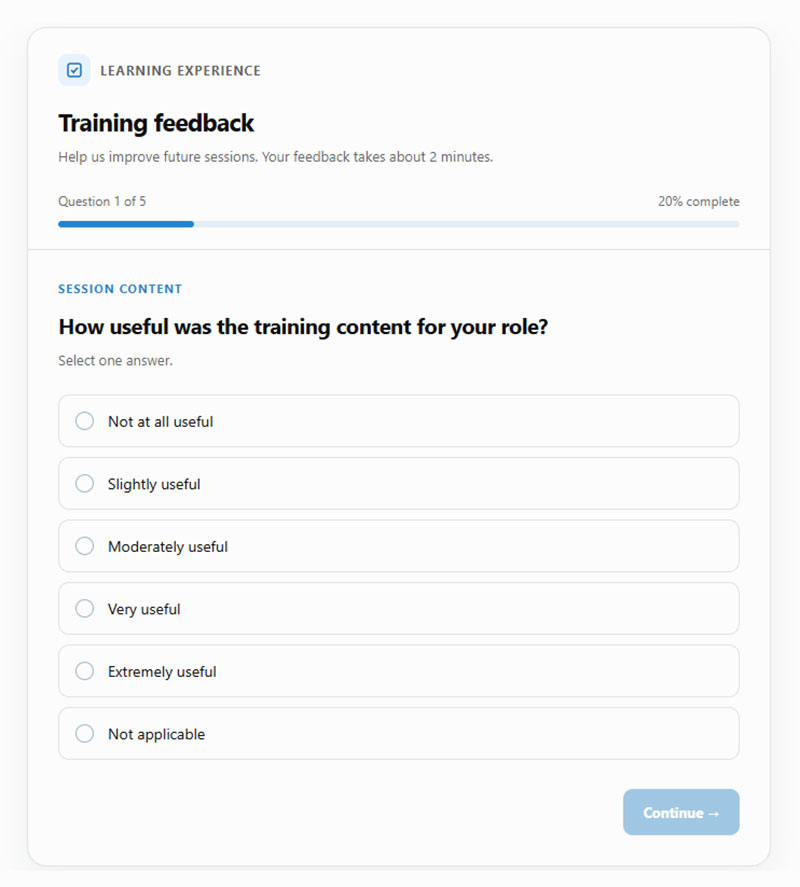
Ask one thing per question, use neutral language, and cut every item you won’t act on. Wording changes the answers people give, and length changes who finishes.
A few wording errors turn up again and again.
- “The pace and the content were right for me” is double-barreled. Split it into two items, because a learner who liked one and not the other can’t answer.
- “How valuable was this highly practical workshop?” leads the respondent, since the adjective pushes the answer. Ask how useful the workshop was for the learner’s role.
- “Did the training improve your performance?” is too vague. Name the task instead: did you update deals in the new CRM faster?
- “Do you use the new process?” has no time frame. Add a period, such as the past 30 days, so everyone answers about the same stretch of time.
Pew Research Center’s questionnaire guidance warns that small wording differences can shift answers substantially. The SAGE Encyclopedia of Survey Research Methods adds that double-barreled items take respondents longer and draw more requests for clarification, with the word “and” as the usual tell.
Harvard’s Program on Survey Research recommends having a few people think out loud while answering. Do that with two or three learners before launch, and fix the item nobody understood.
Length is its own problem. Galesic and Bosnjak (Public Opinion Quarterly, 2009) announced lengths of 10, 20 and 30 minutes for the same web survey. The longer the announced length, the fewer people started and finished, and later answers came faster, shorter and more uniform.
Not every study agrees. A 10-year meta-analysis of health sciences education surveys found that survey length did not affect absolute response rates.
The designs differ. One manipulated announced length in an opt-in web survey, the other pooled published surveys of professional learners who may feel obliged to answer, so the safer assumption for a training team is that length costs completions and effort.
Tag each item with the decision it informs. If you can’t name one, delete the item.
When a longer form is unavoidable, multi-page forms split it into short pages with a progress bar, and conversational forms show one question at a time.
On response rates, the average online survey response rate is 44.1% across 1,071 surveys in education-related research (Wu, Zhao and Fils-Aime, Computers in Human Behavior Reports, 2022).
The same study found that sending to a clearly defined population, pre-contacting participants and phone reminders raised rates, while incentives showed no significant effect. A cohort is already a defined population, so announce the follow-up in the session and send reminders instead of gift cards.
How to analyze training survey results
Analysis starts with matching each learner’s answers across waves. After that you compare, segment and code, and before acting on any of it you check who didn’t respond.
- Match records. Use a learner ID from the LMS or a hidden form field, not names typed by hand. Without it, pre, post and follow-up become three unrelated piles.
- Report by answer choice. Show the percentage who chose each option and compare it with the standard agreed before launch.
- Compare pre and post. Take the difference on identical items for each learner, as the CDC’s pretest and posttest guidance describes.
- Segment. Cut results by cohort, instructor and delivery format. Pull role and tenure from the HR record through the learner ID.
- Code open-ended answers. Read a sample, write a short list of themes, then count. Qualtrics’ Text iQ tags responses to topics you define, and its Advanced tier adds recommended topics and sentiment scoring.
- Check non-response. Compare responders and non-responders on role and cohort, then follow up with a sample of non-responders.
On a WordPress learning site, IvyForms can stamp the learner ID for you. Add a Text field with the default value {{wp.user_id}} and the Read Only setting, and every response from a logged-in learner carries the same ID on each wave. The fields overview lists the other pre-fill placeholders, such as the user email.
Each entry also records its submission date, and the entries table searches and filters by date range, which keeps the waves in order. The wpDataTables integration turns entries into tables and charts, so choose only non-personal fields for anything shown on the front end.
If you must ask for segment fields in the survey itself, keep the demographic questions optional and put them last.
A high response rate doesn’t remove bias. Sheikh and Mattingly (Journal of Epidemiology and Community Health, 1981) ran a mail survey of 2,471 disabled people at an 84% response rate and still found that non-respondents differed significantly on the outcome.
The same risk applies to follow-ups. If the learners who skip the 90-day survey are the ones who never used the skill, the results read better than reality.
Route each finding to its owner. Content and pacing issues go to the designers, while transfer-climate issues (no time to practice, no manager support) go to managers, because rewriting the course won’t fix them.
For general statistics on any survey, this guide on how to analyze survey data is a useful companion.
Which tool should run the survey?
Google Forms or Microsoft Forms is enough when your team already works in that suite and cohorts are small. Move to SurveyMonkey, Qualtrics or your LMS when you need skip logic, automated text analysis or links to learner records.
| Tool | Best for | Strength | Limit (October 2026) |
|---|---|---|---|
| Google Forms | Small cohorts in Google Workspace | Quiz mode scores knowledge checks; responses sync to Sheets | File upload needs a Google sign-in; analysis happens in Sheets |
| Microsoft Forms | Microsoft 365 work and school accounts | Up to 200 questions per form | Personal accounts cap responses at 200 (free) or 1,000 (paid); branching only jumps forward |
| SurveyMonkey | Teams that need skip logic and matrix questions | Skip logic, randomized order, matrix questions | Free plan: 10 questions per survey, 25 viewable responses |
| Qualtrics | Large programs with open-text analysis | Text iQ tags responses to topics; Stats iQ for statistics | Sentiment analysis and recommended topics need the Advanced text tier |
| LMS survey module (Moodle) | Surveys tied to course enrolment | Survey activity ships verified instruments (COLLES, ATTLS) | Not customizable; custom questions need the Feedback activity |
Typeform’s Basic plan includes conditional logic and 100 responses a month, and drop-off rates arrive on the Business plan (Typeform pricing page). Hidden fields pass a learner ID through the survey link, which solves the record-matching problem.
Free-tier caps are what break follow-up waves. SurveyMonkey’s Help Center states that responses over a survey’s limit are not viewable and are eventually deleted, so a 60-person cohort on the free plan loses sight of 35 responses.
Don’t buy an enterprise platform for a quarterly cohort. A Google or Microsoft form plus a spreadsheet handles matched pre and post data, provided every response carries a learner ID.
Training teams that run their learning hub on WordPress also have a plugin route. A form plugin such as IvyForms keeps responses in your own dashboard, offers Likert, Rating and NPS fields, and its permissions can be limited to specific forms, so each trainer sees only the form for their own session.
When a cohort outgrows Google Forms, these alternatives to Google Forms compare the next step up. Once the tool is chosen, this walkthrough on how to create a survey form covers the build.
Training Survey Questions FAQ
Is there a free training survey template I can copy?
Yes. Typeform, SurveyMonkey and most form builders ship free survey templates, and these survey form templates give a starting layout. The feedback form templates include training-specific versions you can edit.
Generic course evaluation templates stop at level 1, so add a baseline skill item before the course and a 30-day application item after it.
Do training surveys need to be anonymous?
No. Confidential works better than anonymous when you match pre, post and follow-up answers, because matching needs a learner ID.
Reaction-only surveys can stay anonymous. Otherwise, tell learners that only the L&D team sees names.
What should I ask after onboarding or compliance training?
Ask for evidence of use, not enjoyment. Compliance training gets scenario questions, because the target behavior rarely shows up on demand.
Onboarding gets 30-day items on role clarity and manager support, and these onboarding survey questions cover the new hire side.
How often can I survey the same group?
As often as each survey drives a decision, and no more.
When one cohort attends several programs, merge the follow-ups into a single combined check instead of sending one per course.
Who can see individual survey responses?
Only the L&D team should see named responses. Trainers get their own session’s results and comments, and managers get grouped application results.
Tell learners this before they answer.
In a WordPress form plugin, permissions can be set by role or by user and limited to specific forms, which fits the trainer-per-session setup.
Which Survey to Launch First
A team new to training survey questions should launch the 30-day follow-up first, sent to the most recent cohort. It fills the behavior gap at once, while a true baseline can only be built into the next program.
Order matters because a baseline can’t be recovered after the course, only estimated with a retrospective rating.
- 30-day follow-up to the last cohort
- Baseline item in the next cohort’s survey
- Ability question at session end
The catch is that the first wave delivers application data within a month, but the pre and post comparison stays a retrospective rating until a real baseline exists.
The program is working once one result has changed a decision, such as a revised module or a manager action on a transfer-climate gap.