



The best AI plugins for WordPress connect a site’s dashboard, page builder, or database to a machine learning model, turning a plugin that follows fixed rules into one that writes,…
Table of contents
Two WordPress form plugins have been going head-to-head for over 15 years. The Gravity Forms vs Contact Form 7 debate comes down to one free and one premium, each with millions of active installations and completely different approaches to building forms.
One gives you a drag-and-drop form builder with conditional logic, payment integrations, and entry management built in. The other hands you a text editor and says “write your own markup.” Both work. Both have loyal users. But picking the wrong one wastes time and money.
This comparison breaks down pricing, field types, spam protection, performance, developer tools, and real use cases so you can choose the right free WordPress form plugin or premium solution for your site.
What Are Gravity Forms and Contact Form 7
Two WordPress form plugins have dominated the conversation for over a decade. Contact Form 7 and Gravity Forms. Both build forms. Both sit inside the WordPress dashboard. But they solve different problems for different people.
Contact Form 7 launched in 2007, built by Japanese developer Takayuki Miyoshi. It’s free, open-source, and listed on the WordPress.org plugin directory with over 5 million active installations. That makes it one of the most downloaded plugins in WordPress history, period.
Gravity Forms came two years later in 2009, created by Rocketgenius. It’s a premium plugin (no free version, no freemium tier) that sells through its own website. You won’t find it on WordPress.org. Pricing starts at $59/year for a single site and goes up to $259/year for unlimited sites.
The core difference between them isn’t really about features. It’s about philosophy.
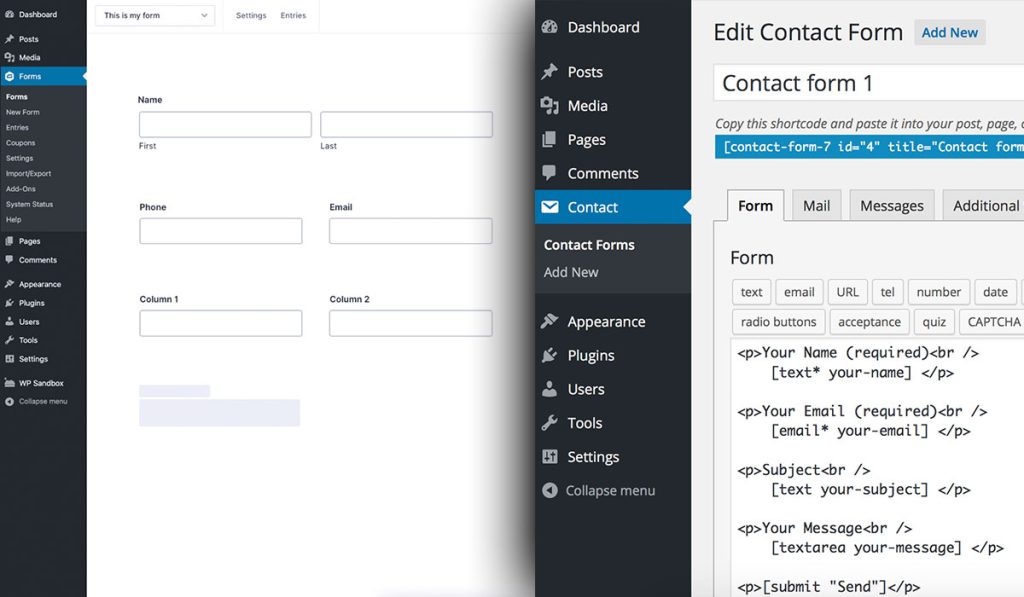
CF7 gives you a blank text editor and says “build what you want with markup.” Gravity Forms hands you a visual drag-and-drop builder and says “click to create.” One expects you to be comfortable with code snippets. The other assumes you’d rather not touch code at all.
WordPress powers roughly 43% of all websites globally, according to W3Techs. With over 60,000 free plugins available in the directory, the form plugin you pick has a real impact on how your WordPress forms function, how data gets handled, and what your visitors actually experience on your contact us page.
Form Builder Interface and Ease of Use
This is where the two plugins split the hardest. If you’ve used both, you know. If you haven’t, here’s what to expect.
How Contact Form 7’s Editor Works
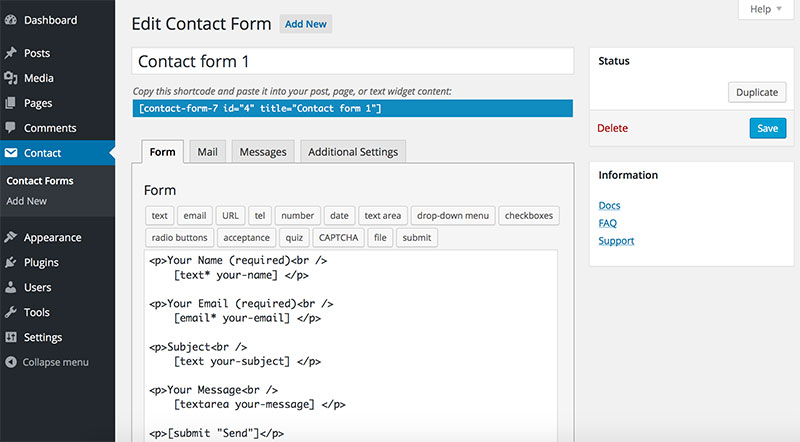
CF7 uses a tag-based text editor. You type markup that looks like a hybrid of HTML and shortcode syntax. Something like [text* your-name] to create a required text field.
There’s no preview inside the editor. You save the form, paste the shortcode on a page, and then check how it looks on the front end. That loop gets old fast when you’re tweaking field order or testing layout changes.
The interface hasn’t changed much since 2007. Some people like that stability. Others find it frustrating, especially when coming from modern page builders like Elementor or the Gutenberg block editor.
Worth knowing: CF7 ships with one default template (a basic name/email/message/submit form). That’s it. You build everything else from scratch.
How Gravity Forms’ Builder Works

Gravity Forms uses a visual drag-and-drop form builder inside the WordPress admin. You click a field type (text, dropdown, email, file upload, whatever), and it appears in your form. Drag it to reorder. Click to configure settings in a sidebar panel.
Live preview is available during editing. You can test multi-column layouts by dragging fields side-by-side. Mobile-responsive output is handled automatically.
Patchstack’s 2025 security report found 7,966 new vulnerabilities in the WordPress ecosystem during 2024, with 96% originating in plugins. That kind of stat makes the plugin you install matter beyond just usability, since each added extension is another potential attack surface. Gravity Forms bundles more functionality into a single plugin, which means fewer third-party add-ons to monitor.

Conditional Logic in the Form Builder
Gravity Forms includes conditional logic natively. You can show or hide fields, skip form sections, or change notification routing based on user input. All configured through a point-and-click interface.
Contact Form 7 does not have built-in conditional logic. You need a third-party plugin like “Contact Form 7 Conditional Fields” to get this done. It works, but it’s one more plugin dependency to maintain and update.
For multi-step forms, the gap widens. Gravity Forms lets you add “Page” fields anywhere to break forms into steps. CF7 requires yet another extension.
| Feature | Gravity Forms | Contact Form 7 |
|---|---|---|
| Builder type | Visual drag-and-drop | Tag-based text editor |
| Live preview | Yes, in editor | No, front-end only |
| Conditional logic | Built-in | Requires third-party plugin |
| Multi-step support | Native Page field | Requires third-party plugin |
| Form templates | Multiple pre-built | One default template |
Available Form Fields and Field Types
The form fields you can use out of the box determine how much you can do before reaching for extensions or custom code. This is where Budget vs. premium really shows.
Contact Form 7 Default Fields
CF7 comes with the basics:
- Text, email, URL, tel, number
- Date picker, textarea
- Drop-down menus, checkboxes, radio buttons
- File upload and acceptance (consent) fields
- Quiz field for basic anti-spam
That covers a standard contact form just fine. But try building a pricing calculator, a user registration flow, or an intake form with detailed conditional branching, and you’ll hit the ceiling fast.
Gravity Forms Field Library
Gravity Forms ships with 30+ field types organized into categories: Standard, Advanced, Post, and Pricing fields.
Standard: single line text, paragraph, dropdown, number, checkboxes, radio buttons, hidden fields, HTML blocks, section breaks.
Advanced: name (with prefix/suffix), date, time, phone, address (with auto-complete), email, file upload, CAPTCHA, list, consent, password.
Post fields: title, body, excerpt, tags, category, image. These let you create front-end post submission forms without custom code.
Pricing fields: product, quantity, option, shipping, total. Combined with Stripe or PayPal add-ons, you can build full WordPress payment forms directly inside Gravity Forms.
Zuko Analytics data shows the average form completion rate across industries sits around 51.7%, with desktop outperforming mobile. The type of fields you use directly affects that number. Dropdown-heavy forms, for example, tend to see the highest abandonment rates.
Pricing and Licensing Structure
Contact Form 7 is free. Full stop. No premium tier, no upsell from the original developer. Takayuki Miyoshi accepts donations, but the plugin itself costs zero dollars regardless of how many sites you install it on.
Gravity Forms charges annually. Here’s the breakdown:
| Plan | Price/Year | Sites | Notable Add-Ons |
|---|---|---|---|
| Basic | $59 | 1 | Mailchimp, HubSpot, reCAPTCHA |
| Pro | $159 | 3 | Stripe, PayPal, Zapier, Slack |
| Elite | $259 | Unlimited | User Registration, Surveys, Webhooks |
A nonprofit license is also available at $129/year, which includes all Elite features.
The Hidden Cost of “Free”
Here’s the thing people miss when comparing these two on price alone. CF7’s core plugin is free, yes. But once you need functionality beyond basic types of forms, you start stacking third-party extensions.
Want conditional logic? That’s a plugin. Want to save entries to the database? Install Flamingo or CFDB7. Want Stripe payments? Another plugin. Want multi-step functionality? Another one.
Each of those plugins comes from a different developer with different update schedules, different support channels, and different levels of code quality. After three or four extensions, you might be spending more annually than a Gravity Forms Pro license, and you’re dealing with more potential compatibility issues.
When a Gravity Forms license expires, the plugin keeps working on your site. You just stop getting updates and support. That’s a detail worth remembering if budget is tight one year.
Third-Party Integrations and Add-Ons

Integrations are where a form plugin stops being “just a form” and starts being a business tool. This section matters if you’re connecting forms to email marketing platforms, CRMs, payment gateways, or automation services.
Gravity Forms Official Add-Ons
32 official add-ons ship across the three license tiers. All maintained by the Gravity Forms team at Rocketgenius.
Payment gateways include Stripe, PayPal Standard, PayPal Checkout, Square, and Authorize.Net (Pro tier and above). CRM and marketing connections cover Mailchimp, HubSpot, ActiveCampaign, Salesforce, Zoho CRM, Constant Contact, and more.
Automation tools like Zapier and Webhooks open the door to thousands of third-party app connections. Slack and Trello integrations are also built in at the Pro tier.
The Elite tier adds advanced capabilities: User Registration for creating WordPress accounts from form submissions, Surveys, Quizzes, Polls, Signature fields, and Partial Entries (which let users save progress and return later).
Contact Form 7 Extension Ecosystem
CF7’s integration story is almost entirely community-driven. Third-party developers build and maintain the extensions. Quality varies.
Some popular ones:
- Flamingo: saves form submissions to the WordPress database (CF7 doesn’t do this by default)
- CF7 to Mailchimp: connects forms to Mailchimp lists
- CF7 Skins: adds visual templates and styling options
- CF7 Conditional Fields: adds show/hide logic to form fields
The risk here is fragmentation. When five different developers maintain five different extensions for your one contact form, and one of those developers abandons their plugin, you’re stuck. Patchstack reported that in 2024, 33% of plugin vulnerabilities were not patched before public disclosure, and many of those were in abandoned plugins. That’s a real concern for sites relying on a chain of CF7 add-ons.
Email Delivery and Notification Setup
Both plugins depend on the WordPress wpmail() function to send email notifications. And both will have deliverability problems if your hosting server doesn’t handle outbound email well. Installing an SMTP plugin (like WP Mail SMTP or Post SMTP) is practically required regardless of which form builder you pick. Properly configured WordPress email settings prevent form submissions from landing in spam folders.
CF7’s mail setup uses a template with mail tags. You define the To, From, Subject, and Body fields using tags like [your-name] and [your-email]. You can set up two mail templates per form (Mail and Mail 2 for autoresponders).
Gravity Forms’ notification system is more flexible. You can create unlimited notification emails per form, each with its own conditional routing. Send different emails to different departments based on a dropdown selection, for example. Merge tags pull in submitted data automatically.
Spam Prevention and Security
Spam is the tax every website form pays for being public. The question isn’t whether you’ll get spam submissions. It’s how well your plugin handles them before they flood your inbox.
Contact Form 7 Anti-Spam Options
CF7 supports Akismet integration, Google reCAPTCHA v3, and a built-in quiz field (basic math or text challenges). There’s also a disallowed word list feature that blocks submissions containing specific terms.
The problem? CF7’s massive install base and predictable HTML output make it a target. Spambots know exactly what a CF7 form looks like in the source code. I’ve seen sites running CF7 with nothing but reCAPTCHA still getting dozens of junk submissions per day.
For stronger form security, most CF7 users end up adding a honeypot through yet another plugin, or layering Cloudflare Turnstile on top of reCAPTCHA.
Gravity Forms Spam Protection
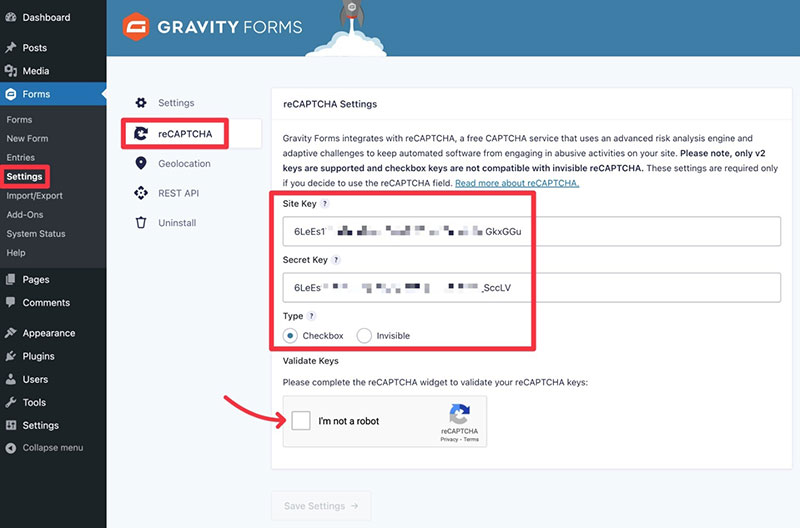
Built-in tools: Google reCAPTCHA, hCaptcha, Akismet, and a native honeypot field (added in version 2.7). Cloudflare Turnstile is available as an official add-on.
The honeypot being native matters. It means one less plugin to install and one less compatibility concern. Combined with Akismet or reCAPTCHA, most Gravity Forms sites see significantly less spam than equivalent CF7 setups.
Gravity Forms also benefits from not being in the WordPress.org directory. Its form HTML structure is less predictable to automated bots compared to CF7, which uses the same default markup across millions of installations.
Patchstack’s data showed that 96% of WordPress vulnerabilities in 2024 came from plugins, and XSS (cross-site scripting) was the most common type. Keeping your form plugin updated and using solid spam prevention tactics is not optional anymore. Both plugins release regular security patches. But with Gravity Forms, you’re dealing with one vendor’s update cycle. With CF7 plus multiple extensions, you’re tracking updates from several independent developers.
Proper form validation also plays a role here. Server-side validation catches what JavaScript-based checks miss, and both plugins handle this, though Gravity Forms gives you more granular control over validation rules per field without writing PHP.
Performance and Page Load Impact
Every plugin you install adds weight to your pages. With form builders, the question is how much CSS and JavaScript gets loaded, and whether it loads on pages that don’t even have a form.
Google’s Core Web Vitals measure loading speed (Largest Contentful Paint), responsiveness (Interaction to Next Paint), and visual stability (Cumulative Layout Shift). A form plugin that loads unnecessary assets on every page can hurt all three metrics.
Contact Form 7 Asset Loading
CF7 loads its CSS and JavaScript on every single page by default. Doesn’t matter if there’s a form on the page or not. This is one of the most common complaints about the plugin and has been for years.
The asset footprint is small (roughly 50-80KB), so on a modern connection it barely registers. But for sites chasing perfect PageSpeed scores or running on budget shared hosting, it adds up alongside other plugins.
You can dequeue the assets manually with a few lines of PHP in your theme’s functions.php. Most developers do this. But it’s extra work that shouldn’t be necessary.
Gravity Forms Asset Loading
Gravity Forms conditionally loads CSS and JavaScript only on pages where a form exists. No form on the page, no assets loaded. This is the expected behavior, honestly.
The trade-off: Gravity Forms’ asset bundle is heavier at around 150-200KB. It includes more functionality (conditional logic scripts, AJAX validation, multi-step navigation), so the larger size makes sense.
Both plugins support AJAX-powered form submission, which means the page doesn’t reload when a user hits submit. That matters for perceived speed and keeps visitors on the page. If you’re looking to optimize forms for performance, AJAX submission is one of the quickest wins.
| Metric | Contact Form 7 | Gravity Forms |
|---|---|---|
| Asset size | 50–80KB | 150–200KB |
| Loads on all pages | Yes (by default) | No (conditional) |
| AJAX submission | Yes | Yes |
| Manual dequeue needed | Yes, for non-form pages | No |
Data Storage and Entry Management
What happens after someone clicks “Submit”? That’s the question most people forget to ask when picking a form plugin. And it’s where the gap between these two gets wide.
Contact Form 7 Has No Built-In Entry Storage
This catches a lot of people off guard. CF7 does not save form submissions in the WordPress database. When someone fills out your form, the data goes to email. That’s it.
If that email bounces, lands in spam, or your inbox has a bad day, the submission is gone. No backup. No way to recover it.
The workaround is Flamingo, a free companion plugin by the same developer. It saves entries to the database and gives you a basic list view in the WordPress admin. CFDB7 is another popular option from a third-party developer.
Gravity Forms Entry Management System
Every submission is stored automatically as an entry in the WordPress database. Gravity Forms gives you a full management dashboard for entries:
- Search, filter, and sort across all form fields
- Star, mark as read, add notes to individual entries
- Edit submitted data directly from the admin
- Export entries as CSV for reporting
The Partial Entries add-on (Elite tier) lets users save progress and come back later. That’s a big deal for long registration forms or detailed applications where improving form abandonment rate is a priority.
Zuko Analytics data shows 55% of people abandon forms before completing them. Having partial entry capture means you at least get something from those drop-offs instead of losing them entirely.
GDPR and Personal Data Handling
Key distinction: CF7 without Flamingo technically doesn’t “store” personal data on your server, since submissions only go to email. Some site owners see this as a GDPR advantage, since fewer stored records mean fewer obligations under data subject access requests.
Gravity Forms stores everything. That means you need to handle deletion requests, data exports, and retention policies. The plugin integrates with WordPress core’s personal data export and erasure tools, which helps. Building GDPR compliant forms is possible with either plugin, but Gravity Forms requires more deliberate configuration.
GDPR non-compliance can result in fines up to 20 million euros or 4% of annual global revenue, whichever is higher. That’s reason enough to understand exactly where your form data lives and who can access it.
Developer Extensibility and Custom Code
Both plugins are open-source at their core. Both let developers customize behavior with PHP hooks. But the depth and quality of developer tools differ significantly.
Contact Form 7 Developer Tools
Action and filter hooks are available for core events. The most commonly used one is wpcf7beforesendmail, which lets you intercept form data before the notification email fires.
Custom validation is possible through filters. You can add your own PHP logic to check submitted values against external databases or APIs.
Documentation is thin. The official docs cover basics, but for advanced use cases you’re searching through WordPress.org support forums, Stack Overflow threads, and blog posts from independent developers. Took me a long time to find reliable examples for some of the more obscure hooks.
Gravity Forms Developer API
Gravity Forms offers a significantly deeper developer toolset:
PHP API: GFAPI class for programmatic form and entry management. Create forms, update entries, delete data, all from custom code.
REST API v2: Built on top of the WordPress REST API. Lets external apps (mobile, desktop, JavaScript front ends) create, read, update, and delete forms and entries over HTTP.
JavaScript hooks: Client-side events like gformprerender and gformpostrender for modifying form behavior in the browser.
Field Framework: The GF_Field class lets you register entirely new field types with custom markup, validation, and storage logic.
The developer documentation at docs.gravityforms.com is thorough. API references, code examples, hook listings. It’s the kind of documentation you wish every WordPress plugin had.
Multisite and Enterprise Use
Gravity Forms Elite: supports WordPress Multisite with network-wide activation. A single license covers unlimited sites. The CLI add-on lets you manage forms through WP-CLI, which is useful for agencies running automated deployments.
CF7 on Multisite: works, but there’s no centralized management across network sites. Each subsite operates independently. For agencies managing 20+ client installations, this creates repetitive manual work.
WooCommerce, which powers roughly 8.8% of all websites according to W3Techs, integrates with Gravity Forms through official add-ons for custom product configurators and checkout fields. CF7 has no native WooCommerce integration.
Which Plugin Fits Which Use Case
After going through every meaningful comparison point, here’s the direct answer. Not “it depends.” Actual recommendations based on common scenarios.
When Contact Form 7 Is the Right Choice
Simple contact page, zero budget. You need a name, email, message, and submit button on a contact form template. CF7 does this in under five minutes and costs nothing.
Developer who prefers code over GUI. If you like writing markup, want full HTML control, and plan to build custom functionality with PHP filters anyway, CF7’s lightweight approach stays out of your way.
Personal blog or nonprofit with a single contact page. When forms aren’t a core business function and you just need something that works, CF7 is plenty.
When Gravity Forms Is the Right Choice
Lead generation with CRM integration. If you’re connecting forms to HubSpot, Salesforce, Mailchimp, or Zapier, Gravity Forms makes this seamless with official add-ons. Businesses focused on using website forms for lead generation will find the built-in tools far more practical than piecing together CF7 extensions.
Payment collection or e-commerce order forms. Stripe, PayPal, and Square are available as official Gravity Forms add-ons. Building a website form that collects payments requires no extra plugins.
Agency managing multiple client sites. The Elite license at $259/year gives you unlimited sites, priority support, and every add-on. For agencies, the math works out fast compared to managing separate CF7 extension licenses per client.
| Scenario | Recommendation | Key Reason |
|---|---|---|
| Simple contact form, no budget | Contact Form 7 | Free, fast to set up |
| Lead capture with CRM sync | Gravity Forms | Official integrations |
| Payment/order forms | Gravity Forms | Native payment add-ons |
| Developer-built custom solution | Contact Form 7 | Lightweight, markup-first |
| Agency with 20+ sites | Gravity Forms Elite | Unlimited sites, all add-ons |
What About Other Options?
Gravity Forms and CF7 aren’t the only WordPress contact form plugins worth considering. WPForms has over 6 million active installations and offers a middle ground between the two: a visual builder with a free tier. Ninja Forms, Fluent Forms, and Formidable Forms each occupy their own niche.
If you need conversational forms or complex form design customizations, some of these alternatives might actually be a better fit than either Gravity Forms or CF7. Your mileage may vary, but at least in my experience, the best plugin is the one that matches how your team actually works.
Look, both Gravity Forms and Contact Form 7 have earned their place in the WordPress ecosystem. One has lasted nearly 20 years by being free and reliable. The other has lasted nearly as long by being powerful and well-supported. The “wrong” choice is usually the one you pick without thinking about what you actually need.
FAQ on Gravity Forms Vs Contact Form 7
Is Contact Form 7 completely free?
Yes. Contact Form 7 is 100% free with no premium tier. You can install it on unlimited WordPress sites at zero cost. Advanced features like conditional logic or database storage require separate third-party plugins, some of which are paid.
How much does Gravity Forms cost per year?
Gravity Forms starts at $59/year for one site (Basic), $159/year for three sites (Pro), and $259/year for unlimited sites (Elite). There’s no free version. A nonprofit license is available at $129/year with full Elite features.
Can Contact Form 7 store form submissions?
Not by default. CF7 sends submissions to email only. Install the free Flamingo plugin to save entries in your WordPress database. Without it, if an email bounces or hits spam, that submission data is lost permanently.
Does Gravity Forms have a drag-and-drop builder?
Yes. Gravity Forms includes a visual drag-and-drop form builder inside the WordPress admin panel. You click to add fields, drag to reorder, and configure settings in a sidebar. Live preview is available during editing.
Which plugin is better for beginners?
Gravity Forms is easier for non-technical users thanks to its visual builder. Contact Form 7 uses tag-based markup that feels dated. But if you just need a basic contact us page template, CF7 gets the job done fast.
Can I accept payments with either plugin?
Gravity Forms supports Stripe, PayPal, Square, and Authorize.Net through official add-ons. Contact Form 7 has no native payment support. You’d need third-party extensions to process payments, and quality varies across those options.
Which plugin loads faster on a WordPress site?
Contact Form 7 has a smaller asset footprint (50-80KB vs 150-200KB). But CF7 loads scripts on every page by default, while Gravity Forms only loads assets on pages with forms. Neither significantly impacts speed on modern hosting.
Do both plugins support Google reCAPTCHA?
Yes. Both support Google reCAPTCHA and Akismet for spam filtering. Gravity Forms also includes a native honeypot field and hCaptcha support. CF7 typically needs an additional plugin for honeypot functionality to strengthen form security.
Can I migrate from Contact Form 7 to Gravity Forms?
There’s no automated migration tool. You’ll need to manually rebuild each form in Gravity Forms, replace shortcodes on your pages, and reconfigure email notifications. Export any stored CF7 data through Flamingo or database plugins before switching.
Which plugin is better for lead generation?
Gravity Forms wins here. It connects directly to HubSpot, Mailchimp, Salesforce, and Zapier through official add-ons. Contact Form 7 relies on community-built extensions for CRM integrations, which means less consistent quality and support.
Conclusion
The Gravity Forms vs Contact Form 7 decision isn’t about which plugin is objectively better. It’s about what your WordPress site actually needs right now and where it’s headed.
Contact Form 7 remains a solid, lightweight option for simple contact pages and developers who prefer markup control. It costs nothing and has survived nearly two decades for good reason.
Gravity Forms makes sense when you need entry management, payment processing, CRM connections, or file upload handling without stitching together five separate extensions. The annual license pays for itself quickly on sites where form submissions drive revenue or lead capture feeds a sales pipeline.
Pick based on your actual requirements, not popularity. Match the plugin to your workflow, your budget, and the form UX design your visitors deserve.