



Gallup’s 2024 data shows only 31% of U.S. employees feel engaged at work. Annual surveys can’t catch that kind of decline fast enough. Pulse surveys can. These short, frequent questionnaires…
Table of Contents
Your contact page is leaking leads. Most businesses grab a random template, add their email address, and wonder why inquiries stay flat.
The right contact us page template does more than collect messages. It builds trust, qualifies visitors, and turns browsers into buyers.
This guide breaks down template types, must-have elements, and the tools that actually work. You’ll learn which layouts fit different business models, from simple WordPress contact forms to custom Webflow designs.
We’ll also cover the mistakes that kill conversion rates and how to fix them.
By the end, you’ll know exactly which contact page design matches your goals.
What is a Contact Us Page Template
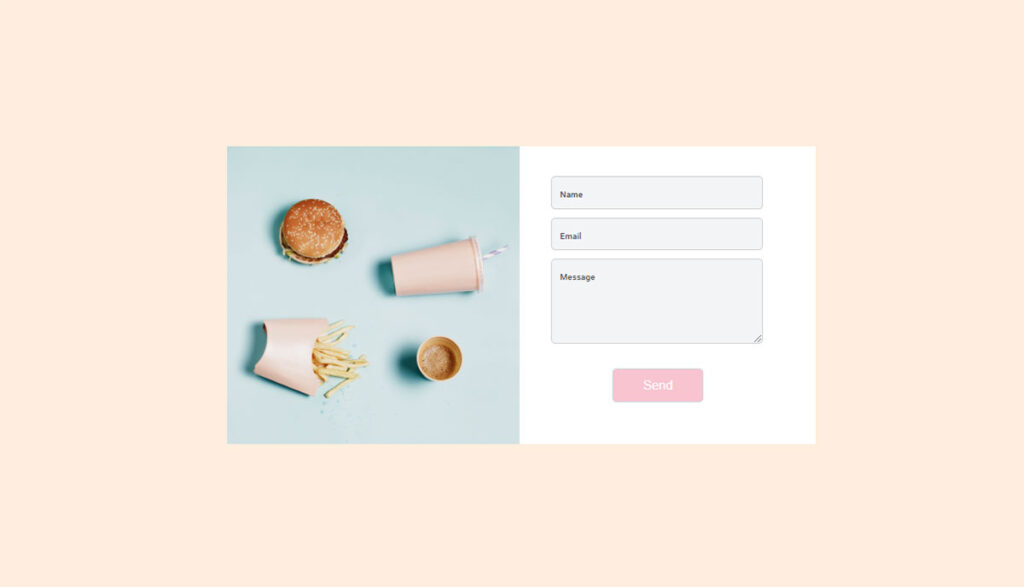
A contact us page template is a pre-designed layout that provides the structure for visitor communication on websites.
It includes form fields, business contact information, and visual elements arranged in a ready-to-use format.
Templates range from simple HTML contact form designs to complex layouts with Google Maps integration, social media links, and multi-step forms.
Contact Us Page Templates
See the Pen
tailwind contact form by fabform (@fabform)
on CodePen.
See the Pen
Tailwind CSS – Contact Form 1 by Rhythm Ruparelia (@rhythm19)
on CodePen.
See the Pen
Responsive Contact Us Page by Nguyễn Tấn Thắng (@nguyn-tn-thng)
on CodePen.
See the Pen
Yellow Dots Contact Form – Pen #15 – 2020 by Ricky Eckhardt (@rickyeckhardt)
on CodePen.
See the Pen
Colorful Contact Form – Day 1 – 100 DAYS – 2020 by Ricky Eckhardt (@rickyeckhardt)
on CodePen.
See the Pen
Contact Form by Carlos Rincon (@mezerotm)
on CodePen.
See the Pen
Contact Form by Couch John (@tmoran18)
on CodePen.
See the Pen
Wordpress/wp7 contact form with animated placeholder text by Jason Heyburgh (@MrShibumi)
on CodePen.
See the Pen
Stylish Contact Form with HTML, CSS, and JS by Envato Tuts+ (@tutsplus)
on CodePen.
See the Pen
healthy lifestyle contact form by Oscar Beamish (@OscarTBeamish)
on CodePen.
See the Pen
jQuery Pop-up Contact Form by Beka (@bekqs)
on CodePen.
See the Pen
Contact Form by Aina Requena (she/her) (@ainarela)
on CodePen.
See the Pen
Elegant Contact Form by Grandvincent Marion (@GrandvincentMarion)
on CodePen.
See the Pen
Contact Us Page Design – Contact Form Design by Ikbal Hossain (@indikbal)
on CodePen.
Why Does a Contact Us Page Template Matter for Websites
A professional contact page design builds trust with visitors and increases inquiry submissions.
Templates save development time. Instead of coding from scratch, you get tested layouts that work across devices.
Good templates follow form UX design principles. They place form fields logically, use clear labels, and guide users toward submission.
Impact on User Experience
Visitors decide within seconds whether to fill out a form. Cluttered layouts kill conversions. Clean templates with proper spacing keep users focused.
Impact on Conversion Rates
Optimized templates can double submission rates. Key factors: field count, button placement, and trust signals like privacy policy links.
Learn more about increasing form conversions through strategic design choices.
Impact on Brand Perception
Your contact page reflects your business. A dated template signals neglect. A modern, responsive design shows professionalism.
What Are the Types of Contact Us Page Templates
Contact templates fall into distinct categories based on layout, functionality, and use case. Understanding the types of forms helps you pick the right structure.
Simple Contact Form Templates
Three to four fields: name, email, message, submit button. Fast to load, easy to complete. Best for service businesses wanting quick inquiries.
Multi-Step Contact Form Templates
Break long forms into sections. Progress bars show completion status. Reduces perceived effort and improves completion rates for complex inquiries.
Full-Width Contact Page Templates
Form spans the entire viewport. Creates immersive experience. Works well for agencies and creative businesses with strong visual branding.
Sidebar Contact Page Templates
Form on one side, business information on the other. Displays phone number, address, and business hours alongside the submission form.
Map-Integrated Contact Templates
Google Maps embed shows your location. Essential for local businesses, restaurants, and retail stores where visitors need directions.
Minimalist Contact Templates
White space dominates. Single input field or floating label design. Popular with tech companies and modern startups.
What Elements Should a Contact Us Page Template Include
Effective templates combine functional components with trust-building elements. Every piece serves a purpose.
Contact Form Fields
Core fields include name, email address, and message box. Optional: phone number, company name, subject dropdown.
Fewer fields mean higher completion rates. Only ask what you actually need. Review form fields best practices before adding extras.
Business Contact Information
Display your phone number, email address, and physical address. Some visitors prefer calling over filling forms.
Include business hours so people know when to expect responses.
Location Map Integration
Embed Google Maps for physical locations. Interactive maps let visitors get directions without leaving your site.
Social Media Links
Add icons linking to your active profiles. Facebook, LinkedIn, Twitter, Instagram. Skip platforms you don’t maintain.
Call-to-Action Buttons
The submit button needs clear text. “Send Message” beats “Submit.” Use contrasting colors for visibility.
Consider secondary CTAs: “Call Now” or “Schedule a Meeting” for visitors who want immediate contact.
How Do You Choose the Right Contact Us Page Template
Match the template to your business type, audience expectations, and technical requirements.
For Small Business Websites
Simple templates work best. Contact form with basic fields, Google Maps, phone number display. Avoid complexity that slows load times.
Consider WordPress contact form plugins for easy setup without coding.
For E-commerce Websites
Include order number field and department dropdown. Route inquiries to the right team: sales, support, returns.
Add FAQ links to reduce unnecessary submissions.
For Corporate Websites
Multiple contact options by department. Office locations with individual maps. GDPR compliant forms for international visitors.
For Portfolio Websites
Clean, minimal design that matches creative work. Project type dropdown helps filter inquiries. Budget range field qualifies leads early.
For Service-Based Businesses
Service selection checkboxes. Appointment scheduling integration. File upload for project briefs or documents.
Lead capture forms with qualifying questions help prioritize high-value prospects.
How Do You Customize a Contact Us Page Template
Most templates allow modification through visual editors or CSS. Start with structure, then refine styling and functionality.
Changing Form Fields
Add, remove, or reorder fields through your form builder. Use conditional logic to show fields based on user selections.
Keep required fields minimal. Mark optional fields clearly.
Adding Brand Colors and Fonts
Match your site’s color scheme. Update button colors, field borders, and background. Import custom fonts or use system defaults for faster loading.
Integrating with Email Services
Connect forms to Mailchimp, HubSpot, or Zoho for automated responses. Configure WordPress email settings for reliable delivery via SMTP.
Set up form submission confirmation messages to acknowledge receipt.
Adding Validation Rules
Require specific formats for email and phone fields. Set character limits on text areas. Add client-side and server-side validation for security.
What Are Common Contact Us Page Template Mistakes to Avoid
These errors kill conversion rates. Check your template against this list.
- Too many required fields – Each additional field drops submissions by 4-7%
- Missing mobile optimization – Over 60% of visitors use phones
- No confirmation message – Users wonder if submission worked
- Hidden or buried contact page – Should be in main navigation
- Generic submit button text – “Send Message” converts better than “Submit”
- No alternative contact methods – Some visitors prefer phone or email directly
- Slow page load – Forms on heavy pages get abandoned
Poor form error messages frustrate users. Be specific: “Please enter a valid email” beats “Error in field 2.”
Review tips for improving form abandonment rate to patch these issues.
How Does a Contact Us Page Template Affect Conversion Rates
Template choice directly impacts how many visitors complete your form. Small changes create measurable differences.
Field Count and Completion Rate
Three fields: 25% average conversion. Six fields: 15% average. Ten or more: under 10%.
Only collect what sales or support actually needs.
Layout and Visual Hierarchy
Single-column forms outperform multi-column on mobile. Place submit buttons where thumbs naturally rest. Use contrasting colors for CTAs.
Trust Elements
Privacy policy links increase submissions by 5-10%. Security badges help on sites collecting sensitive data.
Following form accessibility guidelines expands your audience and improves completion rates for all users.
Page Speed
Each second of load time costs 7% of conversions. Optimize images, minimize JavaScript, use lightweight templates.
What Tools Create Contact Us Page Templates
Choose based on your platform, budget, and technical comfort level.
WordPress Form Plugins
- IvyForms – Beginner-friendly drag and drop builder
- Gravity Forms – Advanced features for developers
- Contact Form 7 – Free, lightweight, millions of installs
- Ninja Forms – Good middle ground between simple and powerful
- Formidable Forms – Complex calculations and views
Compare options in this guide to free WordPress form plugins.
Page Builders with Form Features
Elementor, Divi, and Beaver Builder include form widgets. Good for design consistency but fewer form-specific features than dedicated plugins.
Standalone Form Builders
Typeform, JotForm, and Formstack work on any platform. Embed via iframe or JavaScript. Monthly subscription pricing.
Google Forms and Microsoft Forms offer free options for basic needs.
HTML and CSS Frameworks
Bootstrap and Tailwind CSS provide contact form templates for developers. Full control over styling and behavior. Requires coding knowledge and backend setup with PHP or JavaScript.
Email Marketing Platform Forms
Mailchimp, HubSpot, and Zoho Forms integrate contact collection with CRM and email automation. Best when lead nurturing follows initial contact.
FAQ on Contact Us Page Templates
What is a contact us page template?
A contact us page template is a pre-built layout containing form fields, business information sections, and design elements. Templates work with platforms like WordPress, Squarespace, and Webflow. They save development time while providing tested structures for visitor inquiries.
How many fields should a contact form have?
Three to five fields perform best. Name, email, and message are standard. Each additional field reduces completion rates by 4-7%. Only ask for information your team actually uses when responding to inquiries.
Are free contact form templates good enough?
Free templates from Bootstrap, Contact Form 7, or Google Forms work for basic needs. Paid options like WPForms or Gravity Forms add spam protection, conditional logic, and email integrations. Your choice depends on required features.
What makes a contact page convert better?
Fewer fields, clear submit buttons, and mobile responsive design increase conversions. Add trust signals like privacy policy links. Display alternative contact methods including phone number and business hours for visitors who prefer direct communication.
Should I use a popup or embedded contact form?
Embedded forms suit dedicated contact pages. Popup forms work for quick lead capture on other pages. Test both approaches. Some audiences prefer one over the other based on industry and intent.
How do I add a map to my contact page template?
Embed Google Maps using an iframe code or WordPress plugin. Most page builders like Elementor include map widgets. Enter your business address and adjust zoom level. Maps help local visitors find your physical location.
What spam protection should contact forms have?
Use reCAPTCHA, honeypot fields, or both. Honeypots catch bots without annoying visitors. reCAPTCHA v3 runs invisibly in the background. Strong form security prevents spam submissions flooding your inbox.
Can I customize a contact page template without coding?
Yes. Drag and drop builders like WPForms, Elementor, and JotForm allow full customization. Change colors, fonts, field order, and layouts visually. Templates provide starting points you modify to match your brand.
What confirmation message should appear after form submission?
Tell visitors their message was received and when to expect a response. Include next steps or helpful links. A clear confirmation reduces duplicate submissions and builds trust that their inquiry matters to your business.
How do I make my contact form GDPR compliant?
Add a consent checkbox before submission. Link to your privacy policy. Explain how you store and use data. Delete submissions after a reasonable period. European visitors require explicit consent before collecting personal information.
Conclusion
The right contact us page templates turn passive visitors into active leads. Your choice matters more than most businesses realize.
Start with your goals. Simple inquiry collection needs basic layouts. Lead qualification demands smarter forms with conditional fields and email service integrations.
Tools like Elementor, Typeform, and Formstack make customization accessible without touching HTML5 or CSS3 code.
Focus on mobile forms first. Test your submit button placement. Cut unnecessary fields.
Add trust signals and clear confirmation messages.
Review your current contact page against the templates and examples covered here. Small changes to your form design and layout create measurable differences in visitor communication and submission rates.