



Gallup’s 2024 data shows only 31% of U.S. employees feel engaged at work. Annual surveys can’t catch that kind of decline fast enough. Pulse surveys can. These short, frequent questionnaires…
Table of Contents
Most contact form templates you find online look decent in the preview and fall apart the second you drop them into a real site. Broken validation, zero mobile responsiveness, spam flooding your inbox within a week.
That’s a waste of your time and your visitors’ patience.
This guide breaks down what actually makes a contact form template work, from HTML structure and CSS styling to field selection, CMS compatibility, and backend email delivery through services like SendGrid or SMTP.
You’ll find specific template types for different use cases, the components that affect conversion rates, ranking criteria for choosing the right one, and step-by-step build instructions for WordPress, Shopify, and Webflow.
What is a Contact Form Template
A contact form template is a pre-built HTML and CSS layout that lets website visitors send messages, inquiries, or requests directly to a site owner through structured form fields.
It typically includes input areas for a name, email address, subject line, and message body, all wrapped in a responsive design that works across desktop and mobile screens.
Some templates come with built-in form validation, spam filtering, and server-side processing already configured. Others are bare-bones starting points you style and extend yourself.
The core job is simple: collect visitor data and deliver it to your inbox (or a third-party service like Mailchimp, Zapier, or SendGrid) without forcing users to open their email client.
A good template does this with clean markup, proper accessibility labels, and minimal page load impact. A bad one ships 200KB of JavaScript for three input fields.
Most WordPress forms rely on templates under the hood, whether they come from plugins like WPForms, Contact Form 7, or Gravity Forms, or from custom theme code.
Platforms like Webflow, Squarespace, and Wix include their own native contact form builders, but they still follow the same template logic: predefined structure, customizable fields, backend email delivery.
Contact Form Templates
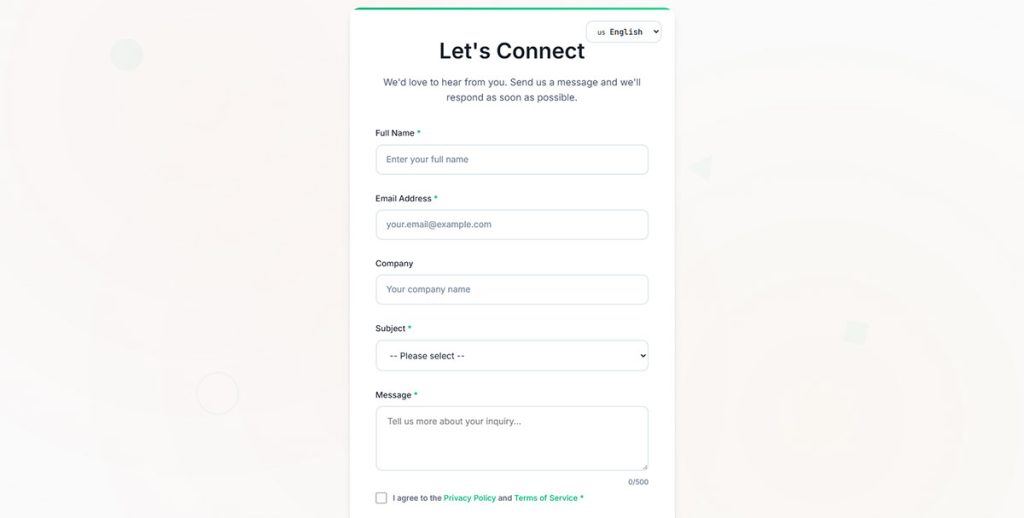
Modern Contact Form
See the Pen
Modern Contact Form by Bogdan Sandu (@bogdansandu)
on CodePen.
A sleek, modern contact form designed with startup aesthetics in mind. Features a fresh green color palette, glass-morphism design, and smooth micro-interactions that create an engaging user experience.
Modern Two-Column Contact Form
See the Pen
Modern Two-Column Contact Form by Bogdan Sandu (@bogdansandu)
on CodePen.
A sleek, contemporary contact form featuring a sophisticated two-column layout with glassmorphism design elements. Built with vanilla HTML, CSS, and JavaScript – no frameworks required.
Modern Dark Contact Form
See the Pen
Modern Dark Contact Form by Bogdan Sandu (@bogdansandu)
on CodePen.
A sleek, startup-style extended contact form featuring a sophisticated dark theme with warm yellow/gold accents. Built with vanilla HTML, CSS, and JavaScript.
Modern Help Desk Support Form
See the Pen
Modern Help Desk Support Form by Bogdan Sandu (@bogdansandu)
on CodePen.
A beautifully crafted support form designed with modern UI/UX principles and startup aesthetics. Features a warm, professional color palette (orange & sage green) with smooth animations and micro-interactions.
Modern Multi-Step Contact Form
See the Pen
Modern Multi-Step Contact Form by Bogdan Sandu (@bogdansandu)
on CodePen.
A sleek, interactive multi-step form featuring modern design patterns and smooth animations. Built with vanilla HTML, CSS, and JavaScript – no frameworks required!
Modern E-commerce Contact Form
See the Pen
Modern E-commerce Contact Form by Bogdan Sandu (@bogdansandu)
on CodePen.
A beautifully designed contact form designed for e-commerce platforms with a fresh, startup-inspired aesthetic. Features a coral, teal, and sky blue color palette that avoids clichéd gradients.
Modern Conditional Logic Contact Form
See the Pen
Modern Conditional Logic Contact Form by Bogdan Sandu (@bogdansandu)
on CodePen.
A sophisticated multi-step contact form featuring advanced conditional logic, micro-interactions, and premium visual design. Built with vanilla HTML, CSS, and JavaScript.
Modern Split-Screen Contact Form
See the Pen
Modern Split-Screen Contact Form by Bogdan Sandu (@bogdansandu)
on CodePen.
A sleek, startup-style contact form featuring a sophisticated 50/50 split layout with advanced UX patterns and micro-interactions. Built with vanilla HTML, CSS, and JavaScript.
Multi-Language Contact Form with Advanced Micro-Interactions
See the Pen
Multi-Language Contact Form with Advanced Micro-Interactions by Bogdan Sandu (@bogdansandu)
on CodePen.
A modern, responsive contact form featuring smooth animations and dynamic user interactions. Built with vanilla HTML, CSS, and JavaScript.
How Does a Contact Form Template Work
A contact form template works by combining three layers: the front-end markup (HTML structure and CSS styling), client-side validation (JavaScript checks before submission), and a back-end handler that processes the data and routes it somewhere useful.
The visitor fills in the fields. JavaScript validates the inputs in real time, checking for empty required fields, properly formatted email addresses, and character limits.
When the user clicks submit, the form sends data using either a POST or GET method through the form’s action attribute.
That data hits a server-side script (PHP is the most common for WordPress setups) or a third-party endpoint like Formspree or Netlify Forms. The script sanitizes the input, checks for spam using tools like Google reCAPTCHA or a honeypot field, and delivers the message via SMTP.
AJAX submission handles this without a full page reload. The user sees a form submission confirmation message right on the page. No redirect, no confusion.
The whole cycle takes about 1-3 seconds on a well-configured setup.
What Are the Types of Contact Form Templates
Contact form templates split into categories based on what they collect, how they collect it, and what happens after submission. Picking the wrong type is one of the fastest ways to tank your conversion rate.
Each type below serves a different purpose, different audience, different business context. There are several types of forms beyond contact forms too, but these are the ones that matter when your goal is direct visitor communication.
What is a Simple Contact Form Template
Three to four fields: name, email, message, and sometimes a subject line. Load time is minimal, completion time under 30 seconds, and conversion rates are typically the highest of any form type.
Best fit for freelancers, small business sites, and portfolio pages where filtering inquiries isn’t a priority.
What is a Multi-Step Contact Form Template
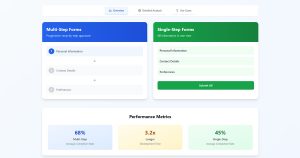
Splits longer forms into two or more screens using a progress indicator. Research from Baymard Institute shows multi-step forms reduce perceived complexity, especially on mobile.
These work well when you need 6+ fields but don’t want to scare people off with a wall of inputs. The multi-step forms or single-step forms debate matters here: if you only need 3 fields, a single step wins every time.
What is a Feedback Form Template
Collects opinions, ratings, and open-ended responses about a product, service, or experience. Usually includes a rating scale (1-5 stars or NPS) alongside a text area.
Following the best practices for creating feedback forms matters here because vague questions produce vague answers. Keep fields specific and short.
What is a Support Request Form Template
Includes dropdown menus for issue categories, urgency levels, and sometimes file upload fields for screenshots or documents. The conditional logic in these templates shows or hides fields based on the selected category.
A customer picking “billing issue” sees different follow-up fields than someone selecting “technical bug.”
What is a Booking Form Template
Date pickers, time slot selectors, and service type dropdowns are the core components. These templates often connect to Google Calendar or scheduling tools through webhooks or Zapier integrations.
Check out appointment form templates for pre-built options that already include calendar functionality and confirmation emails.
What is a Quote Request Form Template
Built for service businesses: contractors, agencies, consultants. Fields include project description, budget range, timeline, and sometimes a file upload for briefs or reference documents.
These are really a specialized type of lead generation form because every submission is a potential sales opportunity. The fields do double duty, collecting contact details while qualifying the lead.
What Are the Components of a Contact Form Template
Every contact form template shares a set of structural components. Some are visible to the user (input fields, buttons, error messages). Others run behind the scenes (client-side vs server-side form input validation, CAPTCHA checks, data encryption).
Getting these components right is the difference between a form that converts at 12% and one that sits there collecting dust.
What Are the Required Fields in a Contact Form
At minimum: name, email address, and message body. That’s it. Every additional field you add drops your completion rate.
Mark required fields with an asterisk and pair it with a clear label. The proper form fields for capturing high-quality leads depend on your goal, but for a basic contact form, fewer fields almost always win.
Optional fields like phone number, company name, or subject line can stay, but only if they help you route or prioritize the message on the backend.
What is Form Validation in a Contact Form Template
Form validation checks user input before or during submission. Client-side validation (JavaScript) catches errors instantly: empty fields, malformed email addresses, inputs exceeding character limits.
Server-side validation (PHP, Node.js) runs after submission as a security layer. It catches anything JavaScript missed and sanitizes data to prevent SQL injection or XSS attacks.
Inline validation, where errors appear next to the field as the user types, outperforms post-submit validation in both completion rates and user satisfaction. Proper form error messages tell the user exactly what went wrong and how to fix it. “Please enter a valid email” beats “Error in field 2.”
What is a Confirmation Message in a Contact Form
The confirmation message appears after a successful submission. It tells the visitor their message was received, sets response time expectations, and sometimes includes a reference number.
Two options: display a message on the same page (AJAX-based) or redirect to a dedicated thank-you page. The thank-you page option also lets you trigger conversion tracking pixels for Google Analytics or ad platforms.
How to Choose a Contact Form Template
Picking a template based on how it looks is a mistake I see constantly. The visual design matters, sure, but it’s the fifth or sixth thing you should evaluate.
Start with your CMS. A Bootstrap-based HTML template is useless if you’re running Shopify. A WordPress contact form plugin won’t help on Webflow.
Then ask yourself these questions:
- How many fields do you actually need? Count them. If it’s under 5, pick a simple template. Over 7, go multi-step.
- Does it work on mobile? Test it on a real phone, not just a browser resize. Touch targets need to be at least 44×44 pixels per WCAG 2.1 guidelines. Review mobile forms best practices before committing.
- What integrations matter? Email delivery via SMTP, CRM connections through Zapier or HubSpot Forms, autoresponder sequences through Mailchimp. Decide this before you pick a template, not after.
- Is it accessible? Proper form accessibility means ARIA labels, keyboard navigation, sufficient color contrast ratios, and screen reader compatibility. W3C compliance isn’t optional if you serve EU or US government clients.
- Does it handle spam? Templates without reCAPTCHA or honeypot integration will get flooded within weeks. Strong form security protects both your inbox and your users’ data.
- Is the code clean? Bloated templates with unnecessary jQuery dependencies and inline CSS will hurt your page speed. Check the file size. Anything over 50KB uncompressed for a basic contact form is a red flag.
For WordPress sites specifically, look at free WordPress form plugins before buying premium themes with built-in forms. The plugin route gives you more flexibility and better long-term update support.
If you care about GDPR compliant forms, verify the template includes a consent checkbox and a link to your privacy policy before the submit button. This is a legal requirement for any site handling EU visitor data, not a nice-to-have.
FAQ on Contact Form Templates
What is a contact form template?
A contact form template is a pre-built HTML and CSS layout with structured input fields (name, email, message) that collects visitor inquiries and delivers them to your inbox or a service like Mailchimp through server-side processing.
Are contact form templates free?
Many are. Platforms like JotForm, Google Forms, and Formspree offer free tiers. WordPress plugins like Contact Form 7 cost nothing. Premium templates from WPForms or Gravity Forms add advanced features like conversational forms and payment integration.
Which CMS platforms support contact form templates?
WordPress, Shopify, Webflow, Wix, and Squarespace all support them natively or through plugins. WordPress has the largest selection through dedicated WordPress lead generation plugins and form builders with drag and drop editors.
How many fields should a contact form have?
Three to five fields perform best for general inquiries. Name, email, and message are the minimum. Every field beyond five drops completion rates. Use multi-step form templates if you need more than seven inputs.
How do I prevent spam on my contact form?
Add Google reCAPTCHA v3, use a honeypot field, or enable server-side filtering. Most WordPress form plugins include these options built in. Never launch a contact form without at least one spam prevention layer active.
Can I use a contact form template without coding?
Yes. Tools like Typeform, JotForm, and WPForms use visual drag and drop builders. No HTML or CSS knowledge needed. Embed codes let you drop the finished form into any website form container or page builder block.
What is the difference between a contact form and a lead capture form?
A contact form collects general inquiries. A lead capture form collects prospect data tied to a specific offer, like a free download or demo request. The distinction matters for contact forms or lead generation forms strategy decisions.
Do contact form templates work on mobile devices?
Responsive design is standard in most modern templates. Check that touch targets meet the 44×44 pixel minimum, fields resize properly, and the submit button stays visible without scrolling. Always test on a real device, not just browser resize.
How do I connect a contact form to my email?
Configure the form’s action attribute to point to a PHP script or use a service like SendGrid, Formspree, or Netlify Forms. WordPress users can adjust their WordPress email settings or connect via SMTP plugins for reliable delivery.
What makes a good contact form template?
Clean HTML5 markup, inline validation, responsive CSS, fast load time under 50KB, spam protection, and proper form design. It should also include accessible labels that meet W3C and WCAG 2.1 standards for screen reader compatibility.
Conclusion
The right contact form template does more than collect messages. It reduces form abandonment, qualifies incoming leads, and protects your site from spam, all while loading fast on every device.
Focus on what matters: clean HTML5 markup, inline error handling, responsive CSS layout, and a reliable backend through PHP or a service like Formspree.
Don’t overload your form with unnecessary fields. Three to five inputs cover most use cases.
Add reCAPTCHA or a honeypot. Set up SMTP delivery so messages actually reach your inbox. Test on real phones, not just Chrome DevTools.
If you’re on WordPress, a plugin like WPForms or Gravity Forms handles most of this out of the box. For Webflow or Squarespace, lean on native form builders and webhook integrations with Zapier.
Match the template to your goal. Simple inquiry page, booking form, or subscription form, each needs a different structure. Pick accordingly and optimize your forms from there.