



Black Friday 2026 is on Friday, November 27, with Cyber Monday following on November 30. For WordPress site owners it’s the one week a year when the plugins and services…
Table of contents
A booking form template saves you from building a reservation form from scratch. The layout already asks for name, contact details, service, date and time, and you trim or add fields to suit the business. They show up as Word and PDF files, Google Forms, online form builder templates and WordPress booking plugins.
The format decides what the form can do. Documents and Google Forms record a request, but only a form that checks a calendar or its own booking records can refuse a taken slot.
WPForms’ documentation shows the gap. Its Google Calendar add-on writes each submission as an event, yet it cannot pull real-time availability to hide booked times.
Which Fields Does a Booking Form Template Need?
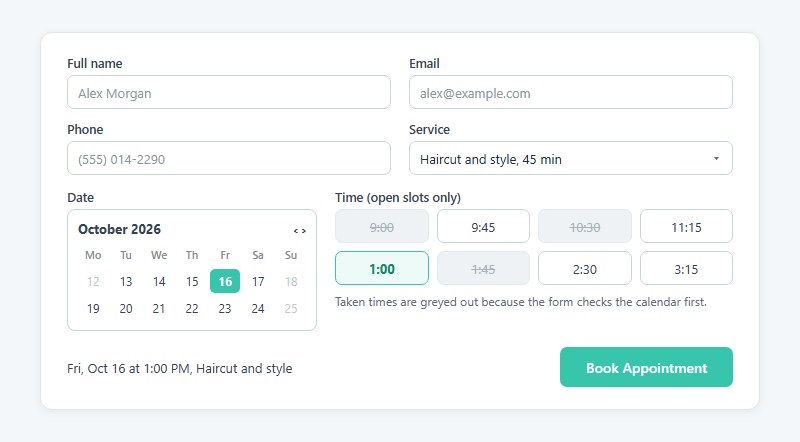
Name, email, phone number, service, date and time are enough to confirm a reservation. Party size or guest count only earns a seventh spot when capacity limits the slot.
- Full name goes in one field, not two, since it only feeds the greeting and the calendar entry.
- The confirmation and the reschedule link land in the email field.
- Staff call the phone number when a slot changes on the day, and SMS reminders use it too.
- Service works best as a dropdown of named options, each tied to a duration.
- Dates come from a date picker, never free text.
- Time should be a slot list that shows only open times, if the tool can check them.
For scale, Baymard Institute’s 2024 checkout research puts the average checkout flow at 11.3 form fields, and finds that field count hurts usability more than step count does. A booking form with six sits well clear of that.
Optional fields earn their place only when staff act on the answer. Choosing the right form fields for each booking type matters more than copying a long template.
- Party size or guest count
- Special requests
- Referral source
- File upload for reference photos or records
Conditional logic keeps the form short. A hotel form can show the room-type field only after check-in dates are picked, and a clinic form can ask insurance questions only of new patients (see how conditional logic works in form builders).
Every rule is a branch to test on a phone before launch. Where privacy law applies, add an unticked consent checkbox for any optional use of the data, such as a newsletter. The data rules section covers the wording.
Booking Form Templates
Modern Hotel Room Booking Form
See the Pen
Modern Hotel Room Booking Form by Bogdan Sandu (@bogdansandu)
on CodePen.
Modern Car Rental Booking Form
See the Pen
Modern Car Rental Booking Form by Bogdan Sandu (@bogdansandu)
on CodePen.
Modern Table Reservation Form
See the Pen
Modern Table Reservation Form by Bogdan Sandu (@bogdansandu)
on CodePen.
Modern Hair Salon Appointment Booking Form
See the Pen
Modern Hair Salon Appointment Booking Form by Bogdan Sandu (@bogdansandu)
on CodePen.
Modern Dentist Booking Form
See the Pen
Modern Dentist Booking Form by Bogdan Sandu (@bogdansandu)
on CodePen.
Personal Trainer Booking Form
See the Pen
Personal Trainer Booking Form by Bogdan Sandu (@bogdansandu)
on CodePen.
Modern Concert & Theater Ticket Booking Form
See the Pen
Modern Concert & Theater Ticket Booking Form by Bogdan Sandu (@bogdansandu)
on CodePen.
Modern Course Enrollment Form
See the Pen
Modern Course Enrollment Form by Bogdan Sandu (@bogdansandu)
on CodePen.
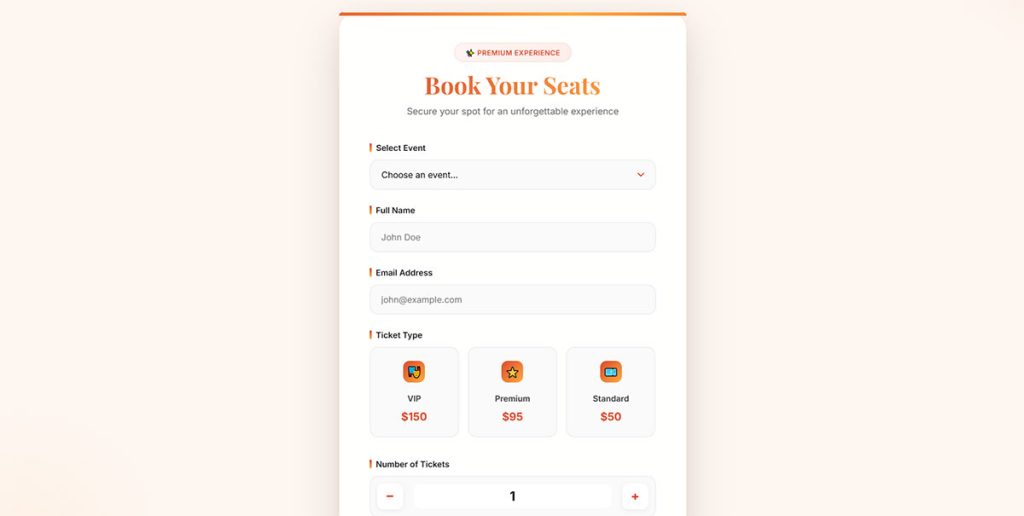
Premium Service Booking Form
See the Pen
Premium Service Booking Form by Bogdan Sandu (@bogdansandu)
on CodePen.
Modern Guided Tour Booking Form
See the Pen
Modern Guided Tour Booking Form by Bogdan Sandu (@bogdansandu)
on CodePen.
House Viewing Appointment Form
See the Pen
House Viewing Appointment Form by Bogdan Sandu (@bogdansandu)
on CodePen.
Wedding Photographer Booking Form
See the Pen
Wedding Photographer Booking Form by Bogdan Sandu (@bogdansandu)
on CodePen.
Word, PDF, Google Forms or a Form Builder: Which Template Format Fits?
Use a Word or PDF file only when a person confirms every booking by hand. Once customers need to pick a slot themselves, move to an online form.
| Format | Live availability | Payments | Best for |
|---|---|---|---|
| Word or PDF file | None, staff check the calendar | None inside the file | Phone-first businesses, event paperwork |
| Google Docs | None | None | Shared edits, quick start |
| Google Forms | No slot check | No native payment field | First few bookings, request forms |
| Online form builder | Calendar or entry-limit field on some tools | Stripe, PayPal or Square on most | Request forms with deposits |
| WordPress booking plugin | Yes, hides taken slots | Gateways, deposits on paid tiers | Slot booking on your own site |
Documents fail quietly. Submissions arrive as email attachments, two customers can ask for the same hour, and nobody finds out until both turn up.
Xola’s guide to DIY booking forms treats a Google Docs or Google Forms setup as a fit for a sole operator with the first few bookings. It tells businesses to move to booking software once they add guides.
Google Forms collects responses into Google Sheets for free, but it has no payment field and no slot check. When those gaps start costing you bookings, compare alternatives to Google Forms that add both.
If the customer must see open slots, skip documents and Google Forms entirely.
Booking Form Template Tools Compared
Jotform and Cognito Forms suit request-style booking forms. Bookly and Amelia make more sense when customers must see open slots, and Google Forms can stay for the first handful of bookings.
Plan limits below come from vendor pages checked in October 2026 and change without notice.
Online form builders
Jotform has dedicated booking template categories, payments on the free Starter plan and conditional logic. The catch is the caps. Starter stops at 5 forms and 100 submissions a month, allows only 10 payment submissions, keeps Jotform branding and leaves out HIPAA features (Jotform pricing page, 2026). Bronze lifts the limits to 25 forms, 1,000 submissions and 100 payment submissions, and removes the branding.
A busy salon burns through 100 submissions fast, which is when owners start weighing alternatives to Jotform.
Cognito Forms gives you unlimited forms and payments on the free Individual plan, with a limit of 100 entries a month, Cognito branding, and HIPAA only on the Enterprise plan. Pro starts at $19 a month billed annually for 2,000 entries (Cognito Forms pricing, October 2026).
Google Forms is free with any Google account and there’s nothing to install. Every booking still needs a manual calendar check.
WordPress plugins and booking systems
WPForms Lite is free but adds a 3% platform fee on payments, and Basic and Plus carry additional processing fees. Fee-free Stripe, Square and PayPal start at Pro (WPForms pricing page, 2026).
WPForms lists a date and time field and a Google Calendar add-on on Pro, but its pricing page describes no slot-availability logic. Gravity Forms has no free plan and lists $59 (Basic), $159 (Pro) and $259 (Elite) per year, so booking logic is yours to assemble.
WPForms discounts the first year and renews at full price, while Gravity Forms lists flat prices. The full comparison of WPForms against Gravity Forms covers where that gap lands over three years.
Neither is a booking system, and that is the obvious-choice trap. Plugin shoppers reach for the biggest form brand when a dedicated booking plugin does the slot work out of the box.
Bookly’s free plugin gives you a booking calendar plus email and SMS notifications, capped at five services with no online payments. Pro adds payments and unlimited staff, and deposit payments are a paid add-on. Its WordPress.org FAQ says it does not fit hotel or rental businesses.
Amelia Lite is free, prevents double bookings automatically and takes Square payments at no cost. PayPal, Stripe, Google Calendar sync and unlimited employees need a paid licence (annual or lifetime, with a 15-day money-back window). IvyForms connects to Amelia through its Amelia integration, so a customer can fill in an intake form before picking a slot.
Industry Booking Form Templates and the Fields Each One Adds
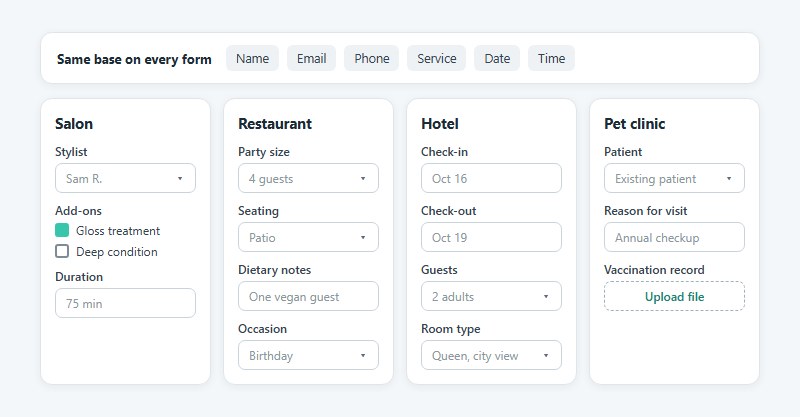
Every industry starts from the same base fields and tacks on a few of its own.
- Salons ask for a stylist choice, add-ons and the service duration.
- Restaurants want party size, seating preference, dietary notes and the occasion.
- Hotels need check-in and check-out dates, guest count and room type.
- Photographers collect session type, package, location and a backup date.
- Medical or dental forms ask whether the patient is new or existing, the reason for the visit, and the insurance provider.
- Fitness studios need the class name and its capacity, plus waiver acceptance.
- Event venues ask for headcount, setup time and catering needs.
- Rentals take the item, pickup and return dates, and a deposit.
Published templates show the pattern. Colorlib’s 2026 free HTML set includes a dental request with separate new-patient and existing-patient paths, a spa form with add-ons and a live total, and a pet clinic form that takes a vaccination record upload.
Paperform’s gallery goes the other way, with pest control, tutoring and tattoo booking templates sitting beside restaurant reservations. The base fields barely change between them. A dinner reservation form template in a WordPress form library follows the same pattern, adding party size and a date to the usual contact fields.
Salon, clinic and coaching bookings share one shape, a person choosing a time with a provider, so appointment form templates are the closest starting point for those. Skip the clinical history questions at booking time.
Patient details fall under health privacy rules (covered in the data rules section), so keep medical history for a separate step. Intake form examples show how that second form is usually split from the booking itself.
How to Collect Deposits and Set a Cancellation Policy in a Booking Form
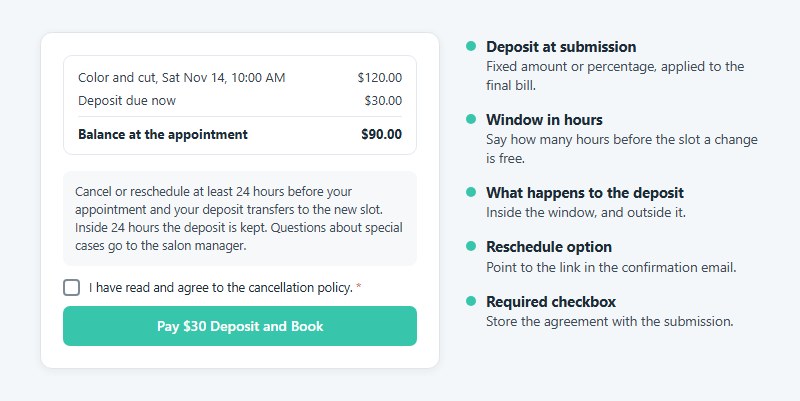
Charge a deposit at submission when the appointment sits more than a week away, because a card hold does not last that long.
Stripe’s documentation says an authorized online card payment is typically held for 7 days, and Visa merchant-initiated transactions allow only 5 (Stripe docs, 2026). A hold placed at booking can lapse before the customer ever arrives.
A deposit is a fixed amount or percentage taken when the form is submitted and applied to the final bill. Full prepayment suits high-value or first-time bookings, though it adds friction at checkout. A card hold (authorize now, capture later) only works for short lead times.
Stripe, PayPal and Square cover most booking forms. Amelia Lite takes Square payments free, and Bookly sells deposit payments as a paid add-on. A form with Stripe or PayPal payments built in creates the entry only after the payment goes through, so an unpaid deposit never shows up as a booking.
Google Forms has no payment field at all. Without a gateway, a deposit becomes a bank-transfer instruction and a manual check.
The cancellation policy belongs in the form as a required checkbox, with the agreement stored alongside the submission. The clause itself should give the cancellation window in hours before the slot, say what happens to the deposit inside that window, point to the reschedule option, and name who decides edge cases.
Something like “Cancel or reschedule at least 24 hours before your appointment and your deposit transfers to the new slot” does the job. Treat the hours as a placeholder for your own rule.
A deposit gives customers a reason to cancel early instead of vanishing. A reschedule link in the confirmation email gives them the easy way to do it.
If your site runs WordPress and you want payments without another plugin, there is a route to build a WordPress payment form yourself. That route trades plugin fees for setup time.
How to Stop Double Bookings With Availability and Calendar Sync
A form stops double bookings only when it reads your calendar’s busy times before it shows a slot. Pushing a submission into a calendar afterwards does not.
WPForms’ Google Calendar add-on (Pro) is the write-only kind. The form creates a calendar event after submission, and WPForms’ own tutorial says it cannot pull real-time availability to hide taken slots.
Jotform’s Appointment field is the two-way kind with Google Calendar, reading busy times and writing new events. Sources disagree on that. Older Jotform support answers call its Google Calendar link one-way, while a later note in the same support thread says an update made it two-way, so overlapping events now show as unavailable slots.
Calendly starts from the calendar side. It checks the busy events on the calendars you pick, then adds each new meeting to one of them (Calendly Help Center, 2026).
Test your own form. Block a slot in Google Calendar, reload the form, and see whether the slot disappears.
Slot rules matter as much as sync. Buffer time before and after each service helps (Calendly writes buffers into Google Calendar as separate events), and so does a daily cap on bookings. Slots should be one-to-one, not group.
That last one catches people. Jotform support says a group-type Appointment field keeps offering a slot after someone books it until the attendee limit is reached, so a salon chair needs the one-to-one setting.
Zapier’s free plan runs two-step Zaps and checks triggers every 15 minutes, while Professional (from $19.99 a month billed annually) polls every 2 minutes (Zapier pricing page, October 2026).
When a Zap trigger polls, two customers can grab the same slot inside that gap. A Google Forms to Google Calendar workaround suits low volume only.
What Should Happen Right After a Customer Submits?
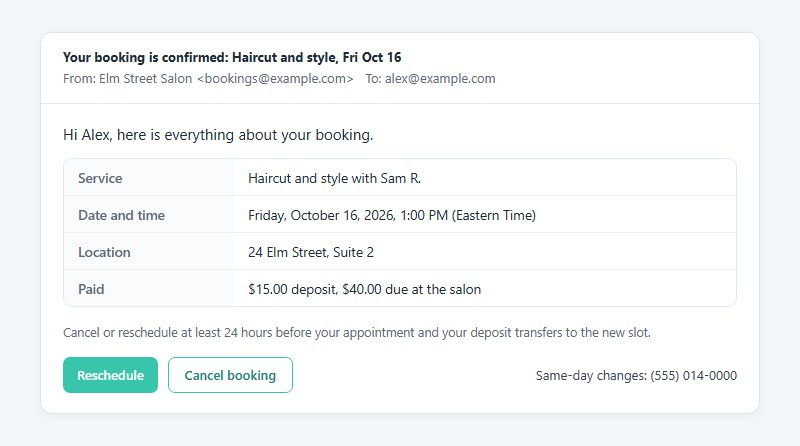
On submission the customer should get a confirmation email and the calendar should get an entry. Staff need a notification too, ideally wherever they already look first.
The confirmation email carries the whole booking, so the customer never reopens the form.
- Service, date and start time, with the time zone
- Location or meeting link
- Amount paid, or the amount still due
- Cancellation policy wording
- Reschedule and cancel links
- A phone number for same-day changes
The page shown after the click matters too. A clear confirmation message after submission repeats the date and time and says what happens next. A form’s confirmation settings can show that message, redirect to a thank-you page, or hide the form once it’s sent.
Cochrane’s review of seven trials with 5,841 participants found that text message reminders raised attendance at healthcare appointments compared with no reminders (risk ratio 1.14, 95% CI 1.03 to 1.26).
The evidence is low to moderate quality and clinical, so read it as direction for a salon, not a promise.
On email versus SMS, Acuity Scheduling includes email reminders on every plan and adds text reminders from its Standard tier. Bookly sends SMS from a prepaid balance you top up inside the plugin.
Square Appointments lists Square Assistant, which lets customers answer an SMS reminder to confirm, cancel or change the appointment. Calendly can sync cancellations and reschedules made in Google Calendar back to the booking, so deleting an event reopens the time.
Emails can also fail before they leave your server. Amelia’s WordPress.org FAQ warns that some hosting providers block third-party SMTP, so review your WordPress email settings and send a test booking before launch.
Which Data Rules Apply to a Booking Form?
The rule that applies depends on who books and what you store. GDPR covers people in the EU or UK, HIPAA covers US patient bookings, and PCI DSS covers card data.
| Rule | Applies when | What the form must do |
|---|---|---|
| GDPR | You book people in the EU or UK | Collect consent with an unticked box and keep a record |
| HIPAA | You are a US covered entity booking patients | Use a tool that signs a business associate agreement |
| PCI DSS | Card payments run through the form | Keep card fields on the gateway’s hosted page |
| WCAG 2.2 | Anyone must be able to complete the form | Label every input and state formats |
GDPR consent
Breaking the consent conditions can cost up to 20 million EUR or 4% of worldwide annual turnover, whichever is higher (GDPR Article 83(5)).
The ICO’s consent guidance says pre-ticked boxes are invalid, consent should sit apart from your general terms, and you must keep records that show who agreed. In practice that means an unticked checkbox with one plain sentence naming the purpose, kept separate from the cancellation policy checkbox.
The booking itself usually rests on contract necessity, so the checkbox covers optional extras such as a newsletter. Because consent must be freely given, leave that box optional and never make it a condition of booking. For the wording and the storage side, see how to build a GDPR compliant form, and ask a privacy advisor about edge cases.
HIPAA for patient bookings
HHS guidance lets a covered entity use a cloud service for health data only under a business associate agreement (BAA). That one fact decides which form tool a clinic can use.
Google’s HIPAA Included Functionality list, dated August 31, 2025, names Google Forms under Google Drive, covered once an admin accepts the BAA. Third-party add-ons sit outside it. Some compliance vendors disagree, saying Forms is excluded, or that a BAA alone leaves gaps such as automatic logoff and connected Sheets.
The disagreement is real, so treat Google Forms as usable only on a paid Workspace plan with the BAA accepted, and have a compliance advisor review the setup. Acuity Scheduling signs a BAA only on its Premium tier.
PCI DSS and card fields
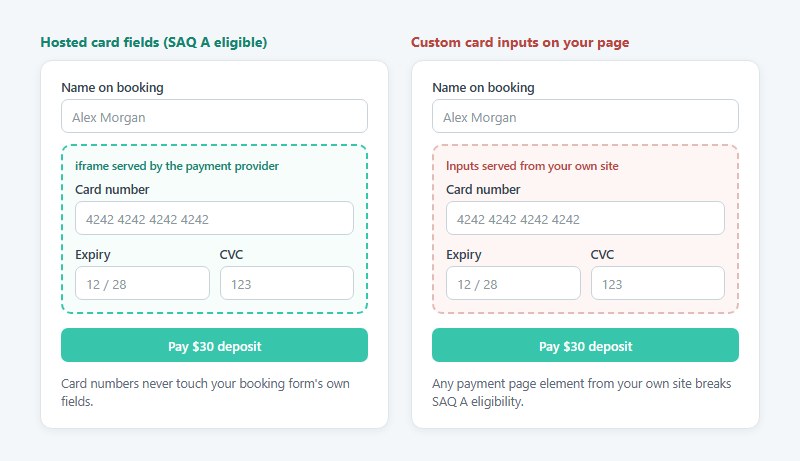
Card numbers should never touch your booking form’s own fields.
The PCI Security Standards Council says SAQ A, the lightest self-assessment, fits only when payment pages come entirely from a validated third-party provider, through a redirect or an embedded iframe. With an iframe, you must also confirm that your own page is not open to script attacks (FAQ 1588, 2025).
Any payment page element that originates from your own site breaks that eligibility. Hosted fields keep you in the lightest tier, and custom card inputs do not.
Spam protection and accessibility
reCAPTCHA v3 returns a score from 0.0 (likely a bot) to 1.0 (likely a good interaction) with no puzzle. Each token expires after two minutes and verifies only once (Google reCAPTCHA documentation).
A form left open while a customer hunts for a slot can therefore reject a real booking. Request a fresh token when the customer presses submit. Cloudflare Turnstile and hCaptcha are other spam checks a booking form can use without a puzzle for most visitors.
On the accessibility side, WCAG 2.2 success criterion 3.3.2, Labels or Instructions (Level A), requires a label or instruction on every input, optional fields included. W3C’s own example fits a booking form, a date field with text stating the expected format.
Run through the form accessibility best practices before launch, since pickers and sliders cause most of the failures.
How to Set Up a Booking Form Template From Start to Live
Order matters here because payment and consent settings depend on the tool you pick first.
- Match the tool to the slot question. Documents work for hand-confirmed bookings, a form builder with a calendar field for request-style forms, and a plugin when customers pick live slots.
- Cut the template down to the base fields and add only the industry fields your staff use. Apply form validation best practices to phone, email and date fields so typos fail on the form, not on the phone.
- Set availability. Working hours, slot length, buffer time and a daily cap go in first, then connect the calendar.
- Add the deposit and the cancellation checkbox, using gateway-hosted card fields.
- Add the consent checkbox, spam protection and field labels.
- Write the confirmation email, the staff alert and the reminders.
- Test, then publish. Submit a booking, pay in the gateway’s test mode, cancel it, reschedule it, and confirm the calendar, the email and the staff alert each updated.
Run the test on a real phone, because date pickers and dropdowns behave differently on small screens. The mobile form best practices list the tap targets and keyboard types worth checking.
Publishing differs by tool.
- Amelia uses the
[ameliastepbooking]shortcode on any page. - Bookly adds an “Add Bookly booking form” button to the page editor.
- WPForms has a built-in QR code generator on every plan, added in August 2026.
- Square Appointments gives you a Book Now button, a QR code, or an embedded widget.
When a Booking Form Template Is Not Enough
A template form stops working once more than one person can be booked, a room or device is shared, or slots change faster than your sync catches them.
- A second provider with separate hours and separate prices
- Shared resources such as a room, chair or device (Square lists resource management only on its top tier)
- Rules a form cannot express, like packages, waitlists and memberships
- Automatic late-cancellation fees charged to a card on file (Square Appointments lists this from its Plus plan)
| Software | Entry price | Next tier adds | Pick it when |
|---|---|---|---|
| Acuity Scheduling | From $16 a month, billed annually | Text reminders, waitlist, up to 6 calendars | Several staff, deposits, intake forms |
| Square Appointments | Free plan, then $49 a month per location | Cancellation policy, no-show fees, multi-staff booking | You already take payments with Square |
| Bookly or Amelia | Free plugin, paid licence | Payments, more staff, add-ons | The booking system must live on your WordPress site |
Acuity and Square prices come from their pricing pages in October 2026, and both change often. Acuity offers a 7-day trial, and Square’s paid plans offer a 30-day one.
Move when a second provider joins, when a room gets shared, or when you catch your first preventable double booking, whichever comes first.
Booking Form Templates FAQ
How is a booking form different from a contact form?
A contact form sends a message and commits nothing, while a booking form claims a service, date and time. It also needs payment, cancellation and confirmation steps that a message form skips.
Plain contact form examples show the contrast.
Is a reservation form the same as an appointment form?
Close, but not identical. A reservation form holds a resource such as a table, room or rental item, so party size or dates are what it asks for.
Appointment forms hold a provider’s time instead, which is why they ask about the service and the staff member.
How do I make a booking form in Google Forms?
Open Google Forms, start a blank form, name it, and add questions for name, email, phone, service, date and time. Press Send, then read replies on the Responses tab (Xola’s DIY booking form guide).
The result takes no payment and checks no slots.
Is there a booking form template for Excel?
Yes. Template download sites list booking forms in Word, PDF and Excel formats.
Excel suits a booking log, one row per reservation, better than a customer-facing form. Like Word, it cannot check availability. An online form can fill the same kind of log on its own through a Google Sheets integration.
Can I use a free booking form template for my business?
Usually yes for your own bookings, but the license on the download page decides. Check whether it allows commercial use.
Look also for clauses that bar reselling or redistributing the template itself.
Can one booking form check more than one calendar?
Some schedulers can. Calendly lets you pick which connected calendars it checks for conflicts, yet it adds new meetings to one calendar only, and its free plan connects 1 calendar (Calendly Help Center, 2026).
A form with write-only sync checks none.
Monthly Checks for a Live Booking Form
A booking form built from a template needs one test booking each month that exercises calendar sync, payment, confirmation and consent.
Start with slot sync, since a wrong slot costs a customer the booking before any later step matters. Block a calendar time and reload the form. Then complete a deposit payment in test mode, and finish by checking the confirmation email and the consent record.
Free plan caps arrive sooner than the headline numbers suggest. Jotform’s Starter plan allows 100 submissions but only 10 payment submissions a month, so a form that takes a deposit with every booking outgrows it at the tenth reservation, not the hundredth.
Plan limits and sync behavior were verified in October 2026, and a change in either moves the pick. To see where visitors abandon the form, track form submissions in Google Analytics.