




Most manufacturers still rely on trade shows and cold calls to fill their sales pipeline. Meanwhile, their buyers are already 60% through the purchasing process before they ever pick up…
Table of Contents
More fields mean better data but fewer conversions. Fewer fields mean more leads but lower quality. Every business struggles with this tradeoff.
The best form fields for capturing high-quality leads depend on your sales process, target audience, and what happens after someone hits submit.
This guide breaks down exactly which fields to include on your lead capture forms. You’ll learn which contact fields actually matter, how qualification frameworks like BANT translate into form design, and when to use multi-step forms versus single-page layouts.
No fluff. Just field-by-field guidance backed by real conversion data.
What Are Lead Capture Form Fields
Lead capture form fields are input elements on web forms that collect contact information from website visitors.
Businesses use these fields to gather names, email addresses, phone numbers, and qualifying data that helps identify potential customers.
The right combination of form fields determines whether you attract marketing qualified leads or waste your sales team’s time on unqualified prospects.
Every field you add creates friction. Every field you remove loses valuable data.
Finding that balance separates high-performing lead generation forms from forms that either convert nobody or convert everybody (including the wrong people).
Core Contact Fields for Lead Forms
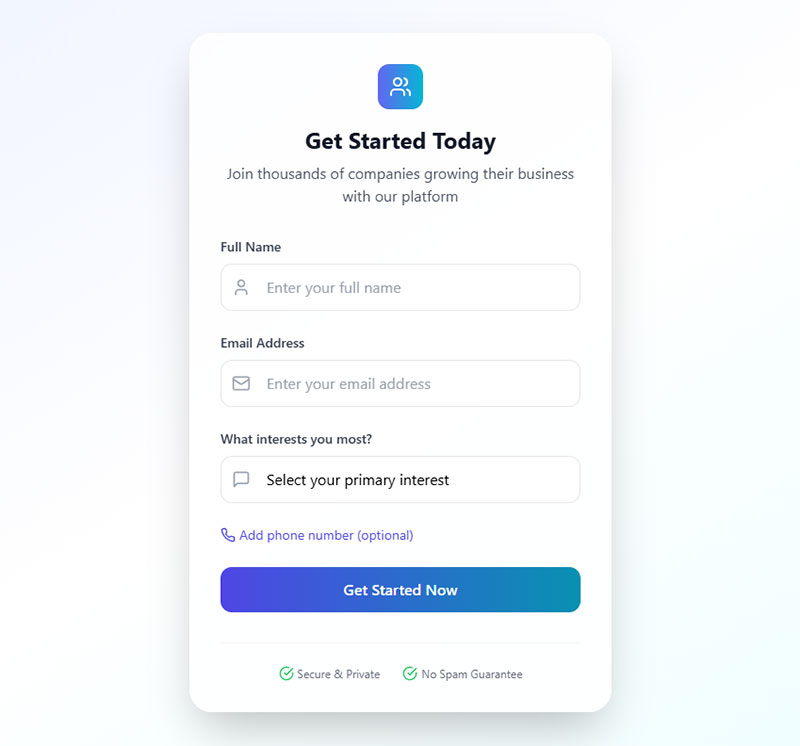
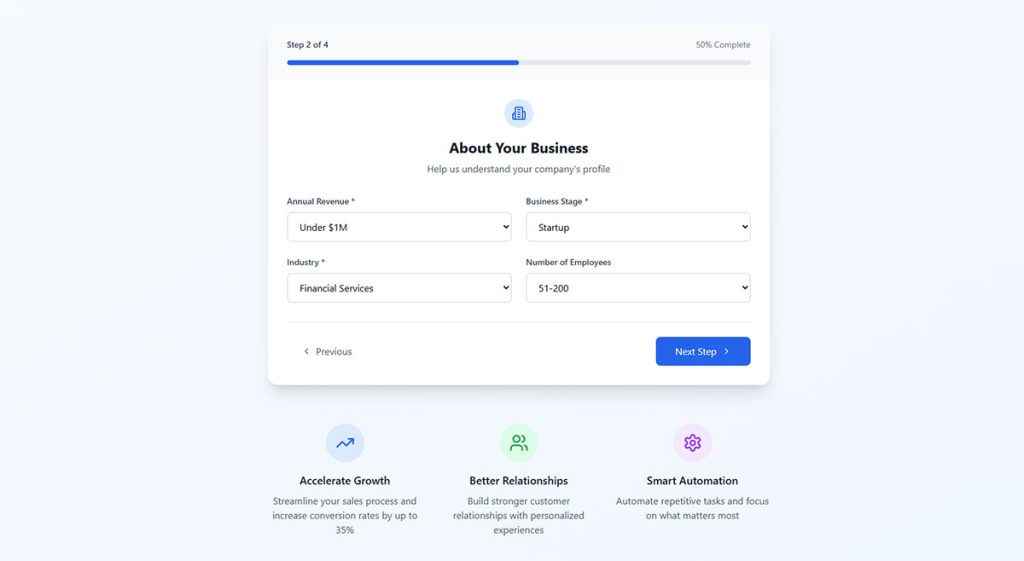
These fields form the foundation of any lead capture strategy. Get them wrong and nothing else matters.
Name Fields
First name alone works for newsletter subscription forms. B2B demo requests need both first and last name for CRM integration and sales outreach.
Split name fields improve personalization in email marketing automation but add friction. Data from Zuko Analytics shows name fields have the shortest completion time at 3.5 seconds with just 0.3 field returns.
For simple lead capture, use a single “Full Name” field. Research from Zyxware shows 99% of visitors provide their full names when given a single field. This approach accommodates different naming conventions globally and reduces cognitive load.
B2B forms requiring sales follow-up should split first and last names. Marketing automation platforms need separated fields for proper personalization.
Email Address Fields
The email field is non-negotiable. It’s the minimum viable data point for any lead capture form.
Work email versus personal email creates a real tradeoff:
- Requiring business emails causes a 52% conversion decrease (Gartner Digital Markets)
- Only 44% of users provide business email if personal is rejected (Hushly)
- Personal emails often mean lower lead quality
Consider your sales cycle. High-ticket B2B products benefit from business email validation. Consumer products and low-commitment offers should accept any valid email.
Real-time email validation boosts quality without killing conversions. A study from Lucid Software found that among users who entered invalid emails, 54% successfully corrected them when shown a warning. This group saw 34% more product returns and 44% more conversions to paid accounts.
According to Moosend, implementing real-time validation increased conversions by 55%, from 2.07% to 3.22%.
Phone Number Fields
Phone fields dramatically increase form abandonment. Data from Zuko Analytics shows phone numbers have a 6.3% abandonment rate.
Conversion impact varies by study:
- Average 5% decrease (Unbounce)
- 48% decrease in one case study (Vital Design)
- 36.9% drop in another test (NextAfter)
- 37% of users abandon forms with phone requirements (WPForms)
Use phone fields only when phone contact is part of your sales process.
Mark phone number fields as optional whenever possible. Research shows changing phone fields from required to optional decreases abandonment from 39% to just 4%. Optional phone fields double conversion rates from 43% to 80% according to Forms.io data.
Leads who provide phone numbers voluntarily show higher buyer intent.
Include country code dropdowns for international businesses. Mobile-specific input types trigger numeric keyboards on smartphones, reducing friction in mobile forms.
Business Qualification Fields
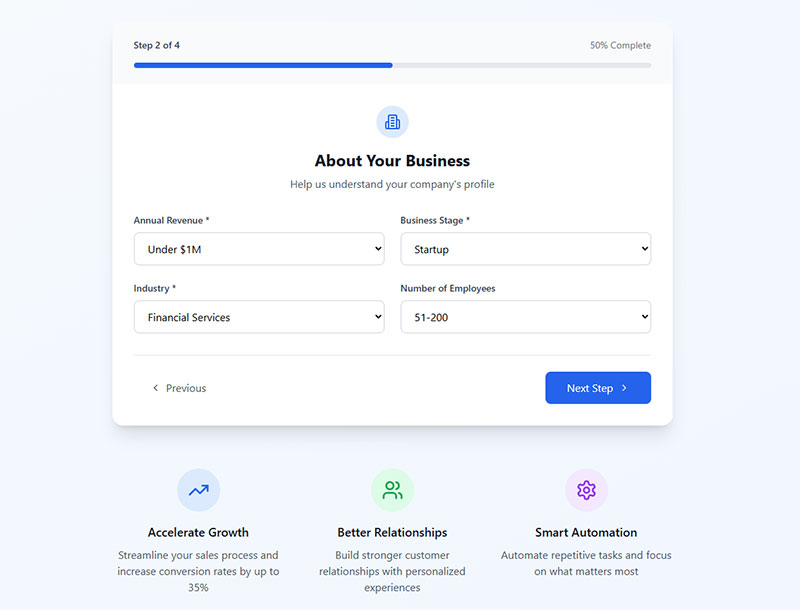
These fields separate tire-kickers from serious buyers. They reduce lead volume but increase lead quality.
Company Name
Company name enables account-based marketing and helps sales teams research prospects before outreach. Standard for B2B lead generation, unnecessary for B2C.
Research from NotifyVisitors shows 79% of B2B businesses prioritize company name, ranking third after email (97%) and name (92%).
Job Title and Role
Job title reveals decision-making authority. A marketing intern and a CMO have very different purchasing power.
Use dropdown selection with common titles plus an “Other” option. Free text fields create messy data that’s hard to segment in systems like Salesforce or HubSpot.
According to Salespanel, job role and company data work for initial qualification, but behavioral data becomes more valuable as leads progress through longer B2B sales cycles.
Data from Landbase shows organizations using progressive profiling (gradually collecting data across multiple interactions) achieve 35% better qualification rates than those requiring extensive upfront information.
Company Size Fields
One of the most powerful qualification fields available.
Research from SalesHive indicates precise employee-count filters improve response rates by 20-40% compared with untargeted campaigns. Companies using size data to personalize outreach see a 5-8x ROI increase.
The tradeoff: A 2024 HubSpot study shows each additional form field decreases conversion by 4.1%. But 67% of B2B sales teams lack critical qualification information.
Standard employee ranges:
- 1-10 employees
- 11-50 employees
- 51-200 employees
- 201-1000 employees
- 1000+ employees
Enterprise sales teams need this. SMB-focused businesses can skip it.
Industry Selection
Industry fields enable vertical-specific follow-up sequences and customized sales pitches.
Use a dropdown with your target industries. Limit to 10-15 options maximum to avoid overwhelming prospects.
Research from Umbrex shows B2B SaaS companies see lead quality scores between 70 and 90, with industry as a key conversion factor.
Matters most for businesses serving multiple verticals with different value propositions. Data from WPForms shows 44% of B2B organizations gate content, with 62% using fields like industry and company size to identify qualified leads.
Intent and Need Qualification Fields
These fields reveal where prospects sit in the buying journey and what problems they need solved.
Budget Range Fields
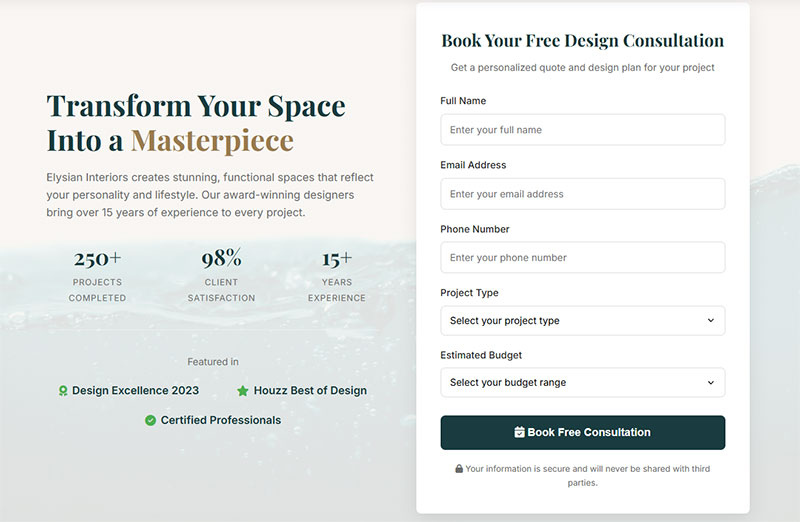
Budget questions feel invasive but save everyone time. Prospects without budget rarely convert.
Research from Brixon Group shows budget, timeframe, and phone number are the most important information for sales teams, yet simultaneously have the most negative impact on conversion rates. A 2025 study of 500 B2B sales leaders identified budget as a critical qualification factor despite its friction.
Pre-defined ranges work better than open text input:
- Under $1,000
- $1,000-$5,000
- $5,000-$25,000
- $25,000-$100,000
- $100,000+
The BANT framework (Budget, Authority, Need, Timeline) treats budget as a primary qualification factor. Your lead capture forms should reflect this.
Data from Marketo shows B2B companies with data-rich lead scoring models achieve a 35% higher Sales Acceptance Rate. Predictive accuracy decreases by 27% when critical demographic and firmographic data is missing.
Timeline Fields
Timeline reveals urgency. A prospect buying “within 30 days” needs different handling than someone “just researching.”
Simple options work best:
- Immediately
- Within 1 month
- 1-3 months
- 3-6 months
- No timeline yet
Hot leads go straight to sales. Longer timelines enter nurturing sequences in your marketing automation platform like Marketo or ActiveCampaign.
According to research on lead qualification frameworks, timeline (or timeframe) helps assess the urgency of the lead’s need for a solution. This directly impacts lead prioritization and routing decisions.
Challenge or Pain Point Fields
Open-ended challenge fields provide context for sales conversations but create longer forms.
Multiple choice options reduce friction while still capturing intent data. List your product’s top 4-5 use cases as selectable options.
Research from Edge Digital shows including qualifying questions improves lead quality dramatically. Multiple-choice format works well for qualification, with questions about budget, timeline, or specific needs helping identify serious prospects.
This data powers personalized follow-up and helps with prospect segmentation.
Product Interest Fields
Product interest fields route leads to the right team and customize follow-up messaging.
Options might include:
- Request a demo
- Start free trial
- Talk to sales
- Get pricing information
- Download resource
Each selection can trigger different automation workflows and lead scoring criteria. Data from Chili Piper shows 66.7% of qualified form submissions book a meeting compared to the industry average of just 30%.
How Many Fields Should a Lead Form Have
Field count directly impacts both conversion rate and lead quality. More fields mean fewer but better leads.
Field Count by Form Type
Different types of forms require different field counts.
Research from HubSpot analyzing over 40,000 landing pages shows forms with 3 fields had the highest conversion rate (slightly over 25%), followed by forms with 5 fields (above 21%). Going from 3 to 4 fields showed a sharp decline in conversions.
Data from WPForms indicates over 30% of marketers get the highest conversion rates from forms with 4 fields. However, reducing a form from 4 fields to 3 can increase conversion rate by almost 50% according to Quicksprout.
Low commitment offers (1-2 fields):
- Newsletter signup
- Blog subscription
- Content download
Medium commitment (3-4 fields):
- Webinar registration
- Ebook download
- Free tool access
High commitment (5-7 fields):
- Demo request
- Free trial signup
- Consultation booking
- Quote request
The 3-5 field range works for most landing page forms. Going beyond 7 fields requires strong justification and a compelling offer.
Research from Formstack shows forms with 3 fields boost conversions by up to 160% compared to those with 10 or more fields. However, data from the same source indicates lead gen forms average 11 fields with a 17% conversion rate, while web page contact forms average only 4 fields with just 1% conversion.
B2B vs B2C Field Requirements
B2B forms typically include name, work email, company name, job title, and phone number. Decision-makers expect to share business details.
Research indicates the sweet spot for B2B lead capture forms is between 3 to 5 fields. This range minimizes friction while providing qualification data. For high-value offers, B2B forms can extend to 7 fields.
B2C forms stay minimal: email address and maybe first name. Consumers protect personal information more carefully. Studies show B2C forms perform best with 1-3 fields.
Generating B2B leads requires qualification data upfront. Generating B2C leads prioritizes volume and uses progressive profiling to gather additional information over time.
Research from Brixon Group shows B2B form conversion rates decrease by an average of 7% with each additional required field. With more than 7 fields, the bounce rate increases by 50% compared to forms with only 3 fields.
According to Gartner survey data, 71% of B2C and 86% of B2B customers expect companies to be well-informed about their personal information. Progressive profiling addresses this by collecting data gradually across multiple interactions, enabling comprehensive customer profiles without sacrificing conversion rates.
A 2024 HubSpot study shows each additional form field decreases conversion rate by an average of 4.1%. Meanwhile, organizations using progressive profiling techniques achieve 35% better qualification rates than those requiring extensive upfront information, according to Landbase research.
Lead Qualification Frameworks for Form Design
Build your form fields around proven sales qualification methodologies. These frameworks tell you exactly what data to collect.
BANT Fields
BANT (Budget, Authority, Need, Timeline) is the classic qualification framework developed by IBM in the 1950s.
Research from InsideSales shows companies that effectively implemented BANT saw a 59% increase in their conversion rates. According to a Gartner report, 52% of sales reps trust BANT for its reliability, with 41% valuing its adaptability and 36% highlighting its usefulness in creating realistic sales timelines.
Translate it into form fields:
- Budget range dropdown
- Role/seniority selection (authority indicator)
- Challenge or use case selection (need)
- Purchase timeline dropdown
Prospects meeting 3 of 4 BANT criteria qualify as sales-ready leads.
BANT works best for simpler sales cycles where decisions are made relatively quickly. Its simplicity requires less training, making it suitable for sales teams with limited experience or smaller resources.
MEDDIC Fields
MEDDIC was created in the mid-1990s and remains the dominant methodology used in lead qualification for complex B2B sales.
The framework focuses on Metrics, Economic Buyer, Decision Criteria, Decision Process, Identify Pain, and Champion. It’s designed for complex sales environments with longer sales cycles and multiple stakeholders.
Form-friendly MEDDIC fields include:
- Current solution/tools in use
- Primary business goal
- Number of stakeholders involved in purchasing decisions
- Key performance indicators they need to improve
Enterprise lead generation for SaaS companies often prefer this approach.
MEDDIC requires more training and is best suited for experienced sales teams handling high-ticket, complex deals. It provides deeper qualification than BANT but demands more time and effort to implement effectively.
CHAMP Fields
CHAMP prioritizes Challenges first, followed by Authority, Money, and Prioritization.
This framework flips the traditional BANT method by placing the prospect’s problem at the forefront. It’s ideal for consultative selling where trust and understanding the customer’s pain are paramount.
Lead with a challenge selection field. Follow with role, budget range, and urgency level.
This framework works well when prospects don’t know their budget yet but have clear pain points. It emphasizes problem-solving, making it more relationship-driven than BANT.
Many sales teams combine these frameworks for maximum effectiveness. For example, using BANT for initial qualification and MEDDIC for deeper qualification in later stages ensures comprehensive coverage without overwhelming prospects.
Multi-Step Form Field Strategy
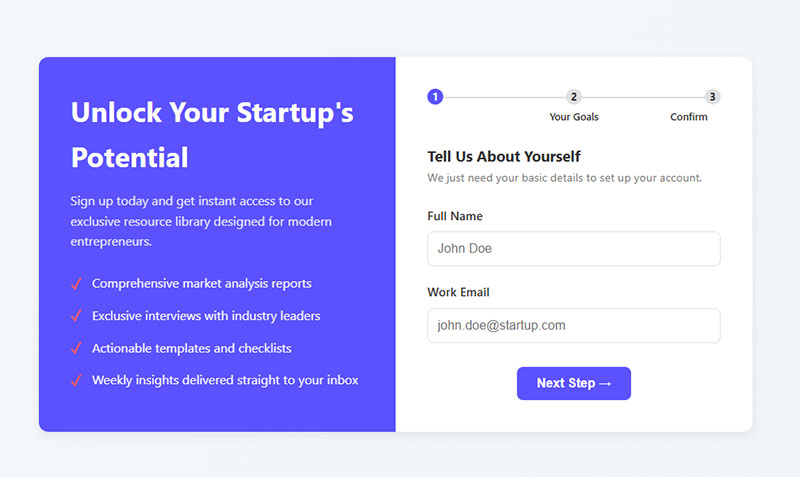
Breaking forms into steps increases completion rates. Prospects commit progressively rather than facing a wall of fields upfront.
First Step Fields
Capture contact information first: name and email only. Keep step one under 3 fields. Show a progress indicator.
Research from Responsify shows successful multi-step forms present just two fields in the first step. Data from Venture Harbour shows converting from single-page to multi-step increased conversion from 0.96% to 8.1%, a 743% increase.
According to WPForms, only 40% of marketers use multi-step forms, but their conversion rate is 86% higher. Formstack found multi-page forms achieve 13.9% conversion compared to single-page forms at 4.5%.
Subsequent Step Fields
Add qualifying questions in steps 2 and 3.
Group related fields together:
- Business information in one step
- Needs assessment in another
Studies show medium forms (6-15 fields) convert at 34% with single-step. Multi-step versions reach 71% completion.
Long forms (16+ fields) achieve just 8% completion as single-step. Multi-step approaches reach 52% when properly structured.
Decision point: Under 4 fields, single step works. Over 5 fields, split them.
Progressive Profiling Fields
Progressive profiling collects additional data from returning visitors over multiple interactions.
Your CRM (HubSpot, Marketo, Pardot) tracks what you already know and serves new questions each time:
- First visit: name, email
- Second visit: company, role
- Third visit: budget, timeline
Research from Brixon Group shows B2B form conversion rates decrease by 7% with each additional required field. Organizations using progressive profiling achieve 35% better qualification rates.
A 2022 Gartner survey found 86% of B2B customers expect companies to be well-informed about their personal information.
Smart form builder with conditional logic handles this automatically.
Form Field Types and Input Methods
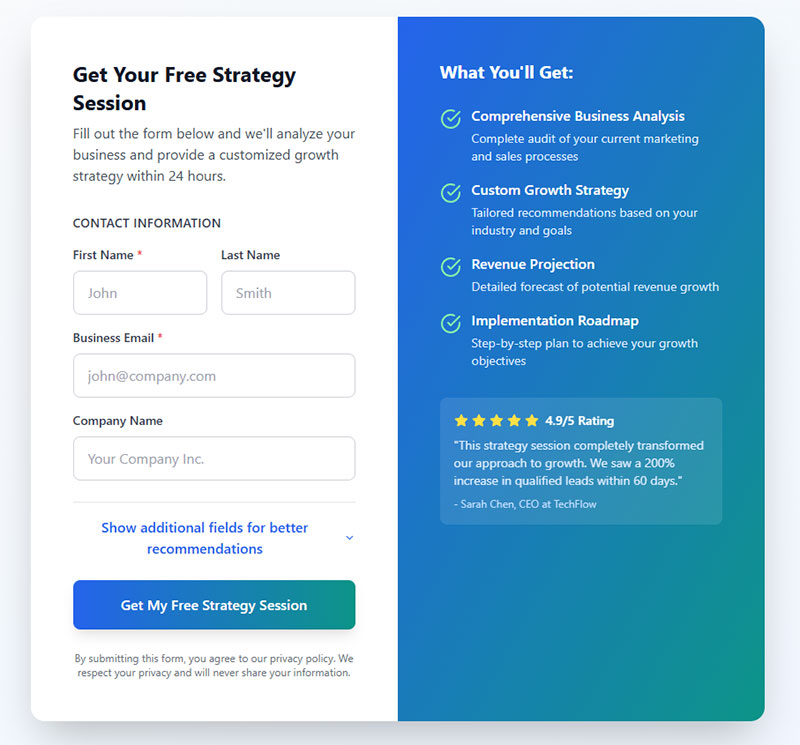
The right input type reduces friction and improves data quality. Match field type to the data you’re collecting.
Text Input Fields
Single-line text works for names, email addresses, and short answers. Research from HubSpot analyzing over 40,000 landing pages found single-line text fields have very little negative impact on conversion rates as you add more.
Multi-line text fields suit open-ended questions like “describe your challenge.” Limit these to one per form maximum. Studies show multiple textareas have a powerful depressing effect on conversion rates.
Use placeholder text to show expected format without cluttering labels. According to Google eye-tracking research, matching input field size to expected answer length improves completion rates.
Dropdown Selection Fields
Dropdowns force standardized responses. Perfect for company size, industry, budget ranges, and timeline selection. Limit options to 7-10 maximum.
Research shows multiple dropdown fields tend to be associated with lower conversion rates. They break the flow when users are typing and tabbing through fields, forcing them to switch to mouse interaction.
Radio Button Fields
Radio buttons work for single-selection questions with 2-5 options. Display all options visibly rather than hiding them in a dropdown.
Great for yes/no questions, purchase timeline, or lead type selection. Visible options reduce cognitive load and allow users to maintain typing flow.
Checkbox Fields
Checkboxes allow multiple selections:
- Product interests
- Communication preferences
- Consent agreements
GDPR and privacy consent checkboxes are legally required in many jurisdictions. GDPR compliant forms need explicit opt-in checkboxes.
Conditional Logic Fields
Conditional logic shows or hides fields based on previous answers.
Select “Enterprise” company size? Show budget field. Select “Individual”? Skip it entirely.
According to Chili Piper, dynamic forms can increase conversion rate by as much as 160%. This keeps forms short for simple leads while gathering detailed data from qualified prospects.
Field Validation Requirements
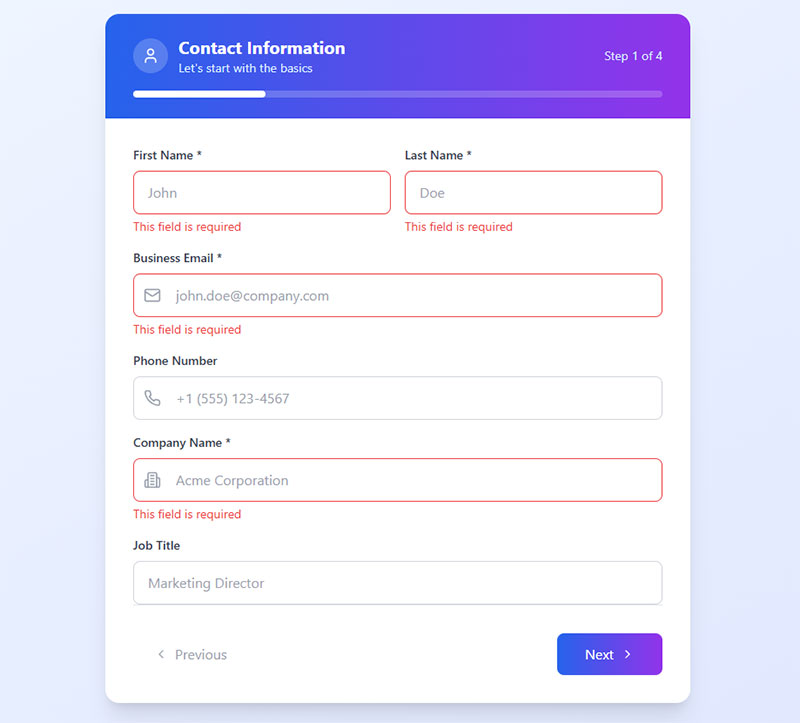
Validation cuts junk submissions while keeping real prospects moving forward. Research from CXL shows that inline validation reduces form errors by 22% and cuts completion time by 42%.
Email Validation
Catch typos before they kill conversions. Basic format checking stops “gmail.con” or missing @ symbols.
Verification steps:
- Domain verification confirms the email domain exists
- Real-time tools like Clearbit or ZoomInfo flag disposable addresses
- According to Zuko Analytics, email fields have a 6.4% abandonment rate
Strong form validation reduces spam without blocking legitimate users.
Phone Number Validation
Baymard Institute research reveals 14% of users abandon checkout when phone fields are required without explanation.
Format handling:
Accept multiple formats. Users enter numbers differently: (555) 123-4567, 555-123-4567, 5551234567.
Auto-format as users type. Display country code with flag icon. Validate length based on selected country.
Critical finding: Making phone fields optional nearly doubles completion rates, dropping abandonment from 39% to 4%, according to research from WPForms.
Required vs Optional Fields
Mark required fields with asterisks (*). Keep required fields to the absolute minimum for follow-up.
Smart field strategy:
- Asking for phone numbers drops conversion rates by 5% (Zuko data)
- Street address requests decrease conversions by 4%
- Job title, phone number, and company size work better as optional
Every required field increases form abandonment. Data from Quicksprout shows reducing fields from 4 to 3 increases conversion rates by 50%.
Clear form error messages help users fix validation issues quickly. Forms using inline validation see 31% higher user satisfaction and 42% faster completion, per A List Apart research.
Mobile Form Field Optimization
Data from Zuko Analytics shows desktop users convert at 47% while mobile users convert at just 42%. Mobile optimization isn’t optional when mobile commerce is projected to reach $99.18 billion by 2033, according to StraitResearch.
Touch-Friendly Field Sizing
Set minimum tap targets to 44×44 pixels. Research from MIT Touch Lab shows touch precision drops by 40% when targets fall below 20 pixels.
Critical sizing guidelines:
- Average fingertip contact: 28-40 pixels
- Thumb contact area: 34-57 pixels
- Success rates drop 60% with targets under 32×32 pixels (WebAbility research)
- Sites with proper target sizes see 15% higher mobile conversion rates
Add spacing between fields to prevent accidental taps. According to Smashing Magazine research, tap targets need 42-46 pixels at screen edges, 27 pixels minimum in the center.
Input Type Selection
Trigger appropriate mobile keyboards with HTML input types. This simple change dramatically improves mobile experience.
Essential input types:
type="email"displays @ symboltype="tel"shows number padtype="number"for numeric fields
Disable auto-capitalization for email fields. Enable it for name fields. These small details prevent typing errors and reduce user frustration on mobile keyboards.
Auto-Fill Compatibility
Browser auto-fill can reduce typing by 50% or more. Research from Zuko shows users who trigger autofill have 71% completion rates versus 59% for those who don’t.
Implementation impact:
- PayKickstart customers saw 30% conversion increases using auto-address forms
- Formstack data reveals social media autofill boosted conversion rates by 189%
- 23% of form users trigger autofill functionality (Feathery data)
Standard field names for auto-fill:
Use name, email, tel, organization, address so browsers recognize fields. Google address auto-complete handles location fields effectively.
Mobile cart abandonment hits 85%, according to research from PayKickstart. Typing on small mobile keyboards is 3x slower than desktop, making autofill critical for mobile conversions.
Form UX design on mobile prioritizes speed and zero typing frustration.
Privacy and Consent Fields
Privacy violations trigger massive fines. As of January 2025, GDPR fines reached €5.88 billion cumulative, according to DLA Piper research.
GDPR Compliance Fields
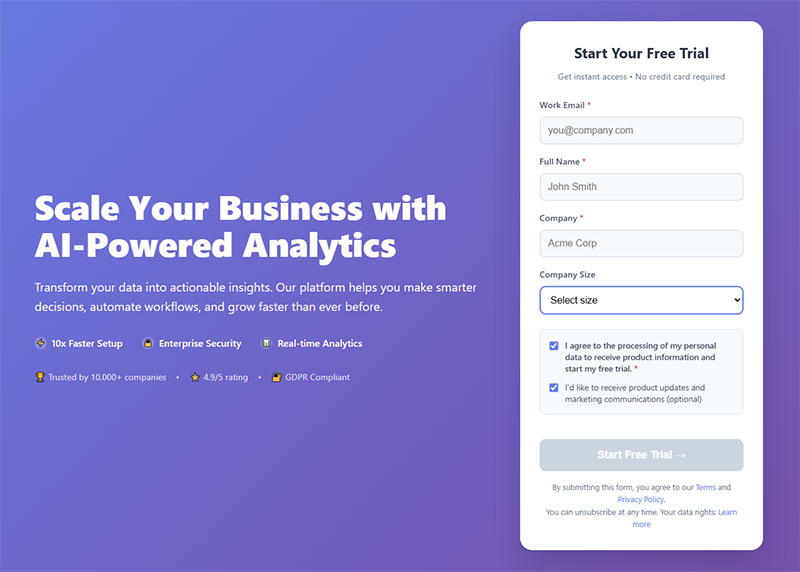
GDPR demands explicit, unbundled consent for EU residents. CMS Enforcement Tracker data shows 2,245 fines totaling €5.65 billion by March 2025.
Required consent elements:
- Unchecked consent checkbox (pre-ticked boxes violate regulations)
- Clear explanation of data usage
- Link to privacy policy
- Option to withdraw consent
Violation costs:
Average GDPR fine is €2,360,409 per case. Non-compliance with data processing principles generated €2.4 billion in fines by September 2024, per Statista data. Meta’s €1.2 billion penalty remains the largest single fine.
See GDPR consent form examples for compliant implementations.
CASL and CCPA Requirements
CASL (Canada):
Requires express consent before commercial emails. Canadian Radio-television and Telecommunications Commission reports 427,572 complaints in 2023-24.
Potential penalties reach $10 million per violation for companies, $1 million for individuals. In 2024, enforcement resulted in $17,000 in penalties, with 25 companies receiving warning letters for violations.
CCPA (California):
Effective January 2025, adjusted fines are $2,663 per unintentional violation and $7,988 per intentional violation, according to California Privacy Protection Agency announcements.
Zoom received the largest CCPA penalty at $85 million. DoorDash paid $375,000 for sharing customer data without consent. Consumer damages range $107-$799 per incident.
Implementation strategy:
Add regional consent variations based on visitor location. Your form security setup should include compliance safeguards.
19 U.S. states have consumer privacy laws as of February 2025 (Scytale data). Non-compliance damages reputation and increases customer churn beyond direct fines.
CTA Button Text for Form Submission
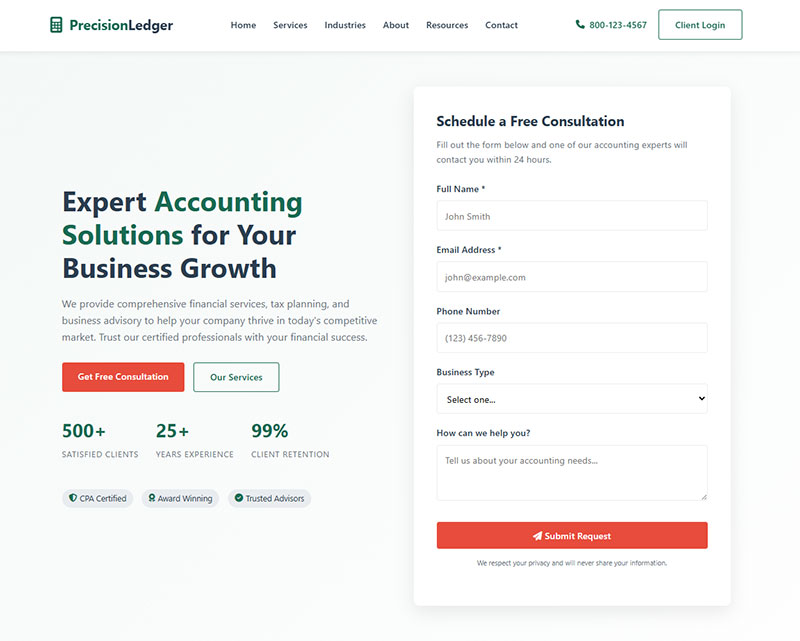
Generic “Submit” buttons destroy conversions. Research from Unbounce shows switching from text links to CTA buttons increases clicks by 45%.
Action-Oriented Button Labels
Replace vague text with benefit-focused language. HubSpot data reveals personalized CTAs convert 202% better than generic versions.
High-converting button examples:
- “Get My Free Guide”
- “Start My Trial”
- “Book My Demo”
- “Send Me the Report”
First-person impact:
ContentVerve testing proves first-person phrasing drives massive results. “Get My Free Template” outperformed “Get Your Free Template” by 90%.
Research from Amra and Elma shows action words like “Get,” “Download,” and “Try” boost CTA performance by 20%. WordStream data confirms buttons shaped like actual buttons see a 45% increase in clicks compared to text-based CTAs.
Button Copy Strategy
Match button text to your exact offer. Campaign Monitor research reveals CTA buttons achieve 28% higher click-through rates than text-only links.
Conversion multipliers:
- Single CTA in emails increases clicks by 371% (WordStream)
- Emails with one CTA boost sales by 1,617%
- Adding urgency like “Now” or “Today Only” drives immediate action
- Specific CTAs can increase conversion rates by 161%
According to Sender data, clear CTAs achieve a 22% conversion rate when properly implemented. A form submission confirmation message reinforces next steps and reduces user anxiety.
Testing priority:
Red CTA buttons increased conversions by 21% in QuickSprout testing. However, color must contrast with page design. PartnerStack saw 111.55% higher conversions switching from “Book a Demo” to “Get Started.”
Visual presentation matters. The Vineyard hotel increased click-through to their booking page by 32.12% simply by switching from text to button-based CTAs and improving visibility.
Form Field Placement and Layout
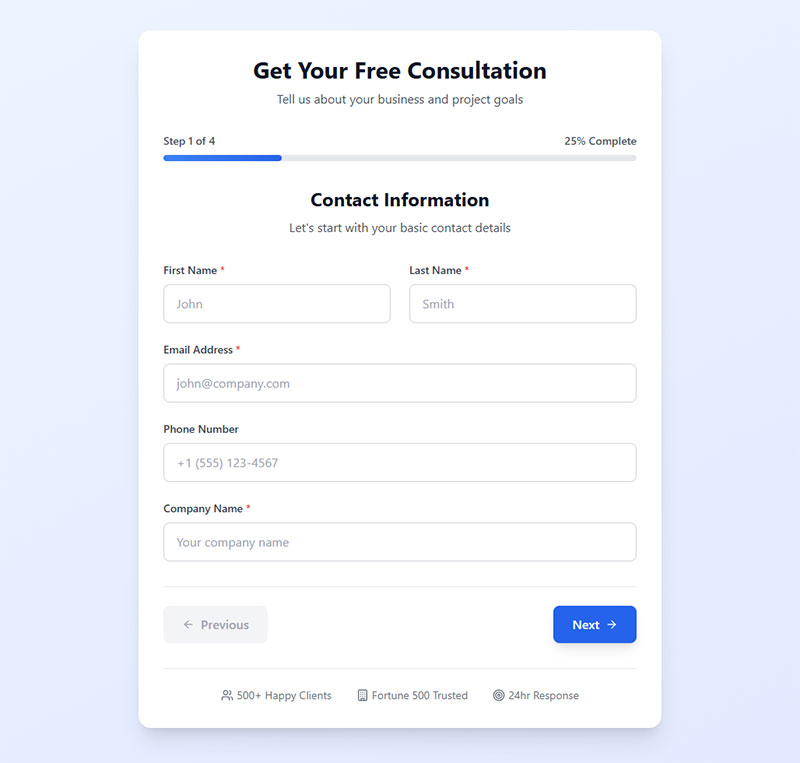
Layout directly impacts completion rates. Research from Baymard Institute shows 16% of sites use extensive multi-column forms, leading to checkout abandonment.
Single Column vs Multi-Column
Single column layouts convert better. CXL Institute research reveals users complete single-column forms 15.4 seconds faster than multi-column versions.
Why single columns win:
Users scan top to bottom naturally. Multi-column layouts force Z-pattern scanning, slowing comprehension and obscuring the completion path.
Multi-column problems:
According to Baymard testing, users misinterpret field relationships in two-column layouts. They skip required fields or complete unnecessary ones, generating validation errors that kill conversions.
Exception for multi-column:
Works only for obviously related short fields like first name + last name or city + state. HubSpot testing showed their specific 13-field form converted 22% better in two columns, but this contradicts broader research and depends heavily on form complexity.
Proper form design maintains single-direction eye movement for maximum speed.
Label Positioning
Labels positioned above fields work best. Matteo Penzo’s 2006 eye-tracking research confirms this placement optimizes usability.
Critical label rules:
Avoid inline labels (placeholder-only). Nielsen Norman Group research proves major usability problems. Users lose context the moment typing starts. Baymard mobile testing showed inline labels created serious completion issues.
Why labels above win:
- Always visible while users type
- No memory burden on users
- Essential for mobile (narrow screens need maximum field width)
- Screen readers require permanent labels for accessibility
- Users can review answers against labels anytime
Positioning disasters:
Left-aligned labels with right-aligned fields create visual friction and inconsistent spacing. This increases visual distance between labels and fields, demanding more user attention and slowing completion.
Keep everything left-aligned for fastest scanning. UXmatters research shows right-aligned labels (when positioned left of fields) create stronger visual association, but labels above fields eliminate this trade-off entirely.
Testing Form Field Configurations
Assumptions destroy conversions. According to Invesp research, A/B testing landing pages leads to a 30% improvement in conversion rates.
A/B Testing Variables
Test one variable at a time for accurate measurement. Research shows 56% of marketers prefer A/B testing as their primary CRO method.
Priority test variables:
- Field count (3 fields vs 5 fields)
- Field order (email first vs name first)
- Required vs optional status
- Label text variations
- Button text and color
Testing impact data:
Companies seeing the biggest conversion improvements run 50% more tests than competitors, according to Keywords Everywhere analysis. DocuSign achieved a 35% mobile conversion increase by simplifying their sign-up process and removing non-essential form fields.
Critical finding: HubSpot data reveals conversion rates drop most dramatically going from 3 to 4 form fields.
Tools like Google Optimize (used by 578,779 websites), Unbounce, and Leadpages handle form A/B testing natively.
Conversion Rate Tracking
Track three essential metrics. VWO case studies show Portland Trail Blazers increased revenue by 62.9% through form optimization testing.
Required tracking metrics:
- Form start rate: Visitors who begin filling the form
- Field abandonment: Which specific field causes drop-offs
- Completion rate: Successful submissions divided by form views
Implementation insight:
Reassured insurance company achieved a 31.23% increase in form submissions by redesigning their quotation form based on testing data.
Google Analytics tracks form events. Dedicated tools like Typeform and Jotform provide field-level analytics showing exactly where users abandon.
Testing velocity matters:
Less than 0.11% of websites use CRO tools currently. Companies spending even small amounts on testing see measurable improvements. The United States leads with 520,415 websites running A/B tests.
Use this data to optimize forms continuously. Small improvements compound. Marketers running A/B tests report conversion rates 10% higher than those who don’t test.
Review conversion rate benchmarks to understand performance. Focus on improving form abandonment rate at weakest points first.
FAQ on Form Fields for Lead Capture
What are the essential form fields for lead capture?
Name, email address, and one qualifying question form the minimum viable lead capture setup. B2B forms typically add company name and job title. Phone number remains optional unless your sales process requires direct calls.
How many form fields should a lead generation form have?
Aim for 3-5 fields for most website forms. Newsletter signups need 1-2 fields. Demo requests and consultation bookings work with 5-7 fields. More fields reduce volume but improve lead quality.
Should I require business email addresses on lead forms?
Requiring work email decreases conversions by approximately 52%. High-ticket B2B products benefit from this filter. Lower-commitment offers should accept personal emails to maximize lead volume.
What qualification fields improve lead quality most?
Company size and budget range fields have the biggest impact. Adding company size alone increased qualified prospects by 37% in documented tests. Timeline fields help prioritize follow-up urgency.
Are multi-step forms better than single-page forms?
Multi-step form templates convert up to 300% better when total field count exceeds five. Single-page forms work fine for 3-4 fields. Progress indicators keep prospects moving forward.
What form fields help with lead scoring?
Budget range, company size, job title, and timeline fields feed directly into lead scoring systems. CRM platforms like HubSpot and Salesforce use this data to calculate sales readiness automatically.
Should phone number fields be required or optional?
Make phone fields optional. Required phone numbers dramatically increase form abandonment rates. Prospects who voluntarily provide phone numbers show higher buyer intent and convert better.
How do I reduce form abandonment on lead capture forms?
Remove unnecessary fields, use conditional logic to hide irrelevant questions, and enable browser auto-fill. Clear error messages and mobile optimization also reduce drop-offs significantly.
What GDPR fields do lead forms need?
An unchecked consent checkbox, clear data usage explanation, and privacy policy link are mandatory for EU visitors. Pre-checked boxes violate GDPR requirements and create legal exposure.
How do I test which form fields perform best?
Run A/B tests changing one variable at a time: field count, field order, or required status. Track form start rate, field-level abandonment, and completion rate in Google Analytics or your form builder.
Conclusion
The best form fields for capturing high-quality leads balance conversion rate optimization with prospect qualification. There’s no universal formula.
Start with the basics: name, email, and one qualifying question. Add company size or budget range fields only when your sales team needs that data for lead routing and prioritization.
Test everything. A/B test field count, field order, and required versus optional status. Track form abandonment rates at each field.
Use progressive profiling to gather additional data over time rather than asking for everything upfront. Let your CRM and marketing automation tools like HubSpot or Marketo do the heavy lifting.
Fewer fields, better data, more qualified prospects. That’s the goal.