

A new client doesn’t sign with an accounting firm because a landing page convinced them. They sign because someone they trust vouched for the firm, or because the firm showed…
Table of contents
Giving something away for an email address is simple to describe and easy to get wrong. Ecommerce stores lean on discounts, SaaS companies on templates and trials, coaches on assessments, and publishers on bonus downloads tied to a single post.
Who sees the offer matters about as much as what the offer is. Unbounce’s 2024 Conversion Benchmark Report found that landing pages fed by email convert at 19.3% on average, the highest of any traffic source. A warm audience can make an average offer look good.
Whatever format you pick, the opt-in form is the one piece every magnet shares. IvyForms Lite builds that form for free inside WordPress, and the sections on placement, delivery and tracking below show where it fits.
Lead magnet ideas grouped by format
Format decides who has to build the thing, how fast the visitor gets value, and how much they have to do first. Downloads, interactive tools, video and live sessions, and trials or offers each sit differently on those scales.
Downloadable resources

Checklists are the quickest to make and the quickest to use. One process, one page, done in minutes. Templates are a spreadsheet or Notion page the visitor copies and fills in. Cheat sheets squeeze reference material onto a single page, and swipe files hand over proven examples like subject lines or ad copy. Ebooks and guides run longer and are built for authority more than speed. Reports sit at the far end, because original data makes the publisher the source everyone else cites.
Digital Marketer’s Ultimate Facebook Ad Template Library shows the template format scaled up into a full collection. Search Engine Journal’s State of SEO report is a typical case of the report format.
Ebooks are the old default. A one-page checklist delivers a result faster, and speed to value is what drives the opt-in.
Those cover the core. Most other types of lead magnets are variations on the same promise, a ready-made shortcut to a result.
Interactive tools

Interactive tools make the visitor do something before they get the reward.
Jones Road Beauty runs a Complexion Quiz that asks about skin type and tone along with undertone, then points visitors to a product and shade. In many quizzes the email request sits between the last question and the result.
Quizzes recommend a product, plan or result. Calculators return a number, say ROI or a freelance rate. Assessments score the visitor against a benchmark.
Segmenting by answer is a big part of using quizzes and interactive forms for lead generation, since each result maps to a different follow-up email.
In IvyForms, Radio, Slider, Rating and Likert fields collect the answers. The Calculated field (Pro Essentials or higher) adds up numbers, prices and option values with a formula and shows the result live on the form, which suits calculators and simple scored assessments.
Video and live formats
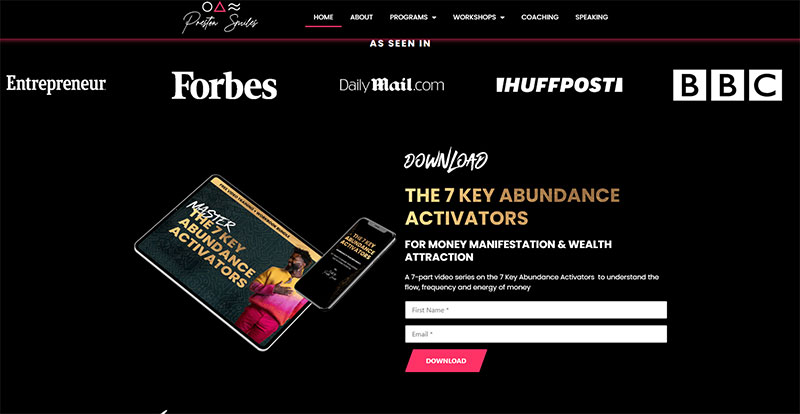
Image source: prestonsmiles.com
Video asks more of the visitor than a PDF does.
Live formats are webinars and workshops, which come with a fixed date and a registration form. The on-demand versions (recorded webinars, short training series, email courses) are available the moment someone opts in.
A recorded webinar keeps working as a lead magnet after the live session ends. An email course builds trust over several days, which suits services where the buyer needs to see the thinking first.
For the sign-up side, the IvyForms General Webinar Registration Form is built around delivering the access link after registration, and the workshop registration forms cover multi-session formats.
Trials, consultations and discounts

These formats sit closest to a purchase and attract buyers rather than browsers.
A free trial works for software, since using the product is the proof. Service businesses that sell on trust tend to get more out of a free consultation. Stores do well with a discount code because the visitor is already shopping. A resource library is the odd one out: one signup gives access to every asset at once.
Expect smaller lists and sharper intent.
For free consultations, the Consultation Appointment Booking Form collects contact details, a preferred time and the reason for the call. If you already run the Amelia booking plugin, the Amelia integration can show an IvyForms form as a pre-booking questionnaire.
How much work does each lead magnet format take to build?
Checklists, cheat sheets and templates take the least work. Quizzes and calculators need a builder tool and careful question writing. Webinars and consultations cost the most, because the effort repeats with every session.
| Format | Build effort | Ongoing upkeep |
|---|---|---|
| Checklist or cheat sheet | Low (one page of expertise plus layout) | Annual review |
| Template | Low to medium (build, test, write instructions) | Update when the host tool changes |
| Ebook or report | Medium to high (research, writing, design) | Refresh figures as they age |
| Quiz or calculator | Medium (question logic, result copy, a follow-up email per result) | Retest when offers change |
| Webinar or consultation | High (topic, slides, promotion, live delivery) | Repeats with every session |
- Canva handles layout for checklists, cheat sheets and ebooks, exported as PDF.
- Google Sheets and Notion suit templates the visitor duplicates into their own account.
- Typeform covers form-style quizzes and surveys, while Interact and Outgrow are dedicated quiz and calculator builders.
- Zoom hosts live webinars.
- Calendly gives free consultations a booking page.
- IvyForms builds the opt-in form, simple assessments and calculators inside WordPress, with entries stored in your own dashboard.
Outgrow says in its own benchmark report that a quiz or ROI calculator can launch in under an hour without developers. That is a vendor claim, but the bottleneck is writing the questions and result copy, not the software.
Tool choice shifts with format, and a roundup of the best lead magnet tools compares pricing and features in more detail.
More effort rarely buys more opt-ins. Build two or three cheap formats first and let traffic pick the winner before committing to a quiz or webinar.
What conversion rate should a lead magnet get?
Plan for single digits on cold traffic. A figure above 10% usually means a different denominator or warmer visitors.
- Across 41,000 landing pages and 57 million conversions, the median conversion rate is 6.6% (Unbounce, 2024 Conversion Benchmark Report).
- Of people who start a quiz, 40.1% become a lead, across more than 80 million leads (Interact, 2026 quiz report).
- In a survey of 790 marketers, the gap between the first and third best-performing lead magnet types was 4 points (GetResponse, 2020).
Why published benchmarks disagree
The quiz figure only counts people who already clicked start. The landing page figure divides by every visitor who loaded the page, a much bigger pool.
That difference alone explains most of the gap. Traffic temperature is the other big factor, since a subscriber to your own newsletter converts above a stranger from a paid click.
Then there is source bias. Interact sells quiz software, Unbounce sells landing pages, and the GetResponse result records what marketers believe converts best, not measured rates, fielded between March and May 2020.
Unbounce uses medians for most of its benchmarks because the median shows where a typical page lands instead of being pulled up by a few very high converting pages. Industry shifts the baseline as well, so check conversion rate benchmarks by industry before judging a number.
In practice, measure opt-ins per page visitor and only compare against figures that divide the same way.
How to match a lead magnet to the funnel stage
Match the format to what the visitor already knows. Quick-win downloads suit awareness, templates, quizzes and reports suit consideration, and webinars, trials and consultations suit decision.
Early on, the visitor has a problem and no solution yet, so checklists, cheat sheets and short guides work because they deliver a quick win.
Once they are comparing options, they want proof or a personal result. Templates, quizzes, benchmark reports and case studies fit there.
At the decision stage the visitor is ready to buy and wants a low-risk way to start. Free trials, consultations, demos, webinars and discount codes belong here.
Placement matters. A webinar asks for an hour from someone who has not decided the topic matters, and Jeff Bullas’s guide treats it as a late-funnel format for that reason.
Even at the right stage, a webinar loses people between signup and showing up. ON24’s 2024 platform data shows 57% of B2B webinar registrations convert to attendees.
Reminders and a short webinar registration form protect that number. The IvyForms webinar registration templates are a ready starting point.
Awareness magnets collect the most emails and the least buying intent. Decision-stage offers invert that.
Drawing the whole lead generation funnel first shows where each magnet hands a lead to the next step.
Which lead magnet fits your business model?
Ecommerce stores do best with offers such as a discount code or a product quiz. B2B and SaaS companies get more from templates, reports and trials. Local services lean on checklists and free consultations, coaches on assessments and email courses, and publishers on content upgrades.
| Business model | Strongest formats | Weakest fit | Reason |
|---|---|---|---|
| Ecommerce | Discount code, product quiz, free shipping | Long ebooks | Visitors are shoppers, so a purchase incentive wins |
| B2B SaaS | Template, benchmark report, free trial | Generic guides | Buyers want proof before a sales call |
| Local services | Checklist, estimate tool, free consultation | Webinars | The buyer wants a price and availability |
| Coaches and consultants | Assessment, email course, short video series | Template packs | Trust is the product, and DIY readers do not hire |
| Publishers | Content upgrade, resource library | Discount codes | The audience came for the content |
Business model changes the baseline. Unbounce’s 2024 report puts the median landing page at 4.2% for ecommerce and 3.8% for SaaS, both below the all-industry median.
That gap is the case for stronger offers instead of another PDF. A store asking for an email needs a reason like a first-order discount, free shipping or a product quiz, which is where lead magnets for ecommerce differ most from the B2B playbook.
For a single welcome offer, show the code in the IvyForms confirmation message and repeat it in the delivery email.
The catch with a discount is list quality. A code attracts people who want the code, so follow it with a welcome series that sells something beyond the discount.
B2B and SaaS buyers want proof before a sales call, so benchmark reports, templates and free trials suit them better than generic guides.
Coaches and consultants sell trust, so the magnet should sample the work itself. An assessment, a short email course or a free call beats a template pack, which attracts do-it-yourself readers who were never going to hire.
Interact reports its strongest quiz results among course, coaching and service-provider brands. Anyone building lead magnets for coaches should start with a scored assessment before anything longer.
Publishers get the cleanest fit from the content upgrade, a bonus tied to one article. Backlinko’s Brian Dean raised one post’s opt-in rate from 0.54% to 4.82% by adding a checklist, according to the Backlinko case study.
It is one post and an older test, so read it as direction, not a forecast. The cost sits in production, since Grow and Convert points out that a unique upgrade for every post does not scale.
One shortcut is to reuse a single IvyForms opt-in form across many posts with the Gutenberg block or a shortcode. Each entry also records the page it was submitted from (a Source URL field), so you can still see which post produced which lead.
How to build a lead magnet, step by step
The work starts with data you already have and ends with a number you can check. Skip that last part and you cannot tell later whether the magnet worked.
- Mine your existing data for the topic. Top blog posts, site search queries and questions from sales calls show what visitors already want.
- Pick one pain and one outcome. “Learn everything about X” loses to “fix this one problem today”.
- Choose the cheapest format that delivers the result. If a checklist, template or calculator reaches the outcome in under 10 minutes, build that before an ebook or a course.
- Build and package it. Design in Canva and export a PDF, or publish the Google Sheets or Notion template with a “make a copy” link. One asset, one format.
- Wire up delivery. Connect the form to the email platform so the first email carries the asset, and show a cover mockup on the opt-in page.
- Set one success metric before launch. Opt-in rate on the page works for week one, and lead-to-customer rate takes over once buyers start to appear.
Most of the work sits in steps 1 and 2. Formatting is the easy part.
The next few sections cover the opt-in page, the form and what happens after signup. For the writing and design side, there is a longer walkthrough on how to create a lead magnet.
For the opt-in form in IvyForms, good starting points are the contact form, the booking forms and the feedback forms. An email-only form takes a few minutes in the drag and drop builder, or you can describe it to the AI form builder and edit the result.
Where to place the opt-in and how many form fields to use
A dedicated landing page works when you control the traffic. If visitors arrive on a matching article, a content upgrade form fits better, and a popup is how you reach people who never click an offer.
| Placement | Strength | Weakness | Tools |
|---|---|---|---|
| Dedicated landing page | One goal, easy to test per magnet | Needs traffic sent to it | Leadpages, Unbounce |
| Popup | Reaches visitors who never click an offer | Interrupts reading, so timing decides results | OptinMonster |
| Content upgrade form | Offer matches the article being read | Works only on pages with matching content | OptinMonster |
| Embedded form or conversational form page | Lives on your own WordPress site, entries stay in your dashboard | Needs traffic sent to it, and the conversational layout needs Pro | IvyForms |
Trigger timing changes popup results. Wisepops’ 2026 report, based on one billion displays, shows scroll-triggered popups converting at 5.37% and on-landing popups at 4.72%.
An IvyForms form drops into any popup your theme or page builder provides, through a shortcode, the Gutenberg block or Elementor.
For a dedicated page, conversational forms (Pro) give each form its own permalink, a welcome step with a title, description and start button, and one question at a time. It works as a landing page with nothing else on it.
Gated content works only when the asset justifies an email address. A 12-page benchmark report earns a form, while a summary of a blog post does not.
On the form itself, an email address is the only field you always need. Add a first name if the welcome emails use it. Phone, company and job title can wait until after the first email.
An older HubSpot analysis of more than 40,000 landing pages found that conversion falls only slightly as fields increase. The type of field matters more than the count. Single-line text fields cost little, while multiple textareas and dropdowns drag conversion down.
The rule that fewer fields always win does not survive every test. Michael Aagaard, formerly Unbounce’s senior conversion optimizer, cut a client’s form from nine fields to six and conversions fell 14%, according to CXL’s write-up.
Choosing form fields for capturing high-quality leads comes down to what the first follow-up email actually needs.
If you do want extra questions, IvyForms conditional logic (Pro) shows them only when an earlier answer calls for them, and multi-page forms (Pro) put the email field last, after the visitor has already invested in the quiz.
What should happen after someone opts in?
Deliver the asset in the first email, send the welcome message within a day, and start a short nurture series that points at the paid offer. The follow-up decides whether a subscriber becomes a buyer.
Delivery and the welcome sequence
Show the download on the thank-you page and send it by email as well. The email confirms the address works and puts the first message in the inbox.
The delivery email goes out immediately, with the asset and one line on what comes next. A day later, a welcome email says who you are and which problem you solve. After that, nurture emails build toward the paid offer.
Kit’s own automation template follows that rhythm. It sends the lead magnet immediately, waits a day, then applies a tag that starts the welcome sequence. Ready-made lead nurturing templates cut the writing time for that series.
Welcome emails beat regular campaigns on opens, but sources disagree on by how much.
GetResponse’s latest Email Marketing Benchmarks report puts the average welcome email open rate at 83.63%, against 39.64% for all emails. Omnisend’s 2025 dataset puts welcome emails at 35.53%.
Different sender pools explain part of the gap, and Apple Mail Privacy Protection inflates opens everywhere. Judge a welcome email by clicks and conversions, not opens.
Kit’s help documentation describes its confirmation email as an incentive email that doubles as the double opt-in step. The subscriber gets the asset after clicking the confirmation link, through the “After confirming redirect to” setting.
Double opt-in slows list growth, since some people never confirm. GetResponse’s analysis of 2022 account data found double opt-in subscribers open and click more, but it found no drop in spam complaints.
Kit covers forms, the incentive email and automations. Mailchimp offers signup forms and a welcome automation. HubSpot ties forms to a CRM that records which magnet produced each contact. ActiveCampaign runs automation sequences triggered by the signup, and Zapier passes form submissions to an email tool that has no native connection.
Delivering the asset from IvyForms
IvyForms gives you three ways to hand over the asset, and they combine well.
- A success message with a download link, edited in the HTML mode of the editor. Set the form to hide itself after submission so the link stays in view.
- A redirect to a thank-you page on your site, where the download and the next offer sit side by side.
- A notification email to the subscriber. Use the email field as a placeholder in the Send to field, replace the default all-data message with your delivery text and link, and keep your own admin notification as a separate entry.
Pro adds multiple and conditional confirmation messages, plus smart logic on notifications. A visitor who picks one option on a quiz question can see a different message and receive a different email than one who picks another.
For list building, the Mailchimp integration (Pro) maps fields such as email and name to an audience. To tag or segment by answer, map the answer field to an audience field and segment inside Mailchimp.
The Zapier integration (Pro, Growth plan or higher) sends each new entry to more than 5,000 apps, which covers email tools and CRMs with no native connector. Webhooks do the same for any endpoint you control.
Consent and sending rules
The FTC can fine a sender up to $53,088 for each non-compliant email, according to its CAN-SPAM compliance guide.
The CAN-SPAM Act governs how you send. Every marketing email needs a clear opt-out that works for 30 days after sending, and requests must be honored within 10 business days. B2B email gets no exception.
GDPR is about how you collect consent from people in the EU. You must be able to prove consent, present the request separately from other terms, and make withdrawal as easy as signing up (Article 7). Pre-ticked boxes do not count as consent under GDPR Recital 32.
Creating GDPR compliant forms from the start beats patching an old opt-in later.
The IvyForms GDPR field adds a required consent checkbox with agreement text that accepts links to your privacy policy. For marketing emails beyond delivering the asset, add a separate optional Checkbox with no default selection, and use Mailchimp smart logic to sync only the contacts who ticked it.
Use IvyForms notification emails for delivery, and send marketing from your email platform, which handles the unsubscribe link and the physical address.
In August 2024 the FTC announced a settlement in which Verkada agreed to pay $2.95 million, the largest penalty it had obtained for a CAN-SPAM violation. The settlement also covered data security charges. Put a physical address and a working unsubscribe link in the delivery email template before the first send.
Why lead magnets underperform and how to diagnose it
Usually the wrong people opted in, or the right people opted in and nothing followed, or not enough people saw the offer. The symptom tells you which one.
Common failure causes
| Symptom | Likely cause | First fix |
|---|---|---|
| Few visitors opt in | Vague promise or buried offer | Rewrite the headline around one outcome, move the form up |
| Strong opt-in rate, few buyers | Topic draws people outside the paid offer | Retarget the topic toward what you sell |
| High unsubscribes after delivery | First email does not match the promise | Rewrite the delivery email |
| Bounces and fake addresses | Single opt-in without validation | Add confirmation or address validation |
Funnelytics’ 2026 lead magnet guide warns against promising an outcome the asset does not deliver and never tracking which magnet produces revenue.
Dead-end magnets fail quietly. If nothing connects the download to an offer, the subscriber has no next step.
For the bot and fake-address row, add a spam check to the opt-in form. IvyForms supports reCAPTCHA, Turnstile and hCaptcha in the free version, and the No Duplicates option on fields such as email stops the same address from entering twice. See the spam protection feature page for the full list.
When a lead magnet is the wrong tool
A lead magnet is the wrong tool when the visitor wants an answer, not a resource.
- Traffic is too low to read a test, so conversion differences are noise
- Buyers want a quote, a demo or a call and will not trade an email for a PDF
- Nobody owns the follow-up, so subscribers wait weeks for a second email
In the first two cases, a contact form or booking page beats a gated asset. In the third, fix the sequence before building another magnet.
Metrics worth tracking
Opt-in rate is signups divided by page visitors, tracked per magnet. Cost per lead (spend divided by signups) only helps next to lead-to-customer rate, the share of subscribers who buy, which is the one that exposes audience mismatch. Unsubscribe rate after delivery shows whether the first email matched the promise.
Cost per lead flatters broad offers, so read it beside lead-to-customer rate. The full list of lead generation KPIs worth tracking runs longer, but these four diagnose a single magnet.
Tracking runs through Google Analytics 4. Google Analytics Help recommends the generate_lead event for form submissions, and a recommended event needs its required parameters or GA4 treats it as a custom event.
Set value and currency, mark the event as a key event (GA4’s name for conversions since March 2024), and add a lead_source parameter to tell magnets apart.
Wiring that up for each form is covered in a guide to tracking form submissions in Google Analytics.
With IvyForms, point each magnet’s confirmation at its own thank-you page by choosing redirect to page. Then fire the GA4 event on that page through Google Tag Manager or your analytics plugin, and the thank-you URL tells you which magnet converted.
Inside WordPress, the entries table shows the submission date for every entry, and each entry stores a Source URL. The wpDataTables integration (all plans) turns entries into tables and charts, so pick only non-personal fields, since those tables display on the front end.
Keep one form per magnet, so entry counts and mappings stay separate. The Entries column in All Forms then doubles as a quick leaderboard.
Lead Magnet Ideas FAQ
What is a lead magnet?
Anything free that a business hands over in return for contact details, usually an email address. Checklists, templates, quizzes and trials are common examples.
The exchange turns anonymous traffic into a list that can receive follow-up emails.
How does a lead magnet differ from a content upgrade?
Content upgrades belong to one article, such as a checklist that extends that post. A standard lead magnet sits on a landing page or popup instead and serves the whole site.
Upgrades typically convert better on their own post because the offer matches what the reader is already reading.
Is a tripwire offer the same as gated content?
No. Gated content is any asset sitting behind a form. A tripwire is something else, a low-priced paid product offered right after opt-in.
The lead magnet is the free incentive behind the gate, and the tripwire is the first purchase that follows it.
How long should a lead magnet be?
As short as it can be while still delivering one result. In GetResponse’s 2020 survey, 58.6% of marketers comparing written formats said short-form written content converted best.
A one-page checklist is a safer first build than a long ebook.
Can AI tools create lead magnets?
Yes. AI can draft content packs such as 30 social captions or a week of email subject lines written for a niche, a format Salesforce lists among modern lead magnets.
Edit the output with your own examples so it reads as specific to the audience, not generic.
Can IvyForms run a quiz or calculator lead magnet?
Yes. Radio, Slider and Likert fields collect the answers, the Calculated field (Pro Essentials or higher) works out a number from them, and conditional confirmation messages (Pro) can change what each visitor sees afterward.
Put the email field on the last page of a multi-page form so the visitor answers first and opts in last.
Which IvyForms templates work for lead magnets?
Browse the template library and start from the contact form for a simple opt-in, the webinar registration form for live sessions, or the consultation booking form for free calls. Every template is fully editable in the builder.
How do I deliver the download after signup in IvyForms?
Put the link in the confirmation message, redirect to a thank-you page that hosts it, or send it in a notification email addressed to the email the visitor typed. Many sites use the page and the email together.
Scaling From One Lead Magnet to a Set
A site needs one lead magnet per audience segment, and a second belongs on the site only after the first produces customers.
Prove one magnet on the highest-traffic page first. Read lead-to-customer rate before adding another, and build the second for a different segment or funnel stage.
Each addition raises subscriber growth and also adds an asset to refresh and a nurture sequence to write, so the trade-off is upkeep in exchange for coverage.
Retire the magnet whose lead-to-customer rate trails the rest after a full follow-up cycle, since it fills the list without supplying qualified leads.
Every new magnet also needs its own opt-in page, and lead magnet landing page examples show how other teams lay one out. Building each one as a separate IvyForms form, with its own thank-you page and Mailchimp mapping, keeps the numbers clean when it is time to compare them.