



Gallup’s 2024 data shows only 31% of U.S. employees feel engaged at work. Annual surveys can’t catch that kind of decline fast enough. Pulse surveys can. These short, frequent questionnaires…
Table of Contents
A clunky registration form can kill event attendance before it starts. Slow load times, too many fields, broken payment steps. People leave.
The right event registration form template fixes that. It collects attendee information, processes payments through Stripe or PayPal, and sends confirmation emails without friction.
But picking a template isn’t random. Conference sign-ups need different fields than webinar registrations. A 50-person workshop runs on Google Forms. A 2,000-seat corporate event needs Cvent or Bizzabo.
This article breaks down the types of event registration form templates, the fields that matter, the platforms worth using, and the design choices that push completion rates higher. No filler. Just what works.
What Is an Event Registration Form Template
An event registration form template is a pre-built digital form that collects attendee information for conferences, workshops, webinars, and other organized events. It includes structured form fields for personal details, ticket selection, payment processing, and session preferences.
Most event planners use these templates instead of building forms from scratch. Platforms like IvyForms, Jotform, Typeform, and Eventbrite offer ready-made layouts with drag-and-drop form builders that cut setup time from hours to minutes.
A well-structured template does three things: captures the right attendee data, processes payments through gateways like Stripe or PayPal, and sends automated confirmation emails. That’s it.
The difference between a good template and a bad one comes down to completion rate. Templates with too many custom fields see higher abandonment. Templates that feel disorganized lose trust before the first click.
These templates fall under a broader category of registration forms, but they carry specific requirements. Event-specific fields like session selection, dietary restriction options, and ticket type choices separate them from generic sign-up sheets.
Event Registration Form Templates
Modern Event Registration Form
See the Pen
Modern Event Registration Form by Bogdan Sandu (@bogdansandu)
on CodePen.
A sleek, startup-inspired event registration form featuring warm orange gradients, glassmorphism effects, and smooth micro-interactions. Built with vanilla HTML, CSS, and JavaScript.
Features:
- Real-time form validation with animated error states
- Custom checkbox styling and hover effects
- Glassmorphism design with backdrop blur
- Floating background animations
- Mobile-responsive layout
- Shimmer button effects and success states
Modern Conference Registration Form
See the Pen
Modern Conference Registration Form by Bogdan Sandu (@bogdansandu)
on CodePen.
A sleek, interactive conference registration form designed with startup aesthetics in mind. Features a fresh color palette of orange, coral, and mint tones with smooth animations and micro-interactions.
Key Features:
- Progressive form with real-time completion tracking
- Interactive workshop selection cards (max 3 limit)
- Custom-styled form controls with hover/focus animations
- Mobile-responsive grid layout
- Smart validation with user-friendly notifications
- Accessibility-focused with proper semantics
Modern Webinar Registration Form
See the Pen
Modern Webinar Registration Form by Bogdan Sandu (@bogdansandu)
on CodePen.
A sleek, conversion-optimized webinar registration form designed with startup aesthetics in mind. Features a warm, professional color palette (grays + coral accent) that avoids cliche blue/purple gradients.
Key Features:
- Auto-timezone detection & selection grid
- Custom animated checkboxes & form controls
- Progressive loading animations with staggered reveals
- Mobile-first responsive design
- Accessibility-focused with proper ARIA labels
- Interactive hover states & micro-animations
- Success state with smooth transitions
Modern Multi-Step Event Registration Form
See the Pen
Untitled by Bogdan Sandu (@bogdansandu)
on CodePen.
A sophisticated, production-ready multi-step registration form featuring advanced micro-interactions and modern design principles. Built with vanilla HTML, CSS, and JavaScript: no frameworks required.
Key Features:
- Smooth Step Navigation: Intuitive progress tracking with animated indicators
- Advanced Micro-Interactions: Button morphing, field focus animations, and ripple effects
- Real-time Validation: Instant feedback with elegant error states
- Responsive Design: Flawless experience across all devices
- Local Storage: Form data persistence during navigation
- Custom Animations: Sophisticated transitions using cubic-bezier timing
Modern Workshop Registration For
See the Pen
Modern Workshop Registration Form by Bogdan Sandu (@bogdansandu)
on CodePen.
A sleek, interactive workshop registration form built with vanilla HTML, CSS, and JavaScript. Features a warm, professional color palette with orange/coral accents that breaks away from typical blue gradients.
Key Features:
- Smart Progress Tracking: Visual progress bar updates as users complete sections
- Interactive Tool Selection: Clickable tags for technology/software experience
- Custom Form Elements: Styled radio buttons and skill level cards
- Micro-Animations: Subtle hover effects and smooth transitions
- Real-time Feedback: Character counters and form validation
- Fully Responsive: Mobile-first design with adaptive layouts
Modern Sports Event Registration Form
See the Pen
Modern Sports Event Registration Form by Bogdan Sandu (@bogdansandu)
on CodePen.
A sleek, professional registration form for sports events with a clean startup-inspired design. Features individual/team registration toggle, comprehensive validation, and smooth animations throughout.
Key Features:
- Toggle between individual and team registration
- Real-time form validation with visual feedback
- Emergency contact section with relationship options
- Professional liability waiver with clear terms
- Floating labels with smooth animations
- Success/error states with checkmarks and icons
- Helpful tooltips for complex fields
- Custom focus indicators and hover effects
- Visual section separators with lift animations
- Fully responsive design for all devices
Modern Festival Registration Form
See the Pen
Modern Festival Registration Form by Bogdan Sandu (@bogdansandu)
on CodePen.
A sleek, conversion-optimized festival registration form built with vanilla HTML, CSS, and JavaScript. Features a contemporary green color palette inspired by modern startup design systems.
Key Features:
- Multiple ticket tiers with interactive selection
- Real-time pricing calculator with quantity controls
- Add-on services (VIP parking, camping, merchandise)
- Responsive design with smooth animations
- Form validation and UX best practices
- Dynamic order summary with live updates
Modern Corporate Event Registration Form
See the Pen
Modern Corporate Event Registration Form by Bogdan Sandu (@bogdansandu)
on CodePen.
A sleek, professional corporate event registration form built with vanilla HTML, CSS, and JavaScript. Features a sophisticated blue color palette, smooth animations, and comprehensive form validation: perfect for business events and corporate gatherings.
Key Features:
- Clean, startup-inspired design with blue gradient header
- Real-time form validation with helpful error messages
- Smooth animations and hover effects throughout
- Mobile-responsive grid layout
- Auto-formatting for phone numbers
- Professional typography (Inter + Space Grotesk fonts)
- Accessible design with proper focus states
- Loading states and success confirmation
Multi-Language Event Registration Form
See the Pen
Multi-Language Event Registration Form by Bogdan Sandu (@bogdansandu)
on CodePen.
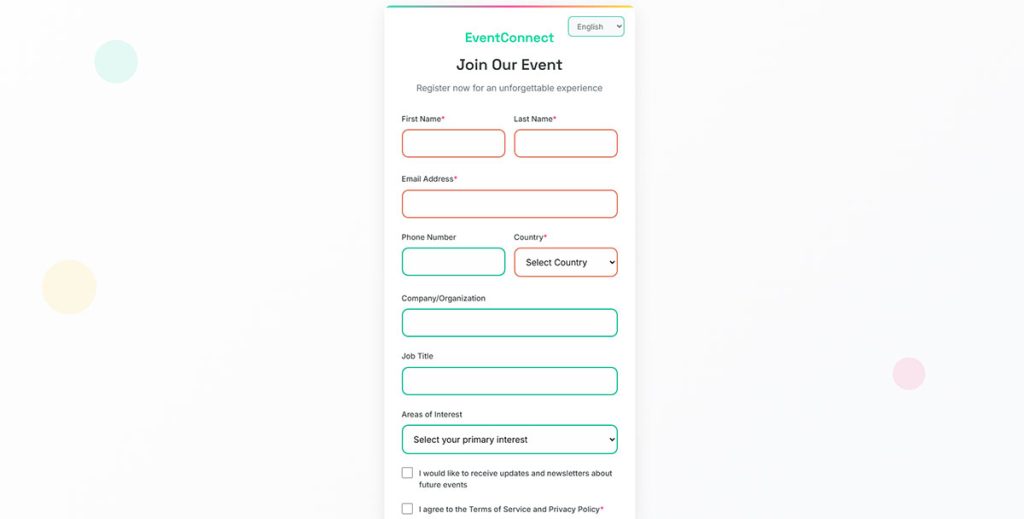
A modern, responsive registration form designed with startup aesthetics and international accessibility in mind. Features complete localization support for 5 languages (English, Spanish, French, German, Chinese) with real-time language switching.
Key Features:
- Multi-language support with instant translation
- Real-time form validation with smooth error animations
- Responsive design optimized for all devices
- Professional event registration fields
- Custom Google Fonts (Inter + Space Grotesk)
- Smooth micro-interactions and hover effects
- Loading states and success messaging
- Accessibility-focused design
How Does an Event Registration Form Template Work
An event registration form template works by guiding attendees through a structured data collection process, from personal information input to payment confirmation. The form captures, validates, and stores participant data while triggering automated workflows like email confirmations and CRM updates.
Most templates follow a linear flow. The attendee lands on the registration page, fills in required fields, selects ticket options or sessions, submits payment (if applicable), and receives a form submission confirmation message.
Behind the scenes, form validation checks each input in real time. Email format, phone number structure, required fields. If something’s off, a clear form error message tells the attendee what to fix.
What Are the Core Components of an Event Registration Form
Every functional event registration template has five parts: attendee information fields, event-specific selection fields, payment integration, confirmation system, and data storage. Skip any of these and the form breaks down operationally.
How Do Attendee Information Fields Function in a Registration Form
Attendee fields collect name, email, phone number, organization, and job title. The best templates keep required fields to a minimum, typically four to six, and use conditional logic to show extra fields only when relevant.
For group registrations, the form dynamically adds repeating field sets per participant. Took me a while to realize that most abandonment happens right here, at the attendee info step, when forms ask for too much too early.
What Role Does Payment Integration Play in Event Registration
Payment integration connects the registration form to processors like Stripe, PayPal, or Square. The attendee selects a ticket type (general admission, VIP, early bird), the form calculates the total, and payment completes without leaving the page.
Promo code fields and group registration discounts add complexity but increase conversions. A WordPress payment form setup handles this well for smaller events without requiring a full event management platform like Cvent or Bizzabo.
What Types of Event Registration Form Templates Exist
Event registration form templates are categorized by event format, audience size, and data collection requirements. Each type includes different field structures, payment configurations, and attendee management features based on the specific event context.
What Is a Conference Registration Form Template
Conference registration templates handle multi-session events with tiered pricing, breakout session selection, and speaker meet-and-greet sign-ups. They typically use multi-step forms because the data requirements are heavy.
Fields include professional title, company name, dietary restrictions, accessibility requirements, and session preference grids.
What Is a Workshop Registration Form Template
Workshop templates are simpler. Smaller groups, single sessions, focused topics. The form collects basic attendee information plus skill level or experience background to help instructors prepare materials.
Most workshop templates include a waitlist management feature since capacity is limited. Supply list downloads or pre-workshop preparation instructions often attach to the registration successful message.
What Is a Webinar Registration Form Template
A webinar registration form collects name, email, company, and sometimes a question field for the Q&A segment. These forms are short by design, usually three to five fields.
Speed matters here. The fewer fields, the higher the conversion rate. Most webinar registration form templates integrate directly with platforms like Zoom, GoToWebinar, or Microsoft Teams.
What Is a Fundraiser or Charity Event Registration Form Template
Fundraiser registration templates combine event sign-up with donation form functionality. Attendees register and optionally contribute additional funds beyond the ticket price.
These templates include tax receipt generation fields, sponsor recognition preferences, and tiered giving levels. Payment integration is non-negotiable here.
What Is a Sports Event Registration Form Template
Sports event templates collect participant health data, emergency contact information, age category, and waiver agreements. A WordPress form with file upload capability lets participants submit medical clearance documents or proof of insurance.
Team registration adds another layer. The form needs to handle multiple participant entries under a single team name with a designated captain.
What Is a Corporate Event Registration Form Template
Corporate event templates serve internal company gatherings, client appreciation events, product launches, and networking sessions. They connect to CRM systems like Salesforce or HubSpot Forms to sync attendee data with existing contact records.
Badge printing integration, parking pass requests, and NDA agreement fields are common additions. These templates prioritize brand consistency, pulling in company logos, fonts, and color schemes from the organization’s style guide.
What Fields Should an Event Registration Form Template Include
The fields in an event registration form template depend on event type, attendee data requirements, and post-event follow-up needs. Every field added increases form length and reduces completion rates, so each field needs clear justification.
A 2023 Formstack study found that forms with more than 11 fields see a 17% drop in submissions. Keep that number in mind.
What Are the Required Personal Information Fields
The baseline: full name, email address, phone number. That’s the minimum for any event registration.
For professional events, add company name and job title. For educational events, add institution and student ID. For ticketed events, add billing address. Every additional field beyond the core three needs to earn its place on the form.
What Are Custom Event-Specific Fields
Custom fields capture information unique to your event. Dietary restrictions for catered events. T-shirt size for races. Session preferences for multi-track conferences. Travel arrangement needs for destination events.
Use dropdown menus and checkboxes for these instead of open text fields. Structured data is easier to process and reduces manual sorting after registration closes. The right form design groups these custom fields logically so they don’t overwhelm the attendee.
How Do Conditional Logic Fields Improve Registration Forms
Conditional logic shows or hides fields based on previous answers. If an attendee selects “VIP ticket,” the form reveals exclusive session options. If they choose “virtual attendance,” physical logistics fields disappear.
This keeps forms short for most users while still collecting detailed data from those who need it. A form builder with conditional logic reduces perceived form length by 30-40% without sacrificing data quality.
How to Choose the Right Event Registration Form Template
Choosing an event registration form template depends on three factors: event type, expected attendee volume, and the complexity of data you need to collect. The wrong template creates friction. The right one feels invisible to the person filling it out.
What Criteria Determine the Best Registration Form Template for Your Event
Match the template to these five criteria:
- Payment needs: free events skip payment integration entirely, paid events need Stripe, PayPal, or Square
- Field complexity: single-session events use flat forms, multi-track events need conditional branching
- Integration requirements: does the form need to sync with your CRM, email marketing tool, or event management platform
- Branding flexibility: can you customize colors, logos, fonts, and layout to match your organization
- Mobile responsiveness: over 60% of registrations happen on phones, according to Eventbrite’s 2024 data
How Does Event Size Affect Template Selection
Events under 50 attendees work fine with Google Forms or Microsoft Forms. Simple, free, fast to set up.
Events between 50 and 500 attendees need Jotform, Typeform, or Cognito Forms. Better customization, payment processing, and automated email confirmations. Beyond 500, platforms like Cvent, Bizzabo, or Splash handle capacity management, badge printing, and check-in logistics that smaller tools can’t.
How Does Event Type Affect Form Structure
Virtual events need minimal fields. Name, email, maybe a time zone selector. The registration form for a webinar looks nothing like the form for a three-day conference with 12 breakout sessions.
Hybrid events are the trickiest. The form has to branch based on attendance mode (in-person vs. virtual), then show completely different field sets for each path. In-person attendees get parking, meal, and accommodation fields. Virtual attendees get platform preference and technical requirements fields.
If you’re running events on WordPress, a dedicated WordPress event registration form setup gives you more control over layout and functionality than generic form builders. Pair it with proper WordPress email settings to make sure confirmation emails actually land in inboxes.
FAQ on Event Registration Form Templates
What is an event registration form template?
An event registration form template is a pre-built digital form that collects attendee details, ticket selections, and payment information for organized events. Platforms like Jotform, Typeform, and Eventbrite offer customizable templates with drag-and-drop builders for conferences, workshops, and webinars.
How many fields should an event registration form have?
Keep it between four and seven fields for standard events. Name, email, phone number, and ticket type cover the basics. Every field beyond that reduces your form completion rate. Add more only when the data directly serves event logistics.
Which platforms offer free event registration form templates?
Google Forms and Microsoft Forms provide free templates with basic functionality. Jotform and Cognito Forms offer free tiers with limited submissions. For WordPress sites, free WordPress form plugins handle event registrations without monthly fees.
Can I accept payments through an event registration form?
Yes. Most form builders integrate with Stripe, PayPal, or Square for payment processing. The form calculates totals based on ticket type, applies promo codes, and handles group registration discounts. Payment completes directly within the form without redirecting attendees.
What is conditional logic in event registration forms?
Conditional logic shows or hides fields based on attendee responses. If someone selects “virtual attendance,” in-person logistics fields disappear. This keeps the form short for most users while collecting detailed data where needed. It reduces perceived form length significantly.
How do I make an event registration form mobile-friendly?
Use a responsive template that adjusts to screen size automatically. Single-column layouts, large tap targets, and minimal typing work best on phones. Following mobile form guidelines matters because over 60% of registrations happen on mobile devices.
How do I reduce form abandonment on event registration pages?
Cut unnecessary fields. Add progress indicators for multi-step registration forms. Show trust signals like SSL badges near payment sections. Tips for improving form abandonment rate include faster load times, autofill support, and clear error messages.
Do event registration forms need GDPR compliance?
Yes, if you collect data from EU residents. The form needs explicit consent checkboxes for marketing communications, a link to your privacy policy, and data processing transparency. Building GDPR compliant forms protects both organizers and attendees legally.
Can I connect an event registration form to my CRM?
Most template platforms integrate with Salesforce, HubSpot Forms, Mailchimp, and Constant Contact through native connections or Zapier. Attendee data syncs automatically after submission, eliminating manual entry and keeping your contact records updated in real time.
What confirmation should attendees receive after registering?
Attendees expect an immediate confirmation email with event details, ticket information, calendar invite link, and any preparation instructions. A proper on-page success message displays right after the form submits, confirming the registration went through.
Conclusion
The best event registration form templates do one thing well: they remove friction between someone wanting to attend and actually signing up. That’s the whole job.
Pick a template that matches your event size and format. Conference, workshop, webinar, fundraiser. Each needs a different field structure and payment setup.
Keep required fields tight. Use conditional branching to hide what’s not relevant. Test on mobile before you publish, because that’s where most attendees will fill it out.
Connect the form to your email marketing tool and CRM so attendee data flows automatically into Mailchimp, Salesforce, or whatever system runs your follow-ups.
Don’t forget data privacy. GDPR and CCPA compliance protects your attendees and your organization.
After the event wraps, send a post event survey to capture feedback while the experience is fresh. That data shapes better registration forms and better events next time around.