




Black Friday 2026 is on Friday, November 27, with Cyber Monday following on November 30. For WordPress site owners it’s the one week a year when the plugins and services…
Table of contents
Desktop users made 55% of donation transactions and 70% of revenue in M+R Benchmarks 2025, even though mobile and tablet users made up most nonprofit website visits. That gap matters when you pick a template, because a layout checked on one screen size leaves gifts on the table on the other.
Nonprofits grab a template so they don’t have to design the fields, gift options, payment step, and receipt setup from scratch. These come as Word files, PDFs, Google Forms, or hosted forms from builders like Givebutter and Donorbox, or from Jotform’s library.
Format sets what the form can do. A Google Form logs a pledge, and that’s about it. A hosted form takes the card and sends the receipt.
What Does a Donation Form Template Include?
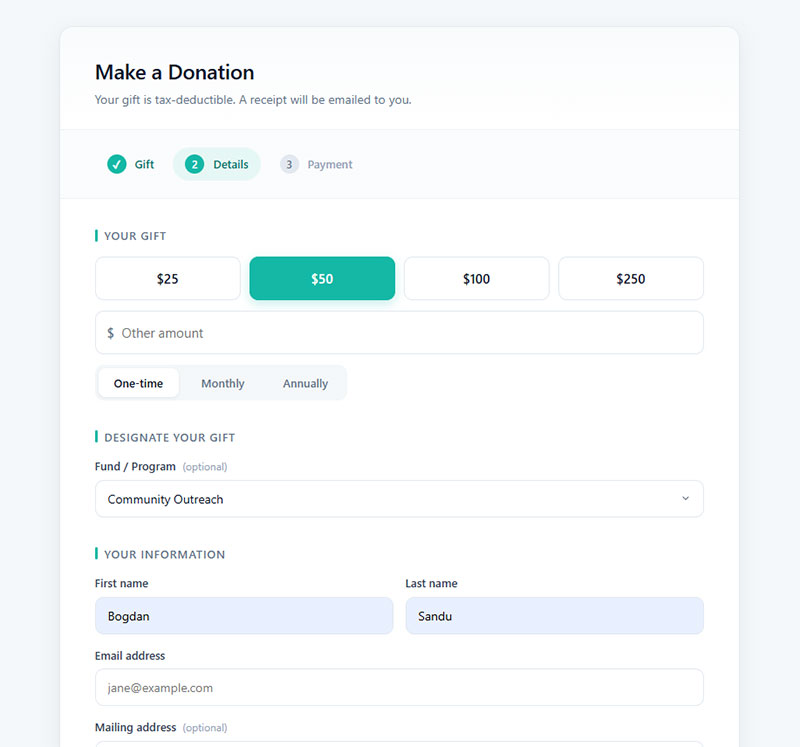
Whatever the format, the fields barely change. You need the donor’s name, an email address (the receipt goes there), the gift amount, and a payment method. That’s the core.
Paymattic’s guide to common donation form mistakes says a form should collect only what completes the gift and sends the receipt. Neon CRM’s guidance adds that asking for a phone number can lower conversion. I’d leave that field off unless someone on staff will actually call.
Beyond the core, a few optional fields are worth adding.
- A mailing address, but only if you send mailed receipts or tribute notification cards. Otherwise skip it.
- A designation dropdown that routes the gift to a specific fund or program
- Dedication text (“in honor of” or “in memory of”) plus the person to notify
- An anonymity toggle, which keeps the donor’s name off public donor lists
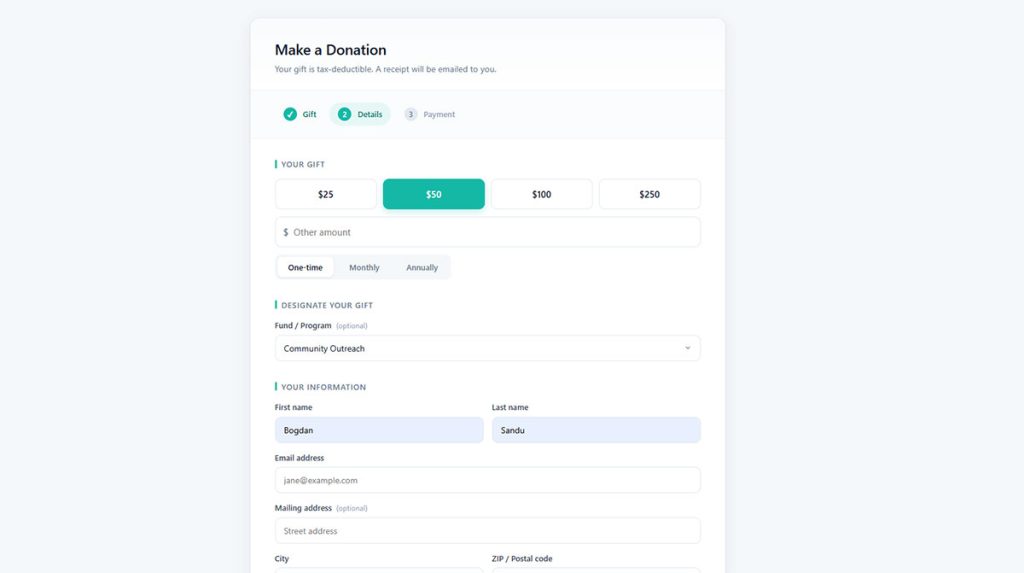
Cognito Forms’ free donation template shows how these pieces fit together. It runs three pages (gift, details, payment) and adds giving tiers, a recurring option, fund selection, anonymous giving, an in-honor field, and an emailed PDF receipt.
Every field past the core four adds friction, so decide which form fields to keep before you publish.
Which Donation Form Template Type Fits Your Campaign?
It comes down to how the gift gets made. Some donors give once, some give monthly, some hand over goods instead of cash, and some promise money for later.
Gift-based templates
One-time templates are the shortest path. Amount, details, payment. They suit appeals and emergency campaigns.
Recurring templates add a frequency toggle and a note on the billing date. M+R Benchmarks 2025 found that 90% of nonprofits offer monthly giving on the main donation form, yet 64% still pre-select the one-time option. That seems backwards to me.
Tribute templates carry a dedication field, the name of the person honored, and an optional notification address. Memorial funds and anniversary appeals lean on them heavily.
Commitment-based templates
Pledge forms record a promised amount and a payment schedule. No card gets charged at signing.
In-kind forms capture an item description, quantity, and a pickup or drop-off choice, and Jotform’s library includes one for tracking non-cash contributions. Event forms pair a gift or ticket tier with attendee details.
Gala and walkathon forms collect two kinds of data at once, and a ready-made event registration form template covers the attendee half. The donation fields sit on top of it.
My advice is to start with the one template your next campaign needs. Add a second only when donors ask for it.
Printable File, Google Form, or Hosted Builder: Which Format Works?
Use a hosted builder to take cards online and a printable file for gifts that arrive by hand or mail. Keep Google Forms for logging pledges.
Word and PDF files print cleanly and get filled in by hand, which means someone types the data in afterward. Google Forms is free and familiar, but it has no built-in payment field. A hosted builder or plugin handles cards, receipts, and donor records.
Google Forms has no first-party payment field. Donations run through a payment link in the confirmation message or an add-on from the Google Workspace Marketplace, such as Payable Forms or Neartail’s payment form.
Payable adds columns that track payment status, which saves some manual matching. If Google Forms still feels limiting, alternatives to Google Forms are worth a look.
M+R Benchmarks 2025 puts mobile and tablet users at 53% of nonprofit website visits, with an average mobile gift of $76 against $145 on desktop.
Hosted forms reflow to the screen. A fixed-layout PDF does not, and it asks phone users to download it and then print and mail it.
Printable files still earn their place at events and with donors who give by check.
How Do the Main Donation Form Template Platforms Compare?
Givebutter, Donorbox, Zeffy, Jotform, and GiveWP cover most of what a small nonprofit needs. They differ mostly in who pays, the organization or the donor.
| Platform | Pricing model | Best fit | Main limit |
|---|---|---|---|
| Givebutter | Free with optional donor tips; flat 3% platform fee with tips off | Forms plus donor tools for small and mid-size nonprofits | Donors see a tip prompt, or the 3% fee applies |
| Donorbox | Free Standard plan, 2.95% platform fee | Embedding a form on any website | Platform fee on every gift |
| Zeffy | Free, funded by optional donor tips | Organizations with no fee budget | Tip prompt at checkout |
| Jotform | No cut of donations; gateway fees apply | Custom fields from 100+ donation templates | Donor records need a CRM connection |
| GiveWP | Free core plugin; paid annual license | WordPress sites | Recurring gifts need a paid add-on |
Jotform connects to 40+ payment gateways and says it takes no share of donations. Gateway fees still apply, and Jotform for Salesforce is the route when donor records need a home beyond form submissions.
GiveWP cannot run without WordPress. Its premium add-ons (Recurring Donations, Fee Recovery, Tributes) come with paid plans.
General-purpose builders such as WPForms and Gravity Forms can run donation forms too, and a comparison of how WPForms and Gravity Forms stack up shows where they split on payments and add-ons. Elegant Themes notes that WPForms needs a paid add-on to collect donations.
What Do Donation Form Templates Really Cost?
The template itself is usually free. The cost sits in card processing, and on some platforms in a platform fee or a donor tip on top.
As of October 2026, the published rates look like this.
- Stripe’s nonprofit rate is 2.2% + $0.30 per card payment against 2.9% + $0.30 standard, for eligible 501(c)(3)s with at least 80% of volume from tax-deductible donations (Givebutter’s Stripe guide, 2026).
- PayPal charges verified charities 1.99% + $0.49, against 2.89% + $0.49 for standard donation payments (PayPal merchant fees, 2026).
- Givebutter charges a $0 platform fee with tips on and a flat 3% with tips off, plus 2.9% + $0.30 on cards and 1.9% + $0.30 on ACH, for accounts created on or after September 9, 2025 (Givebutter).
- Donorbox Standard takes a platform fee of 2.95% on donation forms and 3.95% on ticketing, memberships, and peer-to-peer. That drops to 1.75% on Pro and 1.6% on Premium for donation forms (Donorbox pricing, 2026).
- GiveWP’s core plugin is free, but donations taken through the free Stripe gateway without an active Stripe add-on license carry an extra 2% (GiveWP).
Those rates combine differently on a real gift. Here is a $50 donation run through each setup, calculated from the published rates above, rounded to the nearest cent, and before any monthly plan fees.
| Setup | Fee on $50 | Net to organization |
|---|---|---|
| Stripe nonprofit rate, direct | $1.40 | $48.60 |
| PayPal charity rate | $1.49 | $48.51 |
| Donorbox Standard on Stripe nonprofit rate | $2.88 | $47.12 |
| Givebutter with tips off | $3.25 | $46.75 |
| Givebutter with tips on, or Zeffy | $0 to the organization | $50.00 |
The zero rows shift the cost to the donor, who pays the tip and sometimes the processing fee. The Stripe and PayPal rows look cheapest, but they leave you to build receipts, recurring billing, and donor records yourself.
The cheapest route on paper is no platform at all. Developers who want to skip license fees can build a WordPress payment form without a plugin, but they then own the upkeep and security work.
Donor tips and cover-the-fees prompts
Tip-funded platforms move cost off the organization and onto the donor. Sources disagree on how visible that is.
Zeffy says the tip is optional and the suggested amount can be changed. Donorbox, a competitor, reports that Zeffy’s default tip is 17% on gifts up to $99.49 and 15% above that.
Givebutter’s Guarantee covers any processing fees donors skip when tips are enabled, per Givebutter.
A tip prompt suits online-first campaigns. For a church or school form where donors know the treasurer personally, a flat platform fee is easier to explain.
Donation Form Templates
One-Time Donation Form
See the Pen
Modern One-Time Donation Form by Bogdan Sandu (@bogdansandu)
on CodePen.
Recurring Donation Form
See the Pen
Modern Recurring Donation Form by Bogdan Sandu (@bogdansandu)
on CodePen.
Pledge Form
See the Pen
Modern Pledge Form by Bogdan Sandu (@bogdansandu)
on CodePen.
In-Kind Donation Form
See the Pen
Modern In-Kind Donation Form by Bogdan Sandu (@bogdansandu)
on CodePen.
Sponsorship Form
See the Pen
Modern Multi-Step Sponsorship Form by Bogdan Sandu (@bogdansandu)
on CodePen.
Individual Donation Form
See the Pen
Modern & Interactive Donation Form by Bogdan Sandu (@bogdansandu)
on CodePen.
Corporate Donation Form
See the Pen
Modern Corporate Donation Form by Bogdan Sandu (@bogdansandu)
on CodePen.
Anonymous Donation Form
See the Pen
Modern Anonymous Donation Form by Bogdan Sandu (@bogdansandu)
on CodePen.
Multi-Step Donation Form
See the Pen
Modern & Vivid Multi-Step Donation Form by Bogdan Sandu (@bogdansandu)
on CodePen.
What Must a Donation Form and Receipt Include to Stay Compliant?
Collect what each tax and privacy regime requires, then send a receipt that names the gift and its date, along with anything the donor received in return. The rules differ by country, so the wording has to fit the donors you actually have.
U.S. receipts under IRS Publication 1771
- A donor cannot claim a deduction for a single contribution of $250 or more without a contemporaneous written acknowledgment from the charity (IRS Publication 1771).
- When a donor pays over $75 and gets something back, the charity owes a written disclosure statement (IRS).
- Missing it costs $10 per contribution, capped at $5,000 per fundraising event or mailing, unless reasonable cause is shown.
The IRS example is a $100 gift that comes with a $40 concert ticket. The deductible part is $60, and the disclosure is still required because the payment tops $75.
Publication 1771 lets one annual summary substantiate several single contributions of $250 or more. Separate gifts under $250 are not added together.
Gala and ticketed event templates trip the $75 rule fastest. Show the non-deductible value of the ticket on the form itself, so the receipt can repeat it.
UK Gift Aid declarations
HMRC sets no fixed design for a Gift Aid declaration, but every one needs these items:
- Charity name
- Donor’s full name (first name and surname)
- Home address (for UK donors, a house number or name plus postcode works)
- Whether it covers a single gift or all gifts
- A statement that the donor wants Gift Aid applied (a tick box counts)
- An explanation that the donor must have paid enough UK tax to cover the claim and is responsible for any shortfall
Claim Gift Aid on a donor with no declaration and HMRC can ask the charity to repay the tax, per GOV.UK’s declaration guidance. Signatures are not required, according to HMRC’s detailed guidance.
Leave the tick box unticked, because a tick counts only as the donor’s own confirmation.
Data consent and card security
The ICO’s UK GDPR consent guidance rules out pre-ticked boxes, and consent generally cannot be a condition of the service unless the processing is necessary for it. A newsletter opt-in on the donation form needs its own unticked box, separate from the gift.
For wording and layout, see how to build GDPR-compliant forms.
On the card side, the PCI Security Standards Council’s SAQ A covers card-not-present merchants that fully outsource card entry to a PCI DSS-compliant provider through a hosted page, a redirect, or an iframe, and do not electronically store, process, or transmit cardholder data themselves.
Since 31 March 2025, when the future-dated requirements in PCI DSS v4.x became mandatory (v4.0.1 has been the only active version since 31 December 2024), merchants embedding a provider’s payment form in an iframe must also confirm their site is not susceptible to script attacks (PCI SSC FAQ 1588). A redirect to a hosted donation page, or a payment link sent by email, falls outside that extra criterion.
A standalone hosted donation page carries the lightest card-security load. A paper form that collects card numbers does the opposite, because the organization then handles cardholder data itself.
Which Design Choices Raise Completion Rates?
Sources mostly agree on suggested amounts tied to an impact, and on a phone-ready layout with wallet payments. Form structure is where they split, and it’s the one worth testing on your own traffic.
Suggested amounts and impact statements
Suggested amounts often raise both conversion and gift size, according to Neon CRM’s guidance. Its form templates pair each amount with a one-line statement of what the gift does.
Show a short row of amounts and an “other” field. Tie each amount to one concrete outcome your program delivers, and pre-select the amount closest to your median gift.
Pull the median from donor records, not from a guess.
Mobile layout and digital wallets
Wallet payments skip card entry on a phone, and vendor data agrees they help. It disagrees on how much.
- Classy (GoFundMe Pro) reported an average conversion lift of 11% to 14% when nonprofits enabled digital wallets, per its State of Modern Philanthropy report.
- Fundraise Up found that Google Pay raised conversion by 2.6% and Apple Pay by 2%, based on the company’s own observations.
Both datasets come from the vendors’ own platforms, so the gap likely reflects different baselines and adoption patterns. Expect a result somewhere between the two and measure your own.
Layout counts as much as payment type. Large buttons and touch-friendly fields (Blackbaud’s guidance) are the baseline in best practices for mobile forms.
Single-page or multi-step?
Blackbaud’s 2026 guidance says multi-page forms can outperform single-page ones for mobile users, which cuts against the old one-page rule. Neon CRM agrees that steps make a form look shorter.
NextAfter’s 2020 test for FamilyLife found no overall difference, with 22.1% conversion on the control against 22.5% on the stepped form, below the confidence needed to count as valid. New and returning visitors reacted in opposite directions, and the stepped form helped the returning group.
One test is not a rule, but it explains why published results conflict. The wider argument over multi-step versus single-step forms turns on who is visiting.
If most of your traffic is first-time visitors, start with one page and test steps against it.
How to Customize and Publish a Donation Form Template
The order matters here, because receipts and tracking depend on the payment connection.
- Open the template that matches the campaign type, and duplicate it before editing so the original stays clean.
- Trim the fields down to the core set. Add a designation or dedication field only if the campaign uses it.
- Connect the processor and request the nonprofit rate. Stripe’s discount needs an application with your EIN or IRS determination letter. Stripe publishes no timeline, and platform guides report several business days (Kind Kiosk says 3 to 5). The discount applies to future payments, so gifts taken before approval keep the standard rate.
- Load the receipt wording into the confirmation email: legal name, gift date, amount, and the goods-or-services statement, plus the Gift Aid tick box for UK donors.
- Publish by linking to a hosted page or embedding the form on your site.
- Set the thank-you page and tracking, so donors land on a confirmation screen after the gift clears.
- Run test gifts, one-time and recurring, on desktop and on a phone.
Embedding has its own snags. Donorbox says Apple Pay on an embedded form requires uploading a domain association file to the .well-known folder of each domain.
Give Lively added Apple Pay to its iframe-based Branded Donation Widgets only in February 2024, after restrictions from Apple and Stripe on widgets inside an iframe.
Keep the on-screen message short. A good confirmation message after submission names the gift and says when the receipt arrives.
Tracking completed gifts is a separate job, covered in the guide to tracking form submissions in Google Analytics.
A quick test won’t catch everything, so check for these before you call it done.
- The receipt email lands in spam or never sends
- Currency is set wrong on the processor account
- The designation dropdown isn’t mapped to a fund in the records
- Test mode is still on after launch
When a Donation Form Template Is Not Enough
A template stops working when the form has to do more than take one gift. The table shows where it usually breaks.
| Signal | What breaks | Next step |
|---|---|---|
| Donors give several times a year | The template stores submissions, not donor histories | Connect to a donor CRM |
| Gifts split across funds or installments | A designation dropdown does not reconcile to a ledger | Gift commitments and campaign attribution |
| Donors in several countries | One form cannot carry U.S., UK, and EU wording at once | One form per jurisdiction |
A template ends at the gift. The Fundraising Effectiveness Project’s Q4 2025 report puts overall donor retention at 43.3%, up from 43.1%, and Bloomerang’s donor retention glossary attributes 18.9% to first-time donor retention from the same report.
The thank-you, the second ask, and the donor record all live outside the form.
Blackbaud builds donation forms into Raiser’s Edge NXT, so gifts land in the donor record directly. Its February 2024 release says the standard forms outperformed traditional donation forms by 100 to 150%, which is a company claim, not independent data.
Salesforce Nonprofit Cloud adds a gift entry tool and gift commitments for multi-installment gifts, according to Cloud for Good’s overview. Gift records can be created automatically from a donation page.
A single appeal, a school fundraiser, or a one-night event rarely needs any of that. The template is enough until donors start giving twice.
Donation Form Templates FAQ
What is the difference between a donation form and a donation page?
The form covers the fields and the payment step, while the page around it carries the appeal, imagery, and trust cues.
The same form can also sit embedded on any other page.
Do you need 501(c)(3) status to use a donation form template?
No. A template is only a layout, so any group can use one.
Status matters elsewhere. Stripe and PayPal discounted rates require verified nonprofit or charity status, and the IRS deductible-gift wording applies only to organizations qualified to receive deductible contributions.
Can donors cancel or change a recurring gift from the form?
Yes, when the platform supports it. GiveWP’s donor dashboard with the Recurring Donations add-on, for example, lets donors change card details, adjust the amount, pause, or cancel, though some actions depend on the payment gateway.
Check the cancel path with a test gift before launch.
Can you add a donation form to a website without coding?
Yes. Hosted builders such as Paperform and Jotform give you a shareable link or an embed code to paste into a page, and a WordPress plugin like GiveWP adds forms without custom code.
View the embedded form on a phone before you publish it.
How do you build a printable donation form for an in-person event?
Start from a one-page Word or PDF template with write-in lines for name, contact details, amount, and payment method (cash or check).
Add a tear-off receipt stub, and print a QR code that links to the online form for donors who prefer to pay by card.
Does a donation form need an SSL certificate?
Yes. Serve the form over HTTPS, which means installing an SSL certificate on any page you host yourself. RKD Group lists it among basic donation form best practices.
A form embedded from a provider still sits on your page, so the host page needs the certificate too.
Keeping Donation Form Templates Current After Launch
A review every 6 months suits most organizations, and the order of the checks matters more than the calendar. Start with receipt and consent wording, move on to fee terms and rate eligibility, and finish with test gifts on phone and desktop.
Wording goes first because it carries legal exposure, and fee terms follow because they move net revenue. Testing closes the loop, since the first two edits need a fresh test gift.
One threshold deserves a calendar reminder. As verified in October 2026, Stripe’s nonprofit rate applies only while at least 80% of volume comes from tax-deductible donations, and Givebutter’s Stripe guide notes that tickets, memberships, and auction sales bill at the standard rate.
A gala-heavy year can push an organization below that line and end the discount. The cost of the review is a few staff hours twice a year.
Real traffic data then shows where to start on improving form abandonment rate.