






A form is usually the last thing standing between a visitor and whatever you actually want them to do: buy something, sign up, ask a question. Optimizing that form means…
Table of contents
Most order mix-ups start the same way. A customer asks for something over text or email, the details trickle in across a handful of messages, and by Friday nobody can say whether the cake was supposed to be vanilla.
An order form template fixes that by putting the items, quantities, prices, payment method and delivery details on one page that gets reused for every sale. The seller can confirm and fulfill the order, then invoice it, without rebuilding the layout each time. Retailers, caterers, bakeries and wholesalers all run them, in Word, Excel, Google Sheets, fillable PDF or an online form builder.
A signed order form doesn’t need ink, either. For interstate sales, a signature or contract cannot be denied legal effect solely because it is electronic (E-SIGN Act, U.S. Congress, 2000). So a fillable PDF or an online submission can carry the customer’s signature just fine.
What Fields Should an Order Form Template Include?
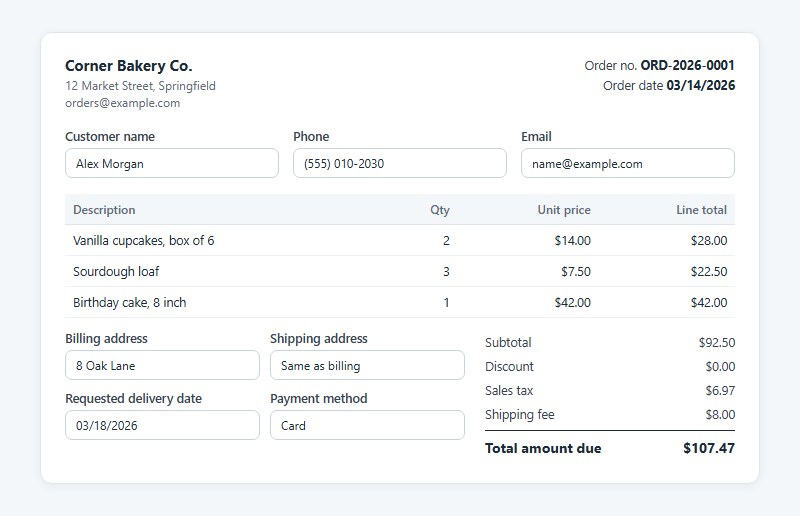
The skeleton is nearly identical in every version. Who is buying, what they want, what it costs, where it ships.
- Seller name and address, plus the customer’s name, phone and email
- An order number and order date
- Line items, each with a description, quantity, unit price and line total
- Subtotal, discount, sales tax, shipping fee, total amount due and payment method
- Billing address, shipping address and the requested delivery date
Optional fields earn a place only when they change how you fulfill the order.
- SKU, if you track stock
- Special instructions on custom and food orders
- A delivery date for anything perishable or timed
A second phone number or a company name rarely changes anything. I’d cut them every time.
Each field should get the input type that fits it. Sizes belong in a dropdown and add-ons in checkboxes, while quantity can just be a number box. A rundown of common form fields helps when you build the online version.
Length matters more than most people expect. Baymard Institute’s 2024 checkout benchmark found an average of 11.3 form fields per checkout, and its testing shows field count hurts usability more than the number of steps.
That research covers ecommerce checkouts, but an online order form asks customers for the same details. Fewer fields is the simplest way to lower form abandonment, and the same holds for checkout optimization in general.
Which Type of Order Form Template Fits Your Business?
The type follows from what you sell and how you price it. Fixed-price goods get a product form. Service work, bulk buying and made-to-order items each need their own variation, covered below.
Product and Digital Goods
Product forms are the default template, and most of the others start from one. They add a line-item table with SKU, quantity and unit price, plus a shipping address.
Physical goods need that address and a shipping fee. Digital downloads drop both and send a delivery email instead.
Involve.me’s digital goods template triggers an automatic delivery confirmation after submission, which a printed form cannot do.
Service
Service orders sell time and scope, not units.
Spell out what the work includes and what it leaves out. Ask for preferred dates and a time window too. Some service forms carry an upfront payment line as well, which Tally points out.
Price per hour or per project here, never per unit.
Wholesale and Bulk
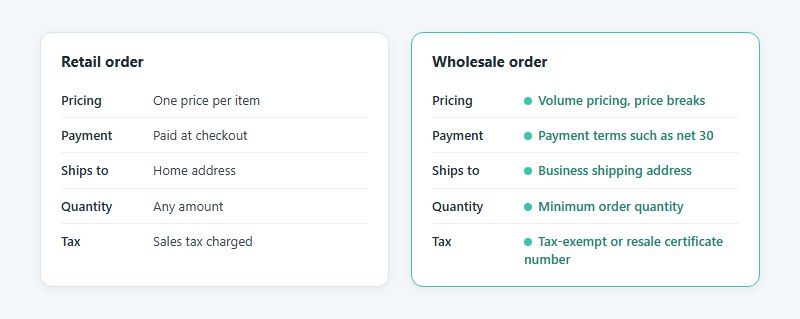
Wholesale buyers order in volume, often on account, and expect price breaks.
A retail order has one price per item and gets paid at checkout. It ships to a home address. A wholesale order adds a minimum order quantity, volume pricing, a tax-exempt or resale certificate number, payment terms such as net 30 and a business shipping address.
SafetyCulture lists its purchase order form template as the fit for wholesalers and bulk orders.
Custom
Custom orders have no fixed price. The form collects a specification, and the seller replies with a quote.
- Dimensions
- Materials
- Reference images
- Deadline
- Budget range
Add a deposit line and a revision limit before work starts. A signed specification settles later arguments about what was ordered.
Catering, Bakery, T-Shirt and Fundraiser
Food and merchandise forms add fields tied to a date, a size or a headcount. Food sellers can start from a set of food order form templates, but the extra fields below carry across all four.
| Business | Extra fields | Why they matter |
|---|---|---|
| Catering | Headcount, event date, dietary notes | Sets quantities and prep time |
| Bakery | Pickup date, flavor, size, inscription | Each order is produced to spec |
| T-shirt | Size grid, print color, artwork upload | One order, many size lines |
| Fundraiser | Buyer name per row, deadline, pickup point | Many small orders on one sheet |
For bakery and T-shirt orders, the cake order form templates and T-shirt order form templates in the IvyForms library are a ready starting point for an online version.
Order Form Templates
Premium Single Product Order Form
See the Pen
Premium Single Product Order Form by Bogdan Sandu (@bogdansandu)
on CodePen.
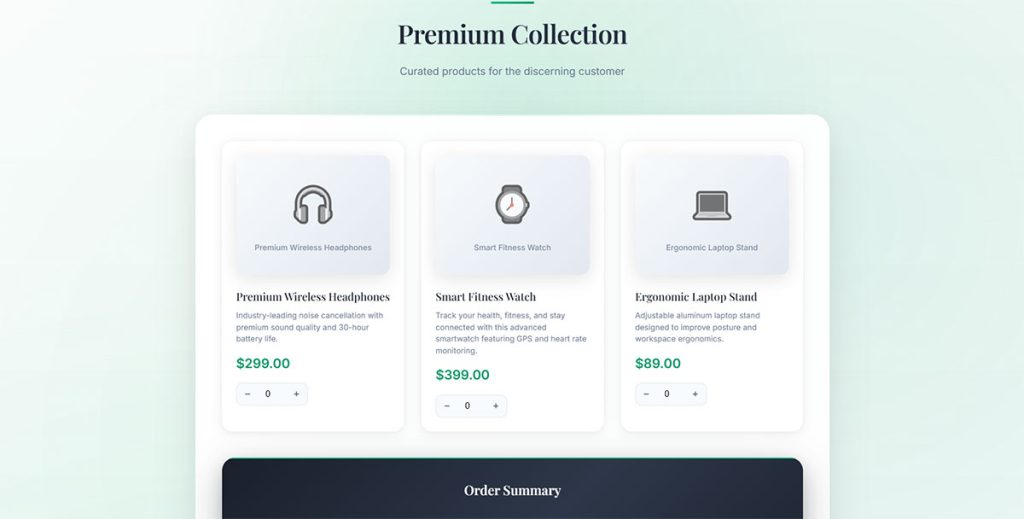
Premium E-commerce Order Form
See the Pen
Premium E-commerce Order Form by Bogdan Sandu (@bogdansandu)
on CodePen.
Aurora Headphones Pre-Order Form
See the Pen
Aurora Headphones Pre-Order Form by Bogdan Sandu (@bogdansandu)
on CodePen.
Wholesale Order Form UI
See the Pen
Wholesale Order Form UI by Bogdan Sandu (@bogdansandu)
on CodePen.
Modern Product Order Form
See the Pen
Modern Product Order Form by Bogdan Sandu (@bogdansandu)
on CodePen.
Modern Service Request Form
See the Pen
Modern Service Request Form by Bogdan Sandu (@bogdansandu)
on CodePen.
Premium Consultation Booking Form
See the Pen
Premium Consultation Booking Form by Bogdan Sandu (@bogdansandu)
on CodePen.
Premium Freelance Service Order Form
See the Pen
Premium Freelance Service Order Form by Bogdan Sandu (@bogdansandu)
on CodePen.
Premium Custom Artwork Order Form
See the Pen
Premium Custom Artwork Order Form by Bogdan Sandu (@bogdansandu)
on CodePen.
SaaS Trial to Paid Upgrade Form
See the Pen
SaaS Trial to Paid Upgrade Form by Bogdan Sandu (@bogdansandu)
on CodePen.
Word, Excel, Google Docs or PDF: Which Template Format Works Best?
A spreadsheet is the pick whenever the form has to calculate. A PDF suits forms that stay fixed and get signed. Word and Google Docs are what’s left, and they only make sense when layout freedom matters more than math. It mostly comes down to who fills the form in and who does the arithmetic.
| Format | Calculates totals | Best for | Main failure mode |
|---|---|---|---|
| Word | Manual | Printed forms, layout control | Hand-typed totals contain errors |
| Excel | Yes, formulas | Orders you fill in and send | Customers overwrite formulas unless cells are locked |
| Google Docs | No | Shareable, text-first forms | Hand-typed totals contain errors |
| Google Sheets | Yes, formulas | Shared order sheets | Anyone with edit access can change prices |
| Fillable PDF | Yes, with calculation fields | Signed, fixed-layout orders | Layout changes need an editor such as Acrobat |
My rule is simple. Calculate in a spreadsheet, present in a PDF.
Build and test the formulas in Excel or Google Sheets, then export the finished layout when the customer only needs to read, sign and return it.
A PDF can also stand alone when the math is simple. Adobe’s Acrobat Prepare Form tool adds calculations, data validation and e-signature fields to a fillable PDF.
How Do You Calculate Subtotal, Tax and Total in an Order Form?
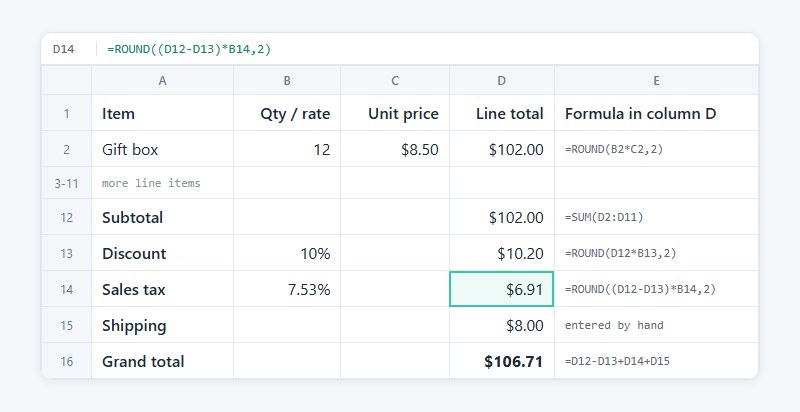
Each line is quantity times unit price. Add the lines for the subtotal, take off any discount, then add sales tax and shipping. What’s left is the grand total.
Here’s how that looks in a spreadsheet, with items in rows 2 to 11 and line totals in column D.
- Each line total is
=ROUND(B2*C2,2) - The subtotal goes in D12 as
=SUM(D2:D11) - Discount in D13 is
=ROUND(D12*B13,2), with the discount rate sitting in B13 - Sales tax in D14 is
=ROUND((D12-D13)*B14,2), and the tax rate lives in B14 - Put shipping in D15, and the grand total in D16 is
=D12-D13+D14+D15
Microsoft’s documentation defines ROUND(number, num_digits), and wrapping each money formula in it keeps cents consistent. The same formulas run in Google Sheets.
Take 12 items at $8.50. The subtotal is $102.00, and a 10% discount removes $10.20.
Tax at 7.53% (the Tax Foundation’s population-weighted average combined rate as of January 1, 2026) on the remaining $91.80 is $6.91. Add $8.00 shipping and the total is $106.71.
Tax is where this setup breaks first. One rate rarely fits every customer, and Vertex counted 681 sales tax rate changes and new rates across US jurisdictions in 2025. Some states tax shipping and some do not, so check yours before adding a shipping line to the taxable base.
Rounding is the smaller trap. Rounding each line and rounding only the total can differ by a few cents, so pick one method and keep it.
What Terms Belong on an Order Form?
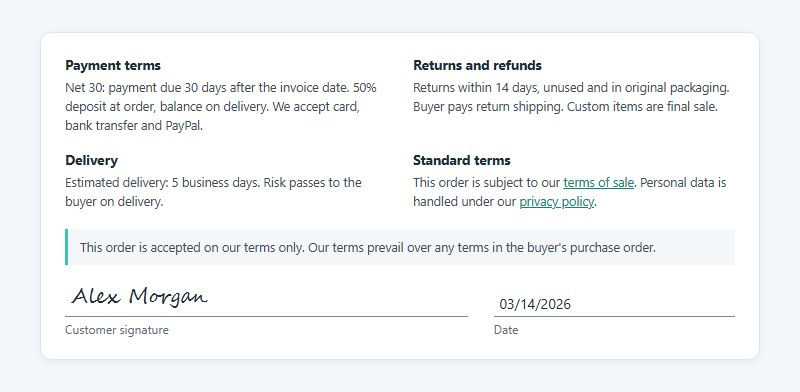
Payment, returns and refunds, delivery, a signature line and a pointer to your standard terms all belong on the form. None of this is legal advice, just general information, and the rules differ by state and country.
Payment Terms
Atradius’ 2025 Payment Practices Barometer for the Netherlands found that late payments affect 35% of B2B invoices.
Terms that spell out the details get paid sooner than vague ones.
- “Net 30” means payment is due 30 days after the invoice date
- State the deposit percentage due at order, and when the balance follows
- List accepted methods, such as card, bank transfer and PayPal
- Late fees need care. In the UK, Sprintlaw notes interest and admin fees must comply with late payment law and reasonableness tests
Return, Refund and Delivery Terms
Returns need a stated window and a stated payer.
- The return time limit
- What condition the item must be in
- Who pays return shipping
- An estimated delivery date, and who carries the risk in transit
- Whether custom items are final sale
The NRF and Happy Returns 2025 report projected that 19.3% of online sales would be returned in 2025. A buyer who sees the policy before paying has fewer reasons to dispute it.
Signature Line and Legal Weight
Under UCC 2-201, a contract for the sale of goods priced at $500 or more is not enforceable without a writing signed by the party against whom enforcement is sought. For a seller, that party is usually the customer.
One dated change worth knowing: New York’s text of the section has replaced “writing” with “record” since June 3, 2026, and keeps the $500 threshold (NY Senate).
A signed writing isn’t the only route, though. Merchant confirmations count, as do specially manufactured goods and admissions in court. So does any situation where the goods were paid for or received and accepted.
UCC Article 2 covers goods, so service orders follow other state rules. Add a signature line and date to every order form anyway.
Standard Terms and Which Ones Prevail
Link or attach your terms of sale and state that they apply to the order. Sprintlaw also advises saying your terms prevail if the buyer arrives with its own.
The conflict is real when a business customer sends a purchase order. Between merchants, UCC 2-207 lets added terms into the contract unless the offer limits acceptance to its own terms or the other side objects in time. Terms that materially alter the deal are out as well.
So add a line stating that the order is accepted on your terms only. If customers are in the EU or UK, the form also collects personal data, so link a privacy policy and build the form to be GDPR compliant.
How to Customize an Order Form Template
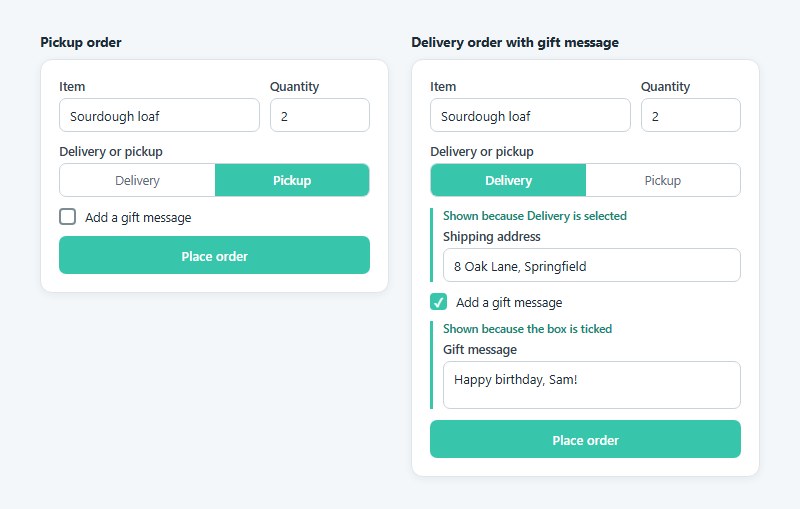
Branding, field order, which fields are required and which ones only show up when needed are the decisions that matter. Make them roughly in that order, then test before a customer ever sees the form.
- Start from the closest type and delete every field the order does not need.
- Put your logo, business name, address and a reply-to email in the header.
- Reorder the fields so items and quantities come first, then contact details, delivery and payment.
- Require items, quantity, contact and delivery details. Leave the rest optional.
- Add conditional fields. A shipping address should show only for delivery orders, and a gift message only when the box is ticked.
- Protect the math. Lock formula cells in a spreadsheet, or set a minimum quantity rule in a builder.
- Submit a test order and check the totals, the confirmation email and the printed page.
Fields that appear only when an earlier answer calls for them keep a long form short. That behavior is conditional logic, and Zoho Forms’ Field Rules, for example, can show, hide or require a field based on a previous response.
Deep rule chains are where this goes wrong. Zoho’s own guidance says to limit nesting, because complex rules confuse customers and the people who maintain the form.
Group related fields into labeled blocks and keep the page to one column. These form layout best practices apply to the printed version as much as the online one.
When Does an Online Order Form Builder Beat a Document Template?
When orders arrive while you are not there to answer them. A builder adds live totals and takes payment at submission, and it sends the confirmation email too, which a document template can’t do on its own.
If you take a few orders a week by email, the template is enough.
Document Template or Online Builder
A document template costs no account and no monthly fee. It prints, works offline and leaves you in full control of layout and wording. The downside is retyping, since order data gets copied into your books by hand, and nobody can pay at the moment of ordering.
Builders flip most of that.
- Calculation fields show customers a running total
- Payment gateways collect the money at submission
- Confirmation emails go out automatically (Zoho Forms adds SMS)
- Every submission lands in one table
On WordPress, IvyForms handles the first two with a Total field fed by Product and Quantity fields, plus Stripe and PayPal payments that create the entry only after a successful charge.
The costs are real, though. Free plans cap volume and add the vendor’s branding, it’s one more account to maintain, and rules and calculations need testing before launch.
Collecting Payment With Stripe
Several builders hand the card payment to a processor, and Stripe is one of the common choices. It charges 2.9% + 30 cents per successful domestic card transaction, so a $100 order costs $3.20 to collect (Stripe pricing page, October 2026).
Payment Links are no-code links to sell without a website, included with standard Payments pricing. There’s also an optional post-payment invoice at 0.4% of the transaction total, capped at $2.00 per invoice.
Build the processor fee into your prices. On small orders, the 30 cents is the part that hurts.
Which Builder Fits
Pick by volume first, then by what the form must calculate.
| Builder | Strength | Limit to check |
|---|---|---|
| Google Forms | Free intake that feeds Google Sheets | No native payment field or live total |
| Jotform | Templates and payment integrations | Free Starter plan: 5 forms, 100 submissions and 10 payment submissions a month |
| Cognito Forms | Calculations and payments on the free plan | Free plan: 100 entries a month, Cognito branding |
| Zoho Forms | Calculation fields, payment gateways, conditional rules | Deeply nested rules get hard to maintain |
Some builders show one question at a time, a format called conversational forms. It suits an order of one or two items, but a 12-line wholesale order reads better on a single page, a trade-off covered in this look at multi-step vs single-step forms.
Google Forms handles intake well, yet sellers who need payment at submission end up comparing Google Forms alternatives.
Order Form vs Purchase Order vs Invoice vs Quote: Which Document Do You Need?
A quote offers a price. An order form or purchase order commits someone to buying, and an invoice is what asks for the money. Each one answers a different question at a different point in the sale.
| Document | Issued by | When | Function |
|---|---|---|---|
| Quote | Seller | Before the order | Offers a price |
| Order form | Seller supplies it, customer completes it | At the order | Records what the customer is buying |
| Purchase order | Buyer | At the order | Authorizes the purchase |
| Invoice | Seller | After fulfillment | Requests payment |
| Work order | Internal team | After the order | Assigns a repair or service task |
Tipalti’s procurement guide states the split directly. The buyer issues a purchase order, and the vendor issues the invoice after fulfilling it. The invoice then carries the original purchase order number.
An order form and a purchase order do the same job, really. The only difference is who drafts the document.
Billdu draws the same line, with a purchase order requesting goods and an invoice requesting payment. A purchase order alone is not a payment request, which is why the invoice still has to follow.
On the bookkeeping side, Intuit’s QuickBooks Online help describes sales orders on the Plus and Advanced plans that convert into invoices, and one sales order can link to multiple invoices. An accepted estimate, QuickBooks’ word for a quote, converts the same way.
Sources disagree here. Method’s help center, last updated over a year ago, says QuickBooks Online does not support sales orders, while Intuit’s own documentation says it does. Check your plan before building a workflow on either claim.
When an Order Form Template Stops Working
A template stops working once volume, stock or tax outgrows what a person can check by hand.
A form cannot see inventory, so two customers can order the last unit. Shopify decrements the inventory of a tracked variant when an order includes it (Shopify developer documentation), and WooCommerce’s stock functions reduce stock for the items in an order once payment completes (WooCommerce code documentation).
Tax is the other wall. A single hand-typed rate stops covering your customers once they live in more than one place. Stripe Tax Basic costs 0.5% per transaction on no-code integrations where you are registered to collect tax (Stripe pricing page, October 2026), which is worth weighing against the time spent auditing a hand-typed rate.
Volume shows up as free-plan caps in builders and as overwritten rows in a shared sheet with several editors. Bookkeeping shows up as typos, because every order copied into QuickBooks by hand is a chance for one.
Do not upgrade early. A handful of orders a week does not justify a store platform, and a shared Google Sheet with one form link covers it. A form plugin with a Google Sheets integration can fill that sheet without copy and paste. The first oversold item or wrong tax rate is the signal to move.
Order Form Templates FAQ
Do I need a SKU on an order form?
Only if you track stock. A SKU is a unique code that identifies a product and attributes such as size, color and price, so it matters when several variants share one name.
Skip it on service and custom orders.
Is an order confirmation the same as an order form?
No. The order form records the customer’s request, while the order confirmation is the seller’s reply stating that the order was accepted, with the final items, total amount due and delivery date.
Builders such as Zoho Forms can send that reply automatically by email or SMS after submission. On WordPress, the form’s notification settings can send it to the email address the customer entered.
How should I number order forms?
Number them sequentially and never reuse a number. Tipalti notes that purchase orders are sequentially numbered and that the invoice later carries the same number, so one sequence lets you trace an order from request to payment.
A prefix and year (ORD-2026-0001) keeps the list readable.
How do I make a PDF order form fillable?
Open the file in Adobe Acrobat, choose Tools, then Prepare Form. Acrobat auto-detects likely fields, and you can add or delete text boxes, checkboxes and signature fields before selecting Preview and saving.
Test the finished file by filling it in once yourself.
What is the difference between a fillable PDF and an editable PDF?
A fillable PDF has interactive fields such as text boxes and checkboxes, while an editable PDF allows free changes to text and layout, according to Adobe.
Customers need the fillable version to complete the form, while changing the design takes the editable one.
Can I use free order form templates for my business?
Yes in most cases, but read the license on each download page first, because terms differ by provider.
Free builder plans also add the vendor’s logo to your form, as Jotform’s Starter plan and Cognito Forms’ free plan both do.
Turning a Completed Order Form Into an Invoice
Enter each completed order once, at acceptance, and let the accounting software generate the invoice from that record. Retyping adds a second chance for error on every sale.
The cheapest path starts with numbering every order sequentially, which costs nothing. Next comes converting accepted orders into invoices, and that needs a plan that supports it. A builder comes last, once errors start showing up, and it brings fees with it.
Cognito Forms’ free plan marks the ceiling. 100 entries a month at $100 each is $10,000 in sales and $320 in Stripe card fees.
The trade-off is plain. A builder ends retyping but adds a volume cap and a processor fee, so show the order number in a form submission confirmation message to keep the customer and the invoice on one reference.