





Black Friday 2026 is on Friday, November 27, with Cyber Monday following on November 30. For WordPress site owners it’s the one week a year when the plugins and services…
Table of contents
Plenty of small food businesses take orders through a form somebody downloaded once and never looked at again. A Word file at the counter, or a Google Form linked from the menu page. Both work fine until a customer wants to pay online or the kitchen can’t read an order.
A food order form template is a ready-made form that collects customer details, menu items, quantities, pickup or delivery timing and payment in one submission. Restaurants, caterers, bakeries and school lunch programs use them as printable Word and PDF files, as Excel sheets, or as online forms in Google Forms, Jotform and similar tools.
The format sets the limits more than anything else. A form that hands card entry to a hosted page, such as Stripe Checkout, qualifies for the lightest PCI self-assessment (SAQ A), according to Stripe’s integration security guide, while a paper or spreadsheet form takes no payment at all.
Which fields should a food order form include?
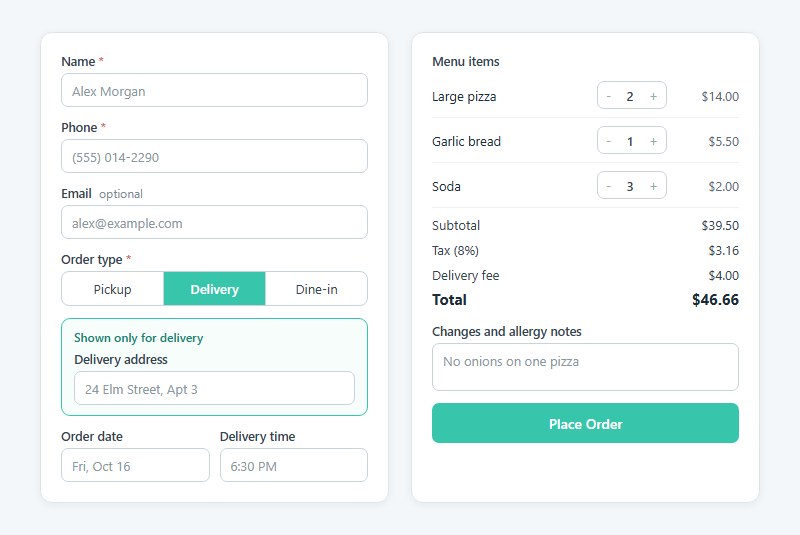
Start with who is ordering and how they’re getting the food. Name, phone number and email cover the first part. A pickup, delivery or dine-in choice covers the second, and the delivery address should only appear when someone picks delivery, otherwise pickup customers are staring at a field that has nothing to do with them. One conditional logic rule on the order type field handles that.
After that come the items, with quantity, unit price and a running total, then the order date and a pickup or delivery time. A free-text box for changes and allergy notes goes at the end. General order form templates outside food follow the same base.
Extras are fine, but a missing field costs you a phone call.
The WPForms food order template runs in roughly this order. Contact details, then the date, order type and carry-out time, then the priced menu, and finally the delivery address and card payment.
Make phone the required contact, not email. Kitchens call when an item runs out, and nobody checks an inbox at 5 pm on a Friday.
Each of your form fields should map to a decision someone in the kitchen makes. If staff never use the answer, cut the field.
Add an auto-generated order number as well. Pair it with a confirmation message that repeats the order back, because pickup disputes are easier to settle when the customer holds a record.
Examples Of Food Order Form Templates
Simple food order form (basic menu items + checkout)
See the Pen
Modern Food Order Form by Bogdan Sandu (@bogdansandu)
on CodePen.
Takeout/delivery form (with address & delivery time fields)
See the Pen
Takeout & Delivery Website Form by Bogdan Sandu (@bogdansandu)
on CodePen.
Dine-in pre-order form (for reservations + meal selection)
See the Pen
Dine-in pre-order form by Bogdan Sandu (@bogdansandu)
on CodePen.
Daily specials order form (highlighting limited-time meals)
See the Pen
Daily Specials Order Form – Interactive Restaurant Menu by Bogdan Sandu (@bogdansandu)
on CodePen.
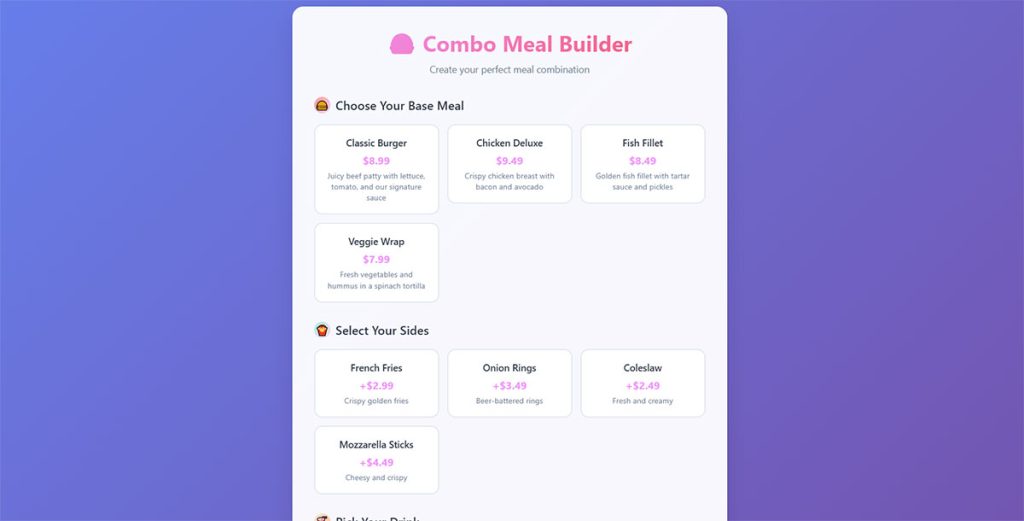
Combo meal form (choose base meal + sides + drink)
See the Pen
Interactive Combo Meal Builder (Food Ordering Form) by Bogdan Sandu (@bogdansandu)
on CodePen.
Pizza order form (size, crust, toppings, extras)
See the Pen
Interactive Pizza Order Form by Bogdan Sandu (@bogdansandu)
on CodePen.
Burger order form (patty type, cheese, toppings, sauces)
See the Pen
🍔 Interactive Burger Builder – Order Form by Bogdan Sandu (@bogdansandu)
on CodePen.
Sushi order form (rolls, platters, custom selection)
See the Pen
Sakura Sushi Order Form – Interactive Restaurant Interface by Bogdan Sandu (@bogdansandu)
on CodePen.
Coffee & drink order form (hot/cold, flavors, size)
See the Pen
Premium Coffee Order Form by Bogdan Sandu (@bogdansandu)
on CodePen.
Wedding cake order form (flavors, tiers, customization)
See the Pen
Wedding Cake Order Form – Premium Bakery Design by Bogdan Sandu (@bogdansandu)
on CodePen.
Meal kit subscription order form (weekly/biweekly plans)
See the Pen
Premium Meal Kit Subscription Form by Bogdan Sandu (@bogdansandu)
on CodePen.
Multi-step form (menu selection → customization → checkout)
See the Pen
Premium Multi-Step Food Order Form by Bogdan Sandu (@bogdansandu)
on CodePen.
Word, Excel, PDF or Google Forms: which template format fits?
Paper counters do fine with Word or PDF. Excel suits owners who like formulas, Google Forms works if you want free online collection, and anyone who needs payment at checkout will end up in a form builder.
| Format | Totals | Payment | Good for |
|---|---|---|---|
| Word | Usually manual | No | Printed counter or event orders |
| Excel | Formulas | No | Tracking orders in a spreadsheet |
| Usually manual | No | Emailed or printed forms | |
| Google Forms | No | No (add-on needed) | Free online order collection |
| Form builder | Yes | Yes | Online orders with card payment |
Google Forms does more than most people expect. Google’s help center lists file upload questions and routing to a section based on a respondent’s answer, which is enough for a pickup or delivery branch.
It stops at money. Jotform’s bakery order guide notes that Google Forms neither calculates totals nor collects payment, and that it happily accepts orders for items you have sold out.
That gap is why owners start looking at Google Forms alternatives once order volume climbs.
A home baker with a handful of orders a week can live with Google Forms and a calculator. Past that, adding totals by hand is where mistakes start.
Which online form builders have food order templates?
Jotform, WPForms, Ninja Forms, AidaForm, Woorise and Stackby all publish a food order template. They differ mostly in where the form lives and what it calculates.
Jotform
Jotform lists separate templates for restaurant, pizza, bakery, custom bakery, catering request and a Stripe online food order form.
The free plan includes payment processors and a PDF generator, plus conditional logic, per Jotform. Calculated totals and PDF receipts are available, and coupon codes work too.
The downside is size. With 20,000+ templates in the library, finding the right food variant takes some digging, and your payment gateway still charges its own processing fee.
WPForms
The template collects contact details, order type and carry-out time, lists menu items with prices, and updates the total as customers click items. Credit card payment is on by default, and other options come through the builder.
It needs a WordPress site, though, and the sample menu items and prices are placeholders you replace.
Ninja Forms
Ninja Forms has a free food order template for WordPress. The total is calculated automatically and confirmed before submit, and an optional PDF Form Submission add-on prints a ticket for kitchen staff.
Ninja Forms itself points caterers with per-guest pricing to a dedicated catering form.
If you are weighing the two WordPress plugins directly, a side-by-side look at WPForms and Ninja Forms covers the differences in more depth.
AidaForm
AidaForm shows the total price and tax while the customer orders, and you can attach dish photos through image fields. The tax amount and currency sit in a hidden formula field.
That single field is also the limit. Expect extra formula work if your menu mixes taxed and untaxed items.
Woorise and Stackby
Woorise has conditional logic and links to payment gateways, PayPal and Stripe among them.
Stackby works differently. It’s a table-based tracker with orders, menu items and payments in separate tables, so it sits closer to a back office than a customer-facing form.
Pick by platform first and features second. WordPress sites get WPForms or Ninja Forms, everything else gets Jotform or AidaForm.
How to calculate the order total on a food order form
The total is every quantity times its unit price, plus sales tax and any delivery fee, minus whatever deposit was already paid.
- Multiply quantity by unit price for each line.
- Add the line totals to get the subtotal.
- Multiply the subtotal by your sales tax rate and round to cents.
- Add the delivery fee when the order type is delivery.
- Subtract any deposit to get the balance due.
A worked example at an 8% tax rate (swap in your local rate):
| Item | Qty | Unit price | Line total |
|---|---|---|---|
| Large pizza | 2 | $14.00 | $28.00 |
| Garlic bread | 1 | $5.50 | $5.50 |
| Soda | 3 | $2.00 | $6.00 |
That makes a subtotal of $39.50, tax of $3.16 at 8%, and a $4.00 delivery fee, so the total comes to $46.66.
In Excel, a line total is =B2*C2 and the subtotal is =SUM(D2:D4). One =SUMPRODUCT(B2:B4,C2:C4) cell gives the same subtotal without the helper column.
Microsoft’s documentation says SUMPRODUCT multiplies corresponding arrays and adds the results, and that it returns a #VALUE! error when the arrays differ in size. A quantity range that stops one row short of the price range triggers it.
Check whether your state taxes delivery fees before you put one inside the taxable base.
Builders do all of this live. AidaForm displays total and tax as the customer orders, and Ninja Forms calculates the total automatically. Jotform supports calculated values and coupon codes too. In Google Forms the customer types their own total and you verify it. In a WordPress form plugin, Product, Quantity and Total fields do the same multiplication as the customer picks items.
How to add allergen and dietary fields
Make the allergen checklist required and cover the nine major allergens, then add a free-text allergy note and a dietary preference question. Whatever people answer should land on the kitchen ticket.
According to Michigan State University Extension, the nine are milk, eggs, fish, crustacean shellfish, tree nuts, peanuts, wheat, soybeans and sesame. FALCPA designated the original eight in 2004, and sesame became the ninth under the FASTER Act, effective January 1, 2023.
Restaurants are where this matters. The FARE Patient Registry study (2021) found that 31% of adults’ food allergy reactions happen in restaurants, against 13% for children.
Does the FASTER Act apply to an order form?
No statute turns an allergen field on an order form into a requirement. The FASTER Act amends federal food law so sesame carries the same labeling and allergen-control duties as the other eight allergens, and those duties fall on food makers.
The field is a safeguard you add, not a legal box to tick. Some states and cities set their own restaurant allergy rules, so check local requirements.
The FARE registry study excluded reactions from takeout and delivery food, so none of its figures speak directly to pickup orders.
Building the allergen field
- One checkbox for each allergen
- A “none” option, so a blank never reads as “no allergy”
- Dietary choices such as vegetarian, vegan and gluten-free
- A free-text note for anything the list misses
Add conditional logic so the note opens only when someone ticks an allergen. Google Forms can approximate this by sending respondents to a different section based on their answer.
A checkbox records a request. It does not make a kitchen allergen-safe, so print the answer at the top of the ticket and confirm it again at pickup.
Which fields change for catering, bakery, custom cake, school lunch and fundraiser orders?
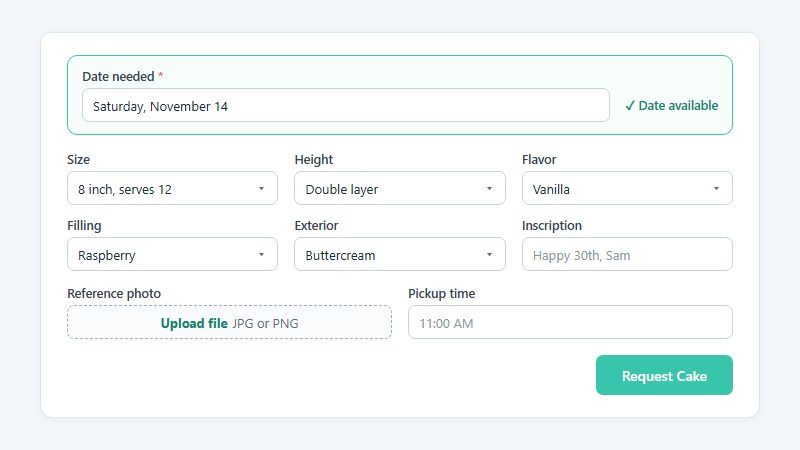
Each business type piles its own fields onto the base order.
- Catering needs the event date and time and a guest count, plus either a delivery address or a pickup window, and per-guest pricing.
- Bakery and custom cake orders ask for size, flavor, filling, inscription, a reference photo and the date needed.
- School lunch forms want a student name, grade, teacher or room, and one menu choice per service day.
- A fundraiser form tracks the seller or class, item counts, the order deadline and the collection date.
- Food trucks mostly need a pickup window and location.
Capital Prep’s weekly lunch form on Jotform gives each student a separate block with name, grade and a choice for every day, including a “No lunch” option. It closes with an order total and a Friday 3 PM deadline.
That repeating student block matters. A parent with three kids at one school should not retype contact details three times.
Arden Occasion Cakery’s custom cake form asks for flavor, filling, size and height, and exterior, then accepts an uploaded reference file and a date. Put the date question first on any cake or catering form, because a booked date makes the rest of the answers pointless. A custom cake order form template is a quick place to start, and its questions can be reordered to put the date first.
Lord Selkirk School in Winnipeg runs pizza lunches as a fundraiser, so one order deadline and a short fixed price list carry the whole form. The list is two pizza slices, a drink and a treat. No tiers, no delivery logic.
How to take payment on a food order form without exposing card data
Connect a processor your form builder supports and let its hosted page handle card entry, so card numbers never touch your own server.
| Processor | US online card fee | Worth knowing |
|---|---|---|
| Stripe | 2.9% + $0.30 | Checkout and Elements keep you at the lightest PCI tier |
| PayPal Checkout | 3.49% + $0.49 | Standard card payments list at 2.99% + $0.49 |
| Square Online (free plan) | 3.3% + $0.30 | Works only with Square processing |
Rates come from Stripe’s pricing page, PayPal’s merchant fee page (last updated October 1, 2026) and FitSmallBusiness for Square. Check each before committing, since processors revise them.
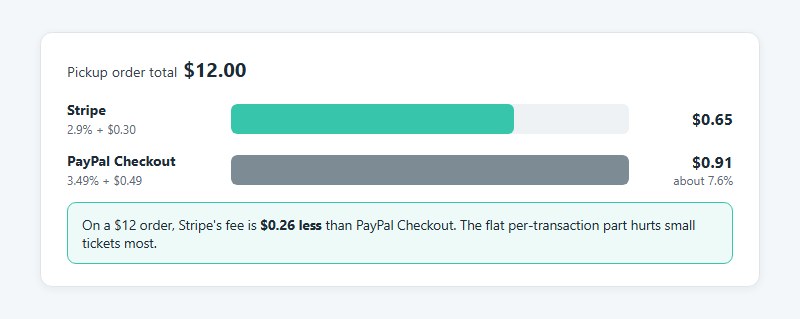
PayPal’s flat 49 cents hurts small tickets. On a $12 pickup order the fee works out to about $0.91, roughly 7.6% of the sale.
Builders also disagree with themselves on gateway counts. Jotform’s payment gateway page says 30+, while its payment FAQ says more than 40, so count the gateways you actually need (Stripe, PayPal, Square) instead of trusting either figure.
WordPress owners who would rather skip plugins can follow a guide to building a WordPress payment form without one.
Hosted payment pages and PCI scope
The PCI Security Standards Council’s SAQ A, the shortest self-assessment, covers card-not-present merchants whose cardholder data processing is fully outsourced to validated providers. Every element of the payment page must come directly from that provider.
Stripe’s integration security guide ties each setup to a PCI level. Checkout or Elements gets SAQ A, since the card inputs sit in an iframe served from Stripe’s domain. Stripe.js v2 on your own form lands at SAQ A-EP, and a direct API integration means SAQ D, the most demanding.
Jotform’s documentation shows the hosted pattern in practice. With Stripe Checkout, Apple Pay and Google Pay appear on Stripe’s payment page, not on the form itself. A WordPress form with a Stripe integration follows the same idea, since the card inputs come from Stripe and card data goes to Stripe, not to your site. The order entry is created only after the payment succeeds.
Jotform’s help center also warns that a personal PayPal account does not allow card details on your form, so use a business account.
The form itself still needs hardening on the site side, which WordPress form security practices cover.
Routing paid orders to the kitchen
- Google Forms responses can feed a Google Sheet, and Zapier can create an Airtable record from each new response with fields mapped
- Jotform stores submissions in Jotform Tables and connects to Airtable and Google Drive
- Square Online pushes orders to Square POS and a kitchen printer or Kitchen Display System
- IvyForms can send each new entry to a Google Sheet, a webhook or Zapier
Which policies belong on the order form?
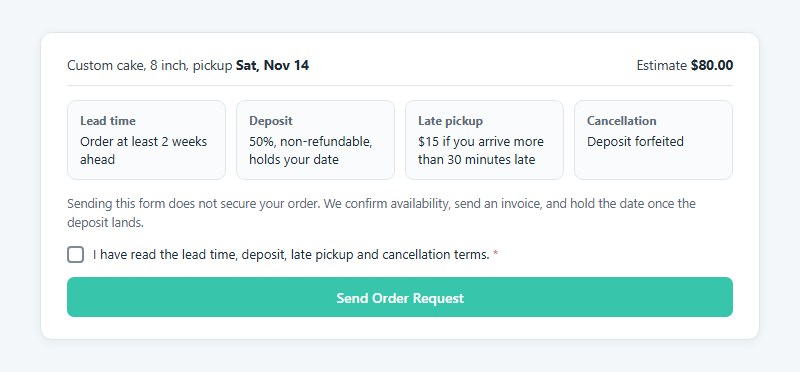
Put lead time, the deposit, late or rush charges and the cancellation window above the submit button, and tie submission to a checkbox confirming the customer read them.
| Term | Custom cakes | Catering |
|---|---|---|
| Lead time | 1 to 3 weeks | 24 to 72 hours |
| Deposit | 50%, non-refundable | 50% at booking |
| Late or rush charge | $15 to $150 | 10% to 15% rush fee |
| Cancellation | Deposit forfeited | 25% to 100% inside 24 to 48 hours |
The ranges come from published terms at Sweet Curiosity, Arden Occasion Cakery, Emory University catering, Carnegie Mellon dining catering, Toastique and Compass cafes. Terms vary by order size and design complexity, so treat them as ranges, not standards.
Divine Sweets and More states outright that filling out the form does not secure an order. The bakery confirms availability, sends an invoice, and holds the date only after the deposit lands. That request-then-confirm setup is worth copying.
Balance deadlines differ more than anything else. One cookie cake bakery collects two days before pickup, Sweet Curiosity seven days before, Arden Occasion Cakery two weeks before.
Minimums protect margin too. Carnegie Mellon sets a $50 minimum for deliveries, and Emory’s catering guide sets $250 for on-campus orders. A floor like that keeps the flat per-transaction processing fee from swallowing a small ticket.
A few terms get forgotten. Sweet Curiosity charges $15 for a pickup that runs 30 minutes late, and Sugar Rush Cottage locks major changes 48 hours after confirmation. The same bakery allows a move within 6 months with two weeks’ notice.
When does a food order form template stop working?
Usually it happens when orders outgrow manual handling or the kitchen needs tickets the form can’t produce. Platform rules can box you in too. Published sources set no order-volume threshold for switching, so the signals below are practical, not numeric.
Paper, Word and PDF forms
Totals, payment and order status all depend on a person.
- Someone adds up each order by hand
- Payment gets chased after the order instead of being collected with it
- Printed copies go missing between the counter and the kitchen
Excel and Google Forms
Both still need a person between the order and the kitchen to copy responses, check totals and collect money. Zapier can remove the copying step, but it cannot add a payment field to a form that lacks one.
Form builders and ordering platforms
Public forms attract junk. Fake and duplicate submissions show up quickly, and basic form spam prevention tactics such as honeypot fields and CAPTCHA keep them out of the kitchen queue.
A form builder is the better choice when orders are scheduled (cakes, catering, school lunches) and you want to pick your own processor and hosting. Staff also need to be comfortable reading a spreadsheet or Airtable view.
Square Online or Toast makes more sense when orders have to print in the kitchen the moment they arrive, or when you already run that vendor’s POS. You do have to accept being tied to its processing.
That last part is the catch. Tech.co notes Square Online works only with Square for processing, and Merchant Maverick lists Toast as Toast processing only.
Scheduled orders fit a form. A live counter fits a platform better.
Food Order Form Templates FAQ
Is a free food order form template safe to use for a business?
Yes. Builders such as Ninja Forms state that their food order template is free to download and use. For Word or PDF files from template sites, read the license on the download page before you add your logo and menu.
Can I make a fillable PDF order form?
Yes, Adobe Acrobat can turn a Word or PDF layout into a fillable PDF with text boxes and checkboxes. The file still takes no payment, and totals are usually manual, so it suits counter pickup better than online ordering.
Do food order forms work on a phone?
Online ones do. AidaForm, for example, describes its food order template as fully responsive on any device.
Word and PDF versions are awkward on a small screen, which is the main reason to move customers to a builder.
How do I cut down on wrong orders?
Make phone number, order type and pickup time required fields. Add an allergy “none” option, calculate totals automatically, and send a confirmation that repeats the full order back.
Most errors come from missing details, not from the menu.
Do I need a separate catering order form?
Only when pricing runs per guest or per event. Ninja Forms itself points caterers with per-guest pricing to a dedicated catering form and keeps the standard template for everyday orders.
How much does a food order form template cost?
The template is usually free. The real cost is payment processing on each paid order, plus a paid builder plan if you outgrow the free tier.
Where to Start With Food Order Form Templates
Write the allergen field and policy text before you pick a tool, and choose a setup where card entry goes to a hosted payment page. Both carry over unchanged to any later platform.
The order of work follows switching cost. Allergen and policy wording moves for free. A builder form with hosted card entry takes an afternoon to rebuild, and a POS or ordering platform rewrites the payment setup, so leave that for when kitchen tickets or retyping become the bottleneck.
Processor choice matters most on small tickets. On a $12 order, Stripe’s fee is about $0.65, which is $0.26 less than PayPal Checkout (rates as of October 2026).
Online payment does add a fee to every ticket, while pay-at-pickup costs nothing in fees but takes staff time at the counter.
Once the form is live, a guide on how to optimize forms covers the next round of changes.