




The best AI plugins for WordPress connect a site’s dashboard, page builder, or database to a machine learning model, turning a plugin that follows fixed rules into one that writes,…
Table of contents
Picking the wrong WordPress form plugin costs you more than money. It costs you time rebuilding, migrating data, and explaining to clients why their forms broke.
WPForms vs Ninja Forms is one of the most common comparisons in the WordPress contact form plugin space, and for good reason. Both are mature, well-supported drag and drop form builders with millions of combined installations. But they take very different approaches to pricing, free features, and developer flexibility.
This guide breaks down the real differences across the form builder interface, spam protection, premium add-ons, performance, pricing tiers, and use case fit. No filler. Just the details you need to pick the right plugin for your site.
WPForms and Ninja Forms at a Glance
Both WPForms and Ninja Forms are drag and drop form builder plugins built for WordPress. They let you create WordPress forms without writing code, but they target slightly different audiences and take different approaches to pricing, features, and overall philosophy.
WPForms sits on over 6 million active installations and carries a 4.8 out of 5 rating on WordPress.org. It’s built by Awesome Motive, the same company behind WPBeginner, and focuses hard on being beginner-friendly above all else.
Ninja Forms, developed by Saturday Drive, has around 600,000 active installations with a 4.4 rating. It’s been around longer (one of WordPress’s oldest form builders, actually) and leans more toward flexibility and developer customization.
The gap in user base is significant. But raw install numbers don’t tell the full story. Ninja Forms gives away more features in its free version than WPForms Lite does. That trade-off matters depending on where you’re starting.
| Feature | WPForms | Ninja Forms |
|---|---|---|
| Active installs | 6,000,000+ | 600,000+ |
| WordPress.org rating | 4.8 / 5 | 4.4 / 5 |
| Free version | WPForms Lite | Ninja Forms Core |
| Builder company | Awesome Motive | Saturday Drive |
| Best for | Beginners, small business | Developers, budget-conscious users |
Zuko Analytics data shows that 55% of people who visit a form page leave without completing it. So whichever plugin you pick, getting the builder right is only half the battle. The form itself has to be well-built, fast, and not annoying to fill out.
WordPress powers over 43% of all websites globally, according to W3Techs. Both of these plugins exist inside that ecosystem and both are mature enough to handle serious workloads. The question is which one fits your specific situation better.
Form Builder Interface Compared
The form editor is where you’ll spend most of your time. Both plugins use drag and drop, but the experience feels different between them.
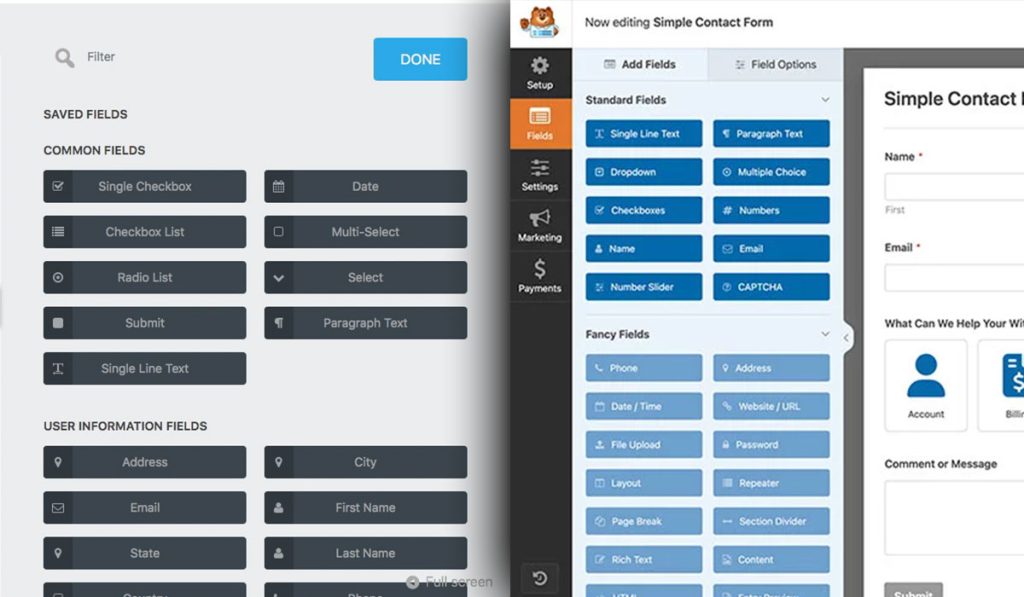
WPForms loads a full-screen builder with a live preview panel on the right and fields listed on the left. You drag a field over, drop it, and see your form update in real time. It’s clean. Even someone who has never touched a WordPress plugin before can build a working contact form in under five minutes.
Ninja Forms takes a slightly different approach. Its editor uses a modal-style interface that feels modern but takes a bit more clicking to get around. Fields are organized into categories, and you configure each field by clicking into it. The preview doesn’t render quite as “what you see is what you get” compared to WPForms, but it’s still intuitive.
Where WPForms pulls ahead: speed of setup and visual clarity. You see exactly what your visitors will see as you build.
Where Ninja Forms pulls ahead: more free field types out of the box. The core plugin includes 27+ field types at no cost, which is generous.
According to Feathery, the average form abandonment time sits at 1 minute and 43 seconds. That stat should shape how you think about your builder. The faster you can create a concise, well-structured form, the better your completion rates will be.
Template Library Differences
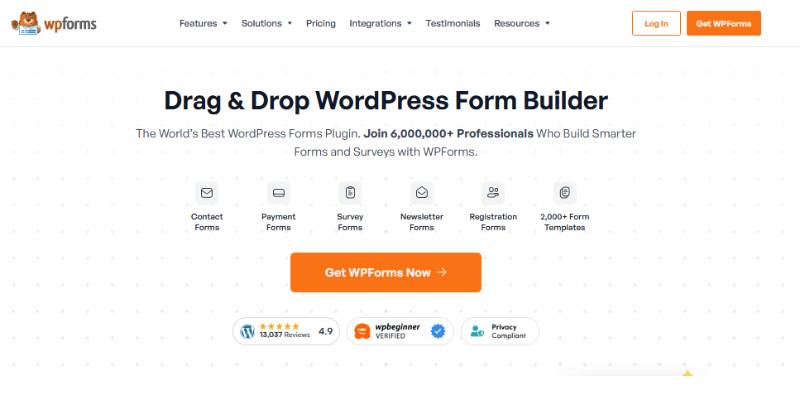
WPForms offers 2,100+ pre-built form templates across categories like business operations, marketing, education, event planning, and nonprofits. This is one of the largest template collections among any WordPress form builder plugin.
Ninja Forms keeps its template library smaller and more focused. The free version ships with a handful of starter templates (contact form, a blank form, and a few others). Premium templates are available through add-ons.
If you regularly build different types of forms for clients or projects, the template count matters more than you’d think. Starting from a pre-built contact form template and tweaking it saves real time versus building from scratch every time.
WPForms also allows you to create custom templates from existing forms and reuse them. Ninja Forms supports this workflow too, but the sheer volume of ready-made starting points in WPForms gives it an edge here.
Features in the Free Versions
This is where the comparison gets interesting. The free tier of each plugin tells you a lot about the company’s approach to its product.
WPForms Lite gives you the drag and drop builder, basic fields (name, email, text, paragraph, numbers, dropdown, checkboxes, multiple choice), Stripe payment processing (with a 3% fee), and spam protection via CAPTCHA. It does not store form entries in your WordPress database. That’s a big limitation. Your submissions come through email notifications only.
Ninja Forms Core stores all submissions locally in your WordPress database, for free. No paywall on that feature. You also get 27+ field types, unlimited forms and submissions, calculations, GDPR compliance options, Google reCAPTCHA, and Akismet integration.
Ninja Forms wins the free version comparison. That’s not a close call.
The Manifest reports that 29% of users abandon forms over security concerns, with form length being the second biggest reason at 27%. Both free versions include basic spam protection, but Ninja Forms bundles more form security features at no cost.
| Free Feature | WPForms Lite | Ninja Forms Core |
|---|---|---|
| Entry storage in WordPress | No | Yes |
| Field types | ~9 basic fields | 27+ fields |
| Conditional logic | No | No (add-on) |
| Spam protection | reCAPTCHA, Akismet | reCAPTCHA, Akismet, honeypot |
| File uploads | No | No (add-on) |
| Payment collection | Stripe (3% fee) | No (add-on) |
One thing I’ll point out: WPForms Lite’s lack of entry storage has frustrated a lot of users over the years. If your email notifications fail or get caught in spam filters, those submissions are gone. Ninja Forms stores everything locally on your server by default, which is the safer approach for anyone serious about collecting data through their website forms.
Try a cheaper & more innovative alternative to WPForms & Ninja Forms
WPForms keeps its best features on higher plans, and Ninja Forms’ pay-per-add-on model means the price creeps up as your forms get serious. IvyForms bundles the advanced features — conditional logic, multi-page and conversational forms, file uploads, payments, Google Sheets, REST API — into flat, affordable plans, so you’re not assembling (and paying for) a pile of add-ons.
IvyForms
WPForms
Ninja Forms
Starting paid price
€29/year (1 site)
~$49.50/year (Basic)
~$99.50/year (single site)
Pricing model
Flat plans — features included
Tiered — features by tier
Core + paid add-ons per feature
Free version
Yes — feature-rich Lite
Yes — limited Lite
Yes — free core
Lifetime license
€399 one-time
No
No
Data & dev
Entries in WordPress; REST API + webhooks
Entries in WordPress
Entries in WordPress; WP hooks
Stands out for
All-in pricing, modern builder, MCP for AI Agents, wpDataTables
Templates & polish
Flexible add-ons & developer hooks
Honest trade-off
Newer plugin with a smaller template library and community than the incumbents; Zapier, Slack and multiple payment gateways are on the near-term roadmap (unlocked when you buy now).
Best features gated to paid tiers
Add-on costs stack up; aging UI; notification quirks
Ninja Forms rewards tinkerers and WPForms rewards beginners. IvyForms aims at the big middle: everything most teams need in one flat plan, with data you own and a lifetime option — no add-on math, no tier-hopping.
Ready to switch? Get IvyForms Pro from €29/year — or €399 once for lifetime access to every current and future feature.
▶ See plans & pricing or download IvyForms free (no credit card).
Premium Features and Add-Ons
The paid versions are where both plugins really open up. But the architecture is different.
WPForms bundles features into tiered plans. You pick a plan, and everything included in that tier is available immediately. No hunting for individual add-ons or worrying about compatibility. The Pro plan ($199.50/year, first year) is where most users land because it includes payment gateways, conditional logic, multi-step forms, form abandonment tracking, geolocation, surveys, polls, and integrations with Zapier.
Ninja Forms takes an a la carte approach. The core plugin is free, and you buy individual add-ons as you need them. Add-ons range from $29 to $129 each. Or you can grab a membership bundle: Plus ($99/year), Pro ($199/year), or Elite ($499/year).
The a la carte model sounds appealing until you actually need three or four add-ons. Then the cost adds up fast and sometimes exceeds what a bundled WPForms plan would cost for the same features.
Conditional logic is available in WPForms starting at the Basic plan ($49.50/year). In Ninja Forms, you need to buy it as a premium add-on. This is a feature that most form builders use constantly, so locking it behind a separate purchase feels limiting.
ConversionXL research found that multi-step forms can increase conversions by up to 300% compared to long single-page forms. Both plugins support multi-step form creation in their premium tiers, which is good. But if you’re building multi-step form layouts regularly, WPForms makes it easier with dedicated templates for that use case.
Email Marketing and CRM Integrations
This is often the deciding factor for businesses that rely on using website forms for lead generation.
WPForms Plus and above connect natively to Mailchimp, Constant Contact, AWeber, GetResponse, ActiveCampaign, Drip, Campaign Monitor, Brevo, and more. CRM integrations like HubSpot and Salesforce come with the Elite plan.
Ninja Forms supports Mailchimp, Constant Contact, ActiveCampaign, HubSpot, Salesforce, Zoho CRM, Insightly, and others. The difference is that each integration is an individual add-on purchase unless you’re on a membership plan that bundles them.
Both plugins integrate with Zapier, which opens up connections to thousands of additional services. WPForms includes this in the Pro plan. Ninja Forms offers it as a separate add-on.
For building a lead generation form that feeds directly into your email platform, WPForms generally requires less configuration. The field mapping is straightforward, and the integration settings live right inside the form builder.
Pricing and Plan Structure
Pricing is where these two plugins differ the most, and honestly, where things get a bit confusing with Ninja Forms.
WPForms uses four tiers:
- Basic: $49.50/year (renews at $99). 1 site. Conditional logic, basic templates, spam protection, entry management.
- Plus: $99.50/year (renews at $199). 3 sites. Adds email marketing integrations and Slack.
- Pro: $199.50/year (renews at $399). 5 sites. Adds payment gateways, Zapier, surveys, form abandonment, conversational forms.
- Elite: $299.50/year (renews at $599). Unlimited sites. Adds Salesforce, HubSpot, multisite support, priority support.
Ninja Forms uses three tiers plus individual add-ons:
- Plus: $99/year. 3 sites. Includes core add-ons and a 20% discount on additional purchases.
- Pro: $199/year. Up to 20 sites. More integrations, 40% add-on discount.
- Elite: $499/year. Unlimited sites. All current and future add-ons, priority support.
Here’s what trips people up with Ninja Forms. The individual add-ons ($29-$129 each) look affordable one at a time. But if you need conditional logic, file uploads, a payment gateway, and an email marketing integration, you’re looking at $200+ in add-ons for a single site. At that point, a WPForms Pro license at $199.50 covers all of that and more.
| Comparison Point | WPForms Pro | Ninja Forms Pro |
|---|---|---|
| First-year price | $199.50 | $199 |
| Renewal price | $399 | $199 |
| Sites covered | 5 | 20 |
| Conditional logic | Included | Included |
| Payment gateways | Stripe, PayPal, Square | Stripe, PayPal (via add-ons in plan) |
The renewal price jump with WPForms is worth noting. Going from $199.50 to $399 in year two is a significant increase. Ninja Forms keeps its renewal pricing flat, which is better for long-term budgeting.
Ninja Forms also offers a 40% first-year discount on membership plans, bringing entry costs down further. But always check which add-ons are included in each tier before buying. The feature overlap between their Plus and Pro plans can be confusing.
Performance and Page Load Impact
This one matters more than most people realize. A slow form plugin can drag down your entire page speed, which affects both user experience and search rankings.
WPForms is built with performance in mind and loads minimal CSS and JavaScript on the frontend. The plugin only loads its assets on pages where a form is actually embedded. This conditional loading approach keeps your other pages clean.
Ninja Forms has historically been a bit heavier on frontend assets. Its modal-based builder and dynamic rendering approach means more JavaScript runs on the page. The gap has narrowed in recent versions, but WPForms generally tests faster in head-to-head page speed comparisons.
GreenGeeks testing found that WPForms shows a 34% higher conversion rate compared to other form plugins, partly due to its conditional logic and gamified multi-step features but also because lighter pages lead to less abandonment.
Database overhead: Ninja Forms stores entries in the free version, which means more database queries as submissions pile up. WPForms Lite avoids this (by not storing entries at all), but WPForms Pro will add similar overhead once entry management is active.
Both plugins work well with popular caching solutions like WP Rocket, W3 Total Cache, and LiteSpeed Cache. Neither one causes known conflicts with mainstream caching plugins or CDNs like Cloudflare.
For sites that prioritize form optimization, the real performance gains come from how you build the form itself. Reducing unnecessary fields, using smart conditional logic to hide irrelevant sections, and keeping form design minimal will do more for speed than switching plugins.
Baymard Institute research shows the average checkout form displays twice as many fields as needed. That applies to all form types, not just ecommerce. Fewer fields means less data to process, fewer DOM elements to render, and faster load times regardless of which plugin you use.
Spam Prevention Options
Form spam is relentless. Imperva’s Bad Bot Report found that bots account for 37% of all internet traffic, and form submission bots specifically increased 87% year-over-year. If you’re running any kind of publicly accessible form, you need layered protection.
A 2025 Clearout analysis showed that 61% of all form spam activity targets WordPress sites. WPForms alone receives about 23% of that spam, not because its protection is weak, but because it’s one of the most popular form plugins on the web.
Both plugins take spam seriously, but their approaches differ.
WPForms Anti-Spam Toolkit
Built-in modern anti-spam protection runs in the background on all new forms created after 2024. No user interaction required. It uses a combination of token-based verification and honeypot techniques to catch automated bots before they submit.
On top of that, WPForms supports Google reCAPTCHA (v2 and v3), hCaptcha, Cloudflare Turnstile, Akismet integration, custom CAPTCHA questions, country filters, and keyword blocklists.
WPForms also lets you create email allowlists and denylists per form. Useful for blocking persistent human spammers who bypass CAPTCHA.
Ninja Forms Anti-Spam Toolkit
Ninja Forms ships with a free honeypot baked into the core plugin. No setup needed.
It also includes a built-in anti-spam field that works as a math verification challenge (like “What is 8+3?”). This is free and surprisingly effective against simpler bots.
Additional spam tools:
- Google reCAPTCHA v2 and v3 (free, built into core)
- Cloudflare Turnstile (free, native support)
- hCaptcha (free)
- Akismet integration
SQ Magazine reports that sign-up forms get hit the hardest (45% of all spam), followed by contact forms (35%) and ecommerce forms (15%). Both plugins cover all three of these form types with their spam tools, so this one is mostly a draw.
The real difference comes down to approach. WPForms focuses on invisible, behind-the-scenes filtering. Ninja Forms gives you more visible, user-facing options in its free tier. If you want to layer multiple tactics for form spam prevention, both plugins deliver.
| Spam Method | WPForms | Ninja Forms |
|---|---|---|
| Honeypot | Built-in (auto) | Built-in (auto) |
| Math challenge | Custom CAPTCHA add-on | Free anti-spam field |
| Cloudflare Turnstile | Supported | Supported (native) |
| Keyword/country blocking | Yes | No (third-party needed) |
Developer Extensibility and Custom Code
Both WPForms and Ninja Forms offer hooks and filters for developers who need to push beyond what the drag and drop builder provides. But the depth of documentation and the structure of those hooks are not equal.
WPForms Developer Resources
WPForms publishes over 450 developer documents, including 108 filter references, 38 action hooks, 146 how-to guides, and 41 code snippets. That’s one of the most thorough developer documentation libraries among WordPress form builder plugins.
Key hooks for developers:
wpformsprocesscompletefires after successful submission (popular for custom API integrations)wpformsprocessfilterruns after field validation for data manipulationwpformsfieldpropertieslets you modify field output, add CSS classes, or change rendering
WPForms works well with Elementor, Divi, Beaver Builder, and the Gutenberg block editor. Compatibility with popular page builders is something the WPForms team actively tests and maintains.
Ninja Forms Developer Resources
Ninja Forms was built with developers in mind from day one. The plugin includes a dedicated Developer Mode that exposes additional actions and settings not visible to regular users.
The standout feature here is the WP Hook action. It lets you hook into any WordPress action directly from the form builder UI, without writing a full custom function. Just enter a hook tag, and Ninja Forms calls it on submission.
Ninja Forms also provides submission processing hooks like ninjaformssubmit_data for filtering form data before processing, plus per-field display filters for granular control.
The documentation at developer.ninjaforms.com covers filters, actions, custom fields, and merge tags. It’s functional but less comprehensive than WPForms’ library. Some sections note that material may be outdated due to plugin updates.
Hostinger reports that 95% of WordPress vulnerabilities come from plugins. For developers extending either plugin with custom code, following best practices on sanitizing user input and proper hook usage matters.
| Developer Feature | WPForms | Ninja Forms |
|---|---|---|
| Documented hooks/filters | 146+ (filters alone: 108) | Moderate, some outdated |
| Developer mode | No | Yes (exposes extra actions) |
| Custom hook from UI | No (code only) | Yes (WP Hook action) |
| Page builder support | Elementor, Divi, Beaver Builder, Gutenberg | Gutenberg, Elementor (via shortcode) |
Support and Documentation Quality
Support quality becomes the deciding factor when something breaks at 2 AM and you need answers fast. The resources available to free versus paid users differ significantly between these two plugins.
WPForms Support Structure
Free users: WordPress.org support forum, actively monitored by the WPForms team. Plus 800+ published blog articles and 450+ developer documents.
Paid users: Email ticket support (9 AM to 5 PM EST, weekdays). Elite plan holders get priority support with faster response times and a White Glove Setup service.
WPForms also runs a VIP Facebook group with over 29,000 members, 1,400+ posts, and 6,000+ comments. It’s an active community for troubleshooting and sharing form-building tips.
Ninja Forms Support Structure
Ninja Forms takes a different (and pretty unusual) stance: they offer support for all users, free and paid. That’s rare in the WordPress plugin space.
Their support team is available 9 AM to 4 PM EST, Monday through Friday, with a goal of responding within 24 hours. Paid users on membership plans get priority handling.
Documentation resources:
- Plugin documentation on ninjaforms.com
- Developer resources at developer.ninjaforms.com
- Blog posts with tutorials and feature walkthroughs
The Ninja Forms documentation library is smaller than what WPForms offers. Some developer docs include notes about potentially outdated material. For straightforward questions this is fine, but for complex technical issues, you may need to rely more heavily on direct support tickets.
WPBeginner (the largest free WordPress resource site) is owned by the same company as WPForms, which means there are hundreds of WPForms tutorials and walkthroughs published across their network. That kind of third-party content coverage creates an indirect support advantage.
Which Plugin Fits Which Use Case
There’s no universal answer here. The right plugin depends entirely on your situation, your budget, and what you’re actually building.
Best for Beginners Building a Simple Contact Form
WPForms. The interface is cleaner, the template library is massive, and you can have a working contact us page in under five minutes. The learning curve is almost flat.
That said, if budget is the main concern and you want entry storage without paying, Ninja Forms is the smarter free option.
Best for Agencies Managing Multiple Client Sites
Ninja Forms Pro covers up to 20 sites for $199/year. WPForms Pro covers 5 sites at roughly the same price. For agencies running 10+ WordPress sites, Ninja Forms offers better per-site value at the Pro tier.
WPForms Elite ($299.50/year) covers unlimited sites. If you need Salesforce, HubSpot, and premium support across all clients, this is the better route. Companies like GoDaddy and Zapier use WPForms across their web properties.
Best for Ecommerce and Payment Collection
WPForms Pro. It bundles Stripe, PayPal, Square, and Authorize.Net integrations without extra add-on purchases. You can build a WordPress payment form and start collecting payments within the same plan.
WPForms Lite even lets you accept Stripe payments for free (with a 3% processing fee on top of Stripe’s own fees). Ninja Forms requires a paid add-on for any payment gateway.
Best for Developers Who Want Deep Customization
Ninja Forms. Developer Mode, the WP Hook action, and the overall architecture cater to developers who want to build custom workflows without fighting the plugin. The a la carte model also makes sense when you only need one or two specific add-ons.
WPForms has solid hooks and filters too, but the plugin is clearly designed for the end user first, developer second.
When Neither Plugin Is the Right Tool
If you need complex calculated fields, dynamic views based on form data, or front-end data management, look at Gravity Forms or Formidable Forms instead. These plugins handle advanced data-driven use cases that go beyond standard contact forms and subscription forms.
For standalone form builders outside WordPress (like Jotform or Typeform), you lose the benefit of keeping data on your own server. But you gain cross-platform flexibility. If you’re already exploring options beyond Ninja Forms, there are several solid Ninja Forms alternatives worth looking at.
And if you’re building survey-heavy forms with detailed analytics, WordPress survey plugins like WPForms Pro (with its Surveys and Polls add-on) or standalone tools give you better reporting than either plugin’s base offering.
FAQ on WPForms vs Ninja Forms
Which plugin has more active installations?
WPForms leads with over 6 million active installations on WordPress.org. Ninja Forms sits around 600,000. The gap is large, but install count alone doesn’t determine which plugin fits your specific needs better.
Is Ninja Forms really free?
Yes. The Ninja Forms core plugin is 100% free and includes 27+ field types, unlimited submissions, entry storage, and spam protection. Premium features like conditional logic and payment gateways require paid add-ons or a membership plan.
Does WPForms Lite store form entries?
No. WPForms Lite sends submissions through email notifications only. Entry storage in your WordPress database requires a paid plan. Ninja Forms stores all entries locally for free, which gives it an advantage here.
Which plugin is easier for beginners?
WPForms is generally considered the more beginner-friendly option. Its drag and drop form builder shows a live preview as you build, and the 2,100+ template library speeds up form creation significantly.
How do the pricing models compare?
WPForms bundles features into four annual tiers ($49.50 to $299.50, first year). Ninja Forms sells individual add-ons ($29 to $129 each) or membership bundles ($99 to $499/year). Buying multiple Ninja Forms add-ons separately can get expensive fast.
Which plugin is better for developers?
Ninja Forms caters more to developers with its Developer Mode and the WP Hook action that lets you trigger WordPress hooks directly from the form builder. WPForms has extensive documentation (450+ developer docs) but is designed for end users first.
Do both plugins support payment processing?
Yes. WPForms integrates with Stripe, PayPal, Square, and Authorize.Net through its Pro and Elite plans. Ninja Forms supports Stripe and PayPal through separate paid add-ons. WPForms Lite even accepts Stripe payments for free (with a 3% fee).
Which plugin handles spam better?
Both offer strong spam protection including honeypot fields, Google reCAPTCHA, hCaptcha, Cloudflare Turnstile, and Akismet support. WPForms adds keyword and country blocking. Ninja Forms includes a free math-based anti-spam field. It’s close to a tie.
Can I use either plugin with Elementor?
WPForms has direct Elementor compatibility and works natively with the Elementor page builder. Ninja Forms works with Elementor through its Gutenberg block or shortcode embedding. Both function fine, but WPForms has tighter integration.
Which plugin is better for agencies?
Depends on scale. Ninja Forms Pro covers 20 sites for $199/year. WPForms Pro covers only 5 sites at roughly the same price. For agencies managing many client sites on a budget, Ninja Forms offers more per-site value at mid-tier pricing.
Conclusion
The WPForms vs Ninja Forms decision comes down to what you value most: ease of use or flexibility. Neither plugin is objectively better. They just serve different priorities.
WPForms is the stronger choice if you want a polished template library, bundled payment gateways like Stripe and PayPal, and a form editor that requires zero learning curve. Its 6 million installations reflect that simplicity.
Ninja Forms wins on free feature depth. Entry storage, 27+ field types, and support for all users at no cost make it hard to beat for budget-conscious WordPress site owners.
For agencies juggling multiple client sites, Ninja Forms offers better per-site licensing value. For solo business owners who want everything in one package, WPForms Pro keeps things simple.
Test both free versions on a staging site before committing. Your forms handle conversions, lead capture, and customer communication. The plugin behind them should match how you actually work.