



Picking the wrong WordPress form builder costs you time, money, and leads you’ll never get back. The Elementor Forms vs WPForms debate comes down to one thing: a page builder…
Table of Contents
Picking the wrong WordPress form builder plugin wastes money and months of your time. With over 60,000 plugins in the WordPress directory, the Formidable Forms vs Ninja Forms debate keeps coming up for good reason.
Both are drag-and-drop form creators with free versions, premium plans, and loyal user bases. But they’re built for very different people.
This comparison breaks down pricing, features, ease of use, performance, integrations, and support so you can pick the right one for your site without second-guessing it later.
What Is Formidable Forms
Formidable Forms is a WordPress form builder plugin developed by Strategy11. It launched over a decade ago and has grown into one of the more feature-heavy options in the plugin directory.
With 300,000+ active installations on WordPress.org, it sits behind heavyweights like Contact Form 7 and WPForms, but it punches above its weight in terms of what it can actually do.
The plugin runs on a drag-and-drop builder. Nothing unusual there. But where Formidable separates itself is in what happens after someone submits a form.
Most WordPress contact form plugins stop at collecting data. Formidable keeps going. Its “Views” feature lets you display submitted data on the front end of your site as directories, listings, calendars, or filtered tables. That one feature alone changes the conversation from “form builder” to “lightweight application builder.”
Think calculated fields for price quotes. User registration systems. Front-end data editing. Repeater fields for group signups. These aren’t premium gimmicks. They’re the reason agencies and developers keep coming back to Formidable over simpler alternatives.
The free version (Formidable Forms Lite) covers the basics. You get a visual form editor, entry management, and over 30 templates to start from. It also includes a built-in styler, which is something competitors like Ninja Forms and WPForms don’t offer in their free tiers.
Who Actually Uses Formidable Forms
Developers and agencies building client sites with complex data requirements. Freelancers who need calculated fields or payment integrations. Business owners running intake forms or application workflows.
It’s not the plugin you install when you just need a quick contact form. It’s what you reach for when the form itself is only half the project.
Formidable’s website lists companies like Audi, Apple, and H&M as users, though the core audience is clearly small-to-midsize businesses and WordPress professionals who need more than a basic drag-and-drop setup.
What Is Ninja Forms

Ninja Forms is a WordPress form plugin built by Saturday Drive. It’s been around since the early 2010s, making it one of the oldest form builders still actively maintained in the WordPress ecosystem.
The plugin has over 600,000 active installations on WordPress.org and more than 30 million total downloads. That’s a pretty big user base, and it tells you something about how well Ninja Forms has positioned itself over the years.
The pitch is simple. You get a clean drag-and-drop interface with 28+ field types, and you don’t need to write a single line of code to get a working form on your site.
The Add-On Model
Here’s where Ninja Forms does things differently from most competitors.
Instead of bundling features into tiered plans (like Formidable does), Ninja Forms lets you buy individual add-ons separately. Need file uploads? Buy that one add-on. Need conditional logic? That’s another add-on.
This sounds flexible on paper. And for someone who only needs one or two extra features, it genuinely is. But the costs can stack up fast if you need several premium capabilities.
They also offer bundled membership plans if you’d rather not cherry-pick:
- Plus: $99/year, 3 sites, 15 add-ons
- Pro: $199/year, 20 sites, 27 add-ons
- Elite: $499/year, unlimited sites, all add-ons
The free core plugin is genuinely usable, though. Unlimited forms, unlimited submissions, no paywalled entry storage. Saturday Drive is pretty vocal about that last point. They don’t restrict access to your own form data behind a paywall, which is a policy some competitors have caught flak for.
Who Is Ninja Forms Built For
Bloggers. Small business owners. People who want a working contact us page without a two-hour setup process.
Ninja Forms targets the less-technical crowd first. Its interface prioritizes simplicity over power, and the documentation reflects that same approach. The onboarding is smooth, the learning curve is shallow.
That said, developers can still dig into hooks and filters if they want. Ninja Forms offers a developer mode and decent extensibility for those who know PHP. But it’s clearly not the first thing they market.
Formidable Forms vs Ninja Forms at a Glance
Before we get into specifics, here’s a side-by-side snapshot of where each plugin stands right now.
Ninja Forms wins on raw install numbers. Formidable wins on feature depth per dollar, especially at the lower price tiers.
The WordPress plugin market is valued at roughly $2.38 billion in 2025, growing at 8.4% annually according to Data Insights Market research. Both plugins are well-established players, but they serve noticeably different segments of that market.
The Quick Verdict
If you need a beginner-friendly form builder that stays out of your way, Ninja Forms is the safer pick. If you’re building anything that goes beyond basic data collection (directories, calculators, front-end editing), Formidable is hard to beat.
We’ll dig into each area in detail below.
Form Builder Interface and Ease of Use
Both plugins use drag-and-drop editors. Both let you build WordPress forms without touching code. But the experience of actually using each builder feels pretty different.
Formidable’s Builder

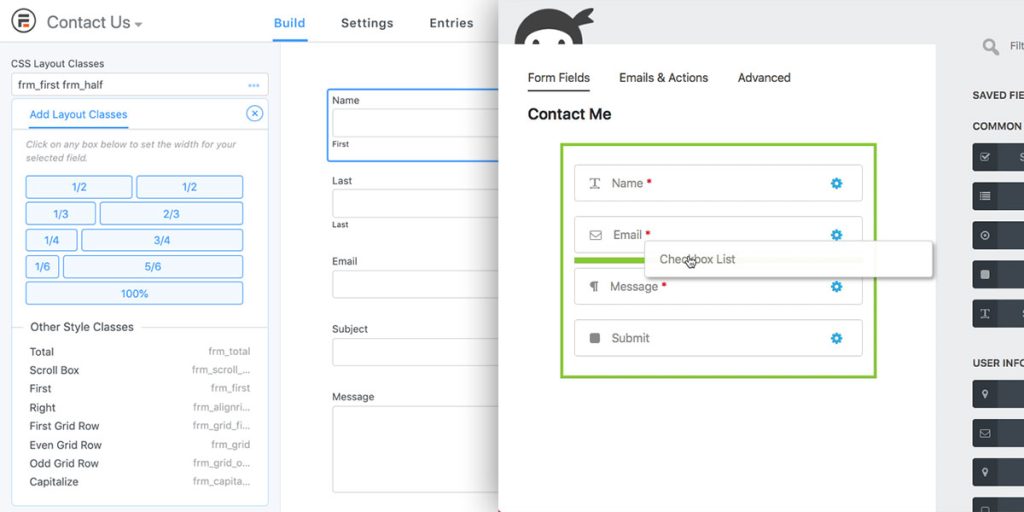
Layout: Fields on the left, live preview on the right. You drag fields in, click to configure them, and see changes immediately.
The builder feels more “tool-heavy” than Ninja Forms. There’s a lot happening on screen at any given time. Field options, styling controls, conditional logic settings, calculation parameters. For someone who knows what they’re doing, this is great. For a first-timer setting up a simple website form, it can feel like overkill.
According to Capterra reviews, users praise Formidable’s flexibility but frequently mention a steeper learning curve for advanced features. Took me a while to get comfortable with calculated fields the first time I used them, and I’d been building WordPress sites for years at that point.
One thing Formidable does well: the built-in visual styler. You can adjust colors, fonts, padding, and borders directly in the form editor without writing CSS. This is available even in the free version. That’s a real advantage when you’re trying to match a form to an existing theme without hunting through stylesheets.
Ninja Forms’ Builder
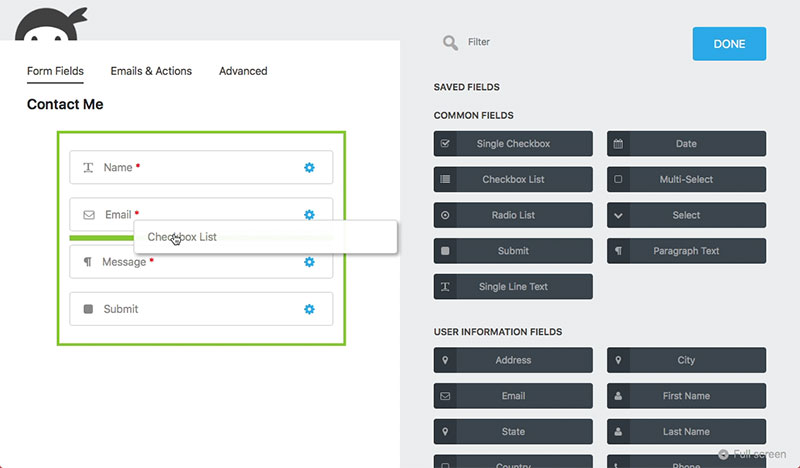
Ninja Forms takes a drawer-based approach. You click a field, and a settings panel slides in from the right. It’s cleaner. Less visual clutter.
The trade-off? You don’t see a real preview of your form while editing. You’re working in a more abstract interface. The form will look different (and usually better) once it’s published on your actual page.
For simple forms, this works fine. WPMarmite’s review highlights that Ninja Forms is easy enough for “non-technical users and beginners” to create a working form in minutes.
But here’s the thing. Ninja Forms doesn’t include a native styling tool in the free version. If you want to customize how your form looks beyond basic theme inheritance, you either buy the Layout and Styles add-on or write custom CSS. That’s an extra cost Formidable doesn’t require.
Conditional Logic Compared
Both plugins support form builders with conditional logic. Show/hide fields based on user input, route email notifications conditionally, display different confirmation messages.
The difference is depth.
Formidable handles nested conditional logic natively. You can create complex rule chains where one condition triggers another, which triggers another. It also applies conditional logic to Views, calculations, and email actions, not just field visibility.
Ninja Forms keeps conditional logic simpler and more straightforward. For most use cases (show a phone field when “Call me” is selected, hide a section when “No” is chosen), it works perfectly well. But if you’re building something with layered dependencies, you’ll hit limits faster.
According to WPForms’ research, about 81% of people abandon a form after beginning to fill it out. Smart conditional logic that hides irrelevant fields is one of the most effective ways to bring that number down, so this feature matters more than it might seem on paper.
Templates, Field Types, and Form Functionality
Templates save time. Field types determine what you can actually build. This is where the gap between Formidable Forms and Ninja Forms starts getting wider.
Form Templates
Formidable Forms offers over 225 templates across its various plans. The free version alone includes 30+. These range from basic contact form templates to more specialized layouts for surveys, quizzes, payment collection, and user registration.
Ninja Forms provides 16 free templates (not counting the blank form option). That’s a significant difference. If you’re someone who likes to start from a pre-built structure and modify from there, Formidable gives you way more starting points.
Templates matter more than people think. WPForms data suggests that multi-step form layouts can increase conversions by up to 300% compared to single-page forms. Starting from a well-designed template with proper field grouping gets you closer to that result without doing everything from scratch.
Field Types and Advanced Capabilities
Both plugins cover the basics: text, email, textarea, dropdown, radio buttons, checkboxes, form fields you’d expect from any serious builder.
The differences show up in specialized fields:
Formidable’s calculated fields are probably its single most distinctive feature. You can build price estimators, loan calculators, BMI tools, and custom quote generators entirely within the form builder. Ninja Forms has some calculation capability, but nothing close to the same level.
Repeater fields are another big one. If you’re building registration forms for events, sports teams, or group signups where users need to add multiple entries (think: “add another attendee”), Formidable handles that natively. Ninja Forms doesn’t offer this.
What About Surveys and Quizzes
Formidable includes dedicated survey and quiz tools in its higher-tier plans. Net Promoter Score fields, Likert scales, scored quizzes with grading, image-based choices. The company positions these as a replacement for standalone tools like SurveyMonkey.
Ninja Forms doesn’t offer dedicated survey functionality. If you need to build a survey form, you can piece something together using basic fields, but you won’t get specialized survey field types, scoring, or built-in data visualization.
For anyone doing regular customer feedback collection or running quizzes on their site, this is a clear win for Formidable.
Third-Party Integrations and Add-Ons
Your form builder doesn’t exist in isolation. It needs to talk to your email marketing platform, your CRM, your payment processor, and probably three other tools you haven’t thought of yet.
Both Formidable Forms and Ninja Forms connect with popular third-party services. The question is how they package those connections, and what it costs to access them.
Formidable Forms Integrations
Formidable bundles its integrations into tiered plans. Buy a higher plan, get more integrations included. No nickel-and-diming on individual add-ons.
Key integrations:
- Mailchimp, AWeber, ConvertKit for email marketing
- Stripe and PayPal for WordPress payment forms
- Zapier and webhooks for automation
- WooCommerce for ecommerce workflows
- Salesforce, HubSpot, and Zoho for CRM
The Elite plan ($299.50/year) unlocks everything, including some niche add-ons like Google Sheets, PDF generation, and ACF Forms. With 30+ available add-ons total, you’re unlikely to hit a wall on integrations.
One thing I appreciate about Formidable’s approach: once you’ve picked your plan, you know what you’re getting. No surprise costs for that one integration you forgot about. The API interface also lets developers build custom connections when the built-in options don’t cover a specific use case.
Ninja Forms Integrations
Ninja Forms takes the opposite approach. The core plugin is free and lean. Integrations come as individual add-ons or through bundled membership plans.
Available connections include:
- Mailchimp, ActiveCampaign, Constant Contact, ConvertKit, EmailOctopus
- Stripe and PayPal for payments
- HubSpot, Salesforce, Zoho CRM, Insightly
- Zapier and webhooks
- Slack, Trello, Help Scout for workflow
- Twilio and ClickSend for SMS notifications
The CRM coverage is actually pretty strong. Ninja Forms connects with more CRM platforms out of the box than most competitors, including some smaller ones like Capsule and PipelineDeals that you won’t find supported elsewhere.
The downside is cost transparency. Individual add-ons range from $29 to $129 each. Need Mailchimp, Stripe, and conditional logic? That’s three separate purchases. Or you buy a membership plan and hope it includes what you need.
According to Financesonline, security concerns cause 29% of form abandonments, and form length accounts for another 27%. Both plugins integrate with Google reCAPTCHA and include anti-spam tools, so form security is covered on both sides. The real differentiator here is pricing structure, not security coverage.
Which Integration Model Works Better
Formidable’s bundled approach is better for agencies and power users who need multiple integrations across client sites. You pay once, you get everything at that tier.
Ninja Forms’ a la carte model works if you need exactly one or two premium features and nothing else. Buy just the Stripe add-on, pair it with the free core, and you’ve got a payment form for less than any Formidable paid plan.
But the moment you need four or five add-ons, Ninja Forms starts costing more than Formidable. That crossover point trips up a lot of people who start on the free tier and gradually realize they need more.
Pricing and Plans Compared
Pricing is where these two plugins take completely different paths. The structure of each plan, what’s included, and what costs extra varies enough that choosing the wrong one could mean overspending by hundreds of dollars per year.
Formidable Forms Pricing Tiers
Formidable uses a traditional tiered model. Higher plans unlock more add-ons, more site licenses, and more advanced features.
Watch the renewal rates. Those prices above are first-year introductory discounts. Renewals jump to full price, which can be nearly double. BlogVault’s 2025 review specifically flags this, noting that buyers should budget based on the renewal cost, not the intro offer.
The free Lite version covers basic forms, entry management, and the built-in styler. It’s more functional than most free form plugins, but premium features like payments, Views, and calculated fields all require a paid plan.
Ninja Forms Pricing Tiers
Ninja Forms takes two approaches at once. You can buy a bundled membership plan, or you can purchase individual add-ons on top of the free core plugin.
Membership plans:
- Plus: $99/year (3 sites, 15 add-ons)
- Pro: $199/year (20 sites, 27 add-ons)
- Elite: $499/year (unlimited sites, all add-ons)
Individual add-ons run between $29 and $129 each. Jotform’s comparison notes that Ninja Forms offers initial plans at half off for the first year, then doubles the price at renewal.
The free core plugin is strong. Unlimited forms, unlimited submissions, no paywalled entry storage, and free support for all users. For a basic sign up form or subscription form, the free version might be all you need.
Real Cost for Common Scenarios
Simple contact form: Free on both. Ninja Forms’ free version includes slightly more field types. Formidable’s free version includes styling tools.
Payment collection form: Formidable Business ($199.50/year) includes Stripe and PayPal. On Ninja Forms, you’d need at least the Plus plan ($99/year) for PayPal, or buy the Stripe add-on separately ($129).
Complex data application: Formidable Elite ($299.50/year) is the clear choice. Ninja Forms doesn’t offer Views, front-end editing, or advanced calculated fields at any price tier.
The average cost for a basic online form builder is around $15/month according to SaaSWorthy. Both Formidable and Ninja Forms fall well below that threshold at their entry-level plans.
Performance, Speed, and Code Quality
Every plugin you add to WordPress loads CSS and JavaScript files. Some load them everywhere. Some only load them on pages where a form actually exists. That difference matters more than most people realize.
Google confirmed Core Web Vitals as a ranking factor in 2021. As of mid-2025, MonsterInsights reports that only 44% of WordPress sites on mobile pass all three Core Web Vitals tests. Your form builder choice contributes to those numbers.
How Formidable Forms Handles Assets
Formidable loads its CSS and JavaScript only on pages containing forms. It doesn’t dump global scripts across every page of your site.
The plugin also offers HTML minification as a built-in option, which strips unnecessary whitespace from form output. Formidable’s team calls it “fine-tuned for speed,” and user reviews on Software Advice generally confirm that performance holds up well on sites with moderate traffic.
One area to watch: Views and calculated fields add processing overhead. If you’re displaying large datasets on the front end, database queries can slow things down on shared hosting. A caching plugin like WP Rocket and decent hosting go a long way here.
How Ninja Forms Handles Assets
Ninja Forms has historically loaded more front-end resources than necessary. Earlier versions were criticized for JavaScript-heavy rendering, even on simple forms.
Saturday Drive has improved this in recent updates. The current builder is lighter than it used to be, but it still relies on a drawer-based JavaScript interface that renders forms client-side rather than server-side.
Software Advice reviews mention that Ninja Forms “slows down your site more than some” alternatives, though a good developer can work around it with script management tools like Perfmatters or Asset CleanUp.
Database Impact
Formidable: Stores entries in custom database tables. More efficient for large volumes of submissions and allows faster queries when using Views.
Ninja Forms: Uses WordPress custom post types for entry storage. Works fine for moderate volumes, but can create database bloat over time on high-traffic sites.
Both plugins are compatible with popular caching solutions and CDN services. Neither will break a well-configured WordPress setup, but Formidable’s custom table approach scales better for data-heavy use cases.
Support, Documentation, and Community
When your form breaks on a client site at 3pm on a Tuesday, the quality of support matters more than any feature comparison chart.
Formidable Forms Support
Capterra reviewers consistently highlight Formidable’s support team. The plugin has a 4.7 star rating on WordPress.org, and multiple reviews specifically call out fast, thorough ticket responses.
Support is ticket-based for premium users. Free Lite users do not get direct support, which is a genuine downside if you’re running the free version on a production site.
Documentation quality: Extensive. Categorized knowledge base with step-by-step guides, video tutorials, and code snippets. Strategy11 has maintained this library for over a decade, so coverage is deep across edge cases.
Ninja Forms Support
Ninja Forms offers free support to all users, including those on the free core plugin. That’s a significant differentiator. Most competitors reserve support for paying customers.
Support hours run 9am to 4pm EST, Monday through Friday. Premium users get priority support with under 8-hour response times.
The company’s blog and learning center publish regular tutorials. Their documentation covers installation, field configuration, and add-on setup, though some users in Capterra reviews note that troubleshooting complex issues can require back-and-forth exchanges.
Community and Ecosystem
WordPress powers over 43% of all websites globally according to W3Techs, which means the community around form plugins is massive. Both plugins have active presence in WordPress.org support forums, Facebook groups, and third-party tutorial sites like WPMarmite, WPBeginner, and BlogVault.
Ninja Forms has a slight edge in community content volume due to its larger install base. Formidable wins on official documentation depth.
Which Plugin Fits Which Use Case
Neither plugin is universally “better.” The right pick depends entirely on what you’re building, who’s building it, and what budget you’re working with.
Best for Beginners Building Simple Forms
Pick: Ninja Forms.
The free core plugin gives you unlimited forms, unlimited submissions, and 28+ field types without paying anything. The drag-and-drop interface is clean and approachable. For a basic contact us page template, it gets the job done in under ten minutes.
Formidable’s free version works too, but its builder shows more options than a beginner needs. If you’ve never built a form before, the extra controls can feel intimidating.
Best for Developers and Agencies
Pick: Formidable Forms.
Calculated fields, repeater fields, Visual Views, front-end editing, API access, and 125+ hooks for custom development. The Elite plan covers 15 sites and includes every add-on.
Agencies building client sites with directory listings, WordPress registration forms, job boards, or any data-driven application will hit Ninja Forms’ ceiling fast. Formidable is built for this tier of complexity.
Best for Budget-Conscious Users
Pick: It depends on how many features you need.
If one or two premium features are enough, buy individual Ninja Forms add-ons. You could spend $29 to $60 total and avoid a full annual plan.
If you need three or more premium features, Formidable’s Basic plan at $39.50/year is cheaper than buying multiple Ninja Forms add-ons separately. The crossover point hits fast.
For anyone working with zero budget, both free WordPress form plugins are usable. Ninja Forms gives more field types for free. Formidable gives styling tools for free. Pick based on which trade-off matters more to you.
Best for Data-Heavy Applications
Pick: Formidable Forms, no contest.
If your project involves displaying submitted data on the front end (directories, member listings, event calendars, filtered tables), only Formidable offers this through its Views feature. Ninja Forms collects data. Formidable collects and displays it.
BlogVault’s 2025 review puts it simply: for building data-driven websites, Formidable is in a class of its own among WordPress form builders.
When Neither Plugin Is the Right Choice
There are scenarios where both fall short.
If site speed is your top priority, Fluent Forms is worth a look. It markets itself as the lightest form builder available and has grown to 500,000+ active installs by 2024.
If you need the absolute easiest builder with the most templates, WPForms (6 million+ installs, 2,000+ templates) is hard to beat. It costs more per feature than Formidable, but the onboarding experience is the smoothest in the market.
Gravity Forms remains the go-to for developers who want rock-solid stability and a massive ecosystem of third-party add-ons. It’s premium-only with no free version, starting at $59/year.
There are also solid Ninja Forms alternatives beyond these if neither plugin clicks. The WordPress form plugin space is crowded enough that you’re not locked into just two options.
FAQ on Formidable Forms Vs Ninja Forms
Which plugin is better for beginners?
Ninja Forms is easier to pick up. Its drag-and-drop builder has less visual clutter, and the free version includes 28+ field types. Formidable works for beginners too, but its interface shows more advanced options upfront.
Can I use both plugins for free?
Yes. Both offer free versions on WordPress.org. Formidable Forms Lite includes a built-in styler. Ninja Forms’ free core gives you unlimited submissions and entry storage without paying anything.
Which one is cheaper overall?
Formidable starts at $39.50/year. Ninja Forms starts at $99/year for bundled plans. If you need three or more premium features, Formidable’s tiered pricing usually costs less than buying individual Ninja Forms add-ons.
Does Ninja Forms have calculated fields?
Ninja Forms has basic calculation support. Formidable Forms offers advanced calculated fields for price quotes, loan estimators, and custom calculators. For anything beyond simple math, Formidable is the stronger choice.
Which plugin loads faster on WordPress sites?
Formidable loads assets only on pages with forms. Ninja Forms has improved its performance recently but historically loaded heavier JavaScript. Both work fine with caching plugins like WP Rocket.
Can I display form data on the front end?
Only with Formidable Forms. Its Visual Views feature turns submitted entries into directories, tables, calendars, and filtered listings. Ninja Forms collects data but doesn’t include any front-end display tools.
Which plugin has more integrations?
Ninja Forms connects natively with more CRM platforms, including Salesforce, HubSpot, and smaller tools like Capsule. Formidable bundles its integrations into plans, covering Mailchimp, Stripe, PayPal, Zapier, and WooCommerce.
Do both plugins support multi-step forms?
Yes. Both let you build multi-step forms with page breaks and progress indicators. Formidable includes this in its Basic plan. Ninja Forms requires a premium add-on for multi-page functionality.
Which one offers better customer support?
Ninja Forms provides free support to all users, including those on the free plugin. Formidable reserves direct support for premium customers only. Both maintain detailed documentation and knowledge bases.
Can I switch from Ninja Forms to Formidable Forms?
Formidable includes a built-in import tool for migrating forms from other plugins. The process isn’t always perfectly clean, so test on a staging site first. Ninja Forms doesn’t offer a direct Formidable importer.
Conclusion
The Formidable Forms vs Ninja Forms decision comes down to what you’re actually building. One plugin collects data. The other collects it and puts it to work on the front end of your site.
Ninja Forms is the smarter pick for small business owners who need a lightweight contact form plugin with a gentle learning curve and flexible add-on pricing. It handles email notifications, spam protection, and basic payment processing without overcomplicating things.
Formidable Forms wins when the project demands more. Calculated fields, repeater fields, Visual Views, and deep Zapier or WooCommerce integrations make it the go-to for agencies and developers managing complex WordPress projects.
Test both free versions before committing. Your specific workflow will make the right choice obvious faster than any comparison article can.