


Google Analytics files plenty of visits under direct that were never direct. In a 2023 experiment by SparkToro and Really Good Data, covering 1,113 test visits across 11 networks, 100%…
Table of contents
Nobody builds a quiz from a blank page anymore. involve.me, Typeform, Google Forms and Microsoft Forms all hand over a ready-made layout, and you swap in your own questions. That’s most of the work.
What changes from one template to the next is the job it was made for. Some collect email addresses, others grade a class, and a few run a game on a projector. In Interact’s 2026 benchmark, 40.1% of people who start a lead generation quiz submit their contact details, which is worth keeping in mind if leads are your goal.
Which Types of Quiz Templates Are Most Common?
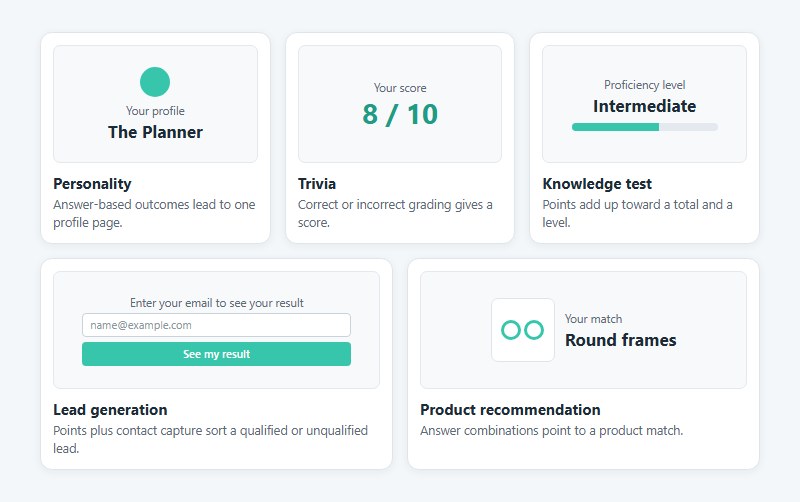
Personality, trivia, knowledge test, lead generation and product recommendation make up the main types. They differ in how answers get scored and in what the reader sees at the end.
| Type | How it scores | What the reader gets | Example template |
|---|---|---|---|
| Personality | Answer-based outcomes | One profile page | Personality Quiz for Online Magazines |
| Trivia | Correct or incorrect grading | A score | Keeping Up With Current Events |
| Knowledge test | Points toward a total | A proficiency level | Financial Literacy Knowledge Quiz |
| Lead generation | Points plus contact capture | A qualified or unqualified lead | Sales Qualified Lead Score Calculator |
| Product recommendation | Answer combinations | A product match | Glasses Recommendation Funnel |
Example names come from involve.me’s quiz gallery as of November 2026.
The scoring underneath is simpler than that table suggests. Scored templates add points toward a numerical result. In outcome-based ones, specific answer combinations lead to different result pages. Graded templates just mark each response correct or incorrect, and galleries mix all of these without much ceremony.
Industry variants narrow a standard type to one vertical. involve.me lists an Investment Personality Quiz for financial services and an Energy Assessment Quiz for utilities.
What Do Marketing and Lead Generation Quiz Template Examples Look Like?
Marketing quiz templates trade a personalized answer for an email address. Personality quizzes and product recommenders do a good share of that trading, and lead scoring and giveaway quizzes handle the rest.
In every one of them the reader answers first and the brand captures contact details second. That’s the pattern behind how quizzes and interactive forms generate leads.
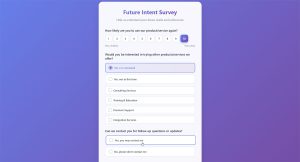
Personality quiz examples
See the Pen
Personality Quiz Template by Bogdan Sandu (@bogdansandu)
on CodePen.
The result page is the product in a personality quiz, since the answers only map to a profile.
involve.me’s Personality Quiz for Online Magazines targets publishers, coaches and brands that want engagement and social sharing. Jotform’s personality template is pitched as an easy way to collect personality data from an online audience.
Out of the box you get answer options already tied to result types and a result page for each profile. There’s an optional email field before the result too. The questions are the only part you rewrite.
Product recommendation quiz examples
See the Pen
Product Recommendation Quiz Template by Bogdan Sandu (@bogdansandu)
on CodePen.
ConvertFlow’s product quiz playbook says 3 to 5 questions are enough for many use cases.
Amelia Gray Skincare asks 4: how skin feels after washing, what pores look like, overall skin condition, and a favorite skincare product. It then asks for explicit email opt-in permission and ends on a personalized recommendation (ConvertFlow blog).
ConvertFlow also offers a skincare quiz funnel template inspired by Jones Road’s quiz, so a store can copy a working structure.
One thing worth borrowing is the cap on results. ConvertFlow advises limiting recommendations per result to three or four at most, because the whole point of the quiz is to reduce choice overload. Start easy, too, and ask skin type before goals or concerns.
Lead scoring and giveaway quiz examples
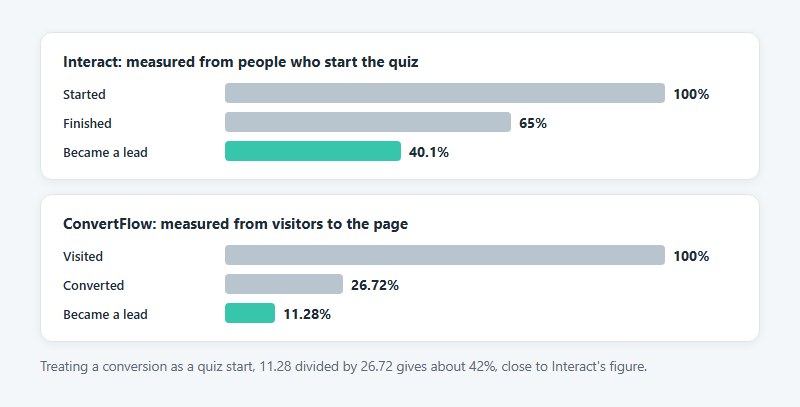
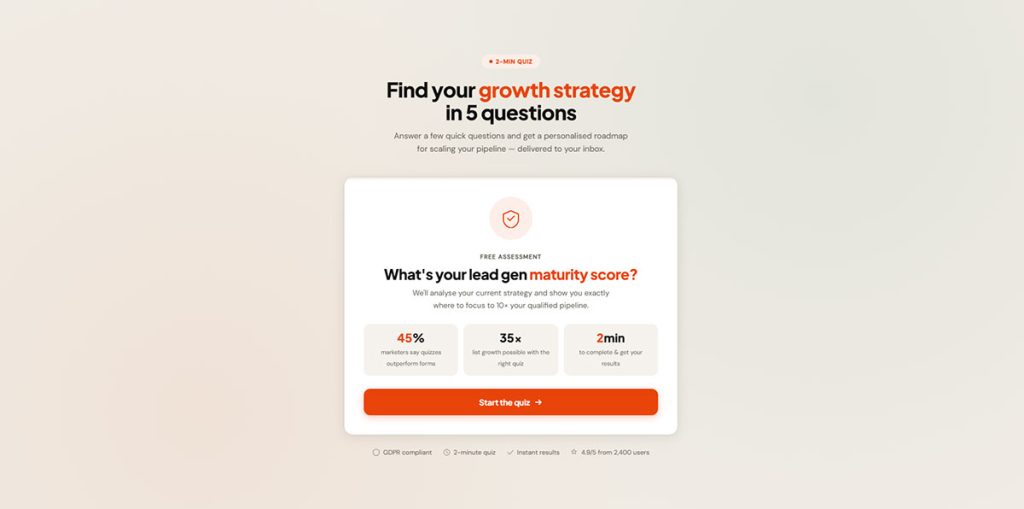
Interact’s September 2026 update puts the average start-to-lead rate across its lead generation quizzes at 40.1%, with 65% of starters finishing.
ConvertFlow measures from the visitor side. Its September 2026 benchmark of 1,063 lead generation quiz funnel campaigns shows landing page templates capturing a lead from 11.28% of visitors and converting 26.72%.
Treating a conversion as a quiz start, 11.28 divided by 26.72 gives about 42%, close to Interact’s figure. That ratio is a calculation across the two reports, not a number either one publishes. The gap in headline rates comes from the denominator: starters versus visitors.
Templates built for this job include involve.me’s Sales Qualified Lead Score Calculator and Know Your Rights Leadgen Quiz, which score each respondent while collecting contact details. Giveaway versions such as Discount Funnel Giveaway for Ecommerce and Giveaway Quiz for Real Estate attach a discount code, free trial or contest entry to the email step.
When the result sits behind the email field, the quiz behaves like gated content, so the result page has to be worth the exchange.
One limit from Interact’s own report: a quiz converts attention that already exists, it does not create demand. A quiz converting 80% of 10 visitors can yield fewer leads than one converting 30% of 10,000.
Which Quiz Template Examples Suit Classrooms, Training and Events?
Scored knowledge checks with instant feedback are what classrooms and training programs mostly use. Events go a different way, with live trivia on a shared screen and a leaderboard.
Education and training examples
Quizzing in class pays off. Yang et al. (Psychological Bulletin, 2021) found that classroom quizzing raises academic achievement by a medium effect, a g of about 0.50.
Subject quizzes are the easiest place to start. Paperform’s gallery covers math, geography, movies, music, art, literature, language and sports, and Youform lists geography, math and online science among its popular templates.
Jotform describes its quiz templates as suited to pop quizzes and end-of-course exams, with automated grading and instant feedback. Its Placement Test Form assesses students’ skills and knowledge.
On the workplace side, involve.me’s Employee Training Quiz uses scored outcomes to segment people by proficiency level, and Jotform also lists onboarding assessments among its quiz uses.
The structure is the same in all of them. Only the content changes.
Event and live trivia examples
One quiz can run two ways in Kahoot, according to its guide for business members. In a live game, players answer on their own devices while questions appear on a large shared screen, which suits in-person training sessions and events, and presentations too. A self-paced challenge puts both questions and answers on each player’s device.
Kahoot also ships pre-designed templates for common uses, which hosts customize before playing.
For slide-based sessions, SlideLizard published 10 free PowerPoint quiz designs in 2020. The set includes a Galaxy quiz, a Picture quiz, a keyboard-style yes-no quiz and a Who Wants to Be a Millionaire style quiz.
The Minimalist quiz has slides for both multiple choice and true/false questions. The Picture quiz comes in 2, 3 or 6 picture layouts. Colors, fonts and shapes are editable in every template, so matching your branding is easy.
Live game templates make sense when everyone in the room answers at once. If you already present in PowerPoint, the slide templates are the easier fit.
What Question Formats Do Quiz Templates Use?
Multiple choice, true/false, fill in the blank, matching, image choice and rating or slider scales cover the formats you’ll run into. Of those, multiple choice and short answer are the ones both Google Forms and Microsoft Forms grade automatically.
A multiple choice item takes one correct answer or several, and the split between radio buttons and checkboxes decides which. That choice also sets how the answer key is built.
| Format | Google Forms answer key | Microsoft Forms auto-grading |
|---|---|---|
| Multiple choice | Yes | Yes |
| Short answer or text | Yes (short answer only) | Yes, once the correct answer is entered |
| Ranking | No | Yes |
| Choice grid | Yes | No |
As of November 2026, Google’s help page lists short answer, multiple choice, checkboxes, dropdown and both grid types for answer keys. Microsoft’s 2021 auto-grading guide, edited in June 2024, names multiple-choice, text and ranking questions as the supported types.
Anything outside those lists needs manual grading, and Google lets you assign points and feedback on every question type.
Matching formats to quiz types
Personality and product quizzes lean on image-based or slider-based questions that feed outcome pages, which involve.me describes as the typical format. In a regular WordPress form, a slider field covers the slider part.
Pop quizzes and live slides mostly stick to multiple choice and true/false, since both grade instantly.
Knowledge tests tend to use multiple choice for recall and short answer wherever the reasoning matters.
Bloom’s taxonomy gives a quick difficulty check. It ranks questions from recall up to analysis and creation, and recall-level items fit multiple choice and true/false while analysis-level items need written answers.
How Do Scoring and Result Pages Work in a Quiz Template?
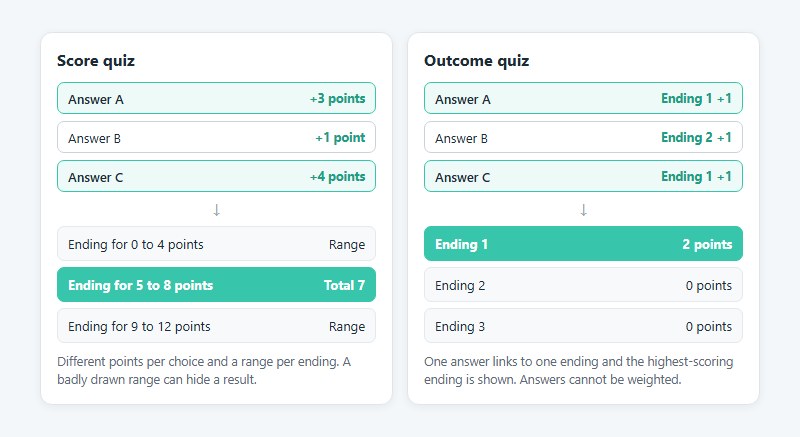
Scored templates add up points and match the total to a range. Outcome-based ones work differently: each answer votes for a result, and whichever gets the most votes wins.
Typeform documents both. In its Outcome quiz, each answer linked to an ending adds 1 point to that ending and the highest-scoring ending is shown (Typeform product manager, community forum, August 2025). Its Score quiz assigns points to answers and a score range to each ending (as of November 2026).
Scored quizzes are the flexible option, with different points per choice and a range per ending. Typeform says they suit lead segmentation and knowledge assessment. The cost is setup time (Typeform support), and a badly drawn range can hide a result entirely.
Outcome-based quizzes are simpler because one answer links to one ending, which fits product recommendations and personality quizzes. involve.me’s answer-based outcomes can also redirect people to different site pages, PDFs or teams. The limit is weighting. In Typeform every linked answer counts as 1 point, so answers cannot be weighted.
What a result page can contain
involve.me funnels come as single outcome, answer-based outcomes or score-based outcomes, and that choice decides how many result pages exist.
With a single outcome, everyone lands on the same thank-you page. Score range pages are a step up from that: involve.me’s credit score calculator template shows a different explanatory page for each range, and its EQ quiz adds a comparison with the average score plus tips per range. Redirects and downloads send the reader to a page, a PDF or a team depending on an answer. A WordPress form gets close to this with conditional confirmation messages.
Grades behave differently in Google Forms, which releases them right after each submission by default. The alternative is a later release after manual review, with scores emailed to respondents whose addresses were collected.
Branching and answer piping
Branching routes people through different questions depending on earlier answers, which is the core of how conditional logic works in a form.
involve.me adds answer piping, which drops a respondent’s own answers into the outcome page text.
The sources disagree on Google Forms limits. Google’s help page says “Go to section based on answer” works only on multiple choice and dropdown questions, and it moves people between sections, not single questions. Youform’s guide adds linear scale to that list.
Google’s page is the platform documentation, so it is the reference. Preview the quiz to confirm the behavior before launch.
Test every result before publishing. Interact’s help center suggests writing one expected answer path per result, previewing it, then trying mixed combinations to catch a result that never appears or appears too often.
Where Can You Find Quiz Templates, and in Which Formats?
Quiz templates come out of form tools and funnel builders, plus a pile of design and document files. Whichever source you pick decides which scoring and result logic arrives with the template.
| Source | Best template use | Scoring and results |
|---|---|---|
| Google Forms | Graded classroom and staff quizzes | Answer key and points, grades released at once or after review |
| Microsoft Forms | Graded quizzes in Microsoft 365 | Auto-grading, points, branching, timer |
| Jotform | Scored quizzes with custom result pages | Quiz Form app, or Form Calculation widget plus conditions |
| Typeform | Personality, recommendation and lead quizzes | Score quiz and Outcome quiz modes |
| involve.me | Funnel-style quizzes with outcome pages | Single, answer-based or score-based outcomes |
Entries reflect each vendor’s help pages as of November 2026.
Printable, Word and slide files
Canva’s quiz maker page says its quizzes can go into presentations and social media posts, and into printable designs too. Canva Docs and websites are the exceptions.
Template.net sells printable quiz templates as Word and PDF files, plus Google Docs downloads. A printed sheet or a Word file cannot score answers or capture an email address.
Which source fits which job
If grading is the job, start in Google Forms or Microsoft Forms, where answer keys and auto-grading come built in. Result pages are a different story, and a funnel builder or Typeform is the better start because they ship score ranges or outcome mapping. For paper or a projector, the Word, PDF or Canva files will do.
If section-level branching is too limiting, browse Google Forms alternatives before building anything.
How to Customize a Quiz Template and Connect It to Your Tools
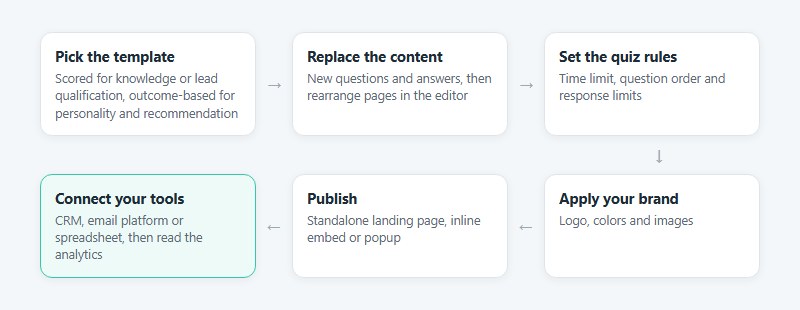
Customizing a quiz template mostly means working down the list below, and the last step is the one that turns answers into follow-up.
- Pick a template whose scoring model matches the goal, which means scored for knowledge or lead qualification and outcome-based for personality and recommendation.
- Replace the questions and answers, then rearrange pages in the drag-and-drop editor.
- Set the quiz rules: time limit, question order and response limits.
- Apply the logo, colors and images.
- Publish as a standalone landing page, an inline embed or a popup.
- Connect the CRM, email platform or spreadsheet, then read the analytics.
Timers, question order and response limits
Microsoft Forms documents a full set of quiz rules (support page, as of November 2026).
- A time duration submits answers automatically when the timer ends, and respondents cannot edit afterward.
- Questions can be shuffled into a random order per person, unless the form has multiple sections or pages.
- You can lock specific questions, such as questions 3 to 5, and shuffle everything else.
- One response per person blocks repeat attempts.
- Start and end dates set an exact window for collecting responses.
Connecting leads to email, CRM and spreadsheets
involve.me lists native connections to HubSpot, Salesforce, Mailchimp, Klaviyo and Google Sheets among its 55+ native integrations. Zapier or webhooks cover tools outside that library. A WordPress form built with IvyForms can pass the same email step to a list through a Mailchimp integration.
The email step is a small lead capture form, so the usual rules for how to design lead capture forms apply.
involve.me’s built-in analytics report completion rates, drop-off points and score distributions. A pile-up in one score band is a sign the ranges need moving.
For quizzes embedded on your own pages, you can also track form submissions in Google Analytics next to regular site traffic.
When Is a Quiz Template the Wrong Choice?
Templates stop helping once the scoring logic outgrows the builder. They also fall short if an LMS has to receive the results, and a quiz that collects personal data without a notice is a problem no matter which template you started from. Check the platform’s limits before building.
Scoring logic the template cannot express
Some quizzes need more than the template’s logic allows.
On Typeform, a reply from support says Score quiz logic cannot handle more than 1 total score in a form, and a product manager confirms that Score quiz and Outcome quiz modes cannot run together. Typeform’s help center documents a workaround for multiple scores built on variables and logic rules.
Google Forms branches by section, and only on multiple choice and dropdown questions (Google help page).
In Jotform, support points to the Form Calculation widget plus conditions to show a custom result page by score (Jotform support forum, April 2024). That is building, not filling a template.
If the quiz needs several totals, treat the template as a starting layout and plan the logic yourself.
Courses that need LMS reporting
SCORM is packaged content that reports completion and test scores to a learning management system (iSpring).
xAPI came from ADL, was first released as version 1.0.0 in 2013, and is now published as IEEE 9274.1.1-2023 (xAPI 2.0). It sends learning statements to a learning record store (TechTarget, ADL).
Confirm the template platform exports SCORM or sends xAPI statements before building, because the format is set by the LMS and not by the quiz.
Quizzes that collect personal data
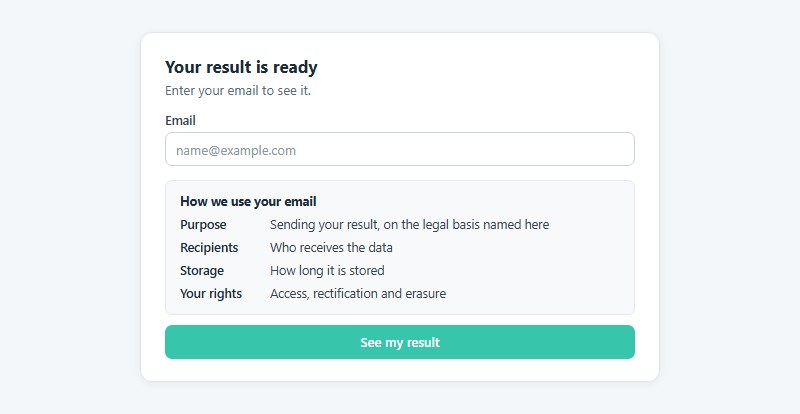
GDPR Article 13(1) and (2) require the controller to give the person specific information at the time personal data are obtained. An email field on a quiz is exactly that moment.
- Purposes and legal basis for the processing
- Recipients of the data
- How long it is stored
- Rights of access, rectification and erasure
Put that notice next to the email field, and see how to create GDPR compliant forms for the full requirements. The GDPR field in IvyForms can sit right beside that email field.
Quiz Templates FAQ
What is a quiz template, and what does it include?
According to involve.me, it’s a pre-built framework that scores, categorizes or routes respondents based on their answers. Questions, scoring logic and result pages all come included, so only the content needs replacing.
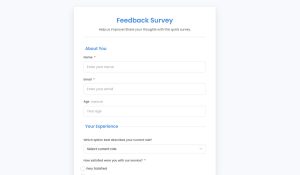
Is a quiz template the same as a survey template?
See the Pen
Survey-Style Quiz Template by Bogdan Sandu (@bogdansandu)
on CodePen.
No. Surveys collect opinions, and there’s no right answer to score against. A quiz template scores or sorts respondents against an answer key or an outcome map.
Microsoft Forms builds both, but only quizzes get point values and auto-grading.
How many questions should a quiz template have?
It depends on the type and the audience. Interact’s 2026 conversion report ties a low start-to-finish rate to quizzes that run too long, and to ones that feel unclear or repeat themselves.
Cut any question that does not move the reader toward the promised result.
Do quiz templates work on websites and phones?
Yes. involve.me says its templates embed inline or as popups on any website, and they also run as standalone pages. Layouts adapt to desktop, tablet and mobile screens.
Preview on a real phone before publishing.
Do you need to code to edit a quiz template?
No. involve.me states that every template works with a drag-and-drop builder, so layout, question flow, design and scoring logic change without touching code. Jotform’s Form Builder customizes its quiz templates the same way.
Can AI build a quiz template from a description?
Yes. involve.me’s AI Agent generates questions, scoring logic and outcome pages from a plain-text description (as of November 2026).
Run sample answers through the quiz before publishing, because the generated scoring is still yours to verify.
How to Tell When a Quiz Template Needs Replacing
Replace the template once edits to its title, questions and opt-in step stop moving the numbers. Before that point, diagnose in a set order instead of rebuilding.
Interact’s 2026 report says to start with traffic and the title. Check that qualified visitors are arriving and that the title names their question. If both hold, look at the finish rate and shorten or clarify the questions. Only then rework the opt-in offer.
Each stage gates the next, because a person who never starts cannot finish, and one who quits mid-quiz never reaches the email field. The trade-off is patience, since changing 1 element at a time slows the fixes but shows which change worked.
Quiz rates then sit alongside the other lead generation KPIs to track.
Platform behavior in this article was verified in November 2026. If Google Forms or Microsoft Forms adds question types to auto-grading or branching, the best starting source changes.