


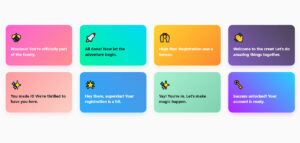
The first message a user sees after creating an account sets the tone for everything that follows. Get it wrong, and you lose them at the exact moment they’re most…
Table of contents
Most organizations lose volunteers before they ever show up – not because the opportunity wasn’t right, but because the sign-up process was a mess.
A well-built volunteer registration form template fixes that. It collects the right data, builds trust with applicants, and saves your coordinator hours of back-and-forth.
Over 75.7 million Americans volunteered through an organization between 2022 and 2023 (AmeriCorps). The demand is there. The question is whether your intake process can handle it.
This guide covers everything from key form fields and free templates to platform options, customization, and legal compliance – so you can build a volunteer sign-up form that actually works.
What is a Volunteer Registration Form Template
A volunteer registration form template is a pre-built form structure that organizations use to collect information from people signing up to volunteer. Think of it as a standardized starting point – you customize it for your program instead of building from scratch every time.
The core purpose is simple: gather what you need, nothing more. Good intake forms strike the right balance between collecting useful data and not scaring people off with a wall of questions.
Where these templates are used:
- Nonprofits and charities (food banks, shelters, crisis centers)
- Community events and one-time volunteer days
- Schools and universities for tutoring or campus programs
- Hospitals and healthcare facilities
- Religious organizations and church programs
- Animal shelters and environmental groups
The difference between a registration form and a plain sign-up sheet matters more than most people realize. A sign-up sheet collects a name and an email. A registration form captures availability, skills, emergency contacts, consents, and role preferences – the data that actually makes volunteer coordination possible.
Between September 2022 and 2023, over 75.7 million Americans formally volunteered through an organization – roughly 28.3% of the population aged 16 and older (AmeriCorps/U.S. Census Bureau). That volume of interest requires a system, not a clipboard.
At the same time, 85% of nonprofits reported at least double the number of volunteer inquiries since the pandemic started (TeamStage). A well-structured volunteer intake form is one of the first tools that helps organizations handle that kind of demand without burning out their coordinators.
Key Fields Every Volunteer Registration Form Should Include
Keep it focused. Volunteers are giving you their time – the form shouldn’t take 20 minutes to complete before they’ve even shown up.
Nonprofits have a form abandonment rate of nearly 77.9% (WPForms/Zuko), one of the highest across all sectors. Asking for only what you actually need is not just good UX – it directly affects how many people complete registration.
Personal and Contact Information
Required basics for every program:
- Full legal name
- Phone number (make it optional when possible – asking for a phone number reduces form completion rates by up to 5% according to Zuko Analytics)
- Email address
- Mailing address (only if your program mails materials)
For youth volunteer programs, add parent or guardian name, contact number, and a parental consent checkbox. Always explain why you need demographic fields – age range, gender identity – if you’re collecting them for grant reporting. Making these optional reduces friction significantly.
Availability and Scheduling
Day/time availability grid: checkboxes for weekday mornings, afternoons, evenings, and weekends work better than free-text fields here. They’re faster to fill out and easier to process on your end.
Also include:
- Start date availability
- Commitment preference (one-time, recurring weekly, monthly)
- Maximum hours per week or month
49% of individuals say work commitments are their biggest obstacle to volunteering (Double the Donation). Showing flexibility in your scheduling fields signals that your program works around real lives – and that matters for conversions.
Skills, Experience, and Role Preferences
Collecting skills upfront saves your coordinator hours of back-and-forth after submission.
Skills checklist: driving, food handling, first aid/CPR, foreign languages, teaching, construction, tech support.
Experience fields: prior volunteer work, professional background relevant to your mission, certifications or licenses.
Role preference: let volunteers pick their top 1-2 preferred roles from a predefined list. This speeds up placement and increases volunteer satisfaction – recognition and a sense of fit are top factors in long-term retention (360MatchPro, citing Time Well Spent 2023).
Emergency Contact and Sensitive Disclosures
A standalone section, not buried at the bottom.
Emergency contact: name, relationship, phone. Required for every program.
Depending on your context, also consider:
- Medical conditions or allergies relevant to physical tasks
- Accommodation needs (mobility, hearing, vision)
- T-shirt size if applicable to your event
Healthcare volunteer forms – hospitals, clinics, hospice organizations – typically also ask for immunization records and certifications in this section. That’s specific to regulated environments.
Waivers, Consent, and Agreements
End the form with these. Never open with them – it creates an immediate sense of obligation before the person has any context about the program.
At minimum, include:
- Photo and media release consent
- Liability waiver with a digital signature or checkbox confirmation
- Data collection and privacy policy agreement
- Background check authorization (for roles involving vulnerable populations)
Liability waivers need to include specific, enforceable language – this is worth a quick review from legal counsel familiar with nonprofit regulations in your jurisdiction (VolunteerMatters).
Volunteer Registration Form Templates by Use Case
A hospital volunteer form and a one-day food drive form should not look the same. The fields, the consents, the level of screening – all of it should match the actual context.
73% of Gen Z volunteers say they seek easy ways to volunteer online (Donorbox, 2025), which means your form needs to match their expectations for speed and simplicity. That’s harder to do with a generic one-size-fits-all template.
Nonprofit Organization Volunteer Form
See the Pen
Volunteer Registration Form – Nonprofit Template (Multi-Step) by Bogdan Sandu (@bogdansandu)
on CodePen.
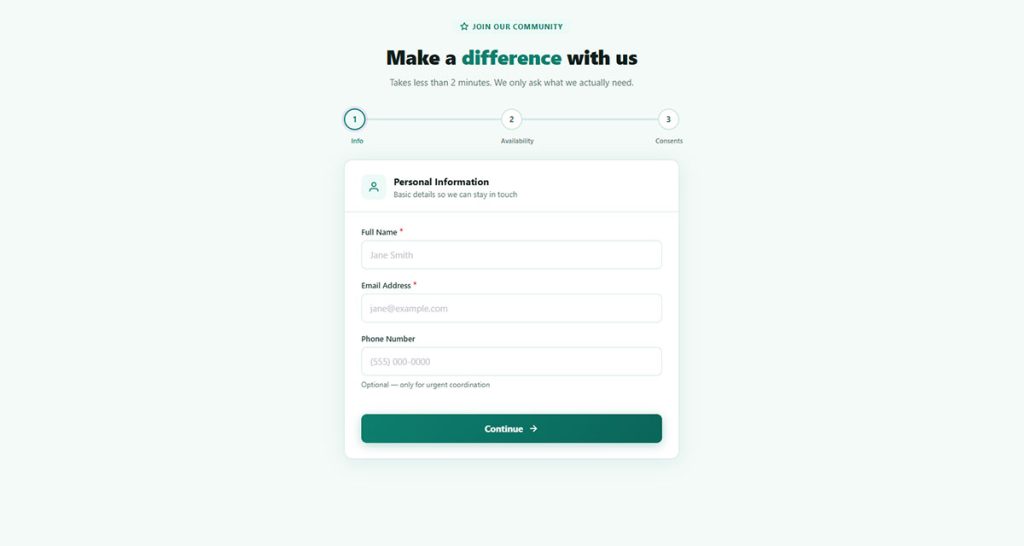
The standard ongoing-program template. Comprehensive, covering all the core field categories: personal info, availability, skills, emergency contacts, background check consent, liability waiver.
Habitat for Humanity, for example, uses a tiered approach – shorter forms for general volunteers, longer vetting forms for crew leaders and site supervisors who need construction certifications and background checks before placement.
One-Time Event Volunteer Sign-Up Form
See the Pen
Volunteer Registration Form – One-Time Event by Bogdan Sandu (@bogdansandu)
on CodePen.
Shorter. Much shorter.
For a single-day event – a 5K, a food bank sort, a park cleanup – you typically only need:
- Name and contact info
- Shift or time slot preference
- T-shirt size (if applicable)
- Emergency contact
- Photo release and liability consent
Anything beyond that adds friction without adding value. More than 67% of people abandon forms permanently if they run into complications (Zuko Analytics). Event forms are where unnecessary fields do the most damage to sign-up rates.
Youth Volunteer Registration Form (with Parental Consent)
See the Pen
Youth Volunteer Registration Form with Parental Consent by Bogdan Sandu (@bogdansandu)
on CodePen.
Any volunteer under 18 requires a separate consent process. The parental consent section is not optional.
Youth-specific additions:
- Date of birth field to confirm minor status
- Parent or guardian name, relationship, and contact number
- Parental signature or digital consent checkbox
- School name and grade (useful for school-required community service tracking)
Conditional logic handles this cleanly – show the parental consent section only when the applicant indicates they are under 18. Jotform and WPForms both support this without custom code.
Medical or Healthcare Volunteer Form
See the Pen
Medical & Healthcare Volunteer Registration Form by Bogdan Sandu (@bogdansandu)
on CodePen.
Additional fields specific to this context:
- Professional licenses or certifications (RN, EMT, CPR)
- Immunization records or confirmation of up-to-date vaccinations
- HIPAA acknowledgment
- Role-specific physical requirements
Healthcare volunteer forms sit closer to employment applications in their depth of screening. Some hospitals require separate credentialing processes beyond the initial registration form.
Use Case Comparison
| Use case | Form length | Key extra fields | Background check |
|---|---|---|---|
| One-time event | Short (5–7 fields) | Shift preference T-shirt size |
No |
| Ongoing nonprofit | Medium (10–15 fields) | Skills Role preference References |
Often yes |
| Youth program | Medium + parental section | DOB Parent / guardian info |
Usually yes |
| Healthcare / hospital | Long (15+ fields) | Licenses Immunizations HIPAA |
Required |
| Animal shelter | Medium (10–12 fields) | Animal handling experience Allergies |
Varies |
How to Customize a Volunteer Registration Form Template
Downloading a template and publishing it unchanged is almost never the right move. At minimum, you need to strip out irrelevant fields and add your organization’s specific requirements.
Here’s how to approach it without over-engineering the form.
Adding and Removing Fields
Start by listing every piece of information your volunteer coordinator actually uses when placing, scheduling, or communicating with a volunteer. If a field doesn’t map to something you do with the data, remove it.
27% of users abandon forms because they’re too long (Convertica/WPForms). Every field you remove is a small improvement to completion rates.
Fields to consider adding based on role:
- Driver’s license number (if volunteers transport clients)
- Food handler certification (food bank or meal prep roles)
- Language proficiency (if you serve non-English-speaking populations)
- References (for roles involving vulnerable adults or children)
Setting Up Conditional Logic
Conditional logic shows or hides fields based on a previous answer. This keeps the form short for most applicants while still capturing extra detail from those who need to provide it.
Common use cases for conditional logic in volunteer forms:
- Show parental consent fields only if applicant selects “under 18”
- Show certification upload field only if applicant selects a role requiring credentials
- Show background check authorization only for roles flagged as requiring one
If you want to understand how this works in practice before building, conditional logic in forms is worth reading through – especially if you’re working in WordPress and haven’t used it before.
Branding and Design
Add your logo, match your organization’s colors, and use your brand fonts if the platform supports it. This isn’t vanity – it builds trust. A form that looks like it belongs to your organization signals legitimacy, especially when you’re asking for sensitive information like background check authorization.
Keep the layout clean. Form UX design consistently shows that single-column layouts outperform multi-column ones – users complete single-column forms about 15 seconds faster on average (FormStory/CXL), and multi-column layouts cause confusion that drives abandonment.
Confirmation Emails and Automated Responses
Set up an automated confirmation email the moment someone submits. Include:
- Confirmation that their registration was received
- Next steps (what to expect, when they’ll hear back)
- Contact info for questions
This is a low-effort step that makes a significant difference in volunteer experience. It also reduces the number of “did my form go through?” emails your coordinator has to field.
For inspiration on what these messages should say, registration confirmation message examples cover both the tone and the structure that works best post-submission.
Online Platforms to Build and Manage Volunteer Registration Forms
The platform you choose affects not just the form itself, but how you manage submissions, communicate with volunteers, and store data long-term. Worth thinking about before you pick the first free option you find.
General Form Builders
These platforms aren’t volunteer-specific, but they’re the most widely used for registration forms because of their flexibility and integrations.
| Platform | Free tier | Best for | Notable feature |
|---|---|---|---|
| Google Forms | Yes (unlimited) | Small orgs, simple forms | Native Google Sheets integration |
| Jotform | Yes (limited) | Nonprofits needing more fields | Nonprofit discount available |
| Typeform | Yes (10 responses/mo) | Conversational, higher completion | Card-style one-question-at-a-time UX |
| Cognito Forms | Yes (1 form, unlimited entries) | Calculation fields, payment forms | Built-in repeating sections |
| Formstack | Trial only | Mid-to-large orgs with integrations | Workflow routing and approvals |
If none of these fully fit what you’re building – or the pricing doesn’t work – it’s worth checking out other platforms similar to Jotform or Typeform alternatives that may better match your budget and features.
Volunteer-Specific Platforms
General form builders handle registration well. But they don’t handle scheduling, hours tracking, role assignment, or volunteer communication – which is where purpose-built platforms come in.
VolunteerHub: covers registration, scheduling, and automated reminders. Built specifically for nonprofits running ongoing programs with large volunteer pools.
SignUpGenius: strong for event-based sign-ups with shift selection built into the form itself. Free tier is functional for smaller events.
Galaxy Digital: adds community engagement features alongside registration – volunteer hours tracking, reporting for grant compliance, and CRM-style volunteer profiles.
Better Impact: used by larger organizations like United Way chapters and hospital systems. More setup involved but significantly more data management capability.
The right choice depends on volume. For under 50 volunteers or a one-time event, a general form builder is fine. Once you’re managing hundreds of active volunteers across multiple programs, purpose-built platforms save meaningful coordinator time.
WordPress-Based Solutions
If your organization runs a WordPress site, building the registration form directly in WordPress keeps everything in one place and avoids data going to a third-party platform.
Plugins like IvyForms have volunteer registration templates and support conditional logic, file uploads, and automated emails.
If you’re on WordPress and want to understand your full range of options before committing to a plugin, the guide on WordPress event registration forms walks through the most common approaches and what each one involves technically.
Volunteer Registration Form Best Practices
See the Pen
Volunteer Registration Form – Multi-Step with Micro-interactions by Bogdan Sandu (@bogdansandu)
on CodePen.
Most volunteer sign-up forms fail for the same reasons: too long, too vague, or built without the volunteer’s experience in mind. The value of a volunteer hour in the U.S. was estimated at $31.80 in 2023 (Independent Sector). That’s worth designing a form that doesn’t lose people halfway through.
57% of website traffic now comes from mobile and tablet devices (M+R Benchmarks 2023). If your volunteer registration form isn’t optimized for mobile, you’re creating friction for more than half your potential sign-ups before they even start.
Keep the Form Short
One rule, no exceptions: only ask for information you will actually use.
Every added field increases the chance of abandonment. 27% of users leave forms because they’re too long (WPForms/Convertica). That’s not a small number to ignore.
- Audit your current form: for each field, name the specific action you take with that data
- If you can’t name one, remove the field
- Use conditional logic to show extra fields only when relevant
For a practical look at sign-up form best practices that apply directly to registration flows, there’s solid guidance on field order, label placement, and CTA copy that translates well to volunteer forms.
Mobile Optimization
Single-column layouts complete about 15.4 seconds faster than multi-column forms (CXL Institute). On mobile, that difference feels even more pronounced.
Mobile-specific requirements for volunteer forms:
- Single-column layout with adequate spacing between fields
- Touch targets at least 44px tall (Apple HIG standard)
- Correct keyboard type per field (numeric for phone, email for email address)
- Autofill support for name, email, and address fields
For a full breakdown of mobile form design best practices, covering touch targets, input types, and progress indicators for longer flows, it’s worth reading before finalizing your form layout.
Privacy Policy and Data Transparency
29% of users abandon online forms due to security concerns (Zuko Analytics). For volunteer forms collecting sensitive data – emergency contacts, medical notes, background check authorization – trust signals matter.
What to include:
- A brief plain-language statement explaining what data is collected and why
- A link to your full privacy policy (not buried in footer text)
- An opt-in checkbox for any marketing communications, kept separate from registration consent
Testing Before Launch
Obvious, but often skipped. Have someone outside your organization complete the form on a phone they’ve never used for this purpose.
Watch for: confusing field labels, unclear required-field indicators, and error messages that don’t explain what went wrong. Form error message examples – with specific language for required fields, invalid formats, and submission failures – can help you write messages that actually help volunteers fix problems instead of giving up.
Also test the confirmation flow. The form submission experience doesn’t end at “submit.” A well-written form submission confirmation message sets the right expectations and reduces follow-up emails to your coordinator.
Form Design and Visual Layout
Clean layout directly affects completion rates. Well-designed forms feel trustworthy; cluttered ones feel like traps.
Design rules worth following:
- Left-align all labels (faster to scan than top-aligned or right-aligned)
- Group related fields visually with whitespace or section headers
- Use clear section headings for multi-part forms (Personal Info, Availability, Consents)
- Avoid dropdown menus where checkboxes or radio buttons would work – dropdowns have the highest abandonment rates of any field type (Zuko Analytics)
For the broader principles behind what makes forms usable and what drives drop-off, web form best practices covers the key design and UX decisions in one place.
Legal and Compliance Considerations for Volunteer Registration Forms
Compliance is not optional, and it’s not just about GDPR. U.S. nonprofits face a growing patchwork of state privacy laws, ADA accessibility requirements, and liability rules that all touch the volunteer registration process.
Less than 2% of nonprofit organizations currently have fully accessible websites (Equalize Digital). Most don’t realize their forms are part of that problem until there’s a legal challenge.
GDPR and Data Privacy for Volunteer Data
GDPR applies to any organization – including U.S.-based nonprofits – that collects personal data from individuals located in the EU/EEA (DataGuard). Volunteer data falls squarely under this.
GDPR requirements that apply directly to volunteer registration forms:
- Lawful basis for processing (usually consent or legitimate interest)
- Clear disclosure of what data is collected and why
- Right to access, correct, or delete data on request
- Data breach notification within 72 hours of discovery
Fines for non-compliance can reach up to 4% of annual global revenue or EUR 20 million, whichever is larger (DataGuard). For a nonprofit with international volunteers or an EU presence, this is not a theoretical risk.
For a practical guide to building GDPR-compliant forms – covering consent checkboxes, privacy notices, and data retention fields – that’s the right starting point before publishing any online registration form.
U.S. State Privacy Laws
As of early 2024, over 25 data privacy bills were under review across 11 U.S. states (HelpYouSponsor). Oregon’s Consumer Privacy Act, effective July 1, 2024, is notable because it does not exempt nonprofits from compliance.
Key state laws to know:
- CCPA (California): applies to some nonprofits meeting revenue or data-volume thresholds
- Oregon OCPA: no nonprofit exemption; full consumer rights apply
- Texas TDPSA: nonprofits exempt, but only if classified as a small business under SBA standards
- Colorado CPA: similar to GDPR in scope, with opt-out rights for consumers
The safest approach: build your volunteer form with GDPR-level data minimization and consent practices, and you’ll meet or exceed most U.S. state requirements by default.
Liability Waivers and Enforceability
A liability waiver is only as good as its language. Generic online templates often lack the jurisdiction-specific phrasing needed to hold up in court.
| Waiver element | Why it matters | Common mistake |
|---|---|---|
| Specific risk description | Courts require clear description of the risks being waived | Vague “any and all risks” language |
| Digital signature or checkbox | Creates legal record of consent with timestamp | No confirmation mechanism at all |
| Jurisdiction clause | Determines which state’s laws govern the agreement | Omitted entirely from template |
| Separate from registration | Bundled consents can be challenged as not freely given | Waiver buried in terms checkbox |
VolunteerMatters recommends having liability waivers reviewed by legal counsel familiar with nonprofit regulations in your jurisdiction before publishing.
ADA Accessibility Compliance for Online Forms
Courts are increasingly treating nonprofit websites as public accommodations under ADA Title III (BOIA). Federal precedent in cases like Robles v. Domino’s Pizza (2019) established that the ADA applies to websites and apps.
The standard to target is WCAG 2.1 Level AA, which is what the DOJ’s April 2024 final rule specified for government websites and is widely cited in legal cases involving private organizations.
For volunteer registration forms specifically, WCAG 2.1 AA means:
- All form fields have visible, associated labels (not just placeholder text)
- Error messages identify the specific field and explain how to fix it
- The form is fully navigable via keyboard without a mouse
- Color contrast between text and background meets a 4.5:1 ratio minimum
Forms are among the most common sources of accessibility failures on nonprofit websites (ArcStone). Running your form through the WAVE accessibility tool before launch takes about five minutes and catches most structural issues.
Parental Consent for Minor Volunteers
GDPR explicitly requires parental consent for processing data from children under the applicable age threshold (13-16 depending on EU member state). U.S. COPPA rules cover under-13 online data collection.
For any volunteer program accepting minors:
- Use conditional logic to trigger the parental consent section when DOB confirms minor status
- Collect parent or guardian name, signature, and contact number as separate required fields
- Store parental consent records separately and retain them for the duration of the volunteer’s involvement
Background check authorization for youth programs should also be handled as a separate consent field, not bundled with general registration terms. Schools and hospital systems running youth volunteer programs routinely treat this as a distinct section requiring a separate acknowledgment.
Background Check Authorization
Background check authorization language has to be specific to be valid. The Fair Credit Reporting Act (FCRA) requires a separate, standalone disclosure for any background check – not buried in general terms.
FCRA-compliant background check consent includes:
- A standalone disclosure form (separate from the registration form itself, per FCRA requirements)
- Explicit statement of what will be checked (criminal history, sex offender registry, driving record)
- Who is conducting the check and how results will be used
- Volunteer’s right to dispute inaccurate results
Organizations like Coeus Global (which handles background screenings for thousands of nonprofits annually) recommend treating background check authorization as a completely separate document from your standard volunteer registration form.
FAQ on Volunteer Registration Form Templates
What is a volunteer registration form template?
A volunteer registration form template is a pre-built form structure organizations use to collect information from people signing up to volunteer.
It covers standard fields like contact details, availability, skills, and consent. You customize it for your program instead of starting from scratch every time.
What fields should a volunteer registration form include?
At minimum: full name, email, phone, availability, skills, emergency contact, and a liability waiver.
Programs involving minors or healthcare settings need extra fields – parental consent, certifications, and background check authorization. Only collect what you’ll actually use.
Are there free volunteer registration form templates available?
Yes. Google Forms, Jotform, Typeform, and WPForms all offer free volunteer sign-up templates.
Free tiers have submission limits and fewer features. For ongoing programs with high volume, a paid plan or a volunteer management platform like VolunteerHub or SignUpGenius makes more sense.
What is the difference between a printable and a digital volunteer form?
Printable forms work for in-person events or low-connectivity environments. Digital forms are better for ongoing programs – they automate confirmations, store data cleanly, and reduce manual entry.
Many organizations use both: online pre-registration plus paper check-in on the day.
How do I customize a volunteer registration form template?
Start by removing fields you won’t use. Add role-specific fields, apply your branding, and set up conditional logic to show or hide sections based on applicant answers.
Finish with an automated confirmation email so volunteers know their submission went through.
Do volunteer registration forms need to be GDPR compliant?
Yes, if you collect data from anyone located in the EU or EEA. GDPR applies to nonprofits regardless of where they’re based.
Your form needs a lawful basis for data collection, a clear privacy notice, and separate opt-in checkboxes for any marketing communications. Fines reach up to 4% of annual global revenue.
What platforms are best for building a volunteer registration form?
Google Forms is the simplest free option. Jotform and Cognito Forms offer more flexibility with conditional logic and file uploads.
For WordPress sites, WPForms and Gravity Forms both have dedicated volunteer registration templates with email automation built in.
How do I reduce drop-off on my volunteer sign-up form?
Keep it short. Nonprofits have a form abandonment rate of nearly 78% – one of the highest across all sectors (WPForms/Zuko).
Remove unnecessary fields, use a single-column layout, make phone number optional, and avoid dropdown menus where checkboxes work just as well.
Can I use conditional logic in a volunteer registration form?
Yes, and you should. Conditional logic shows or hides fields based on previous answers – for example, displaying a parental consent section only when an applicant indicates they’re under 18.
Jotform, Typeform, WPForms, and Gravity Forms all support this without custom code.
What legal considerations apply to volunteer registration forms?
Liability waivers need jurisdiction-specific language to be enforceable. Background check authorization must follow FCRA rules as a standalone disclosure.
For ADA accessibility, target WCAG 2.1 Level AA – all form fields need visible labels, keyboard navigation support, and clear error messages.
Conclusion
This conclusion is for an article presenting volunteer registration form templates as a practical tool – not a formality.
The right online volunteer registration form collects what you need, respects your applicants’ time, and holds up legally.
Whether you’re running a one-time food bank event or managing an ongoing nonprofit volunteer program, the core principles stay the same: keep fields lean, optimize for mobile, and handle data responsibly.
Platforms like Jotform, Google Forms, and SignUpGenius make it easy to get started. Conditional logic, automated confirmation emails, and WCAG-compliant design take it from functional to genuinely good.
A well-built volunteer intake form is often the first impression your organization makes. Make it count.