



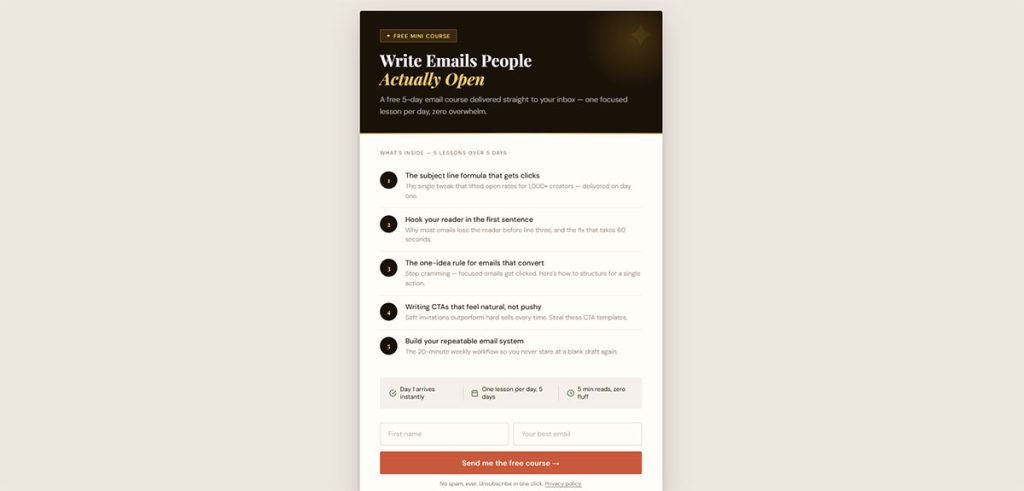





A new client doesn’t sign with an accounting firm because a landing page convinced them. They sign because someone they trust vouched for the firm, or because the firm showed…
Table of contents
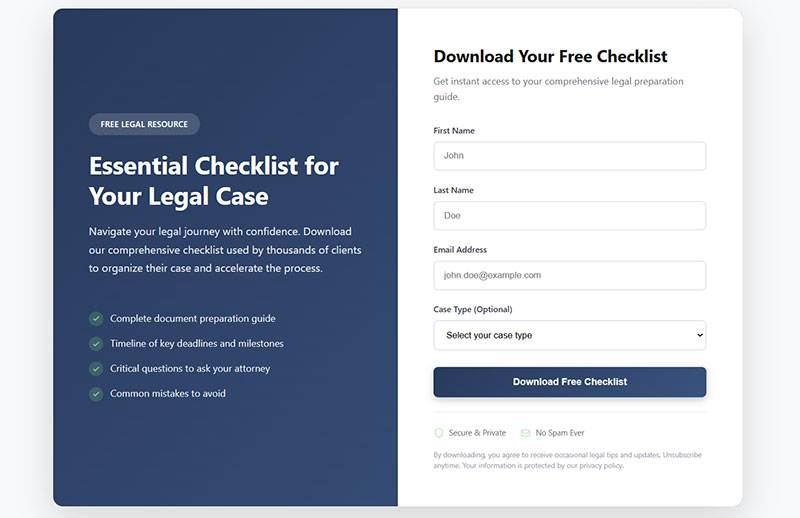
Most readers reach the last paragraph of a post, decide it was useful, and leave. A content upgrade gives them a reason to stay one step longer. It’s a post-specific bonus asset (a checklist, template, cheat sheet, audio version or the held-back items from a list) unlocked with an email address, and the ones worth building save the reader the next step after the post ends.
Bloggers and email marketers add them to high-traffic posts in place of generic newsletter forms, then judge them by opt-in rate.
Backlinko’s 2014 case study is the one people usually cite. It reported a 4.82% opt-in rate on one post after a checklist was added, and 65% of the people who saw the opt-in box subscribed. That is two rates for one upgrade, so a figure means little until you know what it was divided by.
Content upgrade ideas grouped by format
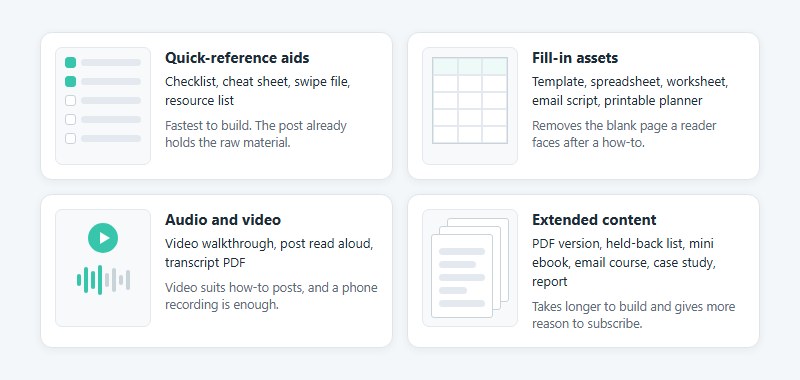
Each upgrade is built for one specific post and offered in exchange for an email address, so the download matches what the reader just finished.
That’s the difference from a standard lead magnet, which offers the same freebie on every page. An upgrade changes from post to post.
Quick-reference aids
These are the fastest wins, because the post already holds the raw material. If I had to pick one to build first, it would be the checklist.
- A checklist turns the post’s steps into tick boxes. OptinMonster recommends it for how-to posts and longer guides.
- OptinMonster built a one-page cheat sheet of key facts for its post on power words.
- Swipe files hold reference examples, such as headlines or ads, for readers who work from inspiration.
- A resource list puts every tool or link the post mentions into a single PDF.
Resource lists suit roundup posts best. OptinMonster’s example is a directory of stock photo sites, where one master list saves readers from opening each link.
Fill-in assets
Readers finish a how-to and then face a blank page. A fill-in asset removes that step.
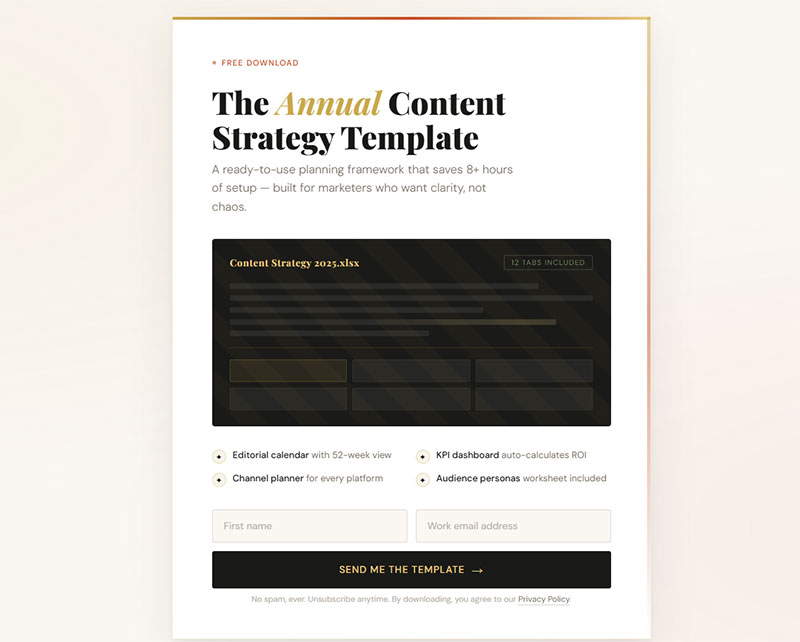
Templates, spreadsheets, worksheets, email scripts and printable planners all work here.
Siege Media attaches a keyword analysis spreadsheet to its SEO for SaaS guide. Ramit Sethi ends a post on contacting VIPs with a word-for-word email script (both examples come from Popup Maker’s 2024 roundup).
Audio and video
Video suits how-to posts best, and a phone recording is enough. Popup Maker’s 2024 advice is that readers care more about the content than the production.
Audio is simply the post read aloud. Medium asks non-subscribers to sign up before its “Listen” option plays, per OptinMonster.
A transcript works too, meaning a PDF of a podcast or interview. SuperFastBusiness gave these away, a case Backlinko described in 2014.
Extended content
The heavier formats take longer to build, and they give the reader more reason to subscribe.
The simplest is a PDF version of the post itself, which RazorSocial offered across several posts (OptinMonster, 2016). Another common pattern is the held-back list. Kim Roach published ten Fiverr gigs in the post and offered the top twenty as the download, according to Backlinko.
- A mini ebook strings a few related posts together, and OptinMonster stresses the word “mini”.
- Michael Simmons promotes an email course at the end of his posts.
- Case studies prove that a method works.
- HubSpot offers its State of Marketing report as an upgrade.
Popup Maker advises keeping the original headline count even after items are held back. I’d be careful with that. It risks a post that feels unfinished, so hold back bonus items and leave the core steps in.
Which content upgrade fits which kind of post?
Every post leaves one job unfinished, and the upgrade should do it. After a how-to, that’s a checklist. After a list, the held-back items. A case study calls for the working template, and a data study for extra findings.
| Post type | Strong upgrade | Why it fits |
|---|---|---|
| How-to guide | Checklist, template, quick start guide | Turns the steps into a reusable tool |
| Listicle | Held-back items, PDF version | Readers who liked the list want the rest |
| Case study | The template or spreadsheet behind the result | Lets readers repeat the method |
| Data study | Bonus findings, raw data, report | Extends the research they just read |
| Comparison or review | Product guide, comparison sheet | Helps the reader make the choice |
Leadpages pairs a study of successful LinkedIn publishing posts with bonus tips for the next post. For ecommerce sites, Backlinko lists a free product guide or a hands-on review.
Deciding when no idea fits the post
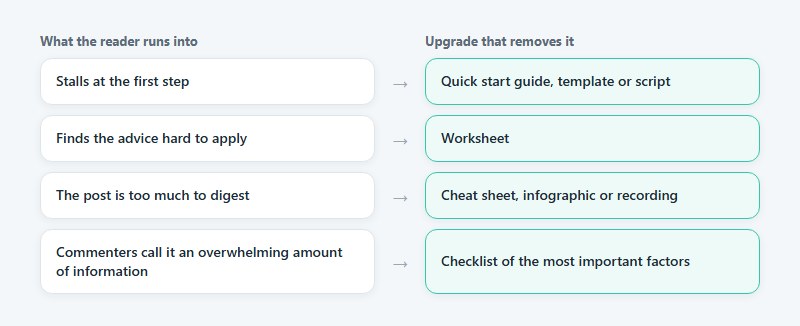
Start with the readers, not the format list. Commenters on Brian Dean’s Google ranking factors post called it an overwhelming amount of information, which pointed straight at a checklist of the most important factors (Backlinko, 2014).
BDOW (formerly Sumo) turns the same habit into questions about the reader’s first step, their biggest obstacle and the risk of information overload. Readers who stall at the first step want a quick start guide, template or script. If something is hard to apply, offer the asset that removes the difficulty, a worksheet for example. And when the post is simply too much to digest, a cheat sheet, infographic or recording does more.
A broad ebook is the usual wrong fit. BDOW warns that a very long one can backfire, since the reader gets no immediate value from it.
Build time and tools for each content upgrade format
Most upgrades take under an hour to build. A case study takes two to four hours, per Popup Maker’s 2024 roundup, and an email course takes three to four.
| Format | Build time | Tool |
|---|---|---|
| PDF version of the post | Under 10 minutes | Google Docs, export as PDF |
| Bonus content | 15 minutes | Google Docs |
| Checklist | 30 minutes | Canva or Checkli |
| Video or audio version | 1 hour | Phone camera, Loom or Snagit |
| Case study | 2 to 4 hours | Google Docs plus Canva |
Canva and Google Docs cover most of these builds, and a wider roundup of lead magnet tools covers the rest.
Resource lists (10 to 20 minutes) and email scripts (30 minutes) sit at the quick end of Popup Maker’s list. Spreadsheets in Google Sheets have no published build time. A Typeform quiz is a bigger project, covered in the guide on how quizzes and interactive forms generate leads.
Who does the building changes the number, too. Popup Maker puts a manual transcript at over an hour, while BDOW (2025) counts under 10 minutes of work once a transcriber is hired.
Checklists show the same gap. Popup Maker lists 30 minutes, yet Backlinko spent five hours writing the checklist behind its best-known case study and then paid a designer, because professional design changes how readers value the file (Backlinko, 2014).
The better trade is polish on a short asset, not extra length. BDOW’s 2025 guide puts quality over size, and ConvertFlow notes that a visual of the download raises its perceived value, pointing to Canva’s ebook cover templates.
Video and email course upgrades carry an upkeep cost, since the asset goes stale when the post changes. BDOW recommends evergreen upgrades for that reason.
What opt-in rates do content upgrades get?
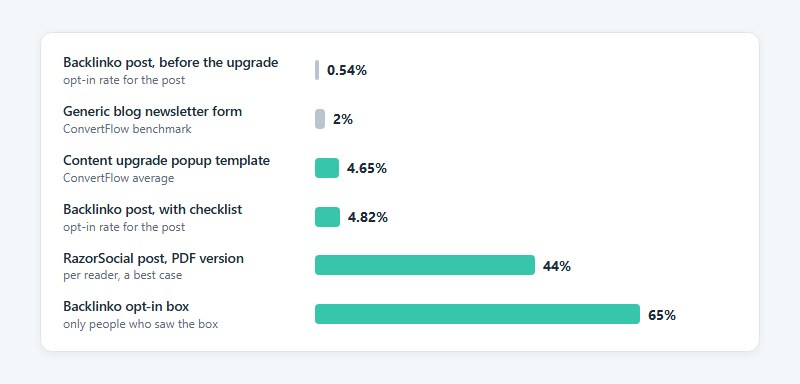
Published rates run from the low single digits for typical setups to above 40% on single posts, and the gap comes mostly from what each source divides by.
- Backlinko’s Google ranking factors post went from a 0.54% opt-in rate to 4.82% after a checklist upgrade, a 785% increase against the previous month (Backlinko, 2014).
- In that same test, 65% of the people who saw the LeadPages opt-in box subscribed.
- ConvertFlow uses 2% as the lead capture benchmark for generic blog newsletter forms.
- Its own content upgrade popup template averages a 4.65% conversion rate.
- RazorSocial’s Social Media Analytics Compass post, which offered a PDF version, reached 44% (OptinMonster case study, 2016).
Backlinko’s 4.82% is a page-level conversion rate for the post. Its 65% starts after the reader has already clicked the offer.
RazorSocial’s case study reports rates per reader without a click-level breakdown. It also states a lower range for upgrades across its other posts, so 44% is a best case, not an average.
Read together, the sources point to something none of them says outright. The dependable gain is a multiple of a site’s own baseline, not a fixed percentage. ConvertFlow explains the low baseline with generic copy, weak relevance and banner fatigue on site-wide forms, and it recommends swapping them for upgrades targeted by content category or article.
Chasing the 44% is the wrong target. No source here publishes a median by format, so the figures show what the technique can reach, not whether a checklist beats a template.
Use industry conversion rate benchmarks as a yardstick for the site-wide forms an upgrade replaces. Judge the upgrade itself against the post’s own earlier rate.
Where to place a content upgrade offer
Put the offer inside the post at the point where the reader decides the post is useful, and repeat it near the end. BDOW (formerly Sumo) recommends offering it at the beginning, middle and end of an article.
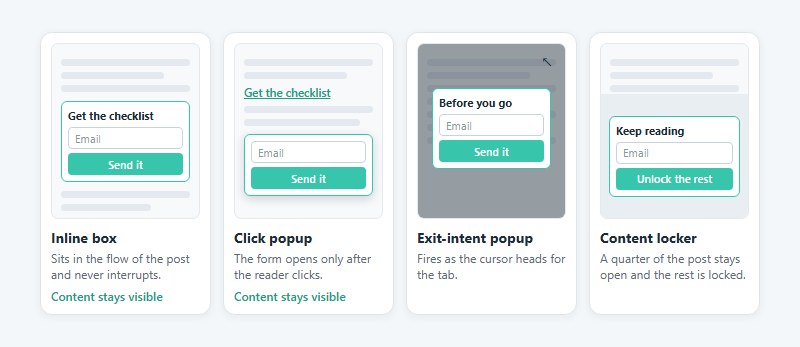
An inline box or text link sits in the flow of the post. Thrive Themes advises placing it where the topic is most relevant, with a visually distinct call to action (2024).
A click-triggered popup opens the email form only after the reader clicks. OptinMonster calls this a 2-step opt-in and credits the Zeigarnik effect, the tendency to finish what you start.
Exit-intent popups fire as the cursor heads for the tab. ConvertFlow’s template defaults to that trigger and can switch to scroll depth or seconds on page.
Then there’s the content locker, which hides part of the post until the reader subscribes. OptinMonster’s example leaves a quarter of the post open and locks the rest.
An inline box never interrupts anyone, but the reader still has to face a form on the page. Popups do interrupt, and the first thing they ask for is one click. The guide to inline forms versus popup forms covers the trade-off in more detail.
Mouse-driven exit-intent forms have no cursor to track on a phone, so OptinMonster lists an inactivity-based trigger as its mobile substitute. Thrive Leads, a WordPress plugin, offers lightbox popups, sticky ribbons, slide-in boxes, screen-filler overlays and scroll mats.
Google’s documentation, last updated December 10, 2025, tells sites not to obscure the entire page with interstitials and to use banners that take up a small part of the screen. It names newsletter sign-up prompts as one use for those banners, and it warns that intrusive dialogs can hurt search performance.
BDOW sees it differently. It calls the slide-in box the least intrusive option and the full-screen Welcome Mat less interruptive because it appears before the reader starts the post, so the two sources judge intrusiveness by different tests, reader experience in BDOW’s case and how much content stays visible in Google’s.
For a post that earns search traffic, start with the inline box and the click popup. Both leave the content visible.
How to deliver the file and start the email sequence
The form submission adds the subscriber. A tag then records which upgrade they asked for, and an automation emails the file and starts the follow-up. The steps below run in that order.
- Build one form per upgrade, so each signup maps to a single post.
- Attach the file, or a link to it, in the form’s delivery settings.
- Choose how the subscriber confirms: double opt-in or auto-confirm.
- Tag the subscriber with the upgrade topic through an automation that starts on form submission.
- Send one welcome email, then a short follow-up sequence on the same topic.
- Test the whole path with a fresh address, including the spam folder and the download link.
Kit (formerly ConvertKit) folds steps two and three together. Its incentive email is the confirmation email and the delivery email at once, and turning that email off also turns double opt-in off (Kit help center, as of November 2026).
ActiveCampaign’s opt-in incentive recipe starts on form submission, though a list join or an applied tag can trigger it instead, and it tags the contact with an interest. Zapier covers form tools without a native connection, with a template that tags new Kit subscribers after a form is filled. A WordPress form can start the same kind of Zap through a Zapier integration with a new entry trigger.
Kit’s default confirmation page cannot be edited, so point confirmations to your own page with a clear confirmation message after the form is submitted. A form’s confirmation settings can redirect to a page or a custom URL.
For the emails that follow, adapt lead nurturing templates to the upgrade’s topic instead of starting from a blank draft.
Double opt-in costs subscribers. Mailchimp reported in October 2017 that completion of double opt-in in its forms had slipped to 39%, so 61% started and did not finish, and its own analysis found the overwhelming majority of them were legitimate people.
Kit takes the opposite default. It recommends double opt-in on all forms and says subscribers who confirm are more likely to keep opening your emails. Delivering the file inside the confirmation email, as Kit’s incentive email does, makes the confirming click and the download one step.
Integrations skip the setting entirely. Mailchimp’s help documentation says email double opt-in works only on its own signup forms, not on form integrations or the API. Imports and API calls were 98% of its subscriptions in 2017, so a form that feeds Mailchimp through a plugin needs its confirmation handled in that plugin. In a WordPress form with a Mailchimp integration, field mapping and smart logic can limit the sync to contacts who opted in.
Spam placement is its own problem. Kit’s troubleshooting guide says the sending address belongs on a custom domain, not a free Gmail or Yahoo address.
Then there are public file links. BDOW’s setup redirects readers to a shared Dropbox link, which works for anyone who has it. Fine for a checklist, wrong for a paid asset.
Tracking whether a content upgrade is working
Divide signups by unique visitors to the post, then compare the result with the same post’s rate before the upgrade went live. Subscriber growth by tag and welcome-email engagement fill in the longer view.
| Metric | Where to read it | What it shows |
|---|---|---|
| Post opt-in rate | GA4 Landing pages report | Whether the offer persuades that post’s readers |
| Subscribers by upgrade tag | Email platform | Which upgrades keep growing the list |
| Welcome email engagement | Email platform | Whether the file attracted the right readers |
| Early unsubscribes | Email platform | A mismatch between offer and follow-up |
If the numbers sit in two dashboards, a form conversion rate calculator handles the division.
In Google Analytics 4, enhanced measurement sends form_start and form_submit events with no code changes, so reports can compare readers who began a form with those who finished it (Google Analytics help, as of November 2026).
Mark form_submit as a key event, GA4’s current name for what it used to call conversions. Standard reports take up to 24 hours to show a new key event and marking one does not rewrite history, so switch it on before the upgrade launches.
The Landing pages report then carries a Key events column per URL, which gives a per-post count without extra tooling. A step-by-step version lives in the guide on how to track form submissions in Google Analytics.
A post that carries both a newsletter form and an upgrade form fires form_submit for either. The form_id parameter separates them, but GA4 reports a parameter only after it is registered as a custom dimension. Form entries that store a Source URL give you a second count per post.
Test one variable at a time, whether that’s the offer, the placement or the format. Judge each change against the post’s own earlier rate, because the same format varies widely between sites. Wishpond reported its PDF version of a post converting at about 5.5% in 2015, far below RazorSocial’s case study for the same format.
Site-wide rates mix every post’s traffic into one denominator, so they cannot judge a single upgrade.
When a content upgrade is the wrong tool
Skip it when the post draws too little traffic to read results, or when the offer just repeats what the post already gives. A generic asset is a reason to skip too. A plain inline newsletter box is the honest fallback in those cases.
- ConvertFlow limits its advice to articles with ample traffic, the top few posts on a blog. A thin post produces too few signups to compare against its earlier rate.
- Thrive Themes warns that trading an email address for a low-quality offer costs trust and leads to unsubscribes. In its view an upgrade should be actionable and relevant, and it should rest on research or expertise.
- Audio versions suit text-led posts. Wishpond notes that recording a post is hard when it depends on visuals, since the listener cannot see the landing page being critiqued.
- Some content is better left open. Wishpond showed Jon Loomer’s article recording ungated and suggested testing both versions (2015).
Whether the file belongs behind a form at all is the first call, and the guide to gated content covers the wider trade-off.
A content locker adds an indexing question. Google’s paywalled-content documentation, last updated September 8, 2026, says sections that require registration should carry isAccessibleForFree set to false and a CSS selector for the locked block, which separates them from cloaking.
That guidance applies only to content you want indexed. If the locked text should stay out of the browser until the reader subscribes, Google advises a paywall that does not send it to the browser at all.
Content Upgrade Ideas FAQ
What is the difference between a content upgrade and a lead magnet?
The upgrade is tied to one specific post, while a lead magnet can be any free asset offered for an email address. Because the upgrade extends what the reader is already reading, it suits a single post.
Can one content upgrade work across several posts?
Yes, when the posts share a topic. Reuse the file but duplicate the form for each post, so every post keeps its own opt-in rate in the Landing pages report.
How many content upgrades should a post have?
One is enough. A second offer splits the reader’s attention and muddies the post’s opt-in rate, because the number then covers two offers.
Should a content upgrade sit behind double opt-in?
Use it when consent rules require proof. Mailchimp advised in 2017 that double opt-in provides additional proof of consent and suggested keeping it for businesses subject to the GDPR.
Elsewhere, auto-confirm removes the extra click and still delivers the file.
Do content upgrades work on videos and webinars?
Yes. Thrive Themes advises ending a webinar or live Q&A with a related upgrade and embedding upgrades in video content (2024). An ebook, an email series or a detailed guide are the formats it names.
Which Post Should Get the First Content Upgrade?
The first content upgrade belongs on the post with the most visitors, built as the quickest asset that fits its topic. Traffic sets how soon a result becomes readable, and build time sets how soon the test starts.
Start with the busiest post and the smallest asset. Use one placement, and read it only after the form has run on real traffic. A second upgrade waits until the first holds a steady rate.
A second upgrade added early changes the post’s baseline while the first is still under measurement, so the two results cannot be separated.
There is a downside. The smallest asset carries the lowest perceived value, so a weak first rate then shows that readers declined that asset, not that the post cannot support an upgrade.
The sequence reflects platform documentation verified on November 3, 2026. A change to GA4 key event handling or to a platform’s default opt-in mode would alter the tracking and delivery steps.