

Gallup’s 2024 data shows only 31% of U.S. employees feel engaged at work. Annual surveys can’t catch that kind of decline fast enough. Pulse surveys can. These short, frequent questionnaires…
Table of Contents
Most buttons on the internet get ignored. The copy is vague, the placement is off, and the visitor leaves without doing anything.
The difference between a page that converts at 2% and one that converts at 8% often comes down to one thing: the call to action.
This article breaks down real call to action examples from brands like Netflix, Shopify, HubSpot, and Airbnb, across websites, emails, landing pages, social media, and e-commerce. Each example includes what the CTA says, where it sits on the page, and why it works based on conversion rate data and A/B testing patterns.
No filler. Just specific CTA examples you can study and apply today.
What Is a Call to Action
A call to action is a specific prompt on a webpage, email, or ad that tells the visitor exactly what to do next. Click a button, fill out a form, start a free trial.
That’s the whole point. Every CTA exists to move someone from passive reading to active doing.
You’ll find them as buttons, text links, banner graphics, and popup forms across landing pages, homepages, product pages, and email campaigns. The format changes, but the function stays the same: reduce hesitation and push toward one clear next step.
A “Sign Up Free” button on Spotify’s homepage is a call to action. So is the “Add to Cart” button on Amazon. So is a simple “Learn More” link at the bottom of a blog post.
Without a CTA, a page is just information sitting there. The visitor reads, maybe nods, then leaves. The call to action turns that moment into a conversion, whether that’s a sale, a signup, a download, or a booked demo.
How Does a Call to Action Work in Marketing
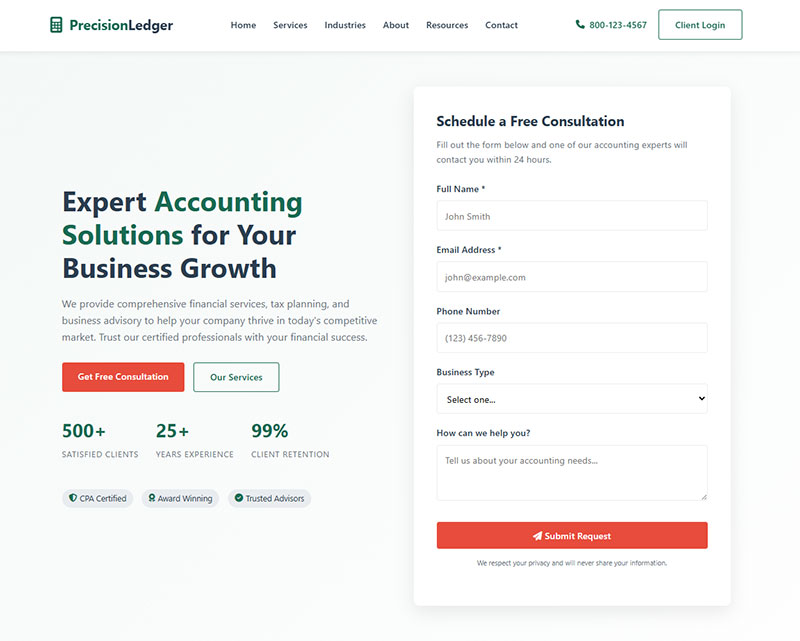
A call to action works by giving the visitor a single, specific instruction at the right moment in their buyer journey. That’s it.
Timing and clarity do most of the heavy lifting.
Someone landing on your page from a Google Ads campaign has different intent than someone reading a blog post. The CTA has to match where they are in the conversion funnel.
Top of funnel? “Download the Free Guide” works because the visitor is still researching. They’re not ready to buy. A “Buy Now” button here would feel aggressive and out of place. Research from VWO shows B2C funnels at this stage typically convert between 1-3%.
Middle of funnel? “Start Your Free Trial” or “Request a Demo” fits better. The person already knows what you do. They need a low-risk way to experience it. Data from multiple B2B studies shows middle funnel conversions averaging 10-15%.
Bottom of funnel? “Get Started for Free” or “Add to Cart” closes the deal. Hesitation is the enemy here, so the CTA copy needs to reduce friction. Bottom funnel conversions hit 20-30% when executed correctly.
The psychology behind this isn’t complicated. People scan pages fast.
According to HubSpot research, personalized CTAs convert 202% better than generic ones. The click-through rate jumps when the button text speaks directly to what the visitor actually wants.
A/B testing is how you figure out what works for your audience specifically.
Changing a single word in the CTA copy, adjusting button color, or moving the placement from below the fold to above it can shift conversion rate benchmarks significantly.
Research from Sender shows brands that A/B test CTAs consistently see about 28% better results. Testing reveals patterns you’d never guess otherwise.
A meta-analysis of 2,732 A/B tests found that tests focusing on a single variable provided more reliable insights than those testing multiple elements at once. Clear Within increased their add-to-cart rate by 80% by testing CTA placement and button contrast separately.
Key testing priorities:
- CTA placement (above fold vs. inline). Data shows CTAs above the fold outperform those below by 304%
- Button vs. text links. Unbounce found switching from text links to buttons leads to a 45% boost in clicks
- Action words vs. passive language. WordStream reports action verbs like “Get,” “Download,” and “Try” improve performance by up to 20%
- Color contrast. Studies show red CTAs beat green by 21% in some contexts, while blue buttons win 31% of all A/B tests
Platforms like Optimizely, Google Optimize, and VWO let you run these tests without touching code.
But the principle is older than any tool. Direct response marketers have been testing action-oriented language in mail-order catalogs since the 1960s.
The CTA connects your content to your business goal.
Blog post to email list. Landing page to free trial. Product page to checkout.
Each click is a micro conversion that moves the relationship forward.
Research from Wiser Notify shows using a specific, clear CTA can increase conversion rates by 161%. Centered CTAs receive 682% more clicks compared to left-aligned ones. And reducing multiple CTAs to a single, focused CTA increased conversion rates by 266%.
The average click-through rate for CTAs sits at 4.23%. But top performers hit much higher. Email newsletters with just one CTA see a 371% engagement boost and 1616% improvement in sales compared to emails with multiple CTAs.
The data is clear: one focused action beats five scattered options every time.
What Are the Types of Call to Action
CTAs fall into distinct categories based on what they ask the visitor to do. Each type serves a different stage of the buyer journey and a different business goal.
The five main types are direct purchase, lead generation, subscription, social sharing, and event registration.
Research from HubSpot shows personalized CTAs convert 202% better than generic versions. The average click-through rate across all CTA types sits at 4.23%, according to VYE data from 2025.
What Is a Direct Purchase CTA
See the Pen
Direct Purchase CTA Buttons – 8 Variations by Bogdan Sandu (@bogdansandu)
on CodePen.
A direct purchase CTA asks the visitor to buy something right now.
“Add to Cart,” “Buy Now,” “Shop the Sale,” “Claim Your Spot.” Amazon, Shopify stores, and most e-commerce sites rely on these at the bottom of the funnel. The visitor already decided; the button just removes the last barrier before checkout optimization kicks in.
Wisernotify data shows placing the CTA button at the end of product pages increases conversions by 70%. The global average e-commerce conversion rate hovers between 2% and 4%, with desktop converting 1.7 times higher than mobile.
Quick wins:
- Position buy buttons at page bottom where purchase intent peaks
- Add urgency language (limited-time offers boost conversions by 332%, according to Wisernotify analysis)
- Test button colors (red CTAs beat green by 21% in A/B tests)
What Is a Lead Generation CTA
See the Pen
Premium Lead Generation CTA Buttons by Bogdan Sandu (@bogdansandu)
on CodePen.
A lead generation CTA trades something valuable for contact information.
“Download the Free Guide,” “Get Your Copy,” “Book a Call.” The visitor fills out a lead generation form and gets a PDF, webinar access, or consultation in return. HubSpot, Unbounce, and most B2B SaaS companies use this approach because their sales cycle is longer than a single visit.
B2B website conversion rates average 1.8% (compared to 2.1% for B2C), with landing pages converting at 5-15% when properly optimized. According to Martal Group research, the average cost per B2B lead is $200.
Pairing the CTA with a strong lead magnet (a checklist, template, or free tool) makes the exchange feel worth it. Subscription forms with fewer form fields (name and email only) consistently outperform longer ones.
Implementation checklist:
- Limit form fields to 5 or fewer (doubles conversion rates per Cobloom research)
- Place one clear CTA above the fold
- Include specific value (“Get the 2025 Playbook” beats “Download Now”)
Forms with 5 or fewer fields convert 120% better than longer forms. Data from Unbounce’s Q4 2024 analysis of 41,000 landing pages shows median conversion rates of 6.6% across industries, with financial services leading at 8.4%.
What Is a Subscription CTA
See the Pen
Startup Subscription CTA Buttons by Bogdan Sandu (@bogdansandu)
on CodePen.
A subscription CTA asks the visitor to join something ongoing.
“Subscribe Now,” “Join for Free,” “Sign Up Free.” Netflix, Spotify, and Duolingo all use this model.
The value proposition has to be clear in the button text itself or directly above it. Email marketing newsletters with a single CTA generate 371% higher engagement and 1,616% more sales compared to multiple CTAs, according to WordStream data.
Forms that reduce friction see the biggest gains. Baymard Institute research found 22% of customers abandon purchases because checkout is too long or complicated.
Email subscription tactics:
- Use one CTA per email (43% of marketers report this works best)
- Email traffic converts at 19.3%, nearly double paid search performance
- Write CTAs in first-person (“Start My Free Trial” lifts clicks by 90%)
What Is a Social Sharing CTA
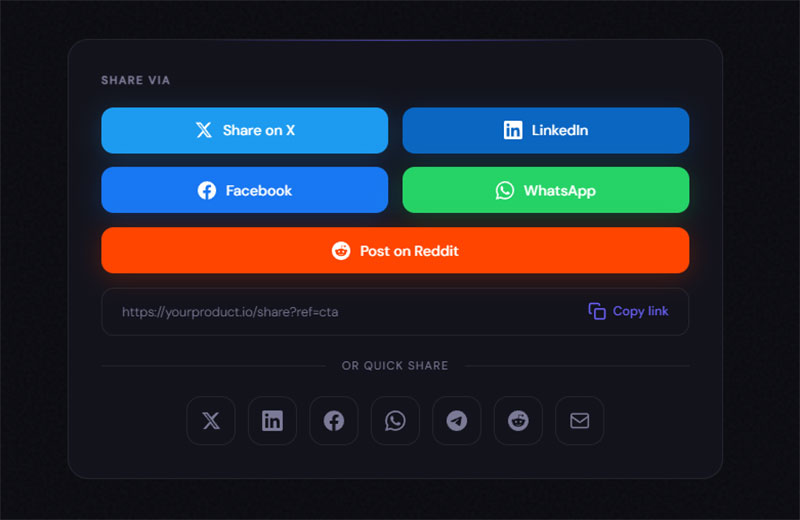
A social sharing CTA asks the visitor to spread your content.
“Share on LinkedIn,” “Tweet This,” “Pin It.” These appear on blog posts, infographics, and video content.
The click-through rate on social sharing CTAs tends to be lower than other types, but the reach compounds. Canva puts share buttons directly inside their design editor, which is smart because the user just finished creating something they’re proud of.
Customers are 16 times more likely to share news about their purchase on social media when a CTA on the post-purchase page prompts them, per HubSpot research. One e-commerce business saw a 20% increase in web traffic after adding social sharing buttons to promotional emails.
Social sharing optimization:
- Place share CTAs immediately after purchase or content creation
- Social media traffic typically converts under 1% (lowest of all channels)
- Focus on platforms where your audience actually engages
What Is an Event Registration CTA
See the Pen
Event Registration CTA Button Kit by Bogdan Sandu (@bogdansandu)
on CodePen.
An event registration CTA drives signups for webinars, conferences, workshops, or live demos.
“Register Now,” “Save Your Seat,” “Claim Your Spot.” Urgency trigger phrases like “Only 50 Spots Left” or “Limited Time Offer” increase conversion rates on these.
Leads from webinar registrations are 16% more likely to make a buying decision, and CTA conversions per webinar increased 24% year-over-year according to Snov.io data. The average B2B lead-to-opportunity conversion rate is 10%, meaning you need 10 times more raw leads than opportunities.
Webinar registration forms that include the date, time, and a one-sentence description directly above the CTA button reduce friction because the visitor doesn’t have to scroll back up to confirm what they’re signing up for.
Event CTA framework:
| Element | Benchmark | Action |
|---|---|---|
| Registration form fields | 5 or fewer doubles conversions | Remove non-essential fields |
| Urgency language | 332% lift with scarcity | Add “Limited spots” or countdown |
| Event details placement | Above CTA reduces friction | Show date/time/format clearly |
| Follow-up speed | 21x more likely to qualify within 5 minutes | Auto-confirm + calendar invite |
Research from Harvard (confirmed in 2024 HubSpot data) shows responding to leads within 5 minutes makes them 21 times more likely to qualify versus waiting 30 minutes.
CTA performance tracking:
Track these metrics weekly to spot what’s working:
- Click-through rate (4.23% average across all CTAs)
- Conversion rate by type (direct purchase 2-4%, lead gen 5-15%, subscription varies)
- Source performance (email 19.3%, organic search 2.6%, social under 1%)
- Device split (desktop 1.7x better than mobile for most industries)
Protocol80 research shows landing page CTAs increase web conversions by 79%. Button-shaped CTAs outperform text links by 45%, and centered CTAs receive 682% more clicks than left-aligned versions.
What Makes a Call to Action Effective
An effective CTA combines clear copy, strong visual contrast, and smart placement. Those three things carry about 80% of the performance. Everything else is optimization at the margins.
Copy That Converts
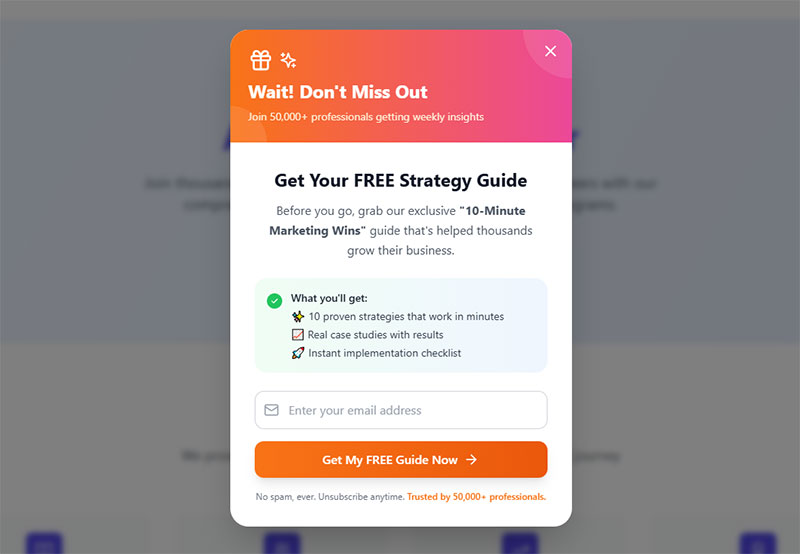
Action verbs come first. “Get,” “Start,” “Try,” “Download,” “Join,” “Book.”
Weak verbs like “Submit” or “Click Here” consistently underperform in A/B tests run by Unbounce and WordStream. Action-oriented language can increase conversions by 121% compared to passive wording, according to Persuasion Nation research.
First-person CTA copy (“Start My Free Trial”) beats second-person (“Start Your Free Trial”) by around 90%. Research from Sender.net shows that first-person phrasing creates a sense of ownership and agency, making users feel more in control of their decision.
Keep it under 5 words when possible. “Get Started for Free” is four words and says everything. “Sign Up Today to Get Access to Our Exclusive Platform” is exhausting and vague.
Quick implementation:
- Test “Get My Free Guide” vs. “Download Your Guide” (first-person typically wins)
- Replace passive CTAs like “Learn More” with “Show Me How” or “Get Started”
- Limit button text to 3-5 words maximum
Research from PartnerStack showed a 111.55% increase in conversion rate when they changed CTA copy from “Book A Demo” to “Get Started.” Using specific, clear CTAs can increase conversion rates by 161%, according to Wisernotify data from 2025.
Button Design and Color Psychology
The button has to visually pop against its background. That’s a contrast ratio issue, not a “best color” issue.
Orange buttons don’t magically convert better. A bright orange button on an orange page is invisible. CXL research confirms that what matters is contrast, not the color itself. Button color changes can boost conversions by 21% when the change improves contrast, per Whitehat research.
Adobe found high-contrast buttons improve CTA visibility by 50%, leading to better response rates. WCAG 2.2 compliance requires a 4.5:1 contrast ratio for text. Blue buttons won in 31% of 2,588 A/B tests analyzed, making it the most consistent performer, but context determines effectiveness.
Color selection tactics:
- Use complementary colors (opposite on color wheel) for 35%+ sales lift per OptinMonster
- Red CTAs can lift conversions by 34% on minimalist designs (creates urgency)
- Green works for “safe” actions like free trials or subscriptions
- Reserve your brand’s accent color exclusively for primary CTAs
Orange and red buttons increase clicks by 32-40% on mobile and high-conversion landing pages, according to Amra and Elma analysis.
Whitespace around the CTA button matters more than most people think.
Crazy Egg and Hotjar heatmap data consistently show that buttons surrounded by clutter get fewer clicks, even when the copy is strong. Good form design principles apply here too: give the button room to breathe.
Placement and Page Layout

Above the fold still matters, especially on landing pages. CTAs placed above the fold outperform those below by 304%, according to Wisernotify research. Nielsen Norman Group data shows CTAs in the top visible section receive 84% more interaction.
Above-the-fold CTAs have a 73% visibility rate versus 44% for below-the-fold placement, per Webdesigner Depot analysis.
But “above the fold” in 2025 doesn’t mean what it meant in 2015. Screen sizes vary wildly. Studies show 91-100% of people scroll beyond the fold, so a single CTA at the top may be too early for action.
The better rule: place the CTA where the visitor has enough information to act.
On a simple offer page, that’s the hero section. On a longer sales page, you might need one CTA at the top, one mid-page, and one at the bottom.
Michael Aagaard’s test placing CTAs at the bottom of long landing pages improved conversion rates by 304%. Placing CTAs at the end of product pages increases conversions by 70%, per Wisernotify data.
Strategic placement guide:
| Page Type | Primary CTA Location | Secondary CTA | Performance Lift |
|---|---|---|---|
| Landing page | Above fold (hero) | Bottom of page | 304% vs. below fold only |
| Product page | End of page | Sticky header | 70% increase |
| Blog post | Mid-content inline | End of article | 121% vs. sidebar |
| Long-form sales | Hero + mid-page + bottom | Sticky button | 27% with sticky CTA |
Centered CTAs receive 682% more clicks than left-aligned versions. Inline CTAs perform 121% better than sidebar CTAs.
Sticky header buttons and exit intent popups serve as safety nets for visitors who scroll past the primary CTA. They work, but overusing them feels desperate. Sticky CTAs increase conversions by 27%, according to Crazy Egg research. Exit-intent CTAs recover 10-15% of abandoning visitors per OptinMonster data.
Value Proposition Near the CTA
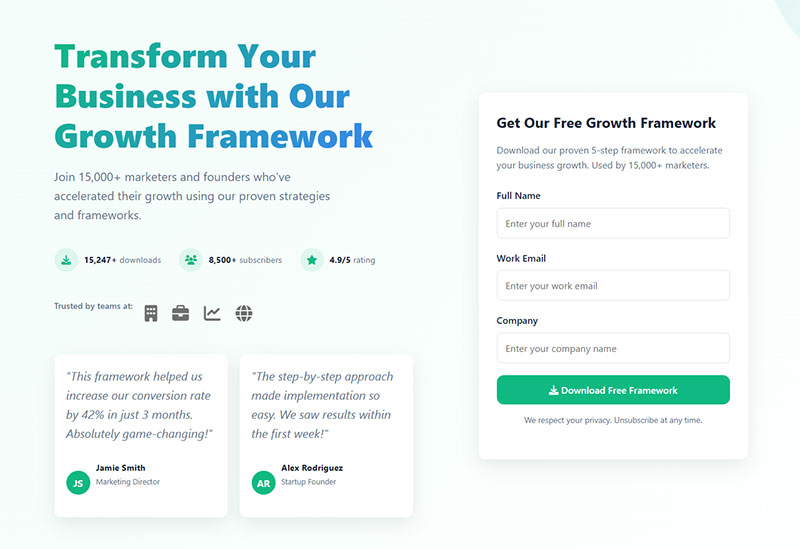
The text directly above or below the button is almost as important as the button itself.
“No credit card required” near a free trial CTA removes a specific fear. “Cancel anytime” removes another. Every decision-stage CTA should include “doubt removers” positioned directly near the button, according to Whitehat research on B2B buyer behavior.
Social proof placed near the CTA (a testimonial, a user count, a trust badge) reduces perceived risk. Basecamp does this well, showing the number of signups from the previous week right next to the “Try it Free” button.
CTA placement after testimonials increases trust and conversions by 25%, per Crazy Egg A/B testing. Adding customer testimonials boosts landing page conversions by 14%, while trust badges increase conversions by 7-12%.
Including customer reviews and social proof strengthens CTAs. Customers are 16 times more likely to share their purchase on social media when prompted by a post-purchase CTA, according to HubSpot research.
Testing protocol:
Test these elements in this priority order (based on average lift):
- CTA copy and action verbs (12% average lift per Marketing LTB)
- Button color for contrast improvement (6% average lift)
- Placement optimization (18-40% lift for layout redesigns)
- Whitespace and visual hierarchy (14% lift with heatmap optimization)
Companies that run 10+ tests per month grow 2.1 times faster. HubSpot reports marketers who consistently test CTAs see a 28% lift in conversion performance.
Single CTAs convert 266% better than pages with multiple competing CTAs, according to Wisernotify research. Landing pages with one CTA convert 32% better than those with 2+ CTAs.
The average website conversion rate is 2.4%, but with a well-crafted CTA, it can reach 11.5% or higher per WordStream data. Full-page popups achieve the highest conversion rates: content downloads at 13.6%, offers at 12.1%, and account signups at 11.5%.
What Are the Best Call to Action Examples for Websites
The examples below are selected based on four criteria: clarity of the CTA copy, visual contrast and button design, placement within the page layout, and documented or estimated impact on conversion rates.
Each one does something specific and does it well.
What CTA Does Netflix Use
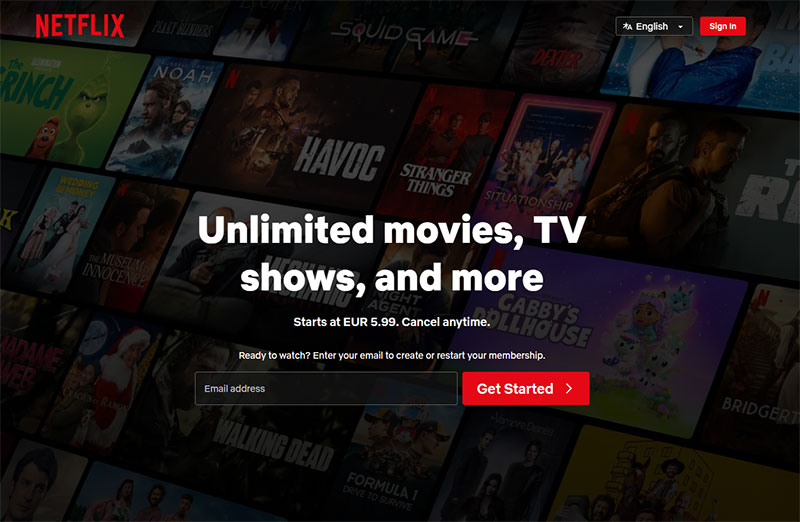
“Get Started” paired with an email input field against a dark background.
The value proposition sits right above: pricing and the cancel-anytime promise. Zero friction. The entire hero section has one job and the CTA gets 100% of the visual attention.
Digital media and entertainment subscriptions (Netflix’s category) convert at 43.3%, the highest among subscription verticals according to Recurly’s 2022 research. By November 2024, Netflix’s ad-supported tier reached 70 million monthly active users, with 45% of total household viewing hours on this tier.
Why it works:
- Single email field reduces friction (strong signup forms convert between 1.95% to 5%+ per Omnisend data)
- “No credit card required” messaging removes barrier
- Dark background creates high contrast for CTA visibility
What CTA Does Spotify Use
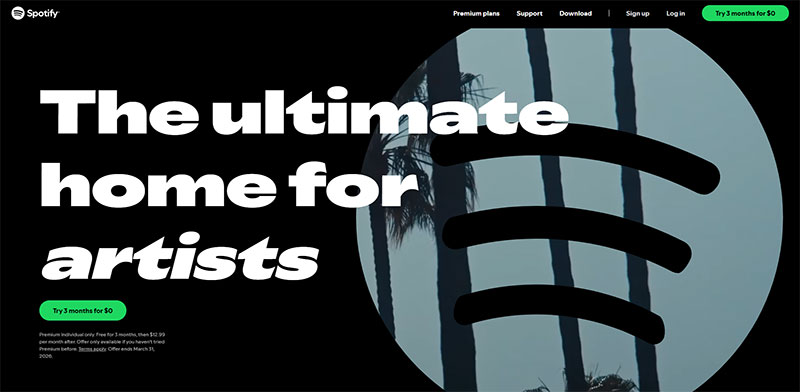
“Try 3 months for $0” in a high-contrast button, usually green on dark.
Spotify runs both a free tier CTA and a premium CTA side by side, letting the visitor self-select. Smart because it captures both tiers of intent without forcing anyone into the higher commitment first.
Offering dual CTAs for free and paid tiers reduces decision paralysis while accommodating different user intents. SaaS signup rates average 3-7%, with freemium models typically converting 2-5% according to Slocum Studio research.
Dual CTA strategy:
- Freemium CTA captures price-sensitive users
- Premium CTA targets users ready to commit
- Self-selection eliminates pressure, increases overall conversion
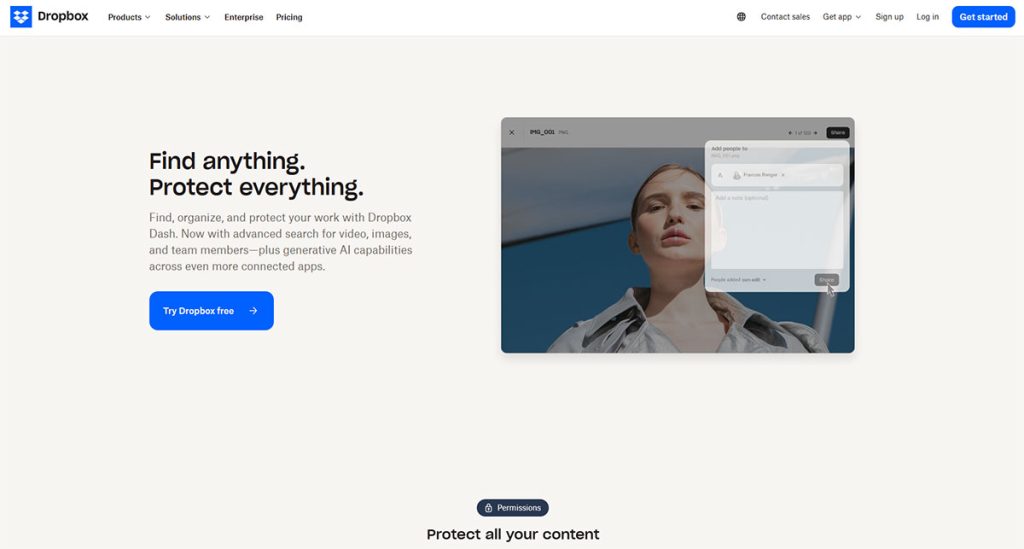
What CTA Does Dropbox Use
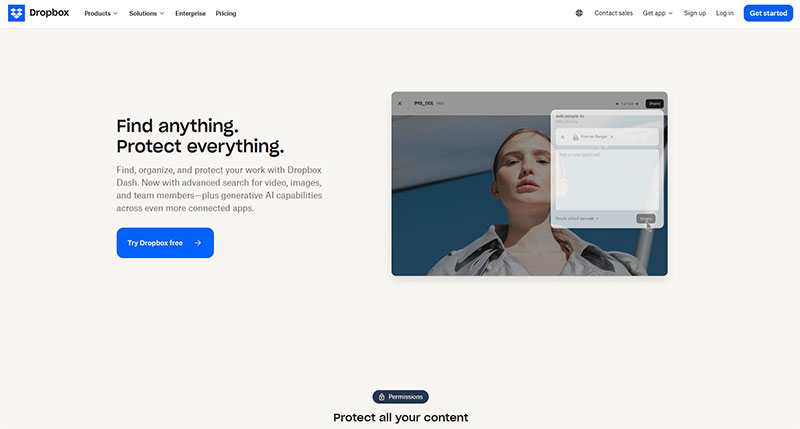
“Try Dropbox Free” with a clean, minimal page.
Dropbox strips away almost everything except the headline, a short description, and the button. That kind of disciplined landing page form approach works because the brand is already well known. New visitors don’t need a paragraph of convincing.
Landing pages with single CTAs convert 32% better than those with 2+ CTAs, according to Marketing LTB research. Minimalist design reduces decision fatigue and focuses attention on the primary action.
Minimalist approach:
- Single clear CTA (266% better conversion vs. multiple CTAs)
- Well-known brand reduces need for extensive copy
- “30 days” specific timeframe sets clear expectations
7-day trials convert around 40.4%, while trials longer than 61 days drop to 30.6% per Amra and Elma analysis. 30-day trials strike a balance.
What CTA Does Slack Use
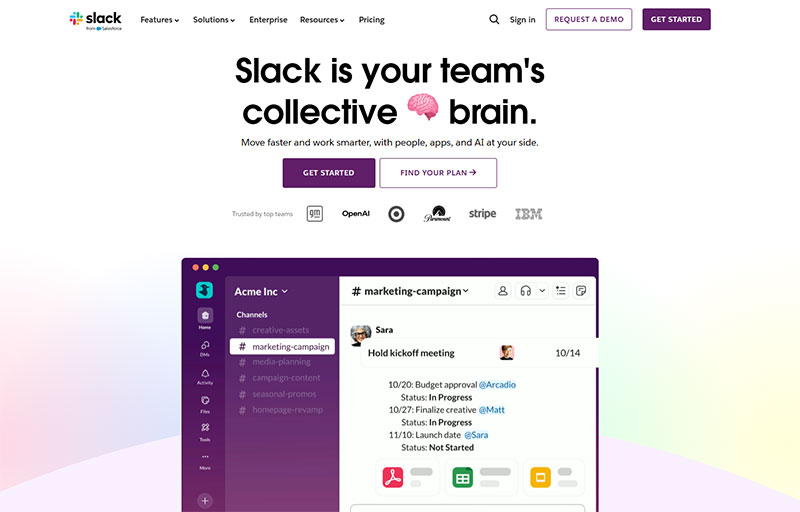
“Get Started” built right into the hero.
No separate sign up form page needed. The visitor types their email and clicks, all in one step. Reducing click count is one of the fastest ways to boost conversion rate, and Slack figured that out early.
Only 2-5% of SaaS website visitors convert into trial signups according to free trial statistics from 2025. Embedding the email field directly in the hero eliminates one full page from the funnel.
Friction reduction tactics:
- Inline email capture (no extra page load)
- “Free” removes cost barrier
- Action verb “Get Started” (increases conversions by 121% vs. passive language)
DocuSign saw a 35% boost in mobile conversion rates by simplifying their signup process, proving friction reduction works.
What CTA Does Shopify Use
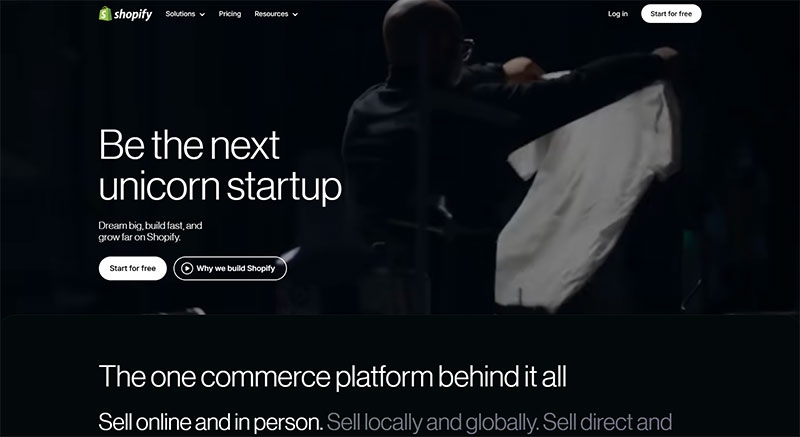
“Start For Free” with the subtext “No credit card required.”
Shopify’s landing pages are built to convert cold traffic from Google Ads and Facebook Ads Manager, so every element above the fold supports the CTA. The button text changes in A/B tests regularly, but the “free trial + no credit card” combination has been the anchor for years.
Since October 2024, Shopify offers a 3-day free trial (no credit card) followed by $1/month for 3 months. This low-barrier entry reduces signup friction significantly.
Trust-building elements:
- “No credit card required” removes primary objection
- “Free” appears in CTA copy
- Low-risk trial period (3 days to test)
- Extended $1 period gives 93 days total for minimal cost
Highrise changed their CTA from “Sign up for free trial” to “See plans and pricing” and saw a 200% increase in trial signups by increasing transparency.
What CTA Does HubSpot Use
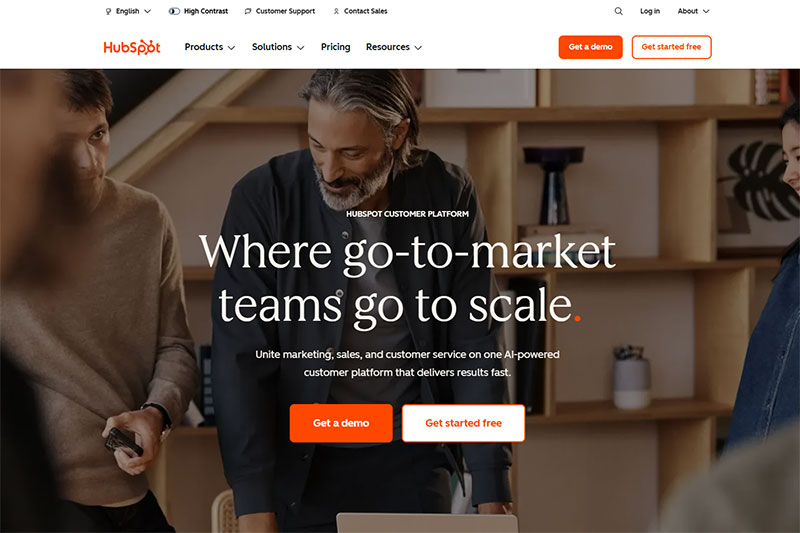
HubSpot runs multiple CTAs depending on the page.
Blog posts use “Download the Free Guide” (a classic lead generation play), while the product pages use “Get Started Free.” The contact form on their sales page keeps fields minimal. What HubSpot does better than most: the CTA copy always matches the specific content on that page, not a generic sitewide button.
HubSpot’s analysis of 330,000+ CTAs found personalized CTAs convert 202% better than generic defaults. Matching CTA copy to page context is a form of contextualization.
Context-matched strategy:
- Blog CTAs: “Download Free Guide” (lead generation focus)
- Product pages: “Get Started Free” (trial signup focus)
- Sales pages: Minimal contact forms (5 or fewer fields double conversion)
Forms with 5 or fewer fields convert 120% better than longer forms per Cobloom research.
What CTA Does Evernote Use
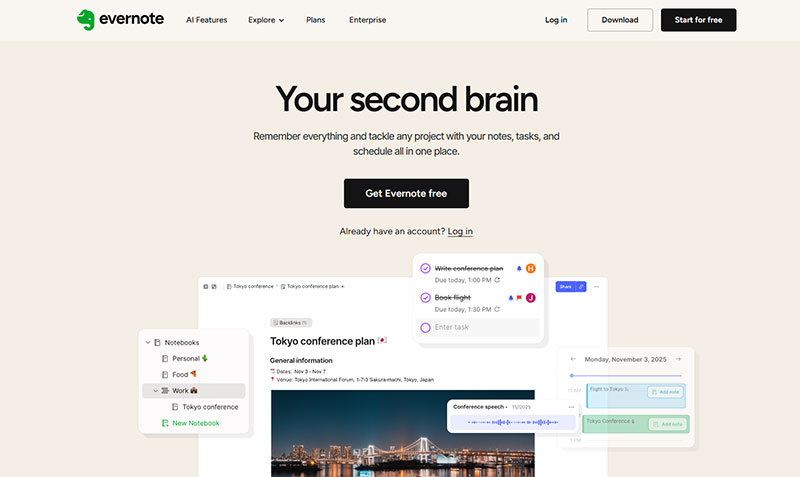
“Get Evernote Free” with a comparison table of free vs. paid features directly below.
Evernote lets the CTA work with the pricing table to do the convincing. The visitor sees what they get for free, what they’d get by upgrading, and makes the decision right there. No separate pages, no extra clicks.
Transparency-driven conversion:
- Pricing table shows value comparison immediately
- Free tier removes barrier to entry
- Upgrade path visible (freemium to paid)
- Decision can be made on single page
SaaS free trial to paid conversions vary by industry: Healthcare SaaS achieves 21.5%, IoT 25.2%, CRM 29.0% according to landing page research.
Implementation framework for effective CTAs:
| Brand | Primary CTA Strategy | Key Stat | Conversion Driver |
|---|---|---|---|
| Netflix | Email capture + value prop | 43.3% subscription conversion | Single field, high contrast |
| Spotify | Dual tier (free + paid) | 3-7% SaaS signup average | Self-selection reduces pressure |
| Dropbox | Minimalist single CTA | 32% lift vs. multi-CTA | Known brand needs less copy |
| Slack | Inline email field | 2-5% visitor-to-signup | Eliminates extra page |
| Shopify | No credit card required | 200% lift with transparency | Removes primary objection |
| HubSpot | Context-matched copy | 202% personalized lift | Page-specific messaging |
| Airbnb | Search as CTA | 9.3% top popup conversion | Matches exploration intent |
| Evernote | Pricing transparency | 21-29% trial-to-paid | Immediate value comparison |
Testing priorities based on these examples:
Test value-adding copy like “No credit card” or “Cancel anytime” near CTAs (these “doubt removers” are standard in high-converting decision-stage CTAs per Whitehat research).
Simplify forms to 5 or fewer fields. Email signup forms average 1.95-5% conversion, with best practices pushing performance above average per Omnisend data.
Use action verbs. CTAs with words like “Get,” “Start,” “Try” increase conversions up to 20% according to WordStream.
Consider dual CTAs for different user segments (but keep total CTAs minimal). Pages with single CTAs convert 266% better than multi-CTA pages, but strategic dual options for clearly different intents can work.
Match CTA copy to page context and user intent. Generic “Submit” or “Click Here” consistently underperform in tests.
FAQ on Call to Action Buttons
What is a call to action in marketing?
A call to action is a prompt on a webpage, email, or ad that tells the visitor what to do next. Common formats include buttons, text links, and banner ad copy. Every CTA drives one specific conversion goal, whether that’s a purchase, signup, or download.
What are good call to action phrases?
“Get Started Free,” “Start Your Free Trial,” “Download the Guide,” and “Book a Call” consistently perform well in A/B tests. Strong action verbs like get, start, try, and join outperform passive words like submit or click here.
Where is the best place to put a CTA on a webpage?
Above the fold in the hero section works best for landing pages. Longer pages benefit from multiple placements: top, mid-page, and bottom. Hotjar and Crazy Egg heatmap click analysis data confirms that buttons surrounded by whitespace get more clicks.
How many CTAs should a page have?
One primary CTA per page keeps the visitor focused. Secondary CTAs can exist, but they should support the main goal, not compete with it. Shopify and Dropbox both use single-CTA landing pages with strong results.
What makes a CTA button convert better?
High contrast against the page background, clear action-oriented language, and enough whitespace around the button. First-person copy like “Start My Free Trial” often outperforms second-person alternatives by significant margins in multivariate testing.
What is the difference between a CTA button and a CTA link?
A CTA button is a styled, clickable element designed to stand out visually. A CTA link is inline text, usually underlined. Buttons typically get higher click-through rates on landing pages, while text links work better inside blog posts and emails.
How do I A/B test a call to action?
Change one variable at a time: button color, copy, size, or placement. Tools like Optimizely, Google Optimize, and VWO run these tests without code changes. Even small copy tweaks can shift conversion rates by double digits.
What are call to action examples for emails?
Grammarly uses “Check My Text,” Duolingo sends “Practice Now,” and Canva prompts “Start Designing.” Effective email CTAs are short, specific, and placed after a clear value statement. Button-style CTAs outperform plain text links in most email campaigns.
Do personalized CTAs perform better than generic ones?
Yes. HubSpot research shows personalized CTAs convert 202% better than default versions. Dynamic text replacement based on visitor behavior, location, or traffic source makes the CTA feel relevant instead of generic.
What CTA mistakes hurt conversion rates the most?
Vague copy like “Learn More” without context, too many competing CTAs on one page, poor color contrast, and burying the button below the fold. Missing a clear value proposition near the button is another common problem that kills conversions.
Conclusion
The best call to action examples share three things: specific copy, high-contrast button design, and placement that matches where the visitor is in the conversion funnel.
Brands like Slack, Basecamp, and Evernote prove that reducing friction beats clever copywriting every time. Fewer form fields, one clear next step, no distractions.
Test everything. Button color, CTA copy, placement above or below the fold. Tools like VWO and Optimizely make this easy without touching code.
Personalized CTAs outperform generic ones by a wide margin. Use behavioral targeting and dynamic text replacement to match the visitor’s intent instead of showing the same button to everyone.
Don’t overthink it. Pick one CTA per page, write action-oriented language that states the value clearly, and give the button enough whitespace to stand out. Then let the A/B testing data tell you what to change next.
Start with what works. Refine from there.