






Black Friday 2026 is on Friday, November 27, with Cyber Monday following on November 30. For WordPress site owners it’s the one week a year when the plugins and services…
Table of contents
Wufoo’s public release notes page has nothing newer than August 2020 (Wufoo, checked November 2026). That’s a long quiet stretch for a product SurveyMonkey has owned since 2011 and still sells in five plans.
The pricing page was edited in May 2025, so someone is minding the place. Maintained, then, but not developed.
Why are teams leaving Wufoo?
Mostly it comes down to entry caps and overage fees. A builder that has stopped changing doesn’t help either. Wufoo still runs, but it sits in maintenance mode.
Is Wufoo still maintained?
Yes, though barely developed. The newest entry on Wufoo’s public release notes page is dated August 2020, and it covers a payment-detail tweak plus a logo change on free forms.
A few things point to a live product. The pricing page was last modified in May 2025, and the site footer still carries a 2026 copyright line under SurveyMonkey Inc. Other signs go the opposite way: no release note since August 2020, and competitors such as Paperform describe development as stalled.
My read is maintained, not developed. No source points to a published shutdown date for Wufoo as of November 2026.
SurveyMonkey has retired acquired products before. FluidSurveys stopped offering access, signups and payments on December 15, 2017, and GetFeedback Direct will be unavailable after December 31, 2026, per SurveyMonkey’s own notices.
Neither notice mentions Wufoo. They do explain why some teams move on their own schedule instead of waiting for one.
What do Wufoo’s plans cost now?
Wufoo bills by entries per month, and the allowance is pooled across every form on the account. Here are the limits from Wufoo’s pricing page as of November 2026, with paid plans shown at annual billing:
- Free gets 5 forms and 100 entries per month, and forms deactivate once the limit passes
- Starter runs $16.25 per month ($195 billed annually) for 10 forms and 1,000 entries
- Professional is $33.25 per month ($399 annually) with 5,000 entries, and payments start here
- Advanced and Ultimate allow 25,000 and 200,000 entries, at $83.25 and $210.25 per month
- Paid plans charge $0.05 per entry past the monthly cap
Third-party listings disagree. Capterra and Software Advice show the paid tiers at $19, $39, $99 and $249 per month, which do not match the figures on Wufoo’s own page.
Trust the vendor page, and confirm the monthly-billing price at checkout.
Which limits catch teams by surprise?
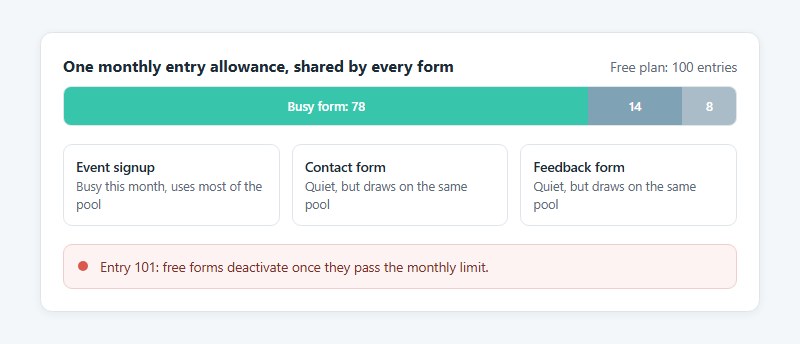
Free forms deactivate once they pass the monthly entry limit, according to Wufoo’s pricing FAQ. Pooling is the other trap, since one busy form can use up the allowance every other form shares.
File storage is paid-only, and uploaded files top out at 25 MB each.
None of this breaks a form on day one. It shows up when volume grows.
Which Wufoo alternative fits which job?
Pick by the limit that broke your setup, not by the longest feature list. Entry caps, price, payment support, compliance and export are the usual culprits. The table sets each tool against Wufoo using vendor pricing pages as of November 2026.
| Tool | Free plan limit | First paid plan (per month, annual billing) | Payments on free plan |
|---|---|---|---|
| Wufoo | 100 entries | $16.25 (Starter) | No, from Professional |
| IvyForms | Unlimited entries (WordPress plugin) | Essentials, billed yearly per domain | No, Stripe and PayPal on Pro |
| Tally | Unlimited, fair use | $24 (Pro) | Yes |
| Fillout | 1,000 responses | $15 (Starter) | Yes |
| Cognito Forms | 100 entries | $19 (Pro) | Yes |
| Jotform | 100 submissions | $34 (Bronze) | Yes, 10 payment submissions |
If the entry cap is what hurt, IvyForms has no entry meter at all on a WordPress site, Tally has no submission cap inside its fair use policy, and Fillout allows 1,000 responses a month. On monthly price, Fillout Starter and Cognito Forms Pro are the cheapest paid steps among the hosted alternatives.
Jotform comes closest to Wufoo’s builder, templates and payment options, so it asks the least relearning. Compliance is narrower. HIPAA features sit on Jotform Gold and Cognito Forms Enterprise, as each vendor’s pricing page states.
Teams that only run internal surveys can skip the table. Google Forms and Microsoft Forms come with accounts many teams already have.
Which alternatives replace Wufoo feature for feature?
Jotform and Cognito Forms come closest to Wufoo’s builder and payment support. Formstack and Zoho Forms give up some parity for workflow depth or an ecosystem, and Paperform and Typeform give up some for layout.
Jotform

Jotform’s free Starter plan covers 5 forms and 100 submissions a month, and its FAQ lists payment integrations among the features included at that level.
Payment integrations come on every plan, with 10 payment submissions a month on Starter. HIPAA features arrive on Gold, at $129 monthly or $99 on annual billing. Bronze starts at $39 monthly, $34 on an annual plan.
The catch is seats. Bronze, Silver and Gold are single-user plans, and multi-user access needs a custom-priced Enterprise plan. Storage bites too, because Jotform deletes the oldest submission when total submission storage fills up, per its pricing FAQ.
That storage rule catches teams who treat Jotform as an archive. Export entries on a schedule, and if the single-seat limit is the blocker, look at options beyond Jotform before requesting an Enterprise quote.
Cognito Forms
Cognito Forms allows unlimited forms and payments on every plan, according to its pricing page.
The free Individual plan stops at 100 entries a month, which is Wufoo’s free ceiling. The gain starts at Pro, which costs $19 a month on annual billing and brings 2,000 entries, e-signatures and save-and-resume.
Payments work on the free plan, Pro removes branding, and entry limits climb to 10,000 on Team. The downside is compliance. HIPAA appears only on Enterprise, and guides disagree on Team and Enterprise pricing, so confirm both on the live page.
Formstack and Zoho Forms
Formstack is for teams that want document delivery and eSignature workflows and have the budget for them. Zoho Forms makes more sense if the rest of your business already lives in Zoho.
Formstack counts submission caps per form (1,000 on Forms, 5,000 on Suite) instead of across the account, and Suite adds document delivery and unlimited eSignatures. The price is steep, though. $83 a month billed annually buys 1 builder seat and 25 forms, just over five times Wufoo’s Starter price.
Teams priced out by that floor can compare Formstack alternatives before moving up to Suite.
On Zoho Forms, the free plan allows 500 submissions a month against Wufoo’s 100, but only three forms in total, according to TechRadar’s review. It pairs most naturally with Zoho CRM.
Paperform and Typeform
Choose these two for layout and completion rate, not for parity with Wufoo.
Paperform has conditional logic, a one-question-at-a-time mode and payments on every plan, with no transaction fee on top of the processor. The catches are a free plan of 30 submissions a month and a $20 monthly add-on for a custom domain on Pro.
Typeform goes for a conversational layout, one question per screen. Its free plan collects 10 responses a month across all forms, according to Typeform’s help center.
Paperform’s pricing page now lists Free, Pro at $49 and Business at $124 on annual billing. Older guides that quote a $24 Essentials plan describe a tier that no longer appears there.
Because Paperform ships a one-at-a-time mode on every plan, Typeform is not the only route to that layout.
What are the best free Wufoo alternatives?
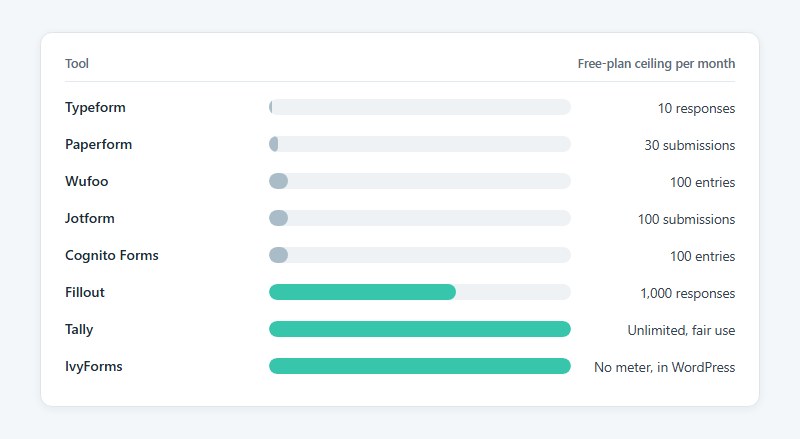
Tally and Fillout are the two hosted tools to look at first. Tally has no submission cap inside its fair use policy, and Fillout allows 1,000 responses a month, ten times Wufoo’s free allowance. On a WordPress site, IvyForms skips the meter entirely.
Free-plan ceilings, per month, as of November 2026:
- Typeform sits at 10 responses, pooled across all forms
- Paperform allows 30 submissions
- Wufoo, Jotform and Cognito Forms each stop at 100 entries or submissions
- Fillout goes to 1,000 responses
- Tally has unlimited submissions, within fair use
- IvyForms has no entry meter, since entries are stored in your own WordPress database
Jotform and Cognito Forms keep Wufoo’s 100-entry ceiling. Moving to either fixes features, not volume.
Tally
Tally’s free plan includes unlimited forms and submissions plus payments, signatures, file uploads, conditional logic, calculations, and connections to Google Sheets, Notion, Airtable, Zapier, Make and webhooks, per its pricing page.
It suits teams that hit Wufoo’s 100-entry cap and need payments without paying anything. Unlimited does sit under a fair use policy, though, uploads stop at 10 MB per file until Pro ($24 a month), and removing Tally branding is a Pro feature too.
Fillout

Fillout’s free plan gives unlimited forms and unlimited seats with 1,000 responses a month, and it includes payments, conditional logic, a REST API and CSV export.
Past the cap, Fillout keeps collecting responses until the month resets or the plan is upgraded, its pricing FAQ says. Wufoo’s free forms deactivate instead.
On the downside, free forms carry a Fillout badge, there’s no CAPTCHA, and files max out at 20 MB.
IvyForms Lite
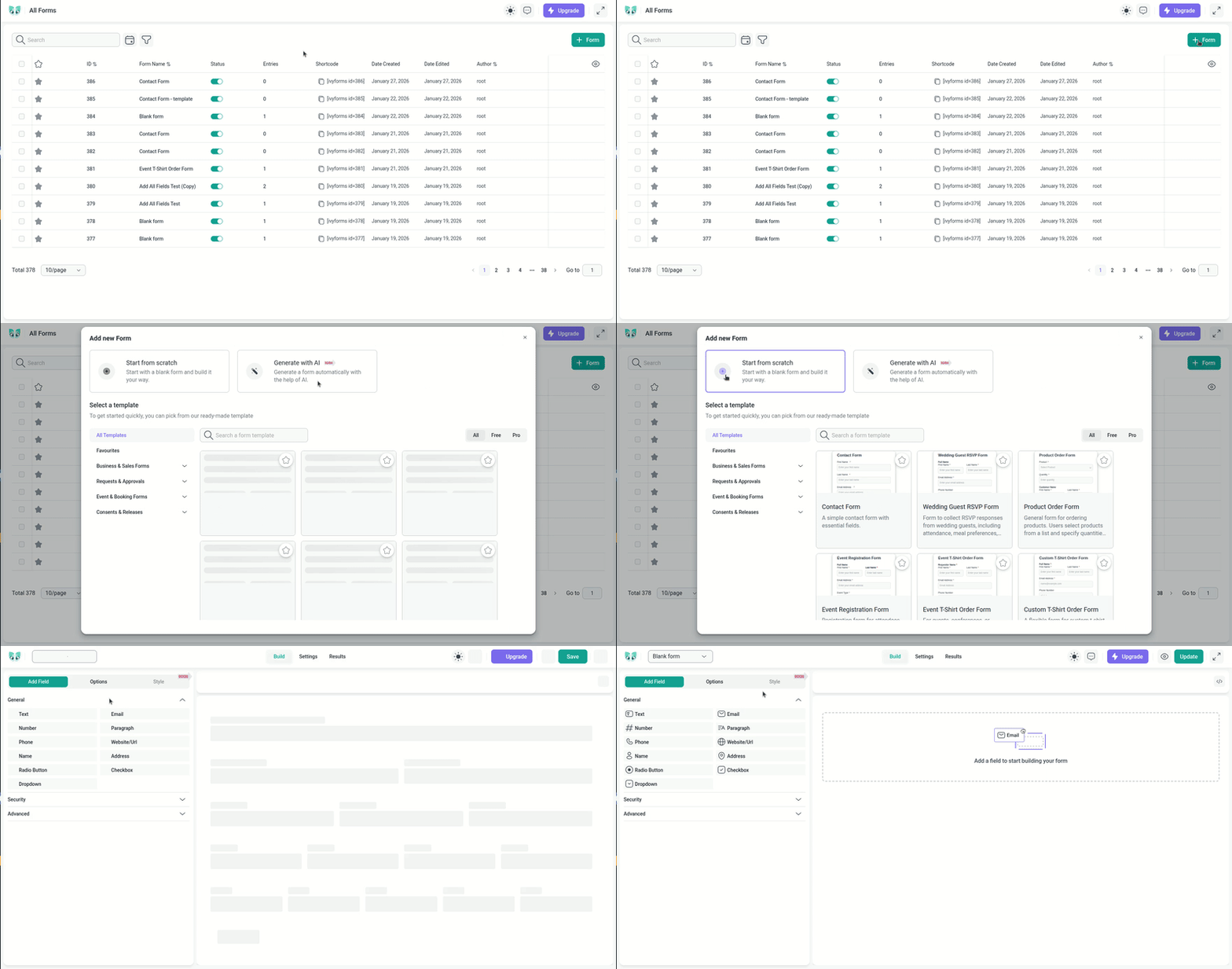
IvyForms Lite is the free version of a WordPress form plugin, with unlimited entries and no vendor branding on forms.
It includes a drag-and-drop builder, 20+ field types with single-file upload, entry management, email notifications, and reCAPTCHA, hCaptcha and Turnstile spam protection, which Fillout’s free plan lacks. Google Sheets and Slack connect directly (WordPress.org plugin listing).
The trade-off is the reverse of Tally’s. Volume costs nothing, but payments and conditional logic are Pro features, and you need a WordPress site to run it.
Google Forms and Microsoft Forms
Google Forms costs nothing with a Google account, and Microsoft Forms is bundled into Microsoft 365 plans.
Both are survey-first tools, so check payment and branding needs before relying on them.
Teams that outgrow Google Forms can browse replacements for Google Forms before committing to a paid tool.
Wufoo alternatives for WordPress and developer setups
WordPress plugins and form backends move hosting off Wufoo’s servers and onto your own stack. Plugin licences bill yearly by site count, and backups and uptime become your job, and so does email delivery.
IvyForms
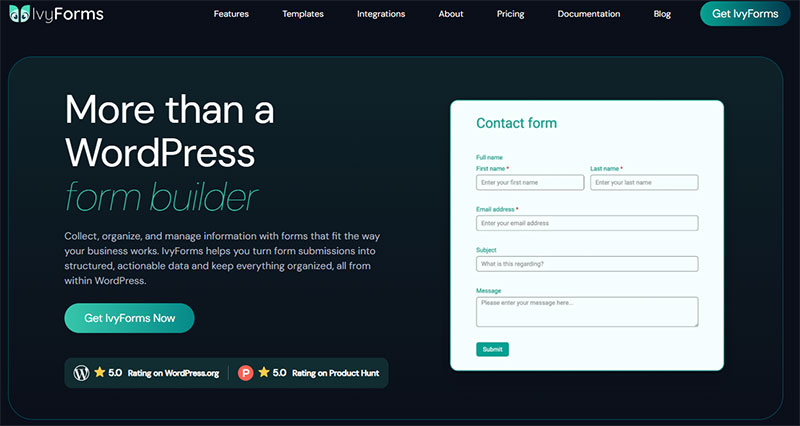
IvyForms is the only plugin in this group with a free version that collects unlimited entries. Paid licenses are sold by domain count: Essentials for 1 site, Growth for 3, Agency for unlimited, plus Elite as a one-time lifetime license, all with a 15-day money-back guarantee.
Pro adds Stripe and PayPal payments, conditional logic, calculated fields, multi-step and conversational forms, and a drawn signature field. For developers there’s a REST API, webhooks and an MCP server for building forms through AI assistants.
It imports forms from WPForms, Gravity Forms, WS Form and Fluent Forms, not from Wufoo, so a Wufoo form is a rebuild. The ecosystem is younger than Gravity Forms’, so check that your CRM or gateway is on the list first.
Gravity Forms
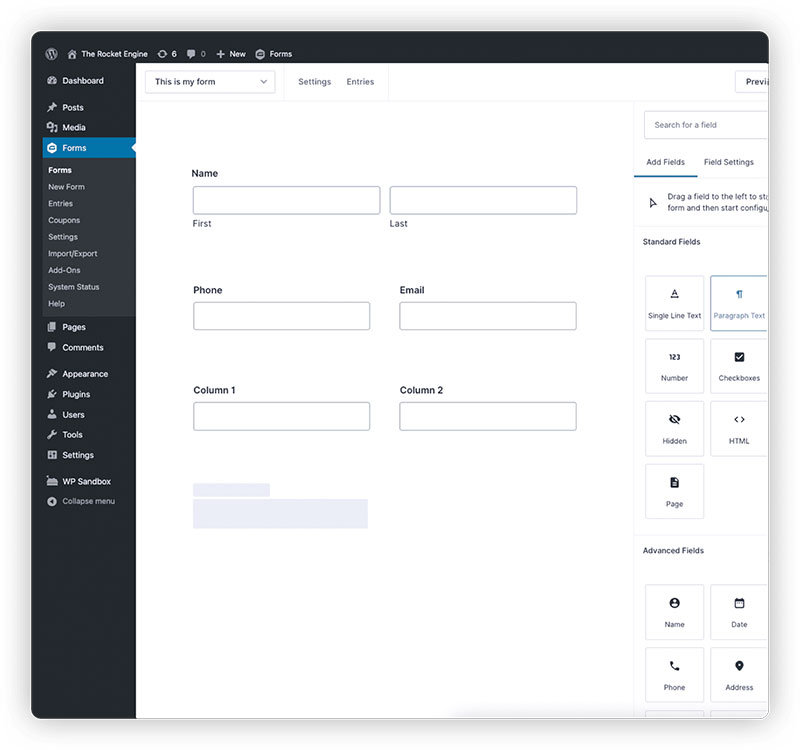
Gravity Forms is a WordPress plugin licensed by site count, with no free plan and no trial, only an online demo, according to its pricing page (updated October 2026).
| License | Sites | Per year | Notable add-ons |
|---|---|---|---|
| Basic | 1 | $59 | Mailchimp, HubSpot, reCAPTCHA |
| Pro | 3 | $159 | Stripe, PayPal Checkout, Zapier |
| Elite | Unlimited | $259 | Webhooks, Salesforce, signatures |
Webhooks sit on Elite only. And WordPress.com sites need their Business plan with a custom domain before they accept the plugin.
Spam filtering is covered on every license through Akismet, reCAPTCHA and Cloudflare Turnstile add-ons. Wufoo bundles CAPTCHA integration on all plans too.
WPForms
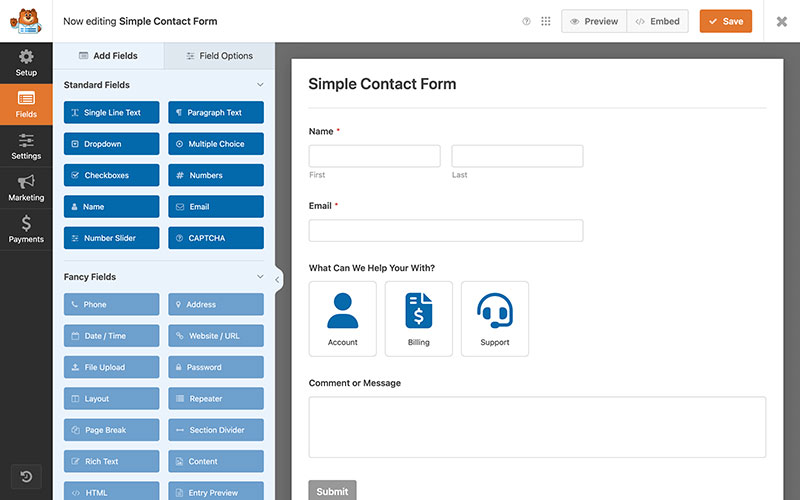
WPForms advertises Pro at $199.50 a year against a regular $399, and Elite at $299.50 against $599, according to its pricing page.
Gravity Forms Elite lists at $259 with unlimited sites, which undercuts WPForms Elite even at the discounted price. Compare the regular price, since the page labels the lower figure as a saving.
WPForms Pro adds no transaction fees of its own, so only the payment processor charges. For the full feature trade-off, a head-to-head of WPForms and Gravity Forms goes deeper.
Formspree
Formspree is a form backend for static sites. It receives submissions from an HTML form you build yourself and has no drag-and-drop builder.
That suits developers who already own the markup. For a basic contact page on WordPress, the wider field of WordPress contact form plugins is easier to maintain, and the IvyForms simple contact form template is a quick place to start.
How do payments and integrations compare?
Wufoo connects to eight payment gateways and caps its REST API per day by plan. Alternatives list fewer processors, and some add a platform fee to free-tier payments.
Which payment processors does Wufoo support?
Wufoo’s payments page lists Stripe, Square, Authorize.Net, PayPal, USAePay, Braintree, FreshBooks and Chargify.
Buyers pay inside the form instead of on a third-party site, and the page does not list a platform fee. It was last modified in July 2021, so check each gateway in the form builder before you rely on it.
What do the alternatives charge on payments?
| Tool | Processors | Platform fee on top of processor fees |
|---|---|---|
| Wufoo | 8 gateways | None listed |
| IvyForms | Stripe and PayPal (Pro) | None listed in its documentation |
| Tally | Stripe, cards only | None added beyond Stripe fees |
| Cognito Forms | Stripe on every plan, PayPal and Square on Team and above, Cognito Pay (US) on all plans | 2% on Individual, 1% on Pro, none on Team and Enterprise |
| Fillout | Stripe | 0% on every plan |
Tally’s help center says it adds no fees beyond Stripe’s own. Older guides cite a 5% commission on free-plan payments, which the current help center does not support, so check the payments page before you rely on either figure.
Tally takes card payments only through Stripe and does not support recurring ones, per its help center. Fillout’s payment page covers subscriptions, pay-what-you-want amounts, Link wallet, US bank accounts and Affirm.
Teams that rely on Square, Authorize.Net or Braintree through Wufoo won’t find them in IvyForms yet. Its pricing page lists Square as coming soon.
How do API limits, webhooks and spreadsheet sync compare?
Wufoo counts API requests per key, per day, and the quota rises with the plan (Wufoo pricing page, November 2026):
- Free gets 100
- Starter gets 10,000
- Professional gets 25,000
- Advanced gets 50,000
- Ultimate gets 100,000
Submitting entries through the API has a second ceiling. Wufoo allows 50 submissions per user in a 5 minute window, after which it returns HTTP 429, per its API documentation.
Webhooks are managed through the same API. Wufoo’s integration directory lists more than 2,300 apps, with Google Sheets reached through Zapier.
Fillout includes webhooks, Google Sheets, Mailchimp and HubSpot connections on the free plan, its pricing page shows. Paperform starts webhooks and standard API access on Pro, while Zapier and Make connections come with every plan.
Jotform reaches more than 3,000 platforms through Zapier, and direct Google Sheets, Mailchimp and Stripe connections are listed as well.
IvyForms connects to Google Sheets directly, even in Lite, and offers webhooks, a REST API and Zapier. Its API runs on your own WordPress install, so the request ceiling is your server, not a vendor quota.
Which alternatives support HIPAA and GDPR?
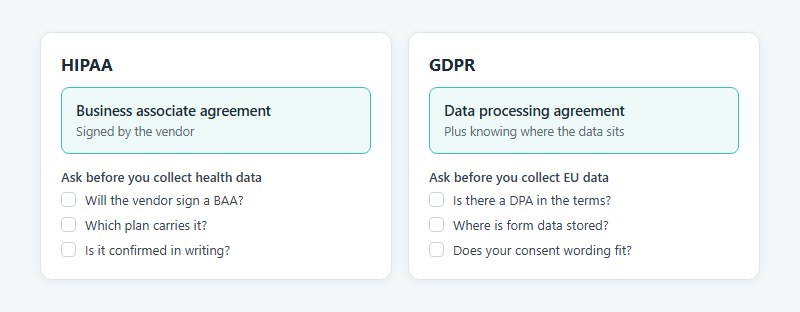
For HIPAA, what counts is a signed business associate agreement (BAA) from the vendor. GDPR is about a data processing agreement and knowing where the data sits. Wufoo’s own security page mentions neither.
Is Wufoo HIPAA compliant?
Wufoo’s own pages do not claim it, and third-party sources disagree on the details.
The security page describes SSL, a SOC 2 Type II audited data center in the United States and encrypted storage for up to 5 fields per form on select plans. It was last modified in April 2018 and makes no HIPAA claim.
SurveyMonkey states that HIPAA-enabled accounts exist only on its Enterprise plan, and that regulated entities may collect protected health information only through such an account with a BAA. Paubox reports that Wufoo will not sign a BAA, while SurveyMars lists Wufoo among form builders with HIPAA options.
Nothing on Wufoo’s pages supports the SurveyMars claim. Treat Wufoo as unfit for protected health information unless SurveyMonkey confirms a BAA in writing.
Which alternatives sign a BAA?
Jotform lets eligible customers on HIPAA-enabled accounts execute a signed BAA, and the environment adds encrypted data, audit-ready activity logs and secure e-signatures, per Jotform’s HIPAA page.
Plan eligibility has moved. Some older guides list the Silver plan as HIPAA-ready, while the current HIPAA page names Gold and Enterprise only.
Formstack offers a Standard BAA and evaluates custom BAA requests, according to its HIPAA page. Its 2016 launch included audit logging and a 15-minute automatic session timeout.
Formstack’s pricing page lists HIPAA as an add-on for Forms and Suite and includes it in the Salesforce and Enterprise plans. A 2024 help article also points healthcare customers to a Formstack for Healthcare plan, so ask sales which plan carries it for you.
Cognito Forms’ security page lists per-field encryption, an audit log, folder permissions, authenticated forms, two-factor authentication and single sign-on alongside its HIPAA, GDPR and CCPA claims. Wufoo caps field encryption at 5 single-line text fields per form, while Cognito’s page states no field count.
Tally makes no HIPAA claim and, on its own comparison page, steers HIPAA intake forms to Formstack. IvyForms makes no HIPAA claim either.
Where does each tool keep your data?
| Tool | Data location | Stated compliance |
|---|---|---|
| Wufoo | US, SOC 2 Type II audited data center | None stated on its security page |
| IvyForms | Your WordPress database, wherever your site is hosted | GDPR consent field, no HIPAA claim |
| Jotform | Google Cloud and AWS, local residency on Enterprise | GDPR and CCPA |
| Tally | Europe | GDPR, data processing agreement in the terms |
| Paperform | EU or Australia residency on Enterprise | SOC 2 Type II, GDPR |
| Fillout | Not stated on pricing page | SOC 2 Type 2, TLS 1.2, AES at rest |
Tally stores form data in Europe, and agreeing to its terms also accepts its data processing agreement, so no signature is needed. Its subprocessor list names US providers for opt-in payments (Stripe) and email notifications (SendGrid).
Deleted data leaves Tally’s backups within 90 days, and the Business plan can purge submissions automatically after a set period.
With IvyForms, residency is a hosting choice. An EU host keeps entries in the EU, but server security, backups and deletion schedules become your responsibility.
Vendor certification covers only half the job. Consent wording and field choices sit with you, which is why guidance on building GDPR compliant forms is worth reading before you rebuild. In IvyForms, a dedicated GDPR field covers that consent step.
How do you move forms and entries off Wufoo?
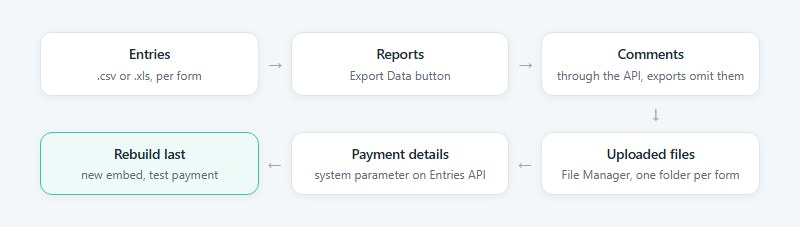
Export entries and reports first, then pull comments and uploaded files separately, since Wufoo’s export leaves comments out and files live in a different place. Rebuild the forms last.
- Export entries per form: in the current interface, go to Forms, open the Entries icon, tick the select-all checkbox, click the Download Entries icon, then choose .xls or .csv. The older Bulk Actions, Export route also offers a tab-delimited .txt file.
- Export each report’s data with the Export Data button, a separate path from entry export.
- Pull comments through the API, because exports omit them. The comments endpoint returns up to 100 per request.
- Download uploaded files from the File Manager, where each form gets its own folder. Only the account creator and admins can open it.
- Add the system parameter to an Entries API request to capture payment status, total, currency, confirmation number and processor.
- Rebuild each form in the new tool, replace the JavaScript, iFrame or WordPress embed on your pages, and run a test payment.
The File Manager’s bulk download button greys out above 500 MB or 1,000 files, so move large upload folders in batches.
Buffalo State’s IT office set a May 15, 2021 cutoff for its campus Wufoo accounts and warned that remaining forms and data would be permanently deleted.
Wufoo’s help center lists .xls and .csv for the current interface, while its April 2020 release notes announce XLSX export. Pick .csv when the destination is not Excel, as Wufoo itself recommends.
Rewrite thank-you pages and redirects while you rebuild. A short confirmation message after each submission tells people the entry landed. In IvyForms, the form’s confirmation settings hold that message or the redirect.
List every active webhook and Zapier connection before you start. An export carries entries, not configuration.
When is staying on Wufoo the better call?
Stay when your volume fits the plan you already pay for and nothing in your stack depends on a feature Wufoo covers better. Switching adds rebuild work without fixing anything in that case.
Processor fit is the first thing to check. Chargify, FreshBooks and USAePay sit on Wufoo’s gateway list, and Stripe users can move almost anywhere, but PayPal, Square and Braintree support varies by tool.
Then look at any code on the API. Scripts written against Wufoo’s REST API authenticate with the account API key and address fields by IDs like Field105, so each one needs rewriting for a new tool.
Reports count too. Every Wufoo plan, free included, carries unlimited reports, and dashboards built there need an equivalent in the new tool.
Allegheny College’s IT office retired Wufoo for general campus use by May 1, 2018, yet kept payment-processing forms and forms embedded in critical websites on Wufoo (Allegheny LITS, February 2018).
A partial move is a valid outcome. Move the forms that gain from the new tool and leave the ones that carry payments or integrations.
Allegheny’s IT office also advised against long-term data and file storage on the Wufoo site. Export on a schedule even when you stay.
Wufoo Alternatives FAQ
How is Wufoo different from SurveyMonkey?
Wufoo builds forms that collect entries and payments, while SurveyMonkey builds surveys.
SurveyMonkey owns Wufoo, lists it under other products and hosts its help center. A Wufoo form can also be embedded inside a SurveyMonkey survey with iframe code.
Can another form builder import Wufoo forms directly?
Yes, with some builders. Jotform and Formstack import Wufoo forms using your Wufoo API key, and Jotform support says its tool leaves the originals in Wufoo untouched.
Cognito Forms imports entries only, from a spreadsheet template on Pro and above, so you rebuild the form first. IvyForms imports forms from other WordPress plugins but not from Wufoo, so plan a rebuild there too.
Which form builder works best for nonprofits?
No single tool wins, so compare discounts first.
Jotform takes 50% off Bronze, Silver and Gold for nonprofit and education accounts. Cognito Forms discounts 501(c)(3) organizations, Fillout and Paperform run discount programs, and Tally’s free plan needs none. A nonprofit with a WordPress site can run IvyForms Lite for free with no entry cap.
Which alternatives accept larger file uploads than Wufoo?
Fillout’s Business plan allows files of 1 GB or more, against Wufoo’s 25 MB per file.
Tally removes its 10 MB per-file cap on Pro. Paperform limits total upload storage instead, at 100 MB on Free, 10 GB on Pro and 100 GB on Business. In IvyForms the maximum file size is a field setting you choose, bounded by your server’s upload limit.
What is the best alternative for lead capture?
Fillout’s free plan is the strongest starting point, because it links to HubSpot and Mailchimp and supports hidden fields.
Partial submissions, which expose abandoned leads, are paid everywhere: Tally Pro, Paperform Pro and Fillout Business.
Does deleting a form in Wufoo also delete its entries?
Yes. Deleting a form from the Forms page removes all its entries and uploaded files permanently, according to Wufoo’s help center.
Export entries and download files first, because the deletion cannot be reversed.
How Long to Run a Replacement Beside Wufoo
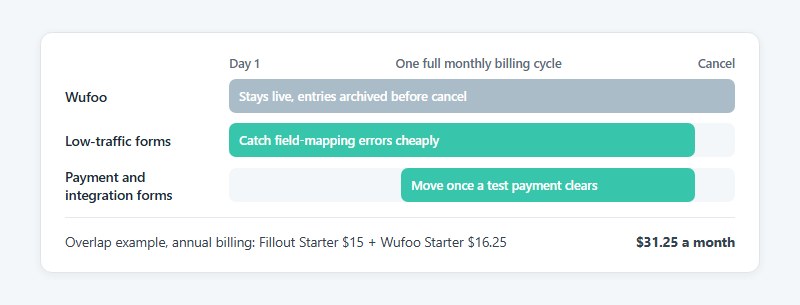
Any of the Wufoo alternatives should run beside Wufoo for one full monthly billing cycle, and the Wufoo plan ends only when the replacement matches it on entries, payments and integrations.
Monthly entry caps only show up over a full month, so a shorter trial misses them.
The order inside that cycle matters. Start with low-traffic forms, to catch field-mapping errors cheaply. Move payment and integration forms next, once a test payment clears. Cancel last, with the export archived.
Overlap costs money. Fillout Starter at $15 a month beside Wufoo Starter at $16.25 (both annual billing) totals $31.25, while a free plan such as Tally or IvyForms Lite adds nothing.
This position was verified on November 4, 2026. A published Wufoo shutdown date would shorten the overlap to the time left before it.