



Gallup’s 2024 data shows only 31% of U.S. employees feel engaged at work. Annual surveys can’t catch that kind of decline fast enough. Pulse surveys can. These short, frequent questionnaires…
Table of Contents
Phone tag is killing your bookings.
Clients call when you are busy. You call back when they are in meetings. The cycle repeats until someone gives up.
Appointment form templates fix this by letting clients book directly into your calendar, any time of day.
These online scheduling forms connect to tools like Google Calendar and Calendly, sending automated reminders that cut no-shows in half.
This guide covers everything you need to build effective booking forms. You will learn the different template types, required form fields, step-by-step creation process, and real examples you can copy today.
No coding required. Just proven templates that work.
What is an Appointment Form Template
An appointment form template is a pre-built document that collects client information and schedules bookings for services, consultations, or meetings.
These templates include fields for contact details, preferred dates, time slot selection, and service type.
Businesses use them to automate the booking system process and reduce manual scheduling work.
A well-designed template integrates with tools like Google Calendar, Calendly, or Acuity Scheduling to sync appointments automatically.
Unlike a basic contact form, appointment templates capture specific scheduling data and trigger confirmation emails.
Examples Of Appointment Form Templates
Medical Appointment Form
See the Pen
Modern Medical Appointment Form by Bogdan Sandu (@bogdansandu)
on CodePen.
Salon / Spa Appointment Form
See the Pen
Salon / Spa Appointment Form by Bogdan Sandu (@bogdansandu)
on CodePen.
Fitness / Personal Trainer Appointment Form
See the Pen
Modern Fitness Trainer Appointment Form by Bogdan Sandu (@bogdansandu)
on CodePen.
Legal / Lawyer Appointment Form
See the Pen
Untitled by Bogdan Sandu (@bogdansandu)
on CodePen.
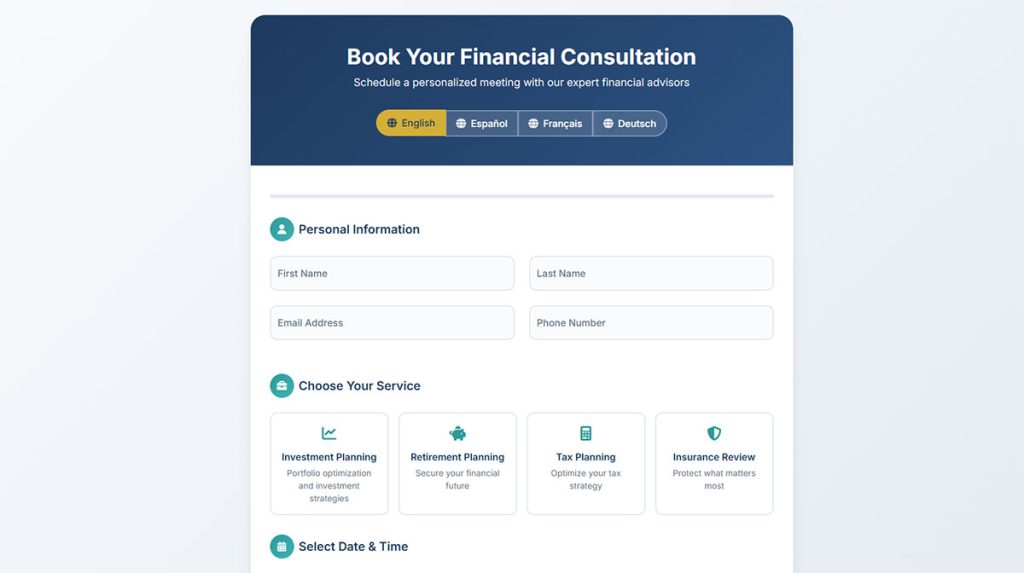
Financial Advisor Appointment Form
See the Pen
Financial Advisor Appointment Form by Bogdan Sandu (@bogdansandu)
on CodePen.
Real Estate Appointment Form
See the Pen
Premium Real Estate Appointment Form by Bogdan Sandu (@bogdansandu)
on CodePen.
Recurring Appointment Form
See the Pen
Financial Services Recurring Appointment Form by Bogdan Sandu (@bogdansandu)
on CodePen.
Payment-Integrated Appointment Form
See the Pen
Payment-Integrated Appointment Booking Form by Bogdan Sandu (@bogdansandu)
on CodePen.
Appointment + Cancellation/Reschedule Option Form
See the Pen
Financial Services Appointment Management System by Bogdan Sandu (@bogdansandu)
on CodePen.
Multi-Language Appointment Form
See the Pen
Multi-Language Financial Appointment Form by Bogdan Sandu (@bogdansandu)
on CodePen.
What are the Types of Appointment Form Templates
Different industries require different form structures based on the information they need to collect before a scheduled visit or call.
What is a Medical Appointment Form Template
A medical appointment form collects patient information, insurance details, reason for visit, and preferred physician; most healthcare providers require HIPAA-compliant fields and integrate with electronic health record systems.
These forms often function as a client intake form that gathers medical history before the appointment.
What is a Business Consultation Appointment Form Template
Consultation booking forms capture company name, industry, project scope, and budget range to qualify leads before meetings.
Many businesses pair these with lead capture form templates to build their sales pipeline.
What is a Salon Appointment Form Template
Salon booking forms list available services (haircut, coloring, styling), preferred stylist, and appointment duration.
Tools like Fresha, Booksy, and Vagaro offer built-in templates with online payment processing through Stripe or Square Appointments.
What is a Legal Consultation Appointment Form Template
Legal appointment forms collect case type, brief description of the matter, and conflict-check information.
Law firms handling sensitive data should follow GDPR compliance guidelines when collecting client information.
What is an Online Booking Form Template
Online booking templates work for any service-based business needing web-based scheduling with calendar integration and automated reminders.
These are a specific category within the different types of forms available for websites.
What are the Components of an Appointment Form Template
Every appointment scheduling form needs specific form fields that capture the right data without overwhelming users.
What Contact Information Fields Should an Appointment Form Include
Required fields: full name, email address, phone number.
Optional fields: company name, preferred contact method, how they heard about you.
Keep it minimal. Every extra field reduces completion rates.
What Date and Time Selection Options Work Best
Use a date picker connected to your availability calendar; display only open time slots to prevent double-booking.
Buffer time between appointments (15-30 minutes) prevents scheduling conflicts.
What Service Selection Fields are Needed
Dropdown menus or radio buttons for service type work best.
Include estimated duration and pricing next to each option. Add a text field for special requests or notes.
What Confirmation and Notification Settings are Required
Every form needs a confirmation message after submission plus automated email confirmation.
Set up reminder emails 24 hours and 1 hour before the appointment to reduce no-shows.
How to Create an Appointment Form Template
Building an effective appointment form requires choosing the right platform, structuring fields logically, and connecting to your existing calendar system.
How to Choose the Right Form Builder Tool
Popular options: Google Forms (free), JotForm, Typeform, or WordPress form builders for website integration.
Look for calendar sync, payment processing, and automated email features.
How to Structure the Form Fields
Order matters: contact info first, then service selection, then date/time.
Use conditional logic to show relevant fields based on service type selected. This keeps forms short and focused.
How to Add Automated Confirmation Messages
Configure your email notification settings to send instant confirmations with appointment details, location or video call link, and cancellation policy.
Include calendar file attachments (.ics) so clients can add appointments to their own calendars.
How to Integrate with Calendar Systems
Connect to Google Calendar, Microsoft Outlook, or Apple Calendar through native integrations or Zapier.
Two-way sync prevents double-booking and updates availability in real-time across all platforms.
What are the Best Practices for Appointment Form Templates
Follow these guidelines to optimize your forms for higher completion rates and better user experience.
How Many Fields Should an Appointment Form Have
Five to seven fields maximum for initial booking. Collect additional information after confirmation or during the actual appointment.
Forms with fewer fields see 20-30% higher completion rates.
What is Mobile Optimization for Appointment Forms
Over 60% of bookings happen on phones. Follow mobile form guidelines: large tap targets, single-column layout, and auto-formatting for phone numbers.
Test on multiple devices before publishing.
How to Reduce Appointment Form Abandonment
Show a progress indicator if using multi-step forms.
Display available time slots immediately. Remove unnecessary required fields.
Read more about reducing form abandonment for detailed strategies.
FAQ on Appointment Form Templates
What is an appointment form template?
An appointment form template is a pre-designed document that collects client details and scheduling preferences for booking services online.
It typically includes contact information fields, date picker, time slot selection, and service type options connected to your availability calendar.
Are appointment form templates free?
Yes, many platforms offer free appointment form templates.
Google Forms, JotForm, and Typeform provide basic templates at no cost. Paid plans from Acuity Scheduling and Calendly unlock features like payment processing and calendar sync.
What fields should an appointment form include?
Include name, email, phone number, service selection, and preferred date and time.
Add optional fields for notes or special requests. Fewer fields mean higher completion rates, so only ask what you truly need.
How do I create an appointment form in Google Forms?
Open Google Forms, select a blank form, and add fields for contact details and appointment preferences.
Use dropdown menus for service selection. Connect responses to Google Calendar manually or through Zapier automation.
Can appointment forms integrate with my calendar?
Yes. Most appointment scheduling forms sync with Google Calendar, Microsoft Outlook, and Apple Calendar.
Two-way integration blocks booked slots automatically, preventing double bookings across all your connected calendars.
How do I reduce no-shows with appointment forms?
Set up automated reminders via email or SMS 24 hours and 1 hour before appointments.
Include your cancellation policy on the form. Some tools like Square Appointments and Setmore offer built-in reminder features.
What is the best appointment form builder?
It depends on your needs. Calendly works best for simple scheduling. Acuity Scheduling handles complex services with multiple staff members.
For WordPress forms, dedicated plugins offer deeper website integration.
Are appointment forms HIPAA compliant?
Not all forms meet HIPAA standards by default.
Healthcare providers must use platforms offering Business Associate Agreements, encrypted data storage, and access controls. JotForm and Formstack provide HIPAA-compliant plans for medical appointment forms.
Can I accept payments through appointment forms?
Yes. Many form builders integrate with Stripe, PayPal, and Square for collecting deposits or full payments at booking.
This reduces no-shows since clients have financial commitment to their scheduled appointments.
How do I embed an appointment form on my website?
Copy the embed code from your form builder and paste it into your website’s HTML.
Most platforms also offer direct integrations with WordPress, Squarespace, and Wix for simpler installation without coding.
Conclusion
The right appointment form templates turn scheduling chaos into a streamlined booking system that runs without constant attention.
Pick a form builder that matches your workflow. JotForm and Typeform work for most businesses. Acuity Scheduling handles complex staff scheduling with multiple service types.
Start with the basics: contact fields, service selection, and a date picker synced to Microsoft Outlook or your preferred calendar.
Add confirmation emails and reminder sequences to cut no-shows.
Connect payment processors like Stripe if you want deposits at booking.
Test your form on mobile devices before publishing. Most clients will book from their phones.
Build your first template today. Your calendar will thank you.