



Black Friday 2026 is on Friday, November 27, with Cyber Monday following on November 30. For WordPress site owners it’s the one week a year when the plugins and services…
Table of contents
Most signup form templates lean on the browser’s own email check, and that check is looser than people assume. MDN Web Docs notes that type=”email” accepts name@domain with no top-level domain.
An address like that goes straight through and lands on the list. So the template needs something stricter than the default.
A newsletter signup form template is a ready-made capture layout. It brings the fields, the copy, the consent text and the styling, and it passes each submission to an email platform. Nobody has to build the form from scratch.
Which Types of Newsletter Signup Form Templates Fit Which Site?
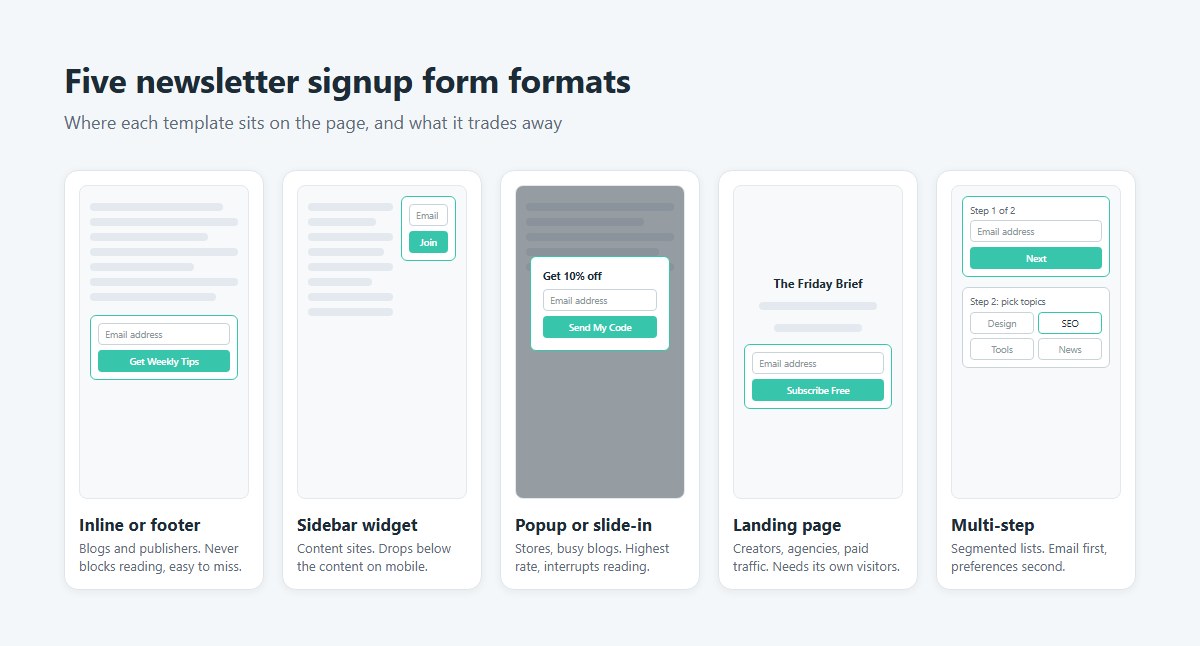
Blogs and publishers do fine with inline and footer forms. Stores lean on popups and slide-ins, and creators or agencies usually get more from a landing page. Sidebar widgets and sticky bars fill in the gaps.
| Format | Best placement | Fits | Main downside |
|---|---|---|---|
| Inline or footer | End of posts, page footer | Blogs, publishers | Easy to overlook |
| Sidebar widget | Blog sidebar | Content sites | Drops below the content on mobile |
| Popup, slide-in or sticky bar | Triggered by time, scroll or exit | Stores, high-traffic blogs | Interrupts reading |
| Landing page | Dedicated URL | Creators, agencies, paid traffic | Needs its own traffic source |
| Multi-step (any format) | Email first, preferences second | Sites that segment subscribers | One extra click |
In Getsitecontrol’s 2024 popup tests, fullscreen popups pulled 3.41% email signups. Modals got 2.95% and sidebar popups 2.61%.
Popup templates range from small modals and slide-ins up to fullscreen takeovers, and the different types of popups mostly vary in how much of the page they cover. Fullscreen wins on rate but costs goodwill. On mobile it also comes closest to what Google’s intrusive interstitial guidance targets, so I’d skip it there.
Inline forms never block anything, but popups catch the people who would scroll right past. The choice between inline forms and popup forms is really attention against interruption.
Builder galleries add industry variants on top of these formats. involve.me lists newsletter templates for ecommerce, agencies, real estate, insurance and software, plus a premium subscription funnel that takes payment at signup.
Form Builder Template or Hand-Coded HTML Template?
If people without code access will be editing the form, go with a builder template. Hand-coded HTML is the better pick for a static site, or anywhere page weight matters.
WPForms lists 18 newsletter form templates, with variants wired for Mailchimp, Kit (formerly ConvertKit), Brevo, MailerLite, Constant Contact, ActiveCampaign, Drip and AWeber. Editing is drag-and-drop, so there’s no markup to maintain. What you give up is plan limits, platform branding and extra scripts on the page.
Quackit’s inline template is pure HTML and CSS with no dependencies, and it relies on type=”email” and required for validation. Colorlib’s free set of 10 covers a hero block, footer band, popup, slide-in, double opt-in card and blog sidebar. You get full control over markup and styling. Spam protection, error states and tracking are yours to write, though.
On WordPress, a plain signup form rarely needs more than the free tier. Browse the free WordPress form plugins before paying, since WPForms, for one, reserves its Stripe and PayPal templates for Pro.
Free builder plans also tend to hold back custom domains and branding removal (fomr.io lists both behind its paid plan).
Tailwind projects have a middle route. Styled newsletter blocks, such as Material Tailwind’s section with a terms checkbox and a modal variant, can be pasted straight into the markup. Some Tailwind form patterns are worth a look before building from scratch.
A hand-coded form connects by pointing its action URL at the email platform’s form endpoint. Mailchimp, Kit, ActiveCampaign and Brevo (formerly Sendinblue) each accept plain HTML forms this way.
My rule of thumb: builder if editors tweak the copy every week. For a form that never changes and has to load fast, plain HTML.
Newsletter Signup Form Templates
Sidebar Widget Newsletter Form
See the Pen
Sidebar Widget Newsletter Form by Bogdan Sandu (@bogdansandu)
on CodePen.
Inline Newsletter Subscribe Form
See the Pen
Inline Newsletter Subscribe Form by Bogdan Sandu (@bogdansandu)
on CodePen.
Modern Glassmorphism Newsletter Signup Form
See the Pen
Untitled by Bogdan Sandu (@bogdansandu)
on CodePen.
Full-width form
See the Pen
Modern Newsletter Signup Form – Glassmorphism & Animations by Bogdan Sandu (@bogdansandu)
on CodePen.
Bold typography form
See the Pen
Bold Newsletter Signup Form by Bogdan Sandu (@bogdansandu)
on CodePen.
Interactive Newsletter Signup Card with Micro-Animations
See the Pen
Interactive Newsletter Signup Card with Micro-Animations by Bogdan Sandu (@bogdansandu)
on CodePen.
Exclusive offer form
See the Pen
Exclusive Offer Newsletter Signup Form by Bogdan Sandu (@bogdansandu)
on CodePen.
Social proof form
See the Pen
Social Proof Newsletter Signup Form by Bogdan Sandu (@bogdansandu)
on CodePen.
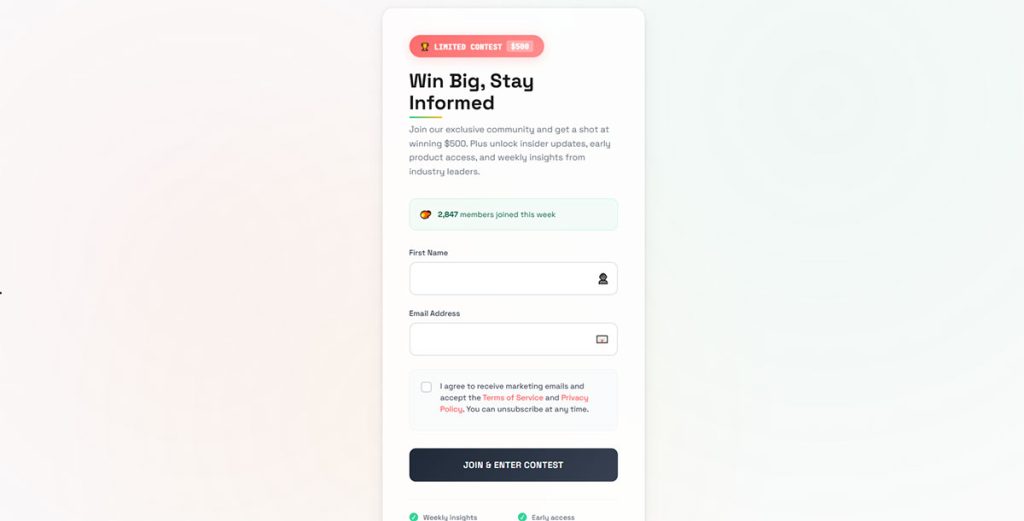
Giveaway / contest entry form
See the Pen
Modern Newsletter Signup Form with Contest Entry by Bogdan Sandu (@bogdansandu)
on CodePen.
Modern Newsletter Signup Form – PDF Download Lead Magnet
See the Pen
Modern Newsletter Signup Form – PDF Download Lead Magnet by Bogdan Sandu (@bogdansandu)
on CodePen.
How Many Fields Should a Newsletter Signup Form Template Have?
One or two. Email is the only field a newsletter really needs, and a first name is the one extra that usually earns its place.
Cutting fields shows up in the numbers. A 2016 NextAfter A/B test for Food for the Poor cut a “Verse of the Day” signup from four fields (first name, last name, email, ZIP code) to two (email and ZIP code) on paid traffic. The conversion rate rose from 0.26% to 0.39%, a 48.3% increase.
Field Count and Order
Email alone is the lowest friction option, though it rules out personalization. Adding a first name costs one extra field and allows a named greeting in the welcome email. Going further into preferences, like topic tiles or a frequency choice (Colorlib’s topic card and split-card templates do this), makes the form noticeably heavier.
Put email first, optional fields after, and the consent checkbox directly above the button. Preference choices belong on a second step or a post-signup page, because every question on the first screen competes with the email field.
Deciding which extra fields earn their place comes down to what the welcome email does with the data. A field nobody uses for segmentation costs signups for nothing.
Button and Placeholder Copy
“Subscribe to our newsletter” is overused, and it says nothing about what arrives.
Copy that names the benefit does more. “Get Weekly Tips” or “Start Learning Free” tells people what they’re getting. “Join 10,000+ Subscribers” works too, but only when the number is true.
Placeholders hint at format and vanish once typing starts, so they never replace a label. Wording options are collected in these placeholder text examples.
When a free guide or discount code backs the signup, name it in the headline and echo it on the button.
Single Opt-In or Double Opt-In: Which Template Setup Is Better?
Single opt-in puts the address on the list as soon as the form is submitted. With double opt-in, nothing happens until the subscriber clicks the link in a confirmation email.
Double opt-in makes sense when proof of consent matters or bots can reach the form. Small lists behind a protected form can get by with single.
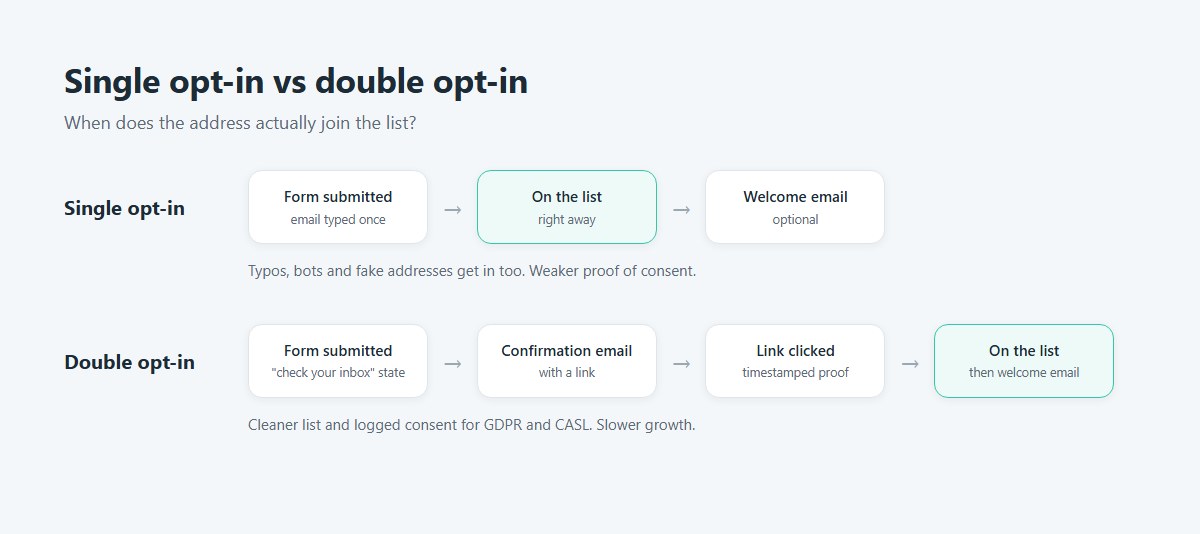
Mailchimp’s flow shows the pattern. As of October 2026, its help documentation describes the form submit, a reCAPTCHA check, the opt-in confirmation email and an optional final welcome email, and states that double opt-in for email contacts can be enabled only for Mailchimp signup forms, so imported contacts need their own consent record.
The template needs a state that tells the visitor to check their inbox, and Colorlib’s double opt-in card ships with one. That form submission confirmation message is the only feedback people get, and without it they assume the form broke.
The confirmation step filters typos and bot addresses, because a mistyped or fake address never clicks. Fewer bad addresses means fewer bounces and cleaner deliverability. The cost is growth, since some real people never confirm.
Single opt-in loses nobody at the confirmation step, and the template is simpler with one fewer email to write. The downside is that typos, bots and fake addresses reach the list, and the proof of who agreed is weaker.
Double opt-in gives a cleaner list and a timestamped confirmation click as evidence of consent. It also grows the list more slowly, and it needs a confirmation email, a thank-you state and a working link before it does anything useful.
GDPR (Article 7) and CASL both put the burden of demonstrating consent on the sender, and a logged confirmation click is clean evidence for either. For a list that serves EU or Canadian subscribers, that tips the decision toward double opt-in.
What Consent Text and Legal Elements Does a Signup Form Template Need?
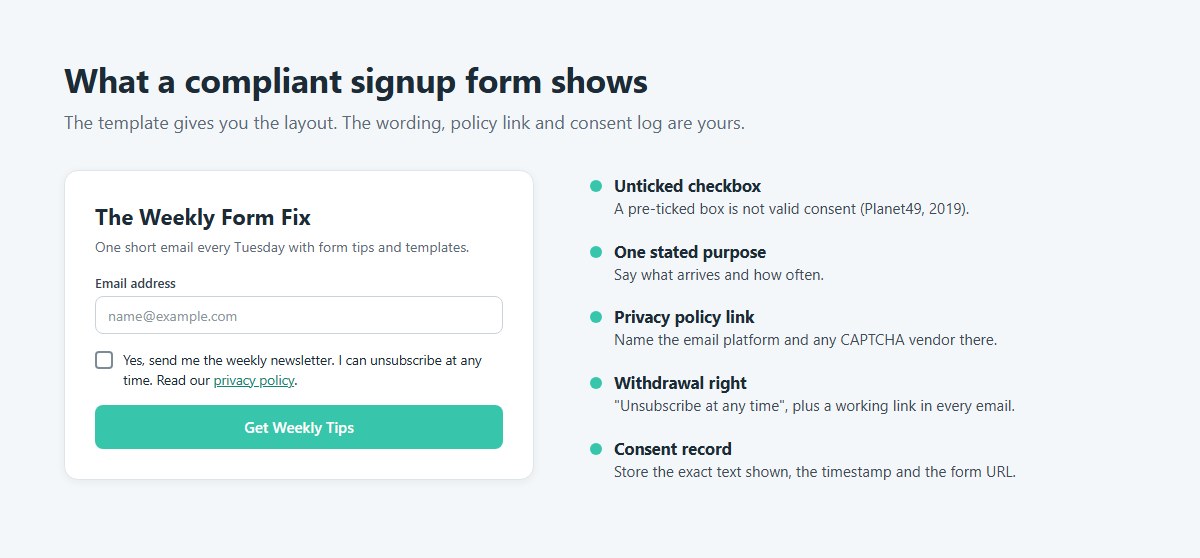
A compliant template carries an unticked consent checkbox, a plain statement of what the subscriber will receive, a privacy policy link and an unsubscribe route in every email. Which of those is mandatory depends on where the subscriber lives.
No template is compliant out of the box. You supply the wording and the policy URL, and you keep the consent log.
GDPR Needs an Unticked Checkbox and a Stated Purpose
The CJEU ruled in the Planet49 case on 1 October 2019 that a pre-ticked box is not valid consent, and GDPR Recital 32 rules out silence and inactivity as well.
So the checkbox starts empty. It sits next to one specific purpose and links to the privacy policy. Example wording: “Yes, send me the weekly newsletter. I can unsubscribe at any time.” Store the exact text shown, along with the timestamp and form URL.
Getsitecontrol measured the cost in 2024. Adding a mandatory consent checkbox cut an email popup’s signup rate by 25.82%. For consent-based marketing to EU subscribers, that cost stays.
The checkbox is only one piece of a compliant form. The rest covers purpose and sender identity, plus withdrawal rights, and a guide on how to build GDPR compliant forms walks through the full setup.
Finished GDPR consent form examples help when drafting the checkbox sentence itself.
CAN-SPAM Act Rules for the Emails, Not the Form
CAN-SPAM applies to the messages you send, so none of it changes the form itself. The From, To and Reply-To information has to be accurate. Every email needs a clear, conspicuous way to unsubscribe that keeps working for at least 30 days after sending, and opt-outs have to be honored within 10 business days. A valid physical postal address goes in every message as well.
The FTC’s compliance guide states that CAN-SPAM covers all commercial email, with no exception for business-to-business messages. Each violating email carries a civil penalty that the FTC adjusts every year.
The act sets no consent requirement for adding US subscribers, so a US-only list needs less form text than an EU one.
CASL and Express Consent With Proof
Canada’s anti-spam law treats express consent as the default and implied consent as a narrow, time-limited exception, according to CRTC guidance. A request for consent is itself a commercial electronic message, so a sender cannot email a stranger to ask for it. The signup form has to be the request.
The sender carries the burden of proving consent. For a template, that means a checkbox, a named sender with contact details, a statement that the subscriber can withdraw, and a stored record of each signup.
How to Make a Newsletter Signup Form Template Accessible
Most of what WCAG 2.2 asks of a signup template involves labels and error messages. The rest is about focus, which has to be visible and can’t be covered by anything.
| Criterion | Level | What the template needs |
|---|---|---|
| 1.3.1 and 3.3.2, labels | A | A label tied to the email input in the markup |
| 3.3.1, error identification | A | The field named and the error described in text |
| 3.3.3, error suggestion | AA | A fix, such as an example address format |
| 2.4.7, focus visible | AA | A visible outline on the input and the button |
| 2.4.11, focus not obscured | AA (new in 2.2) | No sticky bar or popup hiding the focused field |
Placeholder text is not a substitute for a label. W3C’s Understanding document for 3.3.2 notes that a form can pass that criterion and still fail 1.3.1 when labels are not correctly marked up or associated with the input.
If the design has no room for a visible label, keep it in the markup and hide it with a screen-reader-only class. A visible label is still better whenever there’s space.
Add autocomplete=”email” to the input so browsers and password managers fill it (SC 1.3.5, Identify Input Purpose).
Browsers word their built-in validation messages differently, so a template that relies only on type=”email” leaves the wording to chance. A custom message linked to the field names the problem and the fix, and these form error message examples show wording that does both.
WCAG 2.2 guidance lists a button or link whose focus is hidden by a modal, popup or sticky header or footer as a 2.4.11 failure. Sticky-bar and slide-in templates carry that risk, so tab through the page and confirm the focused field stays in view.
A fuller checklist sits in these form accessibility best practices.
Which Spam Protection Works Best on a Signup Form?
Start with a honeypot field, and add a challenge tool only when fake signups keep arriving. Cloudflare Turnstile is the simplest free upgrade for most sites.
| Method | How it works | Cost | Watch for |
|---|---|---|---|
| Honeypot field | Hidden input, no visitor step | Free | Stops basic scripts only |
| Google reCAPTCHA | Score or challenge | Free tier with a monthly cap | Needs a Google Cloud project |
| hCaptcha | Challenge widget | Free plan, paid tiers above it | Name it in the privacy policy |
| Cloudflare Turnstile | Managed, Non-interactive or Invisible widget | Free plan | Hostname and widget limits |
A honeypot is a field hidden with CSS, so a bot that fills every input gives itself away. The honeypot technique costs real visitors nothing, but bots that read the page like a browser skip hidden fields.
As of October 2026, Google Cloud’s reCAPTCHA billing documentation sets the free tier at 10,000 assessments per month. Requests return an error past that cap unless billing is enabled, and the allowance is counted per organization, not per site.
Cloudflare’s plans documentation puts the free Turnstile plan at 20 widgets per account and 10 hostnames per widget, with all widget types included. Managed mode, the recommended one, chooses between a non-interactive check and a checkbox based on visitor risk.
hCaptcha has a free Publisher tier and a self-serve Pro plan, with Enterprise above those, and it publishes WCAG 2.2 accessibility options. Looking beyond these? This list of CAPTCHA alternatives has more options.
Every challenge vendor processes visitor data, so the privacy policy names whichever one the form loads.
How to Connect a Newsletter Signup Form Template to Your Email Platform
Embed code is what most sites use. It’s platform-generated HTML and JavaScript, pasted into a page or widget. Sites without a form area can link to a hosted page instead, a standalone signup URL reachable from anywhere. Custom builds post to the platform through an API or webhook, either directly or via Zapier.
Zapier fits forms with no native integration, because it watches the submissions and creates the subscriber. A webhook or API call suits forms that attach tags or run logic on the server.
For the embed route, the steps run like this.
- Open the platform’s signup form tool and copy the code (in Mailchimp: Forms, Other forms, Create new form, Create embedded form, Copy Code).
- Paste it into a Custom HTML block on WordPress, a Code Block on Squarespace or an HTML embed on Wix.
- Map each field to the platform’s merge fields and add a tag that names the source form.
- Submit a test with a fresh address and confirm it lands in the list with the tag.
- Check the success state on mobile and on desktop.
Mailchimp’s help documentation recommends a separate page for each signup form. As of October 2026, its troubleshooting page also lists several ways an embed breaks. A required field hidden or deleted in the code sends subscribers to the hosted form with an alert. A site element sharing the Subscribe button’s CSS class can hide the button. An embedded form already attracting fake signups needs freshly generated code before reCAPTCHA works, and ASP.NET pages clash with the embed because both use form tags.
How Do Signup Form Templates Perform, and What Should You Test?
Published popup benchmarks sit between 2% and 5%, and the datasets disagree by a factor of two, so test against your own baseline instead of a quoted average.
What Published Benchmarks Say
Omnisend’s 2025 data put average email popup conversion at 2.1% across 1.24 billion displays, with under 1.5% rated underperforming and 5% or more rated excellent.
Wisepops reports higher numbers. Its 2025 report has 4.65% average popup conversion, up from 4.01% in 2024, and the 2026 report has 4.82%, up from 4.65%. Timing results flip between the two. The 2025 report shows 4.97% for on-landing popups against 2.18% for scroll-based ones, while the 2026 report reverses the order, at 4.72% on landing and 5.37% on scroll.
Both Omnisend and Wisepops divide email signups by popup displays, so the gap between 2.1% and 4.82% most likely comes from different platforms and different campaign mixes, not from the counting method.
Images split the sources too. Getsitecontrol’s 2024 test found a lift from adding one, while Omnisend’s 2025 dataset shows image popups converting slightly below plain ones.
How to Track Signups
GA4’s form_start event fires on the first interaction with a form in a session, and form_submit fires when the form is submitted. In Google Tag Manager, a custom event on the success state is sturdier than the built-in trigger.
Both form events come from GA4’s enhanced measurement, which Google’s documentation says is switched on per data stream. Measure School’s GA4 tests recorded false form_submit events for some forms, so confirm every event in DebugView.
Setup is covered step by step in this guide to tracking form submissions in Google Analytics. A submit is not a confirmed subscriber on a double opt-in list, so compare the event count with the list count in the email platform.
What to Test
One variable per test, or the result teaches nothing.
Field count is an easy first test, email only against email plus first name. Button copy comes next, with benefit wording against a plain “Subscribe”. After that, placement (footer against end of post) and timing (on landing against scroll-based).
More ideas for the next round are in this guide on how to increase form conversions.
When Does a Signup Form Template Stop Working?
A template fails when it ends up somewhere it wasn’t built for. That could be the page it sits on, the platform behind it, or a job that goes well past a simple signup.
Mobile Interstitial Rules
Google’s Search Central post of 23 August 2016 announced that mobile pages whose content is hard to reach after a search click may rank lower from 10 January 2017.
Legally required interstitials like cookie and age checks are exempt, as are login dialogs for non-indexable content and small dismissible banners. A newsletter popup fits none of those.
Google publishes no size threshold for a safe popup, and practitioners fill the gap with different numbers. Practical Ecommerce cites 25% of the visible page, and ProfileTree says 30% of the mobile screen.
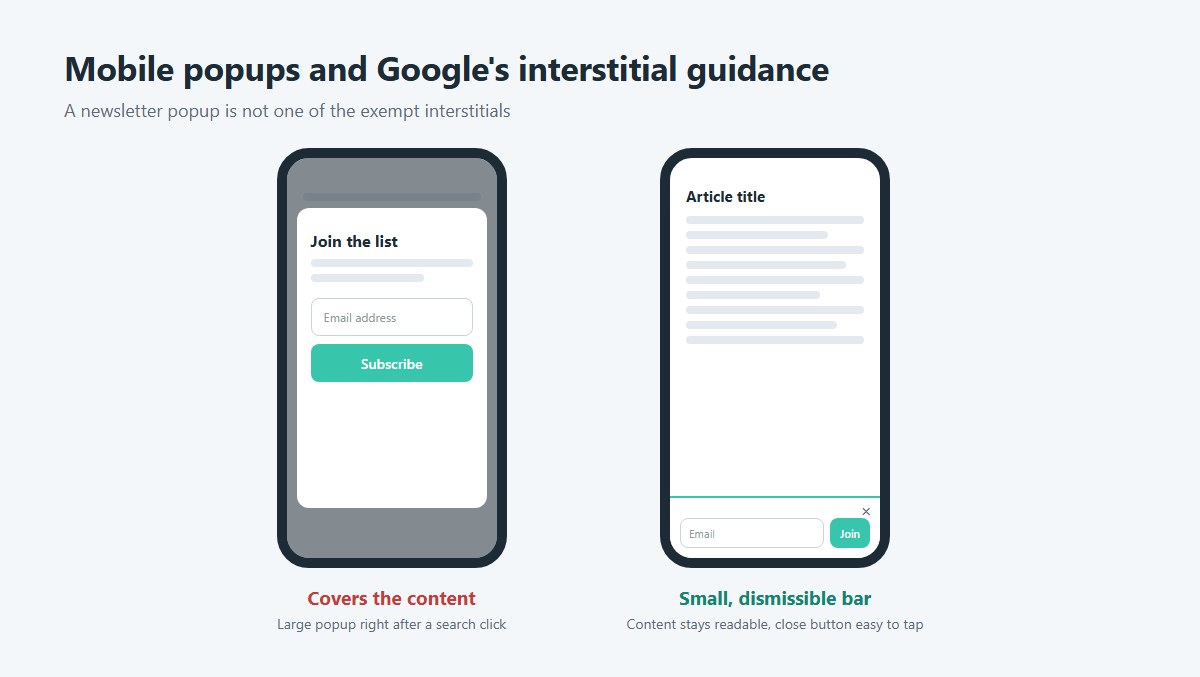
Mobile layouts break first, so run through the mobile form best practices checklist before launch.
Script Weight
Builder embeds load third-party JavaScript wherever the form appears. Compare Largest Contentful Paint and Interaction to Next Paint in PageSpeed Insights before and after adding one.
Platform Mismatch
A template wired to one platform’s merge fields and tags does not carry to another. Switching platforms means remapping every field, and a template that assumes a confirmation flow breaks where that flow does not exist.
Logic Beyond a Simple Signup
Payment steps, branching questions and fields that appear based on earlier answers rely on conditional logic, which a one-screen template does not offer.
A template is a starting point. When any of these applies, change the format or the platform route, or switch tools, and don’t just recolor it.
Newsletter Signup Form Templates FAQ
What does a newsletter signup form template include?
Expect an email field, optional name or preference fields, headline and button copy, a consent checkbox with a privacy policy link, spam protection and a success state.
The platform connection, through embed code or a hosted form, is what turns that layout into a working signup.
What happens after someone submits a signup form?
A success message appears at once, and a welcome email follows.
On a double opt-in list, that message tells the visitor to check their inbox, and Mailchimp’s optional welcome email goes out only after the confirmation click.
Does a lead magnet raise signups?
Yes. In Getsitecontrol’s 2024 tests, adding one raised email popup conversion by 101.82% on mobile and 155.43% on desktop.
That’s one platform’s dataset, so test the offer on your own audience before relying on the lift.
Can I use a signup form template on Shopify?
Yes. Paste the embed code into a Liquid section of the theme, or link to a hosted signup page if the theme blocks custom code.
Either route needs the same test submission before launch.
How do I make a signup form template responsive?
Give the form a flexible width and add a media query that stacks the input above the button on narrow screens.
Set the input to the full width of its container, and keep the button large enough to tap with a thumb.
Which Newsletter Signup Form Template Should Go Live First?
On a site with no list, an inline or footer newsletter signup form template with email and an optional first name goes live first, guarded by a consent checkbox and a honeypot field.
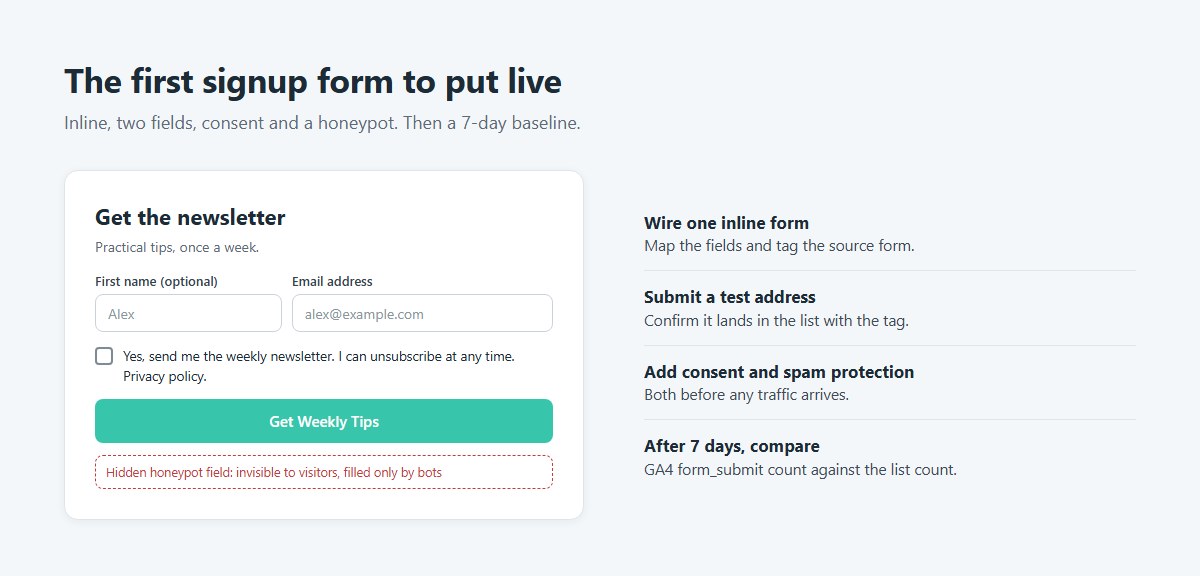
That order trades a lower signup rate than a popup for no interstitial risk.
Wire up one inline form and submit a test address. Add the consent text and spam protection before any traffic arrives, since consent has to exist when the address is collected. After 7 days, compare GA4 form_submit counts with the platform’s list count.
Popups, slide-ins and extra fields wait until that baseline holds. Captcha tiers and embed rules change with vendor updates (verified October 2026), so recheck the documentation before any redesign.
Once the form converts steadily, a lead magnet gives visitors a reason to join, and how to create a lead magnet is the next thing to learn.