

A new client doesn’t sign with an accounting firm because a landing page convinced them. They sign because someone they trust vouched for the firm, or because the firm showed…
Table of contents
Most leads won’t buy the first time they hear from you. Around 80% of new prospects never convert into customers, according to data from Forrester Research. Integrating form templates with your email marketing service is the first step in a successful lead nurturing strategy.
The gap between first contact and closed deal is where lead nurturing templates do their work. They give your email sequences a repeatable structure so every lead gets the right message at the right funnel stage, without your team writing from scratch each time.
This guide covers the specific template types that map to each phase of the buyer journey, how to build automated workflows around them inside platforms like HubSpot and ActiveCampaign, and what metrics actually tell you if your nurture campaign is moving leads forward or just filling inboxes.
What Is a Lead Nurturing Template
A lead nurturing template is a pre-built email structure designed to guide prospects through the sales funnel without writing every message from scratch.
It combines fixed layout elements (subject lines, body sections, CTA buttons) with dynamic placeholders for personalization like the recipient’s name, company, or past behavior.
Marketing teams at companies using HubSpot, ActiveCampaign, or Mailchimp rely on these templates to run automated email sequences that respond to specific trigger events.
The template itself isn’t the campaign. It’s one building block inside a larger drip email sequence that moves contacts from awareness to purchase decision.
Think of it this way: your CRM holds the data, your marketing automation platform runs the workflow, and the template determines what the lead actually sees in their inbox.
Without a clear template structure, nurture campaigns tend to feel random, inconsistent, or overly salesy. And leads notice.
How Lead Nurturing Templates Work Within a Sales Funnel
Every lead enters your funnel at a different level of intent. Some just downloaded a free guide. Others requested a demo. The template you send has to match where they are right now.
Research from Sender.net shows nurturing emails get an 8% click-through rate versus 3% for generic sends. That performance gap exists because properly structured nurture campaigns map each template to a specific funnel stage: top (awareness), middle (consideration), bottom (decision).
At the top, you send educational content. In the middle, case studies and comparisons. At the bottom, direct offers with urgency. Sending a pricing email to someone who just subscribed to your newsletter? That kills trust fast.
Quick Stage Mapping:
- Awareness: Blog posts, guides, industry reports
- Consideration: Product comparisons, webinars, customer stories
- Decision: Trials, consultations, time-sensitive discounts
According to lead generation data from UpLead, nurtured leads make 47% larger purchases than non-nurtured ones. Companies that excel at nurturing generate 50% more sales-ready leads at 33% lower cost.
Platforms like Salesforce, Marketo, and Pardot let you assign templates to automated workflows that trigger based on real user behavior, not arbitrary schedules.
How Templates Connect to Buyer Journey Stages
Awareness stage templates focus on education: blog posts, guides, industry reports. According to Gartner’s buyer journey research, 40% of buyers engage most with written content, while 35% prefer visual formats like videos or infographics during their journey.
Consideration stage templates shift toward product-specific content like webinars, comparison sheets, and social proof. Data from Sender.net indicates that 55% of B2B marketers say articles are the most effective content for moving prospects through the sales funnel.
Decision stage templates carry direct CTAs: free trials, consultations, limited-time discounts. Research from Deeto’s 2024 buyer experience report shows that aligning content with a prospect’s stage in the buyer’s journey can boost conversion rates by 72%.
Each template type maps to a specific intent level. According to Gartner, case studies (71% of sales professionals use them) are the most commonly distributed content to potential buyers during their buying journeys.
Content Performance by Stage:
| Journey Stage | Top Content Type | Conversion Impact |
|---|---|---|
| Awareness | Written articles (40% buyer preference) | Builds trust |
| Consideration | Case studies (71% distribution rate) | 72% better conversion |
| Decision | Product demos, pricing info | 47% larger purchases |
How Lead Scoring Determines Which Template to Send
A lead scoring system assigns points based on actions: email opens, page visits, content downloads, form submissions. When a lead crosses a threshold, they move to the next template sequence.
According to Landbase research, only 44% of organizations use lead scoring despite its proven effectiveness. Organizations implementing lead scoring see 20% increases in sales productivity.
A lead who visited your pricing page three times this week shouldn’t receive the same template as someone who opened one blog email. Scoring automates that distinction inside tools like Zoho CRM or Pipedrive.
Lead Scoring Effectiveness Data:
Data from AI-driven lead scoring systems shows conversion rate improvements up to 30% compared to traditional methods. Research from Landbase indicates that early adopters implementing predictive lead scoring report these gains through superior pattern recognition identifying subtle buying signals manual analysis misses.
Only 27% of leads sent to sales are actually qualified, according to industry data. Following up within the first hour makes companies nearly 7x more likely to qualify leads, yet 70% of prospects are lost due to inadequate follow-up processes.
Build Your Scoring Framework:
Points for high-intent actions:
- Pricing page visit: 15 points
- Demo request: 25 points
- Case study download: 10 points
- Email opens: 2 points per open
Thresholds for template triggers:
- 0-20 points: Awareness templates (educational content)
- 21-50 points: Consideration templates (product comparisons)
- 51+ points: Decision templates (direct offers, demos)
According to research from multiple sources, 68% of successful marketers consider lead scoring based on content as a revenue contributor. Machine learning algorithms in modern lead scoring systems achieve dramatically better performance than traditional rule-based scoring methods when properly evaluated using precision, recall, and F1 scores.
What Types of Lead Nurturing Templates Exist
Not every template serves the same purpose. The type you pick depends on the funnel stage, the action the lead just took, and what you want them to do next.
Below are the core template categories used across B2B and B2C email marketing workflows.
Welcome Email Templates
See the Pen
Lead Nurturing Welcome Email Template by Bogdan Sandu (@bogdansandu)
on CodePen.
Sent immediately after a lead subscribes or fills out a lead generation form. Sets the tone for everything that follows.
According to GetResponse’s 2024 data, welcome emails achieve an average open rate of 83.63% and a click-through rate of 16.60%. Research from Mailmodo shows that 74% of subscribers expect to receive a welcome email immediately after subscribing.
Best welcome templates include a brief brand intro, a clear next step, and a single CTA.
Template structure:
- Subject line with subscriber’s name
- Brand introduction (2-3 sentences)
- Value statement (what they’ll receive)
- Single, clear call to action
- Expected email frequency
Multi-email sequences generate 90% more orders than a single welcome email, according to Omnisend’s research.
Educational Drip Sequence Templates
See the Pen
Educational Drip Sequence – Email 1: Problem Awareness by Bogdan Sandu (@bogdansandu)
on CodePen.
A series of 3-7 emails spaced over days or weeks. Each one teaches something specific about the problem your product solves.
Data from Sender.net shows that companies excelling at lead nurturing generate 50% more sales-ready leads at 33% lower cost. Educational drips do the heavy lifting here.
Timing breakdown:
- Email 1: Sent immediately (problem awareness)
- Email 2: Day 3 (solution framework)
- Email 3: Day 7 (specific approach)
- Email 4: Day 10 (case example)
- Email 5: Day 14 (direct offer)
Aligning content with a prospect’s stage in the buyer’s journey can boost conversion rates by 72%, according to research from Sender.net.
Product Onboarding Templates
See the Pen
Product Onboarding Email Sequence by Bogdan Sandu (@bogdansandu)
on CodePen.
Triggered after a free trial signup or first purchase. These walk users through core features step by step.
SaaS companies like Intercom and Customer.io use onboarding sequences to reduce churn during the first 14 days, which is the window where most trial users drop off.
Research from Stripo shows that new subscribers who receive a well-crafted onboarding email demonstrate 33% more engagement with a brand.
Onboarding sequence structure:
- Welcome + login credentials (immediate)
- First feature walkthrough (Day 1)
- Second key feature (Day 3)
- Advanced capabilities (Day 7)
- Success stories (Day 10)
Re-engagement Templates
See the Pen
Re-engagement Email Template · Lead Nurturing Sequence by Bogdan Sandu (@bogdansandu)
on CodePen.
Targeted at contacts who haven’t opened emails or logged in for 30-90 days. Subject lines like “We miss you” or “Still interested?” work, but only when paired with a genuine incentive.
If re-engagement fails after 2-3 attempts, move the contact to a suppression list. Keeping dead leads in your active list hurts email deliverability and sender reputation.
According to MailerLite’s 2025 benchmarks, the average unsubscribe rate increased to 0.22% (from 0.08% in 2024), likely due to Gmail changes making it easier for people to unsubscribe.
Abandoned Cart Email Templates
See the Pen
Abandoned Cart Email – Hour 1 Recovery Template by Bogdan Sandu (@bogdansandu)
on CodePen.
The Baymard Institute calculated that the average shopping cart abandonment rate in 2025 is 70.19%. That’s a lot of lost revenue.
Research from Klaviyo shows abandoned cart flows drive the highest average revenue per recipient at $3.65, which is 37.74% higher than welcome flows. The average abandoned cart conversion rate is 3.33%.
The three-email approach works best:
- Hour 1: Simple reminder with cart contents
- Hour 24: Address objections (shipping costs, security)
- Hour 48-72: Discount offer or urgency element
Data from Analyzify shows cart abandonment emails achieve a 39.07% open rate and 23.33% click-through rate, with an average conversion rate of 10.7%.
Performance benchmark:
| Timing | Average Conversion | |
|---|---|---|
| Reminder | 1 hour | 4-6% |
| Objection handler | 24 hours | 3-5% |
| Discount offer | 48-72 hours | 2-4% |
Klaviyo and Drip both offer pre-built abandoned cart templates with dynamic product insertion, which pulls in the exact items left behind.
Campaigns utilizing three cart abandonment emails generate $24.9 million in revenue, compared to $3.8 million from campaigns with only one email.
Case Study and Social Proof Templates
See the Pen
Lead Nurturing – Case Study & Social Proof Email Template by Bogdan Sandu (@bogdansandu)
on CodePen.
Best deployed mid-funnel when a lead is evaluating options. Feature a specific client result with numbers, not vague praise.
According to Gartner research, 71% of sales professionals distribute case studies or customer success stories to potential buyers during their buying journeys.
“Company X increased conversions by 40% in 90 days” beats “Our customers love us.” Link to the full case study. Keep the email itself short.
Buyers interact most with written content (40% of buyers) during their journey, while 35% prefer visual formats according to Gartner data.
Discount and Promotional Offer Templates
See the Pen
Lead Nurturing – Discount & Promotional Offer Email Template by Bogdan Sandu (@bogdansandu)
on CodePen.
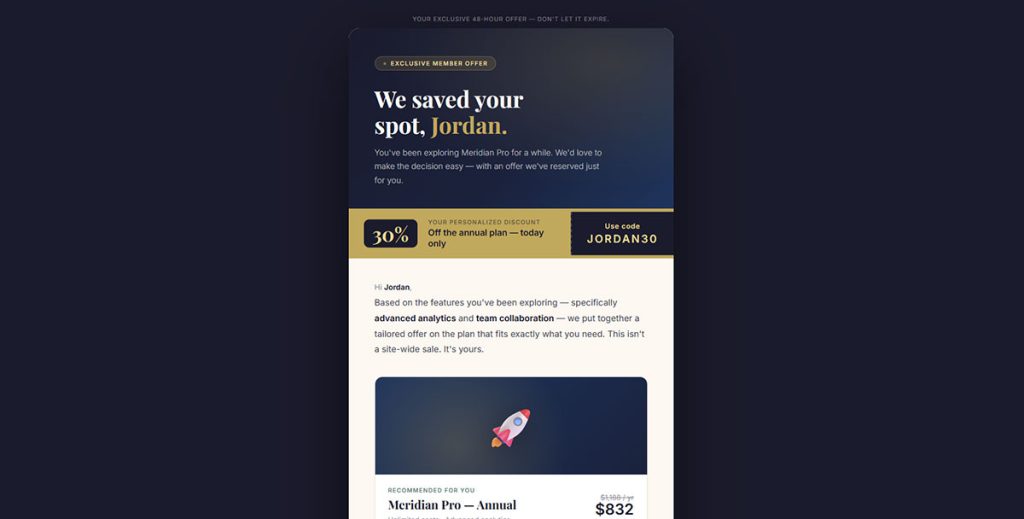
Bottom-of-funnel only. Sending discounts too early trains leads to wait for price drops.
Use urgency elements: countdown timers, limited availability, expiration dates. But make them real. Fake scarcity erodes trust permanently.
Research shows that personalized product offers and calls-to-action increase CTR by 41%.
Event or Webinar Invitation Templates
See the Pen
Webinar / Event Invitation Email Template by Bogdan Sandu (@bogdansandu)
on CodePen.
Effective for both B2B and B2C. The template should include the date, time, speaker credentials, and a one-sentence value proposition.
Data from ON24 shows that 57% of B2B webinar registrations convert to attendees. The average webinar conversion rate is 61.7% according to TwentyThree research.
Proven webinar email tactics:
Research from BigMarker shows the average open rate for webinar invitation emails is 1.7x higher than general marketing emails, with click rates 4.5x higher.
Follow up with a reminder 24 hours before the event and a recording link afterward. Your webinar registration forms should collect just enough data (name, email, company) without creating friction.
Email timing strategy:
- Initial invitation: 2 weeks before
- Reminder 1: 1 week before
- Reminder 2: 24 hours before
- Last chance: 2 hours before
- Follow-up: Recording link within 24 hours
According to multiple sources, 57% of webinar registrations come from email campaigns, making it the most effective promotional channel. The average webinar cost per lead is $72, compared to over $800 per lead at trade shows.
Research from Zoom shows that 73% of B2B marketers consider webinars the top method for generating high-quality leads. Companies see 20% to 40% of webinar attendees entering the sales pipeline as qualified leads.
How to Choose the Right Lead Nurturing Template for Each Funnel Stage
Picking the wrong template for the wrong stage wastes sends and annoys leads. The match between template type and buyer journey position is everything.
What Criteria Determine the Best Template Match
Four factors: funnel stage, lead score, content consumed so far, and industry vertical. A lead who downloaded a pricing PDF needs a different template than one who read a blog post.
Research from Landbase shows that organizations implementing lead scoring see 20% increases in sales productivity. According to industry data, only 27% of leads sent to sales are actually qualified, making proper template matching critical.
Decision matrix for template selection:
| Lead Behavior | Funnel Stage | Template Type | Send Timing |
|---|---|---|---|
| Blog post read | Awareness | Educational drip | 24 hours |
| Guide download | Consideration | Case study | 3 days |
| Pricing page visit | Decision | Product demo | Immediate |
| Demo request | Decision | Onboarding | Immediate |
Also consider your product’s complexity. Simple ecommerce products need shorter sequences (3-5 emails). Enterprise SaaS with long sales cycles might require 12-15 touchpoints before conversion.
According to Deeto’s buyer journey research, the typical buyer is 70% through the decision-making process by the time they reach out. Data from 6sense shows the average buying group now has 11 people, making template personalization more complex.
How Does Industry Type Affect Template Selection
B2B templates tend to be longer, more data-driven, and focused on ROI. B2C templates are visual, emotion-driven, and shorter.
According to ON24’s research, 57% of B2B webinar registrations convert to attendees, while B2C conversion patterns differ significantly. B2B decision cycles involve multiple stakeholders and longer evaluation periods.
Industry-specific template adjustments:
SaaS lead generation campaigns need onboarding-heavy sequences. Research shows that SaaS companies reduce churn by focusing on the first 14 days, making product onboarding templates critical.
Real estate relies on local market updates and property alerts. Healthcare requires strict compliance language. Ecommerce leans on cart recovery and product recommendations.
According to Klaviyo data, abandoned cart flows drive $3.65 revenue per recipient for ecommerce, making them the highest-performing template type for that vertical.
The template framework stays the same, but the content, tone, and send frequency change based on your vertical.
What Are the Components of an Effective Lead Nurturing Email Template
A template is only as good as its individual parts. Every element, from the subject line to the footer, either moves the lead forward or gives them a reason to ignore you.
What Makes a Strong Subject Line for Nurturing Emails
Research from Belkins shows personalized subject lines achieve a 46% open rate versus 35% without personalization. That’s a 31% increase in visibility, with reply rates jumping from 3% to 7% (a 133% boost).
According to Campaign Monitor, personalized subject lines increase open rates by 26%. Data from multiple sources confirms that 43% of people decide to open an email based solely on the subject line.
Subject line best practices backed by data:
Keep it under 50 characters for mobile. GetResponse’s 2024 research shows subject lines between 41-50 characters achieve the highest click-through rate at 17.57%. Subject lines with 2-4 words yield the highest open rates at 46% according to Belkins.
Avoid all-caps, excessive punctuation, and spam trigger words like “FREE” or “ACT NOW.” Research shows that ALL CAPS subject lines slightly outperform others at 30%, but the difference is marginal.
What works:
- Questions (“Are you ready to…”) achieve 46% open rates
- Numbers increase opens by 57%
- Urgent language boosts open rates by 22%
- “Video” in subject line increases opens by 7-13%
What doesn’t work:
- “Newsletter” decreases open rates by 18.7%
- Emojis showed lower performance (42.23% vs 37.5% open rate) according to GetResponse
- Generic greetings drag rates below 36%
A/B test two variants per send until you find patterns that consistently outperform.
How Should CTAs Be Structured in a Nurturing Sequence
One CTA per email. That’s it.
Research shows that newsletters with a single CTA generate a 371% engagement boost and improve sales by 1616% according to WordStream. Multiple CTAs split attention and reduce click-through rates.
The CTA should match the funnel stage: “Read the guide” for awareness, “See the demo” for consideration, “Start your trial” for decision.
CTA performance data:
Button-style CTAs outperform text links by 28% on average. Studies from Opensend indicate that emails with a single, prominent call-to-action can increase clicks by up to 371% compared to emails with multiple competing CTAs.
According to research compiled by Keystar Agency, the average click-through rate for CTAs is 4.23%. Data from MailerLite shows the average email click rate in 2025 is 2.09%, with click-to-open rates at 6.81%.
CTA optimization tactics:
- Use action words (“Get,” “Download,” “Start”) for 122% higher conversions
- Personalized CTAs perform 202% better than basic CTAs
- Mobile-optimized buttons see 42% higher tap-through rates
- Button size increases can boost click-through rates by 90%
- Adding urgency (limited-time offers) increases conversions by 332%
Place CTAs above the fold and repeat once at the bottom for longer emails. Research shows CTAs placed above the fold outperform those below by 304%.
CTA positioning benchmarks:
| Placement | Performance Boost |
|---|---|
| Above the fold | 304% vs below fold |
| Centered | 682% vs left-aligned |
| Single CTA | 371% engagement lift |
| Button format | 28% vs text links |
What Role Does Personalization Play in Template Performance
Basic personalization (first name in the greeting) is table stakes. According to Zippia, including the recipient’s first name increases click-through rates by 41% and open rates by 29%.
The real gains come from behavioral email targeting: referencing pages visited, content downloaded, or products viewed.
Personalization impact statistics:
Research shows that 80% of consumers value emails personalized to their interests. According to multiple sources, personalized emails drive 29% higher open rates and 41% higher click-through rates.
Data indicates that personalized product offers increase CTR by 41%. Studies show personalization can reduce customer acquisition costs by as much as 50%.
Dynamic content blocks inside platforms like ActiveCampaign or Brevo let you swap sections of the template based on lead attributes. A SaaS lead in the finance industry sees different testimonials than one in retail, all from the same template shell.
Behavioral personalization tactics:
- Reference specific pages visited
- Mention content previously downloaded
- Show products viewed but not purchased
- Adjust send time based on past open patterns
- Segment by engagement level and industry
According to research, 72% of consumers are more likely to open emails with personalized subject lines. McKinsey data shows that 71% of consumers expect personalized interactions, and 76% get frustrated when this doesn’t happen.
When your subscription forms collect role, industry, or company size alongside the email address, you give your templates much better data to work with. That extra field or two at signup pays off across every email in the sequence.
Research from Litmus shows that 68% of marketers have observed that dynamic content personalization enhances performance, with 80% noting improved results from personalization tactics.
How to Build a Lead Nurturing Workflow
Templates don’t work in isolation. They need a workflow structure that decides when each email fires, what happens if a lead ignores it, and where the sequence branches based on behavior.
Most marketing automation platforms (HubSpot, Marketo, ActiveCampaign) let you build these visually with drag-and-drop editors. But the logic behind the workflow matters more than the tool.
What Trigger Events Start a Nurturing Workflow
Common triggers: form submission, content download, webinar signup, free trial activation, cart abandonment, or a specific page visit. Every workflow starts with one clear action the lead took.
Your website forms used for lead generation are the most reliable trigger source because they capture intent alongside contact data. A lead who fills out a consultation request form is a different trigger than someone grabbing a free PDF.
How Long Should the Interval Be Between Nurturing Emails
No universal answer, but general benchmarks hold up across industries:
- Welcome sequences: Email 1 immediately, Email 2 at 24-48 hours, Email 3 at 3-5 days
- Educational drips: Every 3-5 days for B2C, every 5-7 days for B2B
- Re-engagement: Day 1, Day 4, Day 10, then stop
- Abandoned cart: 1 hour, 24 hours, 48-72 hours
Sending too frequently gets you unsubscribes. Sending too slowly loses momentum. Watch your unsubscribe rate per sequence and adjust.
What Tools Support Automated Lead Nurturing Workflows
The major players break down by company size and complexity:
- Small business: Mailchimp, ConvertKit, GetResponse, Brevo
- Mid-market: ActiveCampaign, Drip, Klaviyo, Customer.io
- Enterprise: HubSpot, Salesforce, Marketo, Pardot
Pick based on your CRM integration needs, list size, and how complex your branching logic gets. Took me a while to realize that the fanciest tool doesn’t help if your team can’t actually build the workflows.
How to Measure Lead Nurturing Template Performance
Running templates without tracking performance is like sending emails into a void. Every sequence needs clear metrics tied to actual business outcomes, not vanity numbers.
What Metrics Track Lead Nurturing Email Success
Five core metrics to monitor per template and per sequence:
Open rate: MailerLite’s 2025 data shows the average email open rate across all industries is 43.46%, up from 42.35% in 2024. However, benchmarks vary by industry, from 30.1% (travel) to 55.71% (non-profits).
According to HubSpot, B2B email marketing averages 39.5% open rates. Research from multiple sources indicates that Apple’s Mail Privacy Protection has inflated open rates by up to 18 percentage points, making this metric less reliable than before.
Click-through rate: According to MailerLite, the average email click rate in 2025 is 2.09%. Data from ActiveCampaign shows the average CTR across industries is around 2.62%. Anything above 3-5% is strong performance.
Industry-specific CTR benchmarks range from 0.77% to 4.36% according to multiple sources. B2B typically sees 2-2.5% average CTR.
Conversion rate: Tracks the action you actually want (demo booked, trial started, purchase made). According to Klaviyo, email campaigns average 0.08% conversion rate across industries, with top 10% performers reaching 0.44% (5x higher).
Omnisend reports email campaign click-to-conversion rates grew by 27.6% in 2024, showing consumers who engage are increasingly likely to purchase after clicking through.
Unsubscribe rate: MailerLite shows the average unsubscribe rate in 2025 is 0.22% (more than double 2024’s 0.08%), likely due to Gmail changes making it easier to unsubscribe. Research from HubSpot indicates anything under 0.5% is healthy. Above that signals problems with frequency or relevance.
According to ActiveCampaign, below 0.2% is considered excellent. Industry data from Amra & Elma shows the global average sits at 0.1%, with ecommerce averaging 0.27%.
Reply rate: Especially relevant for B2B sequences where replies indicate sales-readiness. Belkins research shows personalized emails achieve 7% reply rates versus 3% without personalization.
Performance benchmarks table:
| Metric | Average | Good | Excellent | Warning Sign |
|---|---|---|---|---|
| Open Rate | 42-43% | 30%+ | 50%+ | Below 25% |
| Click Rate | 2-2.6% | 3-5% | 5%+ | Below 1% |
| Click-to-Open | 6.81% | 8%+ | 10%+ | Below 4% |
| Unsubscribe | 0.22% | Below 0.2% | Below 0.1% | Above 0.5% |
| Conversion | 0.08% | 0.2%+ | 0.4%+ | Below 0.05% |
Google Analytics paired with your email platform’s built-in reporting gives you the full picture from open to on-site behavior. Checking conversion rate benchmarks for your industry helps you set realistic targets instead of chasing arbitrary numbers.
How to A/B Test Lead Nurturing Templates
Test one variable at a time: subject line, CTA placement, email length, send time, or personalization level. Testing multiple variables simultaneously makes results unreadable.
Run each test for at least 1,000 sends or 7 days (whichever comes first) before drawing conclusions. Litmus and Campaign Monitor both offer built-in A/B testing with statistical significance indicators.
Testing priority order:
Start with subject lines since they have the biggest impact on whether the email even gets opened. Research shows that 43% of people decide to open an email based solely on the subject line.
According to data from Belkins, personalized subject lines achieve 46% open rates versus 35% without (a 31% increase). Testing subject line personalization should be your first priority.
Then move to CTA copy and placement. Small changes here shift click-through rates by 10-20%. Research shows button-style CTAs outperform text links by 28%, and emails with a single CTA see 371% more clicks than those with multiple CTAs.
What to test in each variable:
Subject lines: Length (2-4 words vs 41-50 characters), personalization (name, company), urgency language, questions vs statements
CTAs: Button vs text link, action words vs passive language, placement (above fold vs below), single vs multiple
Send timing: Day of week (Tuesday-Wednesday typically best), time of day (8-9 AM shows highest opens), subscriber time zones
What Are Common Mistakes in Lead Nurturing Email Templates
Most nurture sequences fail not because the copy is bad, but because the structure and targeting are wrong. These are the mistakes that quietly kill your lead conversion funnel.
Why Does Over-Sending Hurt Nurturing Campaigns
Sending daily emails to cold leads spikes unsubscribe rates, triggers spam filters, and damages your sender domain reputation.
Research from GetResponse indicates that sending 2 newsletters per week maintains the highest open and click-through rates. Data shows that 44% of consumers unsubscribe if there are too many emails being delivered.
According to multiple sources, the optimal email frequency is 2-4 times per month for most verticals. Industry data shows that 86% of companies send marketing emails at least monthly, with 58% emailing weekly or more often.
If your unsubscribe rate jumps above 0.5% on any single send (compared to the 0.22% average), cut frequency immediately. Research indicates that receiving too many emails is the most common reason consumers unsubscribe.
Frequency impact data:
- 1-2 emails/week: Highest engagement
- 2-4 emails/month: Best for most B2B
- Daily emails: Unsubscribe spikes of 2-3x
- 11-12 emails/week: Lower CTR but engaged audiences
What Happens When Segmentation Is Missing from Nurturing Emails
Every lead gets the same generic sequence. New subscribers see the same emails as people who already had a sales call. The result: low engagement, high opt-outs, wasted sends.
Lead segmentation based on behavior, funnel stage, and demographic data is the difference between a 2% CTR and a 7% CTR.
According to Campaign Monitor, segmented email campaigns drive 30% more opens and 50% higher click rates than non-targeted batches. Research shows that personalized emails have 29% higher unique open rates and 41% more unique click rates than non-personalized emails.
Data from Litmus indicates that 68% of marketers observed that dynamic content personalization enhances performance, with 80% noting improved results from personalization tactics.
Even basic segmentation (new vs. returning, B2B vs. B2C, industry vertical) makes a noticeable impact. According to multiple sources, 71% of decision-makers cited lack of relevancy as the primary reason they ignore emails.
Your forms play a direct role here. When form fields are built to capture high-quality lead data, your segmentation actually has something to work with. Collecting just an email address gives you almost nothing to personalize against.
Lead Nurturing Templates for B2B vs. B2C
Same concept, very different execution. The template structure, email length, tone, and conversion goals shift depending on who you’re selling to.
How Do B2B Nurturing Templates Differ from B2C
According to research from Deeto and 6sense, B2B buyers spend only 17% of their total purchase journey talking to sales reps, and the average buying group now has 11 people. This makes B2B nurturing more complex, requiring content that addresses multiple stakeholders.
B2B templates from companies generating B2B leads tend to include more text, fewer images, and longer educational sequences. B2C templates are visually heavier with shorter copy and faster paths to purchase.
Research shows that 33% of ecommerce revenue is driven by email marketing, with automated emails generating 320% more revenue than non-automated emails despite representing just 2% of email volume.
What Adjustments Does a SaaS Company Need in Its Nurturing Templates
SaaS nurturing sequences split into two distinct tracks: pre-trial and post-trial. Pre-trial templates educate on the problem and position the product as the fix. Post-trial templates focus on feature adoption, usage tips, and upgrade prompts.
The critical window is days 1-7 of a free trial. Research from Stripo shows that new subscribers who receive well-crafted onboarding emails demonstrate 33% more engagement with a brand.
According to industry data, users who complete onboarding in the first week convert at 3x the rate of those who don’t. This makes the first week of email templates absolutely critical for SaaS companies.
SaaS email sequence structure:
Pre-trial (5-7 emails):
- Email 1: Problem awareness content
- Email 2-3: Solution education + social proof
- Email 4: Feature highlights + demo CTA
- Email 5: Case study + trial signup
Post-trial (7-10 emails):
- Day 1: Welcome + setup guide
- Day 2: First feature walkthrough
- Day 4: Advanced feature introduction
- Day 7: Usage tips + support resources
- Day 10: Upgrade prompt with discount
SaaS templates also need usage-based triggers. If a trial user hasn’t logged in for 3 days, that’s a re-engagement trigger. If they used Feature A but not Feature B, that’s a product education trigger. Tools like Customer.io and Drip handle this behavioral email targeting well.
Consider how your initial capture point feeds the entire sequence. A well-designed lead capture form that collects company size and use case gives your onboarding templates the context they need to feel personalized from Email 1.
FAQ on Lead Nurturing Templates
What is a lead nurturing template?
A lead nurturing template is a pre-structured email format used inside marketing automation workflows to guide prospects through the sales funnel. It includes placeholder fields for personalization, a fixed layout, and a single CTA matched to the lead’s current funnel stage.
How many emails should a lead nurturing sequence include?
B2C sequences typically run 3-7 emails. B2B sequences range from 8-15 depending on sales cycle length. SaaS onboarding flows often split into pre-trial and post-trial tracks. Match sequence length to your product’s complexity and average time to purchase.
What tools are best for building lead nurturing workflows?
HubSpot, ActiveCampaign, and Marketo handle complex branching logic well. Klaviyo and Drip work best for ecommerce. ConvertKit and Mailchimp suit smaller teams. Pick based on your CRM integration needs, list size, and how much behavioral email targeting you require.
What is the difference between a drip campaign and a nurture campaign?
A drip campaign sends emails on a fixed time schedule regardless of lead behavior. A nurture campaign adjusts based on actions like email opens, link clicks, or page visits. Nurture campaigns use lead scoring and segmentation to send contextually relevant templates.
How do you personalize lead nurturing emails beyond the first name?
Use dynamic content blocks that swap sections based on industry, role, or past behavior. Reference specific pages visited, content downloaded, or products viewed. Platforms like Salesforce and Customer.io let you build conditional logic into each template.
What is a good open rate for lead nurturing emails?
Industry averages fall between 15-25%. Welcome emails outperform at 50-60%. If your nurture sequence drops below 15%, check your subject lines, send frequency, and list hygiene. Litmus and Campaign Monitor offer benchmarking tools to compare against your vertical.
When should you send the first nurturing email after a lead converts?
Immediately. Leads that receive a response within 5 minutes of form submission are 9x more likely to convert. Set your automation trigger to fire the welcome template the moment a lead capture form is submitted.
How do you know when a lead is ready to move from nurturing to sales?
Lead scoring tracks this. When a contact crosses your predefined threshold through actions like visiting a pricing page, opening 5+ emails, or requesting a demo, they become a sales qualified lead. At that point, hand off to your sales team.
Can you use the same nurturing templates for B2B and B2C?
Not effectively. B2B templates need longer sequences, professional tone, and ROI-focused content. B2C templates are shorter, more visual, and emotion-driven. The underlying workflow logic is similar, but the template content, CTA style, and send frequency differ significantly.
What is the biggest mistake in lead nurturing email campaigns?
Skipping segmentation. Sending the same generic sequence to every lead regardless of funnel stage, behavior, or demographic data kills engagement. Even basic segmentation by source, industry, or buyer journey stage improves click-through rates by 2-3x.
Conclusion
The right lead nurturing templates turn scattered email sends into a structured system that moves prospects from first touch to closed deal. Without them, your marketing automation platform is just expensive software sending random messages.
Match each template type to a specific stage in your lead conversion funnel. Use lead scoring to trigger the right sequence at the right time. Test subject lines, CTA placement, and send frequency through A/B testing inside tools like Marketo or Klaviyo.
Segment your lists. Personalize beyond the first name. Track open rates, click-through rates, and actual conversions, not vanity metrics.
Start with a welcome sequence and one mid-funnel drip. Build from there based on what your data tells you, not assumptions. Every template you add should solve a specific gap in your prospect engagement strategy, not just fill a content calendar.