





Black Friday 2026 is on Friday, November 27, with Cyber Monday following on November 30. For WordPress site owners it’s the one week a year when the plugins and services…
Table of contents
Formstack’s Forms plan costs $83 per month on annual billing. That buys 1 builder user, 25 forms and 1,000 submissions per form (Formstack pricing page, 2026).
The 1,000 is the number people tend to misread. It counts submissions stored in each form’s dashboard, not monthly volume. A tool capped at 1,000 per month resets every cycle, while Formstack’s limit only fills up.
Which Formstack alternatives are worth shortlisting?
IvyForms, Tally, Fillout, Cognito Forms, Jotform, Google Forms, FormAssembly, Zoho Forms and Paperform cover most of the reasons people leave. Which one fits depends on the limit that pushed you out, not on a feature checklist.
| Tool | Best when | Free plan | Paid from |
|---|---|---|---|
| IvyForms | The forms live on a WordPress site | Yes (unlimited responses) | EUR 29 a year (Essentials) |
| Tally | Caps and seat costs are the pain | Yes (fair use) | $29 (Pro) |
| Fillout | Airtable or Notion sits behind the form | Yes (1,000 responses a month) | $15 (Starter) |
| Cognito Forms | Calculations on a small budget | Yes (100 entries a month) | $19 (Pro) |
| Jotform | You want the closest feature match | Yes (100 submissions a month) | $34 (Bronze) |
| Google Forms | Internal forms only | Yes (unlimited) | $7 per user (Workspace) |
| FormAssembly | Salesforce is the system of record | No (trial only) | $59 (Atlas Explorer) |
| Zoho Forms | The CRM is Zoho | Yes (500 submissions a month) | $12 (Basic) |
| Paperform | Forms take payments | Yes (30 submissions a month) | $49 (Pro) |
IvyForms is the odd one out on pricing. It’s a WordPress plugin licensed per domain, not per response or per seat, so the free Lite version has no response cap and submissions sit in your own WordPress database. The trade-off is that conditional logic, multi-step forms and the signature field are Pro features.
IvyForms shows a yearly euro price, Tally and Zoho Forms show monthly prices, FormAssembly shows G2’s listed starting price, and the rest assume annual billing. All figures come from vendor pricing pages and pricing captures dated September to November 2026.
PandaDoc stays out of the table because it replaces Formstack Documents and Sign, not the form builder. It comes up where document generation is covered.
What Formstack costs and where its limits bite
Forms and Suite are the self-serve plans. Salesforce Solutions and Enterprise are priced by sales. There’s no free plan, only a 14-day trial of Forms with no credit card.
Plan details below come from Formstack’s pricing page as of November 2026.
- Forms runs $83 per month billed annually ($99 monthly) and covers 1 builder user, 25 forms, 1,000 submissions per form and 2 GB of storage.
- Suite is $250 per month billed annually ($299 monthly). It gives you 3 builder users, 100 forms, 5,000 submissions per form, 10 GB, 250 document deliveries a month and unlimited eSignatures.
- HIPAA is an add-on on both plans, and approval routing only starts at Suite.
- Salesforce Solutions and Enterprise are quoted by sales, and Enterprise lists unlimited users and submissions.
Builder seats and per-form caps
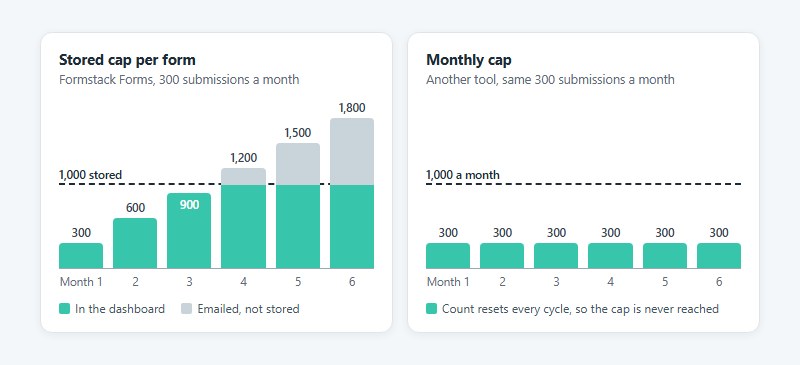
According to its help center, Formstack counts the submissions sitting in each form’s dashboard at any moment, not monthly volume. That one detail changes how the cap compares with other tools.
Past the limit, new submissions get emailed to you instead of stored, and integrations keep running. Nothing is lost, but nothing lands in the dashboard either.
Take a form that collects 300 submissions a month. It crosses 1,000 stored submissions in month four unless someone exports and deletes, while a tool capped at 1,000 per month resets every cycle and never gets there.
Seats work the same way. Forms includes one builder, so one person ends up building everyone’s forms, and extra users are sold as add-ons after signup with no price on the pricing page.
Smaller rules add friction too. Archived forms still count toward the 25-form limit, and deleted forms sit in a deleted folder for 7 days before hard deletion (support can speed that up on request). Hit the file storage limit and the upload prompt switches off on the form.
One caution on sources. The help center article for Suite still uses older plan names (Starter, Teams, Pro) and cites 2,000 stored submissions per form on a Teams suite plan, so take current numbers from the pricing page.
Which limit are you hitting first?
If stored submissions or builder seats are the problem, read the uncapped options next. HIPAA add-on cost sends you to the BAA plan comparison, and Salesforce depth means checking native connectors before you leave. Payments, calculations and document caps get their own comparisons further down.
Whichever limit forces a bill or a workaround today, start with that one.
Cheaper options without per-form submission caps
IvyForms and Tally are the cheapest routes. IvyForms has no response cap at all on its free WordPress plugin, and Tally offers unlimited forms and submissions on its free plan under a fair-use policy. Fillout, Cognito Forms and Google Forms each loosen the Formstack meter in a different way.
A form that takes 3,000 submissions in one month shows how differently these tools count.
| Tool | Plan that holds 3,000 a month | Per month (annual billing) |
|---|---|---|
| IvyForms | Free Lite (no response cap) | $0 (plus your WordPress hosting) |
| Tally | Free (fair use) | $0 |
| Cognito Forms | Team (10,000 entries a month) | $39 |
| Fillout | Pro (5,000 responses a month) | $40 |
| Jotform | Gold (10,000 submissions a month) | $99 |
| Formstack | Suite (5,000 stored per form) | $250 |
Formstack’s Forms plan fails right away, since 1,000 stored submissions fill up in the first third of the month. Suite holds that month, but a second month at the same volume overflows the 5,000 stored cap unless someone exports and deletes.
Plan limits come from IvyForms’ pricing page and WordPress.org listing, Formstack’s pricing page, Cognito Forms’ pricing page and FAQ, Tally’s help center, and the Jotform and Fillout pricing pages.
IvyForms
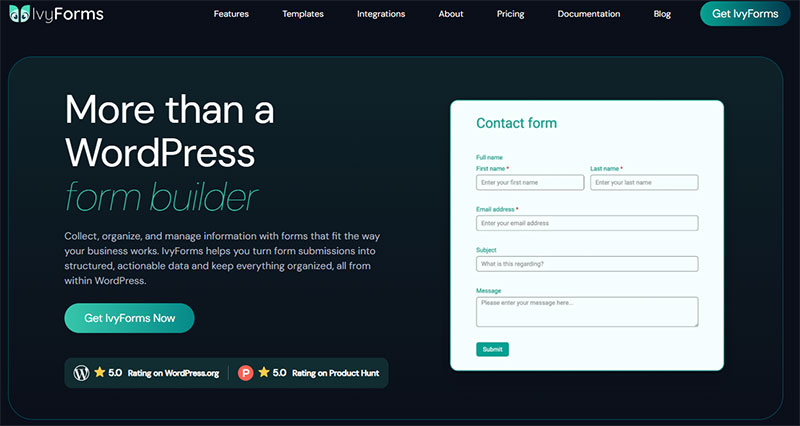
IvyForms licenses by domain, not by response or seat. That means no meter at all: the free Lite version collects unlimited submissions, and entries are stored in your own WordPress database instead of a vendor’s account.
Lite includes the drag-and-drop builder, 20+ field types with file upload, entry management, email notifications, spam protection (reCAPTCHA, hCaptcha, Turnstile) and Google Sheets and Slack integrations. Paid plans start at EUR 29 a year for one domain, and Growth covers three.
The catch is twofold. You need a WordPress site, and storage limits become your host’s problem (a 3,000-a-month form grows the database fast). Conditional logic, multi-step forms and the signature field also sit in Pro, so a Formstack form that leans on branching won’t move over on the free version.
IvyForms replaces Formstack Forms best for teams whose forms already live on a WordPress site.
Tally
Tally’s own comparison pages list unlimited forms and submissions on the free plan, subject to fair use. Pro costs $29 per month and adds custom domains, custom CSS, unlimited team members and partial submissions.
On the plus side, the free plan has no published submission cap, conditional logic, signatures and file uploads are included at no cost, and unlimited team members on Pro mean seats stop costing money. The catch is that fair use has no stated number (Jet Admin’s review flags this). Tally’s own Formstack comparison also says it has no native Salesforce integration, approval workflows or SSO.
Tally replaces Formstack Forms for teams whose workflow ends at collection and who don’t run their own site.
Fillout

Fillout meters responses, not seats. Its free plan allows unlimited forms and seats with 1,000 responses a month, and paid plans start at $15 per month on annual billing.
| Pros | Cons |
|---|---|
| Unlimited seats on every plan | Fillout branding on the free plan |
| Airtable, Google Sheets, Notion and webhook connections | Response caps apply until the Business tier at about $75 per month |
| 1,000 free responses a month | Custom domain and custom code start at Business |
Fillout’s pricing page lists Starter at 2,000 responses a month, Pro at 5,000 and Business as unlimited. Some third-party listings show different Starter figures, so go by Fillout’s own page.
Cognito Forms
Cognito Forms’ own FAQ lists entries per month by plan, with 100 on Individual, 2,000 on Pro, 10,000 on Team and unlimited on Enterprise.
Prices are flat at $19 (Pro), $39 (Team) and $129 (Enterprise) a month on annual billing ($24, $49 and $174 month to month), with 2, 5 and 20 users included. Calculations and conditional logic are on the free tier too.
Entry caps stay tight below Enterprise, storage is 1 GB on Pro and 10 GB on Team, and HIPAA is reserved for Enterprise.
So the meter just moves, from submissions per form to entries, users and storage. At least the bill is predictable.
Google Forms
Google Forms costs nothing and has no response cap. If your company already runs Workspace, which starts at $7 per user per month on annual billing (Google Workspace pricing, October 2026), you’re paying for it anyway.
Internal forms like leave requests, IT tickets and training feedback don’t need a paid platform. Moving them out also frees slots under Formstack’s 25-form cap.
You get unlimited forms and responses, no added cost inside Workspace, and coverage under the Workspace BAA. You don’t get payment collection, custom domains or real branding control, and there’s no native Salesforce connector, per Paperform’s September 2026 comparison.
When a form needs payments or CRM sync, take a look at alternatives to Google Forms built for customer-facing work.
Which Formstack alternatives will sign a HIPAA BAA, and on which plan?
Jotform signs a BAA on Gold, Cognito Forms on Enterprise, Zoho Forms on Premium and Google on a paid Workspace plan. FormAssembly quotes it case by case. Formstack itself sells HIPAA as an add-on on Forms and Suite.
What matters is whether the vendor will sign on the plan you would actually buy, for the product you would actually use.
Plan gating as of November 2026:
- Formstack treats HIPAA as an add-on on Forms and Suite and includes it in Salesforce Solutions and Enterprise, with no add-on price on the pricing page.
- Jotform signs on Gold ($99 a month, annual billing) and Enterprise, and offers nothing on Bronze or Silver (Formester, verified July 30, 2026).
- Cognito Forms reserves it for Enterprise at $129 a month on annual billing.
- Zoho’s help center puts HIPAA features on the Premium and Zoho One plans.
- Google Forms needs a paid Workspace plan with a signed BAA, since Forms sits inside Drive on Google’s HIPAA Included Functionality list.
- FormAssembly handles HIPAA by private offer, according to its AWS Marketplace listing, and its own HIPAA guidance ties the BAA to the Enterprise plan.
Paperform is out for protected health information. Its own help center says it is not HIPAA compliant.
Tally and Fillout name no BAA plan on their pricing pages, and Paubox’s reviews say neither signs a BAA, so treat both as out for PHI unless the vendor confirms otherwise in writing.
The sources don’t agree with each other.
- Formstack’s pricing page treats HIPAA as an add-on, while a Formstack Documents feature page says a standard BAA comes with every Documents account. Ask sales which product and plan the agreement covers.
- Formester, Reform and Formbricks tie Cognito Forms’ HIPAA to Enterprise. Paperform’s comparison text says Pro includes a BAA, yet its own feature table marks Cognito as not HIPAA compliant.
- Paperform says Zoho Forms offers no HIPAA on any plan, but Zoho’s own help center documents HIPAA features on Premium and Zoho One.
- Some compliance blogs say Google excludes Forms from its BAA. Google’s HIPAA documentation, last updated October 28, 2026, lists Forms under Drive, and add-ons fall outside the agreement.
SOC 2 Type II covers audited security controls and PCI DSS covers card-data handling, so neither answers the BAA question. Jotform reports SOC 2 Type II in its security documentation, and Formstack lists PCI and HIPAA solutions under Salesforce Solutions, but neither replaces a signed agreement.
GDPR runs on a separate track again, built around consent capture, retention limits and processor terms. A guide to creating GDPR compliant forms covers that work. On a WordPress site, a GDPR field adds the consent checkbox with your own agreement text.
Salesforce and CRM integrations: native connectors versus Zapier
FormAssembly and Jotform connect natively to Salesforce, Zoho Forms connects natively to Zoho CRM, and Tally has no native Salesforce integration, per its own comparison page. Formstack’s native Salesforce products set the benchmark.
Formstack runs two different Salesforce paths. On Formstack Forms you map fields yourself and data only pushes into Salesforce. Formstack for Salesforce is native and bidirectional, pulling record data to prefill forms and writing updates back.
The two products don’t share forms. A Forms account can’t copy its forms into Formstack for Salesforce, according to the help center.
Native doesn’t mean unlimited. Formstack’s help center documents some constraints on Formstack for Salesforce.
- A minimum of 2 API calls per submission, plus 1 for each secondary object and each object with an upsert field
- 24-hour submission limits tied to the Salesforce edition, at 5,000 on Group or Professional, 15,000 on Developer and 1,000,000 on Enterprise
- A recommended ceiling of 400 fields per form
When the org’s 24-hour API allowance runs out, Salesforce returns a REQUEST_LIMIT_EXCEEDED error, and any API-based connector can trigger it.
How far each alternative goes varies a lot. FormAssembly was built for Salesforce, with record prefill, multi-object updates and bidirectional flow per Paperform’s comparison. Its Zapier connection is listed as beta, and it also offers webhook and HTTPS connectors.
Jotform maps fields to Salesforce records and can update an existing record on a match (Jotform help center). It has been on the AppExchange since September 2023.
Zoho Forms pushes into Zoho CRM natively, which makes it a CRM choice before it’s a Salesforce one. Tally has no native Salesforce connector, and Fillout’s own page lists Airtable, Google Sheets, Notion and webhooks.
Jotform’s older limits deserve a test. Support threads from 2019 restricted the standard integration to Lead, Contact and Account objects, with custom objects routed through Zapier, so map your own object model before committing.
Zapier covers simple record creation and counts every run against a task allowance. That adds a second meter on busy forms.
For prefill from Salesforce records, FormAssembly is the one alternative in the sources checked with documented bidirectional, multi-object flow.
Payments, conditional logic and calculations compared
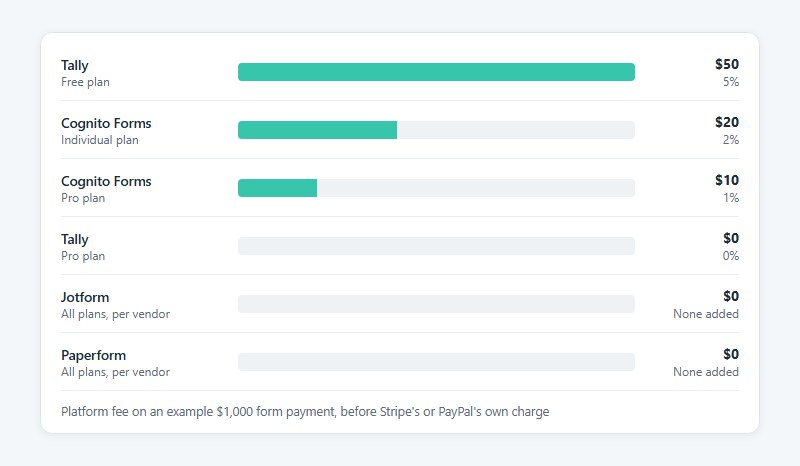
Jotform has the widest gateway list and adds no platform fee, while Tally’s free plan and Cognito Forms’ lower plans take a cut of every payment. Conditional logic and calculations separate the tools far less.
Payment processors and platform fees
Formstack’s help center documents several payment processors, including Stripe, PayPal, PayPal Pro, Authorize.Net and Chargify. Stripe is the only one that lets a submitter choose between a one-time payment and a subscription. A form that needs both with any other processor takes two, for example PayPal for one-time payments and Authorize.Net for recurring ones.
Jotform’s payments pages claim 40+ gateways with no added fee, though some of its own pages say 30+, so check the gateway your region needs by name. Paperform lists five (Stripe, PayPal, Square, Braintree and Google Pay) and also charges no fee of its own, per its pricing page.
| Tool | Plan | Platform fee on top of the gateway |
|---|---|---|
| Tally | Free / Pro | 5% / 0% |
| Cognito Forms | Individual / Pro | 2% / 1% |
| Jotform | All plans | None added, per vendor |
| Paperform | All plans | None added, per vendor |
Fees come from Tally’s payment help page, Cognito Forms’ payment FAQ, and the Jotform and Paperform pages. Each one sits on top of Stripe’s or PayPal’s own charge.
Some limits catch people off guard. Tally’s payment block runs on Stripe and doesn’t support recurring payments. Jotform’s free plan accepts up to 10 payment submissions a month, per its payments FAQ. And Cognito Forms’ Team plan is where Square and PayPal start, per its payment documentation (one directory says every plan, so test your gateway on a trial).
Conditional logic and calculations
Every tool checked lists both.
Formstack’s field logic shows or hides a field when any or all conditions match, according to its developer documentation. Jotform has a Form Calculation widget plus an Update/Calculate Field condition, with math and date functions in both (Jotform help center). Cognito Forms offers a calculation field with an advanced calculations editor, and display rules that hide fields or whole sections.
Tally puts calculated fields and logic on the free plan, per its comparison pages, and Zoho Forms uses conditional formulas that calculate values from other fields (Zoho help).
Paperform’s comparison singles out Cognito Forms for repeating sections and line-item tables, the two features order forms and quotes lean on. For everything else, choose on payment fees and caps first and logic second.
How to replace Formstack Documents, Sign and Workflows
The Suite bundle covers document generation, signatures and approval routing, so a replacement has to cover all of it. Jotform handles everything in one account, PandaDoc covers documents and signatures without a form builder, and Zoho Forms covers approvals plus document merge.
| Job | Replace with | Cap to check |
|---|---|---|
| Documents | Jotform PDF Editor, PandaDoc, Zoho Forms document merge | PandaDoc Free: 5 documents a month |
| Signatures | Jotform Sign, PandaDoc | Jotform Starter: 10 signed documents a month |
| Approvals | Jotform Approvals, Zoho Forms approvals, PandaDoc Business | Jotform paid plans: up to 10 approvers |
PandaDoc replaces Documents and Sign without replacing the form builder. Starter costs $19 per seat on annual billing and Business costs $49, so three Business seats come to $147 a month for documents and signatures only (PandaDoc pricing page, November 2026).
The meter that matters is Usage Credits. A document created through the API, Zapier, Make, Forms or bulk send draws on them, so a form submission that triggers a document falls under it.
On Starter and Business, API document creation stops when credits run out. Other automations bill overage, up to $5 per document when the order form lists no unit price.
Signatures are murkier. Jotform support lists 10 completed signed documents a month on Starter and 100 on Bronze. A Jotform reply on Software Advice says the Starter limit was raised to 100, but a Jotform support reply dated July 2026 still gives 10, so confirm on the live pricing page.
Formstack lists Sign as eSignatures with no per-envelope fees on its pricing page, and its own DocuSign comparison says DocuSign plans can include envelope limits with overage charges by tier. Any replacement with a monthly cap has to clear your real signing volume.
For approvals, Jotform has the most to offer. Approvals is free on every plan, Starter allows up to 3 approvers, paid plans allow up to 10 and Enterprise has no limit (Jotform support). Workflows adds multistep and parallel approvals with an Approve and Sign step.
Zoho Forms splits approvals in two. Basic approvals run sequential levels with no conditions, while Advanced approvals branch on submitted data, such as sending a larger expense to a higher level. PandaDoc’s approval workflows only start on Business.
Formstack’s pricing page points anyone needing workflow automation beyond approvals to Intellistack Streamline, a separate platform. Scope what you actually use before pricing a replacement.
Keep forms and signatures in one product where you can. Separate products each hold their own record, so someone has to stitch the audit trail together.
How to move from Formstack without losing data
Export submissions form by form, import or rebuild the forms, recreate logic and integrations by hand, run both systems side by side, then cut over. Formstack exports one form at a time, so an account with dozens of forms means dozens of exports.
- Inventory every form. List fields, logic rules, integrations, notification emails, prefill links and embeds before touching anything.
- Export submissions per form. Open the form’s Submissions tab, choose Export All and pick a file type. Formstack also offers an export of everything since the last download, and CSV files should be opened as UTF-8 in Excel so special characters survive.
- Export Documents and Sign separately. They run as their own products with their own dashboards, so templates and signed files need their own export.
- Import or rebuild the forms. Jotform publishes a Formstack importer that takes a form URL or an API key and brings in questions, structure and submissions. For any other tool, rebuild from the inventory. On a WordPress site, IvyForms’ ready-made templates cut that rebuild short, and the Formstack CSVs stay your archive of past entries.
- Recreate what the import skips. Jotform’s page lists questions, structure and submissions only, so rebuild and test logic, integrations, notifications and payment connections.
- Run both in parallel. Push test entries through one real form and compare integration payloads, emails and generated documents against the Formstack original.
- Cut over and re-export. Swap embeds and links, then export Formstack once more to catch late submissions before cancelling.
Check the renewal date before cancelling, because the pricing page bills annual plans annually.
The process tends to break in a few predictable places. Jotform’s importer stops when forms and submissions exceed the account’s quota, and its page says to upgrade or wait for the next billing cycle. CSV exports show garbled special characters when opened without UTF-8. Shared prefill links and embeds keep pointing at Formstack until each one is replaced.
After cutover, confirm that completions still register in analytics, since tracking form submissions in Google Analytics usually hangs on a thank-you page or event that changes when the form moves.
When should you stay on Formstack?
Stay when Salesforce records drive your documents, when a signed BAA already covers your forms and documents, or when the Suite bundle costs less than the separate tools that would replace it.
Salesforce-driven documents are the deepest part of Formstack’s offer, and PandaDoc treats its own Salesforce integration as a paid add-on on Business and Enterprise.
If you handle PHI under a signed BAA, moving means a new agreement and a new compliance review before any record moves. PandaDoc lists HIPAA as an optional Enterprise item on its pricing page.
Bundle math matters too. Price forms, per-seat documents, signatures and HIPAA tiers together before assuming separate tools are cheaper.
Pinnacol Assurance, a Colorado workers’ compensation insurer, converted 216 regulated document templates into dynamic PDFs inside Salesforce with Formstack Documents for Salesforce and an implementation partner, according to Formstack’s case study.
It was a phased migration, and leaving a setup like that would be one too.
Enterprise buyers get SSO, custom SLAs and a dedicated Customer Success Manager, and Tally’s own comparison marks SSO as unavailable.
Support hours aren’t a reason to stay. Formstack’s live agents work Monday to Friday, 8 a.m. to 4 p.m. ET, with an AI assistant around the clock (pricing page FAQ), while PandaDoc lists 24/7 chat and email on every plan.
Formstack Alternatives FAQ
Is Formstack now called Intellistack?
Partly. The company rebranded as Intellistack on June 25, 2025, and launched Intellistack Streamline, a separate workflow platform.
Formstack and Formsite products remain on sale and supported, so the form builder keeps its name.
How does Jotform compare with Formstack?
Jotform runs broader and cheaper as a general builder, while Formstack is stronger for native Salesforce work and Formstack Documents. Jotform adds a Formstack importer, approvals on every plan and a longer gateway list.
Formstack keeps the bidirectional Salesforce sync.
Which Formstack alternatives suit nonprofits?
Tally, Fillout and Google Forms have free tiers that fit most small nonprofits. Ask any paid vendor about nonprofit pricing before committing.
If you collect health data, confirm the BAA terms first.
Can Gravity Forms or WPForms replace Formstack?
Yes, for forms that live on a WordPress site. Submissions sit in your own database, so storage, backups and plugin updates become your job.
Check each plugin’s add-ons for Salesforce, signature and payment needs before assuming parity. IvyForms is another WordPress option, with a signature field and Stripe and PayPal payments.
Does a self-hosted or open-source form builder make sense?
Only with staff to run it. Self-hosting gives you full control over where data sits, but patching, backups, uptime and compliance paperwork all move to you.
For regulated data, a hosted tool with a signed BAA is usually less work.
Can a Formstack alternative handle surveys and research?
For short feedback surveys, yes. Conditional logic and calculations cover branching and scoring.
Research-grade work such as panels, sampling and statistical analysis needs a dedicated survey platform.
What to check after you leave Formstack
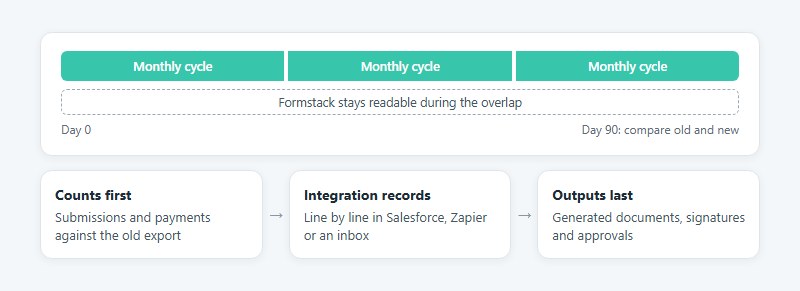
Give the new account 90 days, then compare it with the old one. That covers three monthly cycles, enough for a monthly cap to meet a real peak.
Start with submission and payment counts against the old export. Then go through the integration records line by line, whether they land in Salesforce, Zapier or an inbox. Generated documents, signatures and approvals come last, because lost data can’t be rebuilt while a broken template can.
The price of this check is a second subscription during the overlap, which keeps Formstack readable until the comparison finishes.
Plan caps and prices were verified on November 4, 2026. Vendors revise limits without notice, so reread the live pricing page at each renewal.