



The first message a user sees after creating an account sets the tone for everything that follows. Get it wrong, and you lose them at the exact moment they’re most…
Table of contents
Phone orders get lost. Handwritten slips get misread. And every botched order costs you a customer, a plate of food, and time your kitchen doesn’t have.
Food order form templates fix this by giving restaurants, bakeries, catering companies, and food trucks a ready-made digital system to collect orders, process payments, and track dietary restrictions, all without building anything from scratch.
This guide covers what goes into a good food order form, the different template types for takeout, catering, bakery pre-orders, and delivery, plus how to set up automatic pricing, conditional fields, and payment integration.
Whether you’re launching your first online ordering system or replacing a clunky one, you’ll find the structure and specific fields that actually get customers through checkout.
What Is a Food Order Form Template
A food order form template is a pre-built digital document that restaurants, bakeries, catering companies, and food trucks use to collect meal orders from customers online.
It typically includes menu item selections, quantity fields, pricing calculations, customer contact details, delivery or pickup preferences, and a payment section.
Think of it as the bridge between a printed menu and a full online ordering system. You get the structure without needing to build anything from scratch.
Most templates come from platforms like Jotform, Cognito Forms, 123FormBuilder, or Google Forms. They offer drag-and-drop editors so you can swap out menu items, adjust pricing, and match your branding in minutes.
Some handle just the basics. Others go deep with automatic tax calculations, delivery fee logic, allergy disclaimers, and integrated payment gateways like Stripe or PayPal.
The core purpose stays the same across all of them: collect accurate food orders digitally, reduce errors from phone calls or handwritten notes, and give customers a smooth checkout process from any device.
If you run any kind of food service business and still rely on phone orders or paper slips, a food order form template is the fastest fix. No coding. No app development budget. Just a working website form that takes orders and payments.
Examples Of Food Order Form Templates
Simple food order form (basic menu items + checkout)
See the Pen
Modern Food Order Form by Bogdan Sandu (@bogdansandu)
on CodePen.
Takeout/delivery form (with address & delivery time fields)
See the Pen
Takeout & Delivery Website Form by Bogdan Sandu (@bogdansandu)
on CodePen.
Dine-in pre-order form (for reservations + meal selection)
See the Pen
Dine-in pre-order form by Bogdan Sandu (@bogdansandu)
on CodePen.
Daily specials order form (highlighting limited-time meals)
See the Pen
Daily Specials Order Form – Interactive Restaurant Menu by Bogdan Sandu (@bogdansandu)
on CodePen.
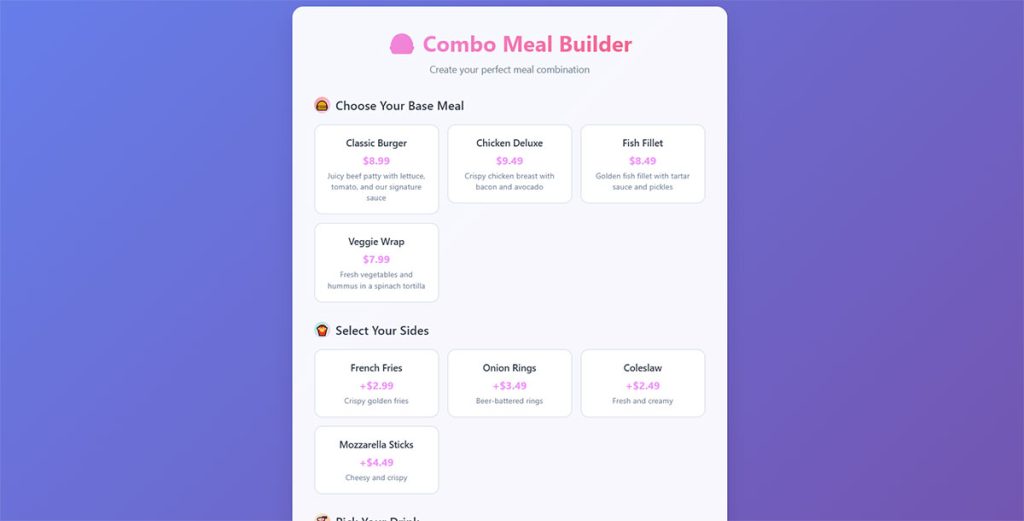
Combo meal form (choose base meal + sides + drink)
See the Pen
Interactive Combo Meal Builder (Food Ordering Form) by Bogdan Sandu (@bogdansandu)
on CodePen.
Pizza order form (size, crust, toppings, extras)
See the Pen
Interactive Pizza Order Form by Bogdan Sandu (@bogdansandu)
on CodePen.
Burger order form (patty type, cheese, toppings, sauces)
See the Pen
🍔 Interactive Burger Builder – Order Form by Bogdan Sandu (@bogdansandu)
on CodePen.
Sushi order form (rolls, platters, custom selection)
See the Pen
Sakura Sushi Order Form – Interactive Restaurant Interface by Bogdan Sandu (@bogdansandu)
on CodePen.
Coffee & drink order form (hot/cold, flavors, size)
See the Pen
Premium Coffee Order Form by Bogdan Sandu (@bogdansandu)
on CodePen.
Wedding cake order form (flavors, tiers, customization)
See the Pen
Wedding Cake Order Form – Premium Bakery Design by Bogdan Sandu (@bogdansandu)
on CodePen.
Meal kit subscription order form (weekly/biweekly plans)
See the Pen
Premium Meal Kit Subscription Form by Bogdan Sandu (@bogdansandu)
on CodePen.
Multi-step form (menu selection → customization → checkout)
See the Pen
Premium Multi-Step Food Order Form by Bogdan Sandu (@bogdansandu)
on CodePen.
Why Do Restaurants and Catering Businesses Use Food Order Form Templates
Phone orders go wrong constantly. Someone mishears “no onions” as “more onions,” and now you’ve got a complaint, a wasted plate, and a customer who probably won’t come back.
Digital order forms eliminate that problem. The customer types exactly what they want, selects their options, and submits. No middleman. No guessing.
But error reduction is just the start. Here’s what actually pushes food businesses toward using templates:
- Faster order processing — orders land directly in your inbox, Google Sheets, or Airtable instead of sitting on a sticky note next to the register
- Payment collection happens at the time of ordering through gateways like Square, Stripe, or PayPal
- Allergy and dietary restriction tracking becomes part of the form itself, with checkboxes for gluten-free, vegan, nut-free, halal, and kosher preferences
- Order history stays organized and searchable, which helps with inventory management and repeat customer tracking
- Staff spend less time on the phone and more time actually preparing food
Restaurants use them for takeout and delivery. Bakeries use them for custom cake and pastry pre-orders. Catering companies use them for event meal planning with guest counts and service style preferences.
School cafeterias collect weekly lunch selections. Corporate offices handle team meal orders for meetings. Food trucks post a direct link on Instagram so customers can order ahead of the lunch rush.
The pattern is the same across all these businesses. Manual ordering is slow, error-prone, and hard to scale. A food order form template fixes that without a massive budget or technical team.
And when you optimize forms for speed and clarity, the number of completed orders goes up. Fewer abandoned carts. Fewer confused customers halfway through checkout.
What Fields Should a Food Order Form Template Include
The fields you include depend on what you sell and how you deliver it. But there’s a baseline that works for nearly every food business, from a pizza shop to a wedding caterer.
Get the form fields wrong and you’ll either collect too little information to fulfill the order, or so much that people quit halfway through.
How Do You Structure the Menu Section
Group items by category: appetizers, mains, sides, desserts, drinks. Each item needs a name, a price, and a quantity selector.
Add customization options where they make sense, like toppings, sauce choices, portion sizes, or combo meal upgrades. Platforms like Jotform and Cognito Forms handle this with dropdown menus and checkboxes.
What Customer Information Is Needed on a Food Order Form
Full name, phone number, email address. If you deliver, add street address fields and a preferred delivery time slot.
Include a clear pickup or delivery toggle so the form can show or hide the relevant fields using conditional logic.
How Do You Add Dietary Restriction Options to a Food Order Form
Use checkboxes for common allergies: gluten, nuts, dairy, shellfish, soy, eggs. Add separate options for dietary preferences like vegan, vegetarian, halal, and kosher.
Always include a free-text “special instructions” field. People have specific needs that checkboxes can’t cover.
What Payment Fields Work Best in a Food Order Form Template
Connect a payment gateway like Stripe, PayPal, or Square directly into the form. The order total, tax, and any delivery fees should auto-calculate before the customer hits pay.
A promo code or discount field helps with marketing campaigns. Tip fields are useful for delivery-focused businesses. If you’re running a food service on WordPress, a WordPress payment form setup can handle all of this without custom development.
What Are the Different Types of Food Order Form Templates
Not every food business needs the same form. A pizza shop’s takeout form looks nothing like a wedding caterer’s event order sheet.
The template you pick should match your service type, your menu complexity, and how you fulfill orders. Here’s how the main types of forms break down for food businesses.
How Does a Restaurant Takeout Order Form Template Work
Pickup time selector, categorized menu with prices, an order summary that auto-calculates the total, and payment integration. That’s the whole thing.
Most restaurant owners embed this directly on their website or share a link through social media. Customers browse, pick their items, pay, and show up at the scheduled time.
What Is a Catering Order Form Template
Catering forms collect more than just food choices. They need event date and time, guest count, venue address, service style (buffet, plated, family-style), and sometimes a budget range.
Menu packages replace individual item selection. A “notes” section handles special requests like specific table setups or dietary splits across the guest list. For events specifically, you might also look at WordPress event registration form setups that pair well with catering order collection.
How Is a Cake or Bakery Order Form Template Different
Cake size, flavor, frosting type, number of tiers, filling, custom inscription text, and a delivery date field. That’s the minimum.
The best bakery templates also include a file upload field so customers can attach reference images of the design they want. Took me a while to realize how much that single field cuts down on back-and-forth emails.
What Does a School or Office Lunch Order Form Template Look Like
Pre-set daily or weekly menu options, a student or employee ID field, and prepaid account balance tracking. No payment per order, usually. Bulk pricing and recurring selections are the norm.
These forms tend to be simpler. Three to five meal choices per day, a name field, and a submit button.
How Do Food Delivery Order Form Templates Handle Logistics
Delivery zone selection, automatic fee calculation based on distance, estimated delivery time display, and a special instructions field for the driver.
Contactless delivery toggle became standard after 2020. Some templates also include a “leave at door” option with a photo confirmation request. The form design matters here because customers are often ordering on their phones while hungry and impatient.
How Do You Create a Food Order Form Template
You don’t need a developer. You don’t even need to know HTML. Most food order forms are built in 15 to 30 minutes using a drag-and-drop form builder.
The real work is deciding what to include and how to organize it so customers finish the order instead of leaving halfway through.
What Tools Can You Use to Build a Food Order Form
IvyForms, Jotform, Google Forms, Cognito Forms, 123FormBuilder, Typeform, Wufoo, Formstack, and Paperform all support food order form creation.
If your site runs on WordPress, dedicated WordPress contact form plugins like WPForms or Formidable Forms can build order forms with payment processing and conditional fields built in. For more options, check out free WordPress form plugins that include order form capabilities.
How Do You Add Conditional Logic to a Food Order Form
Conditional logic shows or hides fields based on what the customer selects. Pick “delivery” and the address fields appear. Pick “pickup” and they don’t.
Select a combo meal and side dish options pop up. Choose “custom cake” and the tier, flavor, and inscription fields show. Most form builders with conditional logic support handle this with simple if-then rules, no code required.
How Do You Set Up Automatic Order Calculations
Each menu item gets a price value. The form multiplies quantity by price, adds tax as a percentage, tacks on delivery fees if applicable, and subtracts any promo code discounts.
The customer sees a running total before they pay. This is where a lot of cheap templates fall short. If the math doesn’t happen automatically, you’ll spend hours manually calculating totals from submitted orders. Good checkout optimization depends on getting this right from the start.
FAQ on Food Order Form Templates
What is a food order form template?
A food order form template is a pre-built digital document that collects meal selections, customer details, delivery preferences, and payment information. Restaurants, bakeries, and catering companies use them to process orders online without custom development.
Are food order form templates free?
Many platforms offer free versions. Jotform, Google Forms, Cognito Forms, and 123FormBuilder all have free food order templates. Paid plans unlock features like payment gateway integration, conditional logic, and custom branding options.
Can I accept payments through a food order form?
Yes. Most form builders connect to payment gateways like Stripe, PayPal, and Square. The form calculates subtotals, tax, and delivery fees automatically, then processes payment at checkout.
What form builder works best for food ordering?
Jotform and Cognito Forms are popular for standalone food order forms. If your site runs on WordPress, dedicated form plugins like WPForms handle menu items, pricing logic, and online payment processing without extra tools.
How do I add menu items to a food order form template?
Use product list fields or dropdown menus grouped by category: appetizers, mains, desserts, drinks. Assign a price and quantity selector to each item. Most drag-and-drop editors make this setup straightforward.
Can food order forms handle dietary restrictions?
Yes. Add checkboxes for common allergies like gluten, nuts, dairy, and shellfish. Include options for vegan, vegetarian, halal, and kosher preferences. A free-text special instructions field catches anything the checkboxes miss.
Do food order form templates work on mobile devices?
Most modern form builders produce mobile-responsive templates by default. The layout adjusts to phone and tablet screens automatically. Always test your form on a real device before publishing, since menu sections can break on smaller screens.
How do I embed a food order form on my website?
Copy the HTML embed code or iframe snippet from your form builder and paste it into your site. WordPress users can also use shortcodes or plugin integrations. Some businesses share a direct link through social media instead.
Can I use conditional logic in a food order form?
Yes. Conditional logic shows or hides fields based on customer selections. Choosing “delivery” reveals address fields. Selecting a combo meal triggers side dish options. It keeps the form clean and reduces unnecessary scrolling.
What is the difference between a food order form and an online ordering system?
A food order form is a single digital document that collects orders and payments. A full online ordering system includes inventory tracking, order management dashboards, driver dispatch, and real-time status updates. Forms are simpler and cheaper to set up.
Conclusion
The right food order form template saves your kitchen from miscommunication, speeds up order fulfillment, and gives customers a checkout experience that actually works on their phone at 7 PM on a Friday.
Whether you’re running a catering company collecting event details or a food truck posting a menu link on Instagram, the template does the heavy lifting. Auto-calculations, allergy checkboxes, delivery zone logic, payment processing through Stripe or Square. All handled.
Pick a form builder that fits your setup. Strip out fields you don’t need. Test it on mobile before you publish.
Don’t overthink it. A clean, fast order form with the right fields will outperform a complicated online ordering system that confuses half your customers before they finish selecting a side dish.
Start with a template, adjust it to match your menu and service style, and let the form handle what sticky notes and phone calls never could.