



What a work order form captures
| Field | Why it’s on a work order |
|---|---|
| Requester & contact | Who reported it and how to reach them |
| Asset / equipment / location | The specific thing and where it is |
| Problem description | What’s wrong or what’s needed |
| Priority / urgency | Emergency, high, routine — drives scheduling |
| Requested / due date | When it needs to be done |
| Assigned technician | Owner of the job |
| Labor & parts | Time and materials used, for costing and records |
| Status & completion sign-off | Open → in progress → done |
Work Order Forms for Different Industries
Work order forms are used across many industries, but the structure changes depending on the type of service, assets, approvals, and job details involved.
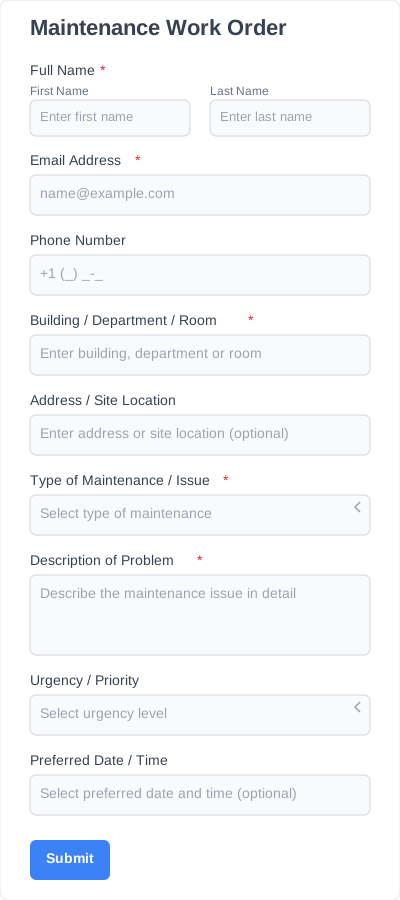
Maintenance work order forms
Maintenance work order forms are useful for buildings, offices, apartment complexes, schools, and facilities teams that manage ongoing service and upkeep. They help standardize requests and make recurring maintenance easier to organize..
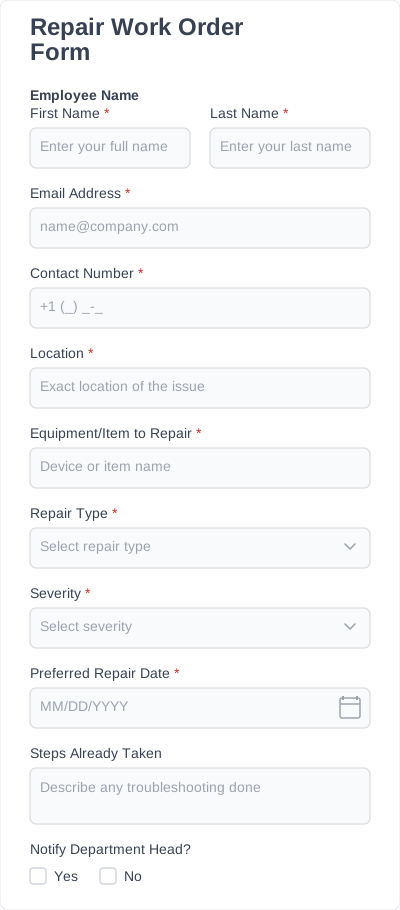
Repair work order forms
Repair work order forms are designed for businesses that need to document repair requests clearly and keep job details organized from submission to completion. They work well when teams need a more focused format for repair-related workflows.
Property and facility management
Property and facility teams often need work order forms that can handle multiple units, locations, or request types. In these settings, forms help keep requests organized and easier to route to the right person or vendor.
Construction and contractor Workflows
Construction and contractor teams often use work order forms to document field tasks, service instructions, and project-related requests.
Manufacturing and equipment servicing
Manufacturing teams and equipment service providers use work order forms to manage maintenance tasks, service records, and equipment-related requests. A structured form helps keep these workflows more consistent and easier to track.
IT and internal operations teams
IT and internal operations teams use work order forms to manage internal service requests, equipment issues, and support tasks. These forms help centralize requests and create a clearer process across departments.
Automotive and field service businesses
Automotive shops and field service businesses use work order forms to capture service details, job instructions, and completion records in one place. This helps teams stay organized and creates a more reliable workflow from request to resolution.
A work order in practice
A property manager runs maintenance across three buildings. A tenant reports a leaking radiator through a public work order form: the asset (Unit 4B radiator), the problem, and a “high” priority land as an entry, which notifies the maintenance lead. He assigns a tech, logs parts and two hours of labor on the same record, and marks it complete — one form, from report to closed, with a paper trail for the owner.
What Are the Key Fields to Include in Work Order Forms?
The right fields help teams collect complete job information the first time, reduce back-and-forth, and keep work orders easier to process.
Requester information
This section should capture the basic contact details of the person submitting the request. That may include name, email, phone number, company name, department, or tenant and unit details.
Job or request type
A work order form should make it easy to identify what kind of work is being requested. This can include maintenance, repair, installation, inspection, replacement, emergency service, or a custom service category.
Work order description
This field gives the requester space to explain the issue, task, or service needed. A clear description helps the team understand the request before any work begins.
Location details
Location fields help identify exactly where the work needs to be done. Depending on the business, that might include a property address, room number, building, floor, unit, or job site.
Asset or equipment information
If the request involves a specific item, machine, or vehicle, the form should include space for those details. This may include equipment type, model number, serial number, vehicle information, or the item being serviced.
Priority level
Priority fields help teams understand how urgent the request is. Common options include low, normal, urgent, or emergency.
Requested date and preferred schedule
This section helps teams plan when the work should happen. It can include a requested service date, deadline, or preferred visit time.
Assigned technician or team details
For internal workflows, it can be helpful to include fields for the technician, department, or team handling the job. This is especially useful in forms managed by supervisors, dispatchers, or operations staff.
Materials, parts, or labor notes
Some work order forms also need space for notes about tools, replacement parts, labor requirements, or special instructions. These fields help add more operational detail to the request.
Approval or authorization fields
If the work requires approval before it begins, the form can include fields for supervisor signoff, budget approval, or other authorization details.
Attachments
Attachment fields allow users to upload photos, supporting documents, or reference images. This can make the request clearer and reduce the need for follow-up questions.
Completion notes and status
A work order form may also include fields used after the job is done. These can cover job status, technician notes, completion date, and any follow-up actions.
Signature field
In some workflows, a signature field is useful for customer approval, tenant confirmation, manager signoff, or technician acknowledgment.
Work order vs change order
A work order initiates a standalone maintenance or repair task. A change order modifies work that’s already under a construction contract. If you’re fixing or servicing something, use a work order; if you’re changing the scope or price of a contracted build, use a change order.
Form Features Tailored to Your Workflow
A good work order form template should do more than give you a basic structure. It should also be flexible enough to match the way your team actually handles requests, approvals, and job details inside WordPress.
Drag-and-drop customization
IvyForms lets you adjust fields, reorder sections, and adapt the template with a drag and drop feature to match your exact work order process. That makes it easier to tailor the form to different industries, teams, or service types without starting over.
Conditional logic
Conditional logic helps keep the form relevant by showing only the fields that match the request. For example, if someone selects equipment repair, you can show asset details. If they choose property maintenance, you can display location or unit fields instead.
File uploads
File upload fields let users attach photos of damage, issue screenshots, invoices, or other supporting documents. This gives your team more context upfront and can reduce the need for follow-up.
Multi-step forms for longer workflows
Some work order forms need more detail than others. Multi-step forms help break longer forms into smaller sections so they feel easier to complete and less overwhelming for the user.
Required fields and validation
Required fields and validation help reduce incomplete submissions and improve the quality of the information collected. This makes work orders easier to review and process.
Mobile-friendly form experience
A mobile-friendly form matters when requests are submitted by field teams, tenants, staff, or customers using a phone. It helps make the submission process smoother across devices.
Easy website embedding
Once your setup is ready, IvyForms makes it easy to embed forms on your WordPress website. That means you can turn a template into a live work order form without a complicated setup.
How To Customize and Add Work Order Templates to Your Website
Choose a work order form template
Start with the template that is closest to your workflow, whether that is a maintenance work order form, repair work order form, or another service request format.
Customize the fields
Add, remove, or rename fields based on the information your business needs to collect for each request.
Adjust the form flow
Use features like conditional logic, required fields, or a multi-step layout to make the form easier to complete and easier to manage internally.
Match the form to your process
Customize the form with your branding, instructions, service categories, approval steps, and file upload fields so it fits the way your team works.
Publish it on your website
Once the form is ready, embed it on the right page of your website so customers, tenants, staff, or clients can submit requests easily.
Increased Productivity & Other Benefits You’ll Experience with Our Templates
Work order templates do more than save setup time. They help businesses collect better information, create a more consistent process, and get forms live faster without building everything from the ground up.
Launch faster with a ready-made structure
Instead of starting from a blank page, you begin with a form that already fits a real work order use case. That helps teams move faster and spend less time on initial setup.
Reduce missing or incomplete requests
A structured template helps you collect the right details from the start. This makes it easier to avoid vague submissions and reduces the chances of missing important information.
Keep work orders more consistent
Using a consistent format makes work orders easier to review, assign, and manage. Standardized fields also help teams process requests more efficiently.
Adapt forms to different teams or industries
A work order template can be customized for different workflows, including maintenance, repairs, facilities, contractor jobs, or internal operations. This gives teams flexibility without forcing them to build separate forms from scratch.
Make the submission process easier for users
Clear structure makes forms easier to understand and faster to complete. That can lead to more accurate submissions and a better overall experience for the person filling out the form.
Improve internal efficiency
When request details are collected properly up front, teams spend less time chasing missing information. That means less back-and-forth and a smoother handoff to the person responsible for the work.
Customize without rebuilding from scratch
This is one of the biggest advantages of IvyForms templates. You start with a form that is already structured, then adjust it to match your workflow instead of building the entire form from zero.
Work order templates
| Template | Best for |
|---|---|
| Maintenance work order form | Scheduled and reactive facilities maintenance |
| Repair work order form | One-off repairs with parts and labor tracking |