



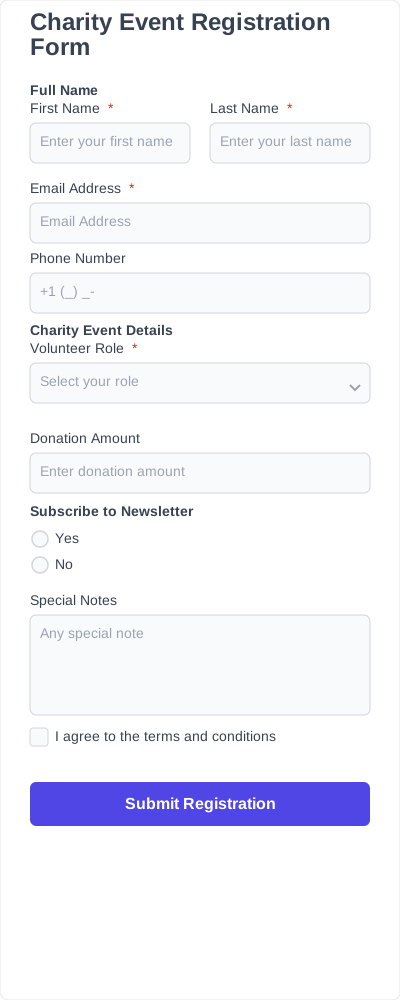
Collect registrations, attendee details, and donations in one form
Every charity event registration form template includes the fields needed to collect clear event details and manage participants. You can add, remove, or rearrange fields depending on your event type.
Attendee information
Collect the attendee’s name, email, phone number, and other basic details needed for registration.
Event selection
Allow attendees to choose the charity event, session, or activity they want to join.
Ticket or registration type
Specify whether the attendee is registering as a guest, donor, volunteer, sponsor, or VIP participant.
Donation amount
Collect donation details directly through the form, including fixed amounts or custom contributions.
Payment information
Accept registration fees, donations, or optional contributions through connected payment fields.
Dietary or accessibility needs
Collect meal preferences, accessibility requests, or special requirements before the event.
Consent and confirmation
Confirm that attendees agree to event terms, donation details, or registration requirements before submitting the form.
IvyForms features for charity event organizers
A charity event form should be easy to build, publish, and manage after launch. IvyForms features give you the tools to customize the form and keep submissions organized.
Drag-and-drop editor
A drag-and-drop form builder lets you set up your event form structure and adjust fields without coding.
Embedded forms
An embedded form lets you place your charity event form on any page and collect responses directly on your website.
Form notifications
Send automatic updates when a form is submitted so you can track responses and follow up.
Conditional logic
Show different fields based on user input with conditional logic, such as donation options, ticket types, or participation roles.
Spam protection
Reduce unwanted or automated submissions and keep your form data clean.
Entry management
An entry management system stores all submissions in one place and allows you to review and organize responses.
Multi-step forms
Split longer forms into steps to make them easier to complete, especially when collecting specific donation details.
How to customize and add charity event form templates to your website
1. Install IvyForms
Choose a plan, install IvyForms, and activate it on your WordPress website. Once set up, the form builder is available directly in your dashboard.
2. Choose a template
Browse the template library and select a charity event registration form template that fits your event. Templates give you a ready-made structure to start from.
3. Edit fields
Customize your form using the drag-and-drop editor. Update event details, adjust donation options, and add or remove fields as needed.
4. Embed the form
Add the form to any page using a shortcode or block. The form is now live and ready for submissions.
5. Start collecting event sign-ups
Participants can now submit registrations and donations online, and all entries are stored in your WordPress dashboard for easy management.
The benefits of using our templates instead of starting from scratch
Using a charity event registration form template helps you set up your form faster and keeps everything structured from the start.
- Faster setup: Start with a ready-made form instead of building fields, donation options, and structure from scratch.
- Clear structure: Collect event details, participant information, and donations in a consistent format.
- Fewer missing details: Predefined fields reduce the chances of incomplete registrations or unclear submissions.
- Easier customization: Adjust fields, donation options, and layout to match your event without rebuilding the form.
- Consistent format: All submissions follow the same structure, making them easier to review and manage.
- Reusable forms: Use the same template for multiple events and update it as needed.