When working with forms that receive multiple submissions, IvyForms provides tools to help you quickly find, filter, and organize entries. These options make it easier to focus on relevant submissions without manually scanning the entire list.
How does searching entries work?
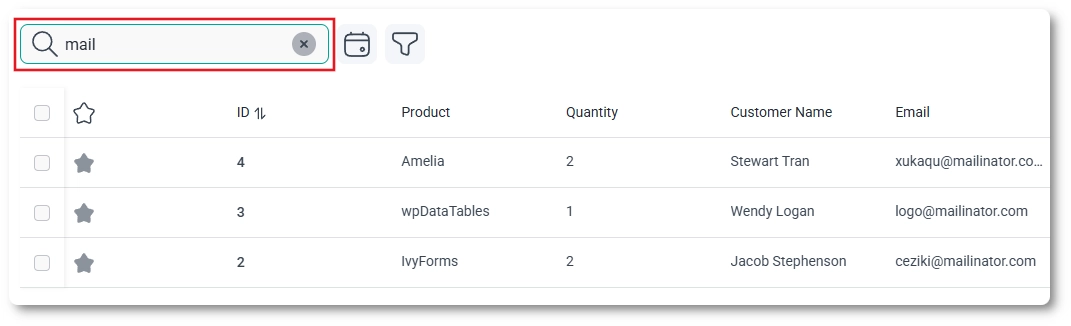
At the top of the entries table, you’ll find a Search field. This allows you to search within the entries of the currently selected form.
The search looks through visible entry data and updates the table in real time as you type, helping you quickly narrow down results.
How can I filter entries by date?
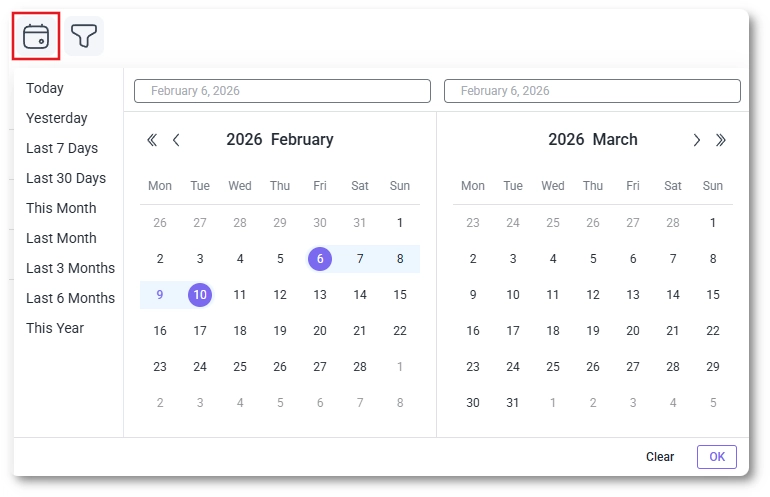
Next to the search field, you’ll find the Date filter option. This allows you to display entries submitted on a specific date or within a selected date range.
You can choose from predefined ranges such as today, yesterday, or the last several days, or manually select a custom date range.
How do entry filters work?
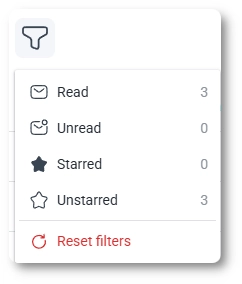
The Filter option lets you refine the entries list based on entry status and other available criteria.
Read – shows entries that have already been reviewed.
Unread – shows entries that have not yet been marked as read.
Starred – shows entries that have been marked as starred.
Unstarred – shows entries that are not starred.
You can combine filters with search and date selection to further narrow down visible results. The Reset filters option clears all active filters and returns the entries table to its default state.
How do totals and pagination work?
Below the entries table, IvyForms displays the total number of entries that match the current filters. This number updates automatically as you apply or remove search terms and filters.
When there are more entries than can fit on a single page, pagination controls appear, allowing you to navigate between pages of results.
Filtering and organizing entries helps you work more efficiently with form submissions, especially as the number of entries grows. By combining search, date filters, and status filters, you can quickly focus on the entries that matter most.
Guides
Explore the IvyForms documentation through key sections like Get Started,
Form Creation, Entry Management, Settings, Integrations, Advanced Features,
and Support & Troubleshooting to make the most of your form-building experience