



A form is usually the last thing standing between a visitor and whatever you actually want them to do: buy something, sign up, ask a question. Optimizing that form means…
Table of contents
A clunky donation form costs nonprofits thousands in abandoned gifts every year.
The right donation form template removes friction between a donor’s intent and their completed contribution. Platforms like Donorbox, GiveWP, and Classy offer pre-built solutions, but choosing the wrong one wastes time and money.
This guide covers everything you need: template types for different campaigns, payment processing options, CRM integration, design practices that actually convert, and compliance requirements for handling donor data.
Whether you’re launching your first online giving page or replacing an outdated system, you’ll find actionable recommendations for every budget and technical skill level.
What is a Donation Form Template
A donation form template is a pre-built online giving page that nonprofits use to collect charitable contributions through their website.
It includes payment processing fields, donor information collection, and gift designation options configured for 501(c)(3) organizations.
Templates from platforms like Donorbox, GiveWP, and Classy reduce setup time from hours to minutes.
Most integrate directly with donor management systems and send automatic tax receipts after each transaction.
How Does a Donation Form Template Work
The donor clicks a give button, selects an amount (preset or custom), enters payment details through Stripe or PayPal, and receives instant confirmation.
Behind the scenes, the template validates card data, processes the secure payment, logs the gift in your CRM, and triggers a thank you confirmation message.
What Are the Components of a Donation Form Template
Every effective template contains these core elements:
- Suggested donation amounts with preset buttons ($25, $50, $100, $250)
- Custom amount field for flexible giving
- Donor information fields (name, email, address for tax receipts)
- Payment gateway integration (credit card, ACH, digital wallets)
- Gift designation dropdown (general fund, specific programs)
- Recurring donation toggle for monthly giving programs
- Tribute/memorial option for honorary gifts
Donation Form Templates
One-Time Donation Form
See the Pen
Modern One-Time Donation Form by Bogdan Sandu (@bogdansandu)
on CodePen.
Recurring Donation Form
See the Pen
Modern Recurring Donation Form by Bogdan Sandu (@bogdansandu)
on CodePen.
Pledge Form
See the Pen
Modern Pledge Form by Bogdan Sandu (@bogdansandu)
on CodePen.
In-Kind Donation Form
See the Pen
Modern In-Kind Donation Form by Bogdan Sandu (@bogdansandu)
on CodePen.
Sponsorship Form
See the Pen
Modern Multi-Step Sponsorship Form by Bogdan Sandu (@bogdansandu)
on CodePen.
Individual Donation Form
See the Pen
Modern & Interactive Donation Form by Bogdan Sandu (@bogdansandu)
on CodePen.
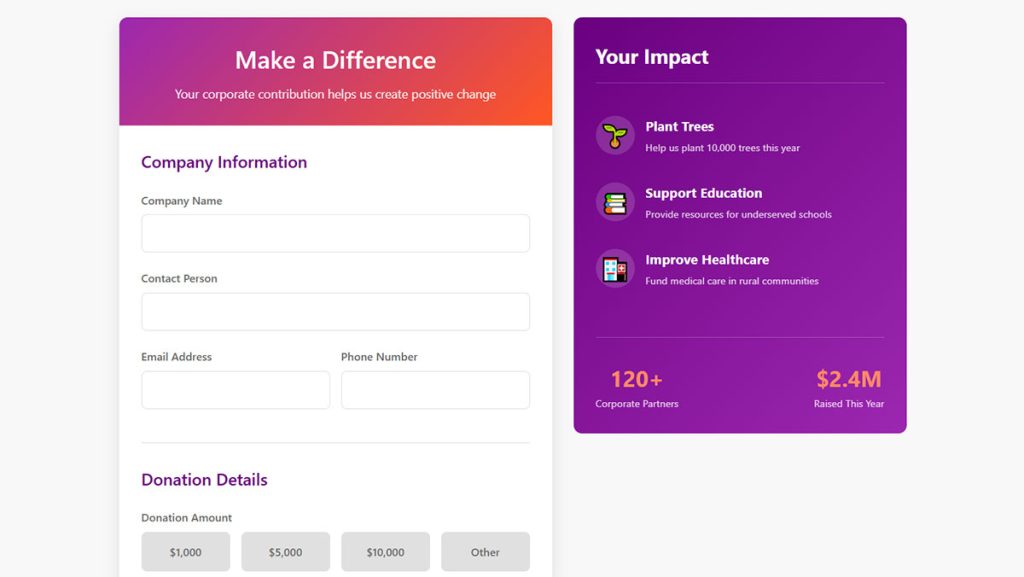
Corporate Donation Form
See the Pen
Modern Corporate Donation Form by Bogdan Sandu (@bogdansandu)
on CodePen.
Anonymous Donation Form
See the Pen
Modern Anonymous Donation Form by Bogdan Sandu (@bogdansandu)
on CodePen.
Multi-Step Donation Form
See the Pen
Modern & Vivid Multi-Step Donation Form by Bogdan Sandu (@bogdansandu)
on CodePen.
What Are the Types of Donation Form Templates
Different fundraising campaigns need different form structures.
Matching your template type to the campaign goal directly affects donor conversion rates and average gift size.
What Is a One-Time Donation Form Template
Single gift forms work best for emergency appeals, year-end campaigns, and first-time donors who aren’t ready to commit monthly.
Keep these forms short. Five fields maximum. Name, email, amount, payment, done.
What Is a Recurring Donation Form Template
Monthly giving templates emphasize frequency options (weekly, monthly, quarterly, annually) and display the annual impact of sustained gifts.
A $25/month pledge shown as “$300 yearly impact” converts better than showing just the monthly amount.
What Is a Peer-to-Peer Fundraising Form Template
These templates let supporters create personal fundraising pages linked to your main campaign.
Each page tracks individual progress toward goals while rolling donations into your central donor database through platforms like Classy and Fundraise Up.
What Is an Event Registration Donation Form Template
Combines event registration with optional donation asks during checkout.
Gala tickets, walkathon signups, and charity auctions use this format. The template handles ticket quantities, meal preferences, and add-on gifts in one flow.
What Is a Memorial and Tribute Donation Form Template
Includes fields for honoree name, notification recipient, and personalized message options.
These forms automatically generate tribute acknowledgment letters to family members, a feature that standard templates lack.
What Features Should a Donation Form Template Include
The right features directly impact your donation form conversion rate.
Skip the fancy extras. Focus on what actually moves donors from landing page to completed gift.
What Payment Processing Options Should a Donation Form Have
Multiple payment methods reduce abandonment at checkout.
Credit and Debit Card Processing
Stripe and Square handle most nonprofit card processing. PCI DSS compliance is non-negotiable for form security.
Display accepted card logos (Visa, Mastercard, Amex) near the payment field.
Digital Wallet Integration
Apple Pay, Google Pay, and PayPal reduce friction for mobile donors.
One-tap payments skip manual card entry entirely, which matters when 60%+ of donations come from phones.
ACH Bank Transfer Options
Lower processing fees (typically 0.8% vs 2.9% for cards) make ACH ideal for major gifts and recurring donors.
Bloomerang and Kindful both support ACH through their native forms.
What Information Fields Should a Donation Form Collect
Every additional form field drops completion rates by roughly 5-10%.
Required vs Optional Fields
Required: name, email, payment info. Optional: phone, address (unless mailing tax receipts), employer (for matching gift programs).
Mark optional fields clearly or hide them behind a “Add more details” link.
Employer Matching Gift Fields
Double the Donation integration auto-populates employer matching programs.
A simple company name field can unlock 2x-3x gift value when corporate matches apply.
How Does Mobile Responsiveness Affect Donation Forms
Over 50% of online donations now happen on smartphones, according to Blackbaud and Network for Good data.
Templates must follow mobile form best practices: large tap targets, single-column layouts, and numeric keyboards for amount fields.
Test your form on actual phones. What looks fine on desktop often breaks on a 5-inch screen.
How to Customize a Donation Form Template
Stock templates work. Branded templates convert better.
Customization builds trust and keeps donors on your site instead of redirecting to generic payment pages.
How to Add Branding to a Donation Form Template
Upload your logo, match brand colors to primary buttons and headers, and use your organization’s fonts if the platform supports custom CSS.
Consistent form design between your main site and giving page reduces donor hesitation at checkout.
How to Set Up Payment Gateway Integration
Connect Stripe for cards (2.9% + 30 cents), PayPal for wallet users, and ACH for major donors wanting lower fees.
Most platforms handle gateway setup through API keys; no coding required. Test with a $1 donation before launching.
How to Create Custom Donation Amount Options
Set 4-5 preset amounts based on your average gift size. If your average is $75, presets might be $50, $75, $100, $150, $250.
Always include a custom field. Some donors give $37 because that’s what they can afford this month.
How to Add Recurring Giving Options to a Form
Display frequency toggles (one-time, monthly, quarterly, annually) prominently near amount selection.
Pre-select monthly as the default if building a sustainer program; leave one-time as default for campaign-specific appeals.
What Are Donation Form Template Design Practices
Good form UX design removes friction between intent and action.
Every extra click, confusing label, or slow-loading element costs you completed donations.
What Colors Increase Donation Form Conversions
High-contrast buttons (orange, green, blue) outperform low-contrast options. Your donate button should be the most visible element on the page.
Red works for urgency appeals; avoid it for standard giving pages where it signals errors.
What Form Length Works Best for Donations
5-7 fields for one-time gifts. 8-10 fields acceptable for recurring donors who expect more setup.
Anything beyond 10 fields needs serious justification. Use conditional logic to show additional fields only when relevant.
Where Should the Donate Button Be Placed
Above the fold on landing pages. At form bottom after all fields. Fixed/sticky on mobile for long forms.
Button text matters: “Donate Now” beats “Submit”; “Give $50” beats both.
How to Write Effective Donation Form Copy
Lead with impact, not process. “Feed 10 families this week” converts better than “Make a tax-deductible contribution.”
Keep field labels simple: “Your Name” not “Donor Full Legal Name for Receipt Purposes.”
How to Integrate Donation Form Templates with CRM Systems
Manual data entry between giving platforms and your donor management system wastes staff time and creates errors.
Native integrations or Zapier connections solve this.
What CRM Platforms Connect with Donation Forms
Salesforce Nonprofit Cloud, Bloomerang, Little Green Light, Kindful, and Blackbaud all offer direct integrations with major form platforms.
Check your current CRM’s integration directory before choosing a donation form tool.
How to Set Up Donor Data Synchronization
Map form fields to CRM fields: donor name, email, gift amount, date, designation, and payment method.
Set sync frequency (real-time preferred; hourly acceptable). Test with a sample donation to verify data flows correctly.
How to Configure Automated Receipt Emails
Templates should trigger instant gift acknowledgment emails containing donor name, amount, date, and your 501(c)(3) statement.
Customize receipts in Mailchimp or Constant Contact for better design control than built-in platform emails.
What Are Donation Form Template Compliance Requirements
Handling donor payment data means legal obligations. Get these wrong and you risk fines, data breaches, and donor trust.
What PCI DSS Standards Apply to Donation Forms
Any form collecting credit card data must meet PCI DSS (Payment Card Industry Data Security Standard) requirements.
Using hosted payment fields from Stripe or Square transfers most compliance burden to them. Never store raw card numbers on your own servers.
What Privacy Policy Elements Are Required
Disclose what donor data you collect, how you use it, and who you share it with.
Link your privacy policy directly from the donation form. GDPR compliant forms require explicit consent checkboxes for EU donors.
What Tax Receipt Information Must Be Included
IRS requirements for 501(c)(3) receipts: organization name, donation amount, date, statement that no goods/services were provided (or fair market value if they were).
Automate this through your donation platform. Manual receipts invite errors and delays that frustrate donors at tax time.
FAQ on Donation Form Templates
What is the best platform for donation form templates?
Donorbox works best for small nonprofits wanting quick setup. GiveWP suits WordPress users needing full customization. Classy and Fundraise Up serve larger organizations with complex campaigns and Salesforce integration needs.
How much does a donation form template cost?
Free options exist through Google Forms and JotForm (limited submissions). Paid platforms range from transaction-only fees (1.75-5%) to monthly subscriptions ($99-$500+). Budget depends on donation volume and feature requirements.
Can I create a donation form without coding?
Yes. Platforms like Donorbox, Bloomerang, and GiveWP offer drag-and-drop builders requiring zero technical skills. Most templates are ready to embed within minutes using copy-paste code snippets.
What payment methods should a donation form accept?
Credit cards through Stripe or Square handle most transactions. Add PayPal for digital wallet users and ACH bank transfers for major donors seeking lower processing fees on large gifts.
How do I add a donation form to my WordPress site?
Install GiveWP or a similar plugin, configure your payment gateway (Stripe, PayPal), customize your template, and embed using shortcodes or blocks. The process takes under 30 minutes for basic WordPress forms.
What fields should I include on a donation form?
Required: name, email, donation amount, payment details. Optional: phone, mailing address, employer (for matching gifts), gift designation. Fewer fields mean higher completion rates, so cut anything non-essential.
How do I reduce donation form abandonment?
Shorten your form to 5-7 fields, add trust badges, display security icons near payment fields, enable digital wallets for one-tap mobile giving, and test load speed. Check our guide on improving form abandonment rate for more tactics.
Are donation form templates mobile-friendly?
Most modern templates from Donorbox, Classy, and Fundraise Up are responsive by default. Always test on actual phones. Over 50% of online donations now come from mobile devices according to Blackbaud data.
How do I set up recurring donations on a form?
Enable the recurring option in your platform settings, add frequency toggles (monthly, quarterly, annually), and display annual impact totals. Most platforms handle automatic billing through Stripe or PayPal subscriptions.
What compliance requirements apply to donation forms?
PCI DSS standards govern credit card handling. Use hosted payment fields from Stripe or Square to shift compliance burden. Include your 501(c)(3) statement, privacy policy link, and IRS-compliant receipt automation.
Conclusion
The right donation form templates turn website visitors into recurring donors. Pick a platform that matches your nonprofit’s size, technical capacity, and fundraising goals.
Start with the basics: Stripe or PayPal integration, mobile-responsive design, and automated tax receipts for your 501(c)(3).
Then build from there. Add monthly giving options. Connect your donor management system. Test different suggested amounts.
Platforms like Bloomerang and Fundraise Up handle the technical complexity so you can focus on your mission. Network for Good and Kindful offer solid mid-range alternatives worth exploring.
Your giving page is often a donor’s first interaction with your organization. Make it count. A streamlined, secure donation form builds trust and keeps donor retention high for years to come.