



Something is filling out your contact form at three in the morning, and it is not a person. HUMAN Security’s 2026 benchmark found 9.22% of agentic activity landing on authentication…
Table of contents
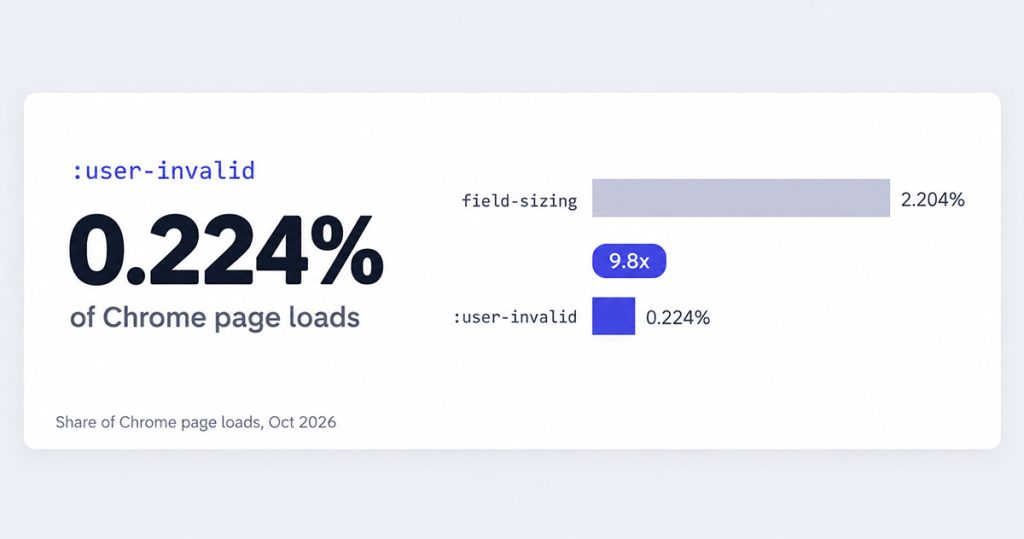
Of the native CSS form features now shipping, field-sizing (the property that sizes a textarea to its content) appears on about 2.204% of Chrome page loads.
:user-invalid, the selector that styles a field only after someone has touched it, appears on about 0.224%, a 9.8x gap by our analysis of Chrome Platform Status data.
The order runs against the calendar. :user-invalid has worked in every major browser since late 2023, while field-sizing reached its last engine in June 2026.
Neither one replaces form validation outright. :user-invalid styles the touched-and-invalid state, but error text, screen reader announcements and server checks still need code.
The third feature, customizable select, works in Chrome and Safari and has not shipped in Firefox.
Key Findings
- field-sizing appears on about 2.204% of Chrome page loads, against about 0.224% for :user-invalid (Chrome Platform Status).
- By our calculation, that is a 9.8x gap, even though :user-invalid reached every major engine first.
- Half of State of HTML 2025 respondents (49.8%) said they had never heard of customizable select.
- Weekly npm downloads of react-textarea-autosize rose 143.6% between October 2025 and October 2026, by our calculation.
- One in three form inputs (33.1%) on the top million home pages had no proper label in February 2026 (WebAIM Million).
- In a 2009 test with 22 participants, showing errors after a field lost focus cut 7 to 10 seconds from the form’s first half (Wroblewski and Etre).
:user-invalid Is on 0.224% of Chrome Page Loads, 9.8x Fewer Than field-sizing
What the data shows
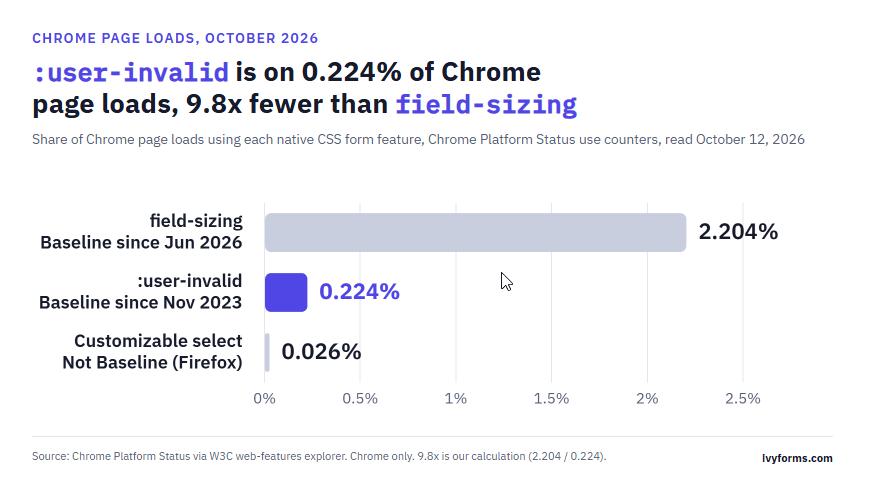
The chart compares how often three native CSS form features appear in Chrome page loads. field-sizing appears on 2.204%, :user-invalid on 0.224% and customizable select on 0.026%. The validation pseudo-class has worked in every major browser since November 2023, yet it trails a property that only reached Baseline in June 2026.
Key insights
- field-sizing appears on 9.8 times more Chrome page loads than :user-invalid, by our calculation.
- Customizable select sits at 0.026%, the lowest of the three, and is the only one not yet Baseline (Firefox missing).
- Support dates don’t predict usage: the oldest cross-browser feature has the smaller share.
Why it matters
Browser support alone doesn’t move developers off JavaScript. The CSS that styles form errors is available everywhere and still barely used.
Sources: Chrome Platform Status, W3C web-features explorer
field-sizing vs :user-invalid: 2.2% vs 0.2% of Chrome Page Loads
The pseudo-class built to fix form error timing is used far less than a property that sizes text boxes.
A CSS property that has been Baseline for four months already runs on 9.8 times more Chrome page loads than a selector that has worked in every browser since 2023 (our calculation, Chrome Platform Status data).
Here are the three native CSS form features, side by side:
The order runs backwards from the support dates. :user-invalid was the first of the three to land everywhere. field-sizing was the last to reach Baseline, and it leads anyway.
Two limits come with these numbers.
They are Chrome-only, so Safari and Firefox traffic is not counted. A use counter may also fire when a framework stylesheet includes the feature, whether or not a visitor ever sees it do anything.
Selectors and properties may not trigger their counters the same way. The source does not document the rule for either.
The gap survives a second snapshot, though. An earlier reading of the same counter put :user-invalid at about 0.309%, which still leaves field-sizing roughly 7.1x ahead by our math.
Which Native Form Features Are Baseline, and Since When?
Two of the three now work in every major engine. Customizable select is still missing from Firefox.
| Feature | Chrome | Safari | Firefox |
|---|---|---|---|
| :user-invalid / :user-valid | 119Oct 2023 | 16.5May 2023 | 88Apr 2021 |
| field-sizing | 123Mar 2024 | 26.2Dec 2025 | 152Jun 2026 |
| Customizable select | 135Apr 2025 | 27Sep 2026 | Not shipped |
Source: web-features explorer (W3C WebDX Community Group), first supporting version and release date per engine.
The Baseline labels, as of October 2026:
:user-invalid: Widely available since May 2, 2026. The web-features data dates newly available to November 2, 2023, when Edge 119 shipped, while Google’s web.dev Baseline page lists October 2023.
field-sizing: Newly available since June 16, 2026, with Widely available expected on December 16, 2028. Google’s June 2026 Baseline digest presents it as a way to drop custom JavaScript auto-resize scripts.
Customizable select: Limited availability. Mozilla’s standards position is positive but lists compatibility concerns, and Firefox has been the only thing blocking Baseline since September 2026.
The wait between the first and the last engine, counted by us from those release dates:
- 925 days for :user-invalid
- 819 days for field-sizing
- 559 days and counting for customizable select
Version check: several tutorials still give Chrome 133 or 134 as the first release with appearance: base-select. Chrome’s own announcement and the compat data both say 135.
Others still call field-sizing Chrome-only, or say Safari only has it in Technology Preview. Neither has been true since Safari 26.2.
What :user-invalid Fixes, and the 7-Second Case for It
:user-invalid fixes one specific problem: required fields that turn red before anyone has typed a letter.
When an error appears is also one of the few form UX questions with test data behind it.
:invalid vs :user-invalid in one form
Take a single required email field.
- :invalid matches the empty field the moment the page loads.
- :user-invalid matches only after the user changes the value and moves focus away, or tries to submit.
Once a field has been flagged, the browser re-checks it on every keystroke, so the error style clears as soon as the value becomes valid. MDN documents this behavior in its :user-valid reference.
Most JavaScript form libraries track the same “touched and invalid” state with a flag per field. Here the browser keeps it for you.
Timing is only one piece, though. Copy, placement and server checks matter just as much, and our guide to validating forms well covers the rest.
What the 2009 test measured, and what it didn’t
In 2009, Luke Wroblewski and the London usability firm Etre tested 22 people on six versions of a registration form, and published the results in A List Apart.
The best inline-validation version beat the submit-only control on completion time (42% shorter), success rate (22% higher) and errors (22% fewer).
The timing result is the part that matters for CSS. In the first half of the form, showing the message after people left a field got them through 7 to 10 seconds faster than validating while they typed, or from the moment a field gained focus.
The “before and while” version also produced more errors and lower satisfaction. Participants complained about red marks appearing before they had typed anything.
By our reading, :invalid is closest to that worst variant (it flags fields before anyone touches them), and :user-invalid matches the faster “after” one. That mapping is ours, not the study’s.
The study’s limits, stated plainly:
Sample: 22 people, each seeing several versions of the same form, a design commenters criticized at the time.
Errors: counted only after the Submit click, according to Etre’s own note.
Status: Etre described the figures as indicative, not definitive.
The 22% is also often quoted as “22% fewer people abandoned the form.” It was a success-rate gain in a lab. If abandonment is your real metric, the only reliable number comes from measuring and reducing abandonment on your own forms.
Why Does the Validation CSS Trail So Far Behind?
Nobody has measured the cause directly. What exists is a handful of signals, and they mostly agree.
What the data shows
Validation has not faded as a complaint. In the State of HTML survey, its share of form pain-point mentions went from 23.0% in 2024 to 25.8% in 2025, by our calculation from the raw counts.
- 2024: styling 1,029 mentions, validation 408, out of 1,773 respondents
- 2025: styling 987, form validation 527, out of 2,041 respondents
- Styling’s share: from 58.0% down to 48.4%, a drop of 9.6 percentage points
Treat this as directional only. The answers are freeform, one person can name several pain points, the respondents opted in, and the survey re-coded its categories between years (“Validation” became “Form Validation”).
The 2025 write-up calls out cross-field checks, where one field’s value depends on another. CSS can’t help there, because :user-invalid only knows HTML constraints such as required, type, pattern, min and max.
Curiosity went the other way. field-sizing ranked third on the State of CSS 2025 reading list, saved 810 times by the 1,741 respondents who used the list.
On real sites, plenty of forms still give no feedback as people type. Baymard Institute reports that 31% of sites it reviewed have no inline validation at all, and that 32% of sites in its e-commerce benchmark provide no field validation of any kind (no benchmark year given).
For a shop, adding it is one of the cheaper items on a checkout optimization list.
What it doesn’t prove yet
None of this explains why developers skip :user-invalid.
Two explanations fit the data. Both are hypotheses.
Hypothesis one: field-sizing is a one-line drop-in that changes nothing else on the page. :user-invalid only works while native constraint validation stays on, and several public design systems tell teams to switch it off (more on that below).
Hypothesis two: teams already running a JavaScript form library get touched state for free, so they see no reason to move it into CSS.
Testing either one would take a survey question about :user-invalid itself. Neither State of survey reported one in the data we pulled.
The Case for Turning Native Validation Off
Some of the most careful form teams in the public sector tell developers to switch native validation off.
The GOV.UK Design System says it plainly: add novalidate to the form. Its reason is that the visual style, placement and content of browser validation messages can’t be made to match its components, and it says its own error message and error summary components are accessible.
The UK’s Office for National Statistics gives the same instruction in its service manual. So does the W3C’s own design system, which recommends avoiding default HTML5 form validation and checking forms on submission.
Their case rests on three points:
- Messages: browser error bubbles can’t be styled or reworded the way a design system needs.
- Placement: the browser decides where the message appears, not the design system.
- Assistive technology: accessibility consultant Adrian Roselli wrote in 2019 that default messages are not always useful and typically do not work with assistive tech.
There is also one implementation report to check. In 2023, Cloud Four noted that :user-invalid did not trigger on form submit in Safari. We have not seen a fix confirmed or ruled out since, so test it in current Safari before relying on it.
The broader accessibility data points at basics that no CSS feature touches.
WebAIM’s February 2026 scan of the top million home pages found missing form input labels on 51% of them, up from 48.2% in 2025. Those pages averaged 6.9 form inputs each.
One in three form inputs on the top million home pages (33.1%) had no proper label in February 2026, according to the WebAIM Million.
Across all checks, 95.9% of those home pages had detectable WCAG 2 failures. No pseudo-class fixes a missing label, and our guide to accessible form markup starts there for that reason.
So who is right? Both, about different things.
| Job | :user-invalid | Your own code |
|---|---|---|
| Style a touched, invalid field | Yes | Optional |
| Write the error text | No | Yes |
| Announce the error to screen readers | No | Yes |
| Check rules on the server | No | Always |
The design-system critique targets native messages and bubbles, not the selector itself. A hybrid fits both positions: script writes the message and ARIA, sets custom validity where needed, and CSS styles the state.
Whether :user-invalid still flags untouched fields on submit once novalidate is set is worth testing in each target browser. Whatever the styling, the words matter most, and these error message examples show what clear wording looks like.
Missing Form Labels Are Back on More Than Half of Top Home Pages: 51% in 2026
What the data shows
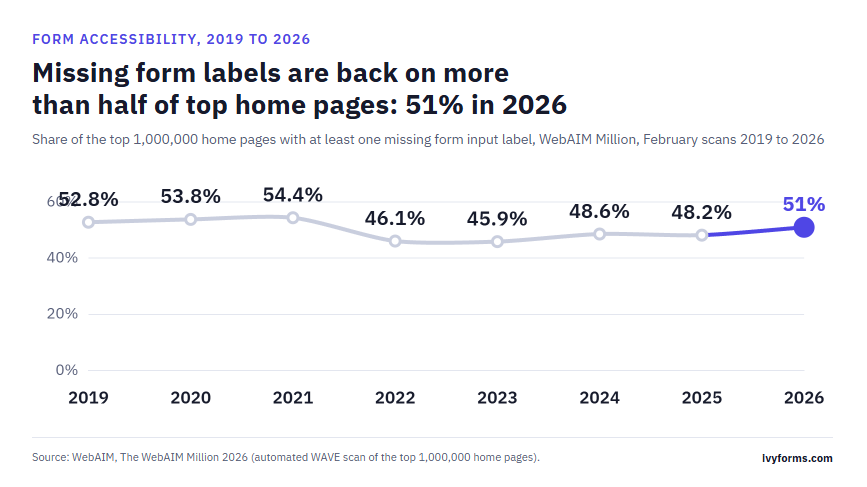
WebAIM scans the top 1,000,000 home pages every February. The share with at least one missing form input label fell from 54.4% in 2021 to 45.9% in 2023. It has since climbed back to 51% in 2026.
Key insights
- The 2023 low of 45.9% was followed by three years without a return to that level.
- From 2023 to 2026 the share rose 5.1 percentage points.
- The 2026 figure is still below the 2019 to 2021 range of 52.8% to 54.4%.
Why it matters
No CSS selector fixes a missing label. The form problem automated scans catch most often is one native styling features don’t touch.
Sources: WebAIM, The WebAIM Million 2026
Customizable Select Works in Two Engines. Half of Developers Haven’t Heard of It
Styling the select element has been a form complaint for years, yet most surveyed developers have not tried the native fix.
| State of HTML 2025 respondents (n = 6,037) | Share |
|---|---|
| Never heard of customizable select | 49.8% |
| Heard of it, haven’t used it | 42.3% |
| Used it | 7.1% |
Among those who had used it, 89% reported a positive experience. The survey is self-selected and leans toward developers who follow new features, so we would expect awareness among all developers to be lower.
The interest was there early. In the 2024 edition, the same feature was one of the least used form items yet ranked second by positive sentiment.
What shipping it involves
Customizable select changes how Chrome parses the markup inside a select, and Chrome’s team said openly that this carries some risk of breaking existing sites.
Their answer was a Finch experiment, a server-side switch that lets Google turn the feature off in an emergency. The new styling applies only to selects that opt in with appearance: base-select, but Chrome tied the risk for existing sites to the parser change, so test pages that put unusual markup inside a select.
Apple’s WWDC26 session pitched it the same way: keep the real select, its keyboard handling and its accessibility, and change only the look. That matters if a select has to match the rest of a site’s form design.
Firefox users get a plain native select, which still works as a form control. Wrapping the custom styles in an @supports (appearance: base-select) block keeps that fallback clean.
What the libraries cost
Bundle size: react-select 5.10.2 weighs 85,803 bytes minified, 29,804 bytes gzipped, with 9 dependencies (Bundlephobia).
Accessibility errors: the 15,211 home pages running Select2 averaged 82.0 detected errors in the WebAIM Million 2026, against a 56.1 average across all pages (+46.2%).
That second number is a correlation. WebAIM says extra errors on pages with a given library can’t always be attributed to the library, and Select2 pages may simply be larger or older sites.
The JavaScript These Features Replace Grew 58% to 144% in a Year
The packages these features could replace are still growing, and some grew fast.
| npm package | Week of Oct 5, 2025 | Week of Oct 5, 2026 | Change |
|---|---|---|---|
| react-textarea-autosize | 3,872,910 | 9,433,388 | +143.6% |
| react-select | 6,195,948 | 9,652,200 | +55.8% |
| jquery-validation | 178,408 | 221,388 | +24.1% |
| autosize | 582,997 | 700,063 | +20.1% |
| select2 | 642,516 | 695,934 | +8.3% |
Source: npm registry downloads API, weekly totals for October 5 to 11 of each year. Percentages are our calculation.
The headline range needs a footnote. The 58% is our combined figure for four select packages (react-select, select2, choices.js and tom-select), which grew 57.8% together. The 144% is react-textarea-autosize alone, and single packages range from +8.3% to +143.6%.
Combined weekly downloads of the two textarea auto-resize packages rose 127.4% year over year, by our count from npm registry data, while field-sizing finished reaching every engine.
What a download count can and can’t say
A download is not a user, a site or an install that ships to production.
- CI pipelines reinstall dependencies on every build.
- Mirrors and caches pull packages too.
- One busy monorepo can add thousands of downloads a week.
We also did not compare these packages against overall npm growth over the same weeks. If the whole registry grew at a similar rate, the right reading is “not shrinking,” not “booming.”
What the download counts do show is no visible shift away from the libraries so far. Several plausible reasons exist: field-sizing has only been Baseline since June, customizable select isn’t Baseline at all, and libraries like react-select also handle search and multi-select, which a native select doesn’t. Those reasons are hypotheses; the downloads are the measurement.
Which Form JavaScript You Can Delete Today
Of the native CSS form features, field-sizing is the safest swap today, :user-invalid is a partial one, and customizable select is not ready to replace a library yet.
A sensible order:
- Remove textarea auto-resize scripts first
- Move touched-state styling to :user-invalid
- Keep the select library, gated behind @supports
That order follows the cost of being wrong. A browser without field-sizing shows a fixed textarea, while a broken select or a silent validation error blocks the form.
The trade-off is real: with field-sizing set, rows and cols stop working, so the size limits move into min-height and max-height.
The picture changes when Firefox ships customizable select. Until then, the error text and the server checks stay in code, and the line between client-side and server-side validation decides what CSS can own. Support data verified October 12, 2026.
How We Got These Numbers
Every figure in this article comes from a public source. The percentages, ratios and day counts we calculated ourselves are listed separately below.
Sources
- W3C WebDX Community Group, web-features explorer (2026): Baseline status, first supporting browser versions and release dates for :user-invalid, field-sizing and customizable select.
- Google, Chrome Platform Status (2026): share of Chrome page loads for each feature, read through the web-features explorer.
- Google web.dev, June 2026 Baseline monthly digest (2026): confirmation of field-sizing’s Baseline date and Google’s description of it.
- Chrome for Developers, “The select element can now be customized with CSS” (2025): parser-change risk and the Finch kill switch.
- Apple, WWDC26 session 315 (2026): Safari’s description of customizable select.
- MDN Web Docs, :user-valid and :user-invalid: when the pseudo-classes match and re-check.
- Devographics, State of HTML 2025 (2026, 2025 survey): customizable select awareness and form pain-point counts.
- Devographics, State of HTML 2024 (2025, 2024 survey): pain-point counts and sentiment ranking.
- Devographics, State of CSS 2025 (2025): field-sizing reading-list count.
- npm registry downloads API (2025 and 2026): weekly downloads for October 5 to 11 of each year.
- Bundlephobia (2026): react-select 5.10.2 bundle size.
- Luke Wroblewski, “Inline Validation in Web Forms”, A List Apart (2009): Etre usability test results and the study’s own caveats from the comment thread.
- Baymard Institute, inline form validation research (year not stated): share of reviewed sites without inline validation, and of benchmarked e-commerce sites without any field validation.
- GOV.UK Design System, Recover from validation errors; ONS Service Manual; W3C Design System, Forms: validation: guidance to turn off native validation.
- Adrian Roselli, “Avoid Default Field Validation” (2019): default messages and assistive technology.
- Cloud Four, “Progressively Enhanced Form Validation, Part 2” (2023): reported Safari submit behavior.
- WebAIM, The WebAIM Million 2026 (scan of February 2026): form label failures, WCAG failure rate and Select2 error averages.
Our calculations
- 9.8x gap: field-sizing page-load share (2.204%) divided by :user-invalid’s (0.224%). The 7.1x figure divides 2.204% by the earlier 0.309% reading.
- Days to Baseline: the release date of the last engine minus the first engine’s release date (925 and 819 days). The 559 days for customizable select run from Chrome 135 to October 12, 2026.
- Pain-point shares: mentions of a topic divided by the number of question respondents for that year. Changes are given in percentage points.
- npm changes: the 2026 weekly downloads divided by the 2025 weekly downloads, minus one. The combined figures sum the weekly downloads of each package group before dividing.
Definitions
Baseline newly available means a feature works in the current Chrome, Edge, Firefox and Safari. Widely available follows 30 months later.
A Chrome use counter records page loads where the feature was used, not unique sites or visible effects.
Limitations
- Usage data covers Chrome only, and the source does not document how selector and property counters trigger.
- The State of HTML and State of CSS surveys are self-selected, with freeform answers re-coded between years.
- npm downloads include CI and mirror traffic, and we did not compare them against overall registry growth.
- The 2009 timing study had 22 participants and counted errors only at submit.
- The Safari submit report dates from 2023 and was not retested for this article.
Data verified in October 2026.