



Users expect to grab a file off their desktop and drop it straight into your browser. The standard file input button feels dated by comparison. Learning how to make a…
Table of Contents
Seven out of ten shoppers abandon their carts before completing checkout. That’s 70% of potential revenue walking away at the final step.
The gap between adding items to cart and clicking “complete purchase” represents billions in lost sales annually. Most of these losses are preventable.
Checkout optimization tips to boost conversions directly address the friction points causing abandonment. Small changes to your payment flow, form design, and shipping display can recover significant revenue without increasing traffic.
This guide covers twelve proven strategies backed by conversion data from Baymard Institute, Shopify, and leading ecommerce platforms. Each tactic targets specific abandonment triggers with measurable impact on transaction completion rates.
What Is Checkout Optimization
Checkout optimization is the systematic process of removing friction points between cart entry and transaction completion.
This isn’t vague conversion rate improvement. It’s specific work on the payment flow itself, from the moment someone hits “checkout” through the order confirmation screen.
Cart abandonment drives the need: Baymard Institute data shows 70.19% of online shopping carts get abandoned globally as of 2024. That’s seven out of every ten shoppers who add items but never complete the purchase.
Checkout optimization addresses issues happening during the final purchase steps, not site-wide experience problems.
Site-wide conversion rate measures all traffic against purchases. Checkout conversion rate only looks at people who started the checkout process.
The difference matters because checkout abandonment stems from specific, fixable issues. Unexpected shipping costs, mandatory account creation, slow page loads, complicated forms.
Display Total Cost Before Checkout Begins
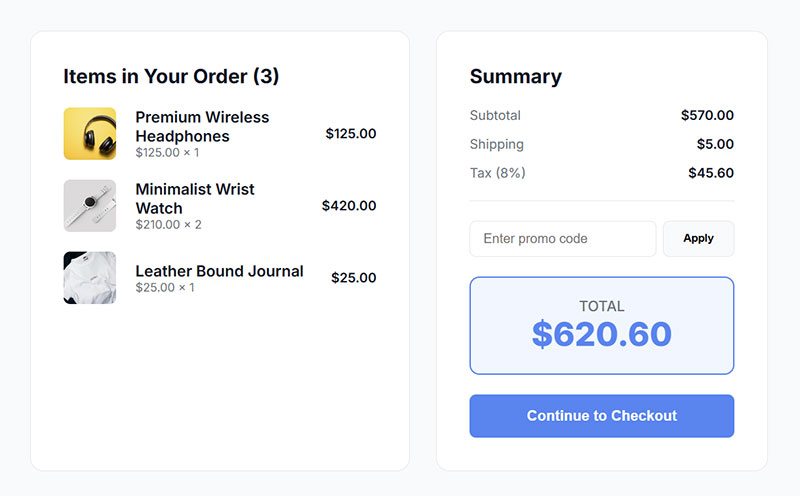
Hidden fees at checkout kill sales faster than almost anything else.
Baymard research indicates 48% of shoppers abandon carts when they encounter unexpected shipping, tax, or service fees during final checkout. People bail when the total jumps unexpectedly.
| Cost Transparency Practice | Implementation | Impact |
|---|---|---|
| Product page estimates | Tax/shipping calculator | Reduces sticker shock |
| Cart page totals | Real-time API pricing | Builds trust early |
| Sticky header pricing | Always-visible total | Prevents mid-flow surprises |
Show the complete price upfront. Not an estimate. The actual total they’ll pay.
Tax calculation during browse: Services like TaxJar and Avalara provide real-time tax estimates based on user location. You can display accurate totals before anyone clicks checkout.
Warby Parker built their entire pricing model around transparency. No surprise fees, period.
Everlane goes further by breaking down production costs and markup. Their “radical transparency” approach converts skeptical browsers into buyers.
Calculate Shipping During Browse
Free shipping thresholds work when they’re visible from the start.
Display shipping costs (or free shipping qualification) on product pages and in the cart. Don’t wait until checkout step three to reveal a $15 shipping charge on a $40 order.
Real-time shipping calculation APIs from carriers like USPS, FedEx, and UPS let you show accurate delivery costs before checkout begins.
Show Price Breakdown in Cart
The cart page is your last chance to set expectations before checkout.
Break down the total into clear line items. Subtotal, shipping, taxes, discounts. No mystery charges.
This eliminates the “let me see the total” browsers who add items just to calculate final costs.
Cut Form Fields to Absolute Minimum
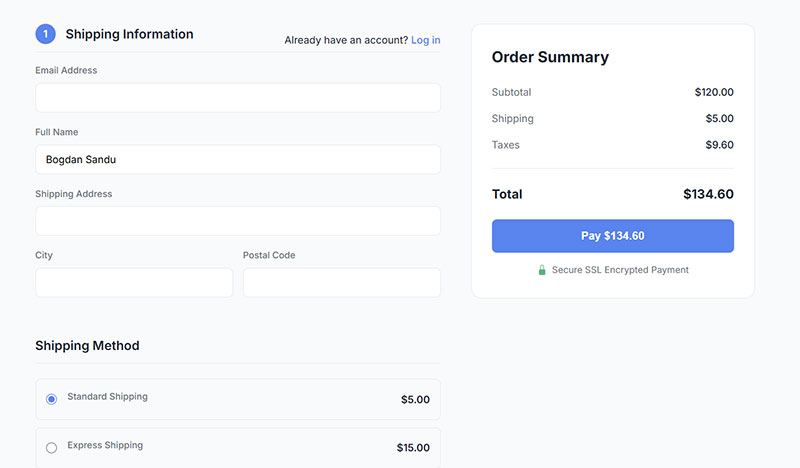
Every unnecessary form field creates friction and abandonment risk.
Baymard’s 2024 benchmark shows the average checkout has 11.3 form fields by default. Their research indicates most sites only need 6-8 fields for a complete guest checkout flow, including payment information.
Removal impact is measurable: Testing from Expedia and Imaginary Landscape found that each removed field can lift conversions by 2-4%. Drop four unnecessary fields, gain an 8-16% conversion boost.
Studies show 18% of shoppers abandon specifically because checkout feels too long or complicated.
Ask yourself what’s actually required to fulfill and charge the order. Name? Yes. Email for receipts? Yes. Shipping address? Yes.
Date of birth for age verification on alcohol? Only if legally required.
Company name field? Optional unless you’re B2B. Phone number? Depends on your carrier’s delivery requirements, but often not essential.
Address autocomplete cuts typing: Google Places API and services like Loqate let users select their address from a dropdown after typing a few characters. This removes multiple manual entry fields and reduces errors.
The debate around single-page versus multi-step checkout misses the point. Field count matters more than step count.
Required vs Optional Field Audit
Go through your checkout form line by line.
For each field, ask: “Can we complete this order without this information?” If yes, make it optional or remove it entirely. Test the difference.
Fields that seem important to marketing often aren’t essential to transactions. Collect additional data post-purchase if needed.
Implement Address Autocomplete
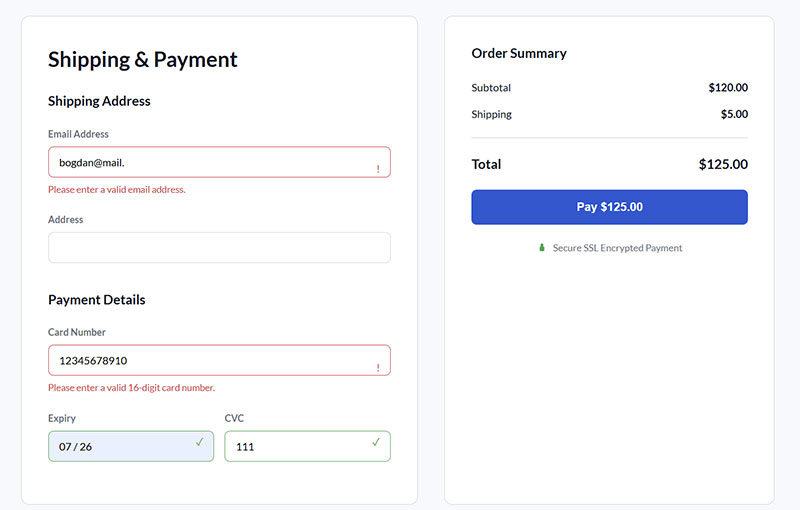
Address entry is one of the most error-prone parts of checkout.
Autocomplete solves two problems at once. Faster entry (users type less) and fewer errors (addresses come from verified databases).
Both Google Places API and Loqate offer straightforward integration. The reduction in abandoned checkouts from address validation errors alone justifies implementation cost.
Default to Single-Page Checkout
Unless you have a complex shipping or customization workflow, keep checkout on one page.
Single-page layouts let users see all requirements upfront. No surprise fields on step three. No wondering how much longer the process will take.
Multi-step can work if steps are genuinely necessary (like separate shipping methods requiring different information). But most stores don’t need this complexity.
Offer Guest Checkout as Default
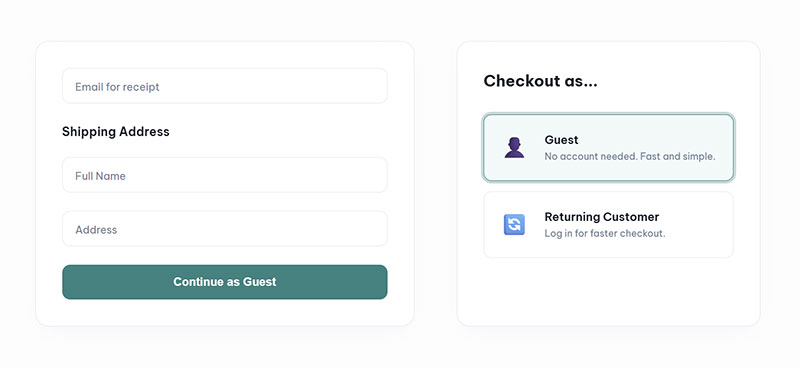
Forced registration murders conversion rates.
Baymard data shows 24% of shoppers abandon their carts when a site requires account creation to complete a purchase. Nearly one in four potential sales lost to a login wall.
First-time buyers don’t trust your site enough yet to create an account. They want to test the experience before committing to another password.
Guest conversion rates run higher: Industry data indicates registered customers convert at 64% while guest users convert at 52%. But that comparison is misleading because it only counts people who made it past the registration gate.
The 24% who never got that far aren’t in either bucket.
Amazon, ASOS, and Apple Store all default to guest checkout. Notice the pattern. These are companies obsessed with conversion optimization.
They offer account creation but never force it as a requirement for purchase.
Session-based cart recovery works for guest users. You can still send abandoned cart emails if someone provided an email address during checkout, even without full account registration.
Post-purchase account creation converts better: After a successful order, customers trust you more. Offering account creation at this point (“Save your info for faster checkout next time?”) has much higher acceptance than forcing it upfront.
The guest checkout flow should collect exactly the same information you’d need for a registered user’s first order. Email, shipping address, payment method. That’s it.
Make the account creation option visible but optional. A single checkbox: “Create an account for faster future orders?” with a password field that only appears if they check it.
Add Multiple Payment Options
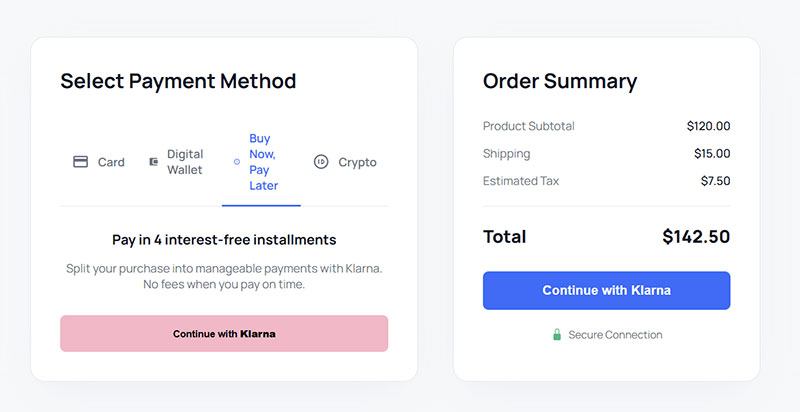
Limited payment methods directly cause cart abandonment.
Studies indicate 42% of shoppers will abandon if they can’t use their preferred payment method. You’re locking out nearly half your potential customers by accepting only credit cards.
Regional payment preferences vary dramatically. Credit cards dominate in North America and Australia. Digital wallets lead in Asia-Pacific (70% of transactions). Buy now, pay later is growing fastest among younger demographics.
| Payment Method | Best For | Adoption Stats |
|---|---|---|
| Credit/debit cards | Baseline, universal | 20% global share (2024) |
| PayPal | Trust signal, speed | Worldwide presence |
| Digital wallets | Mobile, returning customers | 53% global population uses |
| BNPL (Klarna, Affirm) | $100+ cart values | 6.5% of GMV for some brands |
Digital wallet adoption accelerates: Apple Pay, Google Pay, and Shop Pay now represent significant transaction volume. Research shows 53% of the global population used digital wallets for online transactions in recent periods.
Shop Pay specifically shows an 18% higher conversion rate for returning customers according to Shopify data.
Buy now, pay later changes purchase behavior for higher-ticket items. Pillow Cube’s director of business development reports that Shop Pay Installments accounts for 6.5% of their gross merchandise value.
Stripe, Braintree, and Adyen function as multi-method processors. Integrate once, offer many payment options.
The technical implementation barrier has dropped significantly. Most modern payment processors support multiple methods through a single integration.
Digital Wallets for Faster Checkout
Mobile users particularly benefit from wallet checkout.
Apple Pay and Google Pay eliminate form entry entirely on phones. Face ID or fingerprint, done. No typing credit card numbers on a small keyboard.
BCG and Shopify research found that accelerated payment methods (like digital wallets) can increase conversion rates by up to 50%.
BNPL for Higher Cart Values
Buy now, pay later options reduce the psychological barrier on larger purchases.
Klarna, Affirm, and Afterpay let customers split payments into installments. This moves expensive items from “thinking about it” to “buying it today.”
BNPL particularly resonates with younger shoppers who prefer payment flexibility over traditional credit.
Show Security Signals Throughout Flow
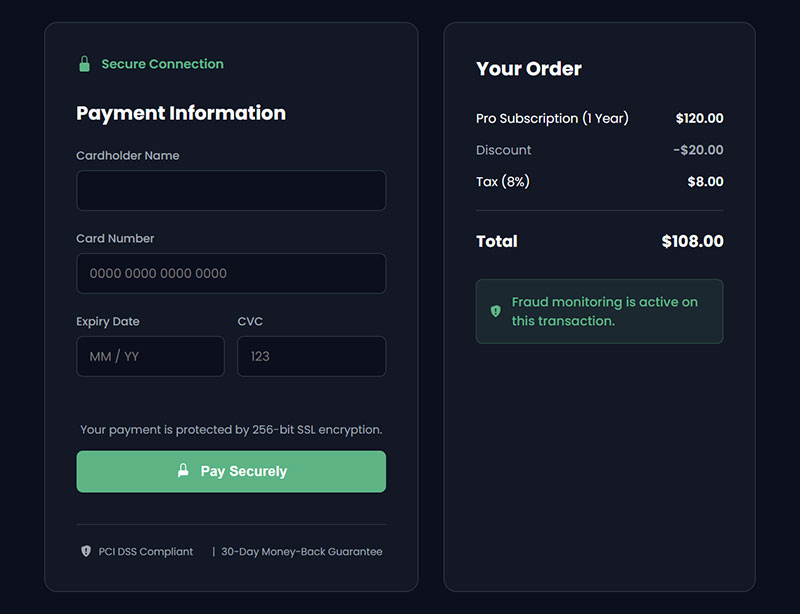
Payment anxiety is real and rational.
Security concerns drive 19% of cart abandonments according to research. People worry about entering credit card information on unfamiliar sites.
Trust badges and security signals counter this hesitation. But they only work if placed strategically throughout checkout, not just buried in the footer.
SSL certificate visibility matters. The padlock icon in the browser bar helps, but many users don’t notice it. Make HTTPS and security explicit within your checkout design.
Trust badge effectiveness varies: Norton Secured, McAfee, and BBB accreditation badges show measurable impact on conversion when displayed near payment input fields. Generic “secure checkout” claims without third-party validation have minimal effect.
PCI compliance is legally required for processing credit cards, but most sites don’t mention it prominently. A simple “PCI-DSS Compliant” statement near payment fields adds credibility.
Money-back guarantees and clear return policies reduce purchase risk. Link to your return policy directly from the checkout page.
Trustpilot found 89% of customers read reviews before purchasing online. Display your review rating or score near the checkout button as social proof.
Place security indicators where anxiety peaks: next to payment input fields and on the final “Complete Order” button.
Don’t overdo it. Three to four well-placed security signals work better than twenty scattered badges that make the page look cluttered and desperate.
Most customers won’t click to verify the badges. The visual presence alone provides psychological reassurance.
Optimize Page Load Speed at Checkout
Slow checkout pages bleed revenue.
Portent research found that ecommerce sites loading in 1 second achieve conversion rates 3x higher than sites loading in 5 seconds. The gap widens as load time increases.
Website conversions drop by 4.42% for every additional second of load time between 0-5 seconds according to site speed analysis. That’s nearly a 22% conversion loss if your checkout takes 5 seconds instead of 1 second.
Checkout pages carry extra weight: Payment processor scripts, fraud detection tools, address verification services, third-party analytics. All this JavaScript slows down the page right when conversion hangs in the balance.
Strip non-critical elements from checkout. Reviews, recommended products, chat widgets, heatmap tracking scripts. None of these belong on the payment page.
Lazy load anything that isn’t required for transaction completion. If it doesn’t directly contribute to capturing payment, defer it or remove it entirely.
CDNs (Content Delivery Networks) cache static assets closer to users geographically. This reduces server response time, which is often the biggest bottleneck on checkout pages.
Mobile load times matter more: Mobile users already convert at lower rates than desktop (around 3% versus 4.4%). Slow mobile checkout compounds this disadvantage.
Google research shows 53% of mobile visitors leave if a page takes longer than 3 seconds to load. Your mobile checkout needs to be fast or those users vanish.
Defer Non-Essential Scripts
Payment processing scripts are essential. Google Analytics on your checkout page isn’t.
Move all non-critical JavaScript to load after the page renders. This lets users see and interact with checkout fields while background scripts load.
Third-party scripts for chat support, recommendation engines, and session recording can wait. Page speed tools like Google PageSpeed Insights will flag which scripts block rendering.
Test Checkout Speed Separately
Product pages and category pages might load fast while checkout crawls.
Monitor checkout-specific load time because it directly correlates with revenue. Use real user monitoring tools or synthetic tests focused specifically on your payment flow.
Portent found that faster speeds on checkout pages, login pages, and high-intent pages made the most impact on conversion rates. Optimize where money is made.
Make Shipping Options Clear and Flexible
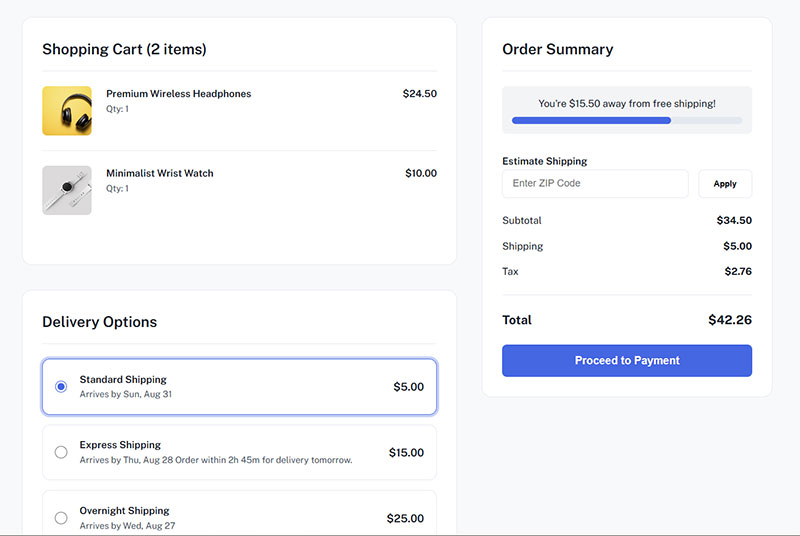
Vague shipping information causes abandonment.
Free shipping drives 93% of consumers to make purchases according to multiple studies. It’s the single strongest conversion factor in ecommerce, outweighing fast delivery for most shoppers.
But free shipping alone isn’t enough. Clarity and flexibility in delivery options matter almost as much.
Display delivery dates, not just shipping speeds. “2-3 day shipping” means nothing to a customer ordering on Friday afternoon. “Arrives by Tuesday, March 11” sets a concrete expectation.
| Shipping Clarity Element | Why It Matters | Implementation |
|---|---|---|
| Delivery date | Sets specific expectations | Calculate from order time + transit |
| All options visible | Lets customers choose speed vs. cost | Show standard, expedited, express |
| Free shipping threshold | Motivates larger orders | “$15 more for free shipping” |
| Cutoff times | Creates urgency without pressure | “Order within 2 hours for Tuesday delivery” |
McKinsey research indicates 90% of consumers are willing to wait 2-3 days for deliveries, especially if it avoids shipping costs. Speed ranked fifth in importance in 2024, down from first place in 2022.
On-time delivery matters more than fast delivery. Customers would rather wait up to a week for an on-time delivery than receive a package later than expected.
Industry delivery performance reached 3.7 days average as of late 2024, representing a 27% improvement from previous periods according to shipping data.
Ship-to-store or local pickup options work well for retailers with physical locations. They eliminate shipping costs entirely and can be faster than standard delivery.
Display shipping cutoff times with countdown timers when relevant. This creates urgency naturally without fake scarcity tactics.
Display Progress Indicators for Multi-Step Checkout
Users abandon what feels endless.
Progress indicators showing checkout steps reduce dropout by 8-12% according to conversion research. Customers want to know how close they are to completion.
Multi-step checkout needs clear navigation: Step 1 of 3, step 2 of 3, step 3 of 3. Or breadcrumb navigation showing Shipping > Payment > Review.
Visual progress bars work better than text alone. A filled progress bar gives immediate visual feedback on completion percentage.
Back buttons that preserve entered data are critical. If someone clicks back to change their shipping address, don’t clear their payment information.
For returning customers (logged in or cookied), save progress automatically. Let them complete checkout later from where they left off.
Mobile progress indicators need special attention: Limited screen space means progress bars should be sticky (always visible) and compact.
Single-page checkout eliminates this entire problem. No progress indicator needed when everything is on one screen.
If you use multi-step checkout, keep it to 3 steps maximum. Baymard data shows the average checkout is 5.1 steps long, but fewer steps almost always perform better.
Don’t hide the step count from users. Knowing there are three steps upfront feels better than discovering a fourth unexpected step after entering payment information.
Enable Cart Editing at Checkout
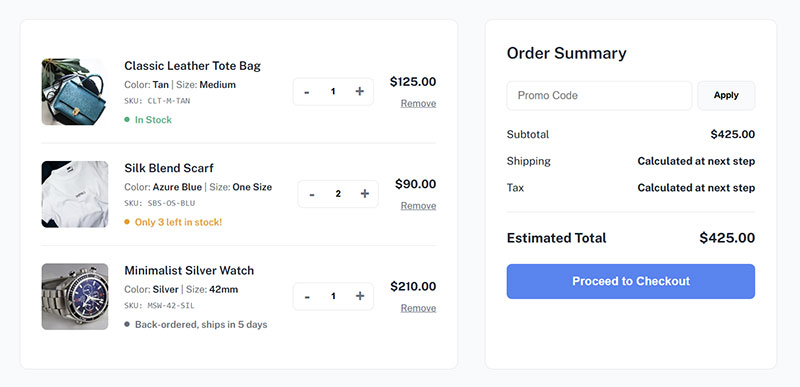
Forcing users back to the cart creates abandonment risk.
Baymard research shows 17% of users abandon because they can’t edit cart quantities during checkout. They want to change an item count or remove something without leaving the payment flow.
Inline quantity adjustment fields within checkout solve this. Small +/- buttons next to each line item let users modify orders without navigation.
Real-time price updates when quantities change build confidence. The total should recalculate immediately, not require page refresh.
Remove item functionality belongs in checkout too. An X icon or “remove” link next to each product keeps users in the flow.
Discount code field placement matters: Don’t remind users to search for promo codes unless they already have one. Place the coupon field after payment information or in a collapsed “Have a promo code?” section.
Prominent discount fields encourage users to abandon checkout to hunt for coupons online. This rarely ends in a completed purchase.
Test Checkout Button Copy and Placement
The final conversion click deserves optimization attention.
Button copy testing shows measurable differences: “Continue to Checkout” versus “Proceed to Payment” versus “Complete Purchase” can shift conversion rates by several percentage points.
Action-oriented, specific copy typically outperforms generic labels. “Place Order” tells users exactly what happens next. “Submit” is vague.
Button color relative to your site’s palette matters more than specific color choice. The CTA needs high contrast against the background, not a particular hue.
Size and whitespace around the button affect clickability: Make it large enough to be obviously the primary action. Surround it with whitespace so nothing competes for attention.
Mobile users need the button in the thumb-zone, bottom third of the screen. Placing critical actions at the top of mobile screens forces awkward reaching.
Test one prominent CTA versus multiple options (“Pay with Card” vs “Pay with PayPal” as separate buttons). Usually, one clear path forward converts better than decision paralysis.
The button should always be visible without scrolling on the final checkout step. Sticky positioning at the bottom of mobile screens helps.
Recover Abandoned Carts With Email Sequences
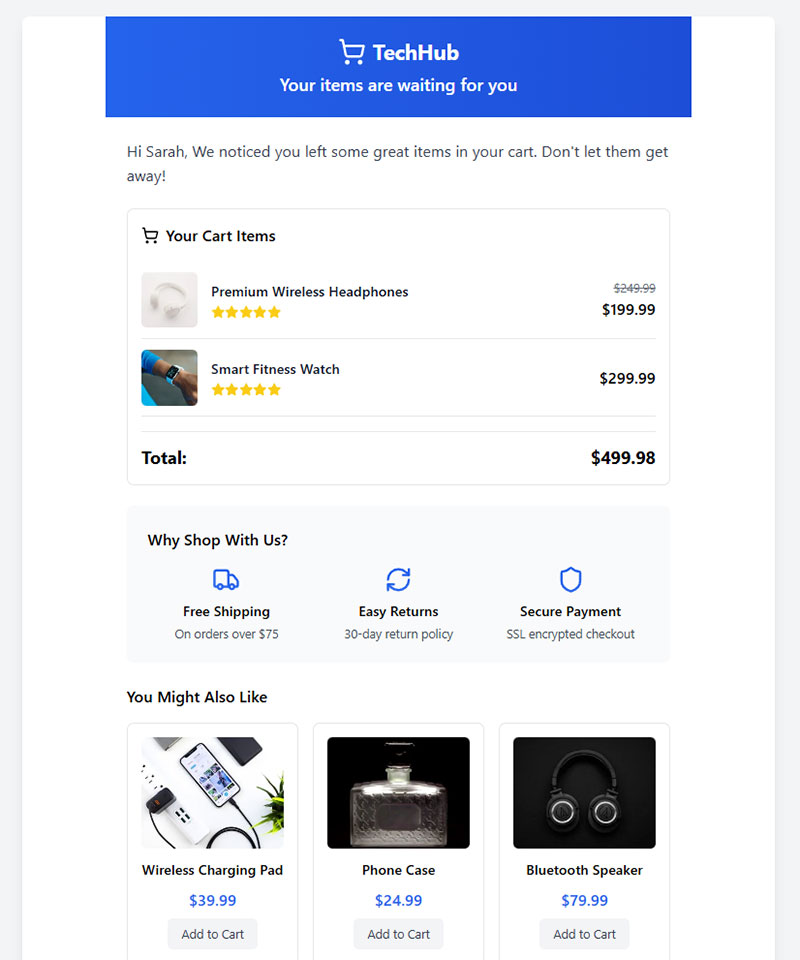
Most abandoned carts can be recovered with timed email follow-up.
First email timing is critical: Sending within 1 hour of abandonment captures 6.4% of abandoners according to SaleCycle data. Wait longer and recovery rates drop.
Average abandoned cart email open rates hit 39.07% with click-through rates of 23.33% based on 2024 Analyzify research. These metrics far exceed standard promotional email performance.
Conversion rates for cart recovery emails average 10.7%, meaning roughly one in ten recipients who receive the email complete their purchase.
| Email Position | Timing | Purpose | Conversion Rate |
|---|---|---|---|
| Email 1 | 1 hour | Gentle reminder | 30-45% (of series total) |
| Email 2 | 24 hours | Add incentive/urgency | 20-25% (of series total) |
| Email 3 | 48-72 hours | Final attempt | 10-15% (of series total) |
Three-email sequences generate significantly more revenue: Klaviyo analysis found campaigns using three emails produced $24.9 million compared to $3.8 million from single-email campaigns. The 6.5x revenue difference justifies the additional touchpoints.
Dynamic cart content in emails is non-negotiable. Show the exact items left behind with product images and prices. Generic “you left items in your cart” messages underperform dramatically.
Klaviyo, Omnisend, and Drip offer automated recovery flows with these capabilities built in. Set them up once and they run automatically.
SMS recovery works for high-value carts: Text messages achieve 98% open rates with most read within 3 minutes. Reserve SMS for cart values above your average order value to justify the higher cost per message.
The first email should be a simple reminder without discounts. Many users just got distracted and will complete purchase without incentive.
Second email can include a small discount (10-15%) to convert fence-sitters. Third email increases urgency with time-limited offers or final-attempt messaging.
Time First Email Within One Hour
Speed matters more than perfection in cart recovery.
Users still have purchase intent immediately after abandonment. Waiting 24 hours means they’ve moved on mentally.
One hour gives enough time for genuine browsing (people comparing prices) while catching legitimate interest before it fades.
Automated email platforms trigger based on cart abandonment events. Set the delay to 60 minutes and let the system handle timing.
Use Three-Email Sequence Structure
A single reminder email leaves money on the table.
The three-email approach gives multiple conversion opportunities without annoying subscribers. Space them at 1 hour, 24 hours, and 48-72 hours.
Monitor unsubscribe rates carefully. If the third email shows a spike in unsubscribes, reduce the sequence to two emails.
Test subject lines aggressively. Klaviyo data shows certain subject lines hit 70% open rates while others underperform at 40%. The difference compounds across thousands of abandoned carts.
FAQ on Checkout Optimization Tips
What is checkout optimization?
Checkout optimization is the process of removing friction from the purchase flow between cart and order confirmation. It focuses specifically on payment page design, form fields, shipping options, and trust signals to reduce cart abandonment and increase transaction completion rates. One of the easiest wins is to embed forms for better engagement across your landing pages.
How many form fields should checkout have?
Most sites need only 6-8 form fields for guest checkout including payment information. Baymard’s 2024 benchmark shows the average checkout has 11.3 fields. Each unnecessary field you remove can lift conversions by 2-4% according to testing data.
Should I offer guest checkout?
Yes. Forced registration causes 24% of shoppers to abandon their carts. Guest checkout conversion rates run higher for first-time buyers. Offer optional account creation after purchase when trust is established rather than requiring it upfront as a barrier.
What’s the ideal checkout page load time?
Under 2 seconds. Sites loading in 1 second achieve conversion rates 3x higher than sites loading in 5 seconds. Conversions drop 4.42% for every additional second between 0-5 seconds. Mobile checkout needs even faster speeds since users expect immediacy.
How important is free shipping?
Critical. 93% of consumers consider free shipping a key purchase driver, making it the strongest conversion factor in ecommerce. Even with minimum purchase thresholds, free shipping outweighs fast delivery in importance. Display thresholds clearly to encourage larger cart values.
Which payment methods should I offer?
At minimum: credit/debit cards, PayPal, and digital wallets like Apple Pay or Google Pay. 42% of shoppers abandon without their preferred payment method. Add buy now, pay later options (Klarna, Affirm) for cart values above $100 to capture additional conversions.
How many abandoned cart emails should I send?
Three emails work best. Send the first within 1 hour of abandonment, second at 24 hours, and third at 48-72 hours. Klaviyo data shows three-email sequences generate $24.9 million versus $3.8 million from single emails—a 6.5x revenue difference.
What causes most cart abandonment?
Unexpected costs. 48% of shoppers abandon when they encounter surprise shipping, tax, or service fees at checkout. Other major causes include forced account creation (24%), complicated checkout process (18%), and slow page load speeds causing technical frustration.
Should checkout be single-page or multi-step?
Single-page typically converts better unless you have complex shipping or customization requirements. Field count matters more than step count. If using multi-step, keep it to 3 steps maximum and show clear progress indicators so users know completion distance.
How do I measure checkout optimization success?
Track checkout conversion rate (completed purchases divided by checkout initiations), cart abandonment rate, average time to complete checkout, and form field abandonment points. Compare before and after metrics for each optimization change. Monitor revenue per visitor as the ultimate success metric.
Conclusion
Implementing checkout optimization tips to boost conversions doesn’t require a complete site overhaul. Start with the highest-impact changes: displaying total costs upfront, reducing form fields to essentials, and offering guest checkout as default.
Each optimization compounds. Faster page load speed combined with multiple payment methods creates measurable lift in transaction completion rates.
Cart abandonment will never hit zero, but recovery email sequences capture revenue that would otherwise disappear. The first email sent within one hour makes the biggest difference.
Test one change at a time to measure actual impact on your checkout conversion rate. Baymard Institute, Shopify, and Klaviyo benchmarks provide targets, but your specific audience determines what works best for your payment flow and customer base.