






You built the form. You set up the notifications. You check the entries every week. And every time something needs to change, like a new field, a different email address,…
Table of contents
IvyForms 0.9 brings a mix of powerful new features and practical usability upgrades designed to give you more control over your forms and clearer insight into your submissions.
From structured rating fields that turn feedback into measurable data, to a flexible HTML field with visual and code editing, this update focuses on customization, clarity, and efficiency. On top of that, several smaller improvements streamline how you manage entries and how users interact with your forms.
Here’s what’s new in IvyForms 0.9.
Rating Fields & Feedback Forms
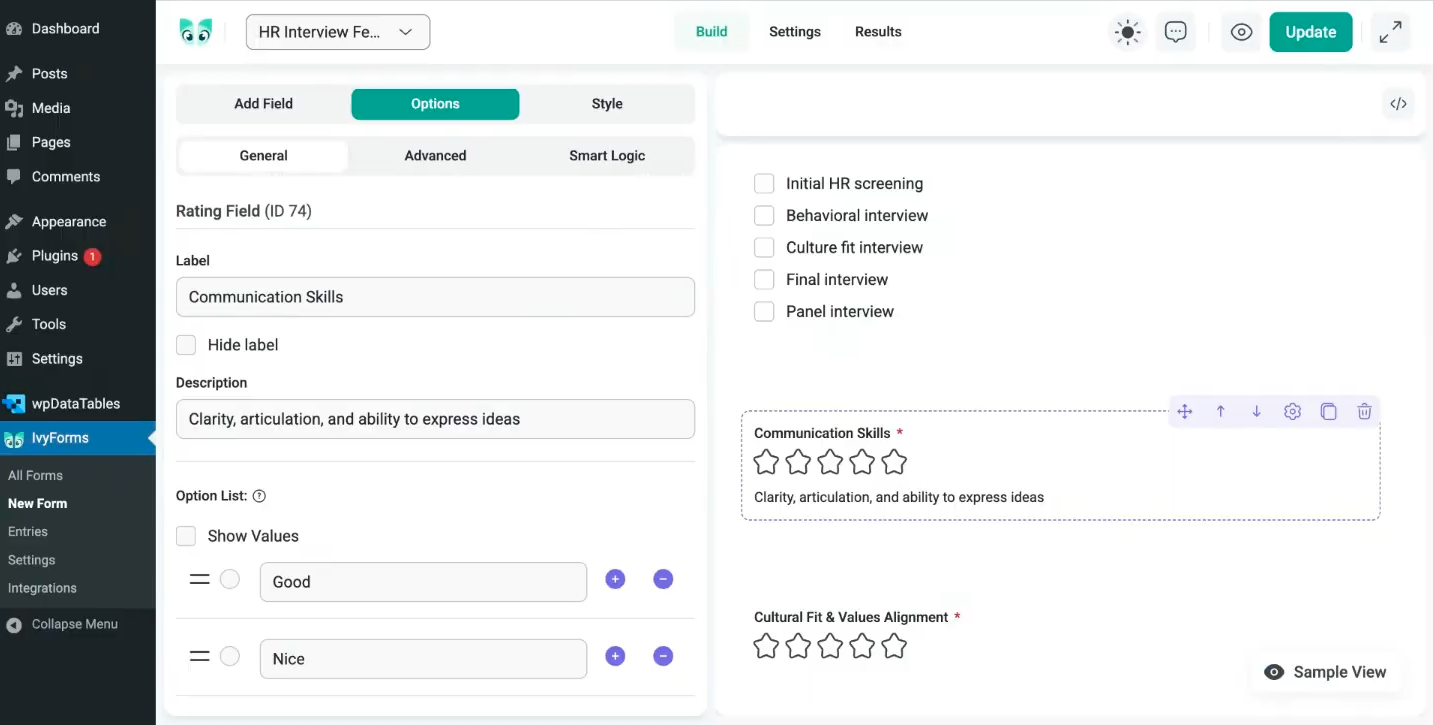
You can now add Rating fields to your forms and collect structured, easy-to-analyze feedback in seconds.
Choose how many stars you want to display, define exactly what’s being rated (for example, “Communication Skills” or “Overall Experience”), and add clear descriptions for each rating level. This helps users understand what each star represents, leading to more consistent and meaningful responses.
You can make the field required, fully customize the label and description, and even apply conditional logic. For example, if someone leaves a low rating, you can automatically display a follow-up question asking for more details. This turns simple ratings into actionable insights.
On the Entry Details page, you’ll see exactly how each item was rated, so reviewing performance, tracking satisfaction, and spotting patterns becomes straightforward and efficient.
The Rating field is included in IvyForms Lite, so you can start collecting structured feedback right away without needing a higher-tier plan.
HTML Field (Visual + Code Editor)
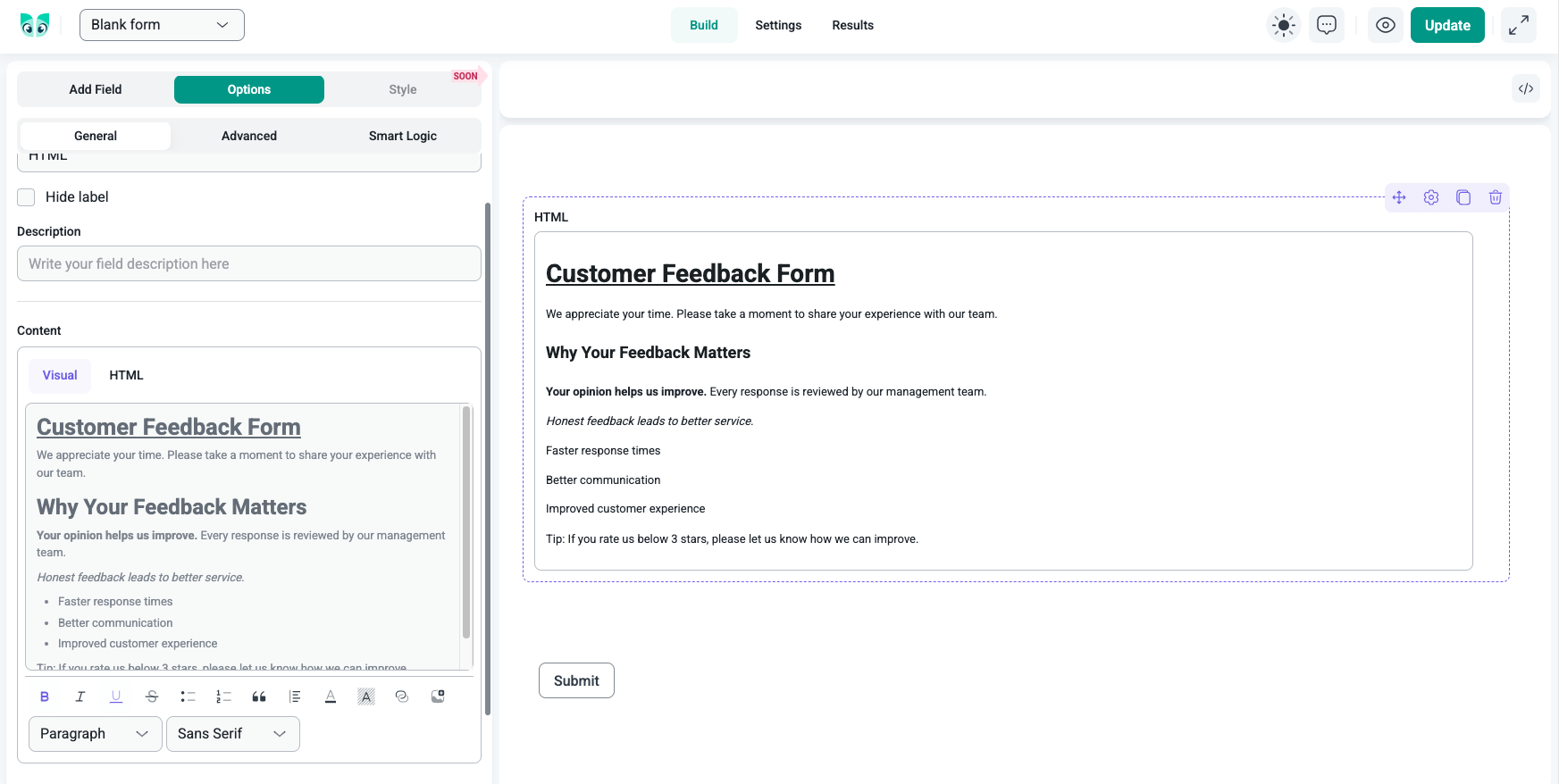
With the new HTML field, you get full control over how content looks inside your forms.
While building the form on the backend, you can style your content exactly the way you want. Make text italic, change the font, adjust formatting, or define proper headings like H1, H2, and more. This gives you complete flexibility when structuring your form content.
Unlike many competitors that offer only a raw HTML input, IvyForms gives you both a visual editor and an HTML editor. You can switch between them and instantly see how your changes will appear on the front end. No guessing, no trial and error.
You can also use the HTML field to embed images and videos, making your forms more dynamic and engaging when needed.
As you make changes in the backend, you can preview everything exactly as it will be displayed to users. What you see while editing reflects what your visitors will see when filling out the form.
The HTML field is available in IvyForms Lite, giving you advanced customization without upgrading to a higher plan.
Small Improvements
Alongside major features, IvyForms 0.9 brings several practical upgrades that make everyday work faster and smoother.
Expanded bulk actions
Managing entries is now more flexible.
Previously, bulk actions only allowed you to delete multiple entries at once. Now, when you select one or more entries (or forms), you can:
- Mark as read
- Mark as unread
- Add a star
- Remove a star
This makes it much easier to organize submissions, highlight important entries, and manage workflows without handling each item individually.
Persistent filters & sorting
Your filters and sorting preferences now stay in place even after a page refresh.
If you filter entries by a specific status or sort them in a certain way, that view will remain active until you manually remove the filter. This saves time and keeps your workflow consistent, especially when working with larger datasets.
Search inside selectable fields
For fields that contain multiple options such as dropdowns, radio buttons, or checkboxes, you can now enable a search feature.
When enabled, users filling out the form can type directly into the field to quickly find the option they’re looking for. This is especially useful for long lists of choices, improving usability and speeding up form completion.
Together, these smaller improvements reduce friction, improve organization, and make both form building and form filling more efficient.
What’s Next?
IvyForms 0.9 moves us closer to an even more complete form-building experience. Along with the improvements introduced in this release, we’re actively preparing the first official IvyForms 1.0 version.
In the upcoming updates, you can expect new form customization options, allowing you to further style and adapt forms to match your website and brand. We’re also working on form import and export functionality, making it easier to move forms between projects, reuse setups, and collaborate more efficiently.
More updates are already on the way, so stay tuned.