

Choose a template
Pick a ready-made form template from our library to get started instantly. Whether it’s a contact form, registration, or order form, you’ll have a solid foundation in seconds.Drag, drop, and you're done.

A kitchen upgrade change form template helps homeowners, contractors, and designers document modifications during kitchen renovation projects. With IvyForms, you can create a clear, professional form to track design changes, material updates, and approval processes efficiently.
Get Template

Pick a ready-made form template from our library to get started instantly. Whether it’s a contact form, registration, or order form, you’ll have a solid foundation in seconds.Drag, drop, and you're done.

Edit your form visually — add, remove, or rearrange fields, adjust layouts, and configure logic. No coding required, just drag, drop, and you’re done.Drag, drop, and you're done.

Publish your form anywhere on your site in minutes. Our templates work seamlessly with WordPress themes and page builders, so collecting submissions is effortless.Drag, drop, and you're done.
This template usually includes fields for project details, description of the requested change, reason for the change, cost implications, approval signatures, and expected completion dates. It ensures all stakeholders are informed and aligned throughout the renovation process.
Using a kitchen upgrade change form helps reduce miscommunication, streamline decision-making, and keep renovation projects on schedule. IvyForms allows you to customize the template, collect submissions digitally, and maintain organized records of all changes.
With this structured approach, kitchen renovations become smoother, more transparent, and easier to manage from start to finish.
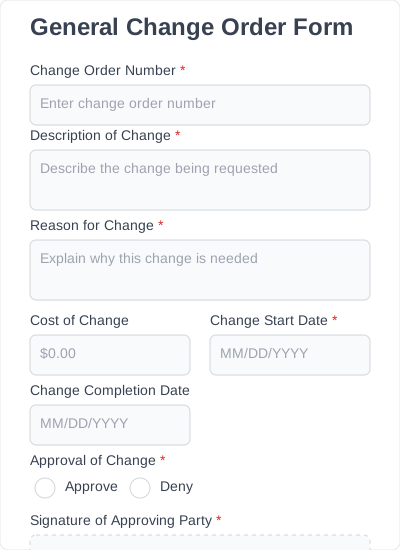
A general form for recording changes in any construction project. Suitable for both residential and commercial construction.

A general form for recording changes in any construction project. Suitable for both residential and commercial construction.
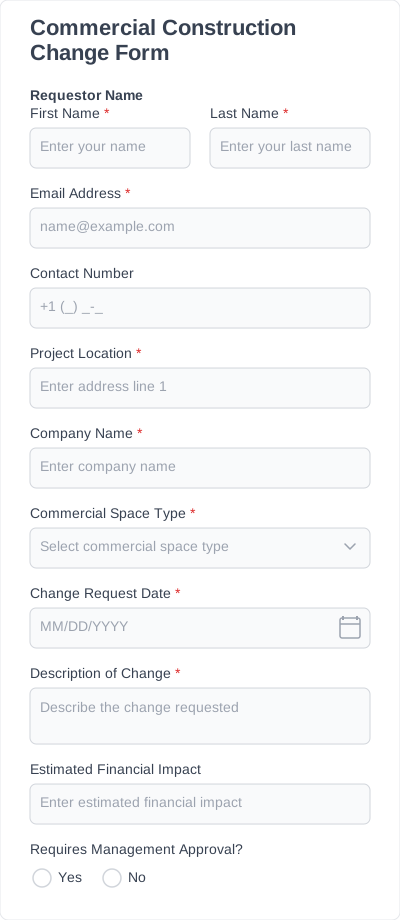
Focused on commercial spaces, offices, shops, and industrial buildings.
Try IvyForms Lite or go Pro. Either way, you’ll love how effortless it feels.