


Install IvyForms
Install and activate IvyForms on your WordPress site. The Slack integration is included in the free version.
Free on WordPress.org
Our Biggest Sale Is Here Up to 50% Off
IvyForms for Slack posts a message to the channel or teammate you choose the moment someone submits a form on your WordPress site. Leads, support requests, and orders reach the right people right away, without anyone checking an inbox or the WordPress dashboard.
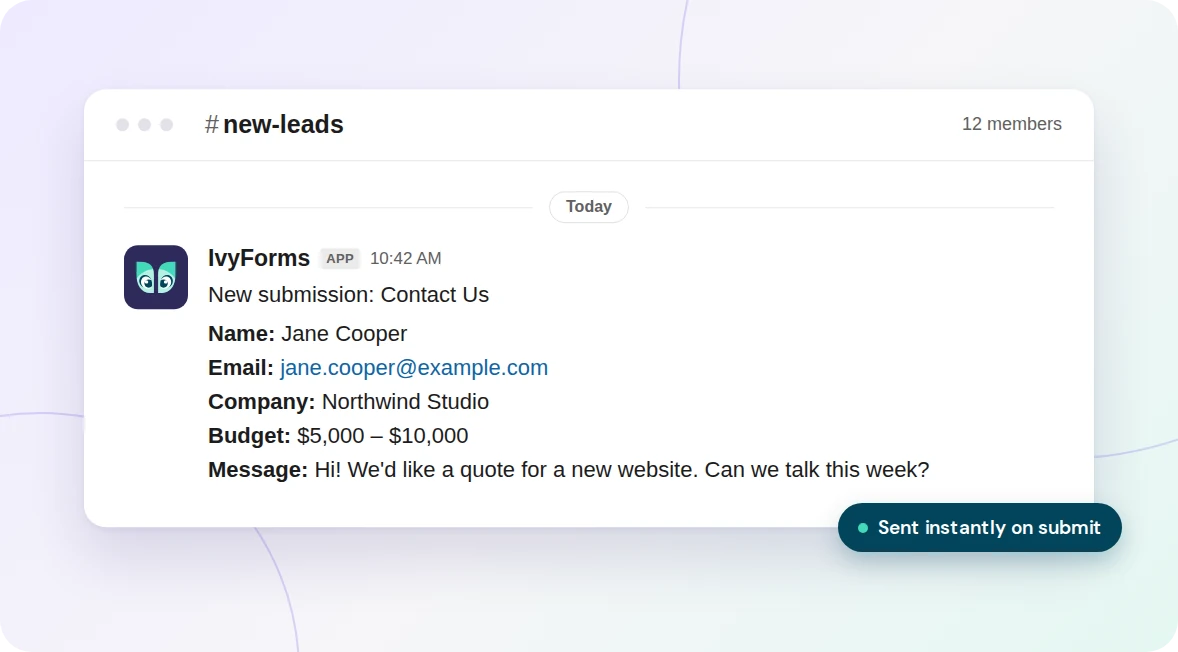
When a visitor submits a form, the IvyForms app posts a message with your custom title and the form fields you picked. Email addresses and links are clickable, empty fields are skipped, and the message lands in a public channel, a private channel, or a direct message. IvyForms only posts messages. It never reads your conversations.
You connect Slack from your WordPress dashboard, so each site gets its own secure connection. Your Add to Slack button is Connect Account, in IvyForms → Settings → Integrations → Slack.
Install and activate IvyForms on your WordPress site. The Slack integration is included in the free version.
Free on WordPress.org

In WordPress, go to IvyForms → Settings → Integrations → Slack and click Connect Account. Slack asks you to review the permissions and click Allow.
You return to IvyForms with a confirmation

Open a form, go to Settings → Integrations → Slack, and click Add new. Pick a channel or a teammate, set the message title, choose the fields to include, and save.
The next submission arrives in Slack
Slack sends you back to the IvyForms Slack settings in WordPress, where you see Slack workspace connected successfully. Next, add a Slack feed to any form (step 3). If you started from Slack and don’t have IvyForms yet, install the free plugin first, then connect from the WordPress dashboard.
chat:write, chat:write.public: post submission messages, including to public channels the app hasn’t joined.
channels:read, groups:read: list channels so you can pick one. Private channels appear after you invite the IvyForms app to them.
users:read: list teammates so you can send them direct messages.
IvyForms doesn’t request any optional scopes or access to message history.

IvyForms sends Slack only the fields you select. Your Slack access token is stored on your own WordPress site, and you can disconnect at any time.
Post to any public channel, or invite the IvyForms app to a private channel and send entries there.
Send a submission straight to a teammate as a direct message from the IvyForms app.
Choose exactly which form fields appear in the message, so sensitive answers can stay in WordPress.
Give every message a clear title, such as the form name, so your team knows what came in at a glance.
Send one form to several channels or people at once, with separate feeds per form. Available with IvyForms Pro Essentials or higher.
Pause a Slack feed without deleting it. Your settings stay in place until you need them again.

New leads and requests show up where your team already works, so you can reply while the visitor is still interested.
Send sales inquiries to #sales, support requests to #support, and urgent forms straight to the person on call.
Connect once from WordPress and configure everything in the form settings. You don't need Zapier or webhooks.
The integration works on free and paid Slack workspaces. All you need is permission to add apps to your workspace.
Yes. IvyForms Lite includes the Slack integration with one Slack feed per form and one channel or person per feed. IvyForms Pro Essentials and higher plans add multiple feeds per form and multiple channels per feed. See pricing.
No. IvyForms works with free and paid Slack workspaces.
Slack only shows the IvyForms app the private channels it belongs to. Open the channel in Slack, type /invite @IvyForms, then refresh the channel list in IvyForms.
IvyForms sends Slack the form fields you selected in the feed. To show the channel picker, it reads your workspace’s channel names and member names and caches them on your WordPress site for up to one hour. The Slack access token is stored on your WordPress site. IvyForms doesn’t read your Slack messages. Read the full IvyForms Privacy Policy.
In WordPress, go to IvyForms → Settings → Integrations → Slack and click Disconnect Account. This revokes the IvyForms token in Slack. You can also remove the app from your workspace’s app management page in Slack.
Contact our support team through the contact page. You don’t need an account, and we reply within two business days.
IvyForms for Slack is built by the IvyForms team. Privacy Policy · Terms and Conditions · Contact support
Start with IvyForms Lite for free, or go Pro for multiple Slack channels and feeds per form.