



Choose a template
Pick a ready-made form template from our library to get started instantly. Whether it’s a contact form, registration, or order form, you’ll have a solid foundation in seconds.Drag, drop, and you're done.
An HR interview feedback form template helps hiring teams collect structured feedback after candidate interviews. With IvyForms, you can streamline the evaluation process and ensure that interviewers capture consistent, organized insights for every candidate.
Get Template

Pick a ready-made form template from our library to get started instantly. Whether it’s a contact form, registration, or order form, you’ll have a solid foundation in seconds.Drag, drop, and you're done.

Edit your form visually — add, remove, or rearrange fields, adjust layouts, and configure logic. No coding required, just drag, drop, and you’re done.Drag, drop, and you're done.

Publish your form anywhere on your site in minutes. Our templates work seamlessly with WordPress themes and page builders, so collecting submissions is effortless.Drag, drop, and you're done.
This template typically includes fields for candidate name, position applied for, interviewer details, evaluation ratings, strengths and weaknesses, cultural fit assessment, and final hiring recommendations. You can also add scoring sections for specific competencies such as communication skills, technical knowledge, and problem-solving ability.
Using an HR interview feedback form helps standardize candidate evaluations, reduce bias, and improve collaboration between recruiters, hiring managers, and HR teams. IvyForms allows you to customize rating scales, automate submission tracking, and securely store interview feedback for easier comparison and decision-making.
Whether you are hiring for a small team or managing large recruitment pipelines, this template helps ensure a structured and transparent hiring process.
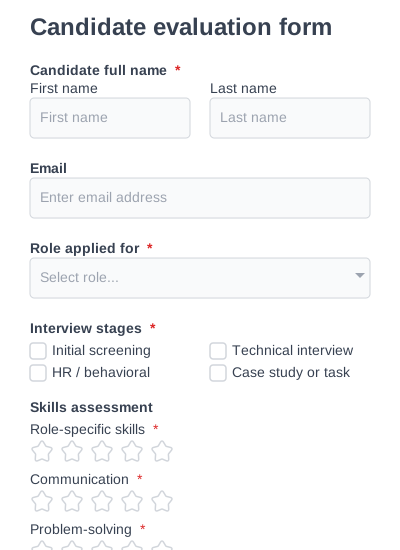
A detailed candidate evaluation form for assessing candidates across multiple criteria.
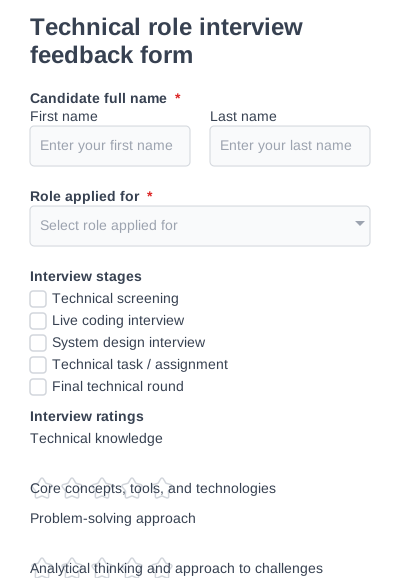
A structured technical interview feedback form for evaluating a candidate’s technical skills.
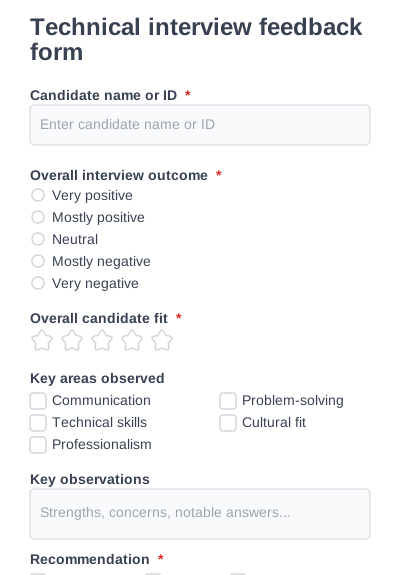
A universal interview feedback form designed to capture structured interviewer insights.
Try IvyForms Lite or go Pro. Either way, you’ll love how effortless it feels.